هل تساءلت يومًا ما الذي يفعله ذلك الرمز المربع أو المخطط على بطاقة صعودك بالفعل؟ فهمه يمكن أن ينقذك من تأخير محبط عند الأمن أو البوابة. يشرح هذا الدليل بالضبط كيف تعمل رموز بطاقة الصعود وماذا تتوقع عند مسحها ضوئيًا في المطار.
ما نوع الرمز الموجود على بطاقة الصعود
ليست كل رموز بطاقات الصعود متماثلة، ويكمن الفرق عندما تقف عند ماسح ضوئي.
تتبع شركات الطيران معيارًا عالميًا يسمى الـ بطاقة صعود الطائرة المشفرة شريطيًا من إياتا (BCBP), ، المحدد بموجب القرار 792. يحدد هذا المعيار تنسيقات الباركود التي يمكن لشركات الطيران استخدامها وكيف يجب أن تكون البيانات بداخلها منظمة بحيث يمكن لأي ماسح ضوئي في المطار في العالم قراءة نفس البطاقة.
بموجب هذا المعيار، تُستخدم عائلتان واسعتان من الرموز:
- PDF417 – باركود مستطيل، مكدس يبدو كسلسلة من الخطوط الأفقية المقسمة إلى أعمدة. هذا هو التنسيق الافتراضي لبطاقات الصعود المطبوعة وهو التنسيق الأكثر شيوعًا الذي ستراه على الورق.
- رموز مصفوفة ثنائية الأبعاد (أزتيك، داتا ماتريكس، رمز الاستجابة السريعة) – رموز مربعة أو شبكية مدمجة. هذه هي التنسيقات القياسية لبطاقات الصعود المحمولة المعروضة على شاشة الهاتف، على الرغم من أنها يمكن أن تظهر أيضًا على البطاقات المطبوعة بموجب الإصدار الحالي من معيار BCBP.
لذا بينما يسميه الكثيرون “رمز QR”، قد تحمل بطاقة صعودك تقنيًا رمز Aztec أو رمز Data Matrix أو باركود PDF417 اعتمادًا على شركة الطيران وما إذا كنت تستخدم نسخة محمولة أو مطبوعة. النقطة الأساسية هي أن جميعها تقوم بتشفير نفس البيانات المنظمة. لفهم المزيد حول كيفية استخدام رموز QR على وجه التحديد عبر شركات الطيران والمطارات، فإن الـ رموز QR لشركات الطيران والمطارات النظرة العامة هي مرجع مفيد.
ما البيانات المخزنة داخل الرمز
الباركود الموجود على بطاقة صعودك ليس مجرد رقم تذكرة. إنه يشفر رسالة بيانات منظمة تحتوي على مجموعة محددة من الحقول الإلزامية، بما في ذلك:
- اسم الراكب الكامل
- ال PNR (سجل أسماء المسافرين) – رمز مرجع حجزك
- رموز مطار المغادرة والوجهة (على سبيل المثال، JFK → LAX)
- رمز الناقل المشغل ورقم الرحلة
- تاريخ الرحلة
- رقم المقعد ورمز درجة المقصورة
- رقم تسلسل تسجيل الدخول
- حالة الراكب
يدعم المعيار أيضًا تشفير مسارات طيران متعددة في باركود واحد, ، ولهذا السبب يمكن أن يظهر مسار رحلة متصل أحيانًا كرمز واحد قابل للمسح الضوئي على بطاقة صعودك بدلاً من رمزين منفصلين.
تتضمن بعض شركات الطيران أيضًا حقلًا اختياريًا أمنيًا يحتوي على توقيع رقمي. يتيح ذلك لأنظمة المطار التحقق من أن الباركود لم يتم تعديله أو تزويره، مما يضيف طبقة حماية ضد البطاقات المزورة.
كيف تعمل عملية المسح الضوئي في المطار
عندما تقدم بطاقة صعودك عند نقطة تفتيش أو بوابة، يقرأ الماسح الضوئي جميع تلك الحقول المشفرة في جزء من الثانية. إليك ما يحدث في كل مرحلة.
عند أمن TSA: يتحقق الضابط أو القارئ الآلي من هويتك ويؤكد أن لديك حجزًا صالحًا ومسجلًا لرحلة مغادرة. في أكثر من 225 مطارًا أمريكيًا، قامت إدارة أمن النقل (TSA) بتركيب تقنية مصادقة الهوية (CAT)، والتي يمكنها استعراض تفاصيل رحلتك عن طريق مسح هويتك الصادرة عن الحكومة وحدها – مما يعني أنك قد لا تحتاج إلى إظهار بطاقة صعود على الإطلاق عند نقطة التفتيش الأمني. ومع ذلك، إذا كانت معدات CAT في مسار معين غير متاحة، فلا يزال بإمكان الضابط طلب بطاقة صعودك.
عند بوابة الصعود: هذا هو المكان الذي يحدث فيه المسح دائمًا، بغض النظر عن المطار الذي تتواجد فيه. يقرأ ماسح وكيل البوابة رمز بطاقة صعودك، ويؤكد مقعدك وحالة الراكب، ويسجل أنك صعدت. ستحتاج إلى بطاقة صعودك – سواء كانت محمولة أو مطبوعة – في هذه المرحلة في كل مرة.
امسح أي تنسيق لبطاقة صعود فورًا هل تحتاج إلى التحقق مما هو مشفر في رمز QR أو باركود؟ استخدم الـ ماسح رمز الاستجابة السريعة Pageloot أو ماسح الباركود لقراءة وفك تشفير أي تنسيق مدعوم مباشرة من متصفحك – لا حاجة لتطبيق.
بطاقات الصعود المحمولة مقابل المطبوعة: اختلافات عملية
كلا التنسيقين يشفران بيانات متطابقة. يكمن التمييز بالكامل في مدى موثوقية قراءة تلك البيانات في ظروف المطار الواقعية.
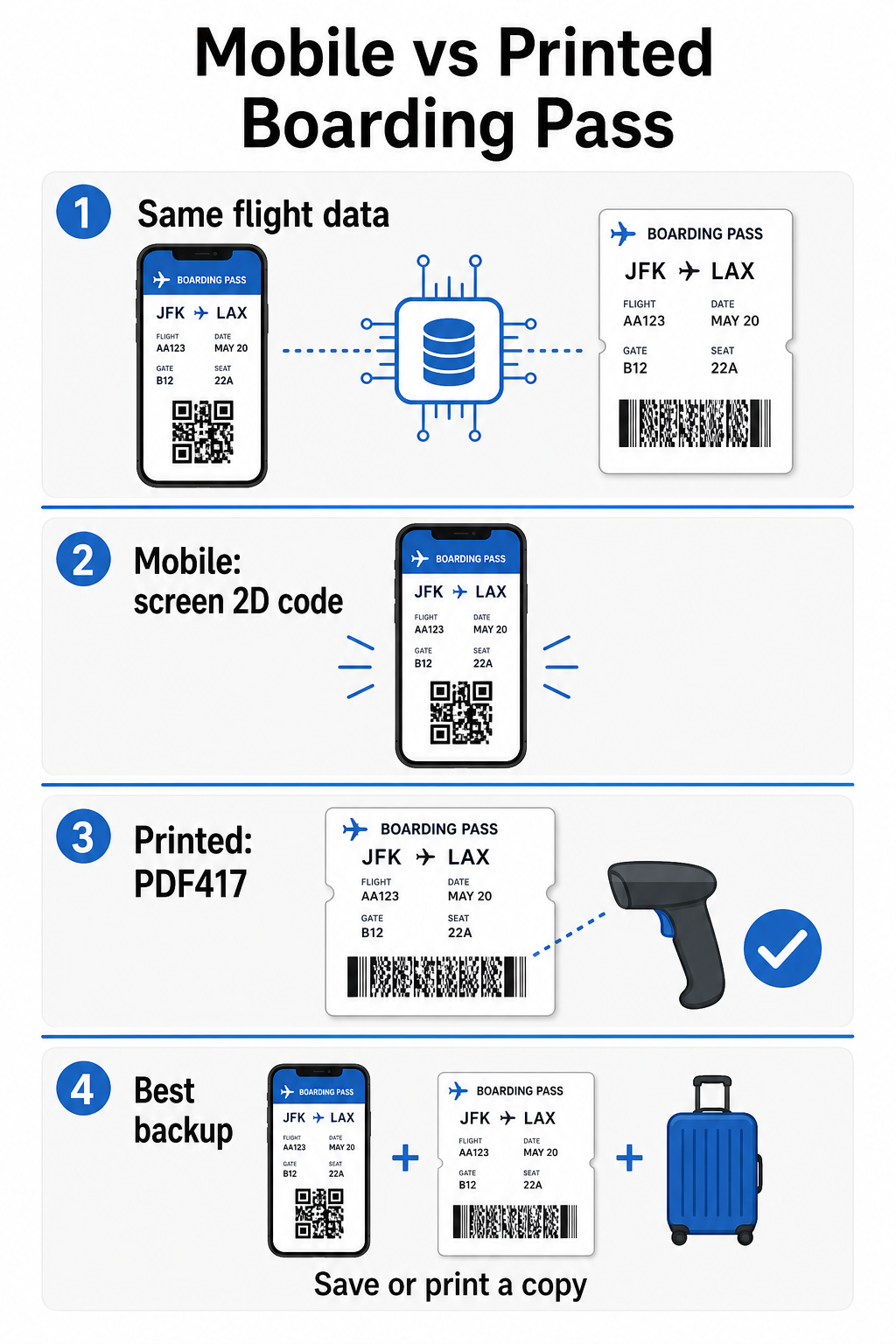
| العامل | بطاقة صعود محمولة | بطاقة صعود مطبوعة |
|---|---|---|
| التنسيق المقبول | Aztec، Data Matrix، أو QR code | PDF417 (افتراضي)؛ أيضًا Aztec، Data Matrix، QR |
| توافق الماسح الضوئي | معظم الماسحات الضوئية ثنائية الأبعاد الحديثة؛ قد تواجه بعض الماسحات الضوئية الليزرية القديمة صعوبة | متوافق على نطاق واسع مع جميع ماسحات المطار الضوئية |
| خطر وهج الشاشة | نعم – إضاءة المطار الساطعة يمكن أن تسبب انعكاسات | لا شيء |
| خطر نمط المواريه | نعم – شاشات LCD/LED يمكن أن تخلق نطاقات تداخل بصرية | لا شيء |
| خطر التلف المادي | الشاشة المتشققة أو المتسخة يمكن أن تعيق الرمز | الورق يمكن أن يتجعد أو يتمزق أو يتلطخ |
| راحة | لا حاجة للطباعة؛ دائمًا على هاتفك | يعمل في كل مكان، لا تتطلب بطارية |
| قبول المطار | ليست عالمية – تتطلب بعض المطارات الأمريكية بطاقات مرور مطبوعة | مقبولة في جميع المطارات |
التحدي الأساسي مع بطاقات الصعود المحمولة هو أن الماسحات الضوئية الليزرية التقليدية مُحسّنة للضوء المنعكس عن الورق, ، وليس الضوء المنبعث من شاشة. عندما تمسك هاتفًا تحت إضاءة المحطة الساطعة، يمكن للشاشة أن تخلق وهجًا أو تداخلاً انعكاسيًا يقلل من التباين الذي يحتاجه الماسح الضوئي لفك تشفير الباركود بدقة. أنماط المواريه – نطاقات بصرية يمكن أن تنتجها شاشات LCD و LED – هي مصدر آخر للتداخل لا تملكه البطاقات المطبوعة ببساطة.
لتقليل هذه المشكلات عند استخدام بطاقة صعود محمولة:
- زد سطوع شاشتك قبل الاقتراب من الماسح الضوئي
- نظّف شاشتك – بصمات الأصابع واللطخات مباشرة فوق الباركود تعيق فك التشفير
- حافظ على الباركود بالكامل مرئيًا على الشاشة دون أن يتم اقتصاصه أو إخفاؤه جزئيًا بواسطة أشرطة الإشعارات
- قم بالتدوير إذا لزم الأمر – تفضل بعض الماسحات الضوئية الرمز في اتجاه معين
لمزيد من المعلومات حول ما يؤثر على قابلية قراءة الباركود بشكل عام، الـ أفضل الممارسات لقابلية قراءة رمز الاستجابة السريعة دليل يغطي التباين والتحجيم والعوامل البيئية بالتفصيل.
متى يجب عليك حمل بطاقة صعود مطبوعة
تعمل البطاقة المحمولة بسلاسة في الغالبية العظمى من المطارات الأمريكية الكبرى. ومع ذلك، هناك حالات محددة يكون فيها وجود نسخة مطبوعة هو الخيار الأكثر أمانًا:
- المطارات الإقليمية الأصغر التي لم تقم بعد بترقية ماسحاتها الضوئية لقراءة رموز الشاشة المحمولة بشكل موثوق
- الرحلات الدولية المتصلة, ، حيث تختلف سياسات قبول بطاقات الصعود بشكل كبير حسب البلد وشركة الطيران
- الرحلات الطويلة أو السفر إلى مناطق ذات وصول محدود للشحن, ، حيث قد تكون بطارية هاتفك مصدر قلق
- الأجهزة القديمة أو التالفة حيث تجعل تشققات الشاشة أو السطوع المنخفض الرمز صعب القراءة
إذا كنت غير متأكد مما إذا كان مطار مغادرتك يقبل البطاقات المحمولة، تحقق مباشرة مع شركة الطيران الخاصة بك قبل السفر. تدرج بعض شركات الطيران صراحة توافق المطار على صفحات بطاقات الصعود المحمولة الخاصة بها. إذا كنت مهتمًا بكيفية تطبيق نفس مبادئ رمز الاستجابة السريعة على أنواع أخرى من التذاكر وبطاقات الفعاليات، الـ رموز QR على التذاكر صفحة تغطي حالة الاستخدام هذه بعمق.
ماذا يحدث إذا لم يتم مسح بطاقة الصعود الخاصة بك
إذا رفض ماسح ضوئي بطاقة الصعود الخاصة بك – محمولة أو مطبوعة – فإن الأسباب الأكثر شيوعًا تستحق المعرفة قبل أن تكون في مقدمة صف صعود مزدحم.
وهج الشاشة أو السطوع المنخفض هو السبب الرئيسي مع البطاقات المحمولة. حاول إمالة الهاتف قليلاً أو وضع يدك حول الشاشة لحجب الضوء المحيط، واضبط شاشتك دائمًا على السطوع الكامل قبل الاقتراب من ماسح ضوئي. بصمات الأصابع أو اللطخات فوق الباركود هي مشكلة متكررة أخرى يمكن لمسحة سريعة حلها. بالنسبة للبطاقات المطبوعة، قد لا يتم فك تشفير باركود مجعد بشدة أو ممزق جزئيًا بشكل صحيح، لذا فإن طي بطاقة ورقية مباشرة عبر الرمز يستحق تجنبه.
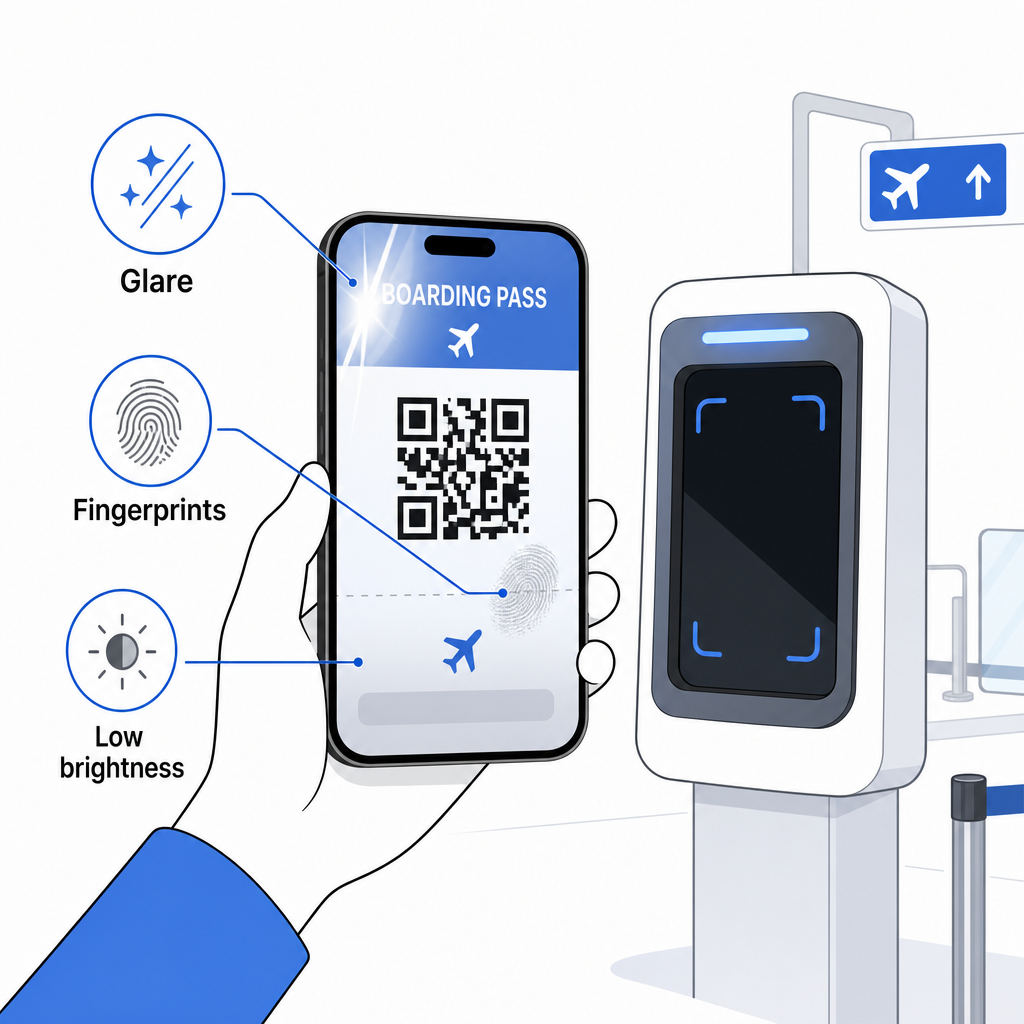
العرض غير الكامل هو أيضًا مشكلة شائعة – تأكد من أن الرمز بالكامل مرئي وغير محجوب بواسطة حافظة هاتفك أو لافتة إشعار. يتعامل وكلاء البوابة مع فشل المسح بشكل روتيني ويمكنهم البحث عن حجزك يدويًا باستخدام اسمك ورقم PNR. نادرًا ما يكون المسح الفاشل مشكلة خطيرة، لكنه يبطئ الأمور أثناء الصعود المزدحم.
فهم كيف تحسّن رموز QR تجربة السفر على نطاق أوسع يمكن أن يساعدك أيضًا في الحصول على أقصى استفادة من الأدوات الرقمية التي تقدمها شركات الطيران الآن طوال الرحلة.
باركود بطاقة الصعود الخاصة بك – سواء كان رمز QR أو رمز Aztec أو شريط PDF417 – يحمل حمولة بيانات دقيقة وموحدة تعتمد عليها أنظمة المطار للتحقق من هويتك وتعيين مقعدك في الوقت الفعلي. البطاقات المحمولة مريحة وتعمل بشكل جيد في معظم المطارات الأمريكية الكبرى، لكن البطاقات المطبوعة تظل الخيار الأكثر توافقًا عالميًا. النهج الأكثر أمانًا هو معرفة مطاراتك مسبقًا والاحتفاظ بخيار احتياطي متاح عند السفر على طرق أقل دراية.
إذا كنت ترغب في فك تشفير ما هو مخزن بالفعل في باركود بطاقة الصعود، الـ ماسح الباركود Pageloot يتيح لك قراءة أي تنسيق مدعوم مباشرة من متصفحك دون تثبيت تطبيق.
الأسئلة الشائعة
ليس دائمًا. تستخدم بطاقات الصعود المطبوعة غالبًا رمزًا شريطيًا PDF417 – التنسيق المستطيل المخطط – كافتراضي بموجب معيار IATA BCBP. تستخدم بطاقات الصعود المحمولة تنسيقات مصفوفة ثنائية الأبعاد مثل Aztec أو Data Matrix أو رمز QR. كل هذه ترمّز نفس بيانات الركاب المهيكلة؛ يختلف التنسيق حسب الوسيط وشركة الطيران.
ليس بالضرورة. في أكثر من 225 مطارًا أمريكيًا مجهزًا بتقنية مصادقة وثائق الهوية التابعة لإدارة أمن النقل (TSA Credential Authentication Technology - CAT)، هويتك الصادرة عن الحكومة كافية لتأكيد تفاصيل رحلتك عند نقطة التفتيش الأمني – لا يلزم بطاقة صعود. ومع ذلك، لا يزال يتعين عليك تسجيل الدخول مع شركة الطيران الخاصة بك للحصول على بطاقة صعود (جوال أو مطبوعة)، وستحتاج دائمًا إلى مسحها ضوئيًا عند بوابة الصعود عندما تصعد إلى الطائرة.
الأسباب الأكثر شيوعًا هي وهج الشاشة من إضاءة المطار الساطعة، أو بصمات الأصابع أو اللطخات فوق الرمز الشريطي، أو انخفاض سطوع الشاشة، وأنماط المواريه التي يمكن أن تنتجها شاشات LCD أو LED. لتحسين الموثوقية، نظّف شاشتك قبل الوصول إلى الماسح الضوئي، واضبط سطوعك إلى الحد الأقصى، وتأكد من أن الرمز الشريطي بأكمله مرئي تمامًا وغير معاق.