Oletko koskaan miettinyt, mitä se neliönmuotoinen tai raidallinen koodi lentolippussasi oikeasti tekee? Sen ymmärtäminen voi säästää sinut turhauttavalta viivästykseltä turvatarkastuksessa tai portilla. Tämä opas selittää tarkalleen, miten lentolippujen koodit toimivat ja mitä odottaa, kun skannaat ne lentokentällä.
Minkä tyyppinen koodi lentolippussa on
Kaikki lentolippujen koodit eivät ole samanlaisia, ja ero on tärkeä, kun seisot skannerin ääressä.
Lentoyhtiöt noudattavat globaalia standardia nimeltä IATA:n viivakoodattu tarkastuskortti (BCBP), määritelty päätöslauselman 792 mukaisesti. Tämä standardi määrittää, mitä viivakoodimuotoja lentoyhtiöt voivat käyttää ja miten niiden sisällä oleva data on jäsenneltävä, jotta mikä tahansa lentokenttäskanneri maailmassa voi lukea saman lipun.
Tämän standardin mukaisesti käytetään kahta laajaa koodiperhettä:
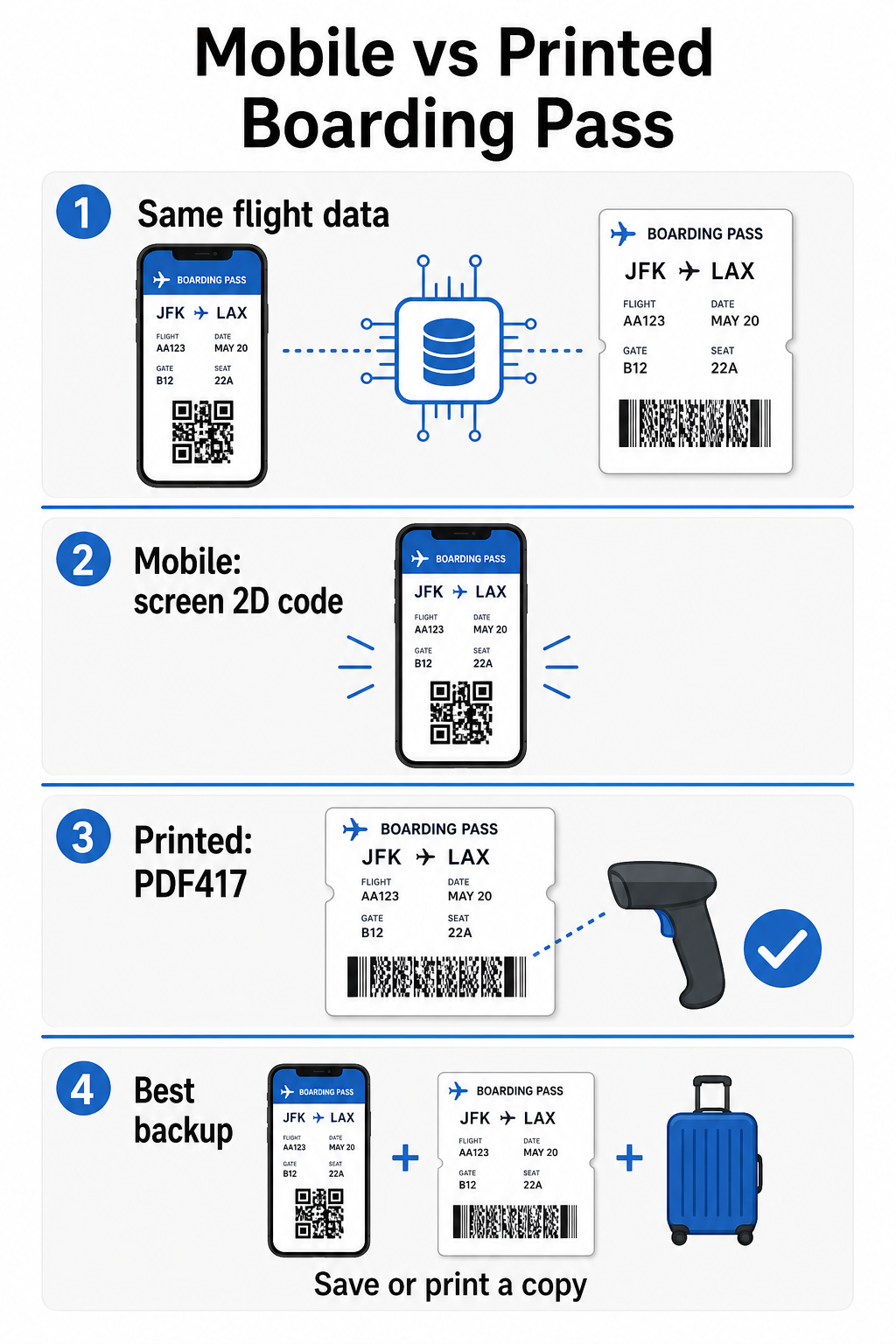
- PDF417 – Suorakulmainen, pinottu viivakoodi, joka näyttää sarjalta vaakasuoria viivoja jaettuna sarakkeisiin. Tämä on oletusmuoto painetuille lentolipuille ja yleisin muoto, jonka näet paperilla.
- 2D-matriisikoodit (Aztec, Data Matrix, QR-koodi) – Neliönmuotoiset tai kompaktit ruudukkoon perustuvat koodit. Nämä ovat mobiililentolippujen standardimuotoja, jotka näytetään puhelimen näytöllä, vaikka ne voivat myös esiintyä painetuissa lipuissa BCBP-standardin nykyisen version mukaisesti.
Joten vaikka monet ihmiset kutsuvat sitä “QR-koodiksi”, lentolippusi voi teknisesti sisältää Aztec-koodin, Data Matrix -koodin tai PDF417-viivakoodin lentoyhtiöstä riippuen ja siitä, käytätkö mobiili- vai painettua versiota. Keskeinen asia on, että ne kaikki koodaavat saman jäsennellyn datan. Ymmärtääksesi enemmän siitä, miten QR-koodeja käytetään erityisesti lentoyhtiöissä ja lentokentillä, QR-koodit lentoyhtiöille ja lentoasemille yleiskatsaus on hyödyllinen viite.
Mitä tietoja on tallennettu koodin sisälle
Lentolippusi viivakoodi ei ole vain lipun numero. Se koodaa jäsennellyn dataviestin, joka sisältää tietyn joukon pakollisia kenttiä, mukaan lukien:
- Koko matkustajanimesi
- Se PNR (Matkustajan nimirekisteri) – varausviitekoodisi
- Lähtö- ja kohdelentokenttäkoodit (esim. JFK → LAX)
- Operoivan lentoyhtiön koodi ja lennon numero
- Lennon päivämäärä
- Paikkanumero ja matkustusluokan koodi
- Lähtöselvitysjärjestysnumero
- Matkustajan tila
Standardi tukee myös koodausta useita lennon osuuksia yhteen viivakoodiin, minkä vuoksi jatkolentoaikataulu voi joskus näkyä yhtenä skannattavana koodina lentolippussasi kahden erillisen sijaan.
Jotkut lentoyhtiöt sisällyttävät myös valinnaisen turvakentän , joka sisältää digitaalisen allekirjoituksen. Tämä antaa lentokenttäjärjestelmille mahdollisuuden varmistaa, ettei viivakoodia ole muutettu tai väärennetty, lisäten suojakerroksen väärennettyjä lippuja vastaan.
Miten skannausprosessi toimii lentokentällä
Kun esität lentolippusi tarkastuspisteellä tai portilla, skanneri lukee kaikki nuo koodatut kentät murto-osassa sekuntia. Tässä mitä tapahtuu kussakin vaiheessa.
TSA-turvatarkastuksessa: Virkailija tai automaattinen lukija tarkistaa henkilöllisyytesi ja vahvistaa, että sinulla on voimassa oleva, lähtöselvitetty varaus lähtevälle lennolle. Yli 225 Yhdysvaltain lentokentällä TSA on asentanut Credential Authentication Technology (CAT) -järjestelmän, joka voi hakea lentotietosi skannaamalla pelkän valtion myöntämän henkilöllisyystodistuksesi – mikä tarkoittaa, että sinun ei välttämättä tarvitse näyttää lentolippua turvatarkastuspisteellä lainkaan. Jos kuitenkin CAT-laitteisto tietyssä kaistalla ei ole käytettävissä, virkailija voi silti pyytää lentolippuasi.
Lähtöportilla: Tässä skannaus tapahtuu aina, riippumatta siitä, millä lentokentällä olet. Porttivirkailijan skanneri lukee lentolippusi koodin, vahvistaa paikkasi ja matkustajan tilan ja kirjaa, että olet noussut koneeseen. Tarvitset lentolippusi – mobiili- tai painetun – tässä vaiheessa joka kerta.
Skannaa mikä tahansa lentolippumuoto välittömästi Tarvitseeko sinun varmistaa, mitä QR- tai viivakoodiin on koodattu? Käytä Pageloot QR-koodinlukija tai Viivakoodinlukija lukeaksesi ja purkaaksesi minkä tahansa tuetun muodon suoraan selaimestasi – sovellusta ei tarvita.
Mobiili- vs. painetut lentoliput: Käytännön erot
Molemmat muodot koodaavat identtistä dataa. Ero liittyy kokonaan siihen, kuinka luotettavasti tämä data voidaan lukea todellisissa lentokenttäolosuhteissa.
| Tekijä | Mobiililentolippu | Painettu lentolippu |
|---|---|---|
| Hyväksytty muoto | Aztec-, Data Matrix- tai QR-koodi | PDF417 (oletus); myös Aztec, Data Matrix, QR |
| Skannerin yhteensopivuus | Useimmat modernit 2D-skannerit; jotkut vanhemmat laserskannerit voivat kamppailla | Laajasti yhteensopiva kaikkien lentokenttäskannerien kanssa |
| Näytön heijastusriski | Kyllä – kirkas lentokenttävalaistus voi aiheuttaa heijastuksia | Ei mitään |
| Moiré-kuvion riski | Kyllä – LCD/LED-näytöt voivat luoda visuaalisia häiriökaistoja | Ei mitään |
| Fyysisen vaurion riski | Halkeillut tai likainen näyttö voi estää koodin lukemisen | Paperi voi rypistyä, repeytyä tai tahriintua |
| Kätevyys | Ei tarvetta tulostaa; aina puhelimessasi | Toimii kaikkialla, ei vaadi akkua |
| Lentokenttähyväksyntä | Ei universaali – jotkut Yhdysvaltain lentokentät vaativat tulostettuja lippuja | Hyväksytty kaikilla lentokentillä |
Suurin haaste mobiililennonlähtökorttien kanssa on se, että perinteiset laserskannerit on optimoitu paperista heijastuvalle valolle, ei näytöltä lähtevälle valolle. Kun pidät puhelinta kirkkaassa terminaalivalaistuksessa, näyttö voi aiheuttaa häikäisyä tai heijastavaa häiriötä, joka vähentää kontrastia, jonka skanneri tarvitsee viivakoodin tarkkaan lukemiseen. Moire-kuviot – visuaaliset raidat, joita LCD- ja LED-näytöt voivat tuottaa – ovat toinen häiriölähde, jota tulostetuissa lipuissa ei yksinkertaisesti ole.
Näiden ongelmien minimoimiseksi mobiililennonlähtökorttia käytettäessä:
- Maksimoi näytön kirkkaus ennen kuin lähestyt skanneria
- Puhdista näyttösi – sormenjäljet ja tahrat suoraan viivakoodin päällä häiritsevät lukemista
- Pidä koko viivakoodi näkyvissä näytöllä ilman rajausta tai osittain piilossa ilmoituspalkkien peittämänä
- Kierrä tarvittaessa – jotkut skannerit suosivat koodia tietyssä asennossa
Lisätietoja siitä, mikä vaikuttaa viivakoodin luettavuuteen yleisesti, parhaita käytäntöjä QR-koodin luettavuudelle opas käsittelee kontrastia, kokoa ja ympäristötekijöitä yksityiskohtaisesti.
Milloin sinun kannattaa pitää mukana tulostettua lennonlähtökorttia
Mobiililippu toimii sujuvasti valtaosassa suurista Yhdysvaltain lentokentistä. Kuitenkin on tiettyjä tilanteita, joissa tulostetun kopion pitäminen on turvallisempi valinta:
- Pienemmät alueelliset lentokentät jotka eivät ole vielä päivittäneet skannereitaan lukemaan luotettavasti mobiilinäytön koodeja
- Kansainväliset jatkolennot, joissa lennonlähtökorttien hyväksymiskäytännöt vaihtelevat merkittävästi maan ja lentoyhtiön mukaan
- Pitkät matkat tai matkustus alueille, joilla on rajoitettu latausmahdollisuus, joissa puhelimen akku voi olla huolenaihe
- Vanhemmat tai vaurioituneet laitteet joissa näytön halkeamat tai alhainen kirkkaus tekevät koodista vaikealukuisen
Jos olet epävarma, hyväksyykö lähtölentokenttäsi mobiilipasseja, tarkista asia suoraan lentoyhtiöltäsi ennen matkaa. Jotkut lentoyhtiöt ilmoittavat lentokenttäyhteensopivuuden selkeästi mobiililennolle pääsykorttisivuillaan. Jos olet kiinnostunut siitä, miten samat QR-koodiperiaatteet soveltuvat muihin lipputyyppeihin ja tapahtumapasseihin, QR-koodeja lipuissa sivu käsittelee tätä käyttötapausta syvällisesti.
Mitä tapahtuu, jos lennolle pääsykorttisi ei skannaa
Jos skanneri hylkää lennolle pääsykorttisi – mobiilin tai tulostetun – yleisimmät syyt kannattaa tietää ennen kuin olet kiireisen jonon kärjessä.
Näytön heijastus tai alhainen kirkkaus on yleisin syyllinen mobiilipassien kanssa. Kokeile kallistaa puhelinta hieman tai pitää kättäsi näytön ympärillä estääksesi ympäristön valoa, ja aseta näyttö aina täyteen kirkkauteen ennen skannerin luo menemistä. Sormenjäljet tai tahrat viivakoodin päällä ovat toinen yleinen ongelma, jonka nopea pyyhkäisy voi ratkaista. Tulostettujen passien osalta pahasti rypistynyt tai osittain repeytynyt viivakoodi ei välttämättä dekoodaudu oikein, joten paperipassin taittaminen suoraan koodin kohdalta on syytä välttää.
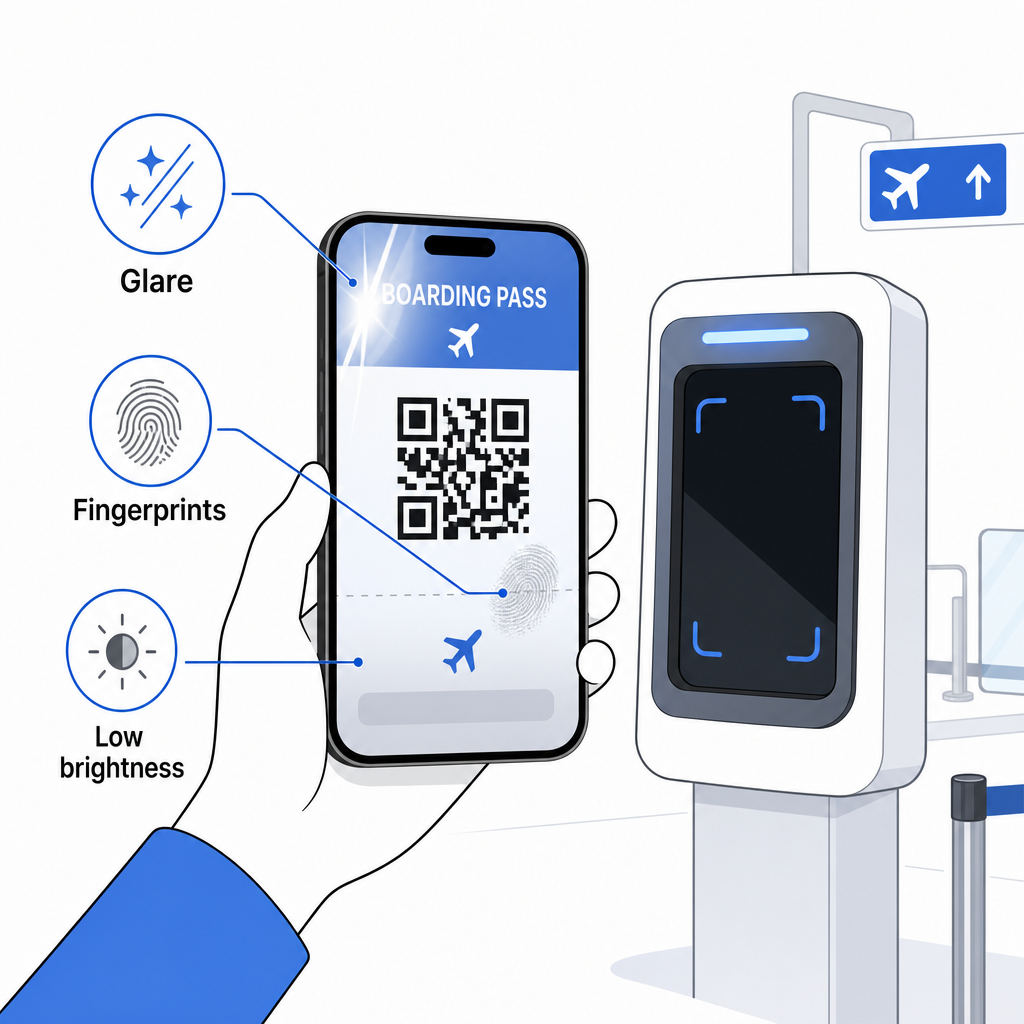
Epätäydellinen näyttö on myös yleinen ongelma – varmista, että koko koodi on näkyvissä eikä puhelimen kuori tai ilmoituspalkki peitä sitä. Porttihenkilökunta käsittelee skannausvirheitä rutiininomaisesti ja voi etsiä varauksesi manuaalisesti nimesi ja PNR-tunnuksesi avulla. Epäonnistunut skannaus on harvoin vakava ongelma, mutta se hidastaa asioita vilkkaassa lennolle nousussa.
Ymmärtäminen QR-koodit parantavat matkailukokemusta laajemmin voi myös auttaa sinua hyödyntämään parhaalla mahdollisella tavalla digitaalisia työkaluja, joita lentoyhtiöt nyt tarjoavat koko matkan ajan.
Lentokorttisi viivakoodi – olipa se sitten QR-koodi, Aztec-koodi tai PDF417-raita – sisältää tarkan, standardoidun datakuorman, jota lentokenttäjärjestelmät käyttävät henkilöllisyytesi ja paikkavarauksesi todentamiseen reaaliajassa. Mobiilipassit ovat käteviä ja toimivat hyvin useimmilla suurimmilla Yhdysvaltain lentokentillä, mutta tulostetut passit ovat edelleen yleismaailmallisesti yhteensopivin vaihtoehto. Turvallisin lähestymistapa on tuntea lentokenttäsi etukäteen ja pitää varavaihtoehto saatavilla matkustaessasi vähemmän tutuilla reiteillä.
Jos haluat purkaa, mitä lentokortin viivakoodiin on todella tallennettu, tämä Pageloot-viivakoodiskanneria antaa sinun lukea mitä tahansa tuettua muotoa suoraan selaimestasi ilman sovelluksen asentamista.
Usein kysytyt kysymykset
Ei aina. Painetut tarkastuskortit käyttävät yleisimmin PDF417-viivakoodia – suorakaiteen muotoista raidallista formaattia – oletuksena IATA BCBP -standardin mukaisesti. Mobiilitarkastuskortit käyttävät 2D-matriisiformaatteja, kuten Aztec, Data Matrix tai QR-koodi. Kaikki nämä koodaavat saman jäsennellyn matkustajatiedon; formaatti vaihtelee välineen ja lentoyhtiön mukaan.
Ei välttämättä. Yli 225 Yhdysvaltain lentoasemalla, jotka on varustettu TSA:n tunnistetietojen todennusteknologialla (CAT), sinun valtion myöntämä henkilöllisyystodistuksesi riittää vahvistamaan lentotietosi turvatarkastuspisteellä – maihinnousukorttia ei tarvita. Sinun on kuitenkin edelleen kirjauduttava sisään lentoyhtiöllesi saadaksesi maihinnousukortin (mobiili tai tulostettu), ja sinun on aina skannattava se lähtöportilla, kun nouset lentokoneeseen.
Yleisimmät syyt ovat näytön heijastus kirkkaasta lentokentän valaistuksesta, sormenjäljet tai tahrat viivakoodin päällä, matala näytön kirkkaus ja moiré-kuviot, joita LCD- tai LED-näytöt voivat tuottaa. Luotettavuuden parantamiseksi puhdista näyttösi ennen skannerille menemistä, aseta kirkkaus maksimiin ja varmista, että koko viivakoodi on täysin näkyvissä ja esteetön.