Da li ste se ikada zapitali šta taj kvadratni ili prugasti kod na vašoj bording karti zapravo radi? Razumevanje toga može vas spasiti od frustrirajućeg zadržavanja na obezbeđenju ili na kapiji. Ovaj vodič objašnjava tačno kako kodovi bording karata funkcionišu i šta da očekujete kada ih skenirate na aerodromu.
Koji tip koda se nalazi na bording karti
Nisu svi kodovi bording karata isti, i razlika je važna kada stojite kod skenera.
Aviokompanije prate globalni standard koji se zove IATA Bar kodirana ukrcajna karta (BCBP), definisan pod Rezolucijom 792. Ovaj standard precizira koje formate bar kodova aviokompanije mogu koristiti i kako podaci unutar njih moraju biti strukturirani tako da bilo koji aerodromski skener na svetu može pročitati istu kartu.
Prema ovom standardu, koriste se dve široke porodice kodova:
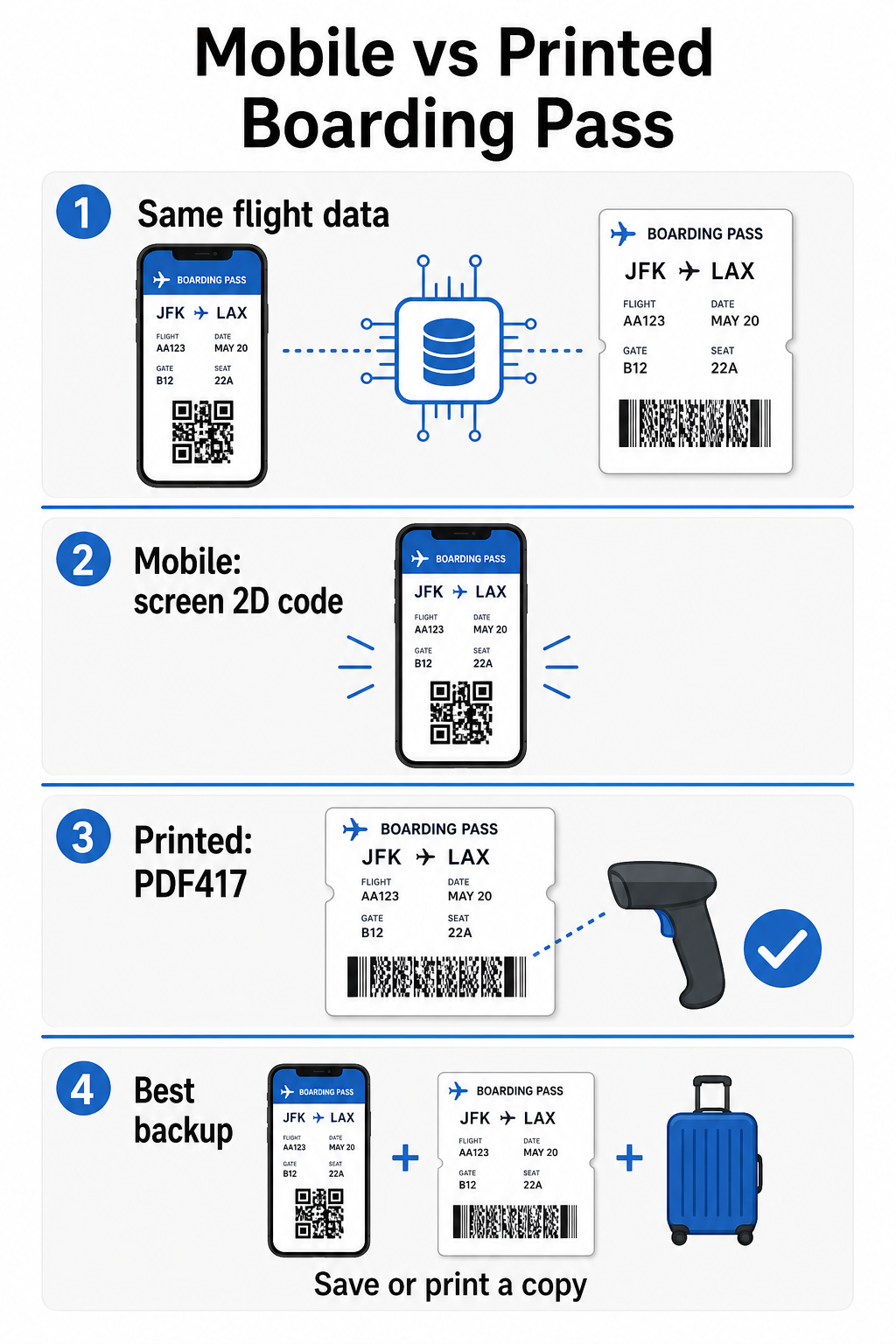
- PDF417 – Pravougaoni, složeni bar kod koji izgleda kao niz horizontalnih linija podeljenih u kolone. Ovo je podrazumevani format za štampane bording karte i najčešći je format koji ćete videti na papiru.
- 2D matrični kodovi (Aztec, Data Matrix, QR code) – Kvadratni ili kompaktni kodovi zasnovani na mreži. Ovo su standardni formati za mobilne bording karte prikazane na ekranu telefona, mada se mogu pojaviti i na štampanim kartama prema trenutnoj verziji BCBP standarda.
Dakle, dok mnogi ljudi to nazivaju “QR kodom”, vaša bording karta tehnički može sadržati Aztec kod, Data Matrix kod ili PDF417 bar kod u zavisnosti od aviokompanije i toga da li koristite mobilnu ili štampanu verziju. Ključna stvar je da svi oni kodiraju iste strukturirane podatke. Da biste razumeli više o tome kako se QR kodovi specifično koriste u aviokompanijama i na aerodromima, QR kodova za avio-kompanije i aerodrome pregled je korisna referenca.
Koji podaci su pohranjeni unutar koda
Bar kod na vašoj bording karti nije samo broj karte. On kodira strukturiranu poruku podataka koja sadrži specifičan skup obaveznih polja, uključujući:
- Vaše puno ime putnika
- Тхе PNR (Evidencija imena putnika) – vaš referentni kod rezervacije
- Kodovi aerodroma polaska i dolaska (npr. JFK → LAX)
- Kod operativnog prevoznika i broj leta
- Datum leta
- Broj sedišta i kod klase kabine
- Redni broj prijave
- Status putnika
Standard takođe podržava kodiranje više segmenata leta u jedan bar kod, zbog čega povezani itinerer ponekad može izgledati kao jedan skenirajući kod na vašoj bording karti, umesto dva odvojena.
Neke aviokompanije takođe uključuju opcionalno bezbednosno polje koje sadrži digitalni potpis. Ovo omogućava aerodromskim sistemima da provere da bar kod nije izmenjen ili falsifikovan, dodajući sloj zaštite od falsifikovanih karata.
Kako funkcioniše proces skeniranja na aerodromu
Kada predate svoju bording kartu na kontrolnom punktu ili kapiji, skener čita sva ta kodirana polja u deliću sekunde. Evo šta se dešava u svakoj fazi.
Na TSA obezbeđenju: Službenik ili automatizovani čitač proverava vaš identitet i potvrđuje da imate važeću, prijavljenu rezervaciju za odlazni let. Na više od 225 američkih aerodroma, TSA je instalirala Tehnologiju za autentifikaciju akreditiva (CAT), koja može prikazati detalje vašeg leta skeniranjem samo vaše lične karte izdate od strane vlade – što znači da možda uopšte nećete morati da pokažete bording kartu na bezbednosnoj kontroli. Međutim, ako CAT oprema na određenoj traci nije dostupna, službenik i dalje može tražiti vašu bording kartu.
Na kapiji za ukrcavanje: Ovo je mesto gde se skeniranje uvek dešava, bez obzira na kom ste aerodromu. Skener agenta na kapiji čita kod vaše bording karte, potvrđuje vaše sedište i status putnika, i beleži da ste se ukrcali. Uvek će vam biti potrebna vaša bording karta – mobilna ili štampana – u ovom trenutku.
Skenirajte bilo koji format bording karte odmah Trebate da proverite šta je kodirano u QR ili bar kodu? Koristite Пагелоот скенер КР кода или Бар код скенер za čitanje i dekodiranje bilo kog podržanog formata direktno iz vašeg pretraživača – nije potrebna aplikacija.
Mobilne vs. Štampane bording karte: Praktične razlike
Oba formata kodiraju identične podatke. Razlika je isključivo u tome koliko pouzdano ti podaci mogu biti pročitani u stvarnim aerodromskim uslovima.
| Faktor | Mobilna bording karta | Štampana bording karta |
|---|---|---|
| Prihvaćeni format | Aztec, Data Matrix, ili QR kod | PDF417 (podrazumevano); takođe Aztec, Data Matrix, QR |
| Kompatibilnost skenera | Većina modernih 2D skenera; neki stariji laserski skeneri mogu imati poteškoća | Široko kompatibilno sa svim aerodromskim skenerima |
| Rizik od odsjaja ekrana | Da – jako aerodromsko osvetljenje može izazvati odsjaje | Nema |
| Rizik od moiré uzorka | Da – LCD/LED ekrani mogu stvarati vizuelne smetnje | Nema |
| Rizik od fizičkog oštećenja | Napukao ili prljav ekran može ometati kod | Papir se može zgužvati, pocepati ili razmazati |
| Погодност | Nije potrebno štampanje; uvek na vašem telefonu | Radi svuda, nije potrebna baterija |
| Prihvatanje na aerodromu | Nije univerzalno – neki američki aerodromi zahtevaju štampane propusnice | Prihvaćeno na svim aerodromima |
Glavni izazov sa mobilnim kartama za ukrcavanje je taj što tradicionalni laserski skeneri su optimizovani za svetlost koja se odbija od papira, a ne za svetlost koja se emituje sa ekrana. Kada držite telefon pod jakim osvetljenjem terminala, ekran može stvoriti odsjaj ili reflektivne smetnje koje smanjuju kontrast potreban skeneru da precizno dešifruje bar-kod. Moiré obrasci – vizuelne trake koje LCD i LED ekrani mogu proizvesti – su još jedan izvor smetnji koje štampane propusnice jednostavno nemaju.
Da biste smanjili ove probleme kada koristite mobilnu kartu za ukrcavanje:
- Maksimalno pojačajte osvetljenost ekrana pre nego što priđete skeneru
- Očistite ekran – otisci prstiju i mrlje direktno preko bar-koda ometaju dešifrovanje
- Držite ceo bar-kod vidljivim na ekranu, a da nije isečen ili delimično sakriven trakama za obaveštenja
- Rotirajte ako je potrebno – neki skeneri preferiraju kod u određenoj orijentaciji
Za više informacija o tome šta generalno utiče na čitljivost bar-koda, najbolje prakse za čitljivost QR kodova vodič detaljno pokriva kontrast, veličinu i faktore okoline.
Kada treba da nosite štampanu kartu za ukrcavanje
Mobilna propusnica funkcioniše glatko na velikoj većini glavnih američkih aerodroma. Međutim, postoje specifične situacije kada je posedovanje štampane kopije sigurniji izbor:
- Manji regionalni aerodromi koji još uvek nisu nadogradili svoje skenere da pouzdano čitaju kodove sa mobilnih ekrana
- Međunarodne veze, gde se pravila prihvatanja karata za ukrcavanje značajno razlikuju po zemlji i prevozniku
- Duga putovanja ili putovanja u područja sa ograničenim pristupom punjenju, gde baterija vašeg telefona može biti problem
- Stariji ili oštećeni uređaji gde pukotine na ekranu ili niska osvetljenost otežavaju čitanje koda
Ako niste sigurni da li vaš aerodrom polaska prihvata mobilne propusnice, proverite direktno sa svojom avio-kompanijom pre putovanja. Neke avio-kompanije eksplicitno navode kompatibilnost aerodroma na svojim stranicama za mobilne karte za ukrcavanje. Ako vas zanima kako se isti principi QR kodova primenjuju na druge vrste karata i propusnica za događaje, QR kodove na ulaznicama stranica detaljno pokriva taj slučaj upotrebe.
Šta se dešava ako vaša karta za ukrcavanje ne može da se skenira
Ako skener odbije vašu kartu za ukrcavanje – mobilnu ili štampanu – najčešće uzroke vredi znati pre nego što se nađete na čelu prometnog reda za ukrcavanje.
Odsjaj ekrana ili niska osvetljenost su glavni krivci kod mobilnih propusnica. Pokušajte da blago nagnete telefon ili da rukom zaklonite ekran kako biste blokirali ambijentalno svetlo, i uvek podesite ekran na punu osvetljenost pre nego što priđete skeneru. Otisci prstiju ili mrlje preko bar-koda su još jedan čest problem koji se može rešiti brzim brisanjem. Za štampane propusnice, jako zgužvan ili delimično pocepan bar-kod možda neće biti ispravno dekodiran, pa je savijanje papirne propusnice direktno preko koda nešto što treba izbegavati.
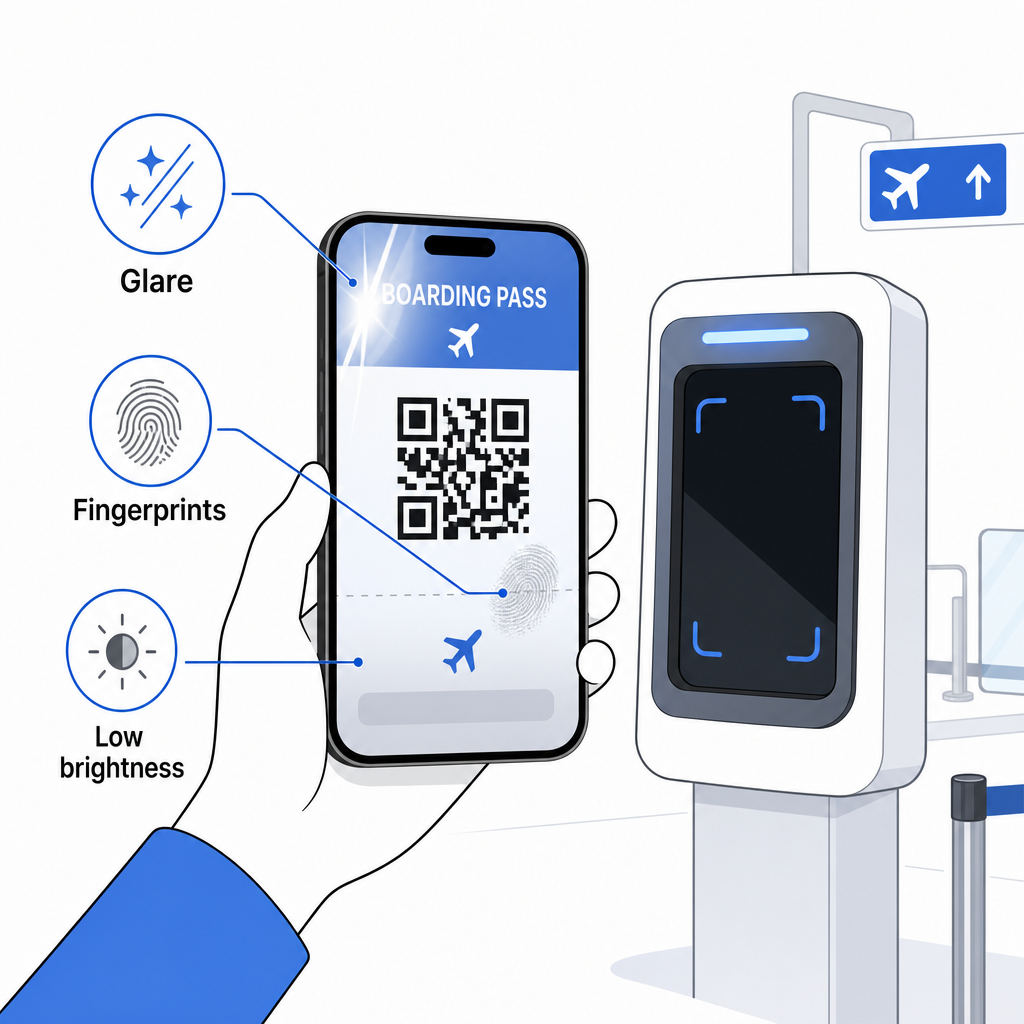
Nepotpun prikaz je takođe čest problem – uverite se da je ceo kod vidljiv i da ga ne zaklanja futrola telefona ili baner sa obaveštenjima. Agenti na gejtu se rutinski suočavaju sa neuspešnim skeniranjem i mogu ručno pronaći vašu rezervaciju koristeći vaše ime i PNR. Neuspelo skeniranje retko predstavlja ozbiljan problem, ali usporava stvari tokom ukrcavanja sa velikim brojem putnika.
Razumevanje kako QR kodovi poboljšavaju iskustva putovanja šire, takođe vam može pomoći da izvučete maksimum iz digitalnih alata koje avio-kompanije sada nude tokom celog putovanja.
Bar kod vaše karte za ukrcavanje – bilo da je to QR kod, Aztec kod ili PDF417 traka – nosi precizan, standardizovan skup podataka na koji se aerodromski sistemi oslanjaju da bi proverili vaš identitet i dodeljeno sedište u realnom vremenu. Mobilne karte su zgodne i dobro funkcionišu na većini velikih američkih aerodroma, ali štampane karte ostaju najuniverzalnije kompatibilna opcija. Najsigurniji pristup je da unapred poznajete svoje aerodrome i da imate rezervnu opciju dostupnu kada putujete manje poznatim rutama.
Ako želite da dešifrujete šta je zapravo pohranjeno u bar kodu karte za ukrcavanje, Pageloot Barcode Scanner omogućava vam da pročitate bilo koji podržani format direktno iz vašeg pretraživača bez instaliranja aplikacije.
Često postavljana pitanja
Nije uvek. Štampane ukrcajne karte najčešće koriste bar kod PDF417 – pravougaoni prugasti format – kao podrazumevani prema IATA BCBP standardu. Mobilne ukrcajne karte koriste formate 2D matrice kao što su Aztec, Data Matrix ili QR kod. Svi oni kodiraju iste strukturirane podatke o putnicima; format varira u zavisnosti od medija i avio-kompanije.
Nije nužno. Na više od 225 američkih aerodroma opremljenih tehnologijom za autentifikaciju akreditiva TSA (CAT), vaš identifikacioni dokument izdat od strane vlade je dovoljan da potvrdite vaše detalje leta na bezbednosnoj kontroli – nije potrebna karta za ukrcavanje. Međutim, i dalje morate da se prijavite kod vaše avio-kompanije da biste dobili kartu za ukrcavanje (mobilnu ili štampanu), i uvek ćete morati da je skenirate na izlazu za ukrcavanje kada se ukrcate u avion.
Najčešći uzroci su odsjaj ekrana od jakog aerodromskog osvetljenja, otisci prstiju ili mrlje preko bar-koda, niska osvetljenost ekrana i moire šare koje LCD ili LED ekrani mogu da proizvedu. Da biste poboljšali pouzdanost, očistite svoj ekran pre nego što dođete do skenera, podesite svoju osvetljenost na maksimum i uverite se da je ceo bar-kod potpuno vidljiv i neometan.