Vai esat kādreiz domājuši, ko īsti dara tas kvadrātveida vai svītrainais kods uz jūsu iekāpšanas kartes? Tā izpratne var pasargāt jūs no nepatīkamas aizkavēšanās drošības kontrolē vai pie vārtiem. Šis ceļvedis precīzi izskaidro, kā darbojas iekāpšanas karšu kodi un ko sagaidīt, tos skenējot lidostā.
Kāda veida kods ir uz iekāpšanas kartes
Ne visi iekāpšanas karšu kodi ir vienādi, un atšķirībai ir nozīme, kad stāvat pie skenera.
Aviokompānijas ievēro globālu standartu, ko sauc par IATA Svītrkodu iekāpšanas karte (BCBP), definēts saskaņā ar Rezolūciju 792. Šis standarts nosaka, kādus svītrkodu formātus aviokompānijas var izmantot un kā datiem tajos jābūt strukturētiem, lai jebkurš lidostas skeneris pasaulē varētu nolasīt to pašu karti.
Saskaņā ar šo standartu tiek izmantotas divas plašas kodu saimes:
- PDF417 – Taisnstūrveida, sakrauts svītrkods, kas izskatās kā horizontālu līniju virkne, sadalīta kolonnās. Tas ir noklusējuma formāts drukātām iekāpšanas kartēm un ir visizplatītākais formāts, ko redzēsiet uz papīra.
- 2D matricas kodi (Aztec, Data Matrix, QR kods) – Kvadrātveida vai kompakti, uz režģa balstīti kodi. Tie ir standarta formāti mobilajām iekāpšanas kartēm, kas tiek rādītas tālruņa ekrānā, lai gan tie var parādīties arī uz drukātām kartēm saskaņā ar pašreizējo BCBP standarta versiju.
Tātad, lai gan daudzi to sauc par “QR kodu”, jūsu iekāpšanas karte tehniski var saturēt Aztec kodu, Data Matrix kodu vai PDF417 svītrkodu atkarībā no aviokompānijas un tā, vai izmantojat mobilo vai drukāto versiju. Galvenais ir tas, ka tie visi kodē vienus un tos pašus strukturētos datus. Lai uzzinātu vairāk par to, kā QR kodi tiek izmantoti tieši aviokompānijās un lidostās, QR kodus aviosabiedrībām un lidostām pārskats ir noderīga atsauce.
Kādi dati tiek glabāti koda iekšpusē
Svītrkods uz jūsu iekāpšanas kartes nav tikai biļetes numurs. Tas kodē strukturētu datu ziņojumu, kas satur noteiktu obligāto lauku kopumu, tostarp:
- Jūsu pilns pasažiera vārds
- Portāls PNR (Pasažiera vārda ieraksts) – jūsu rezervācijas atsauces kods
- Izlidošanas un galamērķa lidostu kodi (piemēram, JFK → LAX)
- Pārvadātāja kods un lidojuma numurs
- Lidojuma datums
- Sēdvietas numurs un salona klases kods
- Reģistrācijas secības numurs
- Pasažiera statuss
Standarts atbalsta arī kodēšanu vairāku lidojuma posmu vienā svītrkodā, tāpēc savienojošs maršruts dažkārt var parādīties kā viens skenējams kods jūsu iekāpšanas kartē, nevis divi atsevišķi.
Dažas aviosabiedrības iekļauj arī papildu drošības lauku , kas satur digitālo parakstu. Tas ļauj lidostu sistēmām pārbaudīt, vai svītrkods nav mainīts vai viltots, pievienojot aizsardzības slāni pret viltotām pasēm.
Kā darbojas skenēšanas process lidostā
Kad jūs uzrādāt savu iekāpšanas karti kontrolpunktā vai pie vārtiem, skeneris nolasa visus šos kodētos laukus sekundes daļā. Lūk, kas notiek katrā posmā.
TSA drošības kontrolē: Amatpersona vai automatizētais lasītājs pārbauda jūsu identitāti un apstiprina, ka jums ir derīga, reģistrēta rezervācija izlidojošam lidojumam. Vairāk nekā 225 ASV lidostās TSA ir uzstādījusi akreditācijas datu autentifikācijas tehnoloģiju (CAT), kas var parādīt jūsu lidojuma informāciju, skenējot tikai jūsu valdības izsniegto ID – tas nozīmē, ka jums, iespējams, vispār nav jāuzrāda iekāpšanas karte drošības kontrolpunktā. Tomēr, ja CAT aprīkojums konkrētā joslā nav pieejams, amatpersona joprojām var lūgt jūsu iekāpšanas karti.
Pie iekāpšanas vārtiem: Šeit skenēšana vienmēr notiek, neatkarīgi no tā, kurā lidostā atrodaties. Vārtu aģenta skeneris nolasa jūsu iekāpšanas kartes kodu, apstiprina jūsu sēdvietu un pasažiera statusu un reģistrē, ka esat iekāpis. Šajā brīdī jums katru reizi būs nepieciešama iekāpšanas karte – mobilā vai izdrukāta.
Skenējiet jebkuru iekāpšanas kartes formātu uzreiz Jāpārbauda, kas ir kodēts QR vai svītrkodā? Izmantojiet Pageloot QR Code Scanner vai Svītrkodu skeneris , lai nolasītu un atkodētu jebkuru atbalstīto formātu tieši no jūsu pārlūkprogrammas – nav nepieciešama lietotne.
Mobilās pret drukātajām iekāpšanas kartēm: Praktiskās atšķirības
Abi formāti kodē identiskus datus. Atšķirība ir tikai tajā, cik uzticami šos datus var nolasīt reālos lidostas apstākļos.
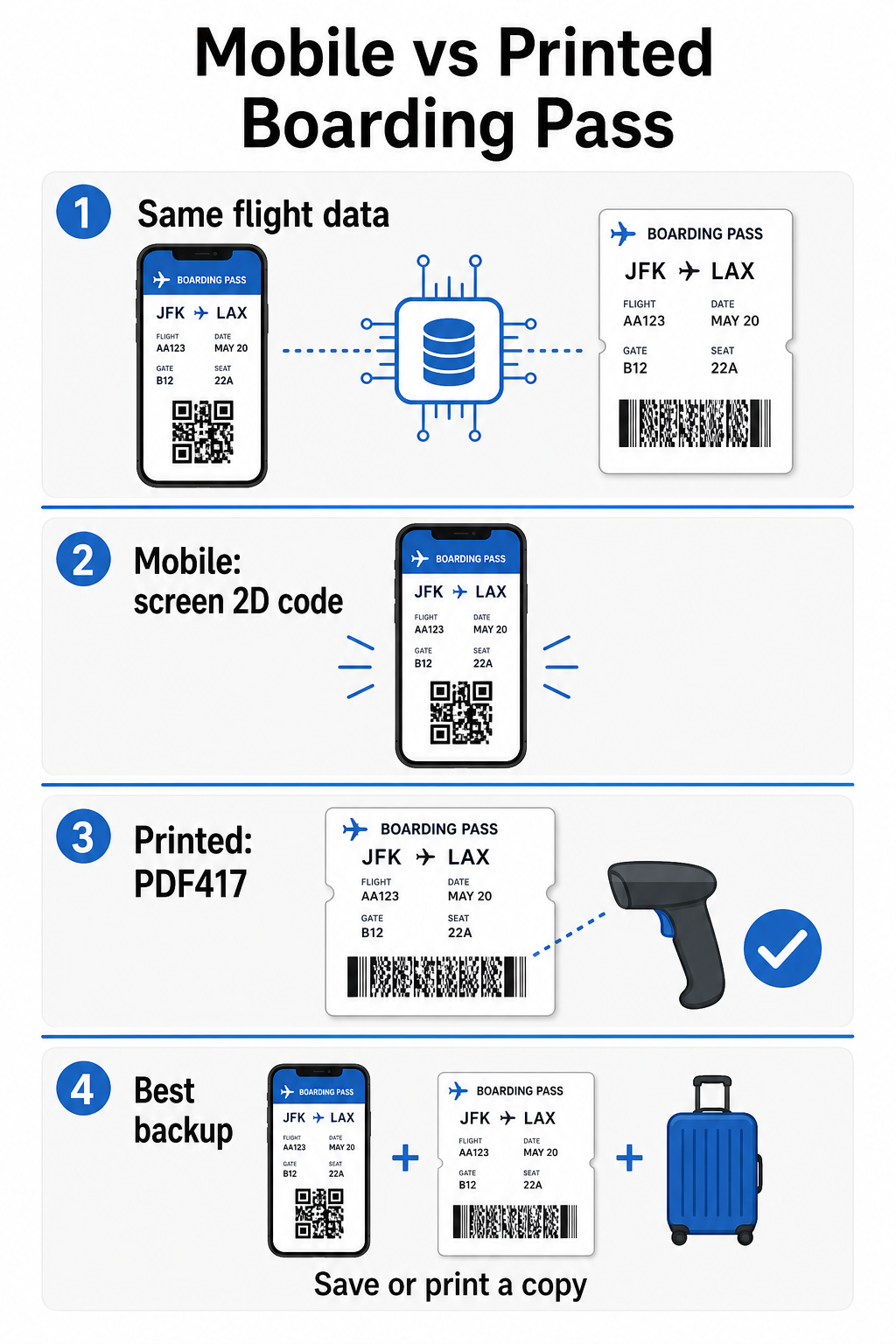
| Faktors | Mobilā iekāpšanas karte | Izdrukāta iekāpšanas karte |
|---|---|---|
| Pieņemtais formāts | Aztec, Data Matrix vai QR kods | PDF417 (noklusējuma); arī Aztec, Data Matrix, QR |
| Skenera saderība | Lielākā daļa mūsdienu 2D skeneru; daži vecāki lāzerskeneri var radīt grūtības | Plaši saderīgs ar visiem lidostas skeneriem |
| Ekrāna atspīduma risks | Jā – spilgts lidostas apgaismojums var izraisīt atspīdumus | Nav |
| Muarē raksta risks | Jā – LCD/LED ekrāni var radīt vizuālas traucējumu joslas | Nav |
| Fizisku bojājumu risks | Ieplaisājis vai netīrs ekrāns var traucēt kodu | Papīrs var saburzīties, saplīst vai nosmērēties |
| Ērtības | Nav nepieciešama drukāšana; vienmēr jūsu tālrunī | Strādā visur, nav nepieciešama baterija |
| Lidostas pieņemšana | Nav universāls – dažas ASV lidostas pieprasa drukātas caurlaides | Pieņemts visās lidostās |
Galvenā problēma ar mobilajām iekāpšanas kartēm ir tā, ka tradicionālie lāzerskeneri ir optimizēti gaismai, kas atstarojas no papīra, nevis gaismai, kas izstaro no ekrāna. Kad turat tālruni spilgtā termināļa apgaismojumā, ekrāns var radīt atspīdumu vai atstarojošus traucējumus, kas samazina kontrastu, kas skenerim nepieciešams, lai precīzi atšifrētu svītrkodu. Muarē raksti – vizuālas joslas, ko var radīt LCD un LED ekrāni – ir vēl viens traucējumu avots, kura drukātām caurlaidēm vienkārši nav.
Lai mazinātu šīs problēmas, izmantojot mobilo iekāpšanas karti:
- Maksimizējiet ekrāna spilgtumu pirms tuvojaties skenerim
- Notīriet ekrānu – pirkstu nospiedumi un traipi tieši virs svītrkoda traucē atšifrēšanu
- Saglabājiet visu svītrkodu redzamu ekrānā, lai tas netiktu apgriezts vai daļēji paslēpts ar paziņojumu joslām
- Pagrieziet, ja nepieciešams – daži skeneri dod priekšroku kodam noteiktā orientācijā
Lai uzzinātu vairāk par to, kas kopumā ietekmē svītrkodu lasāmību, labāko praksi QR kodu lasāmībā ceļvedis detalizēti aplūko kontrastu, izmērus un vides faktorus.
Kad jums vajadzētu nēsāt līdzi drukātu iekāpšanas karti
Mobilā caurlaide nevainojami darbojas lielākajā daļā lielo ASV lidostu. Tomēr ir īpašas situācijas, kad drukātas kopijas esamība ir drošāka izvēle:
- Mazākas reģionālās lidostas kas vēl nav modernizējušas savus skenerus, lai droši nolasītu mobilo ekrānu kodus
- Starptautiskie savienojumi, kur iekāpšanas karšu pieņemšanas politika ievērojami atšķiras atkarībā no valsts un pārvadātāja
- Gari ceļojumi vai ceļojumi uz apgabaliem ar ierobežotu uzlādes piekļuvi, kur jūsu tālruņa akumulators var radīt bažas
- Vecākas vai bojātas ierīces kur ekrāna plaisas vai zems spilgtums apgrūtina koda nolasīšanu
Ja neesat pārliecināts, vai jūsu izlidošanas lidosta pieņem mobilās caurlaides, pirms ceļojuma pārbaudiet to tieši pie savas aviokompānijas. Dažas aviokompānijas skaidri norāda lidostu saderību savās mobilo iekāpšanas karšu lapās. Ja jūs interesē, kā tie paši QR koda principi attiecas uz citiem biļešu un pasākumu caurlaižu veidiem, QR kodus uz biļetēm lapa detalizēti aplūko šo lietošanas gadījumu.
Kas notiek, ja jūsu iekāpšanas karte netiek skenēta
Ja skeneris noraida jūsu iekāpšanas karti – mobilo vai drukātu – ir vērts zināt visbiežākos iemeslus, pirms stāvat aizņemtas iekāpšanas rindas priekšgalā.
Ekrāna atspīdums vai zems spilgtums ir galvenais vaininieks mobilo caurlaižu gadījumā. Mēģiniet nedaudz noliekt tālruni vai aptvert ekrānu ar roku, lai bloķētu apkārtējo gaismu, un vienmēr iestatiet displeju uz pilnu spilgtumu pirms tuvojaties skenerim. Pirkstu nospiedumi vai traipi virs svītrkoda ir vēl viena bieža problēma, ko var atrisināt ar ātru noslaucīšanu. Drukātām caurlaidēm stipri saburzīts vai daļēji saplēsts svītrkods var netikt pareizi atšifrēts, tāpēc ir vērts izvairīties no papīra caurlaides locīšanas tieši caur kodu.
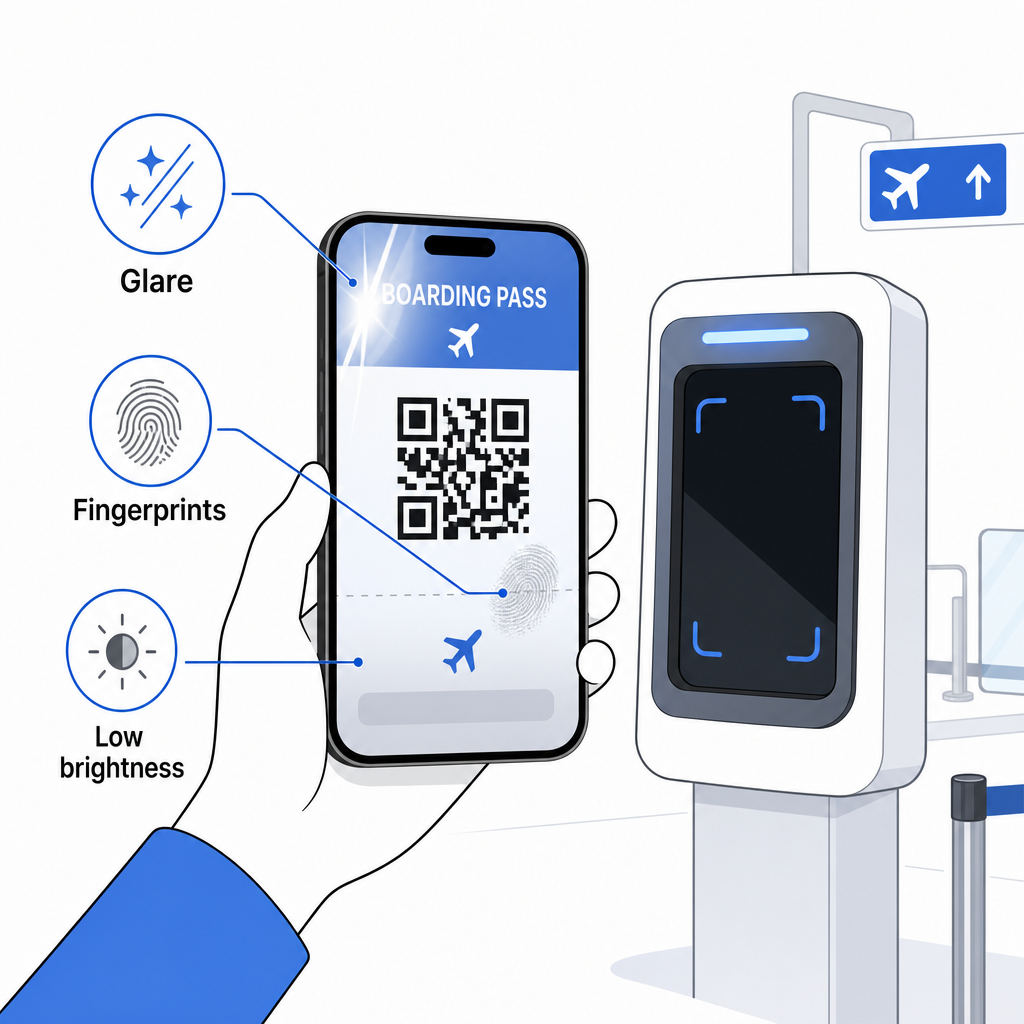
Nepilnīgs attēlojums ir arī bieža problēma – pārliecinieties, ka viss kods ir redzams un nav aizsegts ar tālruņa maciņu vai paziņojumu joslu. Vārtu aģenti regulāri saskaras ar skenēšanas kļūmēm un var manuāli atrast jūsu rezervāciju, izmantojot jūsu vārdu un PNR. Neveiksmīga skenēšana reti ir nopietna problēma, taču tā palēnina procesu intensīvas iekāpšanas laikā.
Izpratne kā QR kodi uzlabo ceļošanas pieredzi plašākā nozīmē var arī palīdzēt jums maksimāli izmantot digitālos rīkus, ko aviokompānijas tagad piedāvā visa ceļojuma laikā.
Jūsu iekāpšanas kartes svītrkods – vai tas būtu QR kods, Acteku kods vai PDF417 svītra – satur precīzu, standartizētu datu slodzi, uz kuru paļaujas lidostu sistēmas, lai reāllaikā pārbaudītu jūsu identitāti un sēdvietas piešķiršanu. Mobilās caurlaides ir ērtas un labi darbojas lielākajā daļā lielo ASV lidostu, taču drukātās caurlaides joprojām ir visuniversālākā saderīgā opcija. Drošākā pieeja ir iepriekš zināt savas lidostas un turēt pieejamu rezerves iespēju, ceļojot pa mazāk pazīstamiem maršrutiem.
Ja vēlaties atšifrēt, kas faktiski tiek glabāts iekāpšanas kartes svītrkoda, Pageloot svītrkodu skeneri ļauj nolasīt jebkuru atbalstīto formātu tieši no jūsu pārlūkprogrammas, neinstalējot lietotni.
Biežāk uzdotie jautājumi
Ne vienmēr. Drukātās iekāpšanas kartes visbiežāk izmanto PDF417 svītrkodu – taisnstūra svītraino formātu – kā noklusējuma saskaņā ar IATA BCBP standartu. Mobilās iekāpšanas kartes izmanto 2D matricas formātus, piemēram, Aztec, Data Matrix vai QR kodu. Visi šie kodē vienus un tos pašus strukturētos pasažieru datus; formāts atšķiras atkarībā no nesēja un aviokompānijas.
Ne obligāti. Vairāk nekā 225 ASV lidostās, kas aprīkotas ar TSA akreditācijas datu autentifikācijas tehnoloģiju (CAT), jūsu valdības izsniegta ID karte ir pietiekama, lai apstiprinātu jūsu lidojuma informāciju drošības kontrolpunktā – nav nepieciešama iekāpšanas karte. Tomēr jums joprojām ir jāreģistrējas pie jūsu aviokompānijas, lai iegūtu iekāpšanas karti (mobilā vai drukātā), un jums vienmēr būs tā jāskenē pie iekāpšanas vārtiem, kad jūs iekāpsiet lidmašīnā.
Visbiežākie cēloņi ir ekrāna atspīdums no spilgta lidostas apgaismojuma, pirkstu nospiedumi vai traipi virs svītrkoda, zems ekrāna spilgtums un muarē raksti, ko var radīt LCD vai LED ekrāni. Lai uzlabotu uzticamību, notīriet savu ekrānu pirms sasniegt skeneri, iestatiet savu spilgtumu uz maksimālo un pārliecinieties, ka viss svītrkods ir pilnībā redzams un netraucēts.