Czy kiedykolwiek zastanawiałeś się, co ten kwadratowy lub paskowy kod na Twojej karcie pokładowej naprawdę robi? Zrozumienie go może uchronić Cię przed frustrującym opóźnieniem na kontroli bezpieczeństwa lub przy bramce. Ten przewodnik wyjaśnia dokładnie, jak działają kody kart pokładowych i czego spodziewać się, skanując je na lotnisku.
Jaki Rodzaj Kodu Znajduje się na Karcie Pokładowej
Nie wszystkie kody kart pokładowych są takie same, a różnica ma znaczenie, gdy stoisz przy skanerze.
Linie lotnicze przestrzegają globalnego standardu zwanego Karta pokładowa IATA z kodem kreskowym (BCBP), zdefiniowanego w Rezolucji 792. Ten standard określa, jakich formatów kodów kreskowych linie lotnicze mogą używać i jak dane w nich muszą być strukturyzowane, aby każdy skaner lotniskowy na świecie mógł odczytać tę samą kartę.
Zgodnie z tym standardem używane są dwie szerokie rodziny kodów:
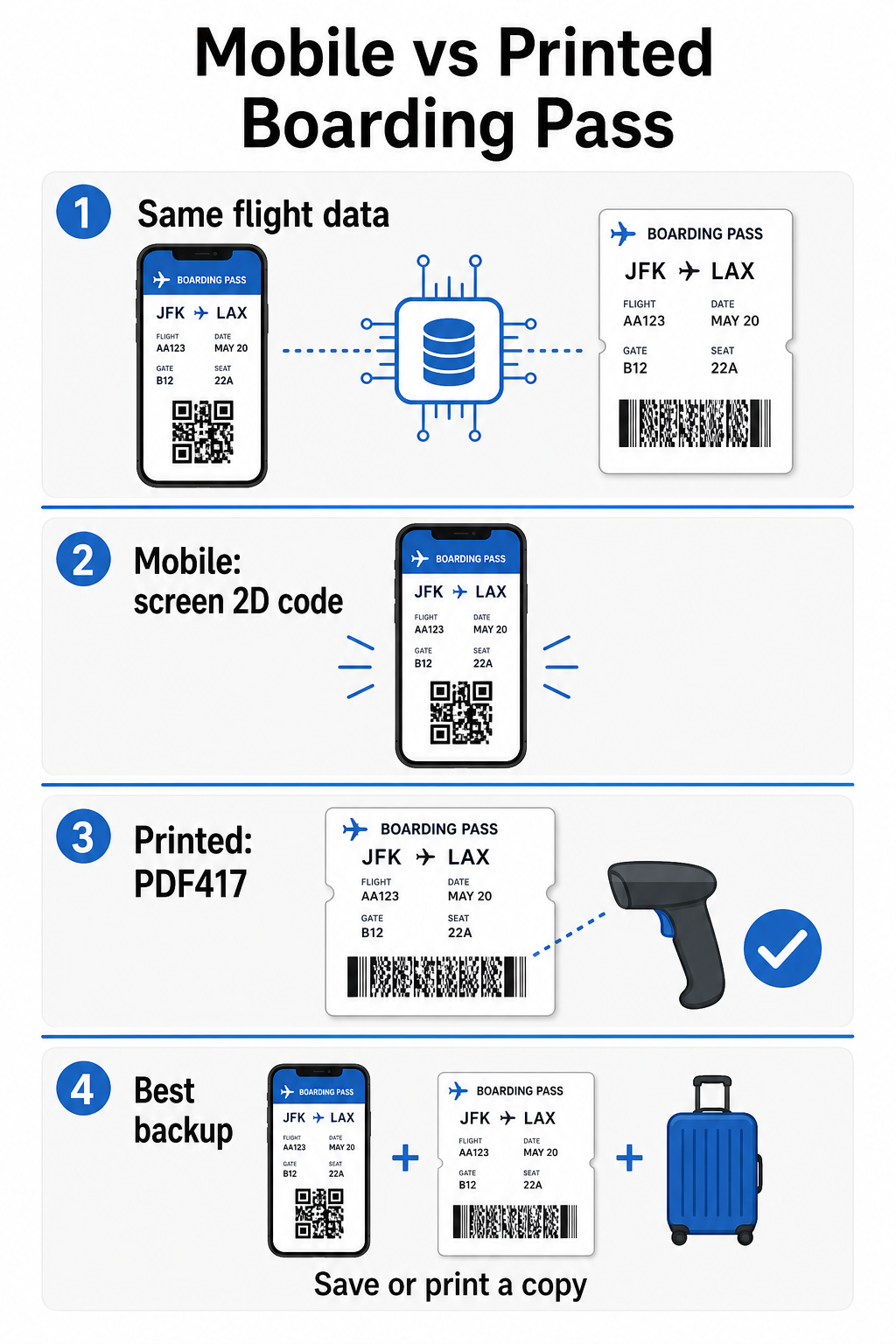
- PDF417 – Prostokątny, piętrowy kod kreskowy, który wygląda jak seria poziomych linii podzielonych na kolumny. Jest to domyślny format dla drukowanych kart pokładowych i jest najczęstszym formatem, jaki zobaczysz na papierze.
- Kody matrycowe 2D (Aztec, Data Matrix, kod QR) – Kwadratowe lub kompaktowe kody oparte na siatce. Są to standardowe formaty dla mobilnych kart pokładowych wyświetlanych na ekranie telefonu, choć mogą również pojawiać się na drukowanych kartach zgodnie z obecną wersją standardu BCBP.
Więc choć wiele osób nazywa go “kodem QR”, Twoja karta pokładowa może technicznie zawierać kod Aztec, kod Data Matrix lub kod kreskowy PDF417 w zależności od linii lotniczej i tego, czy używasz wersji mobilnej, czy drukowanej. Kluczowe jest to, że wszystkie z nich kodują te same ustrukturyzowane dane. Aby dowiedzieć się więcej o tym, jak kody QR są używane w szczególności przez linie lotnicze i na lotniskach, kodów QR dla linii lotniczych i lotnisk przegląd jest przydatnym odniesieniem.
Jakie Dane Są Przechowywane Wewnątrz Kodu
Kod kreskowy na Twojej karcie pokładowej to nie tylko numer biletu. Koduje on ustrukturyzowaną wiadomość danych, która zawiera określony zestaw obowiązkowych pól, w tym:
- Twoje pełne imię i nazwisko pasażera
- Plik PNR (Zapis danych pasażera) – Twój kod referencyjny rezerwacji
- Kody lotnisk wylotu i przylotu (np. JFK → LAX)
- Kod przewoźnika operacyjnego i numer lotu
- Data lotu
- Numer miejsca i kod klasy kabinowej
- Numer kolejności odprawy
- Status pasażera
Standard obsługuje również kodowanie wielu odcinków lotu w jeden kod kreskowy, dlatego plan podróży z przesiadkami może czasami pojawić się jako jeden skanowalny kod na Twojej karcie pokładowej zamiast dwóch oddzielnych.
Niektóre linie lotnicze zawierają również opcjonalne pole bezpieczeństwa zawierające podpis cyfrowy. Pozwala to systemom lotniskowym zweryfikować, czy kod kreskowy nie został zmieniony ani sfałszowany, dodając warstwę ochrony przed fałszywymi kartami.
Jak Działa Proces Skanowania na Lotnisku
Kiedy przedstawiasz swoją kartę pokładową na punkcie kontrolnym lub przy bramce, skaner odczytuje wszystkie te zakodowane pola w ułamku sekundy. Oto, co dzieje się na każdym etapie.
Na kontroli bezpieczeństwa TSA: Funkcjonariusz lub automatyczny czytnik sprawdza Twoją tożsamość i potwierdza, że masz ważną, odprawioną rezerwację na odlatujący lot. Na ponad 225 lotniskach w USA, TSA zainstalowało Technologię Uwierzytelniania Poświadczeń (CAT), która może wyświetlić szczegóły Twojego lotu, skanując sam Twój dowód tożsamości wydany przez rząd – co oznacza, że w ogóle nie musisz pokazywać karty pokładowej na punkcie kontroli bezpieczeństwa. Jednakże, jeśli sprzęt CAT na danej linii jest niedostępny, funkcjonariusz może nadal poprosić o Twoją kartę pokładową.
Przy bramce do wejścia na pokład: To jest miejsce, gdzie skanowanie zawsze ma miejsce, niezależnie od tego, na którym lotnisku się znajdujesz. Skaner agenta bramki odczytuje kod Twojej karty pokładowej, potwierdza Twoje miejsce i status pasażera, i rejestruje, że wszedłeś na pokład. W tym momencie zawsze będziesz potrzebować swojej karty pokładowej – mobilnej lub drukowanej.
Skanuj Dowolny Format Karty Pokładowej Natychmiast Chcesz zweryfikować, co jest zakodowane w kodzie QR lub kreskowym? Użyj Pageloot Skaner kodów QR lub Skaner kodów kreskowych aby odczytać i zdekodować dowolny obsługiwany format bezpośrednio z przeglądarki – bez potrzeby aplikacji.
Mobilne vs. Drukowane Karty Pokładowe: Praktyczne Różnice
Oba formaty kodują identyczne dane. Rozróżnienie dotyczy wyłącznie tego, jak niezawodnie te dane mogą być odczytane w rzeczywistych warunkach lotniskowych.
| Czynnik | Mobilna Karta Pokładowa | Drukowana Karta Pokładowa |
|---|---|---|
| Akceptowany format | Aztec, Data Matrix, lub kod QR | PDF417 (domyślny); również Aztec, Data Matrix, QR |
| Kompatybilność ze skanerami | Większość nowoczesnych skanerów 2D; niektóre starsze skanery laserowe mogą mieć problemy | Szeroko kompatybilny ze wszystkimi skanerami lotniskowymi |
| Ryzyko odblasków ekranu | Tak – jasne oświetlenie lotniskowe może powodować odbicia | Brak |
| Ryzyko wzoru mory | Tak – ekrany LCD/LED mogą tworzyć wizualne pasma zakłóceń | Brak |
| Ryzyko uszkodzenia fizycznego | Pęknięty lub brudny ekran może zasłaniać kod | Papier może się zagnieść, podrzeć lub rozmazać |
| Wygoda | Nie wymaga drukowania; zawsze na Twoim telefonie | Działa wszędzie, nie wymaga baterii |
| Akceptacja na lotnisku | Nie uniwersalne – niektóre lotniska w USA wymagają wydrukowanych kart pokładowych | Akceptowane na wszystkich lotniskach |
Głównym wyzwaniem w przypadku mobilnych kart pokładowych jest to, że tradycyjne skanery laserowe są zoptymalizowane pod kątem światła odbitego od papieru, a nie światła emitowanego z ekranu. Kiedy trzymasz telefon pod jasnym oświetleniem terminala, ekran może powodować odblaski lub zakłócenia odbiciowe, które zmniejszają kontrast potrzebny skanerowi do dokładnego odczytania kodu kreskowego. Wzory mory – wizualne pasma, które mogą wytwarzać ekrany LCD i LED – są kolejnym źródłem zakłóceń, których po prostu nie mają wydrukowane karty pokładowe.
Aby zminimalizować te problemy podczas korzystania z mobilnej karty pokładowej:
- Zmaksymalizuj jasność ekranu przed podejściem do skanera
- Wyczyść ekran – odciski palców i smugi bezpośrednio nad kodem kreskowym zakłócają dekodowanie
- Zachowaj cały kod kreskowy widoczny na ekranie, bez przycinania lub częściowego ukrywania przez paski powiadomień
- Obróć w razie potrzeby – niektóre skanery preferują kod w określonej orientacji
Aby dowiedzieć się więcej o tym, co wpływa na czytelność kodów kreskowych ogólnie, najlepszymi praktykami w zakresie czytelności kodów QR przewodnik omawia kontrast, rozmiar i czynniki środowiskowe szczegółowo.
Kiedy powinieneś mieć przy sobie wydrukowaną kartę pokładową
Mobilna karta pokładowa działa płynnie na zdecydowanej większości głównych lotnisk w USA. Jednak istnieją konkretne sytuacje, w których posiadanie wydrukowanej kopii jest bezpieczniejszym wyborem:
- Mniejsze lotniska regionalne które nie zmodernizowały jeszcze swoich skanerów, aby niezawodnie odczytywać kody z ekranów mobilnych
- Połączenia międzynarodowe, gdzie zasady akceptacji kart pokładowych różnią się znacząco w zależności od kraju i przewoźnika
- Długie podróże lub podróże do obszarów z ograniczonym dostępem do ładowania, gdzie bateria telefonu może stanowić problem
- Starsze lub uszkodzone urządzenia gdzie pęknięcia ekranu lub niska jasność utrudniają odczytanie kodu
Jeśli nie masz pewności, czy Twoje lotnisko wylotu akceptuje mobilne karty pokładowe, sprawdź bezpośrednio u swojej linii lotniczej przed podróżą. Niektóre linie lotnicze wyraźnie wymieniają kompatybilność lotnisk na swoich stronach dotyczących mobilnych kart pokładowych. Jeśli interesuje Cię, jak te same zasady kodów QR mają zastosowanie do innych rodzajów biletów i przepustek na wydarzenia, kody QR na biletach strona omawia ten przypadek użycia szczegółowo.
Co się stanie, jeśli Twoja karta pokładowa nie zostanie zeskanowana
Jeśli skaner odrzuci Twoją kartę pokładową – mobilną lub wydrukowaną – najczęstsze przyczyny warto znać, zanim znajdziesz się na początku ruchliwej kolejki do wejścia na pokład.
Odblaski ekranu lub niska jasność są głównym winowajcą w przypadku mobilnych kart pokładowych. Spróbuj lekko przechylić telefon lub osłonić ekran dłonią, aby zablokować światło otoczenia, i zawsze ustaw wyświetlacz na pełną jasność przed podejściem do skanera. Odciski palców lub smugi nad kodem kreskowym to kolejny częsty problem, który można rozwiązać szybkim przetarciem. W przypadku wydrukowanych kart pokładowych, mocno zagięty lub częściowo podarty kod kreskowy może nie zostać poprawnie odczytany, dlatego składanie papierowej karty bezpośrednio przez kod jest warte uniknięcia.
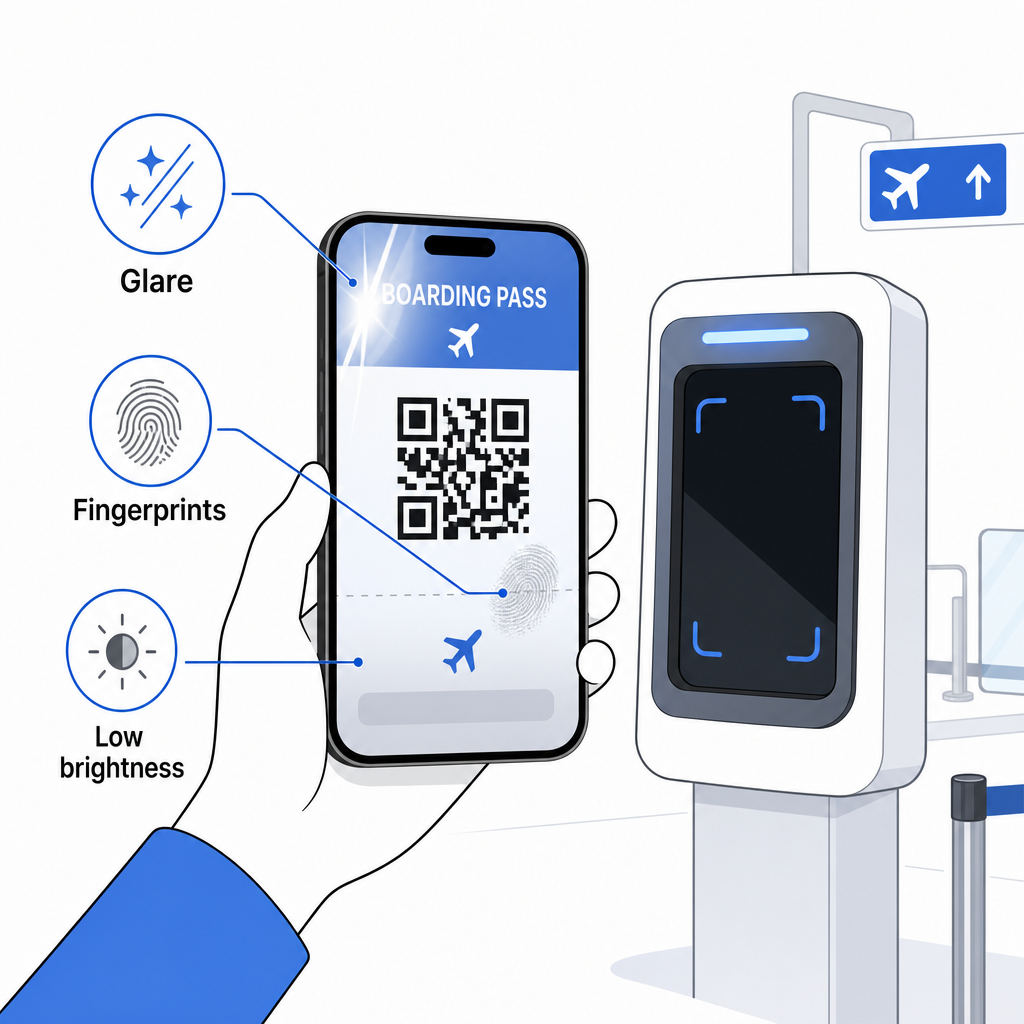
Niekompletne wyświetlanie jest również częstym problemem – upewnij się, że cały kod jest widoczny i nie jest zasłonięty przez etui telefonu lub baner powiadomień. Agenci bramki rutynowo zajmują się niepowodzeniami skanowania i mogą ręcznie wyszukać Twoją rezerwację, używając Twojego imienia i nazwiska oraz PNR. Nieudane skanowanie rzadko jest poważnym problemem, ale spowalnia to proces podczas wejścia na pokład o dużym natężeniu ruchu.
Zrozumienie Jak kody QR poprawiają doświadczenia w podróży szerzej może również pomóc Ci w pełni wykorzystać cyfrowe narzędzia, które linie lotnicze oferują obecnie przez całą podróż.
Twój kod kreskowy karty pokładowej – czy to kod QR, kod Aztec, czy pasek PDF417 – zawiera precyzyjny, ustandaryzowany ładunek danych, na którym polegają systemy lotniskowe, aby zweryfikować Twoją tożsamość i przydział miejsca w czasie rzeczywistym. Mobilne karty pokładowe są wygodne i działają dobrze na większości głównych lotnisk w USA, ale wydrukowane karty pokładowe pozostają najbardziej uniwersalnie kompatybilną opcją. Najbezpieczniejszym podejściem jest wcześniejsze poznanie lotnisk i posiadanie opcji zapasowej podczas podróży mniej znanymi trasami.
Jeśli chcesz rozszyfrować, co faktycznie jest przechowywane w kodzie kreskowym karty pokładowej, Skanera Kodów Kreskowych Pageloot pozwala Ci odczytać dowolny obsługiwany format bezpośrednio z przeglądarki bez instalowania aplikacji.
Najczęściej zadawane pytania
Nie zawsze. Drukowane karty pokładowe najczęściej używają kodu kreskowego PDF417 – prostokątny format paskowy – jako domyślny zgodnie ze standardem IATA BCBP. Mobilne karty pokładowe używają formatów matryc 2D, takich jak Aztec, Data Matrix lub kod QR. Wszystkie z nich kodują te same ustrukturyzowane dane pasażera; format różni się w zależności od nośnika i linii lotniczej.
Niekoniecznie. Na ponad 225 lotniskach w USA wyposażonych w technologię uwierzytelniania danych uwierzytelniających TSA (CAT), państwa dokument tożsamości wydany przez rząd wystarczy, aby potwierdzić państwa dane lotu na punkcie kontroli bezpieczeństwa – karta pokładowa nie jest wymagana. Jednakże, nadal muszą państwo odprawić się w państwa linii lotniczej, aby uzyskać kartę pokładową (mobilną lub wydrukowaną), i zawsze będą państwo musieli zeskanować ją przy bramce wejściowej, gdy będą państwo wchodzić na pokład samolotu.
Najczęstsze przyczyny to odblaski ekranu od jasnego oświetlenia lotniskowego, odciski palców lub smugi na kodzie kreskowym, niska jasność ekranu i wzory mory, które mogą wytwarzać ekrany LCD lub LED. Aby poprawić niezawodność, wyczyść swój ekran przed dotarciem do skanera, ustaw swoją jasność na maksymalną i upewnij się, że cały kod kreskowy jest w pełni widoczny i niezasłonięty.