תהיתם פעם מה באמת עושה הקוד המרובע או המפוספס הזה על כרטיס העלייה למטוס שלכם? הבנתו יכולה לחסוך לכם עיכוב מתסכל בבידוק הביטחוני או בשער. מדריך זה מסביר בדיוק כיצד פועלים קודי כרטיס העלייה למטוס ומה לצפות כשאתם סורקים אותם בשדה התעופה.
איזה סוג קוד נמצא על כרטיס עלייה למטוס
לא כל קודי כרטיס העלייה למטוס זהים, וההבדל חשוב כשאתם עומדים ליד סורק.
חברות תעופה פועלות לפי תקן עולמי הנקרא ה- כרטיס עלייה למטוס מקודד ברקוד של יאט"א (BCBP), המוגדר תחת החלטה 792. תקן זה מפרט אילו פורמטים של ברקודים חברות תעופה יכולות להשתמש וכיצד הנתונים בתוכם חייבים להיות מובנים, כך שכל סורק בשדה תעופה בעולם יוכל לקרוא את אותו כרטיס.
תחת תקן זה, שתי משפחות קודים רחבות נמצאות בשימוש:
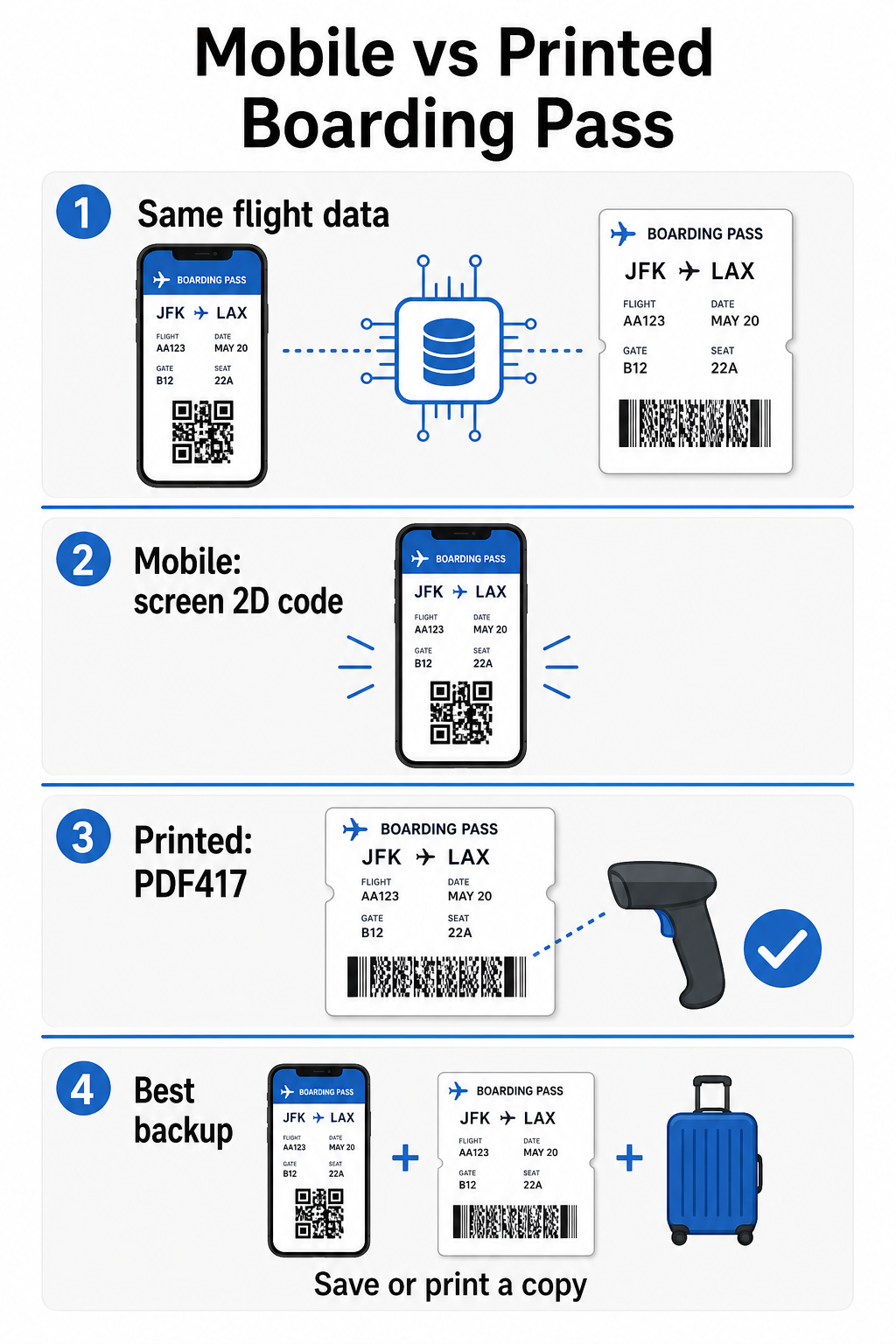
- PDF417 – ברקוד מלבני, מוערם, שנראה כמו סדרה של קווים אופקיים המחולקים לעמודות. זהו פורמט ברירת המחדל עבור כרטיסי עלייה למטוס מודפסים והפורמט הנפוץ ביותר שתראו על נייר.
- קודי מטריצה דו-ממדיים (Aztec, Data Matrix, QR code) – קודים מרובעים או מבוססי רשת קומפקטית. אלו הם הפורמטים הסטנדרטיים עבור כרטיסי עלייה למטוס ניידים המוצגים על מסך טלפון, אם כי הם יכולים להופיע גם על כרטיסים מודפסים תחת הגרסה הנוכחית של תקן ה-BCBP.
לכן, בעוד שאנשים רבים קוראים לו “קוד QR”, כרטיס העלייה למטוס שלכם עשוי לשאת טכנית קוד אצטק, קוד דאטה מטריקס, או ברקוד PDF417 בהתאם לחברת התעופה והאם אתם משתמשים בגרסה ניידת או מודפסת. נקודת המפתח היא שכולם מקודדים את אותם נתונים מובנים. כדי להבין יותר כיצד נעשה שימוש בקודי QR באופן ספציפי בחברות תעופה ובשדות תעופה, ה- קודי QR לחברות תעופה ושדות תעופה סקירה היא אסמכתא שימושית.
אילו נתונים מאוחסנים בתוך הקוד
הברקוד על כרטיס העלייה למטוס שלכם אינו רק מספר כרטיס. הוא מקודד הודעת נתונים מובנית המכילה קבוצה ספציפית של שדות חובה, הכוללים:
- שמכם המלא של הנוסע
- ה רשומת שם נוסע (PNR) – קוד אסמכתא ההזמנה שלכם
- קודי שדות תעופה של מוצא ויעד (לדוגמה, JFK ← LAX)
- קוד חברת תעופה מפעילה ומספר טיסה
- תאריך הטיסה
- מספר מושב וקוד מחלקת טיסה
- מספר סידורי של צ'ק-אין
- סטטוס נוסע
התקן תומך גם בקידוד מספר קטעי טיסה לתוך ברקוד יחיד, וזו הסיבה שמסלול טיסה מקשר יכול לפעמים להופיע כקוד אחד הניתן לסריקה על כרטיס העלייה למטוס שלכם במקום שניים נפרדים.
חלק מחברות התעופה כוללות גם שדה אופציונלי של אבטחה המכיל חתימה דיגיטלית. זה מאפשר למערכות שדה התעופה לוודא שהברקוד לא שונה או זוייף, ומוסיף שכבת הגנה מפני כרטיסים מזויפים.
כיצד פועל תהליך הסריקה בשדה התעופה
כשאתם מציגים את כרטיס העלייה למטוס שלכם בנקודת בידוק או בשער, הסורק קורא את כל השדות המקודדים הללו בשבריר שנייה. הנה מה שקורה בכל שלב.
בבידוק הביטחוני של ה-TSA: הקצין או הקורא האוטומטי בודק את זהותכם ומאשר שיש לכם הזמנה תקפה, עם צ'ק-אין, לטיסה יוצאת. ביותר מ-225 שדות תעופה בארה"ב, ה-TSA התקין טכנולוגיית אימות אישורים (CAT), שיכולה להציג את פרטי הטיסה שלכם על ידי סריקת תעודת הזהות הממשלתית שלכם בלבד – כלומר ייתכן שלא תצטרכו להציג כרטיס עלייה למטוס בנקודת הבידוק הביטחוני כלל. עם זאת, אם ציוד ה-CAT בנתיב נתון אינו זמין, קצין עדיין יכול לבקש את כרטיס העלייה למטוס שלכם.
בשער העלייה למטוס: זה המקום שבו הסריקה מתרחשת תמיד, ללא קשר לאיזה שדה תעופה אתם נמצאים. הסורק של סוכן השער קורא את קוד כרטיס העלייה למטוס שלכם, מאשר את מושבכם וסטטוס הנוסע שלכם, ומתעד שעליתם למטוס. תצטרכו את כרטיס העלייה למטוס שלכם – נייד או מודפס – בנקודה זו בכל פעם.
סרוק כל פורמט של כרטיס עלייה למטוס באופן מיידי צריך לאמת מה מקודד בקוד QR או ברקוד? השתמשו ב- סורק קודי QR של Pageloot אוֹ סורק ברקוד כדי לקרוא ולפענח כל פורמט נתמך ישירות מהדפדפן שלכם – אין צורך באפליקציה.
כרטיסי עלייה למטוס ניידים לעומת מודפסים: הבדלים מעשיים
שני הפורמטים מקודדים נתונים זהים. ההבחנה היא כולה לגבי עד כמה ניתן לקרוא את הנתונים באופן אמין בתנאי שדה תעופה אמיתיים.
| גורם | כרטיס עלייה למטוס נייד | כרטיס עלייה למטוס מודפס |
|---|---|---|
| פורמט מקובל | Aztec, Data Matrix, או QR code | PDF417 (ברירת מחדל); גם Aztec, Data Matrix, QR |
| תאימות סורקים | רוב סורקי הדו-ממד המודרניים; חלק מסורקי הלייזר הישנים יותר עלולים להתקשות | תואם באופן נרחב לכל סורקי שדה התעופה |
| סיכון סנוור מסך | כן – תאורת שדה תעופה בהירה עלולה לגרום להשתקפויות | אין |
| סיכון לדפוס מוארה | כן – מסכי LCD/LED עלולים ליצור פסי הפרעה חזותיים | אין |
| סיכון לנזק פיזי | מסך סדוק או מלוכלך עלול לחסום את הקוד | נייר עלול להתקמט, להיקרע או להימרח |
| נוֹחוּת | אין צורך בהדפסה; תמיד בטלפון שלך | עובד בכל מקום, ללא צורך בסוללה |
| קבלה בשדות תעופה | לא אוניברסלי – חלק משדות התעופה בארה"ב דורשים כרטיסים מודפסים | מתקבל בכל שדות התעופה |
האתגר המרכזי עם כרטיסי עלייה למטוס ניידים הוא ש- סורקי לייזר מסורתיים מותאמים לאור המוחזר מנייר, לא לאור הנפלט ממסך. כאשר מחזיקים טלפון תחת תאורת טרמינל בהירה, המסך יכול ליצור בוהק או הפרעה רפלקטיבית המפחיתה את הניגודיות שהסורק צריך כדי לפענח את הברקוד במדויק. דפוסי מואר – פסים ויזואליים שמסכי LCD ו-LED יכולים לייצר – הם מקור נוסף להפרעה שכרטיסים מודפסים פשוט אינם כוללים.
כדי למזער בעיות אלו בעת שימוש בכרטיס עלייה למטוס נייד:
- מקסם את בהירות המסך שלך לפני התקרבות לסורק
- נקה את המסך שלך – טביעות אצבע וכתמים ישירות מעל הברקוד משבשים את הפענוח
- שמור על הברקוד כולו גלוי על המסך מבלי להיחתך או להיות מוסתר חלקית על ידי סרגלי התראות
- סובב במידת הצורך – חלק מהסורקים מעדיפים את הקוד בכיוון ספציפי
למידע נוסף על מה שמשפיע על קריאות ברקוד באופן כללי, ה- שיטות עבודה מומלצות לקריאות קודי QR מדריך מכסה ניגודיות, גודל וגורמים סביבתיים בפירוט.
מתי כדאי לשאת כרטיס עלייה למטוס מודפס
כרטיס נייד עובד בצורה חלקה ברוב המכריע של שדות התעופה הגדולים בארה"ב. עם זאת, ישנם מצבים ספציפיים שבהם עותק מודפס הוא הבחירה הבטוחה יותר:
- שדות תעופה אזוריים קטנים יותר שטרם שדרגו את הסורקים שלהם כדי לקרוא באופן אמין קודי מסך ניידים
- חיבורים בינלאומיים, כאשר מדיניות קבלת כרטיסי עלייה למטוס משתנה באופן משמעותי לפי מדינה וחברת תעופה
- נסיעות ארוכות או נסיעה לאזורים עם גישה מוגבלת לטעינה, כאשר סוללת הטלפון שלך עלולה להוות דאגה
- מכשירים ישנים או פגומים שבהם סדקים במסך או בהירות נמוכה מקשים על קריאת הקוד
אם אינך בטוח אם שדה התעופה ממנו אתה יוצא מקבל כרטיסים ניידים, בדוק ישירות עם חברת התעופה שלך לפני הנסיעה. חלק מחברות התעופה מפרטות במפורש תאימות שדות תעופה בדפי כרטיסי העלייה למטוס הניידים שלהן. אם אתה מעוניין כיצד אותם עקרונות קוד QR חלים על סוגים אחרים של כרטיסים וכרטיסי אירועים, ה- קודי QR על כרטיסים עמוד מכסה מקרה שימוש זה לעומק.
מה קורה אם כרטיס העלייה למטוס שלך לא נסרק
אם סורק דוחה את כרטיס העלייה למטוס שלך – נייד או מודפס – כדאי לדעת את הסיבות הנפוצות ביותר לפני שאתה נמצא בחזית תור עלייה למטוס עמוס.
בוהק מסך או בהירות נמוכה הם הגורם המוביל לבעיות עם כרטיסים ניידים. נסה להטות את הטלפון מעט או לכסות את המסך בידך כדי לחסום אור סביבתי, ותמיד הגדר את התצוגה שלך לבהירות מלאה לפני התקרבות לסורק. טביעות אצבע או כתמים מעל הברקוד הם בעיה נפוצה נוספת שניתן לפתור בניגוב מהיר. עבור כרטיסים מודפסים, ברקוד מקומט מאוד או קרוע חלקית עשוי שלא לפענח נכון, ולכן כדאי להימנע מקיפול כרטיס נייר ישירות דרך הקוד.
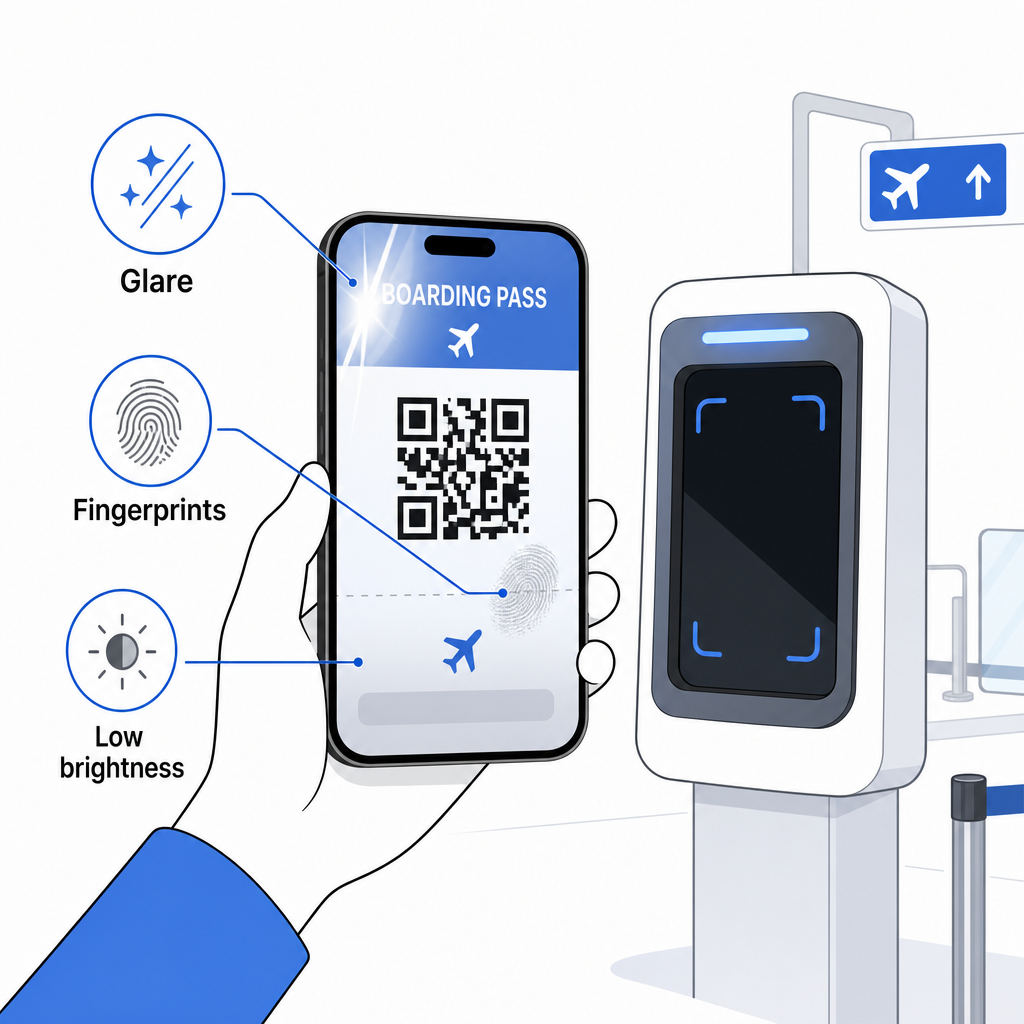
תצוגה לא מלאה היא גם בעיה נפוצה – ודא שהקוד המלא גלוי ואינו מוסתר על ידי כיסוי הטלפון שלך או באנר התראות. סוכני שער מתמודדים עם כשלים בסריקה באופן שגרתי ויכולים לאתר את ההזמנה שלך ידנית באמצעות שמך ומספר PNR. סריקה כושלת היא לעיתים רחוקות בעיה רצינית, אך היא מאטה את הדברים במהלך עלייה למטוס עמוסה.
הבנה כיצד קודי QR משפרים חוויות נסיעה במובן רחב יותר יכול גם לעזור לך להפיק את המרב מהכלים הדיגיטליים שחברות התעופה מציעות כעת לאורך כל המסע.
ברקוד כרטיס העלייה למטוס שלך – בין אם זה קוד QR, קוד אצטקי או פס PDF417 – נושא מטען נתונים מדויק וסטנדרטי שמערכות שדות התעופה מסתמכות עליו כדי לאמת את זהותך והקצאת המושב שלך בזמן אמת. כרטיסים ניידים נוחים ועובדים היטב ברוב שדות התעופה הגדולים בארה"ב, אך כרטיסים מודפסים נשארים האפשרות התואמת ביותר באופן אוניברסלי. הגישה הבטוחה ביותר היא להכיר את שדות התעופה שלך מראש ולשמור על אפשרות גיבוי זמינה בעת נסיעה בנתיבים פחות מוכרים.
אם אתה רוצה לפענח מה באמת מאוחסן בברקוד של כרטיס עלייה למטוס, ה- סורק הברקודים של Pageloot מאפשר לך לקרוא כל פורמט נתמך ישירות מהדפדפן שלך ללא התקנת אפליקציה.
שאלות נפוצות
לא תמיד. כרטיסי עלייה למטוס מודפסים משתמשים לרוב בברקוד PDF417 – הפורמט המפוספס המלבני – כברירת מחדל תחת תקן IATA BCBP. כרטיסי עלייה למטוס ניידים משתמשים בפורמטים של מטריצת דו-ממד כגון Aztec, Data Matrix, או קוד QR. כל אלה מקודדים את אותם נתוני נוסעים מובנים; הפורמט משתנה לפי מדיום וחברת תעופה.
לא בהכרח. ביותר מ-225 שדות תעופה בארה"ב המצוידים בטכנולוגיית אימות אישורים של ה-TSA (CAT), תעודת הזהות שלך שהונפקה על ידי הממשלה מספיקה כדי לאשר את פרטי הטיסה שלך במחסום הביטחון – אין צורך בכרטיס עלייה למטוס. עם זאת, אתה עדיין צריך לבצע צ'ק-אין עם חברת התעופה שלך כדי לקבל כרטיס עלייה למטוס (נייד או מודפס), ותמיד תצטרך לסרוק אותו בשער העלייה למטוס כאשר אתה עולה למטוס.
הגורמים הנפוצים ביותר הם סנוור מסך מתאורת שדה תעופה בהירה, טביעות אצבע או כתמים מעל הברקוד, בהירות מסך נמוכה, ותבניות מוארה שמסכי LCD או LED יכולים לייצר. כדי לשפר את האמינות, נקה את המסך שלך לפני הגעה לסורק, הגדר את הבהירות שלך למקסימום, וודא שכל הברקוד גלוי לחלוטין וללא הפרעה.