Saiz kod QR minimum untuk kad perniagaan adalah sekitar 0.6 x 0.6 inci (1.5 x 1.5 cm), dan hanya jika kod tersebut mengandungi pautan pendek, dicetak tajam dan mempunyai kontras yang kuat. Untuk pengimbasan yang boleh dipercayai, jadikan ia sekurang-kurangnya 0.8 x 0.8 inci (2 x 2 cm). Panduan ini memberikan saiz yang tepat, peraturan percetakan di belakangnya dan senarai semak untuk menguji kad anda sebelum anda menempah.
Berapa Besar Kod QR Sepatutnya pada Kad Perniagaan?
Untuk kad perniagaan standard, saiz yang disyorkan adalah 0.8 x 0.8 inci (2 x 2 cm). Pada saiz itu, kamera telefon fokus dengan cepat, walaupun dalam cahaya malap atau pada sudut sedikit. Orang biasanya memegang kad 4 hingga 10 inci (10 hingga 25 cm) dari telefon, jadi kod tersebut perlu cukup besar untuk mengisi sebahagian besar pandangan kamera pada jarak itu.
Peraturan umum adalah nisbah 10:1: untuk setiap 10 cm jarak imbasan, kod tersebut mestilah sekurang-kurangnya 1 cm lebar. Pada jarak 10 inci (25 cm), itu memberikan kira-kira 1 inci (2.5 cm) untuk imbasan paling mudah, dan jarak yang lebih pendek membolehkan kod yang lebih kecil. Inilah sebabnya mengapa 0.8 inci berfungsi untuk kebanyakan kad dan apa-apa di bawah 0.6 inci mula gagal pada telefon lama.
Saiz Kod QR Minimum dan Saiz Disyorkan
Kad perniagaan meninggalkan sedikit ruang, jadi adalah membantu untuk memutuskan saiz kod terlebih dahulu dan kemudian mereka bentuk di sekelilingnya. Saiz yang disyorkan adalah 0.8 x 0.8 inci (2 x 2 cm). Jika kad padat, minimum adalah 0.6 x 0.6 inci (1.5 x 1.5 cm). Ini adalah jawapan kepada berapa kecil kod QR boleh jadi pada kad perniagaan: 0.6 inci, dengan pautan pendek, kontras tinggi dan cetakan yang bersih.
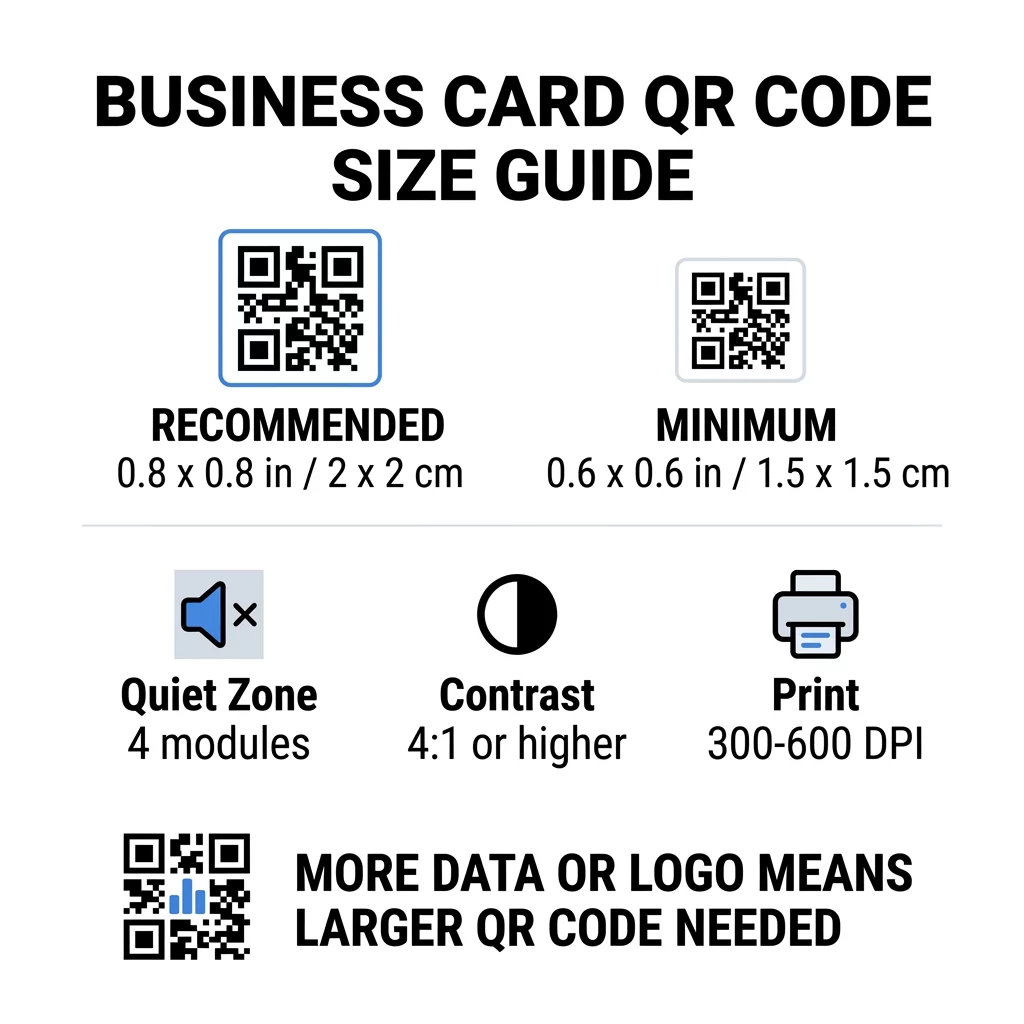
| Kategori Saiz | Dimensi (Inci) | Dimensi (cm) | Kebolehpercayaan | Kes Penggunaan Terbaik |
|---|---|---|---|---|
| Minimum | 0.6 x 0.6 inci | 1.5 x 1.5 cm | Sederhana | URL pendek dan data berketumpatan rendah |
| Disyorkan | 0.8 x 0.8 inci | 2.0 x 2.0 cm | tinggi | Kad perniagaan standard dan pautan hubungan |
| Ketumpatan Tinggi | 1.0 x 1.0 inci+ | 2.5 x 2.5 cm+ | tinggi | Kad hubungan terperinci dan logo terbenam |
Saiz-saiz ini hanya untuk segi empat sama hitam. Jarak kosong di sekeliling kod adalah tambahan, jadi kod 0.8 inci memerlukan kira-kira 0.1 inci ruang kosong di setiap sisi (lihat zon senyap di bawah).
Saiz Kod QR pada Kad Perniagaan mengikut Format Kad
- Kad standard AS (3.5 x 2 inci): kod 0.8 inci mengambil 40% daripada ketinggian kad. Letakkan di belakang supaya bahagian hadapan kekal bersih.
- Kad standard Eropah (85 x 55 mm): gunakan 20 hingga 25 mm. Peraturan 2 cm yang sama terpakai.
- Kad lipat atau segi empat sama: anda mempunyai lebih ruang, jadi gunakan 1 inci (2.5 cm) atau lebih besar dan jauhkan kod daripada lipatan.
- Hanya bahagian belakang kad: jika bahagian hadapan penuh, letakkan kod 1 inci di belakang dengan baris ringkas seperti “Imbas untuk menyimpan kenalan saya”.
Bagaimana Ketumpatan Data Menentukan Saiz Kod
Saiz kod QR anda bergantung pada berapa banyak data yang terkandung di dalamnya. Kod QR ialah grid petak kecil yang dipanggil modul. Versi 1 mempunyai 21 x 21 modul dan Versi 40 mempunyai 177 x 177 modul. Lebih banyak data bermakna lebih banyak modul, dan setiap modul menjadi lebih kecil apabila saiz kod kekal sama. Jika modul dicetak lebih kecil daripada yang boleh diselesaikan oleh kamera, imbasan akan gagal.
Berikut adalah pengiraan untuk kod 2 cm (0.8 inci). Pautan pendek biasanya sesuai dalam kod Versi 2 (25 modul), jadi setiap modul adalah kira-kira 0.8 mm. Rekod kenalan penuh mungkin memerlukan Versi 10 atau lebih tinggi (57 modul atau lebih), dan setiap modul menurun kepada kira-kira 0.35 mm. Kod kedua jauh lebih sukar untuk dicetak dan diimbas pada saiz yang sama.
vCard terus dengan nama, nombor telefon, alamat e-mel dan alamat pejabat anda menghasilkan grid yang padat. Menggunakan Kod QR vCard: apa itu vCard? untuk membuat fail statik terus selalunya memerlukan kod 1 inci (2.5 cm) atau lebih untuk kekal boleh dibaca.
Untuk memastikan kod anda padat dan mudah diimbas pada kad kecil:
- Sertakan pautan pendek ke halaman kenalan anda dan bukannya teks kenalan mentah yang panjang.
- Hanya simpan saluran kenalan yang penting.
- Pastikan bilangan modul rendah supaya setiap petak kekal besar dan tajam.
- Ikuti prinsip tentang cara untuk mereka bentuk kad perniagaan dengan kod QR untuk mengimbangi susun atur dan fungsi.
Pautan pendek adalah cara paling mudah untuk melakukan ini. Kod QR dinamik menyimpan pautan pendek dan membolehkan anda mengubah halaman destinasi selepas kad dicetak. Pageloot menawarkan kod dinamik dengan percubaan percuma 14 hari, dan anda boleh melihat pelan di pageloot.com/pricing. Kod statik sudah mencukupi jika pautan anda tidak akan berubah.
Cipta Kod Kad Perniagaan Tersuai Anda Bersedia untuk membina kod hubungan yang boleh diimbas dan dijejak? Gunakan Kad perniagaan digital dengan kod QR untuk mereka bentuk kod resolusi tinggi dan berkongsi butiran anda dengan satu imbasan.
Adakah Kod QR pada Kad Perniagaan Baik atau Buruk?
Kod QR pada kad perniagaan adalah baik apabila kod itu cukup besar, mudah diimbas dan membawa kepada sesuatu yang berguna. Ia adalah buruk apabila kod itu kecil, pautan rosak atau halaman tidak dibuat untuk telefon.
Faedahnya adalah nyata. Seseorang boleh menyimpan kenalan anda atau membuka portfolio anda dalam dua saat, dan anda boleh memuatkan lebih banyak maklumat daripada yang dibenarkan oleh kad. Risikonya juga nyata: kod yang tidak boleh diimbas kelihatan tidak kemas, dan kod bercetak dengan pautan yang salah tidak boleh diperbaiki pada kod statik. Gunakan peraturan ini:
- Buat kod sekurang-kurangnya 0.8 inci (2 cm).
- Halakannya ke halaman yang dibuka dengan cepat pada telefon.
- Tambah baris pendek di sebelahnya yang menyatakan apa yang orang itu dapat, seperti “Simpan kenalan saya” atau “Lihat kerja saya”.
- Uji bukti cetakan sebelum anda memesan cetakan penuh.
Piawaian Teknikal Penting untuk Pengimbasan yang Boleh Dipercayai
Saiz sahaja tidak menjamin imbasan yang baik. Peraturan cetakan ini menentukan sama ada kamera boleh membaca corak.
Mengekalkan Zon Senyap
Zon senyap adalah margin kosong di sekeliling keseluruhan kod QR. Piawaian ISO/IEC memerlukan sekurang-kurangnya empat modul pada setiap sisi. Untuk kod 2 cm dengan 25 modul, margin itu adalah kira-kira 3 mm. Ruang kosong memberitahu pengimbas di mana kod bermula. Teks, sempadan atau imej latar belakang di dalam margin ini adalah salah satu punca paling biasa bagi imbasan yang gagal.
Menggunakan Kontras Warna Tinggi
Pengimbas membaca perbezaan kecerahan antara modul gelap dan latar belakang terang. Hitam pada putih adalah pilihan paling selamat. Biru gelap, hijau gelap atau hitam pada latar belakang terang juga berfungsi dengan baik. Elakkan modul terang pada latar belakang gelap (kod terbalik), kerana sesetengah aplikasi kamera lalai tidak dapat membacanya. Jangan gunakan dua warna tona pertengahan, seperti oren pada merah. Baca garis panduan kontras warna kod QR untuk memilih pasangan warna yang selamat.
Mengeksport Format Cetakan Vektor
Fail resolusi rendah, seperti JPEG 72 DPI, dicetak dengan tepi kabur. Untuk percetakan, hantar fail sebagai SVG, EPS atau PDF (vektor), yang kekal tajam pada sebarang saiz. Jika anda hanya boleh menghantar PNG, eksport pada 300 DPI atau lebih tinggi pada saiz cetakan akhir. Ini amalan terbaik untuk kebolehbacaan kod QR membantu anda mengelakkan masalah sebelum fail sampai ke kedai cetak.
Pembetulan Ralat dan Integrasi Logo
Kod QR menggunakan pembetulan ralat Reed-Solomon. Ia membolehkan pengimbas membina semula data apabila sebahagian daripada kod tercalar, berlipat atau tertutup. Terdapat empat tahap:
- Tahap L memulihkan kira-kira 7% data yang rosak. Gunakannya untuk kod kecil, ringkas tanpa logo.
- Tahap M memulihkan kira-kira 15% data yang rosak. Ia adalah lalai biasa untuk kad perniagaan.
- Tahap Q memulihkan kira-kira 25% data yang rosak. Ia adalah pilihan yang baik untuk kad yang disimpan di dalam dompet.
- Tahap H memulihkan kira-kira 30% data yang rosak. Gunakannya jika anda meletakkan logo di tengah.
Tahap yang lebih tinggi menambah lebih banyak modul, jadi grid menjadi lebih padat. Jika anda menggunakan Tahap H untuk logo tengah, tingkatkan saiz cetakan kepada sekurang-kurangnya 1.0 x 1.0 inci (2.5 x 2.5 cm), dan pastikan logo kecil, kira-kira satu perlima daripada lebar kod.
Memilih Jenis dan Kemasan Kad
Permukaan kad mengubah cara cahaya mencapai kamera telefon. Jenis kad matte dan tidak bersalut mengimbas terbaik kerana ia menyebarkan cahaya secara sekata.
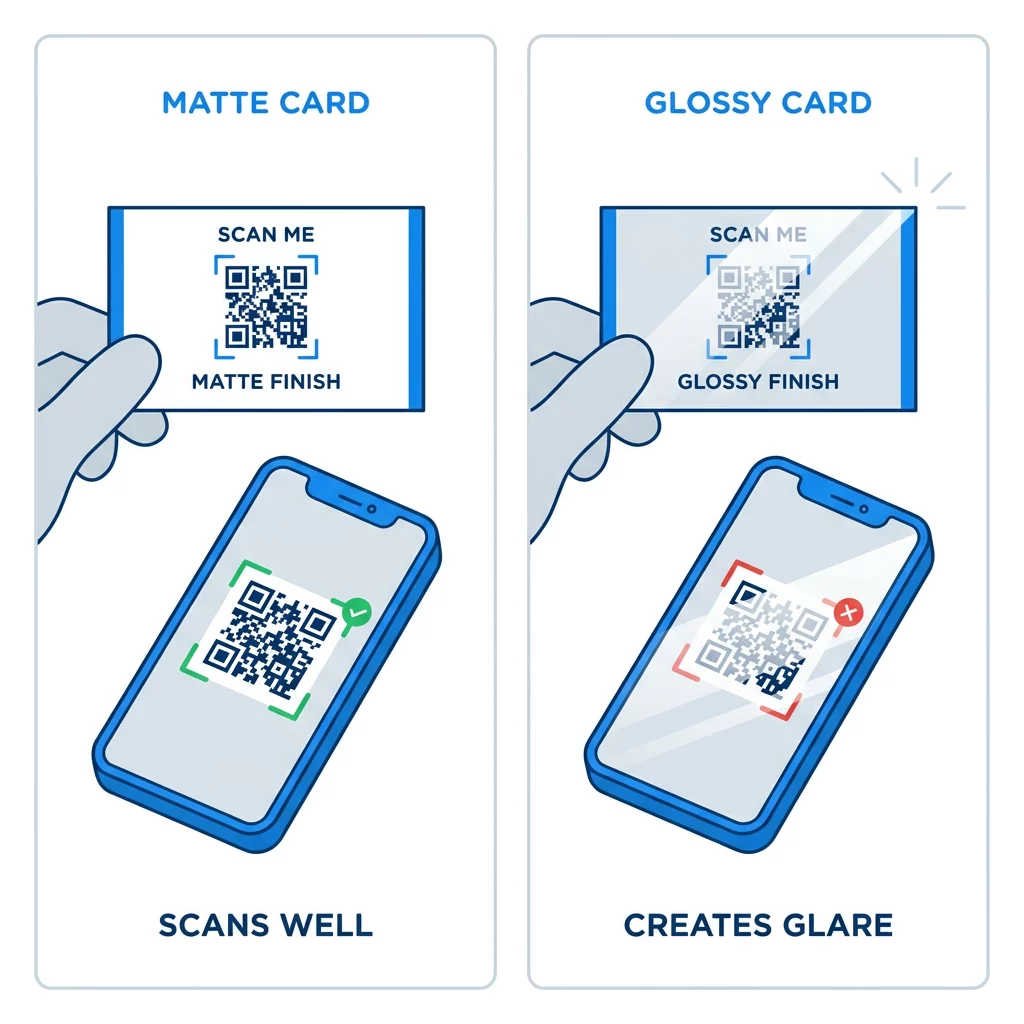
Salutan berkilat tinggi, kerajang logam dan lamina reflektif mencipta silau di bawah lampu sorot, dan silau menghilangkan kontras. Jika anda menggunakan kemasan khas, letakkan kod pada kawasan matte yang rata. Jauhkan kod daripada lipatan, sudut bulat dan tepi di mana ibu jari memegang kad.
Uji Kod QR Kad Perniagaan Anda Sebelum Mencetak
- Cetak pruf pada stok kad sebenar pada skala 100%. Jangan nilai kod pada skrin.
- Imbas dengan sekurang-kurangnya satu iPhone dan satu telefon Android.
- Imbas dalam cahaya siang yang terang dan dalam bilik yang malap.
- Imbas dari kira-kira 4 inci (10 cm) dan dari kira-kira 10 inci (25 cm).
- Buka halaman destinasi menggunakan data mudah alih dan sahkan ia memuatkan dengan pantas.
- Hanya selepas itu tempah cetakan penuh.
Kod QR Kad Perniagaan Tidak Mengimbas? Semak Perkara Ini
- Kod lebih kecil daripada 0.6 inci (1.5 cm), atau pautan terlalu panjang dan modul terlalu kecil. Besarkan kod atau pendekkan pautan.
- Teks atau sempadan berada di dalam zon senyap. Alihkannya keluar sekurang-kurangnya empat modul.
- Kontras terlalu rendah atau warna terbalik. Gunakan modul gelap pada latar belakang cerah.
- Fail adalah imej beresolusi rendah. Cetak semula dari fail vektor atau PNG 300 DPI pada saiz akhir.
- Silau daripada kemasan berkilat atau kerajang. Alihkan kod ke kawasan matte.
- Pautan destinasi salah atau halaman lambat. Buka pautan pada telefon anda dan perbaikinya.
Kod QR bersaiz betul menjadikan kad perniagaan anda jambatan yang boleh dipercayai antara jabat tangan dan profil dalam talian anda. Pastikan kod pada 0.8 x 0.8 inci atau lebih besar, lindungi zon senyap dan cetak dari fail vektor yang bersih. Untuk membina dan menguji kad anda yang seterusnya, gunakan Pageloot penjana kod QR.
Soalan lazim
Rancang untuk 0.8 x 0.8 inci (2 x 2 cm). Saiz ini boleh diimbas dengan cepat pada telefon pintar semasa dari jarak pegangan biasa. Gunakan 1 inci (2.5 cm) atau lebih jika kod itu mengandungi banyak data atau logo.
Saiz terkecil adalah kira-kira 0.6 x 0.6 inci (1.5 x 1.5 cm). Ia hanya berfungsi dengan pautan pendek, kontras tinggi, zon senyap yang jelas dan cetakan yang tajam. Untuk telefon lama, pastikan kod berukuran 0.8 inci (2 cm) atau lebih besar.
Kira-kira 0.6 inci (1.5 cm) setiap sisi dalam kes terbaik. Lebih kecil daripada itu, kebanyakan kamera telefon tidak dapat fokus pada kad yang dipegang pada jarak normal. Memendekkan pautan menjadikan segi empat sama lebih besar dan membantu kod kecil diimbas.
Ya, tetapi gunakan pembetulan ralat Tahap H supaya kod dapat memulihkan data tersembunyi. Tahap H menambah modul, jadi besarkan kod kepada sekurang-kurangnya 1.0 x 1.0 inci (2.5 cm) dan pastikan logo kekal kecil.
Punca-punca biasa adalah zon senyap yang terlalu kecil, kontras warna yang rendah, fail resolusi rendah, silau dari kemasan berkilat atau kod yang terlalu kecil. Semak setiap satu pada bukti cetakan dan betulkan sebelum cetakan seterusnya.
Ia baik apabila kodnya sekurang-kurangnya 0.8 inci, mengimbas dengan baik dan membuka halaman yang dibuat untuk telefon. Ia buruk apabila kodnya terlalu kecil, sukar diimbas atau membawa kepada pautan yang rosak. Sentiasa uji cetakan pruf.
Kod statik sudah memadai jika pautan tidak akan berubah, dan kod statik tidak pernah luput. Kod dinamik berbaloi jika anda mungkin menukar pekerjaan, laman web atau halaman hubungan, kerana anda boleh mengedit destinasi tanpa mencetak semula. Kod dinamik Pageloot disertakan dengan percubaan percuma 14 hari, dan pelan disenaraikan di pageloot.com/pricing.