Minimaalne QR-koodi suurus visiitkaardil on umbes 0.6 x 0.6 tolli (1.5 x 1.5 cm) ja seda ainult juhul, kui kood sisaldab lühikest linki, trükitakse teravalt ja sellel on tugev kontrast. Usaldusväärseks skaneerimiseks tehke see vähemalt 0.8 x 0.8 tolli (2 x 2 cm) suuruseks. See juhend annab täpsed suurused, nende taga olevad printimisreeglid ja kontrollnimekirja oma kaardi testimiseks enne tellimist.
Kui suur peaks QR-kood visiitkaardil olema?
Standardsel visiitkaardil on soovitatav suurus 0.8 x 0.8 tolli (2 x 2 cm). Sellise suuruse juures fokuseerivad telefonikaamerad kiiresti, isegi hämaras valguses või kerge nurga all. Inimesed hoiavad tavaliselt kaarti telefonist 4–10 tolli (10–25 cm) kaugusel, seega peab kood olema piisavalt suur, et täita sel kaugusel oluline osa kaamera vaatest.
Levinud reegel on 10:1 suhe: iga 10 cm skaneerimiskauguse kohta peaks kood olema vähemalt 1 cm lai. 10 tolli (25 cm) kauguselt annab see lihtsaima skaneerimise jaoks umbes 1 tolli (2.5 cm) ja lühemad kaugused võimaldavad väiksemaid koode. Seepärast sobib 0.8 tolli enamiku kaartide jaoks ja kõik alla 0.6 tolli hakkab vanematel telefonidel ebaõnnestuma.
Minimaalne QR-koodi suurus ja soovitatav suurus
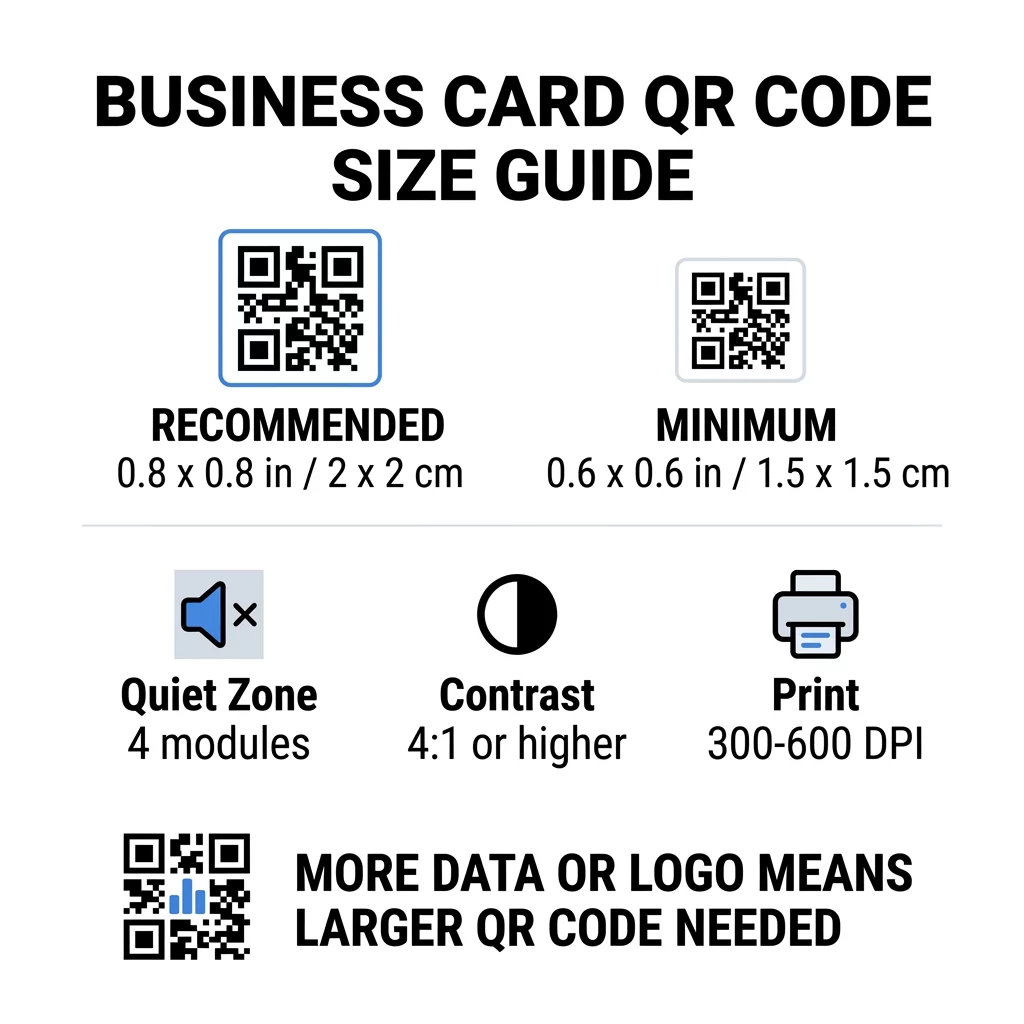
Visiitkaardid jätavad vähe ruumi, seega on kasulik kõigepealt otsustada koodi suurus ja seejärel selle ümber kujundada. Soovitatav suurus on 0.8 x 0.8 tolli (2 x 2 cm). Kui kaart on tihedalt täis, on miinimum 0.6 x 0.6 tolli (1.5 x 1.5 cm). See on vastus küsimusele, kui väike võib QR-kood visiitkaardil olla: 0.6 tolli, lühikese lingiga, kõrge kontrastsusega ja puhta trükiga.
| Suuruse kategooria | Mõõtmed (tollides) | Mõõtmed (cm) | Usaldusväärsus | Parim kasutuskohver |
|---|---|---|---|---|
| Miinimum | 0.6 x 0.6 tolli | 1,5 x 1,5 cm | Mõõdukas | Lühikesed URL-id ja madala tihedusega andmed |
| Soovitatav | 0,8 x 0,8 tolli | 2,0 x 2,0 cm | Kõrge | Standardsed visiitkaardid ja kontaktlingid |
| Kõrge tihedusega | 1.0 x 1.0 in+ | 2.5 x 2.5 cm+ | Kõrge | Üksikasjalikud kontaktkaardid ja manustatud logod |
Need suurused on ainult mustade ruutude jaoks. Tühi veeruni koodi ümber on lisa, seega vajab 0.8-tolline kood umbes 0.1 tolli vaba ruumi igast küljest (vt allpool olevat vaikset tsooni).
QR-koodi suurus visiitkaardil kaardi formaadi järgi
- USA standardkaart (3,5 x 2 tolli): 0,8-tolline kood võtab 40% kaardi kõrgusest. Asetage see tagaküljele, et esikülg jääks puhas.
- Euroopa standardkaart (85 x 55 mm): kasutage 20 kuni 25 mm. Kehtib sama 2 cm reegel.
- Volditud või ruudukujulised kaardid: teil on rohkem ruumi, seega kasutage 1 tolli (2,5 cm) või suuremat ja hoidke kood voldikust eemal.
- Ainult kaardi tagakülg: kui esikülg on täis, asetage tagaküljele 1-tolline kood lühikese tekstiga, näiteks “Skanni minu kontakti salvestamiseks”.
Kuidas andmete tihedus määrab koodi suuruse
Teie QR-koodi suurus sõltub sellest, kui palju andmeid see sisaldab. QR-kood on pisikeste ruutude võrgustik, mida nimetatakse mooduliteks. Versioon 1-l on 21 x 21 moodulit ja versioon 40-l on 177 x 177 moodulit. Rohkem andmeid tähendab rohkem mooduleid ja iga moodul muutub väiksemaks, kui koodi suurus jääb samaks. Kui moodulid trükitakse väiksemaks, kui kaamera suudab eristada, ebaõnnestub skaneerimine.
Siin on matemaatika 2 cm (0,8 tolli) koodi jaoks. Lühike link sobib tavaliselt versioon 2 koodi (25 moodulit), seega on iga moodul umbes 0,8 mm. Täielik kontaktkirje võib vajada versiooni 10 või kõrgemat (57 moodulit või rohkem) ja iga moodul langeb umbes 0,35 mm-ni. Teist koodi on sama suurusega palju raskem printida ja skaneerida.
Otsene vCard teie nime, telefoninumbrite, e-posti aadresside ja kontori aadressiga loob tiheda võrgu. Kasutades vCard QR-koodi generaator otsese staatilise faili loomiseks on sageli vaja koodi suurusega 1 toll (2,5 cm) või rohkem, et see loetav oleks.
Oma koodi kompaktsena ja väikesel kaardil hõlpsasti skaneeritavana hoidmiseks:
- Koodige lühike link oma kontaktilehele pika toore kontaktteksti asemel.
- Hoidke ainult olulised kontaktkanalid.
- Hoidke moodulite arv madalal, et iga ruut jääks suur ja terav.
- Järgige põhimõtteid, kuidas kujundada visiitkaart QR-koodiga paigutuse ja funktsiooni tasakaalustamiseks.
Lühilink on selleks kõige lihtsam viis. Dünaamiline QR-kood salvestab lühilingi ja võimaldab teil sihtlehte muuta pärast kaartide printimist. Pageloot pakub dünaamilisi koode 14-päevase tasuta prooviperioodiga ja plaane näete siit pageloot.com/pricing. Staatiline kood on piisav, kui teie link kunagi ei muutu.
Looge oma kohandatud visiitkaardi kood Kas olete valmis looma skaneeritava ja jälgitava kontaktikoodi? Kasutage Firma visiitkaart QR-koodiga kõrge resolutsiooniga koodide kujundamiseks ja oma andmete jagamiseks ühe skaneerimisega.
Kas QR-koodid visiitkaartidel on head või halvad?
QR-koodid visiitkaartidel on head, kui kood on piisavalt suur, hõlpsasti skaneeritav ja viib millegi kasulikuni. Need on halvad, kui kood on pisike, link on katki või leht pole telefonide jaoks loodud.
Eelised on reaalsed. Inimene saab teie kontakti salvestada või teie portfoolio avada kahe sekundiga ning saate mahutada rohkem teavet, kui kaart võimaldab. Riskid on samuti reaalsed: kood, mis ei skaneeri, tundub hooletu ja vale lingiga prinditud koodi ei saa staatilise koodi puhul parandada. Kasutage neid reegleid:
- Tehke kood vähemalt 0,8 tolli (2 cm) suurune.
- Suunake see lehele, mis avaneb telefonis kiiresti.
- Lisage selle kõrvale lühike rida, mis ütleb, mida inimene saab, näiteks “Salvesta minu kontakt” või “Vaata minu tööd”.
- Kontrollige trükitud proovi enne täieliku tiraaži tellimist.
Olulised tehnilised standardid usaldusväärseks skaneerimiseks
Ainuüksi suurus ei taga head skaneerimist. Need printimisreeglid otsustavad, kas kaamera suudab mustrit lugeda.
Vaikse tsooni säilitamine
Vaikne tsoon on tühi veerise ümber kogu QR-koodi. ISO/IEC standard nõuab igal küljel vähemalt nelja moodulit. 2 cm koodi puhul, millel on 25 moodulit, on see veerise umbes 3 mm. Tühi ruum annab skannerile teada, kus kood algab. Tekst, ääred või taustapildid selle veerise sees on ühed kõige sagedasemad ebaõnnestunud skaneerimiste põhjused.
Kõrge värvikontrasti rakendamine
Skannerid loevad heledusvahet tumedate moodulite ja heleda tausta vahel. Must valgel on kõige turvalisem valik. Tumesinine, tumeroheline või must heledal taustal töötavad samuti hästi. Vältige heledaid mooduleid tumedal taustal (pöördkoodid), sest mõned vaikimisi kaamerarakendused ei suuda neid lugeda. Ärge kasutage kahte keskmise tooniga värvi, näiteks oranži punasel. Lugege QR-koodi värvikontrasti juhised et valida turvaline värvipaar.
Vektorpildiformaatide eksportimine
Madala resolutsiooniga failid, nagu 72 DPI JPEG, prinditakse uduste servadega. Printimiseks saatke fail SVG-, EPS- või PDF-vormingus (vektor), mis jäävad teravaks igas suuruses. Kui saate saata ainult PNG-faili, eksportige see lõplikus printimissuuruses 300 DPI või kõrgema resolutsiooniga. Need QR-koodi loetavuse parimaid tavasid aitavad teil probleeme vältida enne, kui fail trükikotta jõuab.
Veaparandus ja logo integreerimine
QR-koodid kasutavad Reed-Solomoni veaparandust. See võimaldab skanneril andmeid taastada, kui osa koodist on kriimustatud, kortsus või kaetud. On neli taset:
- Tase L taastab umbes 7% kahjustatud andmetest. Kasutage seda väikeste, lihtsate koodide puhul, millel puudub logo.
- Tase M taastab umbes 15% kahjustatud andmetest. See on tavaline vaikevalik visiitkaartidele.
- Tase Q taastab umbes 25% kahjustatud andmetest. See on hea valik rahakotis elavate kaartide jaoks.
- Tase H taastab umbes 30% kahjustatud andmetest. Kasutage seda, kui paigutate logo keskele.
Kõrgemad tasemed lisavad rohkem mooduleid, nii et ruudustik muutub tihedamaks. Kui kasutate keskmise logo jaoks taset H, suurendage prinditud suurust vähemalt 1,0 x 1,0 tollini (2,5 x 2,5 cm) ja hoidke logo väike, umbes viiendik koodi laiusest.
Kaardipaberi ja viimistluste valimine
Kaardi pind mõjutab seda, kuidas valgus telefonikaamerasse jõuab. Matt ja katmata paber skaneerivad kõige paremini, sest need jaotavad valgust ühtlaselt.
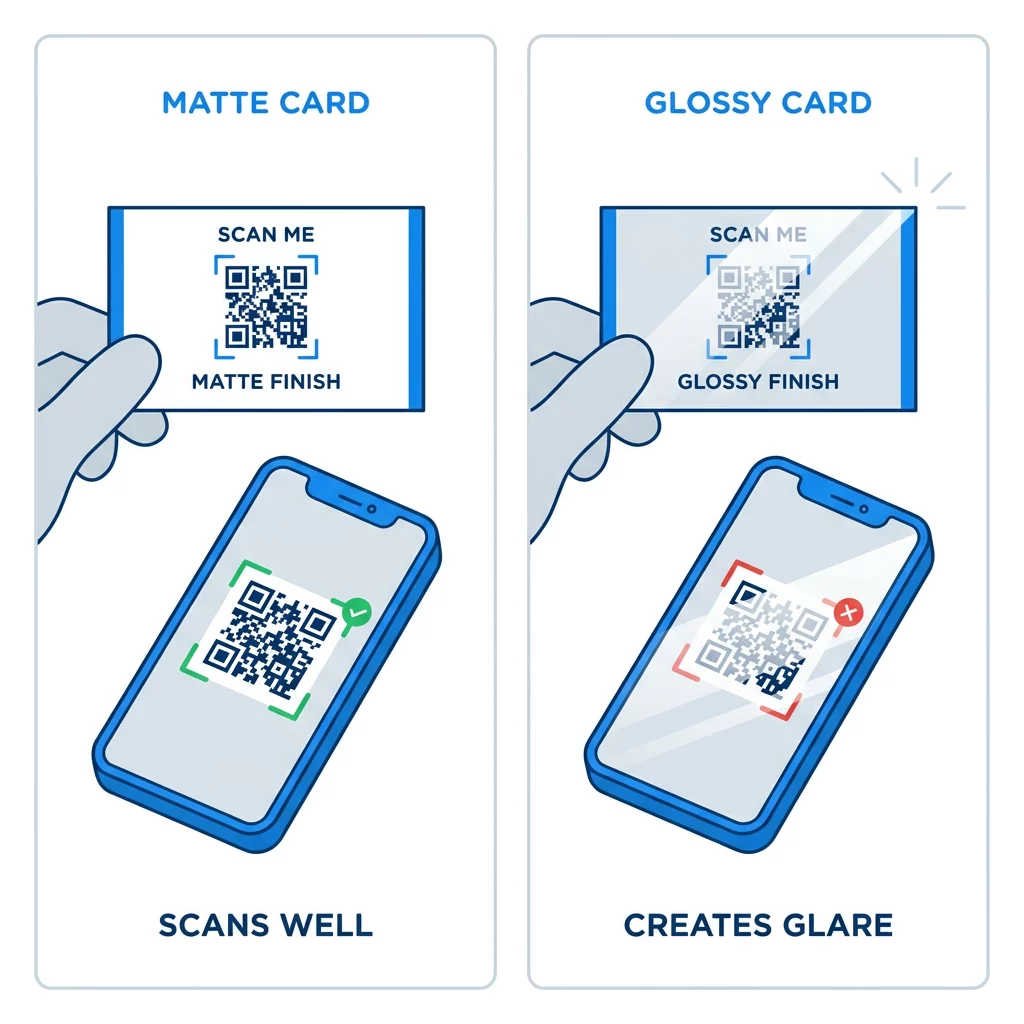
Läikivad katted, metallfoolium ja peegeldav laminaat tekitavad prožektorite all pimestamise ning pimestamine kustutab kontrasti. Kui kasutate spetsiaalset viimistlust, hoidke kood tasasel matil alal. Hoidke koodi eemal voltidest, ümaratest nurkadest ja servast, kust pöidlad kaarti hoiavad.
Testi oma visiitkaardi QR-koodi enne printimist
- Prindi proov päris kaardimaterjalile 100% skaalal. Ära hinda koodi ekraanilt.
- Skanni seda vähemalt ühe iPhone'i ja ühe Android-telefoniga.
- Skanni seda eredas päevavalguses ja hämaras ruumis.
- Skanni umbes 4 tolli (10 cm) ja umbes 10 tolli (25 cm) kauguselt.
- Ava sihtleht mobiilse andmeside kaudu ja veendu, et see laeb kiiresti.
- Alles siis telli kogu trükiarv.
Visiitkaardi QR-kood ei skanni? Kontrolli neid punkte:
- Kood on väiksem kui 0,6 tolli (1,5 cm) või link on pikk ja moodulid on pisikesed. Suurenda koodi või lühenda linki.
- Tekst või äär on vaikses tsoonis. Liiguta see vähemalt nelja mooduli võrra eemale.
- Kontrast on liiga madal või värvid on vastupidised. Kasuta tumedaid mooduleid heledal taustal.
- Fail on madala resolutsiooniga pilt. Prindi uuesti vektorfailist või 300 DPI PNG-failist lõplikus suuruses.
- Läike või fooliumviimistluse peegeldus. Liiguta kood matile alale.
- Sihtlink on vale või leht on aeglane. Ava link telefonis ja paranda see.
Õige suurusega QR-kood muudab teie visiitkaardi usaldusväärseks sillaks käepigistuse ja teie veebiprofiili vahel. Hoidke koodi suurus 0,8 x 0,8 tolli või suurem, kaitske vaikset tsooni ja printige puhastest vektorfailidest. Järgmise kaardi loomiseks ja testimiseks kasutage Pagelooti QR-koodi generaator.
Korduma kippuvad küsimused
Planeerige 0,8 x 0,8 tolli (2 x 2 cm). See suurus skaneeritakse kiiresti praeguste nutitelefonidega tavalisest hoidmiskaugusest. Kasutage 1 tolli (2,5 cm) või rohkem, kui kood sisaldab palju andmeid või logo.
Väikseim suurus on umbes 0.6 x 0.6 tolli (1.5 x 1.5 cm). See töötab ainult lühikese lingi, suure kontrasti, selge vaikse ala ja terava trükiga. Vanemate telefonide puhul hoidke koodi 0.8 tolli (2 cm) või suuremana.
Parimal juhul umbes 0,6 tolli (1,5 cm) külje kohta. Sellest väiksemana ei suuda enamik telefonikaameraid tavalisel kaugusel hoitud kaardile fokuseerida. Lingi lühendamine muudab ruudud suuremaks ja aitab väikseid koode skaneerida.
Jah, aga kasuta H-taseme veaparandust, et kood saaks peidetud andmed taastada. H-tase lisab mooduleid, nii et suurenda koodi vähemalt 1.0 x 1.0 tollini (2.5 cm) ja hoia logo väike.
Levinud põhjused on liiga väike vaikne tsoon, madal värvikontrast, madala resolutsiooniga fail, läikivast pinnast tingitud helk või liiga väike kood. Kontrollige igaüht neist trükitud proovi peal ja parandage see enne järgmist trükki.
Need on head, kui kood on vähemalt 0,8 tolli, skaneerib hästi ja avab telefonidele loodud lehe. Need on halvad, kui kood on pisike, raske skaneerida või viib katkisele lingile. Kontrolli alati trükiproovi.
Staatiline kood on piisav, kui link ei muutu kunagi, ja staatilised koodid ei aegu kunagi. Dünaamiline kood on seda väärt, kui võite muuta töökohti, veebisaite või kontaktilehti, sest saate sihtkohta muuta ilma uuesti printimata. Pagelooti dünaamilised koodid sisaldavad 14-päevast tasuta prooviperioodi ja plaanid on loetletud aadressil pageloot.com/pricing.