Minimalny rozmiar kodu QR dla wizytówki to około 0,6 x 0,6 cala (1,5 x 1,5 cm) i tylko wtedy, gdy kod zawiera krótki link, druk jest ostry i ma silny kontrast. Aby zapewnić niezawodne skanowanie, należy go wykonać w rozmiarze co najmniej 0,8 x 0,8 cala (2 x 2 cm). Ten przewodnik podaje dokładne rozmiary, zasady druku, które za nimi stoją, oraz listę kontrolną do przetestowania karty przed złożeniem zamówienia.
Jak duży powinien być kod QR na wizytówce?
Dla standardowej wizytówki zalecany rozmiar to 0,8 x 0,8 cala (2 x 2 cm). W takim rozmiarze aparaty telefoniczne szybko ostrzą, nawet w słabym świetle lub pod niewielkim kątem. Ludzie zazwyczaj trzymają wizytówkę w odległości 4 do 10 cali (10 do 25 cm) od telefonu, więc kod musi być wystarczająco duży, aby wypełnić znaczną część widoku kamery z tej odległości.
Powszechną zasadą jest stosunek 10:1: na każde 10 cm odległości skanowania kod powinien mieć co najmniej 1 cm szerokości. Przy odległości 10 cali (25 cm) daje to około 1 cal (2,5 cm) dla najłatwiejszego skanowania, a krótsze odległości pozwalają na mniejsze kody. Dlatego 0,8 cala sprawdza się w przypadku większości wizytówek, a wszystko poniżej 0,6 cala zaczyna zawodzić na starszych telefonach.
Minimalny i zalecany rozmiar kodu QR
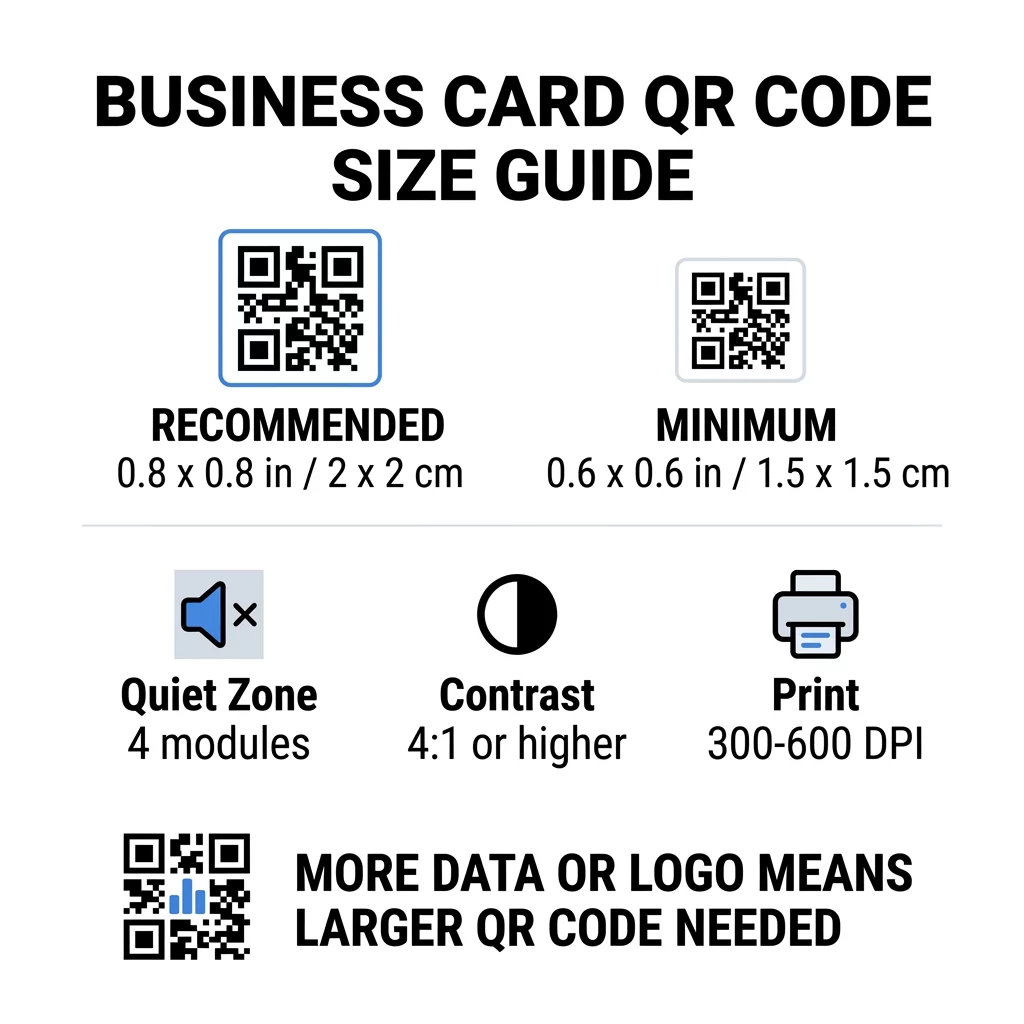
Wizytówki zostawiają mało miejsca, więc warto najpierw zdecydować o rozmiarze kodu, a następnie zaprojektować resztę wokół niego. Zalecany rozmiar to 0,8 x 0,8 cala (2 x 2 cm). Jeśli karta jest zatłoczona, minimum to 0,6 x 0,6 cala (1,5 x 1,5 cm). To jest odpowiedź na pytanie, jak mały może być kod QR na wizytówce: 0,6 cala, z krótkim linkiem, wysokim kontrastem i czystym nadrukiem.
| Kategoria rozmiaru | Wymiary (cale) | Wymiary (cm) | Niezawodność | Najlepszy przypadek użycia |
|---|---|---|---|---|
| Minimalny | 0.6 x 0.6 cala | 1,5 x 1,5 cm | Umiarkowany | Krótkie adresy URL i dane o niskiej gęstości |
| Zalecany | 0.8 x 0.8 cala | 2,0 x 2,0 cm | Wysoki | Standardowe wizytówki i linki kontaktowe |
| Wysoka gęstość | 1,0 x 1,0 cala+ | 2,5 x 2,5 cm+ | Wysoki | Szczegółowe wizytówki kontaktowe i osadzone logo |
Te rozmiary dotyczą tylko czarnych kwadratów. Pusta przestrzeń wokół kodu jest dodatkowa, więc kod o szerokości 0,8 cala wymaga około 0,1 cala wolnej przestrzeni z każdej strony (patrz strefa ciszy poniżej).
Rozmiar kodu QR na wizytówce według formatu karty
- Standardowa wizytówka amerykańska (3.5 x 2 cale): kod o rozmiarze 0.8 cala zajmuje 40% wysokości karty. Umieść go z tyłu, aby przód pozostał czysty.
- Standardowa wizytówka europejska (85 x 55 mm): użyj 20 do 25 mm. Obowiązuje ta sama zasada 2 cm.
- Wizytówki składane lub kwadratowe: masz więcej miejsca, więc użyj kodu o rozmiarze 1 cal (2.5 cm) lub większego i trzymaj kod z dala od zagięcia.
- Tylko tył karty: jeśli przód jest pełny, umieść kod o rozmiarze 1 cal z tyłu z krótkim tekstem, takim jak „Zeskanuj, aby zapisać mój kontakt”.
Jak gęstość danych dyktuje rozmiar kodu
Rozmiar Twojego kodu QR zależy od ilości danych, które zawiera. Kod QR to siatka małych kwadratów zwanych modułami. Wersja 1 ma 21 x 21 modułów, a Wersja 40 ma 177 x 177 modułów. Więcej danych oznacza więcej modułów, a każdy moduł staje się mniejszy, gdy rozmiar kodu pozostaje ten sam. Jeśli moduły zostaną wydrukowane mniejsze, niż aparat jest w stanie rozdzielić, skanowanie się nie powiedzie.
Oto obliczenia dla kodu o rozmiarze 2 cm (0.8 cala). Krótki link zazwyczaj mieści się w kodzie Wersji 2 (25 modułów), więc każdy moduł ma około 0.8 mm. Pełny rekord kontaktu może wymagać Wersji 10 lub wyższej (57 modułów lub więcej), a każdy moduł zmniejsza się do około 0.35 mm. Drugi kod jest znacznie trudniejszy do wydrukowania i zeskanowania w tym samym rozmiarze.
Bezpośrednia wizytówka vCard z Twoim imieniem i nazwiskiem, numerami telefonów, adresami e-mail i adresem biura tworzy gęstą siatkę. Użycie Generator kodów QR vCard do stworzenia bezpośredniego pliku statycznego często wymaga kodu o rozmiarze 1 cal (2.5 cm) lub większego, aby pozostał czytelny.
Aby Twój kod pozostał kompaktowy i łatwy do zeskanowania na małej karcie:
- Zakoduj krótki link do swojej strony kontaktowej zamiast długiego, surowego tekstu kontaktu.
- Zachowaj tylko niezbędne kanały kontaktu.
- Utrzymuj niską liczbę modułów, aby każdy kwadrat pozostał duży i ostry.
- Postępuj zgodnie z zasadami, jak zaprojektować wizytówkę z kodem QR aby zrównoważyć układ i funkcjonalność.
Krótki link to najprostszy sposób, aby to zrobić. Dynamiczny kod QR przechowuje krótki link i pozwala zmienić stronę docelową po wydrukowaniu wizytówek. Pageloot oferuje dynamiczne kody z 14-dniowym bezpłatnym okresem próbnym, a plany można zobaczyć pod adresem pageloot.com/pricing. Kod statyczny wystarczy, jeśli Twój link nigdy się nie zmieni.
Stwórz Swój Indywidualny Kod Wizytówki Gotów do stworzenia kodu kontaktowego, który można skanować i śledzić? Użyj Generator kodów QR do wizytówek do projektowania kodów o wysokiej rozdzielczości i udostępniania swoich danych za pomocą jednego skanu.
Czy Kody QR na Wizytówkach Są Dobre czy Złe?
Kody QR na wizytówkach są dobre, gdy kod jest wystarczająco duży, łatwy do zeskanowania i prowadzi do czegoś użytecznego. Są złe, gdy kod jest maleńki, link jest uszkodzony lub strona nie jest przystosowana do telefonów.
Korzyści są realne. Osoba może zapisać Twój kontakt lub otworzyć Twoje portfolio w dwie sekundy, a Ty możesz zmieścić więcej informacji niż pozwala na to wizytówka. Ryzyka również są realne: kod, który się nie skanuje, wygląda niedbale, a wydrukowany kod z błędnym linkiem nie może być naprawiony w przypadku kodu statycznego. Stosuj się do tych zasad:
- Spraw, aby kod miał co najmniej 0,8 cala (2 cm).
- Skieruj go na stronę, która szybko otwiera się na telefonie.
- Dodaj obok niego krótką linijkę, która mówi, co osoba zyska, na przykład “Zapisz mój kontakt” lub “Zobacz moją pracę”.
- Przetestuj wydrukowany wzór przed złożeniem pełnego zamówienia.
Podstawowe Standardy Techniczne dla Niezawodnego Skanowania
Sam rozmiar nie gwarantuje dobrego skanu. Te zasady druku decydują o tym, czy kamera może odczytać wzór.
Zachowanie strefy ciszy
Strefa ciszy to puste marginesy wokół całego kodu QR. Norma ISO/IEC wymaga co najmniej czterech modułów z każdej strony. Dla kodu 2 cm z 25 modułami, ten margines wynosi około 3 mm. Pusta przestrzeń informuje skaner, gdzie zaczyna się kod. Tekst, obramowania lub obrazy tła wewnątrz tego marginesu to jedne z najczęstszych przyczyn nieudanych skanów.
Zastosowanie Wysokiego Kontrastu Kolorów
Skanery odczytują różnicę w jasności między ciemnymi modułami a jasnym tłem. Czarny na białym to najbezpieczniejszy wybór. Ciemnoniebieski, ciemnozielony lub czarny na jasnym tle również dobrze działają. Unikaj jasnych modułów na ciemnym tle (odwrócone kody), ponieważ niektóre domyślne aplikacje aparatu nie mogą ich odczytać. Nie używaj dwóch kolorów o średniej tonacji, takich jak pomarańczowy na czerwonym. Przeczytaj wytyczne dotyczące kontrastu kolorów kodów QR aby wybrać bezpieczną parę kolorów.
Eksportowanie wektorowych formatów do druku
Pliki o niskiej rozdzielczości, takie jak JPEG 72 DPI, drukują się z rozmytymi krawędziami. Do druku wysyłaj pliki jako SVG, EPS lub PDF (wektorowe), które zachowują ostrość w każdym rozmiarze. Jeśli możesz wysłać tylko PNG, wyeksportuj go w rozdzielczości 300 DPI lub wyższej w docelowym rozmiarze wydruku. Te najlepszymi praktykami w zakresie czytelności kodów QR pomogą uniknąć problemów, zanim plik trafi do drukarni.
Korekcja błędów i integracja logo
Kody QR wykorzystują korekcję błędów Reeda-Solomona. Pozwala to skanerowi odtworzyć dane, gdy część kodu jest porysowana, zgięta lub zakryta. Istnieją cztery poziomy:
- Poziom L przywraca około 7% uszkodzonych danych. Używaj go do małych, prostych kodów bez logo.
- Poziom M przywraca około 15% uszkodzonych danych. Jest to często domyślny poziom dla wizytówek.
- Poziom Q przywraca około 25% uszkodzonych danych. To dobry wybór dla kart przechowywanych w portfelach.
- Poziom H przywraca około 30% uszkodzonych danych. Używaj go, jeśli umieszczasz logo na środku.
Wyższe poziomy dodają więcej modułów, więc siatka staje się gęstsza. Jeśli używasz Poziomu H dla centralnego logo, zwiększ rozmiar wydruku do co najmniej 1,0 x 1,0 cala (2,5 x 2,5 cm) i zachowaj małe logo, około jednej piątej szerokości kodu.
Wybór papieru i wykończenia karty
Powierzchnia karty wpływa na to, jak światło dociera do aparatu telefonu. Matowe i niepowlekane papiery skanują się najlepiej, ponieważ równomiernie rozpraszają światło.
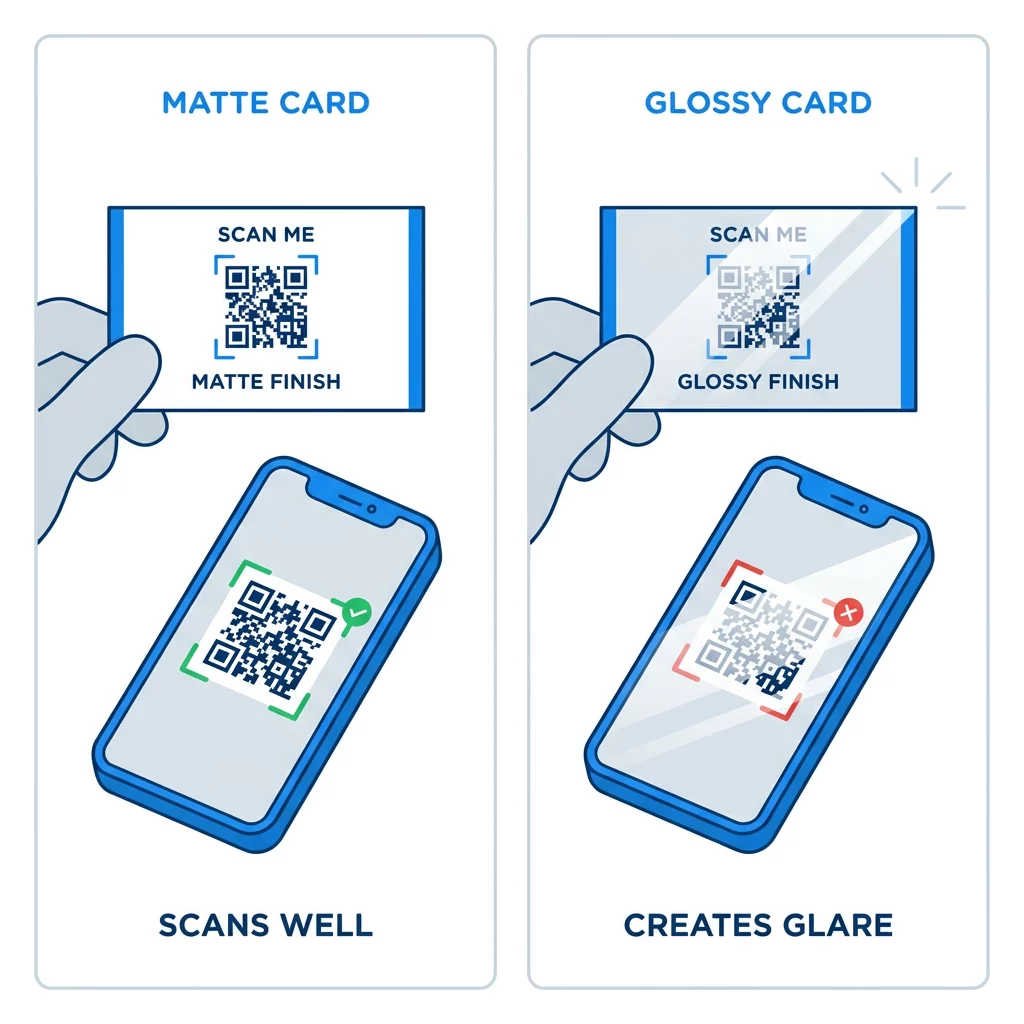
Powłoki o wysokim połysku, metaliczna folia i odblaskowy laminat tworzą odblaski pod światłem reflektorów, a odblaski te zmywają kontrast. Jeśli używasz specjalnego wykończenia, umieść kod na płaskiej, matowej powierzchni. Trzymaj kod z dala od zagięć, zaokrąglonych narożników i krawędzi, gdzie kciuki trzymają kartę.
Przetestuj swój kod QR wizytówki przed wydrukiem
- Wydrukuj próbkę na rzeczywistym papierze wizytówkowym w skali 100%. Nie oceniaj kodu na ekranie.
- Zeskanuj go przynajmniej jednym iPhone'em i jednym telefonem z systemem Android.
- Zeskanuj go w jasnym świetle dziennym i w słabo oświetlonym pomieszczeniu.
- Skanuj z odległości około 4 cali (10 cm) i około 10 cali (25 cm).
- Otwórz stronę docelową na danych mobilnych i upewnij się, że ładuje się szybko.
- Dopiero wtedy zamów pełny nakład druku.
Kod QR wizytówki się nie skanuje? Sprawdź te kwestie:
- Kod jest mniejszy niż 0.6 cala (1.5 cm) lub link jest długi, a moduły są zbyt małe. Powiększ kod lub skróć link.
- Tekst lub obramowanie znajduje się w strefie ciszy. Przesuń je o co najmniej cztery moduły.
- Kontrast jest zbyt niski lub kolory są odwrócone. Użyj ciemnych modułów na jasnym tle.
- Plik jest obrazem o niskiej rozdzielczości. Wydrukuj ponownie z pliku wektorowego lub PNG 300 DPI w ostatecznym rozmiarze.
- Odblaski od błyszczącego lub foliowego wykończenia. Przenieś kod na obszar matowy.
- Link docelowy jest błędny lub strona ładuje się wolno. Otwórz link na swoim telefonie i napraw go.
Prawidłowo zwymiarowany kod QR sprawia, że Twoja wizytówka staje się niezawodnym mostem między uściskiem dłoni a Twoim profilem online. Utrzymuj kod w rozmiarze 0.8 x 0.8 cala lub większym, chroń strefę ciszy i drukuj z czystych plików wektorowych. Aby stworzyć i przetestować swoją następną kartę, użyj Pageloot generator kodów QR.
Najczęściej zadawane pytania
Zaprojektuj rozmiar 0,8 x 0,8 cala (2 x 2 cm). Taki rozmiar szybko skanuje się na współczesnych smartfonach z typowej odległości. Użyj 1 cala (2,5 cm) lub więcej, jeśli kod zawiera dużo danych lub logo.
Najmniejszy rozmiar to około 0.6 x 0.6 cala (1.5 x 1.5 cm). Działa tylko z krótkim linkiem, wysokim kontrastem, wyraźną strefą ciszy i ostrym drukiem. W przypadku starszych telefonów, zachowaj kod o rozmiarze 0.8 cala (2 cm) lub większym.
Około 0,6 cala (1,5 cm) na stronę w najlepszym przypadku. Poniżej tego rozmiaru, większość aparatów w telefonach nie jest w stanie wyostrzyć obrazu na karcie trzymanej w normalnej odległości. Skrócenie linku sprawia, że kwadraty stają się większe i pomaga skanować małe kody.
Tak, ale użyj korekcji błędów na poziomie H, aby kod mógł odzyskać ukryte dane. Poziom H dodaje moduły, więc powiększ kod do co najmniej 1.0 x 1.0 cala (2.5 cm) i zachowaj małe logo.
Częstymi przyczynami są zbyt mała strefa ciszy, niski kontrast kolorów, plik o niskiej rozdzielczości, odblaski od błyszczącej powierzchni lub zbyt mały kod. Sprawdź każdy z nich na wydruku próbnym i napraw przed kolejnym nakładem.
Są dobre, gdy kod ma co najmniej 0,8 cala, dobrze się skanuje i otwiera stronę przeznaczoną dla telefonów. Są złe, gdy kod jest bardzo mały, trudny do zeskanowania lub prowadzi do niedziałającego linku. Zawsze testuj wydruk próbny.
Statyczny kod jest wystarczający, jeśli link nigdy się nie zmieni, a statyczne kody nigdy nie wygasają. Kod dynamiczny jest opłacalny, jeśli możesz zmienić pracę, strony internetowe lub strony kontaktowe, ponieważ możesz edytować miejsce docelowe bez ponownego drukowania. Dynamiczne kody Pageloot oferują 14-dniowy bezpłatny okres próbny, a plany są dostępne na pageloot.com/pricing.