De minimale QR-code grootte voor een visitekaartje is ongeveer 0,6 x 0,6 inch (1,5 x 1,5 cm), en alleen als de code een korte link bevat, scherp gedrukt is en een sterk contrast heeft. Voor betrouwbaar scannen, maak hem minstens 0,8 x 0,8 inch (2 x 2 cm). Deze gids geeft de exacte groottes, de printregels erachter en een checklist om je kaart te testen voordat je bestelt.
Hoe Groot Moet een QR-code Zijn op een Visitekaartje?
Voor een standaard visitekaartje is de aanbevolen grootte 0,8 x 0,8 inch (2 x 2 cm). Op dat formaat stellen telefooncamera's snel scherp, zelfs bij weinig licht of onder een lichte hoek. Mensen houden een kaart meestal 10 tot 25 cm (4 tot 10 inch) van de telefoon, dus de code moet groot genoeg zijn om een flink deel van het camerabeeld op die afstand te vullen.
Een veelvoorkomende regel is een verhouding van 10:1: voor elke 10 cm scanafstand moet de code minstens 1 cm breed zijn. Op een afstand van 10 inch (25 cm) geeft dat ongeveer 1 inch (2,5 cm) voor de gemakkelijkste scan, en kortere afstanden maken kleinere codes mogelijk. Dit is waarom 0,8 inch werkt voor de meeste kaarten en alles onder de 0,6 inch begint te falen op oudere telefoons.
Minimale QR-code Grootte en Aanbevolen Grootte
Visitekaartjes laten weinig ruimte over, dus het helpt om eerst de code grootte te bepalen en dan daaromheen te ontwerpen. De aanbevolen grootte is 0,8 x 0,8 inch (2 x 2 cm). Als de kaart druk is, is het minimum 0,6 x 0,6 inch (1,5 x 1,5 cm). Dit is het antwoord op hoe klein een QR-code kan zijn op een visitekaartje: 0,6 inch, met een korte link, hoog contrast en een strakke afdruk.
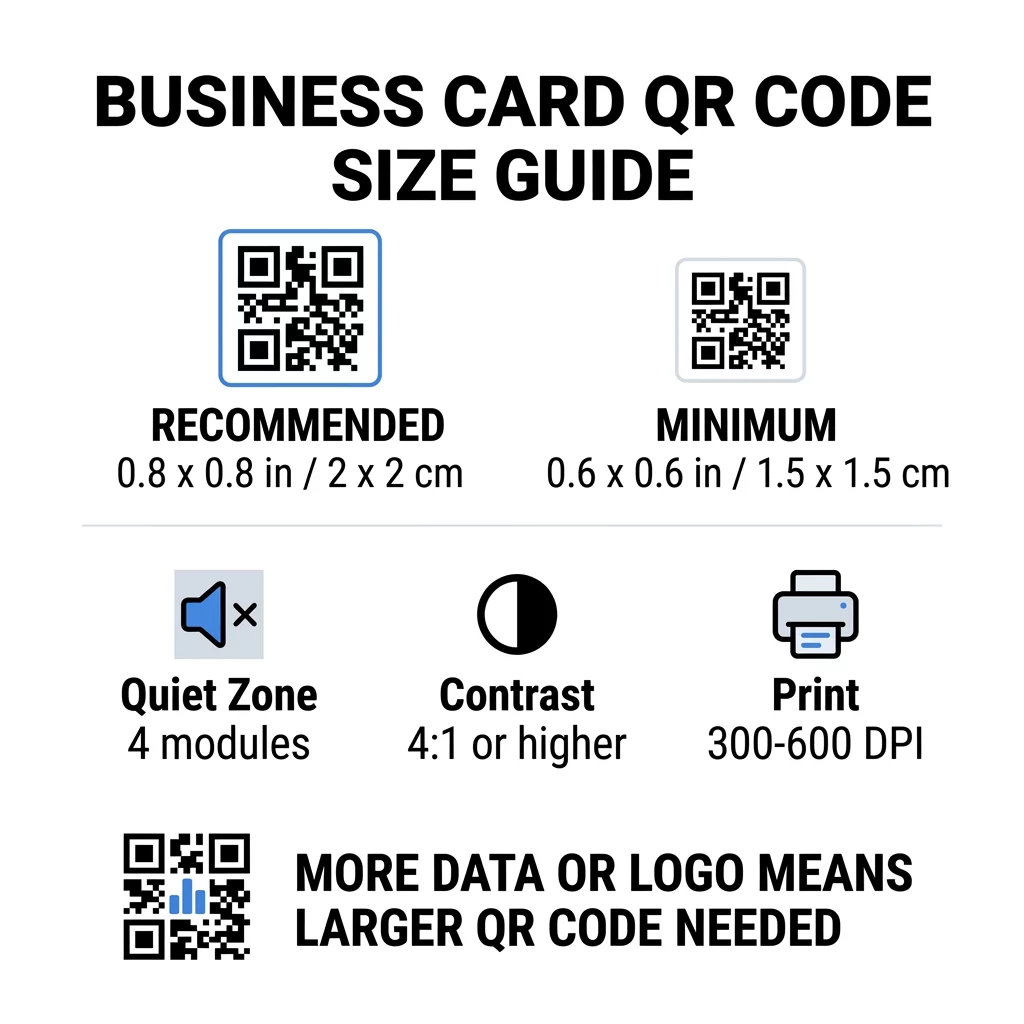
| Groottecategorie | Afmetingen (inches) | Afmetingen (cm) | Betrouwbaarheid | Beste gebruikscasus |
|---|---|---|---|---|
| Minimum | 0.6 x 0.6 inch | 1,5 x 1,5 cm | Matig | Korte URL's en data met lage dichtheid |
| Aanbevolen | 0,8 x 0,8 inch | 2,0 x 2,0 cm | Hoog | Standaard visitekaartjes en contactlinks |
| Hoge dichtheid | 1,0 x 1,0 inch+ | 2,5 x 2,5 cm+ | Hoog | Gedetailleerde contactkaarten en ingebedde logo's |
Deze groottes zijn alleen voor de zwarte vierkanten. De lege marge rond de code is extra, dus een code van 0,8 inch heeft ongeveer 0,1 inch vrije ruimte aan elke kant nodig (zie de rustzone hieronder).
QR Code Size on a Business Card by Card Format
- US standard card (3.5 x 2 inches): a 0.8 inch code takes 40% of the card height. Place it on the back so the front stays clean.
- European standard card (85 x 55 mm): use 20 to 25 mm. The same 2 cm rule applies.
- Folded or square cards: you have more room, so use 1 inch (2.5 cm) or larger and keep the code away from the fold.
- Back of the card only: if the front is full, put a 1 inch code on the back with a short line such as “Scan to save my contact”.
How Data Density Dictates Code Size
The size of your QR code depends on how much data it holds. A QR code is a grid of small squares called modules. Version 1 has 21 x 21 modules and Version 40 has 177 x 177 modules. More data means more modules, and each module gets smaller when the code size stays the same. If the modules print smaller than a camera can resolve, the scan fails.
Here is the math for a 2 cm (0.8 inch) code. A short link usually fits in a Version 2 code (25 modules), so each module is about 0.8 mm. A full contact record can need Version 10 or higher (57 modules or more), and each module drops to about 0.35 mm. The second code is much harder to print and scan at the same size.
A direct vCard with your name, phone numbers, email addresses and office address creates a dense grid. Using a vCard QR-code generator voor contactgegevens to create a direct static file often needs a code of 1 inch (2.5 cm) or more to stay readable.
To keep your code compact and easy to scan on a small card:
- Encode a short link to your contact page instead of long raw contact text.
- Keep only the essential contact channels.
- Keep the module count low so each square stays large and sharp.
- Follow the principles for how to design a business card with a QR code to balance layout and function.
Een korte link is de eenvoudigste manier om dit te doen. Een dynamische QR-code slaat een korte link op en stelt u in staat de bestemmingspagina te wijzigen nadat de kaarten zijn gedrukt. Pageloot biedt dynamische codes met een gratis proefperiode van 14 dagen, en u kunt de abonnementen bekijken op pageloot.com/pricing. Een statische code is voldoende als uw link nooit zal veranderen.
Maak uw aangepaste visitekaartje-code Klaar om een scanbare, traceerbare contactcode te maken? Gebruik de QR-code voor visitekaartjes maken om codes in hoge resolutie te ontwerpen en uw gegevens te delen met één scan.
Zijn QR-codes op visitekaartjes goed of slecht?
QR-codes op visitekaartjes zijn goed wanneer de code groot genoeg is, gemakkelijk te scannen is en naar iets nuttigs leidt. Ze zijn slecht wanneer de code te klein is, de link kapot is of de pagina niet voor telefoons is gemaakt.
De voordelen zijn reëel. De persoon kan uw contact opslaan of uw portfolio in twee seconden openen, en u kunt meer informatie kwijt dan de kaart toelaat. De risico's zijn ook reëel: een code die niet scant, oogt onzorgvuldig, en een gedrukte code met een verkeerde link kan niet worden gecorrigeerd op een statische code. Gebruik deze regels:
- Maak de code minstens 0,8 inch (2 cm).
- Richt het naar een pagina die snel opent op een telefoon.
- Voeg er een korte regel naast toe die aangeeft wat de persoon krijgt, zoals “Bewaar mijn contact” of “Bekijk mijn werk”.
- Test de gedrukte proef voordat u de volledige oplage bestelt.
Essentiële technische standaarden voor betrouwbaar scannen
Grootte alleen garandeert geen goede scan. Deze afdrukregels bepalen of een camera het patroon kan lezen.
De rustzone handhaven
De rustzone is de lege marge rond de gehele QR-code. De ISO/IEC-standaard vereist minimaal vier modules aan elke zijde. Voor een code van 2 cm met 25 modules bedraagt die marge ongeveer 3 mm. De lege ruimte vertelt de scanner waar de code begint. Tekst, randen of achtergrondafbeeldingen binnen deze marge zijn een van de meest voorkomende oorzaken van mislukte scans.
Hoge kleurcontrast toepassen
Scanners lezen het verschil in helderheid tussen de donkere modules en de lichte achtergrond. Zwart op wit is de veiligste keuze. Donkerblauw, donkergroen of zwart op een lichte achtergrond werken ook goed. Vermijd lichte modules op een donkere achtergrond (geïnverteerde codes), omdat sommige standaard camera-apps ze niet kunnen lezen. Gebruik geen twee middentoonkleuren, zoals oranje op rood. Lees de richtlijnen voor kleurcontrast van QR-codes om een veilige kleurencombinatie te kiezen.
Vector afdrukformaten exporteren
Bestanden met lage resolutie, zoals een JPEG van 72 DPI, worden met wazige randen afgedrukt. Voor afdrukken stuurt u het bestand als SVG, EPS of PDF (vector), die op elke grootte scherp blijven. Als u alleen een PNG kunt versturen, exporteer deze dan met 300 DPI of hoger op de uiteindelijke afdrukmaat. Deze best practices voor de leesbaarheid van QR-codes helpen u problemen te voorkomen voordat het bestand bij de drukkerij aankomt.
Foutcorrectie en logo-integratie
QR-codes gebruiken Reed-Solomon foutcorrectie. Dit stelt een scanner in staat de gegevens te reconstrueren wanneer een deel van de code bekrast, gekreukt of bedekt is. Er zijn vier niveaus:
- Niveau L herstelt ongeveer 7% van de beschadigde gegevens. Gebruik dit voor kleine, eenvoudige codes zonder logo.
- Niveau M herstelt ongeveer 15% van de beschadigde gegevens. Dit is een veelvoorkomende standaard voor visitekaartjes.
- Niveau Q herstelt ongeveer 25% van de beschadigde gegevens. Het is een goede keuze voor kaarten die in portemonnees leven.
- Niveau H herstelt ongeveer 30% van de beschadigde gegevens. Gebruik dit als u een logo in het midden plaatst.
Hogere niveaus voegen meer modules toe, waardoor het raster dichter wordt. Als u Niveau H gebruikt voor een centraal logo, vergroot dan de afgedrukte grootte tot ten minste 1.0 x 1.0 inch (2.5 x 2.5 cm), en houd het logo klein, ongeveer een vijfde van de breedte van de code.
Keuze van kaartpapier en afwerkingen
Het oppervlak van de kaart beïnvloedt hoe licht de telefooncamera bereikt. Mat en ongestreken papier scannen het beste omdat ze het licht gelijkmatig verspreiden.
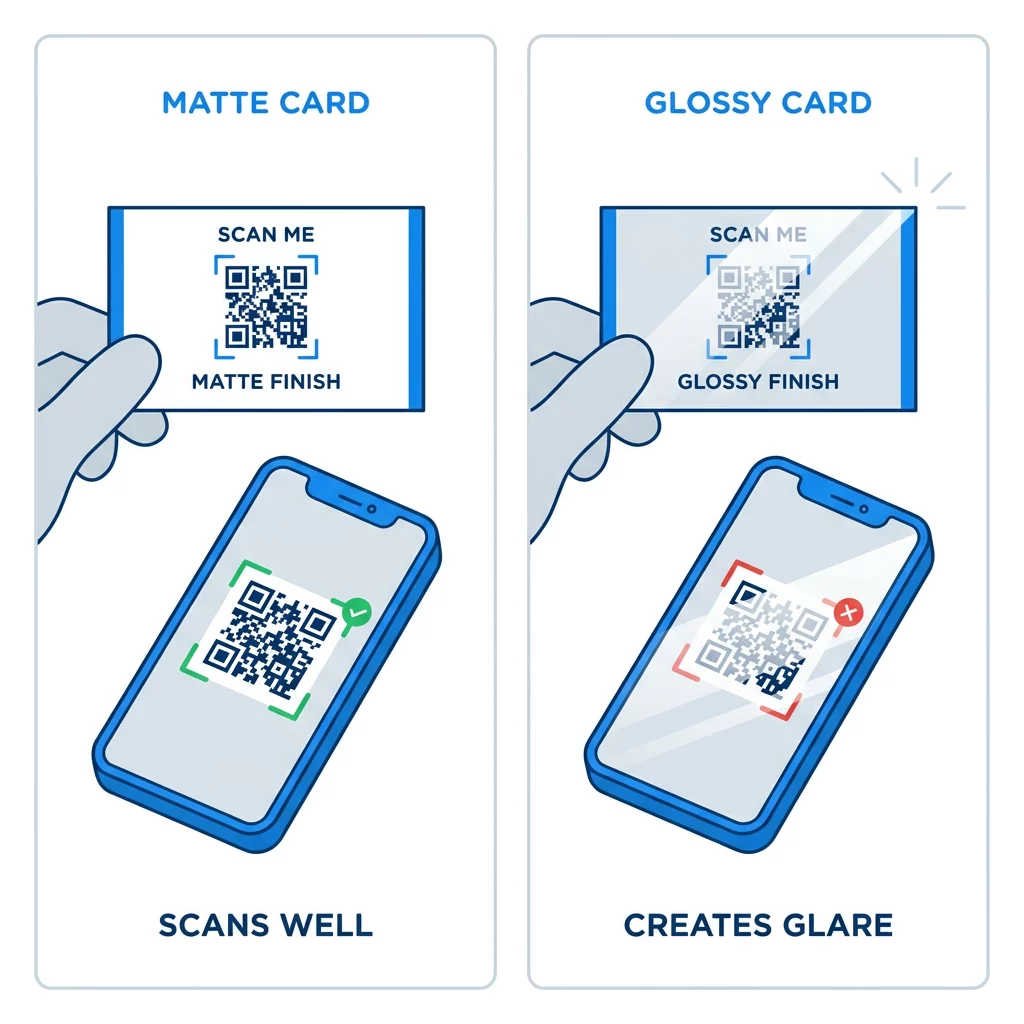
Hoogglanscoatings, metallic folie en reflecterend laminaat veroorzaken schittering onder spotlights, en die schittering wast het contrast weg. Als u een speciale afwerking gebruikt, houd de code dan op een vlak mat gebied. Houd de code weg van vouwen, afgeronde hoeken en de rand waar duimen de kaart vasthouden.
Test de QR-code van je visitekaartje voordat je print
- Print een proefdruk op het echte kaartmateriaal op 100% schaal. Beoordeel de code niet op een scherm.
- Scan hem met minstens één iPhone en één Android-telefoon.
- Scan hem in fel daglicht en in een schemerige kamer.
- Scan van ongeveer 4 inch (10 cm) en van ongeveer 10 inch (25 cm).
- Open de bestemmingspagina via mobiele data en controleer of deze snel laadt.
- Pas dan bestel je de volledige oplage.
Scant de QR-code van je visitekaartje niet? Controleer deze punten.
- De code is kleiner dan 0,6 inch (1,5 cm), of de link is lang en de modules zijn erg klein. Vergroot de code of verkort de link.
- Tekst of een rand bevindt zich binnen de stille zone. Verplaats deze minstens vier modules.
- Het contrast is te laag of de kleuren zijn geïnverteerd. Gebruik donkere modules op een lichte achtergrond.
- Het bestand is een afbeelding met lage resolutie. Print opnieuw vanaf een vectorbestand of een 300 DPI PNG op het uiteindelijke formaat.
- Schittering door een glanzende of folieafwerking. Verplaats de code naar een mat gebied.
- De bestemmingslink is verkeerd of de pagina is traag. Open de link op je telefoon en herstel deze.
Een correct formaat QR-code maakt van je visitekaartje een betrouwbare brug tussen een handdruk en je online profiel. Houd de code op 0,8 x 0,8 inch of groter, bescherm de stille zone en print vanuit schone vectorbestanden. Om je volgende kaart te maken en te testen, gebruik je de Pageloot QR-codegenerator.
Veelgestelde vragen
Houd rekening met 0,8 x 0,8 inch (2 x 2 cm). Dit formaat scant snel op huidige smartphones vanaf een normale leesafstand. Gebruik 1 inch (2,5 cm) of meer als de code veel gegevens of een logo bevat.
De kleinste maat is ongeveer 0,6 x 0,6 inch (1,5 x 1,5 cm). Het werkt alleen met een korte link, hoog contrast, een duidelijke rustzone en een scherpe afdruk. Voor oudere telefoons, houd de code op 0,8 inch (2 cm) of groter.
Ongeveer 0,6 inch (1,5 cm) per zijde in het beste geval. Kleiner dan dat kunnen de meeste telefooncamera's niet scherpstellen op een kaart die op een normale afstand wordt gehouden. Het inkorten van de link maakt de vierkanten groter en helpt kleine codes te scannen.
Ja, maar gebruik Level H foutcorrectie zodat de code de verborgen data kan herstellen. Level H voegt modules toe, dus vergroot de code tot minstens 1.0 x 1.0 inch (2.5 cm) en houd het logo klein.
Veelvoorkomende oorzaken zijn een stiltezone die te klein is, een laag kleurcontrast, een bestand met een lage resolutie, schittering door een glanzende afwerking of een code die te klein is. Controleer elk van deze punten op de gedrukte proef en los het op vóór de volgende printrun.
Ze zijn goed wanneer de code minimaal 0,8 inch is, goed scant en een pagina opent die voor telefoons is gemaakt. Ze zijn slecht wanneer de code klein, moeilijk te scannen is of naar een kapotte link leidt. Test altijd een afgedrukt proefexemplaar.
Een statische code is voldoende als de link nooit zal veranderen, en statische codes verlopen nooit. Een dynamische code is de moeite waard als u van baan, websites of contactpagina's kunt veranderen, omdat u de bestemming kunt bewerken zonder opnieuw af te drukken. Pageloot dynamische codes worden geleverd met een gratis proefperiode van 14 dagen, en abonnementen staan vermeld op pageloot.com/pricing.