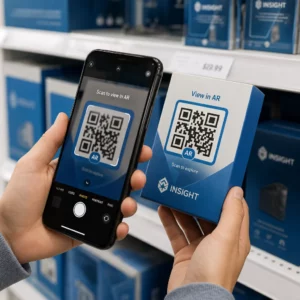
Minimālais QR koda izmērs vizītkartei ir aptuveni 0.6 x 0.6 collas (1.5 x 1.5 cm), un tikai tad, ja kods satur īsu saiti, ir asi izdrukāts un ar spēcīgu kontrastu. Lai nodrošinātu uzticamu skenēšanu, izveidojiet to vismaz 0.8 x 0.8 collu (2 x 2 cm) lielumā. Šajā rokasgrāmatā ir norādīti precīzi izmēri, drukāšanas noteikumi un kontrolsaraksts, lai pārbaudītu jūsu karti pirms pasūtīšanas.
Cik liels QR kods jābūt uz vizītkartes?
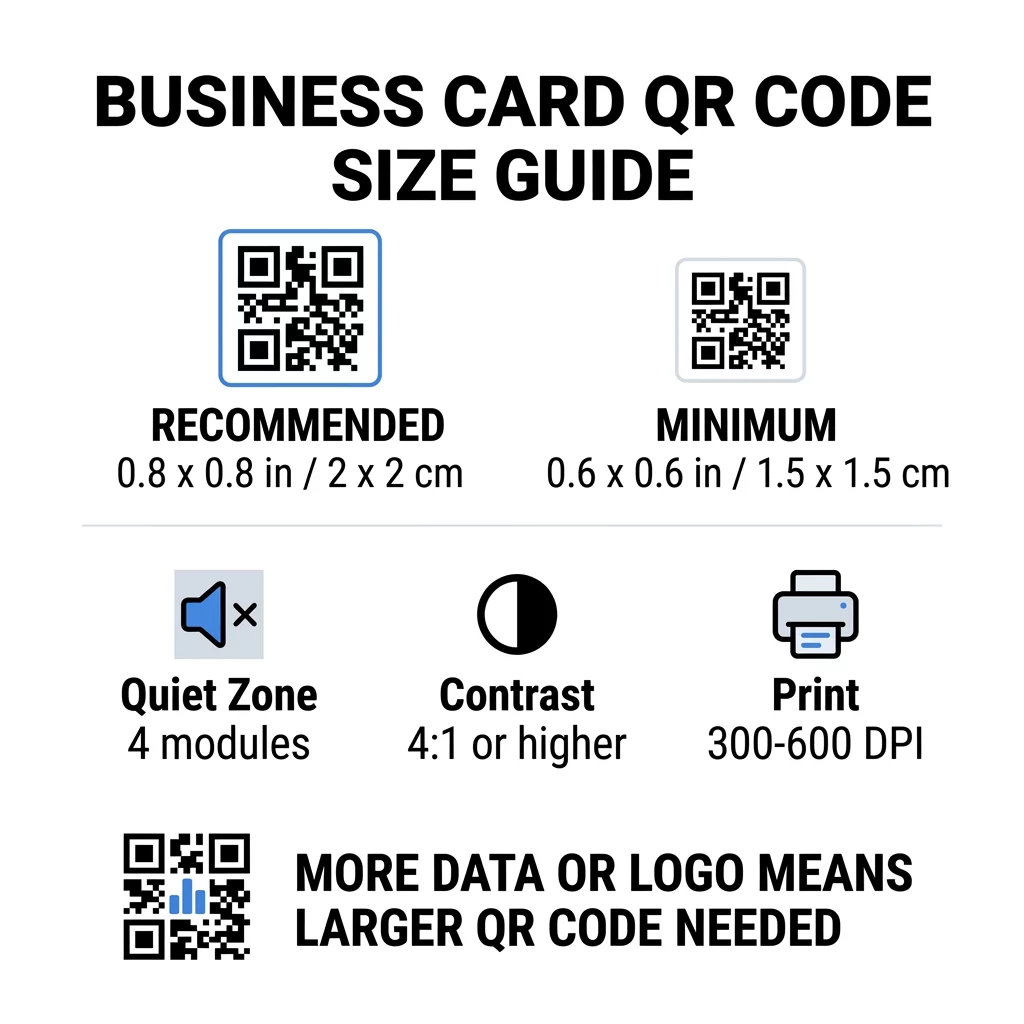
Standarta vizītkartei ieteicamais izmērs ir 0.8 x 0.8 collas (2 x 2 cm). Šādā izmērā tālruņu kameras ātri fokusējas pat vājā apgaismojumā vai nelielā leņķī. Cilvēki parasti tur karti 4 līdz 10 collu (10 līdz 25 cm) attālumā no tālruņa, tāpēc kodam jābūt pietiekami lielam, lai aizpildītu lielu daļu kameras skata šajā attālumā.
Bieži izmantots noteikums ir attiecība 10:1: katram 10 cm skenēšanas attālumam kodam jābūt vismaz 1 cm platam. 10 collu (25 cm) attālumā tas nodrošina aptuveni 1 collu (2.5 cm) vieglākai skenēšanai, un īsāki attālumi pieļauj mazākus kodus. Tāpēc 0.8 collas der lielākajai daļai karšu, un viss zem 0.6 collām sāk nedarboties vecākos tālruņos.
Minimālais QR koda izmērs un ieteicamais izmērs
Vizītkartes atstāj maz vietas, tāpēc ir noderīgi vispirms izlemt par koda izmēru un pēc tam veidot dizainu ap to. Ieteicamais izmērs ir 0.8 x 0.8 collas (2 x 2 cm). Ja karte ir pārslogota, minimālais izmērs ir 0.6 x 0.6 collas (1.5 x 1.5 cm). Tā ir atbilde uz jautājumu, cik mazs var būt QR kods uz vizītkartes: 0.6 collas, ar īsu saiti, augstu kontrastu un tīru druku.
| Izmēru kategorija | Izmēri (collas) | Izmēri (cm) | Uzticamība | Labākais izmantošanas gadījums |
|---|---|---|---|---|
| Minimālais | 0.6 x 0.6 collas | 1,5 x 1,5 cm | Mērens | Īsas URL adreses un zema blīvuma dati |
| Ieteicamais | 0.8 x 0.8 collas | 2.0 x 2.0 cm | Augsts | Standarta vizītkartes un kontaktu saites |
| Augsts blīvums | 1.0 x 1.0 in+ | 2.5 x 2.5 cm+ | Augsts | Detalizētas kontaktu kartes un iestrādāti logotipi |
Šie izmēri attiecas tikai uz melnajiem kvadrātiem. Tukšā mala ap kodu ir papildus, tāpēc 0.8 collu kodam katrā pusē nepieciešama aptuveni 0.1 collas brīva vieta (skatīt "klusuma zonu" zemāk).
QR koda izmērs vizītkartē pēc kartes formāta
- ASV standarta karte (3.5 x 2 collas): 0.8 collu kods aizņem 40% no kartes augstuma. Novietojiet to aizmugurē, lai priekšpuse paliktu tīra.
- Eiropas standarta karte (85 x 55 mm): izmantojiet no 20 līdz 25 mm. Ir spēkā tas pats 2 cm noteikums.
- Salocītās vai kvadrātveida kartes: jums ir vairāk vietas, tāpēc izmantojiet 1 collu (2.5 cm) vai lielāku un turiet kodu tālāk no locījuma vietas.
- Tikai kartes aizmugure: ja priekšpuse ir pilna, novietojiet 1 collu kodu aizmugurē ar īsu rindiņu, piemēram, “Skenēt, lai saglabātu manu kontaktu”.
Kā datu blīvums nosaka koda izmēru
Jūsu QR koda izmērs ir atkarīgs no tā, cik daudz datu tas satur. QR kods ir mazu kvadrātu režģis, ko sauc par moduļiem. Versijai 1 ir 21 x 21 modulis, un versijai 40 ir 177 x 177 moduļi. Vairāk datu nozīmē vairāk moduļu, un katrs modulis kļūst mazāks, ja koda izmērs paliek nemainīgs. Ja moduļi tiek izdrukāti mazāki, nekā kamera spēj atrisināt, skenēšana neizdodas.
Šeit ir aprēķini 2 cm (0.8 collu) kodam. Īsa saite parasti ietilpst 2. versijas kodā (25 moduļi), tāpēc katrs modulis ir aptuveni 0.8 mm. Pilnīga kontakta ierakstam var būt nepieciešama 10. versija vai augstāka (57 moduļi vai vairāk), un katrs modulis samazinās līdz aptuveni 0.35 mm. Otro kodu ir daudz grūtāk izdrukāt un skenēt tādā pašā izmērā.
Tieša vCard ar jūsu vārdu, tālruņa numuriem, e-pasta adresēm un biroja adresi rada blīvu režģi. Izmantojot vCard QR koda ģenerators lai izveidotu tiešu statisku failu, bieži ir nepieciešams 1 collu (2.5 cm) vai lielāks kods, lai tas paliktu salasāms.
Lai jūsu kods būtu kompakts un viegli skenējams uz mazas kartes:
- Kodējiet īsu saiti uz savu kontaktu lapu, nevis garu neapstrādātu kontakta tekstu.
- Saglabājiet tikai būtiskos kontaktu kanālus.
- Saglabājiet zemu moduļu skaitu, lai katrs kvadrāts paliktu liels un ass.
- Ievērojiet principus, kā izveidot vizītkarti ar QR kodu līdzsvarot izkārtojumu un funkciju.
Īsa saite ir vienkāršākais veids, kā to izdarīt. Dinamisks QR kods saglabā īsu saiti un ļauj mainīt galamērķa lapu pēc karšu izdrukāšanas. Pageloot piedāvā dinamiskus kodus ar 14 dienu bezmaksas izmēģinājuma periodu, un plānus varat apskatīt šeit: pageloot.com/pricing. Statisks kods ir pietiekams, ja jūsu saite nekad nemainīsies.
Izveidojiet savu pielāgoto vizītkartes kodu Vai esat gatavs izveidot skenējamu, izsekojamu kontakta kodu? Izmantojiet Digitālā vizītkarte: vizītkartes QR koda ģenerators , lai izstrādātu augstas izšķirtspējas kodus un kopīgotu savu informāciju ar vienu skenēšanu.
Vai QR kodi uz vizītkartēm ir labi vai slikti?
QR kodi uz vizītkartēm ir labi, ja kods ir pietiekami liels, viegli skenējams un ved uz kaut ko noderīgu. Tie ir slikti, ja kods ir pārāk mazs, saite ir bojāta vai lapa nav pielāgota tālruņiem.
Ieguvumi ir reāli. Persona var saglabāt jūsu kontaktu vai atvērt jūsu portfolio divu sekunžu laikā, un jūs varat ievietot vairāk informācijas, nekā atļauj karte. Riski ir arī reāli: kods, kas neskenējas, izskatās paviršs, un izdrukātu kodu ar nepareizu saiti nevar labot, ja tas ir statisks kods. Izmantojiet šos noteikumus:
- Izveidojiet kodu vismaz 0,8 collu (2 cm) lielu.
- Novirziet to uz lapu, kas ātri atveras tālrunī.
- Pievienojiet īsu rindu blakus, kas norāda, ko persona iegūs, piemēram, “Saglabāt manu kontaktu” vai “Skatīt manu darbu”.
- Pārbaudiet drukāto paraugu pirms pilna pasūtījuma veikšanas.
Būtiskie tehniskie standarti uzticamai skenēšanai
Tikai izmērs negarantē labu skenēšanu. Šie drukas noteikumi nosaka, vai kamera var nolasīt rakstu.
Klusās zonas uzturēšana
Klusā zona ir tukša mala ap visu QR kodu. ISO/IEC standarts prasa vismaz četrus moduļus katrā pusē. 2 cm kodam ar 25 moduļiem šī mala ir aptuveni 3 mm. Tukšā vieta norāda skenerim, kur sākas kods. Teksts, apmales vai fona attēli šajā malā ir viens no biežākajiem neveiksmīgu skenēšanas iemesliem.
Augsta krāsu kontrasta pielietošana
Skeneri nolasī gaismas spilgtuma atšķirību starp tumšajiem moduļiem un gaišo fonu. Melns uz balta ir drošākā izvēle. Tumši zils, tumši zaļš vai melns uz gaiša fona arī labi darbojas. Izvairieties no gaišiem moduļiem uz tumša fona (invertēti kodi), jo dažas noklusējuma kameras lietotnes tos nevar nolasīt. Nelietojiet divas vidējas toņu krāsas, piemēram, oranžu uz sarkana. Izlasiet QR koda krāsu kontrasta vadlīnijas lai izvēlētos drošu krāsu pāri.
Vektoru drukas formātu eksportēšana
Zemas izšķirtspējas faili, piemēram, 72 DPI JPEG, tiek drukāti ar izplūdušām malām. Drukāšanai sūtiet failu kā SVG, EPS vai PDF (vektoru), kas saglabā asumu jebkurā izmērā. Ja varat sūtīt tikai PNG, eksportējiet to ar 300 DPI vai augstāku izšķirtspēju galīgajā drukas izmērā. Tie labāko praksi QR kodu lasāmībā palīdz jums izvairīties no problēmām, pirms fails nonāk tipogrāfijā.
Kļūdu labošana un logotipa integrācija
QR kodi izmanto Rīda-Solomona kļūdu labošanu. Tas ļauj skenerim atjaunot datus, ja daļa koda ir nodilusi, saburzīta vai aizklāta. Ir četri līmeņi:
- L līmenis atjauno aptuveni 7% bojātu datu. Izmantojiet to maziem, vienkāršiem kodiem bez logotipa.
- M līmenis atjauno aptuveni 15% bojātu datu. Tā ir bieži izmantota noklusējuma vērtība vizītkartēm.
- Q līmenis atjauno aptuveni 25% bojātu datu. Tā ir laba izvēle kartēm, kas atrodas makos.
- H līmenis atjauno aptuveni 30% bojātu datu. Izmantojiet to, ja logotipu novietojat centrā.
Augstāki līmeņi pievieno vairāk moduļu, tāpēc režģis kļūst blīvāks. Ja izmantojat H līmeni centrālajam logotipam, palieliniet drukas izmēru vismaz līdz 1,0 x 1,0 collai (2,5 x 2,5 cm) un saglabājiet logotipu mazu, apmēram vienu piekto daļu no koda platuma.
Kartes papīra un apdares izvēle
Kartes virsma maina veidu, kā gaisma sasniedz tālruņa kameru. Matēts un nepārklāts papīrs skenējas vislabāk, jo tie vienmērīgi izkliedē gaismu.
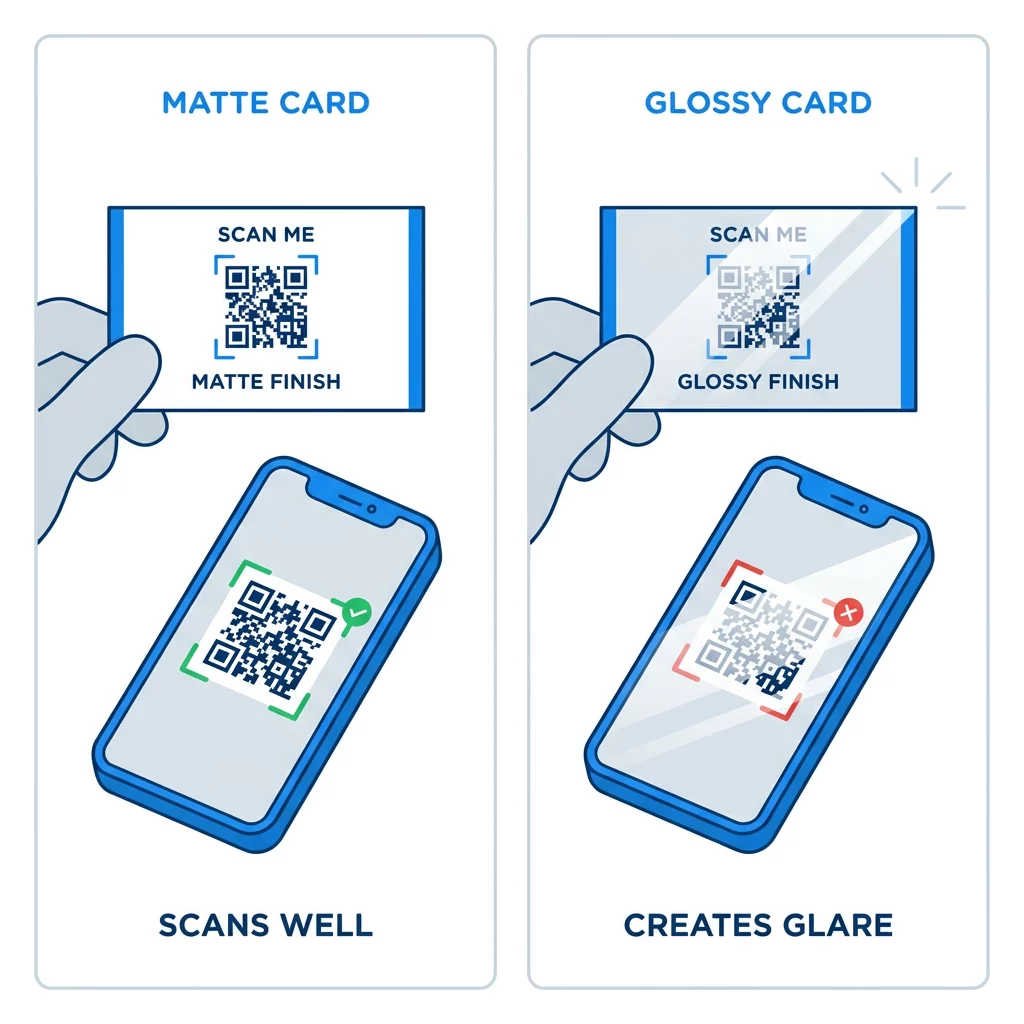
Augstas spīduma pārklājumi, metāla folija un atstarojošs lamināts rada atspīdumu prožektoru gaismā, un atspīdums nomazgā kontrastu. Ja izmantojat īpašu apdari, saglabājiet kodu uz plakanas matētas virsmas. Turiet kodu prom no locījumiem, noapaļotiem stūriem un malas, kur īkšķi tur karti.
Pārbaudiet sava vizītkartes QR kodu pirms drukāšanas
- Izdrukājiet paraugu uz reāla kartona 100% mērogā. Nevērtējiet kodu ekrānā.
- Skenējiet to vismaz ar vienu iPhone un vienu Android tālruni.
- Skenējiet to spožā dienasgaismā un vājā telpā.
- Skenējiet no aptuveni 4 collu (10 cm) un no aptuveni 10 collu (25 cm) attāluma.
- Atveriet galamērķa lapu, izmantojot mobilos datus, un pārliecinieties, ka tā ielādējas ātri.
- Tikai tad pasūtiet pilnu tirāžu.
Vizītkartes QR kods neskenējas? Pārbaudiet šos punktus
- Kods ir mazāks par 0,6 collām (1,5 cm), vai arī saite ir gara un moduļi ir sīki. Palieliniet kodu vai saīsiniet saiti.
- Teksts vai apmale atrodas klusajā zonā. Pārvietojiet to prom vismaz par četriem moduļiem.
- Kontrasts ir pārāk zems vai krāsas ir apgrieztas. Izmantojiet tumšus moduļus uz gaiša fona.
- Fails ir zemas izšķirtspējas attēls. Pārprintējiet no vektora faila vai 300 DPI PNG faila gala izmērā.
- Atspīdums no glancētas vai folijas apdares. Pārvietojiet kodu uz matētu zonu.
- Galamērķa saite ir nepareiza vai lapa ir lēna. Atveriet saiti tālrunī un izlabojiet to.
Pareiza izmēra QR kods padara jūsu vizītkarti par uzticamu tiltu starp rokasspiedienu un jūsu tiešsaistes profilu. Saglabājiet kodu 0,8 x 0,8 collu vai lielākā izmērā, aizsargājiet kluso zonu un drukājiet no tīriem vektora failiem. Lai izveidotu un pārbaudītu savu nākamo karti, izmantojiet Pageloot QR kodu ģenerators.
Biežāk uzdotie jautājumi
Plānojiet 0,8 x 0,8 collas (2 x 2 cm). Šis izmērs ātri skenējas ar mūsdienu viedtālruņiem no parasta turēšanas attāluma. Izmantojiet 1 collu (2,5 cm) vai vairāk, ja kods satur daudz datu vai logotipu.
Mazākais izmērs ir aptuveni 0,6 x 0,6 collas (1,5 x 1,5 cm). Tas darbojas tikai ar īsu saiti, augstu kontrastu, skaidru kluso zonu un asu apdruku. Vecākiem tālruņiem kodu saglabājiet 0,8 collas (2 cm) vai lielāku.
Aptuveni 0,6 collas (1,5 cm) katrā pusē labākajā gadījumā. Ja mazāki par to, lielākā daļa tālruņu kameru nespēj fokusēties uz karti, kas tiek turēta normālā attālumā. Saites saīsināšana palielina kvadrātus un palīdz skenēt mazus kodus.
Jā, bet izmantojiet H līmeņa kļūdu labošanu, lai kods varētu atgūt paslēptos datus. H līmenis pievieno moduļus, tāpēc palieliniet kodu līdz vismaz 1.0 x 1.0 collai (2.5 cm) un saglabājiet logotipu mazu.
Bieži sastopami cēloņi ir pārāk maza klusā zona, zems krāsu kontrasts, zemas izšķirtspējas fails, atspīdums no spīdīgas virsmas vai pārāk mazs kods. Pārbaudiet katru no tiem uz drukātās parauga un izlabojiet pirms nākamās drukas partijas.
Tie ir labi, ja kods ir vismaz 0,8 collas liels, labi skenējas un atver tālruņiem paredzētu lapu. Tie ir slikti, ja kods ir sīks, grūti skenējams vai ved uz bojātu saiti. Vienmēr pārbaudiet drukātu pierādījumu.
Statiskais kods ir pietiekams, ja saite nekad nemainīsies, un statiskie kodi nekad nebeidzas. Dinamiskais kods ir vērts, ja jūs varat mainīt darbu, vietnes vai kontaktu lapas, jo galamērķi var rediģēt bez atkārtotas drukāšanas. Pageloot dinamiskajiem kodiem ir 14 dienu bezmaksas izmēģinājuma periods, un plāni ir uzskaitīti vietnē pageloot.com/pricing.