Den minsta QR-kodstorleken för ett visitkort är cirka 0,6 x 0,6 tum (1,5 x 1,5 cm), och endast om koden innehåller en kort länk, skrivs ut skarpt och har stark kontrast. För pålitlig skanning, gör den minst 0,8 x 0,8 tum (2 x 2 cm). Denna guide ger de exakta storlekarna, utskriftsreglerna bakom dem och en checklista för att testa ditt kort innan du beställer.
Hur stor ska en QR-kod vara på ett visitkort?
För ett standardvisitkort är den rekommenderade storleken 0,8 x 0,8 tum (2 x 2 cm). I den storleken fokuserar telefonkameror snabbt, även i svagt ljus eller i en lätt vinkel. Folk håller vanligtvis ett kort 10 till 25 cm från telefonen, så koden måste vara tillräckligt stor för att fylla en bra del av kamerans vy på det avståndet.
En vanlig regel är ett förhållande på 10:1: för varje 10 cm skanningsavstånd bör koden vara minst 1 cm bred. På ett avstånd av 10 tum (25 cm) ger det cirka 1 tum (2,5 cm) för den enklaste skanningen, och kortare avstånd tillåter mindre koder. Detta är anledningen till att 0,8 tum fungerar för de flesta kort och allt under 0,6 tum börjar misslyckas på äldre telefoner.
Minsta QR-kodstorlek och rekommenderad storlek
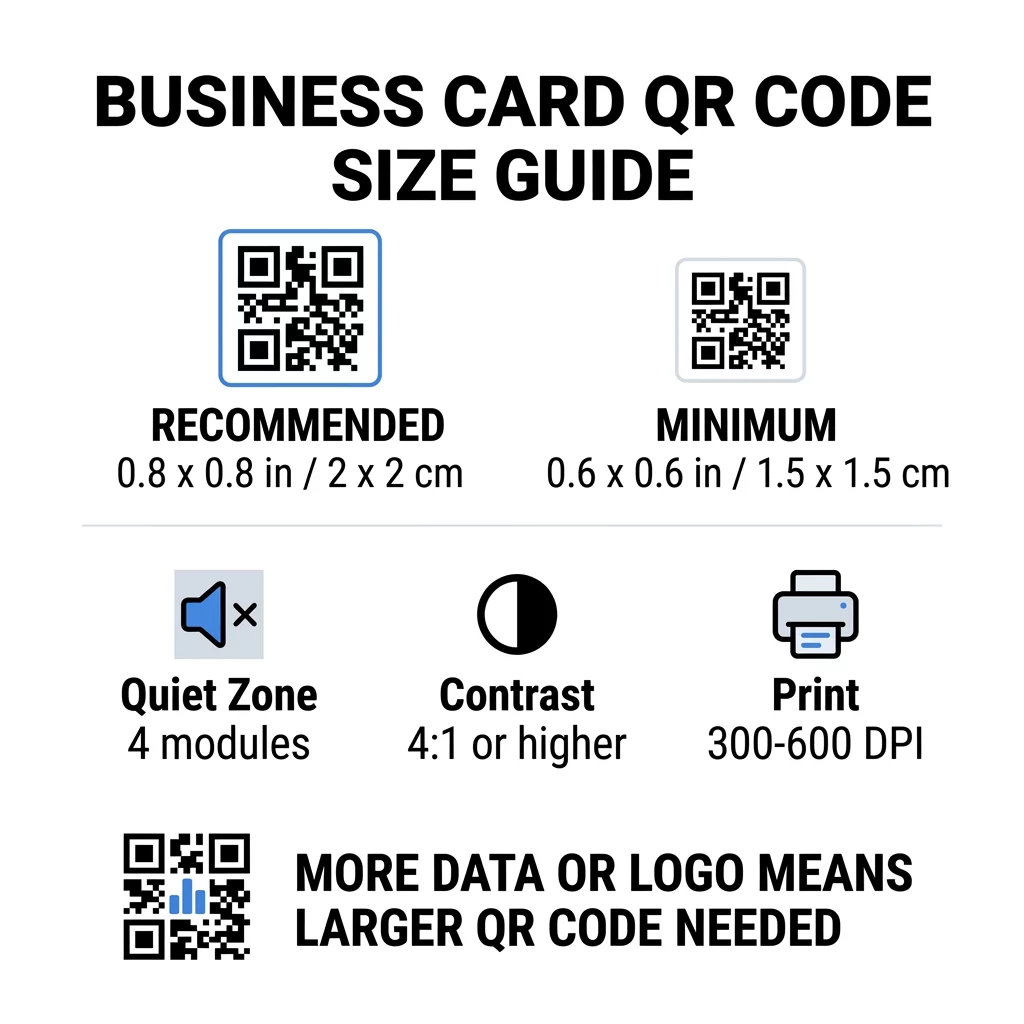
Visitkort lämnar lite utrymme, så det är bra att bestämma kodstorleken först och sedan designa runt den. Den rekommenderade storleken är 0,8 x 0,8 tum (2 x 2 cm). Om kortet är trångt är minimistorleken 0,6 x 0,6 tum (1,5 x 1,5 cm). Detta är svaret på hur liten en QR-kod kan vara på ett visitkort: 0,6 tum, med en kort länk, hög kontrast och ett rent tryck.
| Storlekskategori | Mått (tum) | Mått (cm) | Pålitlighet | Bästa användningsfallet |
|---|---|---|---|---|
| Minimum | 0,6 x 0,6 tum | 1,5 x 1,5 cm | Moderat | Korta URL:er och lågdensitetsdata |
| Rekommenderad | 0,8 x 0,8 tum | 2,0 x 2,0 cm | Hög | Standardvisitkort och kontaktlänkar |
| Hög densitet | 1,0 x 1,0 tum+ | 2,5 x 2,5 cm+ | Hög | Detaljerade kontaktkort och inbäddade logotyper |
Dessa storlekar gäller endast för de svarta rutorna. Den tomma marginalen runt koden är extra, så en kod på 0,8 tum behöver cirka 0,1 tum rent utrymme på varje sida (se den tysta zonen nedan).
QR-kodens storlek på ett visitkort beroende på kortformat
- Amerikanskt standardkort (3.5 x 2 tum): en 0.8 tums kod tar 40% av kortets höjd. Placera den på baksidan så att framsidan förblir ren.
- Europeiskt standardkort (85 x 55 mm): använd 20 till 25 mm. Samma 2 cm-regel gäller.
- Vikta eller kvadratiska kort: du har mer utrymme, så använd 1 tum (2.5 cm) eller större och håll koden borta från vikningen.
- Endast baksidan av kortet: om framsidan är full, placera en 1 tums kod på baksidan med en kort text som “Skanna för att spara min kontakt”.
Hur datatäthet avgör kodstorleken
Storleken på din QR-kod beror på hur mycket data den innehåller. En QR-kod är ett rutnät av små rutor som kallas moduler. Version 1 har 21 x 21 moduler och Version 40 har 177 x 177 moduler. Mer data innebär fler moduler, och varje modul blir mindre när kodstorleken förblir densamma. Om modulerna skrivs ut mindre än vad en kamera kan läsa av, misslyckas skanningen.
Här är beräkningen för en 2 cm (0.8 tum) kod. En kort länk får oftast plats i en Version 2-kod (25 moduler), så varje modul är cirka 0.8 mm. En fullständig kontaktpost kan behöva Version 10 eller högre (57 moduler eller mer), och varje modul minskar då till cirka 0.35 mm. Den andra koden är mycket svårare att skriva ut och skanna i samma storlek.
Ett direkt vCard med ditt namn, telefonnummer, e-postadresser och kontorsadress skapar ett tätt rutnät. Att använda en vCard QR-kodgenerator för att skapa en direkt statisk fil kräver ofta en kod på 1 tum (2.5 cm) eller mer för att förbli läsbar.
För att hålla din kod kompakt och enkel att skanna på ett litet kort:
- Koda en kort länk till din kontaktsida istället för lång rå kontakttext.
- Behåll endast de viktigaste kontaktkanalerna.
- Håll modulantalet lågt så att varje ruta förblir stor och skarp.
- Följ principerna för hur man designar ett visitkort med en QR-kod för att balansera layout och funktion.
En kortlänk är det enklaste sättet att göra detta. En dynamisk QR-kod lagrar en kortlänk och låter dig ändra målsidan efter att korten har skrivits ut. Pageloot erbjuder dynamiska koder med en 14-dagars gratis provperiod, och du kan se planerna på pageloot.com/pricing. En statisk kod räcker om din länk aldrig kommer att ändras.
Skapa din anpassade visitkortskod Redo att bygga en skanningsbar, spårbar kontaktkod? Använd QR-kod för visitkort för att designa högupplösta koder och dela dina uppgifter med en enda skanning.
Är QR-koder på visitkort bra eller dåliga?
QR-koder på visitkort är bra när koden är tillräckligt stor, lätt att skanna och leder till något användbart. De är dåliga när koden är liten, länken är bruten eller sidan inte är anpassad för telefoner.
Fördelarna är påtagliga. Personen kan spara din kontakt eller öppna din portfolio på två sekunder, och du kan få plats med mer information än vad kortet tillåter. Riskerna är också påtagliga: en kod som inte går att skanna ser slarvig ut, och en tryckt kod med en felaktig länk kan inte åtgärdas om det är en statisk kod. Använd dessa regler:
- Gör koden minst 0,8 tum (2 cm).
- Peka den mot en sida som öppnas snabbt på en telefon.
- Lägg till en kort rad bredvid koden som anger vad personen får, till exempel “Spara min kontakt” eller “Se mitt arbete”.
- Testa tryckprovet innan du beställer hela upplagan.
Viktiga tekniska standarder för tillförlitlig skanning
Storleken ensam garanterar inte en bra skanning. Dessa utskriftsregler avgör om en kamera kan läsa mönstret.
Bibehålla den tysta zonen
Den tysta zonen är den tomma marginalen runt hela QR-koden. ISO/IEC-standarden kräver minst fyra moduler på varje sida. För en 2 cm kod med 25 moduler är den marginalen cirka 3 mm. Det tomma utrymmet talar om för skannern var koden börjar. Text, ramar eller bakgrundsbilder inom denna marginal är en av de vanligaste orsakerna till misslyckade skanningar.
Använda hög färgkontrast
Skannrar läser skillnaden i ljusstyrka mellan de mörka modulerna och den ljusa bakgrunden. Svart på vitt är det säkraste valet. Mörkblått, mörkgrönt eller svart på ljus bakgrund fungerar också bra. Undvik ljusa moduler på mörk bakgrund (inverterade koder), eftersom vissa standardkameraappar inte kan läsa dem. Använd inte två mellantonsfärger, som orange på rött. Läs riktlinjer för färgkontrast för QR-koder för att välja ett säkert färgpar.
Exportera vektortryckformat
Lågupplösta filer, som en 72 DPI JPEG, skrivs ut med suddiga kanter. För utskrift, skicka filen som SVG, EPS eller PDF (vektor), som håller sig skarpa oavsett storlek. Om du bara kan skicka en PNG, exportera den med 300 DPI eller högre i den slutliga utskriftsstorleken. Dessa bästa praxis för läsbarhet av QR-koder hjälper dig att undvika problem innan filen når tryckeriet.
Felkorrigering och logointegration
QR-koder använder Reed-Solomon felkorrigering. Det låter en skanner återskapa data när en del av koden är skadad, skrynklig eller täckt. Det finns fyra nivåer:
- Nivå L återställer cirka 7% av skadad data. Använd den för små, enkla koder utan logotyp.
- Nivå M återställer cirka 15% av skadad data. Det är en vanlig standard för visitkort.
- Nivå Q återställer cirka 25% av skadad data. Det är ett bra val för kort som förvaras i plånböcker.
- Nivå H återställer cirka 30% av skadad data. Använd den om du placerar en logotyp i mitten.
Högre nivåer lägger till fler moduler, så rutnätet blir tätare. Om du använder nivå H för en centrerad logotyp, öka den tryckta storleken till minst 1,0 x 1,0 tum (2,5 x 2,5 cm), och håll logotypen liten, ungefär en femtedel av kodens bredd.
Val av kortmaterial och ytbehandlingar
Kortets yta ändrar hur ljus når telefonens kamera. Matta och obestrukna material skannas bäst eftersom de sprider ljuset jämnt.
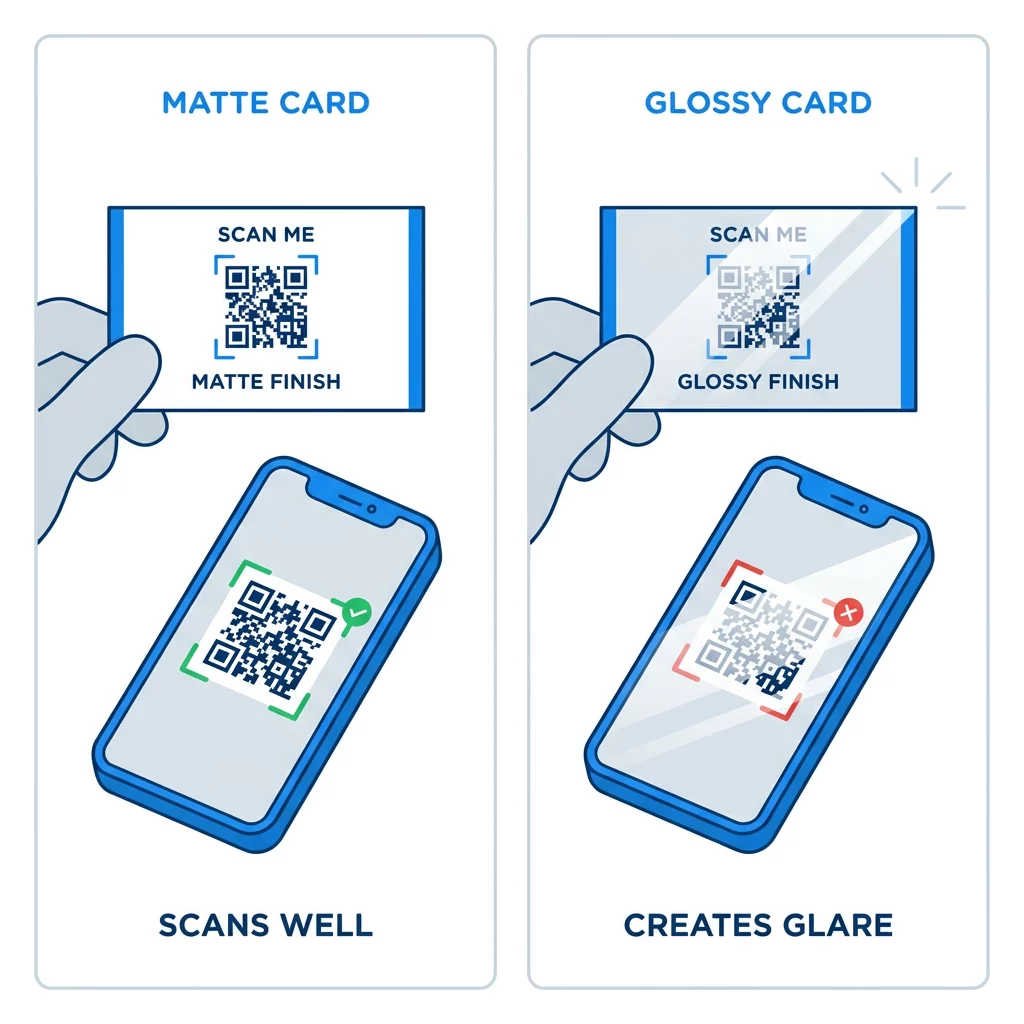
Högblanka beläggningar, metallfolie och reflekterande laminat skapar bländning under spotlights, och bländningen suddar ut kontrasten. Om du använder en speciell ytbehandling, håll koden på ett platt matt område. Håll koden borta från veck, rundade hörn och kanten där tummarna håller kortet.
Testa din QR-kod för visitkort innan du skriver ut
- Skriv ut ett provtryck på det riktiga visitkortspappret i 100% skala. Bedöm inte koden på en skärm.
- Skanna den med minst en iPhone och en Android-telefon.
- Skanna den i starkt dagsljus och i ett dunkelt rum.
- Skanna från cirka 4 tum (10 cm) och från cirka 10 tum (25 cm).
- Öppna målsidan via mobildata och bekräfta att den laddar snabbt.
- Först då beställer du hela tryckupplagan.
QR-kod för visitkort skannar inte? Kontrollera detta
- Koden är mindre än 0,6 tum (1,5 cm), eller länken är lång och modulerna är pyttesmå. Förstora koden eller förkorta länken.
- Text eller en ram finns innanför den tysta zonen. Flytta bort den med minst fyra moduler.
- Kontrasten är för låg eller färgerna är inverterade. Använd mörka moduler på en ljus bakgrund.
- Filen är en lågupplöst bild. Skriv ut igen från en vektorgrafikfil eller en 300 DPI PNG i den slutliga storleken.
- Blänk från en glansig eller folierad yta. Flytta koden till ett matt område.
- Mållänken är felaktig eller sidan är långsam. Öppna länken på din telefon och åtgärda den.
En korrekt storlek på QR-koden gör ditt visitkort till en pålitlig bro mellan ett handslag och din onlineprofil. Håll koden på 0,8 x 0,8 tum eller större, skydda den tysta zonen och skriv ut från rena vektorfiler. För att skapa och testa ditt nästa kort, använd Pageloot QR-kodgenerator.
Vanliga frågor
Planera för 0,8 x 0,8 tum (2 x 2 cm). Denna storlek skannas snabbt på nuvarande smartphones från ett normalt avstånd. Använd 1 tum (2,5 cm) eller mer om koden innehåller mycket data eller en logotyp.
Den minsta storleken är cirka 0,6 x 0,6 tum (1,5 x 1,5 cm). Den fungerar bara med en kort länk, hög kontrast, en tydlig tyst zon och ett skarpt tryck. För äldre telefoner, behåll koden på 0,8 tum (2 cm) eller större.
Ungefär 0,6 tum (1,5 cm) per sida i bästa fall. Mindre än så kan de flesta telefonkameror inte fokusera på ett kort som hålls på normalt avstånd. Att förkorta länken gör rutorna större och hjälper små koder att skannas.
Ja, men använd felkorrigering på nivå H så att koden kan återställa den dolda datan. Nivå H lägger till moduler, så förstora koden till minst 1,0 x 1,0 tum (2,5 cm) och håll logotypen liten.
Vanliga orsaker är en för liten tyst zon, låg färgkontrast, en lågupplöst fil, bländning från en glansig yta eller en kod som är för liten. Kontrollera var och en på det tryckta korrekturet och åtgärda det före nästa tryckkörning.
De är bra när koden är minst 0,8 tum, skannar bra och öppnar en sida anpassad för mobiler. De är dåliga när koden är liten, svår att skanna eller leder till en trasig länk. Testa alltid ett tryckt korrektur.
En statisk kod räcker om länken aldrig kommer att ändras, och statiska koder upphör aldrig att gälla. En dynamisk kod är värd det om du kan komma att byta jobb, webbplatser eller kontaktsidor, eftersom du kan redigera destinationen utan att behöva trycka om. Pageloots dynamiska koder kommer med en 14-dagars gratis provperiod, och planer listas på pageloot.com/pricing.