Die minimale QR-Code-Größe für eine Visitenkarte beträgt etwa 0,6 x 0,6 Zoll (1,5 x 1,5 cm), und nur wenn der Code einen kurzen Link enthält, scharf gedruckt ist und einen starken Kontrast aufweist. Für zuverlässiges Scannen sollte er mindestens 0,8 x 0,8 Zoll (2 x 2 cm) groß sein. Dieser Leitfaden enthält die genauen Größen, die dahinterstehenden Druckregeln und eine Checkliste, um Ihre Karte vor der Bestellung zu testen.
Wie groß sollte ein QR-Code auf einer Visitenkarte sein?
Für eine Standard-Visitenkarte beträgt die empfohlene Größe 0,8 x 0,8 Zoll (2 x 2 cm). Bei dieser Größe fokussieren Handykameras schnell, selbst bei schwachem Licht oder aus einem leichten Winkel. Menschen halten eine Karte normalerweise 4 bis 10 Zoll (10 bis 25 cm) vom Telefon entfernt, daher muss der Code groß genug sein, um einen guten Teil der Kameraansicht aus dieser Entfernung auszufüllen.
Eine gängige Regel ist ein Verhältnis von 10:1: Für alle 10 cm Scan-Abstand sollte der Code mindestens 1 cm breit sein. Bei einem Abstand von 10 Zoll (25 cm) ergibt das etwa 1 Zoll (2,5 cm) für den einfachsten Scan, und kürzere Abstände erlauben kleinere Codes. Deshalb funktionieren 0,8 Zoll für die meisten Karten, und alles unter 0,6 Zoll beginnt auf älteren Telefonen zu versagen.
Minimale QR-Code-Größe und empfohlene Größe
Visitenkarten lassen wenig Platz, daher ist es hilfreich, zuerst die Code-Größe festzulegen und dann darum herum zu gestalten. Die empfohlene Größe beträgt 0,8 x 0,8 Zoll (2 x 2 cm). Wenn die Karte überladen ist, beträgt das Minimum 0,6 x 0,6 Zoll (1,5 x 1,5 cm). Das ist die Antwort auf die Frage, wie klein ein QR-Code auf einer Visitenkarte sein kann: 0,6 Zoll, mit einem kurzen Link, hohem Kontrast und einem sauberen Druck.
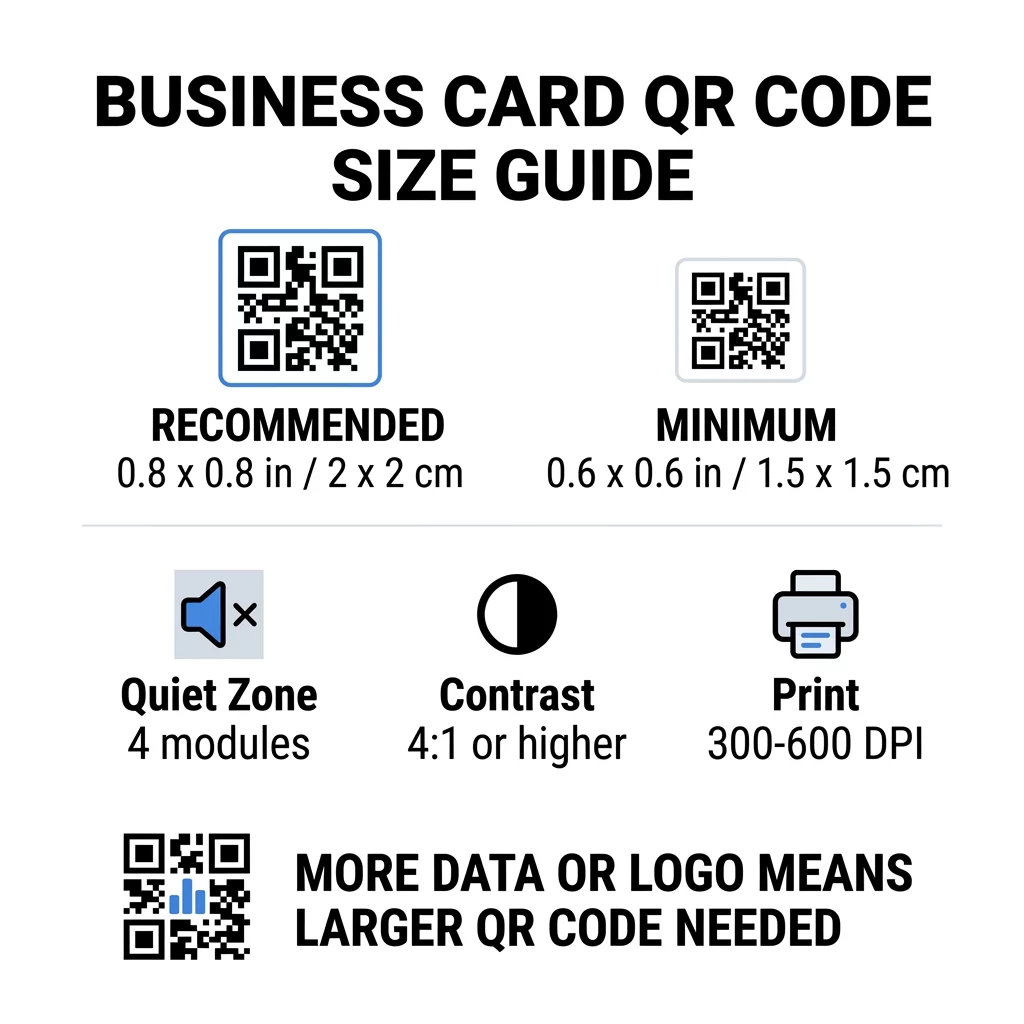
| Größenkategorie | Abmessungen (Zoll) | Abmessungen (cm) | Zuverlässigkeit | Bester Anwendungsfall |
|---|---|---|---|---|
| Minimum | 0,6 x 0,6 Zoll | 1,5 x 1,5 cm | Mäßig | Kurze URLs und Daten geringer Dichte |
| Empfohlen | 0,8 x 0,8 Zoll | 2,0 x 2,0 cm | Hoch | Standard-Visitenkarten und Kontaktlinks |
| Hohe Dichte | 1.0 x 1.0 Zoll+ | 2,5 x 2,5 cm+ | Hoch | Detaillierte Kontaktkarten und eingebettete Logos |
Diese Größen beziehen sich nur auf die schwarzen Quadrate. Der leere Rand um den Code herum ist zusätzlich, daher benötigt ein 0,8 Zoll großer Code etwa 0,1 Zoll freien Raum auf jeder Seite (siehe die Ruhezone unten).
QR-Code-Größe auf einer Visitenkarte nach Kartenformat
- US-Standardkarte (3,5 x 2 Zoll): Ein 0,8 Zoll großer Code nimmt 40 % der Kartenhöhe ein. Platzieren Sie ihn auf der Rückseite, damit die Vorderseite sauber bleibt.
- Europäische Standardkarte (85 x 55 mm): Verwenden Sie 20 bis 25 mm. Die gleiche 2-cm-Regel gilt hier.
- Gefaltete oder quadratische Karten: Sie haben mehr Platz, verwenden Sie daher 1 Zoll (2,5 cm) oder größer und halten Sie den Code von der Falz fern.
- Nur auf der Rückseite der Karte: Wenn die Vorderseite voll ist, platzieren Sie einen 1 Zoll großen Code auf der Rückseite mit einem kurzen Hinweis wie „Scannen, um meinen Kontakt zu speichern“.
Wie die Datendichte die Code-Größe bestimmt
Die Größe Ihres QR-Codes hängt davon ab, wie viele Daten er enthält. Ein QR-Code ist ein Gitter aus kleinen Quadraten, die Module genannt werden. Version 1 hat 21 x 21 Module und Version 40 hat 177 x 177 Module. Mehr Daten bedeuten mehr Module, und jedes Modul wird kleiner, wenn die Code-Größe gleich bleibt. Wenn die Module kleiner gedruckt werden, als eine Kamera auflösen kann, schlägt der Scan fehl.
Hier ist die Berechnung für einen 2 cm (0,8 Zoll) Code. Ein kurzer Link passt normalerweise in einen Version 2 Code (25 Module), sodass jedes Modul etwa 0,8 mm groß ist. Ein vollständiger Kontaktdatensatz kann Version 10 oder höher (57 Module oder mehr) erfordern, und jedes Modul schrumpft auf etwa 0,35 mm. Der zweite Code ist bei gleicher Größe wesentlich schwieriger zu drucken und zu scannen.
Eine direkte vCard mit Ihrem Namen, Telefonnummern, E-Mail-Adressen und Büroadresse erzeugt ein dichtes Gitter. Die Verwendung eines vCard QR-Code Generator zur Erstellung einer direkten statischen Datei erfordert oft einen Code von 1 Zoll (2,5 cm) oder mehr, um lesbar zu bleiben.
Um Ihren Code kompakt und einfach auf einer kleinen Karte scannbar zu halten:
- Codieren Sie einen kurzen Link zu Ihrer Kontaktseite anstelle eines langen, unformatierten Kontakttextes.
- Behalten Sie nur die wesentlichen Kontaktkanäle bei.
- Halten Sie die Modulanzahl niedrig, damit jedes Quadrat groß und scharf bleibt.
- Befolgen Sie die Prinzipien, wie man eine Visitenkarte mit QR-Code gestaltet um Layout und Funktion in Einklang zu bringen.
Ein Kurzlink ist der einfachste Weg dazu. Ein dynamischer QR-Code speichert einen Kurzlink und ermöglicht es Ihnen, die Zielseite zu ändern, nachdem die Karten gedruckt wurden. Pageloot bietet dynamische Codes mit einer 14-tägigen kostenlosen Testphase an, und Sie können die Pläne unter einsehen. pageloot.com/pricing. Ein statischer Code ist ausreichend, wenn Ihr Link sich niemals ändern wird.
Erstellen Sie Ihren individuellen Visitenkarten-Code Bereit, einen scannbaren, verfolgbaren Kontakt-Code zu erstellen? Nutzen Sie den/die Visitenkarten mit QR-Code erstellen , um hochauflösende Codes zu gestalten und Ihre Details mit einem Scan zu teilen.
Sind QR-Codes auf Visitenkarten gut oder schlecht?
QR-Codes auf Visitenkarten sind gut, wenn der Code groß genug, leicht zu scannen ist und zu etwas Nützlichem führt. Sie sind schlecht, wenn der Code winzig ist, der Link defekt ist oder die Seite nicht für Mobiltelefone optimiert ist.
Die Vorteile sind real. Die Person kann Ihren Kontakt speichern oder Ihr Portfolio in zwei Sekunden öffnen, und Sie können mehr Informationen unterbringen, als die Karte erlaubt. Die Risiken sind ebenfalls real: Ein Code, der nicht scannt, wirkt nachlässig, und ein gedruckter Code mit einem falschen Link kann bei einem statischen Code nicht korrigiert werden. Beachten Sie diese Regeln:
- Machen Sie den Code mindestens 0,8 Zoll (2 cm) groß.
- Leiten Sie ihn auf eine Seite, die auf einem Telefon schnell geöffnet werden kann.
- Fügen Sie eine kurze Zeile daneben hinzu, die angibt, was die Person erhält, wie „Meinen Kontakt speichern“ oder „Meine Arbeit ansehen“.
- Testen Sie den gedruckten Entwurf, bevor Sie die gesamte Auflage bestellen.
Wesentliche technische Standards für zuverlässiges Scannen
Die Größe allein garantiert keinen guten Scan. Diese Druckregeln entscheiden, ob eine Kamera das Muster lesen kann.
Die Ruhezone beibehalten
Die Ruhezone ist der leere Rand um den gesamten QR-Code. Der ISO/IEC-Standard erfordert mindestens vier Module auf jeder Seite. Für einen 2 cm großen Code mit 25 Modulen beträgt dieser Rand etwa 3 mm. Der leere Raum zeigt dem Scanner, wo der Code beginnt. Text, Ränder oder Hintergrundbilder innerhalb dieses Rands sind eine der häufigsten Ursachen für fehlgeschlagene Scans.
Anwenden von hohem Farbkontrast
Scanner lesen den Helligkeitsunterschied zwischen den dunklen Modulen und dem hellen Hintergrund. Schwarz auf Weiß ist die sicherste Wahl. Dunkelblau, Dunkelgrün oder Schwarz auf hellem Hintergrund funktionieren ebenfalls gut. Vermeiden Sie helle Module auf dunklem Hintergrund (invertierte Codes), da einige Standard-Kamera-Apps diese nicht lesen können. Verwenden Sie keine zwei Mitteltöne, wie z.B. Orange auf Rot. Lesen Sie die Richtlinien für den Farbkontrast von QR-Codes um ein sicheres Farbschema zu wählen.
Vektor-Druckformate exportieren
Niedrigauflösende Dateien, wie z.B. ein 72 DPI JPEG, werden mit unscharfen Kanten gedruckt. Für den Druck senden Sie die Datei als SVG, EPS oder PDF (Vektor), die in jeder Größe scharf bleiben. Wenn Sie nur ein PNG senden können, exportieren Sie es mit 300 DPI oder höher in der endgültigen Druckgröße. Diese Best Practices für die Lesbarkeit von QR-Codes helfen Ihnen, Probleme zu vermeiden, bevor die Datei die Druckerei erreicht.
Fehlerkorrektur und Logo-Integration
QR-Codes verwenden Reed-Solomon-Fehlerkorrektur. Sie ermöglicht es einem Scanner, die Daten wiederherzustellen, wenn Teile des Codes zerkratzt, geknickt oder abgedeckt sind. Es gibt vier Stufen:
- Stufe L stellt etwa 7% der beschädigten Daten wieder her. Verwenden Sie sie für kleine, einfache Codes ohne Logo.
- Stufe M stellt etwa 15% der beschädigten Daten wieder her. Sie ist eine gängige Standardeinstellung für Visitenkarten.
- Stufe Q stellt etwa 25% der beschädigten Daten wieder her. Sie ist eine gute Wahl für Karten, die in Geldbörsen aufbewahrt werden.
- Stufe H stellt etwa 30% der beschädigten Daten wieder her. Verwenden Sie sie, wenn Sie ein Logo in der Mitte platzieren.
Höhere Stufen fügen mehr Module hinzu, wodurch das Raster dichter wird. Wenn Sie Stufe H für ein mittiges Logo verwenden, erhöhen Sie die gedruckte Größe auf mindestens 1,0 x 1,0 Zoll (2,5 x 2,5 cm) und halten Sie das Logo klein, etwa ein Fünftel der Codebreite.
Auswahl von Karton und Veredelungen
Die Kartenoberfläche beeinflusst, wie Licht die Handykamera erreicht. Matte und ungestrichene Materialien lassen sich am besten scannen, da sie das Licht gleichmäßig verteilen.
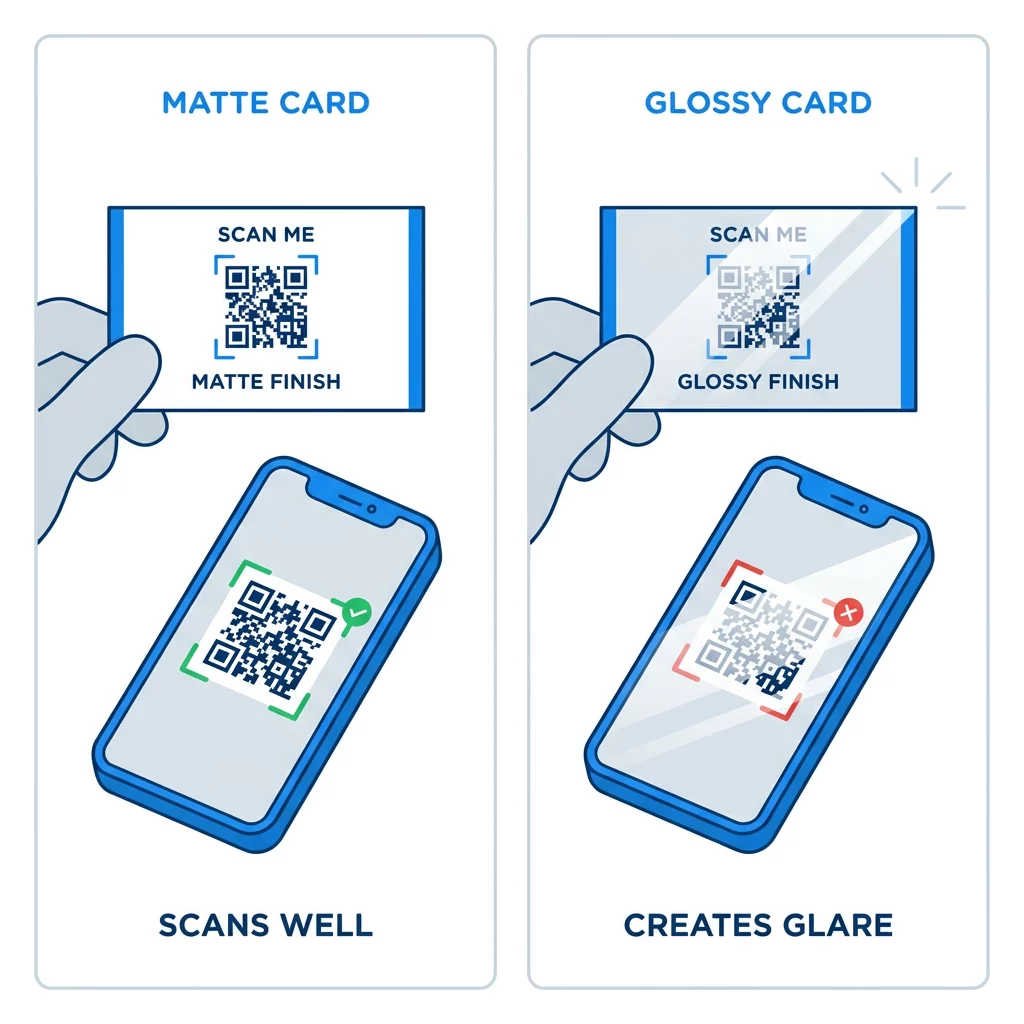
Hochglanzbeschichtungen, Metallfolie und reflektierendes Laminat erzeugen Blendeffekte unter Scheinwerfern, und die Blendung wäscht den Kontrast aus. Wenn Sie eine spezielle Veredelung verwenden, platzieren Sie den Code auf einer flachen, matten Fläche. Halten Sie den Code von Falzen, abgerundeten Ecken und dem Rand fern, wo Daumen die Karte halten.
Testen Sie Ihren Visitenkarten-QR-Code, bevor Sie drucken
- Drucken Sie einen Probedruck auf dem echten Kartenmaterial in 100 % Skalierung. Beurteilen Sie den Code nicht auf einem Bildschirm.
- Scannen Sie ihn mit mindestens einem iPhone und einem Android-Telefon.
- Scannen Sie ihn bei hellem Tageslicht und in einem schwach beleuchteten Raum.
- Scannen Sie aus etwa 4 Zoll (10 cm) und aus etwa 10 Zoll (25 cm) Entfernung.
- Öffnen Sie die Zielseite über mobile Daten und bestätigen Sie, dass sie schnell lädt.
- Erst dann bestellen Sie den vollständigen Druckauftrag.
Visitenkarten-QR-Code scannt nicht? Überprüfen Sie Folgendes
- Der Code ist kleiner als 0,6 Zoll (1,5 cm), oder der Link ist lang und die Module sind winzig. Vergrößern Sie den Code oder kürzen Sie den Link.
- Text oder ein Rahmen befindet sich innerhalb der Ruhezone. Verschieben Sie ihn um mindestens vier Module.
- Der Kontrast ist zu gering oder die Farben sind invertiert. Verwenden Sie dunkle Module auf hellem Hintergrund.
- Die Datei ist ein Bild mit geringer Auflösung. Drucken Sie von einer Vektordatei oder einer 300 DPI PNG in der endgültigen Größe neu.
- Blendung durch eine glänzende oder Folienoberfläche. Verschieben Sie den Code auf eine matte Fläche.
- Der Ziellink ist falsch oder die Seite ist langsam. Öffnen Sie den Link auf Ihrem Telefon und korrigieren Sie ihn.
Ein richtig dimensionierter QR-Code macht Ihre Visitenkarte zu einer zuverlässigen Brücke zwischen einem Händedruck und Ihrem Online-Profil. Halten Sie den Code auf 0,8 x 0,8 Zoll oder größer, schützen Sie die Ruhezone und drucken Sie aus sauberen Vektordateien. Um Ihre nächste Karte zu erstellen und zu testen, verwenden Sie Pageloot QR-Code-Generator.
Häufig gestellte Fragen
Planen Sie 0,8 x 0,8 Zoll (2 x 2 cm) ein. Diese Größe lässt sich mit aktuellen Smartphones aus normaler Halteentfernung schnell scannen. Verwenden Sie 1 Zoll (2,5 cm) oder mehr, wenn der Code viele Daten oder ein Logo enthält.
Die kleinste Größe beträgt etwa 0,6 x 0,6 Zoll (1,5 x 1,5 cm). Es funktioniert nur mit einem kurzen Link, hohem Kontrast, einer klaren Ruhezone und einem scharfen Druck. Für ältere Telefone sollte der Code 0,8 Zoll (2 cm) oder größer sein.
Im besten Fall etwa 0,6 Zoll (1,5 cm) pro Seite. Ist es kleiner, können die meisten Handykameras nicht auf eine Karte fokussieren, die in normaler Entfernung gehalten wird. Das Kürzen des Links macht die Quadrate größer und hilft, kleine Codes zu scannen.
Ja, aber verwenden Sie die Fehlerkorrekturstufe H, damit der Code die versteckten Daten wiederherstellen kann. Stufe H fügt Module hinzu, vergrößern Sie den Code daher auf mindestens 1,0 x 1,0 Zoll (2,5 cm) und halten Sie das Logo klein.
Häufige Ursachen sind eine zu kleine Ruhezone, geringer Farbkontrast, eine Datei mit niedriger Auflösung, Blendung durch eine glänzende Oberfläche oder ein zu kleiner Code. Überprüfen Sie jeden Punkt auf dem gedruckten Korrekturabzug und beheben Sie ihn vor dem nächsten Drucklauf.
Sie sind gut, wenn der Code mindestens 0,8 Zoll groß ist, gut scannt und eine für Mobiltelefone erstellte Seite öffnet. Sie sind schlecht, wenn der Code winzig, schwer zu scannen ist oder zu einem defekten Link führt. Testen Sie immer einen gedruckten Abzug.
Ein statischer Code ist ausreichend, wenn sich der Link nie ändern wird, und statische Codes verfallen nie. Ein dynamischer Code lohnt sich, wenn Sie möglicherweise Arbeitsplätze, Websites oder Kontaktseiten ändern, da Sie das Ziel bearbeiten können, ohne neu drucken zu müssen. Dynamische Pageloot-Codes kommen mit einer 14-tägigen kostenlosen Testphase, und die Tarife sind unter pageloot.com/pricing aufgeführt.