Мінімальний розмір QR-коду для візитівки становить приблизно 0.6 x 0.6 дюйма (1.5 x 1.5 см), і лише якщо код містить коротке посилання, друкується чітко та має сильний контраст. Для надійного сканування зробіть його щонайменше 0.8 x 0.8 дюйма (2 x 2 см). Цей посібник надає точні розміри, правила друку та контрольний список для перевірки вашої візитівки перед замовленням.
Наскільки великим має бути QR-код на візитівці?
Для стандартної візитівки рекомендований розмір становить 0.8 x 0.8 дюйма (2 x 2 см). За такого розміру камери телефонів швидко фокусуються, навіть при тьмяному освітленні або під невеликим кутом. Люди зазвичай тримають візитівку на відстані 4-10 дюймів (10-25 см) від телефону, тому код має бути достатньо великим, щоб займати значну частину огляду камери на цій відстані.
Поширене правило – співвідношення 10:1: на кожні 10 см відстані сканування код повинен бути щонайменше 1 см завширшки. На відстані 10 дюймів (25 см) це дає приблизно 1 дюйм (2.5 см) для найпростішого сканування, а менші відстані дозволяють використовувати менші коди. Ось чому 0.8 дюйма підходить для більшості візитівок, а все, що менше 0.6 дюйма, починає не працювати на старих телефонах.
Мінімальний та рекомендований розмір QR-коду
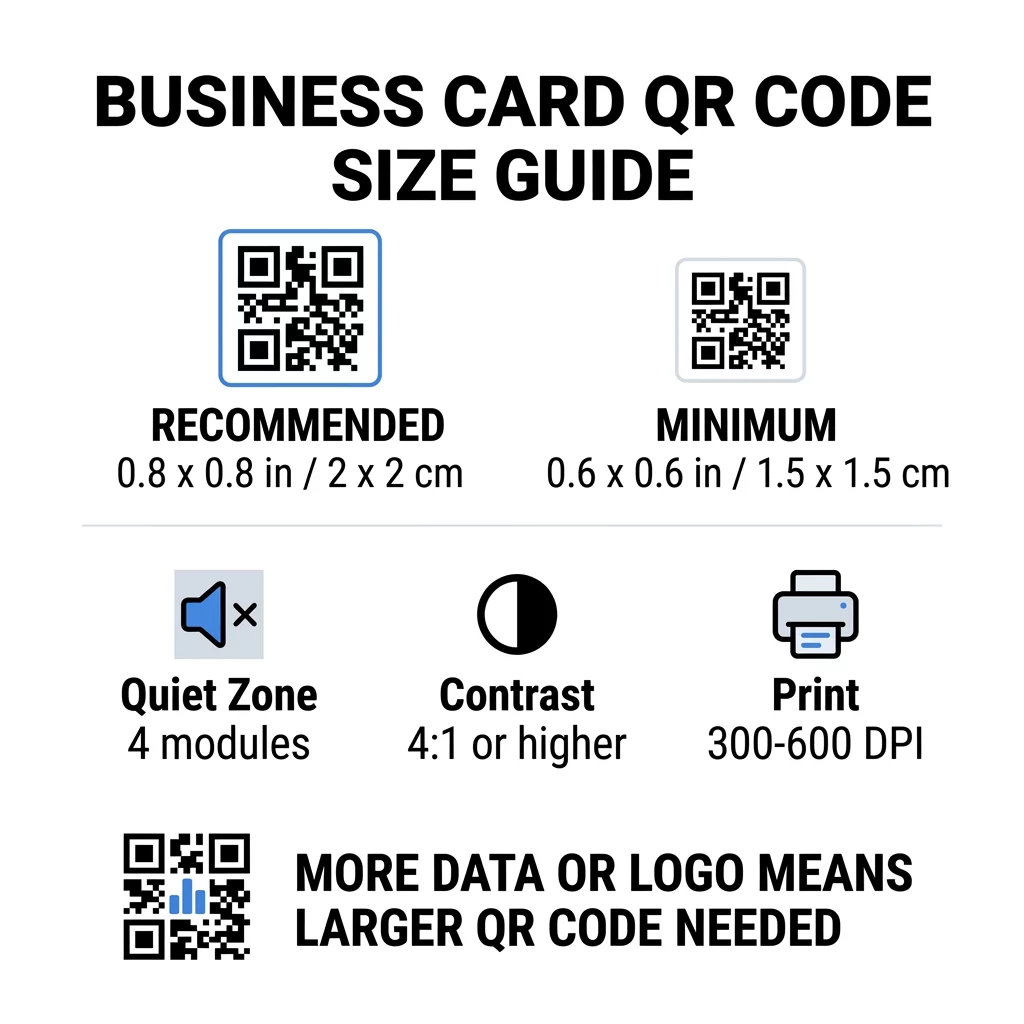
Візитівки залишають мало місця, тому корисно спочатку визначитися з розміром коду, а потім вже створювати дизайн навколо нього. Рекомендований розмір – 0.8 x 0.8 дюйма (2 x 2 см). Якщо на візитівці мало місця, мінімальний розмір становить 0.6 x 0.6 дюйма (1.5 x 1.5 см). Це відповідь на питання, наскільки маленьким може бути QR-код на візитівці: 0.6 дюйма, з коротким посиланням, високим контрастом та чистим друком.
| Категорія розміру | Розміри (дюйми) | Розміри (см) | Надійність | Найкращий варіант використання |
|---|---|---|---|---|
| Мінімальний | 0,6 x 0,6 дюйма | 1,5 х 1,5 см | Помірний | Короткі URL-адреси та дані низької щільності |
| Рекомендований | 0.8 x 0.8 дюйма | 2.0 x 2.0 см | Високий | Стандартні візитівки та посилання для контактів |
| Висока щільність | 1.0 x 1.0 дюйм+ | 2.5 x 2.5 см+ | Високий | Детальні контактні картки та вбудовані логотипи |
Ці розміри стосуються лише чорних квадратів. Порожній відступ навколо коду є додатковим, тому код розміром 0.8 дюйма потребує приблизно 0.1 дюйма вільного простору з кожного боку (див. тиху зону нижче).
Розмір QR-коду на візитній картці за форматом картки
- Стандартна картка США (3,5 x 2 дюйми): код розміром 0,8 дюйма займає 40% висоти картки. Розмістіть його на звороті, щоб лицьова сторона залишалася чистою.
- Європейська стандартна картка (85 x 55 мм): використовуйте 20-25 мм. Діє те саме правило 2 см.
- Складені або квадратні картки: у вас є більше місця, тому використовуйте 1 дюйм (2,5 см) або більше і тримайте код подалі від згину.
- Лише зворотна сторона картки: якщо лицьова сторона заповнена, розмістіть код розміром 1 дюйм на звороті з коротким рядком, наприклад, “Відскануйте, щоб зберегти мій контакт”.
Як щільність даних диктує розмір коду
Розмір вашого QR-коду залежить від обсягу даних, які він містить. QR-код — це сітка з невеликих квадратів, які називаються модулями. Версія 1 має 21 x 21 модуль, а Версія 40 — 177 x 177 модулів. Більше даних означає більше модулів, і кожен модуль стає меншим, якщо розмір коду залишається незмінним. Якщо модулі друкуються меншими, ніж може розпізнати камера, сканування не вдасться.
Ось розрахунок для коду 2 см (0,8 дюйма). Коротке посилання зазвичай поміщається в код Версії 2 (25 модулів), тому кожен модуль становить близько 0,8 мм. Повний запис контакту може потребувати Версії 10 або вище (57 модулів або більше), і кожен модуль зменшується до близько 0,35 мм. Другий код значно важче надрукувати та відсканувати того ж розміру.
Пряма vCard з вашим ім'ям, номерами телефонів, електронними адресами та адресою офісу створює щільну сітку. Використання QR-код для візитки vCard для створення прямого статичного файлу часто потребує коду розміром 1 дюйм (2,5 см) або більше, щоб залишатися читабельним.
Щоб ваш код залишався компактним і легко сканованим на невеликій картці:
- Кодуйте коротке посилання на вашу сторінку контактів замість довгого необробленого тексту контакту.
- Залишайте лише найважливіші канали зв'язку.
- Зберігайте низьку кількість модулів, щоб кожен квадрат залишався великим і чітким.
- Дотримуйтесь принципів того, як розробити візитну картку з QR-кодом щоб збалансувати макет і функціональність.
Коротке посилання – найпростіший спосіб це зробити. Динамічний QR-код зберігає коротке посилання та дозволяє змінювати цільову сторінку після друку карток. Pageloot пропонує динамічні коди з 14-денною безкоштовною пробною версією, а плани можна переглянути за посиланням pageloot.com/pricing. Статичного коду достатньо, якщо ваше посилання ніколи не зміниться.
Створіть Свій Індивідуальний QR-код Для Візитної Картки Готові створити сканований, відстежуваний контактний код? Використовуйте Візитка з QR кодом для розробки кодів високої роздільної здатності та обміну вашими даними за допомогою одного сканування.
QR-коди на візитних картках: добре чи погано?
QR-коди на візитних картках – це добре, коли код достатньо великий, легко сканується та веде до чогось корисного. Вони погані, коли код занадто малий, посилання не працює або сторінка не пристосована для телефонів.
Переваги реальні. Людина може зберегти ваш контакт або відкрити ваше портфоліо за дві секунди, і ви можете вмістити більше інформації, ніж дозволяє картка. Ризики також реальні: код, який не сканується, виглядає недбало, а надрукований код з неправильним посиланням неможливо виправити на статичному коді. Дотримуйтесь цих правил:
- Зробіть код розміром щонайменше 0,8 дюйма (2 см).
- Спрямуйте його на сторінку, яка швидко відкривається на телефоні.
- Додайте поруч короткий рядок, який пояснює, що отримає людина, наприклад, “Зберегти мій контакт” або “Переглянути мої роботи”.
- Протестуйте надрукований зразок, перш ніж замовляти повний тираж.
Основні Технічні Стандарти для Надійного Сканування
Сам лише розмір не гарантує успішного сканування. Ці правила друку визначають, чи зможе камера прочитати шаблон.
Підтримка тихої зони
Тиха зона – це порожній відступ навколо всього QR-коду. Стандарт ISO/IEC вимагає щонайменше чотири модулі з кожного боку. Для коду розміром 2 см з 25 модулями цей відступ становить близько 3 мм. Порожній простір вказує сканеру, де починається код. Текст, рамки або фонові зображення всередині цього відступу є однією з найпоширеніших причин невдалих сканувань.
Застосування Високого Кольорового Контрасту
Сканери зчитують різницю в яскравості між темними модулями та світлим фоном. Чорне на білому – найбезпечніший вибір. Темно-синій, темно-зелений або чорний на світлому фоні також добре працюють. Уникайте світлих модулів на темному фоні (інвертовані коди), оскільки деякі стандартні програми камери не можуть їх прочитати. Не використовуйте два середні тони кольорів, наприклад, помаранчевий на червоному. Прочитайте рекомендації щодо колірного контрасту QR-кодів щоб вибрати безпечну пару кольорів.
Експорт векторних форматів для друку
Файли з низькою роздільною здатністю, наприклад, JPEG 72 DPI, друкуються з розмитими краями. Для друку надсилайте файл у форматі SVG, EPS або PDF (векторний), які залишаються чіткими за будь-якого розміру. Якщо ви можете надіслати лише PNG, експортуйте його з роздільною здатністю 300 DPI або вище у кінцевому розмірі друку. Ці найкращих практик для читабельності QR-кодів допоможуть вам уникнути проблем, перш ніж файл потрапить до друкарні.
Корекція помилок та інтеграція логотипу
QR-коди використовують корекцію помилок Ріда-Соломона. Вона дозволяє сканеру відновити дані, якщо частина коду пошкоджена, пом’ята або закрита. Існує чотири рівні:
- Рівень L відновлює близько 7% пошкоджених даних. Використовуйте його для невеликих, простих кодів без логотипу.
- Рівень M відновлює близько 15% пошкоджених даних. Це поширений стандарт для візитних карток.
- Рівень Q відновлює близько 25% пошкоджених даних. Це хороший вибір для карток, які зберігаються в гаманцях.
- Рівень H відновлює близько 30% пошкоджених даних. Використовуйте його, якщо розміщуєте логотип по центру.
Вищі рівні додають більше модулів, тому сітка стає щільнішою. Якщо ви використовуєте Рівень H для логотипу по центру, збільште розмір друку щонайменше до 1.0 x 1.0 дюйма (2.5 x 2.5 см) і тримайте логотип невеликим, приблизно одну п'яту ширини коду.
Вибір картону та покриттів
Поверхня картки змінює спосіб потрапляння світла на камеру телефону. Матовий і нелакований картон скануються найкраще, оскільки вони рівномірно розсіюють світло.
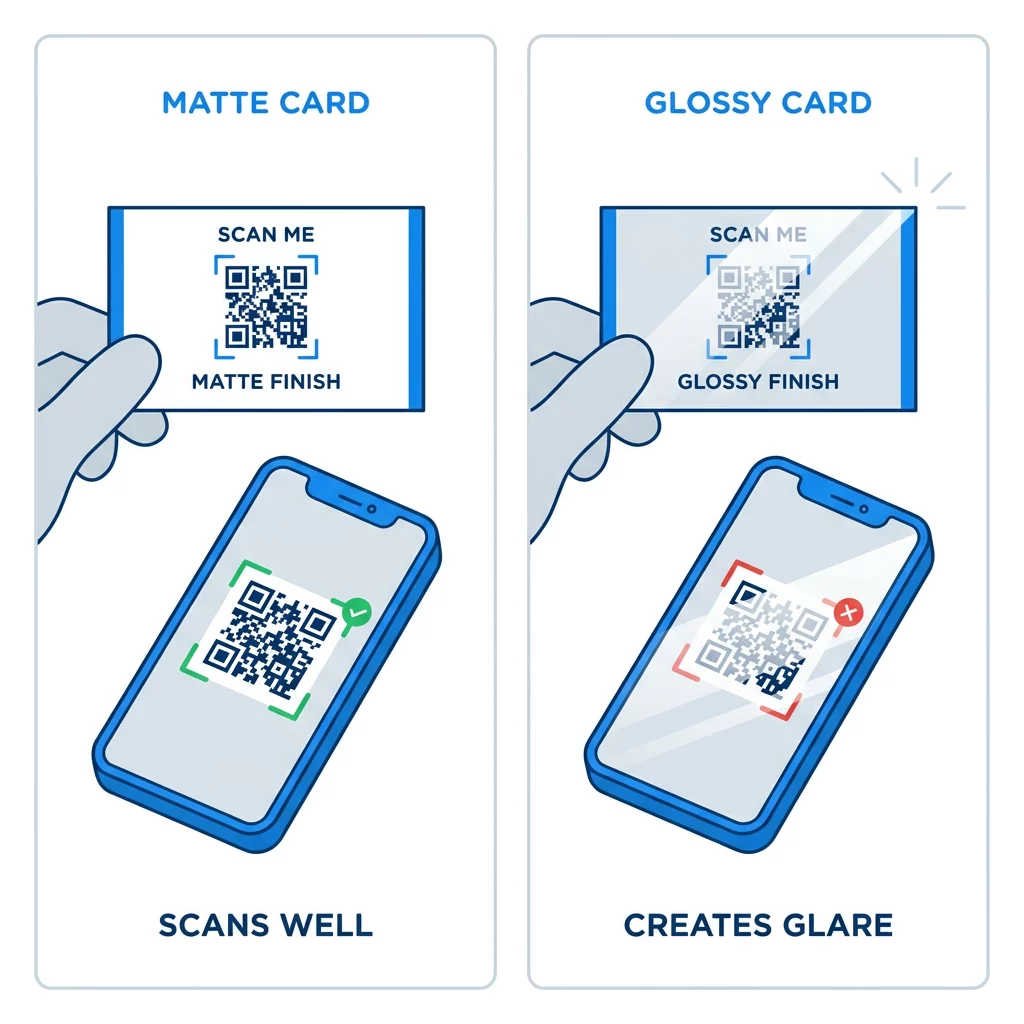
Глянцеві покриття, металева фольга та відбивний ламінат створюють відблиски під прожекторами, і ці відблиски пригнічують контраст. Якщо ви використовуєте спеціальне покриття, тримайте код на плоскій матовій ділянці. Тримайте код подалі від згинів, заокруглених кутів та краю, де великі пальці тримають картку.
Протестуйте QR-код вашої візитівки перед друком
- Надрукуйте пробний зразок на реальному папері для візитівок у масштабі 100%. Не оцінюйте код на екрані.
- Відскануйте його щонайменше одним iPhone та одним телефоном Android.
- Відскануйте його при яскравому денному світлі та в тьмяній кімнаті.
- Скануйте з відстані приблизно 4 дюйми (10 см) та приблизно 10 дюймів (25 см).
- Відкрийте цільову сторінку через мобільні дані та переконайтеся, що вона завантажується швидко.
- Лише тоді замовляйте повний тираж.
QR-код візитівки не сканується? Перевірте це
- Код менший за 0.6 дюйма (1.5 см), або посилання довге, а модулі крихітні. Збільшіть код або скоротіть посилання.
- Текст або рамка знаходяться всередині тихої зони. Відсуньте їх щонайменше на чотири модулі.
- Контраст занадто низький або кольори інвертовані. Використовуйте темні модулі на світлому фоні.
- Файл є зображенням низької роздільної здатності. Передрукуйте з векторного файлу або PNG 300 DPI у фінальному розмірі.
- Блік від глянцевого або фольгованого покриття. Перемістіть код на матову ділянку.
- Цільове посилання невірне або сторінка повільна. Відкрийте посилання на своєму телефоні та виправте його.
Правильно розміщений QR-код робить вашу візитівку надійним мостом між рукостисканням та вашим онлайн-профілем. Зберігайте код розміром 0.8 x 0.8 дюйма або більше, захищайте тиху зону та друкуйте з чистих векторних файлів. Щоб створити та протестувати свою наступну картку, використовуйте Pageloot генератор QR-кодів.
Поширені запитання
Плануйте для 0,8 x 0,8 дюйма (2 x 2 см). Цей розмір швидко сканується на сучасних смартфонах зі звичайної відстані тримання. Використовуйте 1 дюйм (2,5 см) або більше, якщо код містить багато даних або логотип.
Найменший розмір становить приблизно 0.6 x 0.6 дюйма (1.5 x 1.5 см). Він працює лише з коротким посиланням, високою контрастністю, чіткою тихою зоною та чітким друком. Для старих телефонів тримайте код розміром 0.8 дюйма (2 см) або більше.
Приблизно 0.6 дюйма (1.5 см) на сторону в найкращому випадку. Якщо менше, більшість камер телефонів не зможуть сфокусуватися на картці, що тримається на звичайній відстані. Скорочення посилання робить квадрати більшими та допомагає сканувати невеликі коди.
Так, але використовуйте корекцію помилок рівня H, щоб код міг відновити приховані дані. Рівень H додає модулі, тому збільште код щонайменше до 1.0 x 1.0 дюйма (2.5 см) і залиште логотип невеликим.
Поширеними причинами є занадто мала тиха зона, низький колірний контраст, файл низької роздільної здатності, відблиски від глянцевого покриття або занадто маленький код. Перевірте кожен з них на друкованому зразку та виправте перед наступним тиражем.
Вони хороші, коли код має розмір щонайменше 0,8 дюйма, добре сканується та відкриває сторінку, розроблену для телефонів. Вони погані, коли код крихітний, важко сканується або веде до непрацюючого посилання. Завжди тестуйте надрукований зразок.
Статичного коду достатньо, якщо посилання ніколи не зміниться, а статичні коди ніколи не закінчуються. Динамічний код вартий того, якщо ви можете змінити роботу, веб-сайти або контактні сторінки, оскільки ви можете редагувати пункт призначення без повторного друку. Динамічні коди Pageloot постачаються з 14-денною безкоштовною пробною версією, а тарифи вказані за адресою [pageloot.com/pricing].