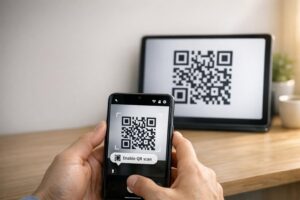
Bir kartvizit için minimum QR kod boyutu yaklaşık 0.6 x 0.6 inç (1.5 x 1.5 cm) olup, bu ancak kod kısa bir bağlantı içeriyorsa, net basılıyorsa ve güçlü bir kontrasta sahipse geçerlidir. Güvenilir tarama için en az 0.8 x 0.8 inç (2 x 2 cm) boyutunda yapın. Bu rehber, tam boyutları, bunların arkasındaki baskı kurallarını ve sipariş vermeden önce kartınızı test etmek için bir kontrol listesi sunar.
Kartvizitte QR Kodu Ne Kadar Büyük Olmalı?
Standart bir kartvizit için önerilen boyut 0.8 x 0.8 inç (2 x 2 cm)'dir. Bu boyutta, telefon kameraları loş ışıkta veya hafif açıda bile hızlı odaklanır. İnsanlar genellikle kartı telefondan 4 ila 10 inç (10 ila 25 cm) uzaklıkta tutar, bu nedenle kodun o mesafede kamera görüntüsünün iyi bir kısmını dolduracak kadar büyük olması gerekir.
Yaygın bir kural 10:1 oranıdır: her 10 cm tarama mesafesi için kod en az 1 cm genişliğinde olmalıdır. 10 inç (25 cm) mesafede bu, en kolay tarama için yaklaşık 1 inç (2.5 cm) verir ve daha kısa mesafeler daha küçük kodlara izin verir. Bu yüzden 0.8 inç çoğu kart için işe yarar ve 0.6 inçin altındaki her şey eski telefonlarda başarısız olmaya başlar.
Minimum QR Kod Boyutu ve Önerilen Boyut
Kartvizitler az yer kaplar, bu yüzden önce kod boyutuna karar verip sonra etrafında tasarım yapmak faydalıdır. Önerilen boyut 0.8 x 0.8 inç (2 x 2 cm)'dir. Kart kalabalıksa, minimum 0.6 x 0.6 inç (1.5 x 1.5 cm)'dir. Bir kartvizitte QR kodunun ne kadar küçük olabileceği sorusunun cevabı budur: 0.6 inç, kısa bir bağlantı, yüksek kontrast ve temiz bir baskı ile.
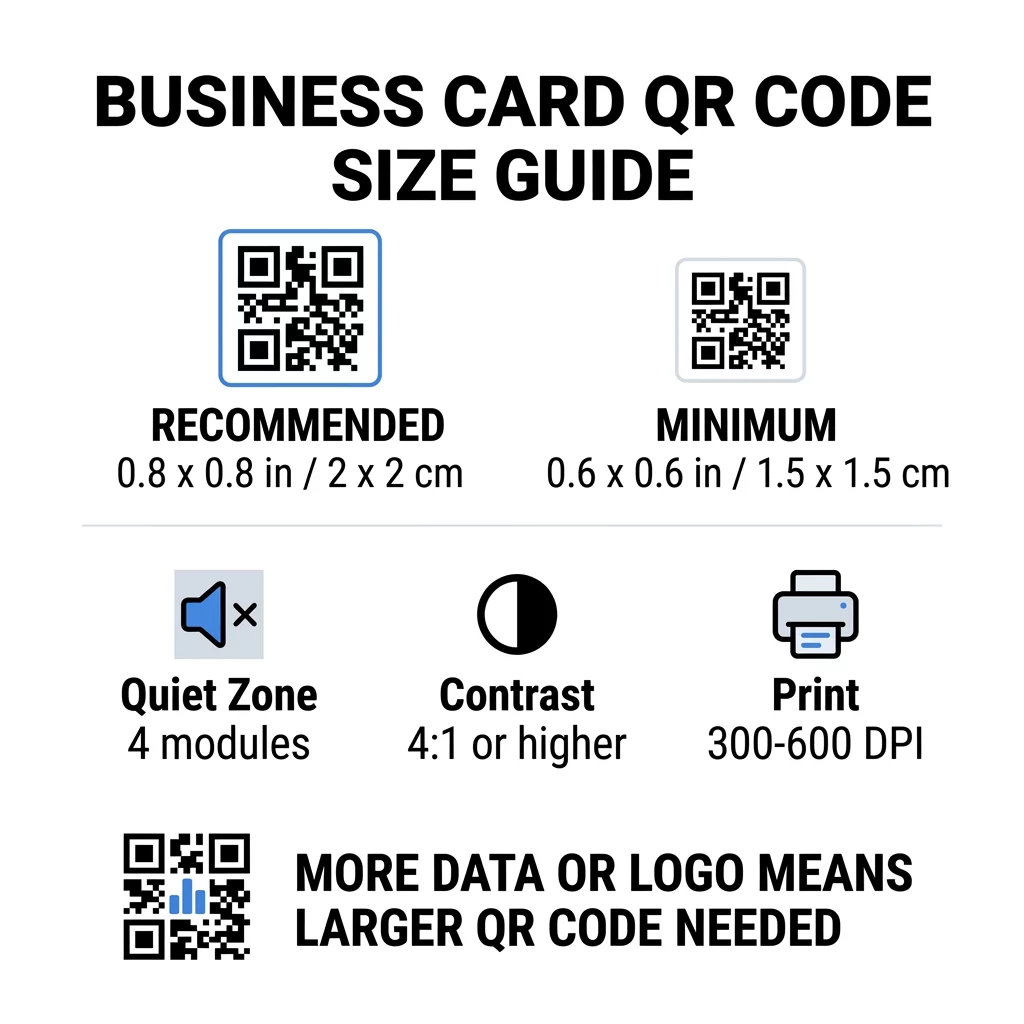
| Boyut Kategorisi | Boyutlar (İnç) | Boyutlar (cm) | Güvenilirlik | En İyi Kullanım Örneği |
|---|---|---|---|---|
| Minimum | 0.6 x 0.6 inç | 1,5 x 1,5 cm | Orta düzeyde | Kısa URL'ler ve düşük yoğunluklu veriler |
| Önerilen | 0.8 x 0.8 inç | 2.0 x 2.0 cm | Yüksek | Standart kartvizitler ve iletişim bağlantıları |
| Yüksek Yoğunluk | 1.0 x 1.0 inç+ | 2.5 x 2.5 cm+ | Yüksek | Detaylı iletişim kartları ve gömülü logolar |
Bu boyutlar sadece siyah kareler içindir. Kodun etrafındaki boş marj ekstradır, bu nedenle 0.8 inçlik bir kodun her iki tarafında yaklaşık 0.1 inç boş alana ihtiyacı vardır (aşağıdaki "sessiz bölge"ye bakın).
Kart Biçimine Göre Kartvizitte QR Kodu Boyutu
- ABD standart kartı (3.5 x 2 inç): 0.8 inçlik bir kod, kart yüksekliğinin 'ını kaplar. Ön yüzün temiz kalması için arkaya yerleştirin.
- Avrupa standart kartı (85 x 55 mm): 20 ila 25 mm kullanın. Aynı 2 cm kuralı geçerlidir.
- Katlanmış veya kare kartlar: Daha fazla alanınız var, bu yüzden 1 inç (2.5 cm) veya daha büyük kullanın ve kodu katlama yerinden uzak tutun.
- Sadece kartın arkası: Ön yüz doluysa, kartın arkasına “Kişilerimi kaydetmek için tarayın” gibi kısa bir açıklama ile 1 inçlik bir kod yerleştirin.
Veri Yoğunluğu Kod Boyutunu Nasıl Belirler
QR kodunuzun boyutu, ne kadar veri barındırdığına bağlıdır. Bir QR kodu, modül adı verilen küçük karelerden oluşan bir ızgaradır. Sürüm 1, 21 x 21 modüle ve Sürüm 40 ise 177 x 177 modüle sahiptir. Daha fazla veri, daha fazla modül anlamına gelir ve kod boyutu aynı kaldığında her modül küçülür. Modüller bir kameranın çözebileceğinden daha küçük basılırsa, tarama başarısız olur.
İşte 2 cm'lik (0.8 inç) bir kod için hesaplama. Kısa bir bağlantı genellikle Sürüm 2 koduna (25 modül) sığar, bu nedenle her modül yaklaşık 0.8 mm'dir. Tam bir iletişim kaydı Sürüm 10 veya daha yüksek (57 modül veya daha fazla) gerektirebilir ve her modül yaklaşık 0.35 mm'ye düşer. İkinci kodu aynı boyutta yazdırmak ve taramak çok daha zordur.
Adınız, telefon numaralarınız, e-posta adresleriniz ve ofis adresinizle doğrudan bir vCard, yoğun bir ızgara oluşturur. Bir vCard QR Kod Oluşturucu doğrudan statik bir dosya oluşturmak için genellikle okunabilir kalması için 1 inç (2.5 cm) veya daha büyük bir koda ihtiyaç duyar.
Küçük bir kartta kodunuzu kompakt ve kolay taranabilir tutmak için:
- Uzun ham iletişim metni yerine iletişim sayfanıza kısa bir bağlantı kodlayın.
- Yalnızca temel iletişim kanallarını kullanın.
- Modül sayısını düşük tutun, böylece her kare büyük ve keskin kalır.
- nasıl yapılacağına ilişkin prensipleri takip edin QR kodlu bir kartvizit tasarlayın düzen ve işlevi dengelemek için.
Bunu yapmanın en basit yolu kısa bir bağlantıdır. Dinamik bir QR kodu, kısa bir bağlantıyı saklar ve kartlar basıldıktan sonra hedef sayfayı değiştirmenize olanak tanır. Pageloot, 14 günlük ücretsiz deneme sürümüyle dinamik kodlar sunar ve planları şuradan görebilirsiniz: pageloot.com/pricing. Bağlantınız asla değişmeyecekse statik bir kod yeterlidir.
Özel Kartvizit Kodunuzu Oluşturun Taranabilir, izlenebilir bir iletişim kodu oluşturmaya hazır mısınız? Kullanın QR Kodlu Kartvizit Oluşturucu yüksek çözünürlüklü kodlar tasarlamak ve bilgilerinizi tek bir taramayla paylaşmak için.
Kartvizitlerdeki QR Kodları İyi mi Kötü mü?
Kartvizitlerdeki QR kodları, kod yeterince büyük olduğunda, taranması kolay olduğunda ve faydalı bir şeye yönlendirdiğinde iyidir. Kod çok küçük olduğunda, bağlantı bozuk olduğunda veya sayfa telefonlar için yapılmadığında kötüdür.
Faydaları gerçektir. Kişi, iletişiminizi kaydedebilir veya portföyünüzü iki saniyede açabilir ve karta sığandan daha fazla bilgi sığdırabilirsiniz. Riskler de gerçektir: taranmayan bir kod özensiz görünür ve yanlış bağlantı içeren basılı bir kod statik bir kodda düzeltilemez. Şu kuralları kullanın:
- Kodu en az 0.8 inç (2 cm) yapın.
- Telefonlarda hızlı açılan bir sayfaya yönlendirin.
- Yanına kişinin ne elde edeceğini belirten kısa bir cümle ekleyin, örneğin “İletişim bilgilerimi kaydet” veya “Çalışmalarımı gör”.
- Tam baskı siparişini vermeden önce basılı prova örneğini test edin.
Güvenilir Tarama İçin Temel Teknik Standartlar
Yalnızca boyut iyi bir taramayı garanti etmez. Bu baskı kuralları, bir kameranın deseni okuyup okuyamayacağına karar verir.
Sessiz Bölgeyi Korumak
Sessiz bölge, tüm QR kodunun etrafındaki boş kenar boşluğudur. ISO/IEC standardı her tarafta en az dört modül gerektirir. 25 modüllü 2 cm'lik bir kod için bu kenar boşluğu yaklaşık 3 mm'dir. Boş alan, tarayıcıya kodun nerede başladığını söyler. Bu kenar boşluğunun içindeki metin, kenarlıklar veya arka plan resimleri, başarısız taramaların en yaygın nedenlerinden biridir.
Yüksek Renk Kontrastı Uygulamak
Tarayıcılar, koyu modüller ile açık arka plan arasındaki parlaklık farkını okur. Siyah üzerine beyaz en güvenli seçimdir. Açık bir arka plan üzerinde koyu mavi, koyu yeşil veya siyah da iyi çalışır. Koyu bir arka plan üzerindeki açık modüllerden (ters çevrilmiş kodlar) kaçının, çünkü bazı varsayılan kamera uygulamaları bunları okuyamaz. Kırmızı üzerine turuncu gibi iki orta tonlu renk kullanmayın. Okuyun QR kodu renk kontrastı yönergelerini uygulayın güvenli bir renk çifti seçmek için.
Vektör Baskı Formatlarını Dışa Aktarma
72 DPI JPEG gibi düşük çözünürlüklü dosyalar bulanık kenarlarla basılır. Baskı için dosyayı SVG, EPS veya PDF (vektör) olarak gönderin, bunlar her boyutta keskin kalır. Yalnızca bir PNG gönderebiliyorsanız, son baskı boyutunda 300 DPI veya daha yüksek çözünürlükte dışa aktarın. Bunlar QR kodu okunabilirliği için en iyi uygulamaları dosya matbaaya ulaşmadan önce sorunları önlemenize yardımcı olur.
Hata Düzeltme ve Logo Entegrasyonu
QR kodları Reed-Solomon hata düzeltmesi kullanır. Kodun bir kısmı çizildiğinde, kırıştığında veya kapandığında bir tarayıcının verileri yeniden oluşturmasına olanak tanır. Dört seviyesi vardır:
- L Seviyesi, hasarlı verilerin yaklaşık %7'sini kurtarır. Logo içermeyen küçük, basit kodlar için kullanın.
- M Seviyesi, hasarlı verilerin yaklaşık 'ini kurtarır. Kartvizitler için yaygın bir varsayılan ayardır.
- Q Seviyesi, hasarlı verilerin yaklaşık 'ini kurtarır. Cüzdanlarda duran kartlar için iyi bir seçimdir.
- H Seviyesi, hasarlı verilerin yaklaşık 'unu kurtarır. Ortasına bir logo yerleştirirseniz kullanın.
Daha yüksek seviyeler daha fazla modül ekler, bu nedenle ızgara daha yoğun hale gelir. Ortadaki bir logo için H Seviyesi kullanıyorsanız, baskı boyutunu en az 1.0 x 1.0 inç (2.5 x 2.5 cm) olarak artırın ve logoyu küçük, kod genişliğinin yaklaşık beşte biri kadar tutun.
Kart Stok ve Cilaları Seçme
Kart yüzeyi ışığın telefon kamerasına ulaşma şeklini değiştirir. Mat ve kaplamasız kartlar ışığı eşit şekilde dağıttıkları için en iyi şekilde taranır.
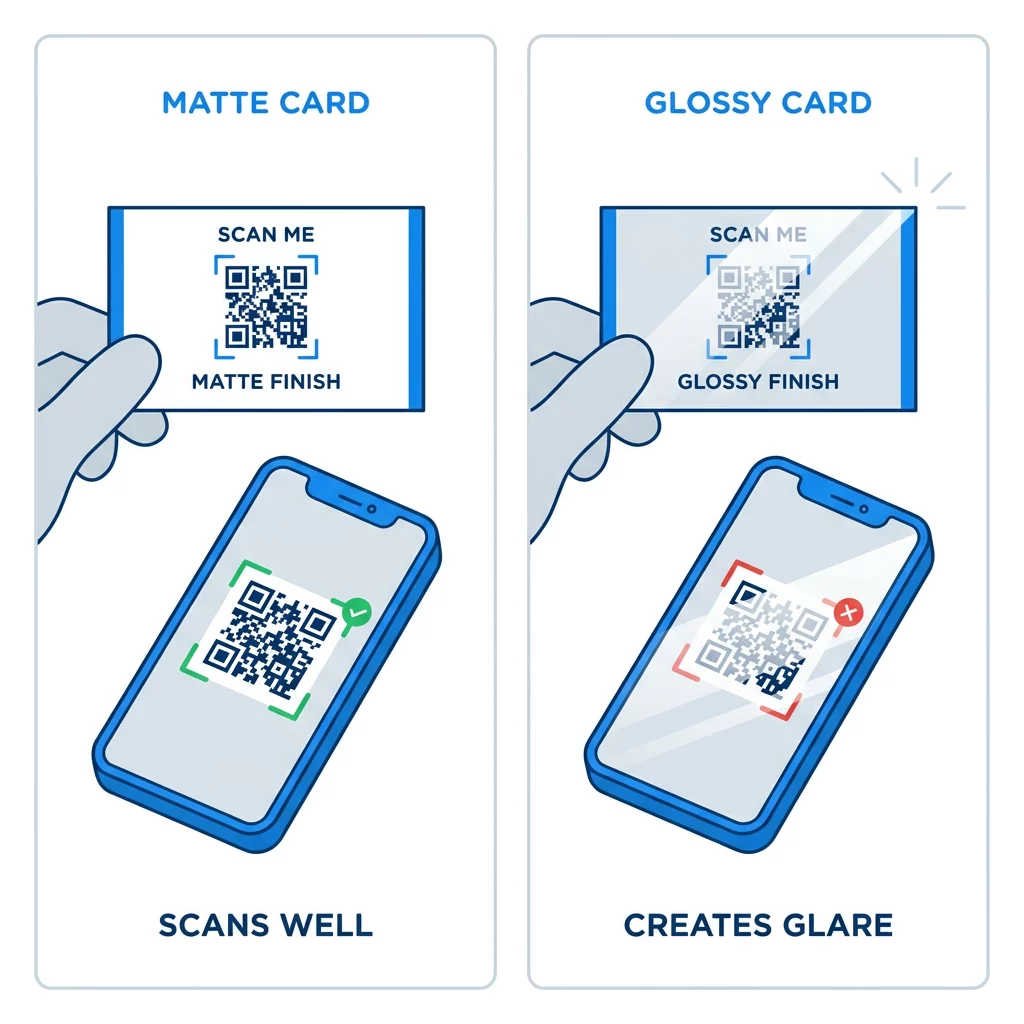
Yüksek parlaklıkta kaplamalar, metalik folyo ve yansıtıcı laminat spot ışıkları altında parlamaya neden olur ve bu parlama kontrastı yok eder. Özel bir cila kullanıyorsanız, kodu düz mat bir alanda tutun. Kodu katlamalardan, yuvarlak köşelerden ve başparmakların kartı tuttuğu kenardan uzak tutun.
Kartvizitinizin QR Kodunu Baskıdan Önce Test Edin
- Gerçek kartvizit kağıdına 0 ölçekte bir prova baskı yapın. Kodu ekranda değerlendirmeyin.
- En az bir iPhone ve bir Android telefonla tarayın.
- Parlak gün ışığında ve loş bir odada tarayın.
- Yaklaşık 4 inç (10 cm) ve yaklaşık 10 inç (25 cm) mesafeden tarayın.
- Hedef sayfayı mobil veriyle açın ve hızlı yüklendiğini onaylayın.
- Ancak o zaman tam baskı siparişini verin.
Kartvizit QR Kodu Taranmıyor mu? Bunları Kontrol Edin
- Kod 0.6 inç (1.5 cm)den küçük veya bağlantı uzun ve modüller çok küçük. Kodu büyütün veya bağlantıyı kısaltın.
- Metin veya bir kenarlık sessiz alanın içinde bulunuyor. Bunu en az dört modül kadar uzağa taşıyın.
- Kontrast çok düşük veya renkler tersine çevrilmiş. Açık bir arka plan üzerinde koyu modüller kullanın.
- Dosya düşük çözünürlüklü bir görüntü. Vektör dosyasından veya son boyutta 300 DPI PNG'den yeniden yazdırın.
- Parlak veya folyo kaplamadan kaynaklanan parlama. Kodu mat bir alana taşıyın.
- Hedef bağlantı yanlış veya sayfa yavaş. Bağlantıyı telefonunuzda açın ve düzeltin.
Uygun boyutta bir QR kodu, kartvizitinizi bir el sıkışma ile çevrimiçi profiliniz arasında güvenilir bir köprü yapar. Kodu 0.8 x 0.8 inç veya daha büyük tutun, sessiz alanı koruyun ve temiz vektör dosyalarından yazdırın. Bir sonraki kartınızı oluşturmak ve test etmek için Pageloot'u kullanın QR kod oluşturucu.
Sıkça sorulan sorular
0.8 x 0.8 inç (2 x 2 cm) boyutunu planlayın. Bu boyut, mevcut akıllı telefonlarda normal tutma mesafesinden hızlıca taranır. Kod çok fazla veri veya bir logo içeriyorsa 1 inç (2.5 cm) veya daha fazlasını kullanın.
En küçük boyut yaklaşık 0.6 x 0.6 inç (1.5 x 1.5 cm) civarındadır. Yalnızca kısa bir bağlantı, yüksek kontrast, net bir sessiz bölge ve keskin bir baskı ile çalışır. Eski telefonlar için kodu 0.8 inç (2 cm) veya daha büyük tutun.
En iyi durumda her kenarı yaklaşık 0.6 inç (1.5 cm). Bundan daha küçük olursa, çoğu telefon kamerası normal mesafede tutulan bir karta odaklanamaz. Bağlantıyı kısaltmak kareleri büyütür ve küçük kodların taranmasına yardımcı olur.
Evet, ancak kodun gizli verileri kurtarabilmesi için Düzey H hata düzeltmesi kullanın. Düzey H modüller ekler, bu nedenle kodu en az 1.0 x 1.0 inç (2.5 cm) boyutuna büyütün ve logoyu küçük tutun.
Yaygın nedenler; çok küçük bir sessiz alan, düşük renk kontrastı, düşük çözünürlüklü bir dosya, parlak yüzeyden kaynaklanan yansıma veya çok küçük bir koddur. Basılı provada her birini kontrol edin ve bir sonraki baskıdan önce düzeltin.
Kod en az 0,8 inç olduğunda, iyi tarandığında ve telefonlar için yapılmış bir sayfa açtığında iyidirler. Kod çok küçük olduğunda, taranması zor olduğunda veya bozuk bir bağlantıya yönlendirdiğinde kötü olurlar. Her zaman basılı bir provayı test edin.
Bağlantı asla değişmeyecekse statik bir kod yeterlidir ve statik kodların süresi asla dolmaz. İş, web sitesi veya iletişim sayfalarını değiştirebilecekseniz dinamik bir kod kullanmaya değerdir, çünkü hedefi yeniden yazdırmadan düzenleyebilirsiniz. Pageloot dinamik kodları 14 günlük ücretsiz deneme sürümüyle gelir ve planlar pageloot.com/pricing adresinde listelenir.