גודל קוד ה-QR המינימלי לכרטיס ביקור הוא כ-0.6 x 0.6 אינץ' (1.5 x 1.5 ס"מ), וזאת רק אם הקוד מכיל קישור קצר, מודפס חד ובעל ניגודיות חזקה. לסריקה אמינה, הפכו אותו לגודל של לפחות 0.8 x 0.8 אינץ' (2 x 2 ס"מ). מדריך זה מפרט את הגדלים המדויקים, את כללי ההדפסה שמאחוריהם ורשימת בדיקה לבדיקת הכרטיס שלכם לפני ההזמנה.
מהו הגודל המומלץ לקוד QR על כרטיס ביקור?
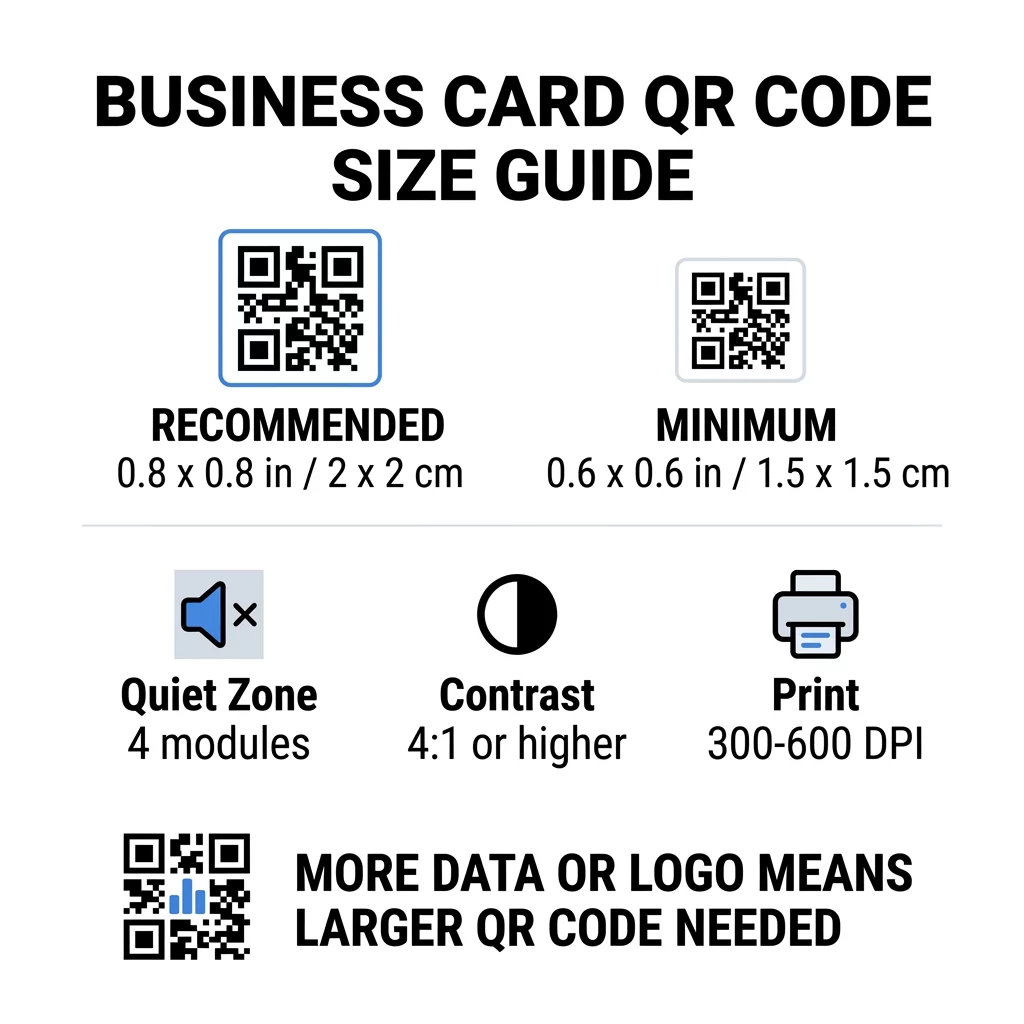
עבור כרטיס ביקור סטנדרטי, הגודל המומלץ הוא 0.8 x 0.8 אינץ' (2 x 2 ס"מ). בגודל כזה, מצלמות טלפון מתמקדות במהירות, גם בתאורה עמומה או בזווית קלה. אנשים בדרך כלל מחזיקים כרטיס במרחק של 4 עד 10 אינץ' (10 עד 25 ס"מ) מהטלפון, ולכן הקוד צריך להיות גדול מספיק כדי למלא חלק ניכר מתצוגת המצלמה במרחק זה.
כלל נפוץ הוא יחס של 10:1: על כל 10 ס"מ של מרחק סריקה, הקוד צריך להיות ברוחב של לפחות 1 ס"מ. במרחק של 10 אינץ' (25 ס"מ) זה נותן כ-1 אינץ' (2.5 ס"מ) לסריקה הקלה ביותר, ומרחקים קצרים יותר מאפשרים קודים קטנים יותר. זו הסיבה ש-0.8 אינץ' עובד עבור רוב הכרטיסים וכל דבר מתחת ל-0.6 אינץ' מתחיל להיכשל בטלפונים ישנים יותר.
גודל קוד QR מינימלי וגודל מומלץ
כרטיסי ביקור משאירים מעט מקום, ולכן כדאי להחליט על גודל הקוד תחילה ולאחר מכן לעצב סביבו. הגודל המומלץ הוא 0.8 x 0.8 אינץ' (2 x 2 ס"מ). אם הכרטיס עמוס, המינימום הוא 0.6 x 0.6 אינץ' (1.5 x 1.5 ס"מ). זו התשובה לשאלה עד כמה קטן יכול להיות קוד QR על כרטיס ביקור: 0.6 אינץ', עם קישור קצר, ניגודיות גבוהה והדפסה נקייה.
| קטגוריית גודל | מידות (אינץ') | מידות (ס"מ) | אמינות | מקרה השימוש הטוב ביותר |
|---|---|---|---|---|
| מינימלי | 0.6 x 0.6 אינץ' | 1.5 על 1.5 ס"מ | לְמַתֵן | כתובות אתרים קצרות ונתונים בצפיפות נמוכה |
| מומלץ | 0.8 x 0.8 אינץ' | 2.0 x 2.0 ס"מ | גָבוֹהַ | כרטיסי ביקור סטנדרטיים וקישורי יצירת קשר |
| צפיפות גבוהה | 1.0 x 1.0 אינץ'+ | 2.5 x 2.5 ס"מ+ | גָבוֹהַ | כרטיסי קשר מפורטים ולוגואים מוטמעים |
גדלים אלו מיועדים לריבועים השחורים בלבד. השוליים הריקים סביב הקוד הם תוספת, כך שקוד בגודל 0.8 אינץ' דורש כ-0.1 אינץ' של שטח נקי מכל צד (ראו את "אזור השקט" למטה).
גודל קוד QR על כרטיס ביקור לפי פורמט הכרטיס
- כרטיס סטנדרטי אמריקאי (3.5 x 2 אינץ'): קוד בגודל 0.8 אינץ' תופס 40% מגובה הכרטיס. מקם אותו מאחור כך שהחזית תישאר נקייה.
- כרטיס סטנדרטי אירופאי (85 x 55 מ"מ): השתמש ב-20 עד 25 מ"מ. חל אותו כלל של 2 ס"מ.
- כרטיסים מקופלים או מרובעים: יש לך יותר מקום, לכן השתמש בגודל של 1 אינץ' (2.5 ס"מ) או יותר ושמור את הקוד רחוק מהקיפול.
- גב הכרטיס בלבד: אם החזית מלאה, מקם קוד בגודל 1 אינץ' בגב עם שורה קצרה כגון "סרוק כדי לשמור את איש הקשר שלי".
כיצד צפיפות הנתונים מכתיבה את גודל הקוד
גודל קוד ה-QR שלך תלוי בכמות הנתונים שהוא מכיל. קוד QR הוא רשת של ריבועים קטנים הנקראים מודולים. גרסה 1 כוללת 21 x 21 מודולים וגרסה 40 כוללת 177 x 177 מודולים. יותר נתונים פירושם יותר מודולים, וכל מודול נעשה קטן יותר כאשר גודל הקוד נשאר זהה. אם המודולים מודפסים קטנים מדי מכדי שמצלמה תוכל לזהות, הסריקה תיכשל.
הנה החישוב עבור קוד בגודל 2 ס"מ (0.8 אינץ'). קישור קצר מתאים בדרך כלל לקוד גרסה 2 (25 מודולים), כך שכל מודול הוא בערך 0.8 מ"מ. רשומת איש קשר מלאה עשויה לדרוש גרסה 10 או גבוהה יותר (57 מודולים או יותר), וכל מודול יורד לכ-0.35 מ"מ. הקוד השני קשה הרבה יותר להדפסה ולסריקה באותו גודל.
vCard ישיר עם שמך, מספרי הטלפון, כתובות האימייל וכתובת המשרד יוצר רשת צפופה. שימוש ב- V card בקוד QR כדי ליצור קובץ סטטי ישיר דורש לעיתים קוד בגודל 1 אינץ' (2.5 ס"מ) או יותר כדי להישאר קריא.
כדי לשמור על הקוד שלך קומפקטי וקל לסריקה על כרטיס קטן:
- קודד קישור קצר לדף אנשי הקשר שלך במקום טקסט קשר גולמי ארוך.
- שמור רק את ערוצי הקשר החיוניים.
- שמור על מספר מודולים נמוך כך שכל ריבוע יישאר גדול וחד.
- פעל לפי העקרונות כיצד ל- לעצב כרטיס ביקור עם קוד QR כדי לאזן בין פריסה ותפקוד.
קישור מקוצר הוא הדרך הפשוטה ביותר לעשות זאת. קוד QR דינמי מאחסן קישור מקוצר ומאפשר לך לשנות את עמוד היעד לאחר הדפסת הכרטיסים. Pageloot מציעה קודים דינמיים עם ניסיון חינם למשך 14 יום, ותוכל לראות את התוכניות בכתובת pageloot.com/pricing. קוד סטטי מספיק אם הקישור שלך לעולם לא ישתנה.
צור את קוד כרטיס הביקור המותאם אישית שלך מוכן לבנות קוד איש קשר שניתן לסרוק ולעקוב אחריו? השתמש ב- כרטיס ביקור דיגיטלי עם קוד QR כדי לעצב קודים ברזולוציה גבוהה ולשתף את הפרטים שלך בסריקה אחת.
האם קודי QR על כרטיסי ביקור טובים או רעים?
קודי QR על כרטיסי ביקור טובים כאשר הקוד גדול מספיק, קל לסריקה ומוביל למשהו שימושי. הם רעים כאשר הקוד קטן, הקישור שבור או העמוד לא מיועד לטלפונים.
היתרונות אמיתיים. האדם יכול לשמור את איש הקשר שלך או לפתוח את תיק העבודות שלך תוך שתי שניות, ואתה יכול להכניס יותר מידע ממה שהכרטיס מאפשר. הסיכונים גם אמיתיים: קוד שלא נסרק נראה חסר זהירות, וקוד מודפס עם קישור שגוי אינו ניתן לתיקון בקוד סטטי. השתמש בכללים הבאים:
- הפוך את הקוד בגודל של לפחות 0.8 אינץ' (2 ס"מ).
- הפנה אותו לעמוד שנפתח במהירות בטלפון.
- הוסף לידו שורה קצרה שמציינת מה האדם מקבל, כגון “שמור את איש הקשר שלי” או “ראה את העבודות שלי”.
- בדוק את ההגהה המודפסת לפני שאתה מזמין את הכמות המלאה.
תקנים טכניים חיוניים לסריקה אמינה
גודל לבדו אינו מבטיח סריקה טובה. כללי הדפסה אלה קובעים אם מצלמה יכולה לקרוא את התבנית.
שמירה על האזור השקט
אזור השקט הוא השוליים הריקים סביב קוד ה-QR כולו. תקן ISO/IEC דורש לפחות ארבעה מודולים מכל צד. עבור קוד בגודל 2 ס"מ עם 25 מודולים, השוליים הללו הם כ-3 מ"מ. השטח הריק אומר לסורק היכן הקוד מתחיל. טקסט, גבולות או תמונות רקע בתוך שוליים אלה הם אחת הסיבות הנפוצות ביותר לסריקות כושלות.
יישום ניגודיות צבע גבוהה
סורקים קוראים את ההבדל בבהירות בין המודולים הכהים לרקע הבהיר. שחור על לבן היא הבחירה הבטוחה ביותר. גם כחול כהה, ירוק כהה או שחור על רקע בהיר עובדים היטב. הימנע ממודולים בהירים על רקע כהה (קודים הפוכים), מכיוון שחלק מיישומי מצלמה ברירת מחדל אינם יכולים לקרוא אותם. אל תשתמש בשני צבעים בטווח ביניים, כגון כתום על אדום. קרא את הـ הנחיות ניגודיות צבעים לקודי QR כדי לבחור זוג צבעים בטוח.
ייצוא פורמטים וקטוריים להדפסה
קבצים ברזולוציה נמוכה, כגון JPEG באיכות 72 DPI, מודפסים עם קצוות מטושטשים. להדפסה, שלח את הקובץ כ-SVG, EPS או PDF (וקטורי), אשר נשארים חדים בכל גודל. אם אתה יכול לשלוח רק PNG, ייצא אותו ב-300 DPI או יותר בגודל ההדפסה הסופי. אלו שיטות עבודה מומלצות לקריאות קודי QR יעזרו לך למנוע בעיות לפני שהקובץ מגיע לבית הדפוס.
תיקון שגיאות ושילוב לוגו
קודי QR משתמשים בתיקון שגיאות ריד-סולומון. הוא מאפשר לסורק לשחזר את הנתונים כאשר חלק מהקוד שרוט, מקומט או מכוסה. ישנן ארבע רמות:
- רמה L משחזרת כ-7% מהנתונים הפגומים. השתמש בה לקודים קטנים ופשוטים ללא לוגו.
- רמה M משחזרת כ-15% מהנתונים הפגומים. זוהי ברירת מחדל נפוצה עבור כרטיסי ביקור.
- רמה Q משחזרת כ-25% מהנתונים הפגומים. זוהי בחירה טובה עבור כרטיסים הנמצאים בארנקים.
- רמה H משחזרת כ-30% מהנתונים הפגומים. השתמש בה אם אתה ממקם לוגו במרכז.
רמות גבוהות יותר מוסיפות מודולים נוספים, כך שהרשת נעשית צפופה יותר. אם אתה משתמש ברמה H עבור לוגו מרכזי, הגדל את גודל ההדפסה ל-1.0 x 1.0 אינץ' לפחות (2.5 x 2.5 ס"מ), ושמור על הלוגו קטן, בסביבות חמישית מרוחב הקוד.
בחירת סוג נייר וגימורים לכרטיסים
משטח הכרטיס משנה את האופן שבו האור מגיע למצלמת הטלפון. גימור מט ולא מצופה נסרקים בצורה הטובה ביותר מכיוון שהם מפזרים אור באופן אחיד.
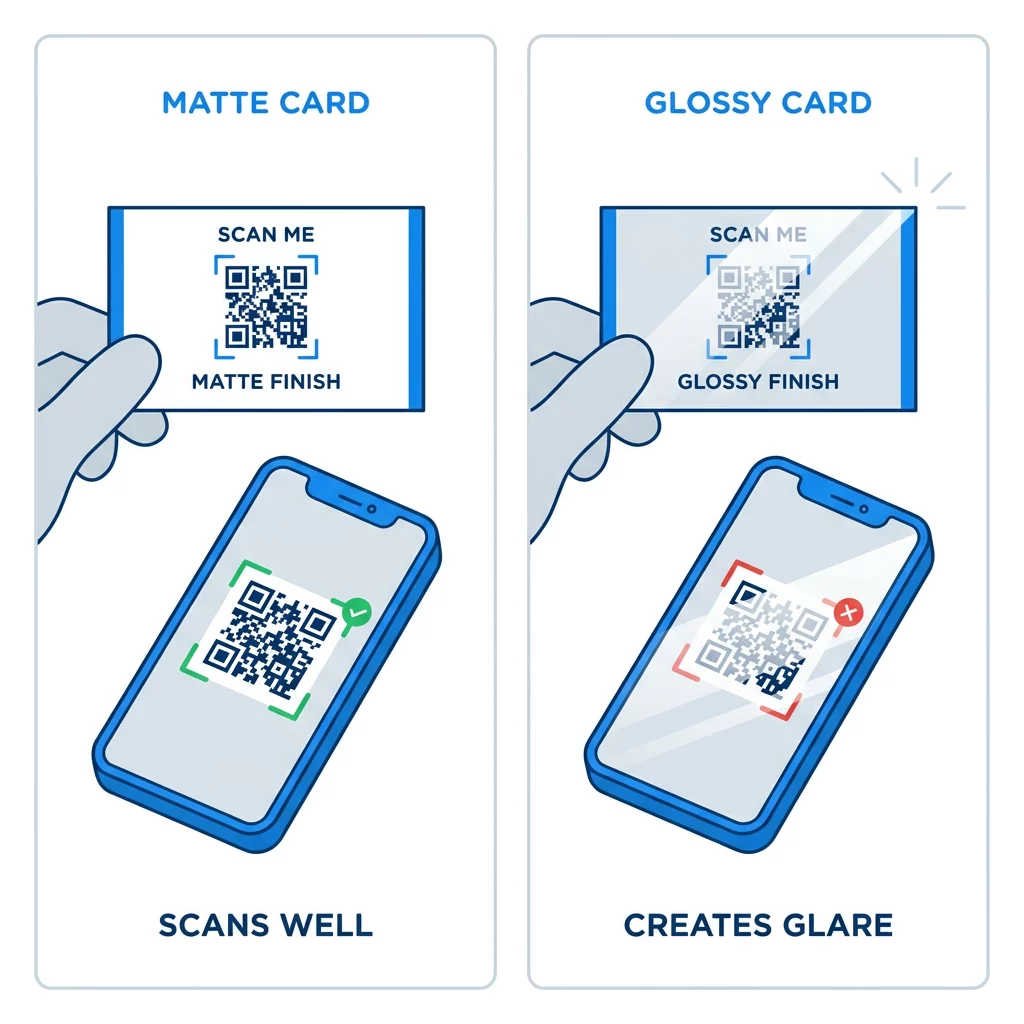
ציפויים מבריקים במיוחד, רדיד מתכתי ולמינציה מחזירה אור יוצרים סנוור תחת אורות זרקורים, והסנוור מוחק את הניגודיות. אם אתה משתמש בגימור מיוחד, שמור את הקוד על אזור מט שטוח. הרחק את הקוד מקפלים, פינות מעוגלות והקצה שבו אגודלים אוחזים בכרטיס.
בדוק את קוד ה-QR של כרטיס הביקור שלך לפני ההדפסה
- הדפס דוגמה על נייר הכרטיס האמיתי בקנה מידה של 100%. אל תשפוט את הקוד על מסך.
- סרוק אותו עם לפחות אייפון אחד וטלפון אנדרואיד אחד.
- סרוק אותו באור יום בהיר ובחדר מעומעם.
- סרוק מכ-4 אינץ' (10 ס"מ) ומכ-10 אינץ' (25 ס"מ).
- פתח את עמוד היעד עם נתונים סלולריים ואשר שהוא נטען במהירות.
- רק אז הזמן את כל סבב ההדפסה.
קוד ה-QR של כרטיס הביקור לא נסרק? בדוק את הנקודות הבאות:
- הקוד קטן מ-0.6 אינץ' (1.5 ס"מ), או שהקישור ארוך והמודולים קטנים מדי. הגדל את הקוד או קצר את הקישור.
- טקסט או מסגרת נמצאים בתוך האזור השקט. הרחק אותם בארבעה מודולים לפחות.
- הניגודיות נמוכה מדי או שהצבעים הפוכים. השתמש במודולים כהים על רקע בהיר.
- הקובץ הוא תמונה ברזולוציה נמוכה. הדפס מחדש מקובץ וקטורי או מקובץ PNG ב-300 DPI בגודל הסופי.
- סנוור מגימור מבריק או בציפוי למינציה. העבר את הקוד לאזור מט.
- קישור היעד שגוי או שהדף איטי. פתח את הקישור בטלפון שלך ותקן אותו.
קוד QR בגודל מתאים הופך את כרטיס הביקור שלך לגשר אמין בין לחיצת יד לפרופיל המקוון שלך. שמור על הקוד בגודל 0.8 x 0.8 אינץ' או גדול יותר, הגן על האזור השקט והדפס מקבצי וקטור נקיים. לבנייה ובדיקה של הכרטיס הבא שלך, השתמש ב-Pageloot מחולל קודי QR.
שאלות נפוצות
תכנן עבור 0.8 על 0.8 אינץ' (2 על 2 ס"מ). גודל זה נסרק במהירות בסמארטפונים עדכניים ממרחק החזקה רגיל. השתמש ב-1 אינץ' (2.5 ס"מ) או יותר אם הקוד מכיל הרבה נתונים או לוגו.
הגודל הקטן ביותר הוא בערך 0.6 x 0.6 אינץ' (1.5 x 1.5 ס"מ). הוא עובד רק עם קישור קצר, ניגודיות גבוהה, אזור שקט ברור והדפסה חדה. עבור טלפונים ישנים יותר, שמור את הקוד בגודל 0.8 אינץ' (2 ס"מ) או גדול יותר.
כ-0.6 אינץ' (1.5 ס"מ) לכל צד במקרה הטוב ביותר. קטן מכך, רוב מצלמות הטלפון אינן יכולות להתמקד בכרטיס המוחזק במרחק רגיל. קיצור הקישור מגדיל את הריבועים ועוזר לסרוק קודים קטנים.
כן, אך השתמש בתיקון שגיאות רמה H כדי שהקוד יוכל לשחזר את הנתונים המוסתרים. רמה H מוסיפה מודולים, לכן הגדל את הקוד לפחות ל-1.0 x 1.0 אינץ' (2.5 ס"מ) ושמור על הלוגו קטן.
סיבות נפוצות הן אזור שקט קטן מדי, ניגודיות צבעים נמוכה, קובץ ברזולוציה נמוכה, בוהק מגימור מבריק או קוד קטן מדי. בדוק כל אחד מהם על ההגהה המודפסת ותקן אותו לפני סבב ההדפסה הבא.
הם טובים כאשר הקוד הוא לפחות 0.8 אינץ', נסרק היטב ופותח דף המיועד לטלפונים. הם גרועים כאשר הקוד זעיר, קשה לסריקה או מוביל לקישור שבור. תמיד יש לבדוק הדפסת ניסיון.
קוד סטטי מספיק אם הקישור לעולם לא ישתנה, וקודים סטטיים לעולם לא פגים. קוד דינמי שווה את זה אם אתה עשוי לשנות עבודות, אתרי אינטרנט או דפי יצירת קשר, מכיוון שתוכל לערוך את היעד מבלי להדפיס מחדש. קודים דינמיים של Pageloot מגיעים עם תקופת ניסיון חינם למשך 14 יום, ותוכניות רשומות בכתובת pageloot.com/pricing.