首页 > 博客 > 名片上二维码尺寸指南
Scanning a business card

名片上二维码尺寸指南

Discover the ideal QR code size for business cards. Learn recommended dimensions, minimum size limits, and technical standards to ensure reliable scanning.
Updated on 9 月 29, 2026
目录

Is your business card’s QR code too small to scan reliably? A non-functional code frustrates potential leads and makes your professional branding appear unreliable. This guide provides the dimensions and technical standards you need to ensure your codes work every time.

推荐和最小二维码尺寸

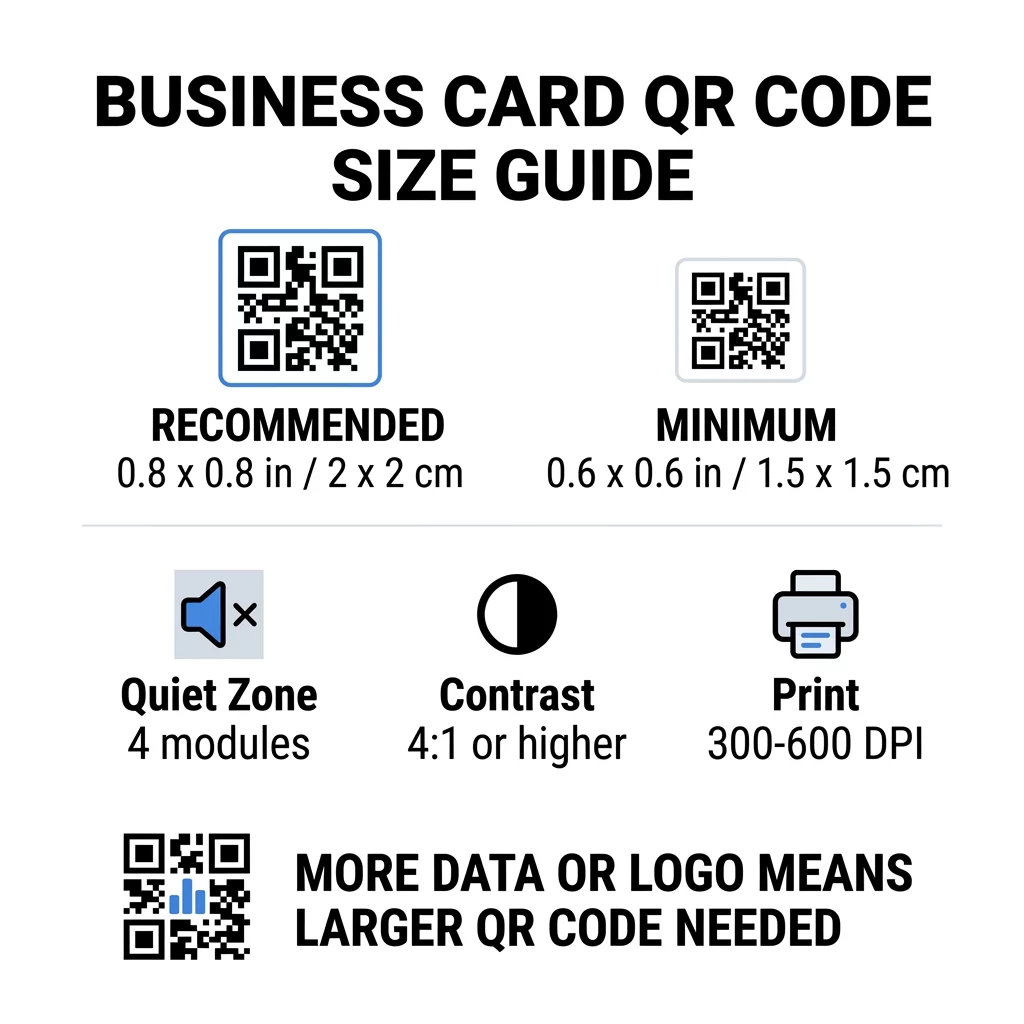
When designing a business card, you work within limited real estate. While you need enough space for your name, title, and branding, shrinking your QR code excessively will lead to scanning failures. For a standard business card, the recommended size is 0.8 x 0.8 inches (2 x 2 cm). This dimension provides enough surface area for modern smartphone cameras to focus quickly, even in uneven lighting or from an angle.

If your card design is crowded, the absolute minimum size is 0.6 x 0.6 inches (1.5 x 1.5 cm). Reaching this compact footprint requires very low data density, high contrast, and flawless print quality. Optical scanners generally follow a 10:1 distance-to-size rule, meaning a code should measure at least 1 cm wide for every 10 cm of scanning distance. Because people hold business cards roughly 4 to 10 inches away, anything smaller than 0.6 inches often falls outside the focal range of standard phone lenses.

二维码尺寸指南
尺寸类别 尺寸(英寸) 尺寸(厘米) 可靠性 最佳使用案例
最小 0.6 x 0.6 英寸 1.5 x 1.5 厘米 中度 Short URLs and low-density data
推荐 0.8 x 0.8 英寸 2.0 x 2.0 厘米 高 Standard business cards and contact links
高密度 1.2 x 1.2 英寸+ 3.0 x 3.0 厘米+ 高 Detailed contact cards and embedded logos

How Data Density Dictates Code Size

The physical size of your QR code directly depends on the volume of encoded information. QR codes are composed of individual square units called modules. Standard QR codes range from Version 1 (21 x 21 modules) up to Version 40 (177 x 177 modules), with each version adding modules to accommodate more characters. As data increases, the grid becomes denser, forcing each module to become smaller. If those modules print smaller than a camera can resolve, the scan fails.

A direct vCard with your full name, phone numbers, email addresses, and physical office location creates a complex grid. Using a vCard QR码生成器 to create a direct static file often demands a physical footprint of at least 1.2 x 1.2 inches to maintain legibility.

To keep your code compact and readable on a small card:

  • Encode a short dynamic URL rather than embedding extensive raw contact text.
  • Limit personal details to essential contact channels.
  • Maintain a lower module count so individual squares remain large and sharp.
  • Follow proven principles on how to design a business card with a QR code to balance visual hierarchy with technical function.

Create Your Custom Business Card Code Ready to build a scannable, trackable contact code? Use the 名片二维码生成器 to design high-resolution codes and share your details seamlessly.

Essential Technical Standards for Reliable Scanning

Size alone does not guarantee performance. Several core graphic specifications dictate whether camera sensors can interpret the pattern.

保持静区

The quiet zone is the clear, unprinted margin surrounding the entire perimeter of the QR code. Standard ISO/IEC specifications require this margin to be at least four modules wide on all sides. This empty buffer tells the scanning software where surrounding text ends and the data grid begins. Placing typography, borders, or background illustrations inside this four-module perimeter is one of the most common causes of scanning failure.

Applying High Color Contrast

Scanners identify data by reading the difference in light reflectance between dark modules and light background areas. Always aim for a contrast ratio of at least 4:1, or 4.5:1 for smaller codes. Dark modules absorb light while pale backgrounds reflect it back to the lens.

Classic black on white delivers an ideal 21:1 contrast ratio. While you can introduce brand styling, avoid inverted schemes such as white codes on dark paper, because many default camera applications struggle to decode inverted patterns. Reviewing QR code color contrast guidelines helps you select color pairings that preserve readability.

Exporting Vector Print Formats

Low-resolution raster files like 72 DPI JPEGs or low-grade PNGs produce blurry, pixelated edges when sent to an offset or digital press. For commercial printing, export your graphics at a resolution between 300 and 600 DPI, or use scalable vector formats such as SVG or EPS. Vectors scale infinitely without distortion, ensuring the edges of every module print with surgical precision. Adhering to technical 二维码可读性的最佳实践 prevents output errors before your file reaches the print shop.

Error Correction and Logo Integration

QR codes feature built-in redundancy through the Reed–Solomon error correction algorithm. This system restores missing or obstructed data if the card gets smudged, creased, or partially covered by a graphic element.

QR codes offer four standard error correction levels:

  • Level L restores approximately 7% of damaged data, making it best for small, simple codes without graphics.
  • Level M restores approximately 15% of damaged data, serving as the standard default for business collateral.
  • Level Q restores approximately 25% of damaged data, offering higher resilience for cards carried in wallets.
  • Level H restores approximately 30% of damaged data, making it necessary if you embed a brand logo in the center.

Keep in mind that higher error correction levels add extra data modules to the symbol. If you apply Level H to incorporate a central logo, the grid becomes much denser. To compensate for this added complexity, increase the printed code size to at least 1.0 x 1.0 inch or larger.

Selecting Card Stock and Finishes

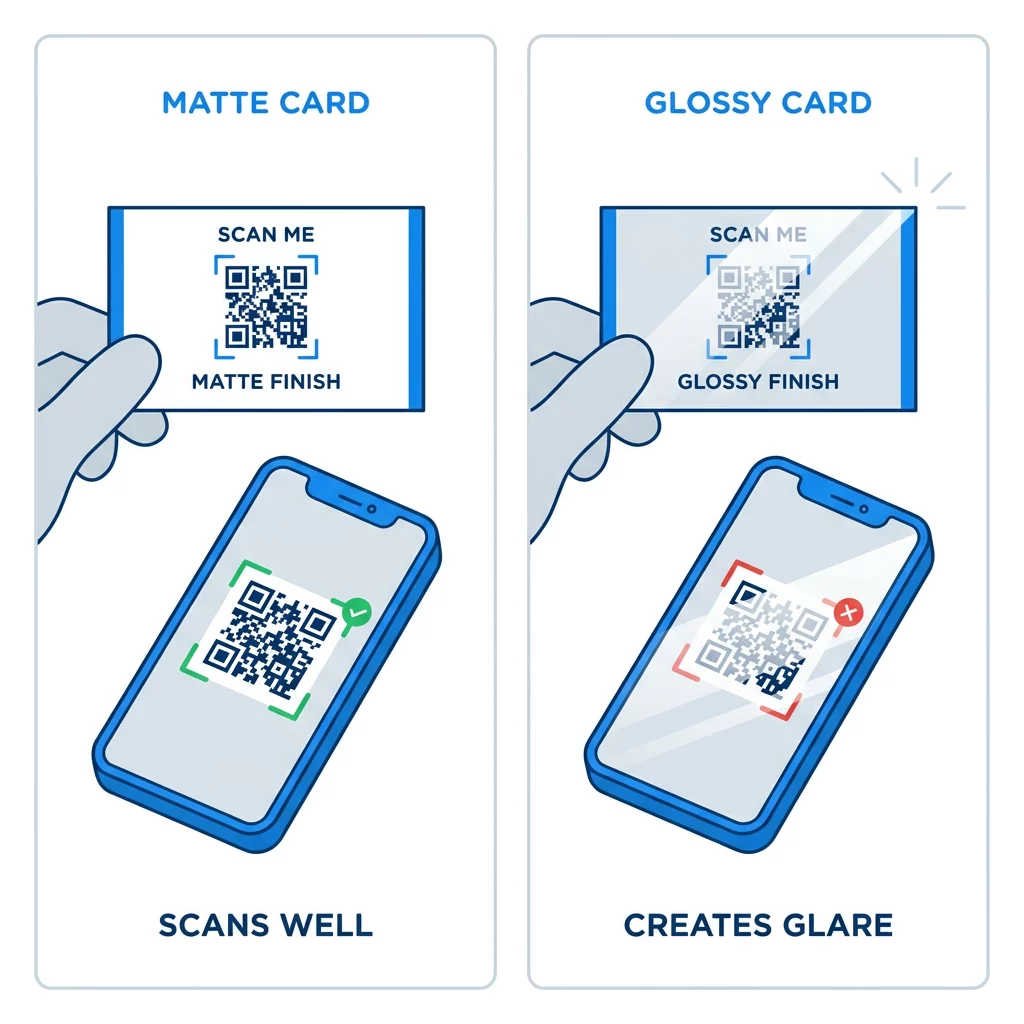
The surface texture of your business card changes how light reflects into a smartphone camera. Matte stocks and uncoated paper boards are ideal for scannability because they diffuse light evenly across the surface.

哑光与光面名片

High-gloss coatings, metallic foils, and reflective laminates create specular reflections under direct indoor spotlights. These reflections wash out the contrast and blind the camera sensor. If you use specialty finishes, position the code over a flat, uncoated, or matte section of the card. Place the code away from folds, rounded die-cut edges, or corners where thumbs naturally rest during exchanges.

Before committing to a complete print run, order a physical proof printed on your chosen stock at 100% scale. Test this hard copy using multiple iOS and Android devices under bright daylight and dim ambient lighting to verify swift scanning.

A properly dimensioned QR code ensures your business card functions as a reliable bridge between physical handshakes and digital connections. By honoring the 0.8 x 0.8 inch baseline, protecting your quiet zones, and using clean vector outputs, you can hand out your cards with complete confidence. To build, customize, and test your next networking tool, start building with the Pageloot 二维码生成器.

常见问题

商务名片二维码的绝对最小尺寸是多少?

The absolute minimum size is 0.6 x 0.6 inches (1.5 x 1.5 cm). This size requires low data density, high contrast, and a clear quiet zone. For general reliability across older smartphones, keep the code at or above 0.8 x 0.8 inches (2 x 2 cm).

Can I put a company logo in the center of a small business card QR code?

Yes, but you must use Level H error correction so the code can recover the obscured data. Because Level H significantly increases module density, you should enlarge the overall QR code to at least 1.0 x 1.0 inch to maintain scannability.

Why is my business card QR code failing to scan after printing?

Common causes include an encroached quiet zone, insufficient color contrast, or low print resolution. Ensure a margin of at least four modules around the code, maintain dark modules on a light background, and export in vector formats like SVG or EPS at 300+ DPI.

关于作者

Siim Kostabi 是 Pageloot 的内容主管,负责撰写关于我们创新型二维码生成器服务的文章。凭借五年多来在二维码领域积累的深厚专业知识,Siim 是该领域的专家。他致力于利用二维码技术简化和增强数字交互,并取得了显著的成果。.

类别
了解更多关于
用于发送加密货币的QR码
的QR码 加密货币
QR QR码的#1解决方案

如果您需要在线创建QR码,则可以 制作二维码 就在这里免费!
Pageloot是 #1转到解决方案 创建和扫描QR码。

BL-0070

博客生成器

受到超过 20,000 个品牌的信赖,可获得更多销售、评论和关注者。

客户徽标
受到顶级品牌的信赖
评分为 4.8(共 5)

4.86 / 5 星评级

雨果·劳伦特
雨果·劳伦特
★★★★★
餐馆老板
有史以来最容易和最可靠的QR码生成器。PDF文件可以立即上传。我们的餐厅菜单现在是数字化的。
卢卡斯-詹森
卢卡斯-詹森
★★★★★
房地产开发商
这是一个很好的工具,二维码带你到你想要的地方。我们只使用位置二维码,但有许多有用的功能。
艾玛-莫雷蒂
艾玛-莫雷蒂
★★★★★
零售产品
易于使用和快速。它工作得很好,创造了一个完美的图像,所以员工可以下载我的vCard。
雨果·劳伦特
雨果·劳伦特
★★★★★
餐馆老板
有史以来最容易和最可靠的QR码生成器。PDF文件可以立即上传。我们的餐厅菜单现在是数字化的。
卢卡斯-詹森
卢卡斯-詹森
★★★★★
房地产开发商
这是一个很好的工具,二维码带你到你想要的地方。我们只使用位置二维码,但有许多有用的功能。
艾玛-莫雷蒂
艾玛-莫雷蒂
★★★★★
零售产品
易于使用和快速。它工作得很好,创造了一个完美的图像,所以员工可以下载我的vCard。
查看更多QR码
将一切转化为数字体验 不到3分钟。

免费试用 14 天。

无需信用卡。

首次购买可享受 30% 折扣

使用代码:

分享您的 MP3 文件

注册以创建 PDF QR 码

上传和显示你需要的一切。

  • 音频文件
  • 播客
  • 音乐

注册即可享 14 天免费试用。.
试用期结束后,二维码将失效。.

注册以创建音频 mp3 二维码

使用边框获得更多扫描

注册以向您的二维码添加更多框架

呼叫行动框架帮助您的客户与QR码轻松互动。试试吧!

注册即可享 14 天免费试用。.
试用期结束后,二维码将失效。.

注册以向您的二维码添加更多框架

使用形状添加更多样式

注册以创建更多形状

二维码不一定是方形的。试着改变它以适应你的品牌形象。

注册即可享 14 天免费试用。.
试用期结束后,二维码将失效。.

注册以创建更多形状

为您的二维码添加徽标

注册以将您的徽标添加到二维码中

通过在二维码上添加你的标志和品牌,使你的二维码脱颖而出。

注册即可享 14 天免费试用。.
试用期结束后,二维码将失效。.

注册以将您的徽标添加到二维码中

智能应用商店重定向

注册以创建应用商店二维码

将您的应用程序链接添加到我们的智能应用程序商店QR码。用户会根据他们的设备被重新定向。

注册即可享 14 天免费试用。.
试用期结束后,二维码将失效。.

注册以创建应用商店二维码

将图片上传到二维码

注册以创建图像二维码

轻松分享你的图像。在几秒钟内动态地改变任何图像。

注册即可享 14 天免费试用。.
试用期结束后,二维码将失效。.

注册以创建图像二维码

分享您的 PDF 文件

注册以创建 PDF QR 码

上传和显示你需要的一切。

  • 菜单和价格表
  • 使用说明
  • 任何文件

注册即可享 14 天免费试用。.
试用期结束后,二维码将失效。.

注册以创建 PDF QR 码

稍后编辑,无需打印

注册即可编辑您的二维码,无需再次打印

动态QR码让你改变你的QR码的内容,而不需要打印新的QR码。

注册即可享 14 天免费试用。.
试用期结束后,二维码将失效。.

注册即可编辑您的二维码,无需再次打印

何时?何地?追踪您的二维码扫描

注册以追踪您的二维码

发现你的哪些二维码收到了最多的扫描,以及什么最能让你的客户兴奋。

注册即可享 14 天免费试用。.
试用期结束后,二维码将失效。.

注册以追踪您的二维码

提供可打印文件

注册以创建 PDF 和 SVG 等矢量二维码

.EPS, .PDF, .SVG

想下载高清分辨率的QR码吗?获得矢量或像素格式,可随时打印。

注册即可享 14 天免费试用。.
试用期结束后,二维码将失效。.

注册以创建 PDF 和 SVG 等矢量二维码

请等待。您的二维码是 正在加载... 正在加载...

打造专属

注册以保存您的二维码以供日后使用

通过创建具有不同颜色、标识和行动呼吁框架的出色的QR码,获得更多的扫描。

注册即可享 14 天免费试用。.
试用期结束后,二维码将失效。.

注册以保存您的二维码以供日后使用