Egy névjegykártyán a minimális QR-kód méret körülbelül 0,6 x 0,6 hüvelyk (1,5 x 1,5 cm), és csak akkor, ha a kód egy rövid linket tartalmaz, élesen nyomtatott és erős kontraszttal rendelkezik. A megbízható szkennelés érdekében készítse legalább 0,8 x 0,8 hüvelykesre (2 x 2 cm). Ez az útmutató megadja a pontos méreteket, a mögöttük álló nyomtatási szabályokat és egy ellenőrzőlistát, amellyel tesztelheti kártyáját megrendelés előtt.
Milyen nagynak kell lennie egy QR-kódnak egy névjegykártyán?
Egy szabványos névjegykártya esetén az ajánlott méret 0,8 x 0,8 hüvelyk (2 x 2 cm). Ezen a méreten a telefon kamerái gyorsan fókuszálnak, még gyenge fényviszonyok között vagy enyhe szögben is. Az emberek általában 4-10 hüvelyk (10-25 cm) távolságra tartják a kártyát a telefontól, ezért a kódnak elég nagynak kell lennie ahhoz, hogy ezen a távolságon jól kitöltse a kamera látóterének egy részét.
Egy általános szabály a 10:1 arány: minden 10 cm szkennelési távolságra a kódnak legalább 1 cm szélesnek kell lennie. Egy 10 hüvelyk (25 cm) távolságnál ez körülbelül 1 hüvelyk (2,5 cm) a legkönnyebb szkenneléshez, és rövidebb távolságok kisebb kódokat tesznek lehetővé. Ezért működik a 0,8 hüvelyk a legtöbb kártyánál, és bármi 0,6 hüvelyk alatt elkezd hibázni régebbi telefonokon.
Minimális QR-kód méret és ajánlott méret
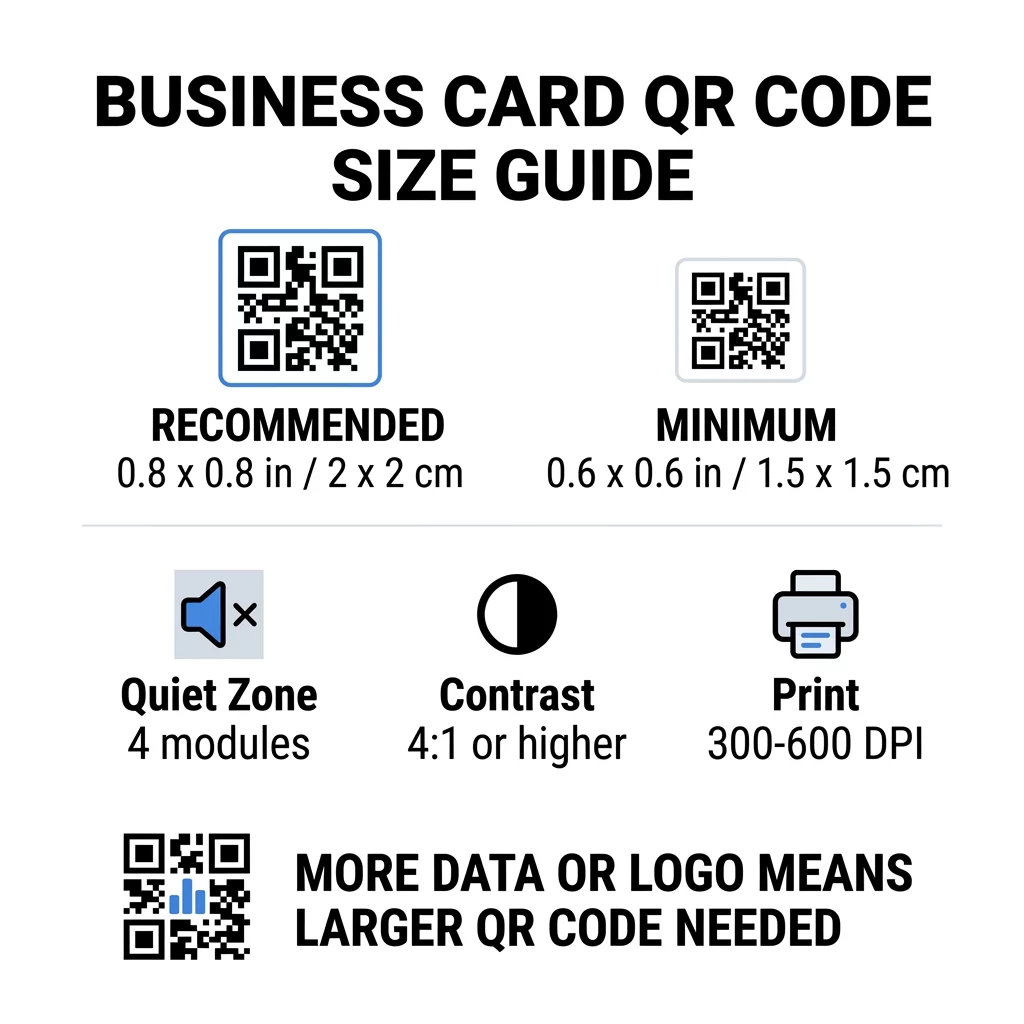
A névjegykártyákon kevés a hely, ezért érdemes először a kód méretét eldönteni, majd aztán köré tervezni. Az ajánlott méret 0,8 x 0,8 hüvelyk (2 x 2 cm). Ha a kártya zsúfolt, a minimum 0,6 x 0,6 hüvelyk (1,5 x 1,5 cm). Ez a válasz arra, hogy milyen kicsi lehet egy QR-kód egy névjegykártyán: 0,6 hüvelyk, rövid linkkel, magas kontraszttal és tiszta nyomtatással.
| Méretkategória | Méretek (hüvelyk) | Méretek (cm) | Megbízhatóság | Legjobb használati eset |
|---|---|---|---|---|
| Minimális | 0,6 x 0,6 hüvelyk | 1,5 x 1,5 cm | Mérsékelt | Rövid URL-ek és alacsony adatsűrűség |
| Ajánlott | 0,8 x 0,8 hüvelyk | 2,0 x 2,0 cm | Magas | Standard névjegykártyák és kapcsolatfelvételi linkek |
| Nagy sűrűségű | 1.0 x 1.0 in+ | 2.5 x 2.5 cm+ | Magas | Részletes kapcsolatkártyák és beágyazott logók |
Ezek a méretek csak a fekete négyzetekre vonatkoznak. A kód körüli üres margó extra, így egy 0,8 hüvelykes kódnak körülbelül 0,1 hüvelyk tiszta helyre van szüksége mindkét oldalon (lásd az alábbi csendes zónát).
QR kód mérete névjegykártyán kártyaformátum szerint
- Amerikai standard kártya (3,5 x 2 hüvelyk): egy 0,8 hüvelykes kód a kártya magasságának 40%-át foglalja el. Helyezze a hátoldalra, hogy az eleje tiszta maradjon.
- Európai standard kártya (85 x 55 mm): használjon 20-25 mm-t. Ugyanaz a 2 cm-es szabály érvényes.
- Hajtogatott vagy négyzet alakú kártyák: több hely áll rendelkezésére, ezért használjon 1 hüvelykes (2,5 cm) vagy nagyobb méretet, és tartsa távol a kódot a hajtástól.
- Csak a kártya hátoldala: ha az eleje tele van, helyezzen egy 1 hüvelykes kódot a hátoldalra egy rövid sorral, például: „Olvassa be a kapcsolatom mentéséhez”.
Hogyan határozza meg az adatsűrűség a kód méretét
A QR kód mérete attól függ, mennyi adatot tartalmaz. A QR kód apró négyzetekből, úgynevezett modulokból álló rács. Az 1-es verzió 21 x 21, a 40-es verzió 177 x 177 modult tartalmaz. Több adat több modult jelent, és minden modul kisebb lesz, ha a kód mérete változatlan marad. Ha a modulok kisebbre nyomtatódnak, mint amennyit egy kamera feloldani képes, a beolvasás sikertelen lesz.
Itt van a matek egy 2 cm-es (0,8 hüvelykes) kódhoz. Egy rövid link általában belefér egy 2-es verziójú kódba (25 modul), így minden modul körülbelül 0,8 mm. Egy teljes kapcsolati rekordhoz a 10-es vagy magasabb verzió (57 vagy több modul) is szükséges lehet, és minden modul körülbelül 0,35 mm-re csökken. A második kódot sokkal nehezebb nyomtatni és beolvasni azonos méretben.
Egy közvetlen vCard az Ön nevével, telefonszámaival, e-mail címeivel és irodai címével sűrű rácsot hoz létre. Egy vCard QR kód generátor közvetlen statikus fájl létrehozásához gyakran 1 hüvelykes (2,5 cm) vagy nagyobb kód szükséges az olvashatóság megőrzéséhez.
Hogy a kódja kompakt és könnyen beolvasható maradjon egy kis kártyán:
- Kódoljon egy rövid linket a kapcsolati oldalára a hosszú, nyers kapcsolati szöveg helyett.
- Csak a lényeges kapcsolattartási csatornákat tartsa meg.
- Tartsa alacsonyan a modulok számát, hogy minden négyzet nagy és éles maradjon.
- Kövesse az elveket, hogyan kell névjegykártyát tervezni QR kóddal az elrendezés és a funkció egyensúlyozásához.
Erre a legegyszerűbb mód egy rövid link. Egy dinamikus QR kód egy rövid linket tárol, és lehetővé teszi a céloldal megváltoztatását a kártyák nyomtatása után is. A Pageloot 14 napos ingyenes próbaverzióval kínál dinamikus kódokat, a csomagokat pedig itt tekintheti meg: pageloot.com/pricing. Statikus kód is elegendő, ha a linkje soha nem fog változni.
Készítsen Egyedi Névjegykártya Kódot Készen áll egy beolvasható, nyomon követhető kapcsolati kód létrehozására? Használja a Névjegykártya QR-kód generátor oldalt a nagy felbontású kódok tervezéséhez és adatainak megosztásához egyetlen beolvasással.
Jók vagy Rosszak a Névjegykártyán Lévő QR Kódok?
A névjegykártyákon lévő QR kódok akkor jók, ha a kód elég nagy, könnyen olvasható és valami hasznoshoz vezet. Akkor rosszak, ha a kód apró, a link törött, vagy az oldal nincs telefonra optimalizálva.
Az előnyök valósak. Az illető két másodperc alatt elmentheti a névjegyét vagy megnyithatja a portfólióját, és több információt is elhelyezhet, mint amennyit a kártya lehetővé tenne. A kockázatok is valósak: egy beolvashatatlan kód gondatlannak tűnik, és egy rossz linkkel nyomtatott kód statikus kód esetén nem javítható. Használja ezeket a szabályokat:
- A kód legalább 0,8 hüvelyk (2 cm) legyen.
- Mutasson olyan oldalra, amely gyorsan megnyílik telefonon.
- Tegyen mellé egy rövid szöveget, ami leírja, mit kap az illető, például: “Névjegy mentése” vagy “Munkáim megtekintése”.
- Tesztelje a nyomtatott próbanyomatot a teljes megrendelés előtt.
Alapvető Technikai Szabványok a Megbízható Beolvasáshoz
Önmagában a méret nem garantálja a jó beolvasást. Ezek a nyomtatási szabályok döntik el, hogy egy kamera képes-e leolvasni a mintát.
A csendes zóna fenntartása
A csendes zóna az üres margó a teljes QR kód körül. Az ISO/IEC szabvány legalább négy modult ír elő minden oldalon. Egy 25 modulos, 2 cm-es kód esetén ez a margó körülbelül 3 mm. Az üres hely megmondja a szkennernek, hol kezdődik a kód. A szöveg, szegélyek vagy háttérképek ezen a margón belül a sikertelen beolvasások egyik leggyakoribb okai.
Magas Színkontraszt Alkalmazása
A szkennerek a sötét modulok és a világos háttér közötti fényerő különbséget olvassák. A fekete fehéren a legbiztonságosabb választás. A sötétkék, sötétzöld vagy fekete világos háttéren szintén jól működik. Kerülje a világos modulokat sötét háttéren (invertált kódok), mert egyes alapértelmezett kamera alkalmazások nem tudják beolvasni azokat. Ne használjon két közepes tónusú színt, például narancsot piroson. Olvassa el a QR-kód színkontraszt irányelveket a biztonságos színpár kiválasztásához.
Vektoros nyomtatási formátumok exportálása
Az alacsony felbontású fájlok, mint például egy 72 DPI-s JPEG, homályos élekkel nyomtatódnak. Nyomtatáshoz küldje el a fájlt SVG, EPS vagy PDF (vektoros) formátumban, amelyek bármilyen méretben élesek maradnak. Ha csak PNG-t tud küldeni, exportálja 300 DPI vagy nagyobb felbontással a végső nyomtatási méretben. Ezek a QR-kód olvashatóságára vonatkozó legjobb gyakorlatokat segítenek elkerülni a problémákat, mielőtt a fájl a nyomdába kerülne.
Hibajavítás és logó integráció
A QR kódok Reed-Solomon hibajavítást használnak. Ez lehetővé teszi a szkenner számára az adatok újraépítését, ha a kód egy része karcos, gyűrött vagy fedett. Négy szint létezik:
- Az L szint körülbelül 7%-át állítja helyre a sérült adatoknak. Használja kis, egyszerű kódokhoz logó nélkül.
- Az M szint körülbelül 15%-át állítja helyre a sérült adatoknak. Ez egy általános alapértelmezés névjegykártyákhoz.
- A Q szint körülbelül 25%-át állítja helyre a sérült adatoknak. Jó választás pénztárcában tartott kártyákhoz.
- A H szint körülbelül 30%-át állítja helyre a sérült adatoknak. Használja, ha logót helyez el a közepén.
A magasabb szintek több modult adnak hozzá, így a rács sűrűbbé válik. Ha H szintet használ középső logóhoz, növelje a nyomtatott méretet legalább 1,0 x 1,0 hüvelykre (2,5 x 2,5 cm), és tartsa kicsiben a logót, körülbelül a kód szélességének egyötödénél.
Kártyapapír és felületek kiválasztása
A kártya felülete befolyásolja, hogyan jut el a fény a telefon kamerájához. A matt és bevonat nélküli papír szkennel a legjobban, mert egyenletesen teríti a fényt.
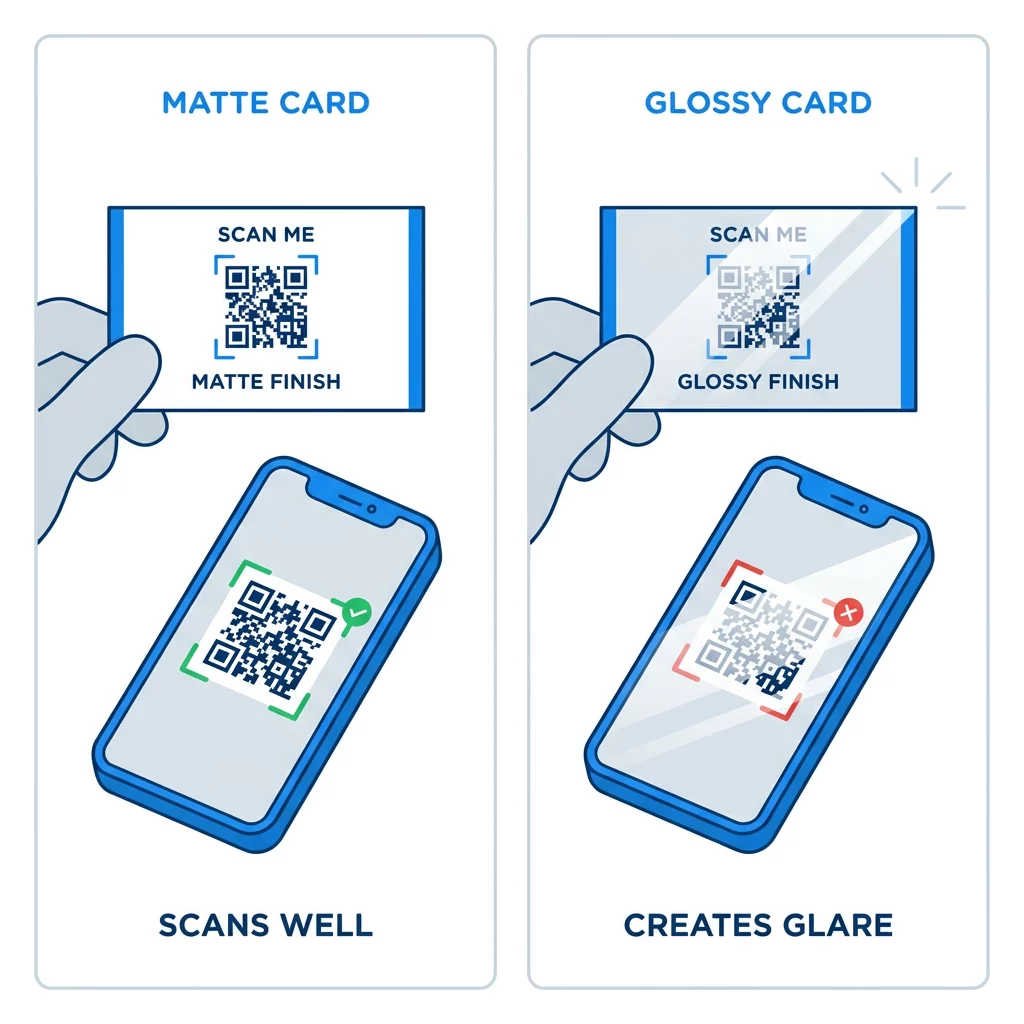
A magasfényű bevonatok, fémfólia és fényvisszaverő laminálás vakító fényt okoz reflektorok alatt, és a vakító fény kimossa a kontrasztot. Ha speciális felületet használ, tartsa a kódot egy sík, matt területen. Tartsa a kódot távol a hajtásoktól, lekerekített sarkoktól és attól a szélétől, ahol a hüvelykujjak tartják a kártyát.
Tesztelje névjegykártyája QR-kódját nyomtatás előtt
- Nyomtasson próbaverziót a tényleges kártyanyersanyagra 100%-os méretben. Ne a képernyőn ítélje meg a kódot.
- Olvassa be legalább egy iPhone és egy Android telefonnal.
- Olvassa be erős nappali fényben és félhomályos szobában.
- Olvassa be kb. 4 hüvelyk (10 cm) és kb. 10 hüvelyk (25 cm) távolságból.
- Nyissa meg a céloldalt mobiladat-kapcsolaton keresztül, és ellenőrizze, hogy gyorsan betöltődik-e.
- Csak ezután rendelje meg a teljes nyomdai mennyiséget.
A névjegykártya QR-kódja nem olvasható be? Ellenőrizze ezeket:
- A kód kisebb, mint 0,6 hüvelyk (1,5 cm), vagy a link hosszú, és a modulok aprók. Nagyítsa a kódot, vagy rövidítse a linket.
- Szöveg vagy keret van a csendes zónán belül. Mozgassa el legalább négy modullal.
- A kontraszt túl alacsony, vagy a színek invertáltak. Használjon sötét modulokat világos háttéren.
- A fájl alacsony felbontású kép. Nyomtassa újra vektoros fájlból vagy 300 DPI-s PNG-ből a végső méretben.
- Fényvisszaverődés fényes vagy fóliás felület miatt. Helyezze a kódot matt területre.
- A céloldal linkje hibás, vagy az oldal lassú. Nyissa meg a linket a telefonján, és javítsa ki.
A megfelelő méretű QR-kód megbízható hidat képez a névjegykártya, a kézfogás és az online profilja között. Tartsa a kódot 0,8 x 0,8 hüvelyk vagy nagyobb méretben, védje a csendes zónát, és tiszta vektoros fájlokból nyomtasson. Következő kártyájának elkészítéséhez és teszteléséhez használja a Pageloot QR-kód generátorunk felfedezésével kezdheti..
Gyakori kérdések
Tervezzen 0,8 x 0,8 hüvelyk (2 x 2 cm) méretet. Ez a méret gyorsan beolvasható a jelenlegi okostelefonokkal normál tartási távolságból. Használjon 1 hüvelyket (2,5 cm) vagy nagyobbat, ha a kód sok adatot vagy logót tartalmaz.
A legkisebb méret körülbelül 0,6 x 0,6 hüvelyk (1,5 x 1,5 cm). Csak rövid linkkel, nagy kontraszttal, tiszta csendes zónával és éles nyomtatással működik. Régebbi telefonok esetén tartsa a kódot 0,8 hüvelyk (2 cm) vagy annál nagyobbnál.
Legjobb esetben körülbelül 0,6 hüvelyk (1,5 cm) oldalanként. Ennél kisebb méret esetén a legtöbb telefonkamera nem tud fókuszálni egy normál távolságra tartott kártyára. A link rövidítése nagyobbá teszi a négyzeteket, és segíti a kis kódok beolvasását.
Igen, de használjon H szintű hibajavítást, hogy a kód képes legyen helyreállítani a rejtett adatokat. A H szint modulokat ad hozzá, ezért nagyítsa a kódot legalább 1,0 x 1,0 hüvelykre (2,5 cm), és tartsa kicsiben a logót.
Gyakori okok közé tartozik a túl kicsi csendes zóna, az alacsony színkontraszt, az alacsony felbontású fájl, a fényes felületről származó tükröződés vagy a túl kicsi kód. Ellenőrizze mindegyiket a nyomdai próbán, és javítsa ki a következő nyomtatás előtt.
Jó, ha a kód legalább 0,8 hüvelyk, jól szkennelhető, és olyan oldalt nyit meg, ami telefonokra készült. Rossz, ha a kód apró, nehéz szkennelni, vagy hibás linkre mutat. Mindig ellenőrizze a nyomtatott próbát.
A statikus kód elegendő, ha a link sosem változik, és a statikus kódok sosem járnak le. Dinamikus kódra érdemes váltani, ha esetleg változtatod a munkahelyedet, weboldalaidat vagy kapcsolatfelvételi oldaladat, mert módosíthatod a célt újranyomtatás nélkül. A Pageloot dinamikus kódjai 14 napos ingyenes próbaidőszakkal érkeznek, és az árak a pageloot.com/pricing oldalon találhatók.