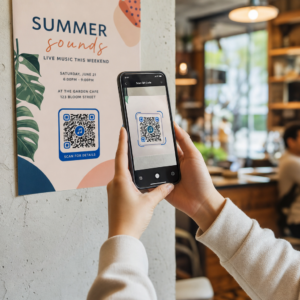
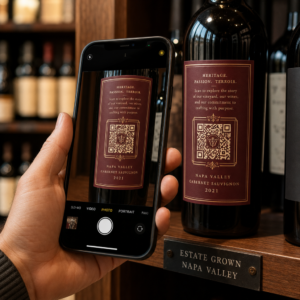
QR-koodin vähimmäiskoko käyntikortille on noin 0,6 x 0,6 tuumaa (1,5 x 1,5 cm), ja vain jos koodi sisältää lyhyen linkin, tulostuu terävästi ja siinä on vahva kontrasti. Luotettavan skannauksen varmistamiseksi tee siitä vähintään 0,8 x 0,8 tuumaa (2 x 2 cm). Tämä opas antaa tarkat koot, niiden takana olevat tulostussäännöt ja tarkistuslistan korttisi testaamiseksi ennen tilaamista.
Kuinka suuri QR-koodin tulisi olla käyntikortissa?
Vakiokäyntikortille suositeltu koko on 0,8 x 0,8 tuumaa (2 x 2 cm). Tässä koossa puhelimen kamerat tarkentavat nopeasti, jopa himmeässä valossa tai hieman vinossa kulmassa. Ihmiset pitävät korttia yleensä 4–10 tuuman (10–25 cm) päässä puhelimesta, joten koodin on oltava riittävän suuri täyttämään hyvä osa kameran näkymästä tällä etäisyydellä.
Yleinen sääntö on 10:1-suhde: jokaista 10 cm skannausetäisyyttä kohden koodin tulisi olla vähintään 1 cm leveä. 10 tuuman (25 cm) etäisyydellä tämä antaa noin 1 tuuman (2,5 cm) helpoimpaan skannaukseen, ja lyhyemmät etäisyydet mahdollistavat pienempiä koodeja. Tästä syystä 0,8 tuumaa toimii useimmille korteille, ja kaikki alle 0,6 tuumaa alkaa epäonnistua vanhemmissa puhelimissa.
QR-koodin vähimmäiskoko ja suositeltu koko
Käyntikorteissa on vähän tilaa, joten on hyödyllistä päättää koodin koko ensin ja suunnitella sitten sen ympärille. Suositeltu koko on 0,8 x 0,8 tuumaa (2 x 2 cm). Jos kortti on ahdas, vähimmäiskoko on 0,6 x 0,6 tuumaa (1,5 x 1,5 cm). Tämä on vastaus siihen, kuinka pieni QR-koodi voi olla käyntikortissa: 0,6 tuumaa, lyhyellä linkillä, korkealla kontrastilla ja puhtaalla tulostuksella.
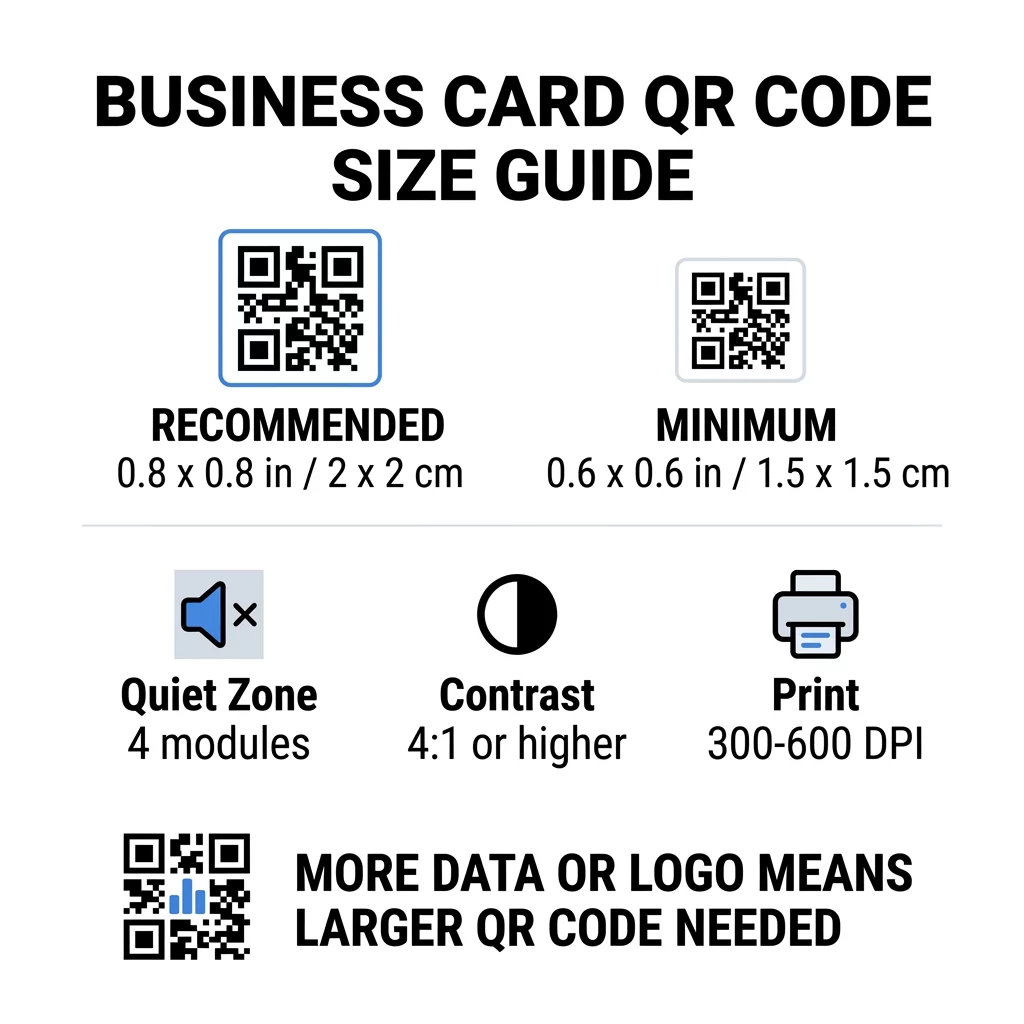
| Kokoluokka | Mitat (tuumaa) | Mitat (cm) | Luotettavuus | Paras käyttökotelo |
|---|---|---|---|---|
| Vähimmäis- | 0.6 x 0.6 tuumaa | 1,5 x 1,5 cm | Kohtalainen | Lyhyet URL-osoitteet ja matalatiheyksinen data |
| Suositeltu | 0,8 x 0,8 tuumaa | 2,0 x 2,0 cm | Korkea | Vakiokäyntikortit ja yhteystiedot-linkit |
| Korkea tiheys | 1.0 x 1.0 in+ | 2.5 x 2.5 cm+ | Korkea | Yksityiskohtaiset yhteystietokortit ja upotetut logot |
Nämä koot ovat vain mustia neliöitä varten. Koodin ympärillä oleva tyhjä marginaali on ylimääräistä, joten 0,8 tuuman koodi tarvitsee noin 0,1 tuumaa tyhjää tilaa molemmille puolille (katso hiljainen vyöhyke alta).
QR-koodin koko käyntikortissa korttimuodon mukaan
- Yhdysvaltain standardikortti (3,5 x 2 tuumaa): 0,8 tuuman koodi vie 40 % kortin korkeudesta. Aseta se taustapuolelle, jotta etupuoli pysyy siistinä.
- Eurooppalainen standardikortti (85 x 55 mm): käytä 20–25 mm. Sama 2 cm sääntö pätee.
- Taitetut tai neliönmuotoiset kortit: sinulla on enemmän tilaa, joten käytä 1 tuuman (2,5 cm) tai suurempaa koodia ja pidä se poissa taitoksesta.
- Vain kortin taustapuoli: jos etupuoli on täynnä, laita 1 tuuman koodi taustapuolelle lyhyellä tekstillä, kuten “Skannaa tallentaaksesi yhteystietoni”.
Miten datatiheys sanelee koodin koon
QR-koodin koko riippuu siitä, kuinka paljon dataa se sisältää. QR-koodi on pienistä neliöistä, joita kutsutaan moduuleiksi, koostuva ruudukko. Versio 1:ssä on 21 x 21 moduulia ja versiossa 40 on 177 x 177 moduulia. Enemmän dataa tarkoittaa enemmän moduuleja, ja jokainen moduuli pienenee, kun koodin koko pysyy samana. Jos moduulit tulostuvat niin pieninä, ettei kamera pysty niitä tunnistamaan, skannaus epäonnistuu.
Tässä laskelma 2 cm:n (0,8 tuuman) koodille. Lyhyt linkki mahtuu yleensä Version 2 -koodiin (25 moduulia), joten jokainen moduuli on noin 0,8 mm. Täysi yhteystietue voi tarvita Version 10 tai uudemman (57 moduulia tai enemmän), jolloin jokainen moduuli pienenee noin 0,35 mm:iin. Toinen koodi on paljon vaikeampi tulostaa ja skannata samassa koossa.
Suora vCard nimelläsi, puhelinnumeroillasi, sähköpostiosoitteillasi ja toimisto-osoitteellasi luo tiheän ruudukon. Käyttämällä vCard QR-koodi: tee ilmainen yhteystieto-QR-koodi luodaksesi suoran staattisen tiedoston tarvitsee usein vähintään 1 tuuman (2,5 cm) koodin pysyäkseen luettavana.
Jotta koodisi pysyy kompaktina ja helposti skannattavana pienellä kortilla:
- Koodaa lyhyt linkki yhteyssivullesi pitkän raa'an yhteystekstin sijaan.
- Pidä vain olennaiset yhteydenottokanavat.
- Pidä moduulimäärä alhaisena, jotta jokainen neliö pysyy suurena ja terävänä.
- Noudata periaatteita siitä, miten suunnitella käyntikortti QR-koodilla tasapainottaa ulkoasua ja toimivuutta.
Lyhyt linkki on yksinkertaisin tapa tehdä tämä. Dynaaminen QR-koodi tallentaa lyhyen linkin ja antaa sinun muuttaa kohdesivua, kun kortit on painettu. Pageloot tarjoaa dynaamisia koodeja 14 päivän ilmaisella kokeilujaksolla, ja voit tarkastella suunnitelmia osoitteessa pageloot.com/pricing. Staattinen koodi riittää, jos linkkisi ei koskaan muutu.
Luo oma käyntikorttikoodisi Valmiina luomaan skannattavan, seurattavan yhteystietokoodin? Käytä QR-koodi käyntikorttiin suunnitellaksesi korkearesoluutioisia koodeja ja jakaaksesi tietosi yhdellä skannauksella.
Ovatko QR-koodit käyntikorteissa hyviä vai huonoja?
QR-koodit käyntikorteissa ovat hyviä, kun koodi on riittävän suuri, helppo skannata ja johtaa johonkin hyödylliseen. Ne ovat huonoja, kun koodi on pieni, linkki on rikki tai sivu ei ole optimoitu puhelimille.
Hyödyt ovat todellisia. Henkilö voi tallentaa yhteystietosi tai avata portfoliosi kahdessa sekunnissa, ja voit mahduttaa enemmän tietoa kuin kortti sallii. Riskit ovat myös todellisia: koodi, joka ei skannaa, näyttää huolimattomalta, ja painettua koodia väärällä linkillä ei voi korjata staattisessa koodissa. Käytä näitä sääntöjä:
- Tee koodista vähintään 0,8 tuumaa (2 cm).
- Ohjaa se sivulle, joka avautuu nopeasti puhelimella.
- Lisää sen viereen lyhyt rivi, joka kertoo, mitä henkilö saa, kuten ”Tallenna yhteystietoni” tai ”Katso töitäni”.
- Testaa painettu vedos ennen kuin tilaat koko erän.
Tärkeät tekniset standardit luotettavaa skannausta varten
Koko yksinään ei takaa hyvää skannausta. Nämä tulostussäännöt päättävät, pystyykö kamera lukemaan kuvion.
Hiljaisen vyöhykkeen ylläpitäminen
Hiljainen vyöhyke on tyhjä marginaali koko QR-koodin ympärillä. ISO/IEC-standardi edellyttää vähintään neljää moduulia joka puolelle. 2 cm:n koodille, jossa on 25 moduulia, tämä marginaali on noin 3 mm. Tyhjä tila kertoo skannerille, mistä koodi alkaa. Teksti, reunukset tai taustakuvat tämän marginaalin sisällä ovat yleisimpiä syitä epäonnistuneisiin skannauksiin.
Korkean värikontrastin käyttö
Skannerit lukevat kirkkauseroa tummien moduulien ja vaalean taustan välillä. Musta valkoisella on turvallisin valinta. Tumma sininen, tumma vihreä tai musta vaalealla taustalla toimivat myös hyvin. Vältä vaaleita moduuleita tummalla taustalla (käännetyt koodit), koska jotkut oletuskamerasovellukset eivät pysty lukemaan niitä. Älä käytä kahta keskisävyistä väriä, kuten oranssia punaisella. Lue QR-koodin värikontrastiohjeita valitaksesi turvallisen väriparin.
Vektoripainomuotojen vienti
Matalaresoluutioiset tiedostot, kuten 72 DPI:n JPEG, tulostuvat sumeareunaisina. Tulostusta varten lähetä tiedosto SVG-, EPS- tai PDF-muodossa (vektori), jotka pysyvät terävinä koosta riippumatta. Jos voit lähettää vain PNG-tiedoston, vie se 300 DPI:n tarkkuudella tai suurempana lopullisessa tulostuskoossa. Nämä parhaita käytäntöjä QR-koodin luettavuudelle auttavat sinua välttämään ongelmia ennen kuin tiedosto saapuu painotaloon.
Virheenkorjaus ja logon integrointi
QR-koodit käyttävät Reed-Solomon-virheenkorjausta. Se antaa skannerin uudelleenrakentaa tiedot, kun osa koodista on naarmuuntunut, rypistynyt tai peitetty. Tasoja on neljä:
- Taso L palauttaa noin 7 % vahingoittuneesta tiedosta. Käytä sitä pienissä, yksinkertaisissa koodeissa ilman logoa.
- Taso M palauttaa noin 15 % vahingoittuneesta tiedosta. Se on yleinen oletus käyntikorteissa.
- Taso Q palauttaa noin 25 % vahingoittuneesta tiedosta. Se on hyvä valinta lompakossa säilytettäville korteille.
- Taso H palauttaa noin 30 % vahingoittuneesta tiedosta. Käytä sitä, jos sijoitat logon keskelle.
Korkeammat tasot lisäävät moduuleita, joten ruudukosta tulee tiheämpi. Jos käytät tasoa H keskelle sijoitetulle logolle, suurenna tulostuskoko vähintään 1,0 x 1,0 tuumaan (2,5 x 2,5 cm) ja pidä logo pienenä, noin yhden viidesosan kokoisena koodin leveydestä.
Korttimateriaalin ja viimeistelyjen valinta
Kortin pinta vaikuttaa siihen, miten valo saavuttaa puhelimen kameran. Mattapintaiset ja päällystämättömät materiaalit skannautuvat parhaiten, koska ne hajottavat valon tasaisesti.
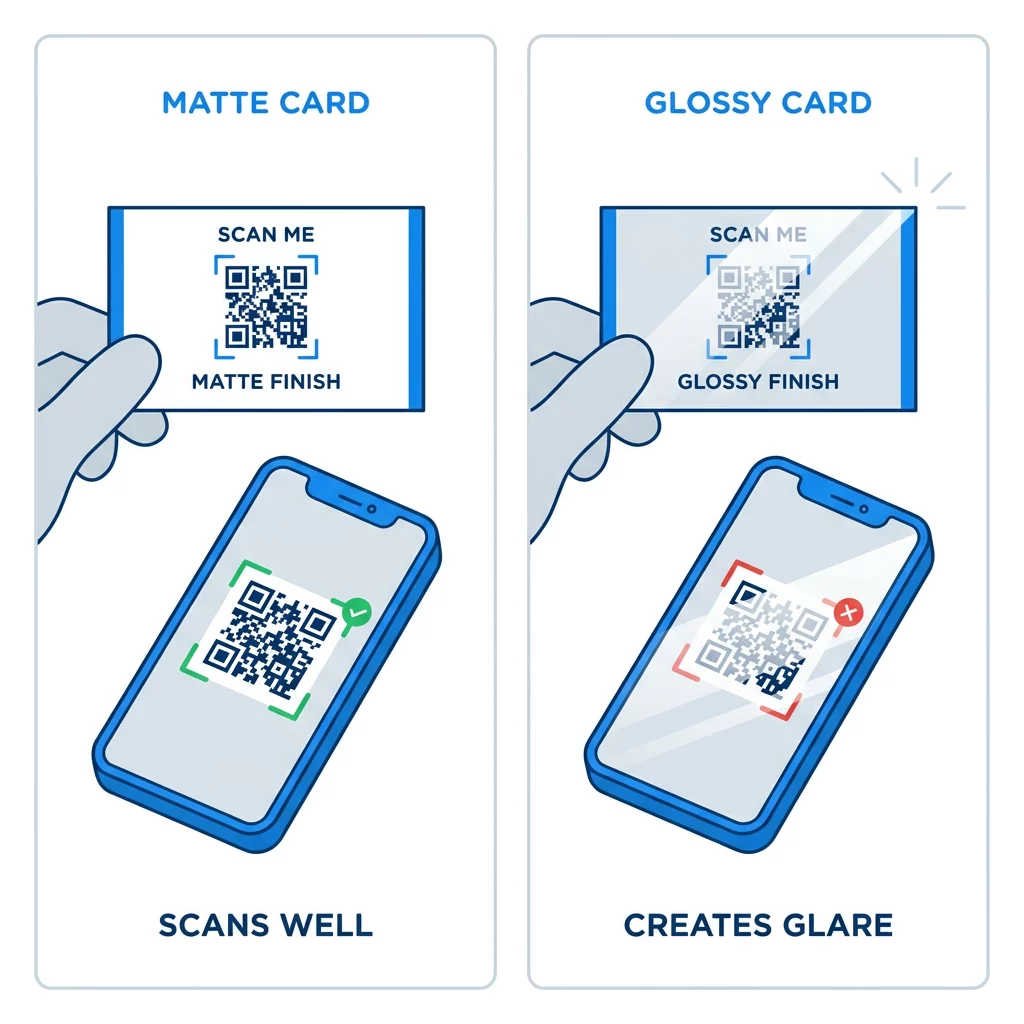
Kiiltävät pinnoitteet, metallifolio ja heijastava laminaatti luovat heijastusta kohdevalojen alla, ja heijastus peittää kontrastin. Jos käytät erikoisviimeistelyä, pidä koodi tasaisella mattapinnalla. Pidä koodi poissa taitoksista, pyöristetyistä kulmista ja reunasta, josta peukalot pitävät korttia.
Testaa käyntikorttisi QR-koodi ennen tulostusta
- Tulosta vedos oikealle korttipohjalle 100 % mittakaavassa. Älä arvioi koodia näytöltä.
- Skannaa se vähintään yhdellä iPhonella ja yhdellä Android-puhelimella.
- Skannaa se kirkkaassa päivänvalossa ja hämärässä huoneessa.
- Skannaa noin 4 tuuman (10 cm) ja noin 10 tuuman (25 cm) etäisyydeltä.
- Avaa kohdesivu mobiilidatalla ja varmista, että se latautuu nopeasti.
- Vasta sitten tilaa koko painos.
Käyntikortin QR-koodi ei skannaa? Tarkista nämä
- Koodi on pienempi kuin 0,6 tuumaa (1,5 cm), tai linkki on pitkä ja moduulit ovat hyvin pieniä. Suurenna koodia tai lyhennä linkkiä.
- Teksti tai reunus on hiljaisen alueen sisällä. Siirrä se vähintään neljän moduulin etäisyydelle.
- Kontrasti on liian heikko tai värit ovat käänteiset. Käytä tummia moduuleja vaalealla taustalla.
- Tiedosto on matalaresoluutioinen kuva. Uudelleentulosta vektoritiedostosta tai 300 DPI:n PNG-tiedostosta lopullisessa koossa.
- Heijastus kiiltävästä tai folioviimeistelystä. Siirrä koodi mattapintaiselle alueelle.
- Kohdelinkki on väärä tai sivu on hidas. Avaa linkki puhelimellasi ja korjaa se.
Oikean kokoinen QR-koodi tekee käyntikortistasi luotettavan sillan kädenpuristuksen ja online-profiilisi välille. Pidä koodi vähintään 0,8 x 0,8 tuuman kokoisena, suojaa hiljainen alue ja tulosta puhtaista vektoritiedostoista. Seuraavan korttisi rakentamiseen ja testaamiseen käytä Pagelootia. QR-koodigeneraattori.
Usein kysytyt kysymykset
Suunnittele kooltaan 0,8 x 0,8 tuumaa (2 x 2 cm). Tämä koko skannautuu nopeasti nykyisillä älypuhelimilla normaalilta etäisyydeltä. Käytä 1 tuumaa (2,5 cm) tai enemmän, jos koodi sisältää paljon tietoa tai logon.
Pienin koko on noin 0,6 x 0,6 tuumaa (1,5 x 1,5 cm). Se toimii vain lyhyellä linkillä, suurella kontrastilla, selkeällä hiljaisella alueella ja terävällä painatuksella. Vanhempien puhelinten osalta pidä koodi vähintään 0,8 tuuman (2 cm) kokoisena tai suurempana.
Noin 0,6 tuumaa (1,5 cm) sivua kohden parhaassa tapauksessa. Sitä pienempinä useimmat puhelimen kamerat eivät pysty tarkentamaan normaalilla etäisyydellä pidettyyn korttiin. Linkin lyhentäminen suurentaa neliöitä ja auttaa pieniä koodeja skannautumaan.
Kyllä, mutta käytä Level H -virheenkorjausta, jotta koodi voi palauttaa piilotetun datan. Level H lisää moduuleja, joten suurenna koodi vähintään 1,0 x 1,0 tuumaan (2,5 cm) ja pidä logo pienenä.
Yleisiä syitä ovat liian pieni hiljainen vyöhyke, heikko värikontrasti, matalaresoluutioinen tiedosto, kiiltävän pinnan aiheuttama häikäisy tai liian pieni koodi. Tarkista jokainen painetusta vedoksesta ja korjaa se ennen seuraavaa painosta.
Ne ovat hyviä, kun koodi on vähintään 0,8 tuumaa, skannautuu hyvin ja avaa puhelimille tarkoitetun sivun. Ne ovat huonoja, kun koodi on pieni, vaikea skannata tai johtaa rikkinäiseen linkkiin. Testaa aina painettu vedos.
Staattinen koodi riittää, jos linkki ei koskaan muutu, ja staattiset koodit eivät koskaan vanhene. Dynaaminen koodi on hyödyllinen, jos saatat vaihtaa työpaikkaa, verkkosivustoja tai yhteydenottosivuja, koska voit muokata kohdetta tulostamatta uudelleen. Pagelootin dynaamisiin koodeihin sisältyy 14 päivän ilmainen kokeilu, ja palvelupaketit on lueteltu osoitteessa pageloot.com/pricing.