El tamaño mínimo de un código QR para una tarjeta de visita es de aproximadamente 0.6 x 0.6 pulgadas (1.5 x 1.5 cm), y solo si el código contiene un enlace corto, se imprime nítidamente y tiene un contraste fuerte. Para un escaneo fiable, hazlo de al menos 0.8 x 0.8 pulgadas (2 x 2 cm). Esta guía proporciona los tamaños exactos, las reglas de impresión subyacentes y una lista de verificación para probar tu tarjeta antes de pedirla.
¿Qué tamaño debe tener un código QR en una tarjeta de visita?
Para una tarjeta de visita estándar, el tamaño recomendado es de 0.8 x 0.8 pulgadas (2 x 2 cm). Con ese tamaño, las cámaras de los teléfonos enfocan rápidamente, incluso con poca luz o en un ligero ángulo. La gente suele sostener una tarjeta a 4 a 10 pulgadas (10 a 25 cm) del teléfono, por lo que el código debe ser lo suficientemente grande como para ocupar una buena parte de la vista de la cámara a esa distancia.
Una regla común es una relación de 10:1: por cada 10 cm de distancia de escaneo, el código debe tener al menos 1 cm de ancho. A una distancia de 10 pulgadas (25 cm), esto resulta en aproximadamente 1 pulgada (2.5 cm) para el escaneo más fácil, y distancias más cortas permiten códigos más pequeños. Por eso, 0.8 pulgadas funciona para la mayoría de las tarjetas y cualquier cosa por debajo de 0.6 pulgadas comienza a fallar en teléfonos más antiguos.
Tamaño Mínimo y Tamaño Recomendado del Código QR
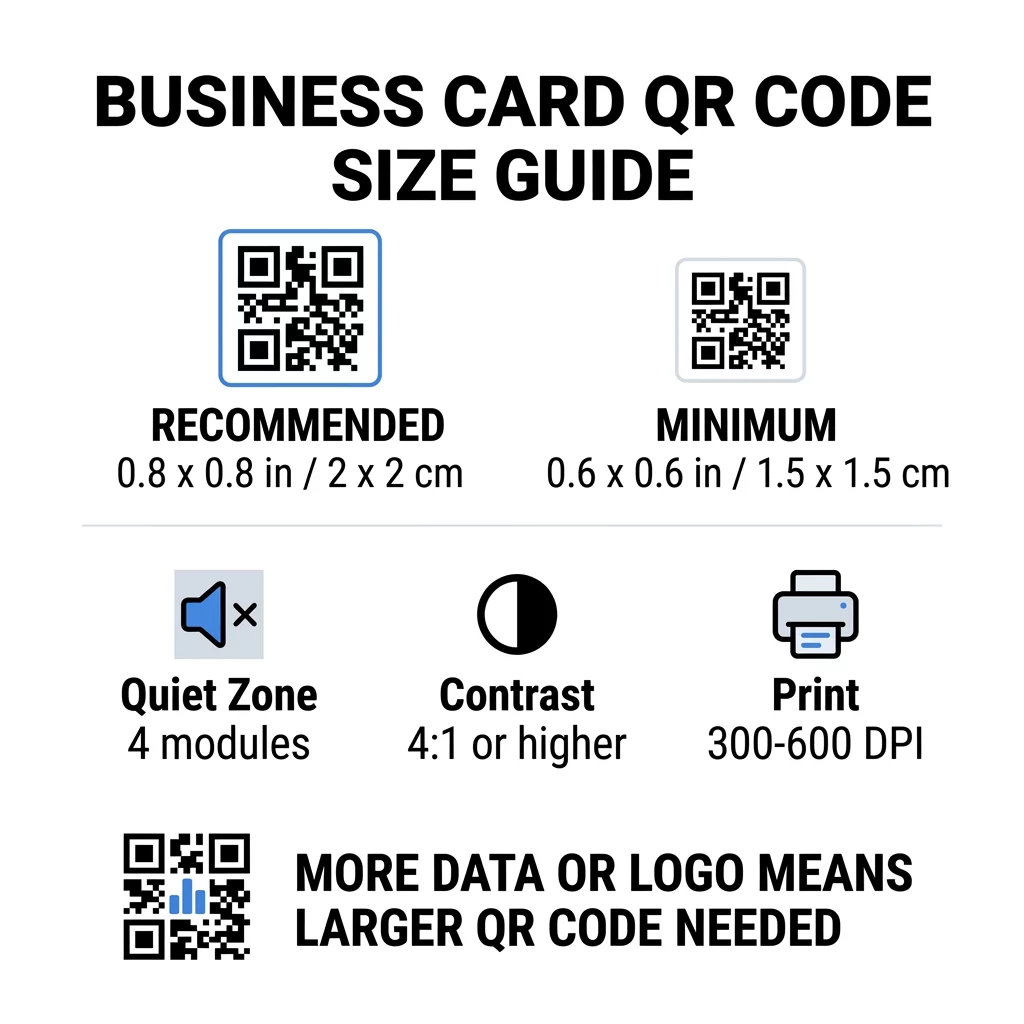
Las tarjetas de visita dejan poco espacio, por lo que ayuda decidir el tamaño del código primero y luego diseñar en torno a él. El tamaño recomendado es de 0.8 x 0.8 pulgadas (2 x 2 cm). Si la tarjeta está abarrotada, el mínimo es de 0.6 x 0.6 pulgadas (1.5 x 1.5 cm). Esta es la respuesta a qué tan pequeño puede ser un código QR en una tarjeta de visita: 0.6 pulgadas, con un enlace corto, alto contraste y una impresión limpia.
| Categoría de tamaño | Dimensiones (pulgadas) | Dimensiones (cm) | Fiabilidad | El mejor caso de uso |
|---|---|---|---|---|
| Mínimo | 0.6 x 0.6 pulg. | 1,5 x 1,5 cm | Moderado | URLs cortas y datos de baja densidad |
| Recomendado | 0.8 x 0.8 pulg | 2.0 x 2.0 cm | Alta | Tarjetas de visita estándar y enlaces de contacto |
| Alta Densidad | 1.0 x 1.0 in+ | 2.5 x 2.5 cm+ | Alta | Tarjetas de contacto detalladas y logotipos incrustados |
Estos tamaños son solo para los cuadrados negros. El margen vacío alrededor del código es adicional, por lo que un código de 0.8 pulgadas necesita aproximadamente 0.1 pulgadas de espacio libre en cada lado (ver la zona tranquila a continuación).
Tamaño del Código QR en una Tarjeta de Presentación según el Formato de Tarjeta
- Tarjeta estándar de EE. UU. (3.5 x 2 pulgadas): un código de 0.8 pulgadas ocupa el 40% de la altura de la tarjeta. Colóquelo en la parte posterior para que el frente quede limpio.
- Tarjeta estándar europea (85 x 55 mm): use de 20 a 25 mm. Se aplica la misma regla de 2 cm.
- Tarjetas plegadas o cuadradas: tiene más espacio, así que use 1 pulgada (2.5 cm) o más grande y mantenga el código alejado del pliegue.
- Solo la parte posterior de la tarjeta: si el frente está lleno, coloque un código de 1 pulgada en la parte posterior con una línea corta como “Escanear para guardar mi contacto”.
Cómo la Densidad de Datos Dicta el Tamaño del Código
El tamaño de su código QR depende de cuántos datos contenga. Un código QR es una cuadrícula de pequeños cuadrados llamados módulos. La Versión 1 tiene 21 x 21 módulos y la Versión 40 tiene 177 x 177 módulos. Más datos significan más módulos, y cada módulo se vuelve más pequeño cuando el tamaño del código permanece igual. Si los módulos se imprimen más pequeños de lo que una cámara puede resolver, el escaneo falla.
Aquí está el cálculo para un código de 2 cm (0.8 pulgadas). Un enlace corto generalmente cabe en un código de Versión 2 (25 módulos), por lo que cada módulo mide aproximadamente 0.8 mm. Un registro de contacto completo puede necesitar la Versión 10 o superior (57 módulos o más), y cada módulo se reduce a aproximadamente 0.35 mm. El segundo código es mucho más difícil de imprimir y escanear con el mismo tamaño.
Una vCard directa con su nombre, números de teléfono, direcciones de correo electrónico y dirección de la oficina crea una cuadrícula densa. Usando un Generador de códigos QR de contacto vCard para crear un archivo estático directo a menudo necesita un código de 1 pulgada (2.5 cm) o más para seguir siendo legible.
Para mantener su código compacto y fácil de escanear en una tarjeta pequeña:
- Codifique un enlace corto a su página de contacto en lugar de un texto de contacto sin formato largo.
- Mantenga solo los canales de contacto esenciales.
- Mantenga el número de módulos bajo para que cada cuadrado permanezca grande y nítido.
- Siga los principios sobre cómo diseñar una tarjeta de presentación con un código QR para equilibrar el diseño y la función.
Un enlace corto es la forma más sencilla de hacerlo. Un código QR dinámico almacena un enlace corto y le permite cambiar la página de destino después de que las tarjetas estén impresas. Pageloot ofrece códigos dinámicos con una prueba gratuita de 14 días, y puede ver los planes en pageloot.com/pricing. Un código estático es suficiente si su enlace nunca cambiará.
Cree su Código QR Personalizado para Tarjetas de Visita ¿Listo para construir un código de contacto escaneable y rastreable? Utilice el Generador de QR para tarjetas de visita para diseñar códigos de alta resolución y compartir sus detalles con un solo escaneo.
¿Son Buenos o Malos los Códigos QR en las Tarjetas de Visita?
Los códigos QR en las tarjetas de visita son buenos cuando el código es lo suficientemente grande, fácil de escanear y lleva a algo útil. Son malos cuando el código es diminuto, el enlace está roto o la página no está optimizada para teléfonos.
Los beneficios son reales. La persona puede guardar su contacto o abrir su portafolio en dos segundos, y usted puede incluir más información de la que permite la tarjeta. Los riesgos también son reales: un código que no escanea da una imagen descuidada, y un código impreso con un enlace incorrecto no se puede arreglar si es estático. Siga estas reglas:
- Haga el código de al menos 0.8 pulgadas (2 cm).
- Diríjalo a una página que se abra rápidamente en un teléfono.
- Añada una frase corta junto a él que indique lo que la persona obtiene, como “Guardar mi contacto” o “Ver mi trabajo”.
- Pruebe la prueba impresa antes de encargar la tirada completa.
Estándares Técnicos Esenciales para un Escaneo Fiable
El tamaño por sí solo no garantiza un buen escaneo. Estas reglas de impresión deciden si una cámara puede leer el patrón.
Mantener la Zona Silenciosa
La zona de silencio es el margen vacío alrededor de todo el código QR. El estándar ISO/IEC requiere al menos cuatro módulos en cada lado. Para un código de 2 cm con 25 módulos, ese margen es de aproximadamente 3 mm. El espacio vacío le indica al escáner dónde comienza el código. Texto, bordes o imágenes de fondo dentro de este margen son una de las causas más comunes de escaneos fallidos.
Aplicar Alto Contraste de Color
Los escáneres leen la diferencia de brillo entre los módulos oscuros y el fondo claro. El negro sobre blanco es la opción más segura. El azul oscuro, el verde oscuro o el negro sobre un fondo claro también funcionan bien. Evite los módulos claros sobre un fondo oscuro (códigos invertidos), porque algunas aplicaciones de cámara predeterminadas no pueden leerlos. No utilice dos colores de tono medio, como el naranja sobre rojo. Lea el pautas de contraste de color de códigos QR para elegir una combinación de colores segura.
Exportación de formatos de impresión vectorial
Los archivos de baja resolución, como un JPEG de 72 DPI, se imprimen con bordes borrosos. Para imprimir, envíe el archivo como SVG, EPS o PDF (vectorial), que se mantienen nítidos en cualquier tamaño. Si solo puede enviar un PNG, expórtelo a 300 DPI o más a la medida de impresión final. Estos las mejores prácticas para la legibilidad de los códigos QR le ayudan a evitar problemas antes de que el archivo llegue a la imprenta.
Corrección de errores e integración de logotipos
Los códigos QR utilizan corrección de errores Reed-Solomon. Permite que un escáner reconstruya los datos cuando parte del código está rayado, arrugado o cubierto. Hay cuatro niveles:
- El Nivel L restaura aproximadamente el 7% de los datos dañados. Úselo para códigos pequeños y simples sin logotipo.
- El Nivel M restaura aproximadamente el 15% de los datos dañados. Es un valor predeterminado común para tarjetas de visita.
- El Nivel Q restaura aproximadamente el 25% de los datos dañados. Es una buena opción para tarjetas que se guardan en carteras.
- El Nivel H restaura aproximadamente el 30% de los datos dañados. Úselo si coloca un logotipo en el centro.
Los niveles más altos añaden más módulos, por lo que la cuadrícula se vuelve más densa. Si utiliza el Nivel H para un logotipo central, aumente el tamaño impreso a al menos 1.0 x 1.0 pulgada (2.5 x 2.5 cm), y mantenga el logotipo pequeño, alrededor de un quinto del ancho del código.
Selección de cartulina y acabados
La superficie de la tarjeta cambia la forma en que la luz llega a la cámara del teléfono. Los materiales mate y sin recubrimiento se escanean mejor porque distribuyen la luz de manera uniforme.
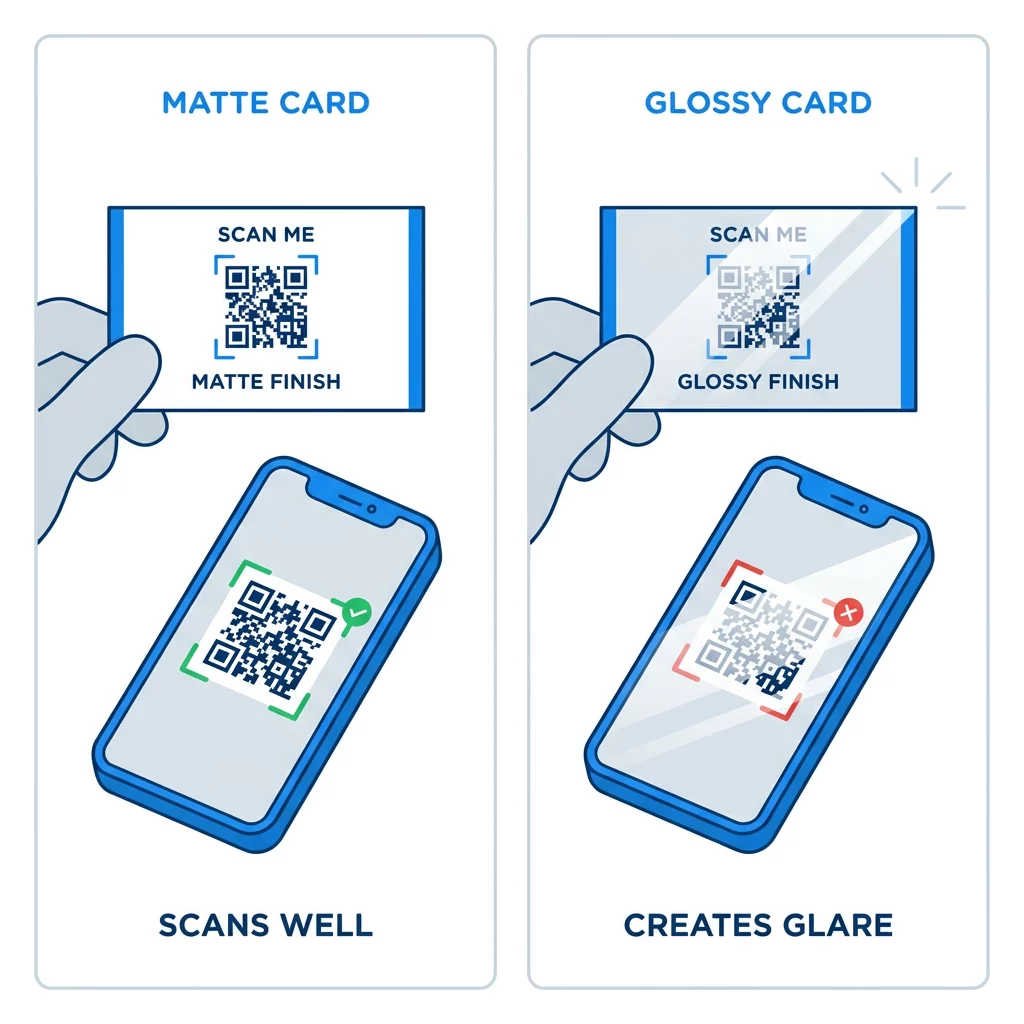
Los recubrimientos de alto brillo, la lámina metálica y el laminado reflectante crean deslumbramiento bajo los focos, y el deslumbramiento elimina el contraste. Si utiliza un acabado especial, mantenga el código en un área mate plana. Mantenga el código alejado de pliegues, esquinas redondeadas y el borde donde los pulgares sujetan la tarjeta.
Prueba el Código QR de Tu Tarjeta de Presentación Antes de Imprimir
- Imprime una prueba en el papel real de la tarjeta a escala del 100%. No juzgues el código en una pantalla.
- Escanéalo con al menos un iPhone y un teléfono Android.
- Escanéalo a plena luz del día y en una habitación con poca luz.
- Escanéalo desde aproximadamente 4 pulgadas (10 cm) y desde aproximadamente 10 pulgadas (25 cm).
- Abre la página de destino con datos móviles y confirma que carga rápido.
- Solo entonces encarga la tirada completa.
¿El Código QR de Tu Tarjeta de Presentación No Escanea? Revisa Esto
- El código es más pequeño que 0.6 pulgadas (1.5 cm), o el enlace es largo y los módulos son minúsculos. Aumenta el tamaño del código o acorta el enlace.
- Texto o un borde se encuentra dentro de la zona de silencio. Muévelo al menos cuatro módulos.
- El contraste es demasiado bajo o los colores están invertidos. Usa módulos oscuros sobre un fondo claro.
- El archivo es una imagen de baja resolución. Reimprime desde un archivo vectorial o un PNG de 300 PPP al tamaño final.
- Reflejo de un acabado brillante o metalizado. Mueve el código a un área mate.
- El enlace de destino es incorrecto o la página es lenta. Abre el enlace en tu teléfono y corrígelo.
Un código QR de tamaño adecuado convierte tu tarjeta de presentación en un puente fiable entre un apretón de manos y tu perfil en línea. Mantén el código en 0.8 x 0.8 pulgadas o más grande, protege la zona de silencio e imprime desde archivos vectoriales limpios. Para construir y probar tu próxima tarjeta, usa Pageloot generador de códigos QR.
Preguntas frecuentes
Planifique para 0.8 x 0.8 pulgadas (2 x 2 cm). Este tamaño se escanea rápidamente con los teléfonos inteligentes actuales desde una distancia de sujeción normal. Use 1 pulgada (2.5 cm) o más si el código contiene muchos datos o un logotipo.
El tamaño más pequeño es de aproximadamente 0.6 x 0.6 pulgadas (1.5 x 1.5 cm). Funciona solo con un enlace corto, alto contraste, una zona de silencio clara y una impresión nítida. Para teléfonos más antiguos, mantenga el código en 0.8 pulgadas (2 cm) o más grande.
Aproximadamente 0.6 pulgadas (1.5 cm) por lado en el mejor de los casos. Si es más pequeño, la mayoría de las cámaras de teléfono no pueden enfocar una tarjeta sostenida a una distancia normal. Acortar el enlace hace que los cuadrados sean más grandes y ayuda a escanear códigos pequeños.
Sí, pero usa la corrección de errores Nivel H para que el código pueda recuperar los datos ocultos. El Nivel H añade módulos, así que agranda el código a al menos 1.0 x 1.0 pulgada (2.5 cm) y mantén el logotipo pequeño.
Las causas comunes son una zona tranquila demasiado pequeña, bajo contraste de color, un archivo de baja resolución, el deslumbramiento de un acabado brillante o un código demasiado pequeño. Revise cada uno en la prueba impresa y corríjalo antes de la próxima tirada de impresión.
Son buenos cuando el código tiene al menos 0.8 pulgadas, escanea bien y abre una página hecha para teléfonos. Son malos cuando el código es muy pequeño, difícil de escanear o lleva a un enlace roto. Siempre prueba una muestra impresa.
Un código estático es suficiente si el enlace nunca cambiará, y los códigos estáticos nunca expiran. Un código dinámico vale la pena si puedes cambiar de trabajo, sitios web o páginas de contacto, porque puedes editar el destino sin reimprimir. Los códigos dinámicos de Pageloot vienen con una prueba gratuita de 14 días, y los planes se encuentran en pageloot.com/pricing.