名刺のQRコードの最小サイズは約0.6 x 0.6インチ (1.5 x 1.5 cm) ですが、これはコードが短いリンクを含み、鮮明に印刷され、コントラストが強い場合に限ります。確実にスキャンできるようにするには、少なくとも0.8 x 0.8インチ (2 x 2 cm) にしてください。このガイドでは、正確なサイズ、その背後にある印刷ルール、および注文前にカードをテストするためのチェックリストを提供します。
名刺のQRコードはどのくらいの大きさにすべきですか?
標準的な名刺の場合、推奨サイズは0.8 x 0.8インチ (2 x 2 cm) です。このサイズであれば、暗い場所や少し傾いた状態でも、スマートフォンのカメラは素早く焦点を合わせます。人々は通常、名刺をスマートフォンから4〜10インチ (10〜25 cm) 離して持つため、その距離でカメラの視野のかなりの部分を占めるのに十分な大きさのコードが必要です。
一般的なルールは10:1の比率です。つまり、スキャン距離10cmごとに、コードは少なくとも1cmの幅であるべきです。10インチ (25 cm) の距離では、最も簡単にスキャンするには約1インチ (2.5 cm) のサイズが必要となり、距離が短いほど小さいコードでも可能です。これが、ほとんどの名刺で0.8インチが機能し、0.6インチを下回ると古いスマートフォンでは失敗し始める理由です。
QRコードの最小サイズと推奨サイズ
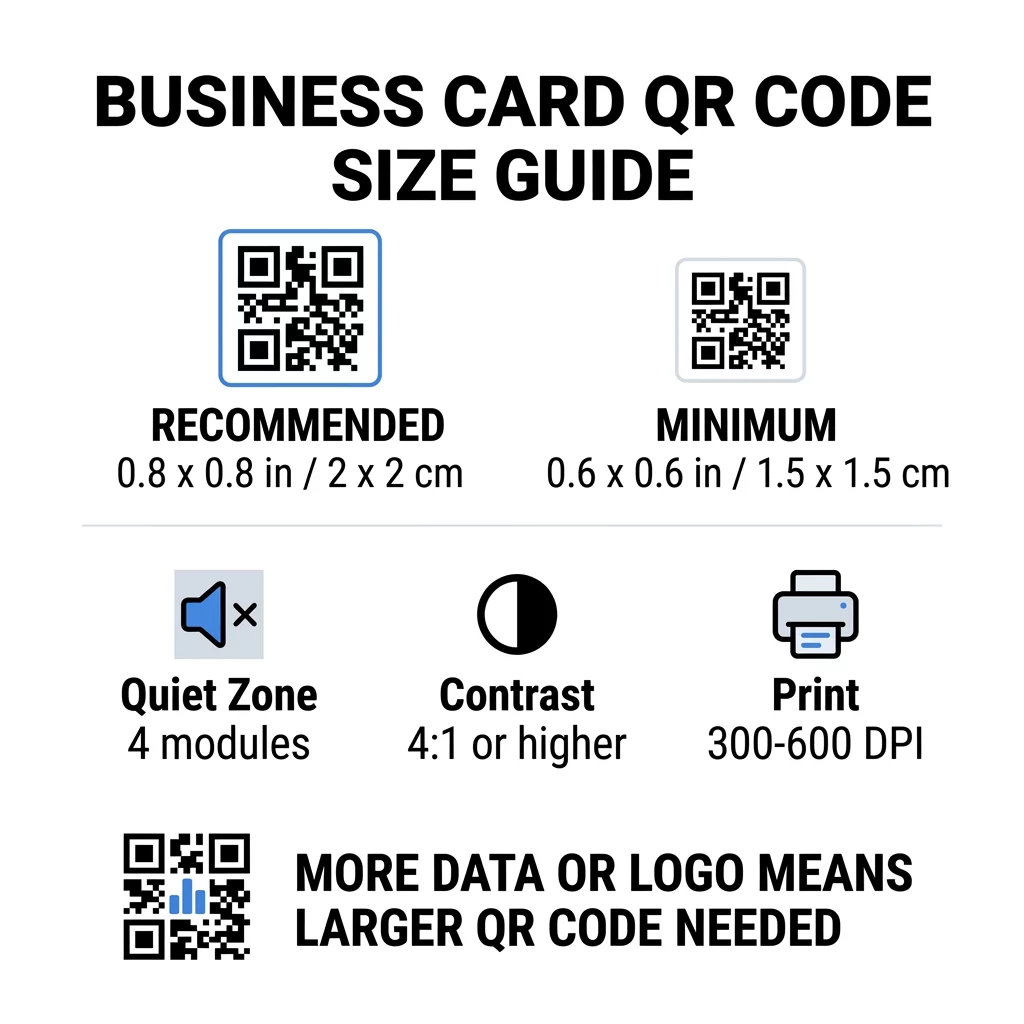
名刺にはスペースが限られているため、まずコードのサイズを決めてからデザインすると役立ちます。推奨サイズは0.8 x 0.8インチ (2 x 2 cm) です。名刺が混み合っている場合は、最小サイズは0.6 x 0.6インチ (1.5 x 1.5 cm) です。これが、名刺のQRコードはどのくらい小さくできるかという問いへの答えです。短いリンク、高コントラスト、きれいな印刷であれば、0.6インチです。
| サイズカテゴリ | 寸法(インチ) | 寸法(cm) | 信頼性 | ベスト・ユースケース |
|---|---|---|---|---|
| 最小 | 0.6 x 0.6 インチ | 1.5 x 1.5 cm | 中程度 | 短いURLと低密度データ |
| 推奨 | 0.8 x 0.8インチ | 2.0 x 2.0 cm | 高い | 標準的な名刺と連絡先リンク |
| 高密度 | 1.0 x 1.0 インチ+ | 2.5 x 2.5 cm+ | 高い | 詳細な連絡先カードと埋め込みロゴ |
これらのサイズは黒い正方形部分のみです。コードの周りの空白の余白は別途必要で、0.8インチのコードの場合、各辺に約0.1インチのクリアスペースが必要です(以下のクワイエットゾーンを参照)。
QR Code Size on a Business Card by Card Format
- US standard card (3.5 x 2 inches): a 0.8 inch code takes 40% of the card height. Place it on the back so the front stays clean.
- European standard card (85 x 55 mm): use 20 to 25 mm. The same 2 cm rule applies.
- Folded or square cards: you have more room, so use 1 inch (2.5 cm) or larger and keep the code away from the fold.
- Back of the card only: if the front is full, put a 1 inch code on the back with a short line such as “Scan to save my contact”.
How Data Density Dictates Code Size
The size of your QR code depends on how much data it holds. A QR code is a grid of small squares called modules. Version 1 has 21 x 21 modules and Version 40 has 177 x 177 modules. More data means more modules, and each module gets smaller when the code size stays the same. If the modules print smaller than a camera can resolve, the scan fails.
Here is the math for a 2 cm (0.8 inch) code. A short link usually fits in a Version 2 code (25 modules), so each module is about 0.8 mm. A full contact record can need Version 10 or higher (57 modules or more), and each module drops to about 0.35 mm. The second code is much harder to print and scan at the same size.
A direct vCard with your name, phone numbers, email addresses and office address creates a dense grid. Using a vCard QRコードジェネレーター to create a direct static file often needs a code of 1 inch (2.5 cm) or more to stay readable.
To keep your code compact and easy to scan on a small card:
- Encode a short link to your contact page instead of long raw contact text.
- Keep only the essential contact channels.
- Keep the module count low so each square stays large and sharp.
- Follow the principles for how to design a business card with a QR code to balance layout and function.
短いリンクが最も簡単な方法です。動的QRコードは短いリンクを保存し、カードが印刷された後でも宛先ページを変更できます。Pagelootは14日間の無料トライアル付きの動的コードを提供しており、プランはこちらで確認できます。 pageloot.com/pricing。リンクが変更されることがない場合は、静的コードで十分です。
オリジナル名刺コードを作成する スキャン可能で追跡可能な連絡先コードを作成する準備はできていますか? 名刺用QRコードジェネレーター を使用して高解像度コードをデザインし、ワンクリックで詳細を共有しましょう。
名刺のQRコードは良いのか悪いのか?
名刺のQRコードは、コードが十分に大きく、スキャンしやすく、役立つものにつながる場合に良いものです。コードが小さすぎたり、リンクが壊れていたり、ページが携帯電話向けに作成されていない場合は悪いものです。
メリットは明らかです。相手はあなたの連絡先を保存したり、ポートフォリオを2秒で開いたりでき、名刺に収まらないほどの情報を載せることができます。リスクも同様に明らかです。スキャンできないコードは不注意に見えますし、間違ったリンクが印刷されたコードは静的コードでは修正できません。以下のルールに従ってください。
- コードは少なくとも0.8インチ(2cm)以上にしてください。
- 携帯電話で素早く開くページにリンクさせてください。
- 相手が何を得るかを示す短い一行を隣に追加してください。例えば、「連絡先を保存」や「私の作品を見る」などです。
- 全量を注文する前に、印刷プルーフをテストしてください。
信頼性の高いスキャンのための必須技術基準
サイズだけでは良いスキャンを保証できません。これらの印刷ルールが、カメラがパターンを読み取れるかどうかを決定します。
クワイエットゾーンの維持
クワイエットゾーンとは、QRコード全体の周りの余白のことです。ISO/IEC規格では、四方すべてに少なくとも4つのモジュールが必要です。25モジュールの2cmコードの場合、その余白は約3mmになります。この空白は、コードがどこから始まるかをスキャナーに伝えます。この余白内のテキスト、境界線、または背景画像は、スキャン失敗の最も一般的な原因の一つです。
高い色コントラストを適用する
スキャナーは、暗いモジュールと明るい背景との間の輝度の差を読み取ります。白地に黒が最も安全な選択です。水色、濃い緑、または黒を明るい背景に配置するのも効果的です。一部のデフォルトのカメラアプリは読み取れないため、暗い背景に明るいモジュール(反転コード)を使用しないでください。赤にオレンジのような2つの中間色の組み合わせは避けてください。以下の情報を読んでください。 QRコードの色のコントラストガイドライン 安全な色の組み合わせを選択するために。
ベクター印刷形式のエクスポート
72 DPIのJPEGのような低解像度ファイルは、印刷するとエッジがぼやけます。印刷用には、SVG、EPS、またはPDF(ベクター)としてファイルを送信してください。これらはどんなサイズでも鮮明さを保ちます。PNGしか送れない場合は、最終的な印刷サイズで300 DPI以上でエクスポートしてください。これらの情報は QRコードの読みやすさに関するベストプラクティス ファイルが印刷所に届く前に問題を回避するのに役立ちます。
誤り訂正とロゴの統合
QRコードはリード・ソロモン誤り訂正を使用しています。これにより、コードの一部が擦れたり、しわになったり、覆われたりした場合でも、スキャナーがデータを再構築できます。以下の4つのレベルがあります。
- レベルLは、損傷したデータの約7%を復元します。ロゴのない小さくシンプルなコードに使用してください。
- レベルMは、損傷したデータの約15%を復元します。名刺では一般的なデフォルト設定です。
- レベルQは、損傷したデータの約25%を復元します。財布に入れて持ち歩くカードに適しています。
- レベルHは、損傷したデータの約30%を復元します。中央にロゴを配置する場合に使用してください。
レベルが高くなるとモジュールが増え、グリッドが密になります。中央にロゴを配置するためにレベルHを使用する場合は、印刷サイズを少なくとも1.0 x 1.0インチ(2.5 x 2.5 cm)に拡大し、ロゴはコード幅の約5分の1程度の小さなサイズに保ってください。
カード用紙と仕上げの選択
カードの表面は、光がスマートフォンのカメラに到達する方法に影響を与えます。マット仕上げや非コート紙は、光を均一に拡散するため、最もスキャンに適しています。
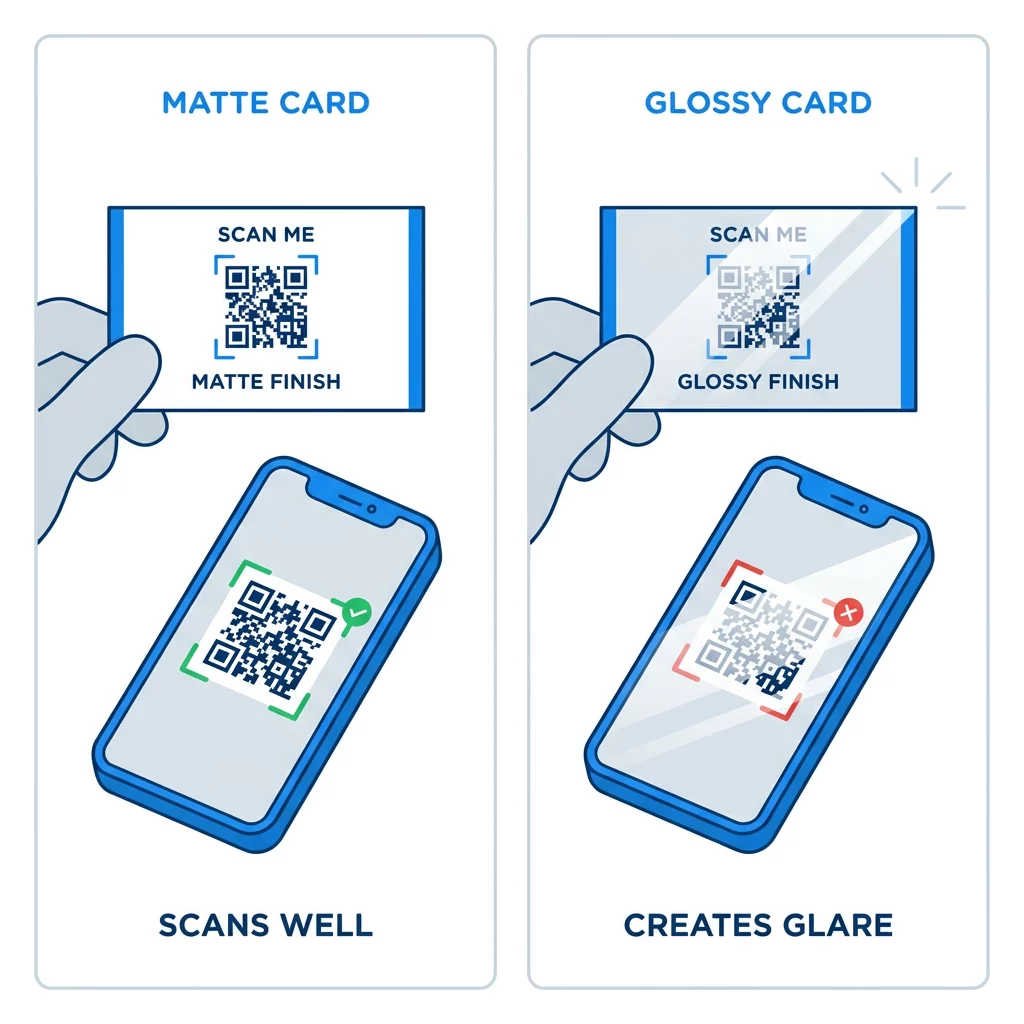
高光沢コーティング、金属箔、反射性ラミネートは、スポットライトの下でグレア(まぶしさ)を発生させ、コントラストを損ないます。特殊な仕上げを使用する場合は、コードを平らなマットな領域に配置してください。コードは、折り目、丸い角、および指がカードを持つ端から離してください。
印刷前に名刺のQRコードをテストしてください
- 実際のカード用紙に100%スケールで校正印刷してください。画面上でコードを判断しないでください。
- 少なくとも1台のiPhoneと1台のAndroid携帯でスキャンしてください。
- 明るい日光の下と薄暗い部屋でスキャンしてください。
- 約4インチ (10 cm) と約10インチ (25 cm) の距離からスキャンしてください。
- 携帯データ通信で目的のページを開き、高速に読み込まれることを確認してください。
- その後で、初めて全量を印刷注文してください。
名刺のQRコードがスキャンできない?これらを確認してください
- コードが0.6インチ (1.5 cm) 未満であるか、リンクが長くモジュールが小さすぎる。コードを拡大するか、リンクを短くしてください。
- テキストまたは境界線がクワイエットゾーン内にある。少なくとも4モジュール分遠ざけてください。
- コントラストが低すぎるか、色が反転している。明るい背景に暗いモジュールを使用してください。
- ファイルが低解像度の画像である。最終サイズでベクターファイルまたは300 DPIのPNGから再印刷してください。
- 光沢または箔仕上げによるグレア。コードをマットな領域に移動してください。
- 目的のリンクが間違っているか、ページが遅い。携帯電話でリンクを開いて修正してください。
適切にサイズ調整されたQRコードは、名刺を握手とオンラインプロフィールを結ぶ信頼できる架け橋にします。コードを0.8 x 0.8インチ以上にし、クワイエットゾーンを保護し、きれいなベクターファイルから印刷してください。次回のカードを作成してテストするには、Pagelootを使用してください。 QRコードジェネレーター.
よくある質問
0.8 x 0.8インチ (2 x 2 cm) を目安にしてください。このサイズは、現在のスマートフォンで通常の保持距離から素早くスキャンできます。コードに大量のデータやロゴが含まれる場合は、1インチ (2.5 cm) 以上を使用してください。
最小サイズは約0.6 x 0.6インチ (1.5 x 1.5 cm) です。短いリンク、高いコントラスト、明確なクワイエットゾーン、鮮明な印刷でのみ機能します。古い携帯電話の場合は、コードを0.8インチ (2 cm) 以上にしてください。
最高の状況でも、1辺あたり約0.6インチ(1.5 cm)。それよりも小さいと、ほとんどのスマートフォンのカメラは、通常の距離で保持されたカードに焦点を合わせることができません。リンクを短くすると、正方形が大きくなり、小さなコードでもスキャンしやすくなります。
はい、ただし、コードが隠されたデータを回復できるように、レベルHの誤り訂正を使用してください。レベルHはモジュールを追加するため、コードを少なくとも1.0 x 1.0インチ(2.5 cm)に拡大し、ロゴを小さく保ってください。
一般的な原因としては、クワイエットゾーンが小さすぎる、色のコントラストが低い、低解像度のファイル、光沢仕上げによるグレア、または小さすぎるコードなどが挙げられます。印刷されたプルーフでそれぞれを確認し、次回の印刷前に修正してください。
コードが少なくとも0.8インチあり、良好にスキャンでき、スマートフォン向けページが開かれる場合、それらは良好です。コードが小さすぎたり、スキャンしにくかったり、またはリンク切れにつながる場合、それらは不良です。印刷された校正刷りを必ずテストしてください。
リンクが変更されることがない場合、静的コードで十分です。静的コードに有効期限はありません。職務、ウェブサイト、連絡先ページなどを変更する可能性がある場合、動的コードは価値があります。再印刷することなくリンク先を編集できるためです。Pagelootの動的コードには14日間の無料トライアルが付属しており、プランはpageloot.com/pricingに掲載されています。