ขนาด QR โค้ดขั้นต่ำสำหรับนามบัตรคือประมาณ 0.6 x 0.6 นิ้ว (1.5 x 1.5 ซม.) และเฉพาะในกรณีที่โค้ดมีลิงก์สั้น ๆ, พิมพ์คมชัดและมีคอนทราสต์สูง สำหรับการสแกนที่น่าเชื่อถือ ควรมีขนาดอย่างน้อย 0.8 x 0.8 นิ้ว (2 x 2 ซม.) คู่มือนี้จะให้ขนาดที่แน่นอน, กฎการพิมพ์เบื้องหลัง และรายการตรวจสอบเพื่อทดสอบนามบัตรของคุณก่อนสั่งพิมพ์
QR โค้ดบนนามบัตรควรมีขนาดเท่าไหร่?
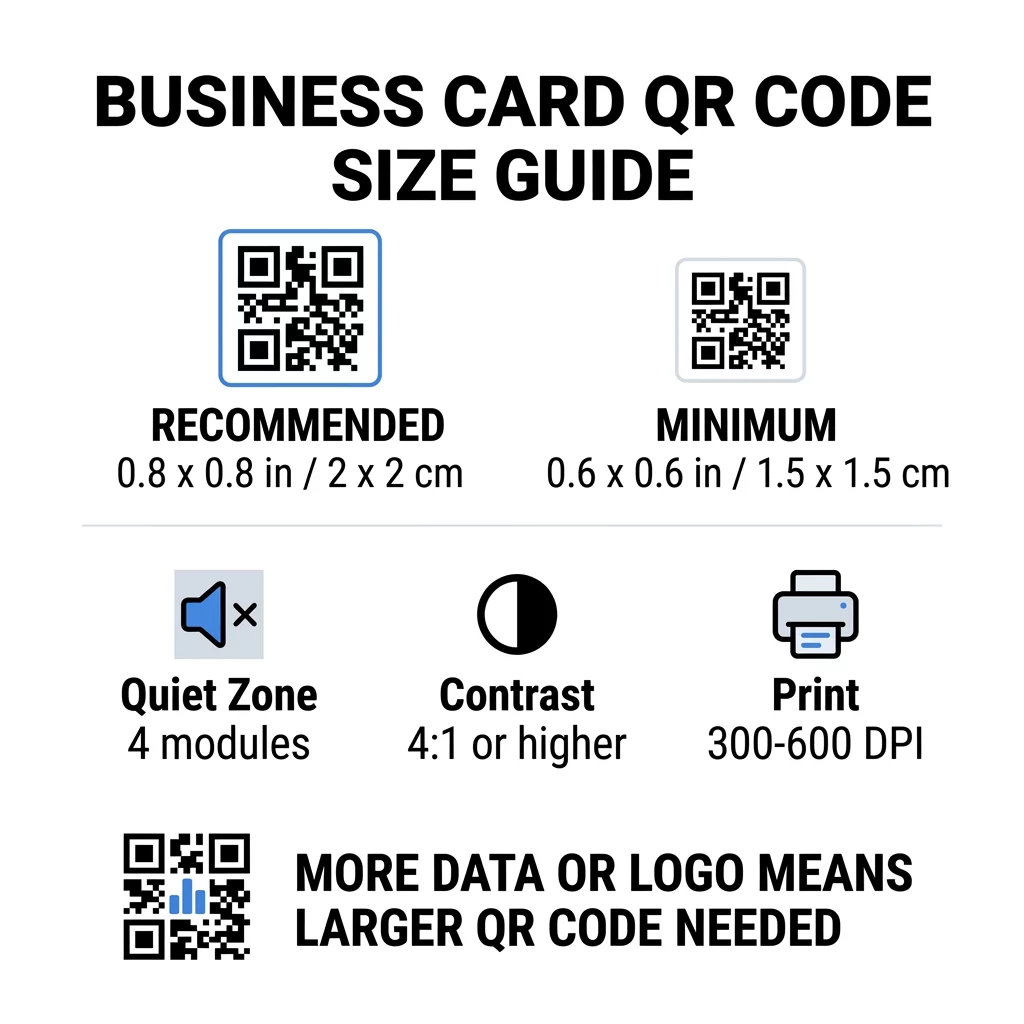
สำหรับนามบัตรมาตรฐาน ขนาดที่แนะนำคือ 0.8 x 0.8 นิ้ว (2 x 2 ซม.) ที่ขนาดนั้น กล้องโทรศัพท์จะโฟกัสได้อย่างรวดเร็ว แม้ในที่แสงน้อยหรือทำมุมเล็กน้อย ผู้คนมักจะถือนามบัตรห่างจากโทรศัพท์ 4 ถึง 10 นิ้ว (10 ถึง 25 ซม.) ดังนั้นโค้ดจึงต้องมีขนาดใหญ่พอที่จะครอบคลุมส่วนที่ดีของมุมมองกล้องที่ระยะนั้น
กฎทั่วไปคืออัตราส่วน 10:1: สำหรับทุก ๆ ระยะการสแกน 10 ซม. โค้ดควรมีความกว้างอย่างน้อย 1 ซม. ที่ระยะห่าง 10 นิ้ว (25 ซม.) จะได้ประมาณ 1 นิ้ว (2.5 ซม.) สำหรับการสแกนที่ง่ายที่สุด และระยะทางที่สั้นลงจะช่วยให้ใช้โค้ดขนาดเล็กได้ นี่คือเหตุผลว่าทำไม 0.8 นิ้วจึงใช้ได้กับนามบัตรส่วนใหญ่ และอะไรก็ตามที่ต่ำกว่า 0.6 นิ้วจะเริ่มล้มเหลวบนโทรศัพท์รุ่นเก่า
ขนาด QR โค้ดขั้นต่ำและขนาดที่แนะนำ
นามบัตรมีพื้นที่น้อย ดังนั้นจึงควรตัดสินใจขนาดโค้ดก่อนแล้วจึงออกแบบตาม ขนาดที่แนะนำคือ 0.8 x 0.8 นิ้ว (2 x 2 ซม.) หากนามบัตรมีข้อมูลหนาแน่น ขนาดขั้นต่ำคือ 0.6 x 0.6 นิ้ว (1.5 x 1.5 ซม.) นี่คือคำตอบว่า QR โค้ดบนนามบัตรสามารถเล็กได้แค่ไหน: 0.6 นิ้ว พร้อมลิงก์สั้น ๆ, คอนทราสต์สูง และการพิมพ์ที่สะอาด
| หมวดหมู่ขนาด | ขนาด (นิ้ว) | ขนาด (ซม.) | ความน่าเชื่อถือ | กรณีการใช้งานที่ดีที่สุด |
|---|---|---|---|---|
| ขั้นต่ำ | 0.6 x 0.6 นิ้ว | 1.5 x 1.5 ซม. | ปานกลาง | URL สั้น ๆ และข้อมูลความหนาแน่นต่ำ |
| แนะนำ | 0.8 x 0.8 นิ้ว | 2.0 x 2.0 ซม. | สูง | นามบัตรมาตรฐานและลิงก์ติดต่อ |
| ความหนาแน่นสูง | 1.0 x 1.0 นิ้ว+ | 2.5 x 2.5 ซม.+ | สูง | นามบัตรติดต่อที่มีรายละเอียดและโลโก้ฝังตัว |
ขนาดเหล่านี้มีไว้สำหรับสี่เหลี่ยมสีดำเท่านั้น ระยะขอบว่างรอบโค้ดเป็นส่วนเพิ่มเติม ดังนั้นโค้ดขนาด 0.8 นิ้วจึงต้องการพื้นที่ว่างประมาณ 0.1 นิ้วในแต่ละด้าน (ดูโซนเงียบด้านล่าง)
ขนาดของคิวอาร์โค้ดบนนามบัตรตามรูปแบบนามบัตร
- นามบัตรมาตรฐานสหรัฐฯ (3.5 x 2 นิ้ว): คิวอาร์โค้ดขนาด 0.8 นิ้วจะใช้พื้นที่ 40% ของความสูงนามบัตร วางไว้ด้านหลังเพื่อให้ด้านหน้าดูเรียบร้อย
- นามบัตรมาตรฐานยุโรป (85 x 55 มม.): ใช้ขนาด 20 ถึง 25 มม. กฎ 2 ซม. เดียวกันนี้ก็ใช้ได้
- นามบัตรแบบพับหรือแบบสี่เหลี่ยมจัตุรัส: คุณมีพื้นที่มากขึ้น จึงควรใช้ขนาด 1 นิ้ว (2.5 ซม.) หรือใหญ่กว่า และวางโค้ดให้ห่างจากรอยพับ
- ด้านหลังนามบัตรเท่านั้น: หากด้านหน้าเต็ม ให้วางโค้ดขนาด 1 นิ้วไว้ด้านหลังพร้อมข้อความสั้นๆ เช่น “สแกนเพื่อบันทึกผู้ติดต่อของฉัน”
ความหนาแน่นของข้อมูลกำหนดขนาดของคิวอาร์โค้ดได้อย่างไร
ขนาดของคิวอาร์โค้ดขึ้นอยู่กับปริมาณข้อมูลที่บรรจุอยู่ คิวอาร์โค้ดคือตารางสี่เหลี่ยมเล็กๆ ที่เรียกว่าโมดูล เวอร์ชัน 1 มีโมดูลขนาด 21 x 21 และเวอร์ชัน 40 มีโมดูลขนาด 177 x 177 ข้อมูลที่มากขึ้นหมายถึงโมดูลที่มากขึ้น และแต่ละโมดูลจะเล็กลงเมื่อขนาดโค้ดยังคงเท่าเดิม หากโมดูลพิมพ์ออกมาเล็กเกินกว่าที่กล้องจะอ่านได้ การสแกนจะล้มเหลว
นี่คือการคำนวณสำหรับโค้ดขนาด 2 ซม. (0.8 นิ้ว) ลิงก์สั้นๆ มักจะพอดีกับโค้ดเวอร์ชัน 2 (25 โมดูล) ดังนั้นแต่ละโมดูลจะประมาณ 0.8 มม. ข้อมูลผู้ติดต่อเต็มรูปแบบอาจต้องใช้เวอร์ชัน 10 หรือสูงกว่า (57 โมดูลขึ้นไป) และแต่ละโมดูลจะลดลงเหลือประมาณ 0.35 มม. โค้ดแบบหลังนั้นพิมพ์และสแกนได้ยากกว่ามากในขนาดเท่าเดิม
vCard โดยตรงที่มีชื่อของคุณ หมายเลขโทรศัพท์ ที่อยู่อีเมล และที่อยู่สำนักงาน จะสร้างตารางที่หนาแน่น การใช้ vCard คืออะไร สร้าง QR Code vCard เพื่อสร้างไฟล์สแตติกโดยตรงมักจะต้องใช้โค้ดขนาด 1 นิ้ว (2.5 ซม.) หรือมากกว่าจึงจะยังคงอ่านได้
เพื่อให้โค้ดของคุณกะทัดรัดและสแกนง่ายบนนามบัตรขนาดเล็ก:
- เข้ารหัสลิงก์สั้นๆ ไปยังหน้าติดต่อของคุณ แทนที่จะเป็นข้อความผู้ติดต่อดิบที่ยาว
- เก็บเฉพาะช่องทางการติดต่อที่จำเป็น
- รักษาจำนวนโมดูลให้ต่ำ เพื่อให้แต่ละช่องสี่เหลี่ยมยังคงใหญ่และคมชัด
- ปฏิบัติตามหลักการในการ ออกแบบนามบัตรด้วยคิวอาร์โค้ด เพื่อสร้างความสมดุลระหว่างการจัดวางและฟังก์ชัน
ลิงก์แบบสั้นเป็นวิธีที่ง่ายที่สุดในการดำเนินการนี้ โค้ด QR แบบไดนามิกจะจัดเก็บลิงก์แบบสั้นและช่วยให้คุณสามารถเปลี่ยนหน้าปลายทางได้หลังจากพิมพ์นามบัตรแล้ว Pageloot มีโค้ดแบบไดนามิกพร้อมการทดลองใช้ฟรี 14 วัน และคุณสามารถดูแผนบริการได้ที่ pageloot.com/pricing. โค้ดแบบคงที่ก็เพียงพอแล้วหากลิงก์ของคุณจะไม่เปลี่ยนแปลง
สร้างโค้ดนามบัตรแบบกำหนดเองของคุณ พร้อมที่จะสร้างโค้ดผู้ติดต่อที่สแกนได้และติดตามได้แล้วใช่ไหม? ใช้ สร้าง QR Code นามบัตร ฟรี เพื่อออกแบบโค้ดที่มีความละเอียดสูงและแบ่งปันรายละเอียดของคุณด้วยการสแกนเพียงครั้งเดียว
โค้ด QR บนนามบัตรดีหรือไม่ดี?
โค้ด QR บนนามบัตรจะดีเมื่อโค้ดมีขนาดใหญ่พอ สแกนง่าย และนำไปสู่สิ่งที่เป็นประโยชน์ โค้ดจะแย่เมื่อมีขนาดเล็ก ลิงก์เสีย หรือหน้าเว็บไม่ได้ถูกออกแบบมาสำหรับโทรศัพท์
ประโยชน์นั้นมีจริง ผู้คนสามารถบันทึกข้อมูลติดต่อของคุณหรือเปิดพอร์ตโฟลิโอของคุณได้ภายในสองวินาที และคุณสามารถใส่ข้อมูลได้มากกว่าที่นามบัตรจะรองรับได้ ความเสี่ยงก็มีจริงเช่นกัน: โค้ดที่สแกนไม่ได้ดูเหมือนไม่ใส่ใจ และโค้ดที่พิมพ์ออกมาพร้อมลิงก์ที่ผิดไม่สามารถแก้ไขได้บนโค้ดแบบคงที่ ใช้กฎเหล่านี้:
- ทำให้โค้ดมีขนาดอย่างน้อย 0.8 นิ้ว (2 ซม.)
- ชี้ไปยังหน้าเว็บที่เปิดได้รวดเร็วบนโทรศัพท์
- เพิ่มข้อความสั้นๆ ข้างๆ เพื่อระบุว่าผู้คนจะได้รับอะไร เช่น “บันทึกรายชื่อติดต่อ” หรือ “ดูผลงานของฉัน”
- ทดสอบหลักฐานการพิมพ์ก่อนที่คุณจะสั่งพิมพ์ทั้งหมด
มาตรฐานทางเทคนิคที่จำเป็นสำหรับการสแกนที่น่าเชื่อถือ
ขนาดเพียงอย่างเดียวไม่ได้รับประกันว่าจะสแกนได้ดี กฎการพิมพ์เหล่านี้เป็นตัวกำหนดว่ากล้องจะสามารถอ่านรูปแบบได้หรือไม่
การรักษาระยะห่างที่เงียบ (Quiet Zone)
โซนเงียบคือระยะขอบว่างรอบโค้ด QR ทั้งหมด มาตรฐาน ISO/IEC กำหนดให้มีอย่างน้อยสี่โมดูลในแต่ละด้าน สำหรับโค้ดขนาด 2 ซม. ที่มี 25 โมดูล ระยะขอบนั้นอยู่ที่ประมาณ 3 มม. พื้นที่ว่างนี้จะบอกเครื่องสแกนว่าโค้ดเริ่มต้นที่ไหน ข้อความ เส้นขอบ หรือรูปภาพพื้นหลังภายในระยะขอบนี้เป็นหนึ่งในสาเหตุที่พบบ่อยที่สุดของการสแกนล้มเหลว
การใช้ความคมชัดของสีสูง
เครื่องสแกนจะอ่านค่าความแตกต่างของความสว่างระหว่างโมดูลสีเข้มและพื้นหลังสีอ่อน สีดำบนพื้นขาวเป็นตัวเลือกที่ปลอดภัยที่สุด สีน้ำเงินเข้ม, สีเขียวเข้ม หรือสีดำบนพื้นหลังสีอ่อนก็ใช้ได้ดีเช่นกัน หลีกเลี่ยงโมดูลสีอ่อนบนพื้นหลังสีเข้ม (โค้ดกลับด้าน) เนื่องจากแอปกล้องบางตัวอาจไม่สามารถอ่านได้ ห้ามใช้สีโทนกลางสองสี เช่น สีส้มบนสีแดง อ่าน แนวทางการใช้คอนทราสต์สีของรหัส QR เพื่อเลือกคู่สีที่ปลอดภัย
การส่งออกรูปแบบไฟล์เวกเตอร์สำหรับพิมพ์
ไฟล์ที่มีความละเอียดต่ำ เช่น JPEG 72 DPI จะพิมพ์ออกมาแล้วขอบเบลอ สำหรับการพิมพ์ ควรส่งไฟล์เป็น SVG, EPS หรือ PDF (เวกเตอร์) ซึ่งจะคงความคมชัดไม่ว่าจะขยายขนาดเท่าใด หากคุณสามารถส่งได้เพียง PNG ให้ส่งออกที่ 300 DPI หรือสูงกว่าในขนาดพิมพ์สุดท้าย สิ่งเหล่านี้ แนวทางปฏิบัติที่ดีที่สุดสำหรับการอ่านรหัส QR ช่วยให้คุณหลีกเลี่ยงปัญหาได้ก่อนที่ไฟล์จะไปถึงร้านพิมพ์
การแก้ไขข้อผิดพลาดและการรวมโลโก้
โค้ด QR ใช้การแก้ไขข้อผิดพลาดแบบ Reed-Solomon ซึ่งช่วยให้เครื่องสแกนสามารถสร้างข้อมูลขึ้นมาใหม่ได้เมื่อส่วนหนึ่งของโค้ดถูกขีดข่วน พับงอ หรือถูกปกปิด มีสี่ระดับดังนี้:
- ระดับ L กู้คืนข้อมูลที่เสียหายได้ประมาณ 7% ใช้สำหรับโค้ดขนาดเล็กและเรียบง่ายที่ไม่มีโลโก้
- ระดับ M กู้คืนข้อมูลที่เสียหายได้ประมาณ 15% เป็นค่าเริ่มต้นที่พบบ่อยสำหรับนามบัตร
- ระดับ Q กู้คืนข้อมูลที่เสียหายได้ประมาณ 25% เป็นตัวเลือกที่ดีสำหรับบัตรที่เก็บไว้ในกระเป๋าสตางค์
- ระดับ H กู้คืนข้อมูลที่เสียหายได้ประมาณ 30% ใช้ได้หากคุณวางโลโก้ไว้ตรงกลาง
ระดับที่สูงขึ้นจะเพิ่มโมดูลมากขึ้น ทำให้ตารางมีความหนาแน่นมากขึ้น หากคุณใช้ระดับ H สำหรับโลโก้ตรงกลาง ให้เพิ่มขนาดที่พิมพ์อย่างน้อย 1.0 x 1.0 นิ้ว (2.5 x 2.5 ซม.) และทำให้โลโก้มีขนาดเล็กประมาณหนึ่งในห้าของความกว้างโค้ด
การเลือกชนิดและพื้นผิวของกระดาษการ์ด
พื้นผิวของการ์ดมีผลต่อการรับแสงของกล้องโทรศัพท์ กระดาษผิวด้านและไม่เคลือบจะสแกนได้ดีที่สุดเพราะกระจายแสงได้อย่างสม่ำเสมอ
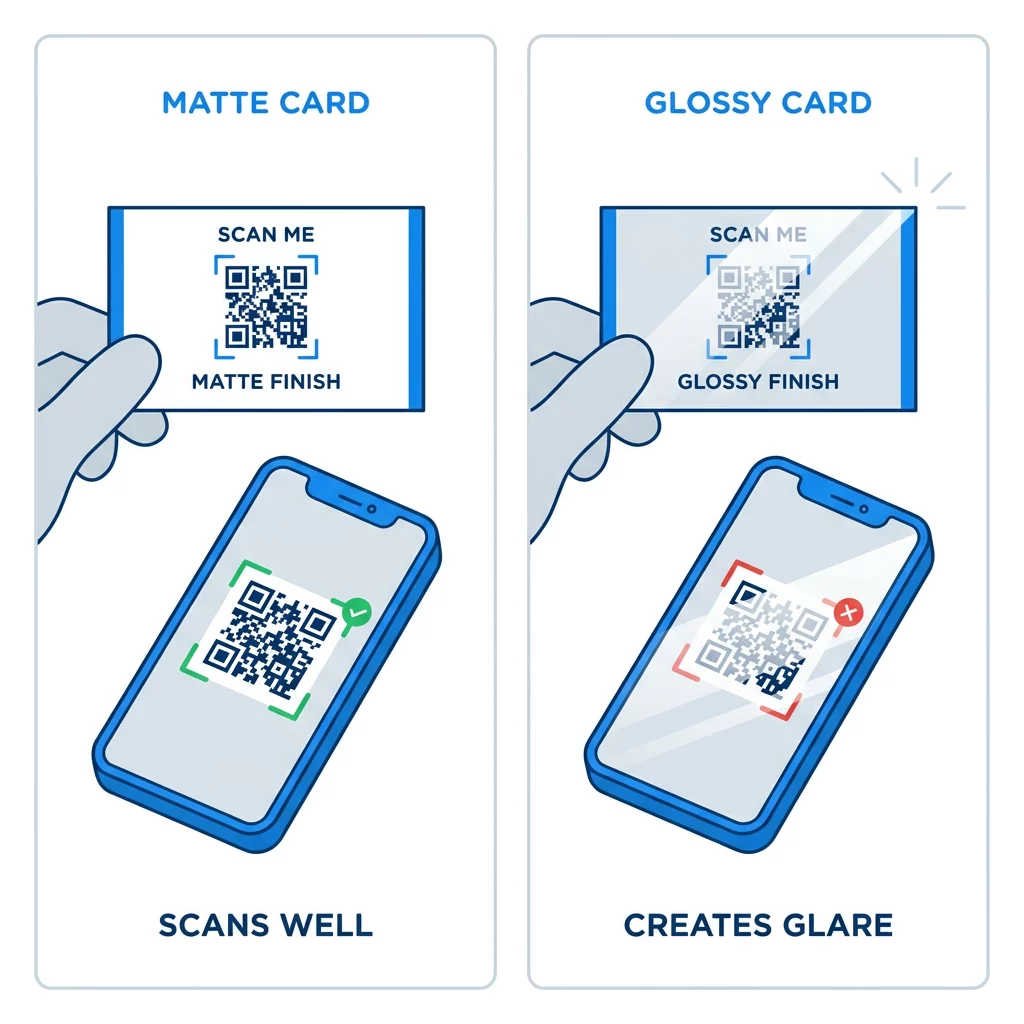
การเคลือบผิวมันวาวสูง, ฟอยล์โลหะ และลามิเนตสะท้อนแสงจะทำให้เกิดแสงสะท้อนภายใต้สปอตไลท์ และแสงสะท้อนนั้นจะลดความแตกต่างของสี (contrast) หากคุณใช้พื้นผิวพิเศษ ให้รักษารหัสไว้ในบริเวณที่เป็นผิวด้านและเรียบ หลีกเลี่ยงการวางรหัสใกล้รอยพับ, มุมโค้งมน และขอบที่นิ้วหัวแม่มือจับการ์ด
ทดสอบรหัส QR บนบัตรธุรกิจของคุณก่อนพิมพ์
- พิมพ์ตัวอย่างบนกระดาษนามบัตรจริงในขนาด 100% อย่าตัดสินรหัสจากหน้าจอ
- สแกนด้วย iPhone อย่างน้อยหนึ่งเครื่องและโทรศัพท์ Android หนึ่งเครื่อง
- สแกนในที่แสงสว่างจ้าและในห้องที่มืดสลัว
- สแกนจากระยะประมาณ 4 นิ้ว (10 ซม.) และจากระยะประมาณ 10 นิ้ว (25 ซม.)
- เปิดหน้าปลายทางบนข้อมูลมือถือและยืนยันว่าโหลดเร็ว
- จากนั้นจึงสั่งพิมพ์ทั้งหมด
รหัส QR บนบัตรธุรกิจสแกนไม่ได้? ตรวจสอบสิ่งเหล่านี้
- รหัสมีขนาดเล็กกว่า 0.6 นิ้ว (1.5 ซม.) หรือลิงก์ยาวและโมดูลมีขนาดเล็กมาก ขยายรหัสหรือย่อลิงก์ให้สั้นลง
- ข้อความหรือขอบอยู่ในโซนเงียบ ย้ายออกไปอย่างน้อยสี่โมดูล
- คอนทราสต์ต่ำเกินไปหรือสีกลับด้าน ใช้โมดูลสีเข้มบนพื้นหลังสีอ่อน
- ไฟล์เป็นภาพความละเอียดต่ำ พิมพ์ใหม่จากไฟล์เวกเตอร์หรือ PNG 300 DPI ในขนาดสุดท้าย
- แสงสะท้อนจากพื้นผิวมันวาวหรือฟอยล์ ย้ายรหัสไปยังบริเวณผิวด้าน
- ลิงก์ปลายทางผิดพลาดหรือหน้าโหลดช้า เปิดลิงก์บนโทรศัพท์ของคุณแล้วแก้ไข
รหัส QR ที่มีขนาดเหมาะสมจะทำให้บัตรธุรกิจของคุณเป็นสะพานเชื่อมที่น่าเชื่อถือระหว่างการทักทายกับโปรไฟล์ออนไลน์ของคุณ รักษารหัสให้อยู่ที่ 0.8 x 0.8 นิ้วหรือใหญ่กว่านั้น ปกป้องโซนเงียบ และพิมพ์จากไฟล์เวกเตอร์ที่สะอาดตา หากต้องการสร้างและทดสอบบัตรใบต่อไปของคุณ ให้ใช้ Pageloot เครื่องสร้างรหัส QR.
คำถามที่พบบ่อย
แนะนำให้ใช้ขนาด 0.8 x 0.8 นิ้ว (2 x 2 ซม.) ขนาดนี้สามารถสแกนได้อย่างรวดเร็วด้วยสมาร์ทโฟนรุ่นปัจจุบันจากระยะการถือปกติ ใช้ 1 นิ้ว (2.5 ซม.) หรือใหญ่กว่า หากโค้ดมีข้อมูลจำนวนมากหรือมีโลโก้
ขนาดที่เล็กที่สุดคือประมาณ 0.6 x 0.6 นิ้ว (1.5 x 1.5 ซม.) ใช้งานได้เฉพาะกับลิงก์สั้นๆ, คอนทราสต์สูง, พื้นที่ว่างที่ชัดเจน และงานพิมพ์ที่คมชัด สำหรับโทรศัพท์รุ่นเก่า ควรใช้รหัสขนาด 0.8 นิ้ว (2 ซม.) ขึ้นไป
ประมาณ 0.6 นิ้ว (1.5 ซม.) ต่อด้านในกรณีที่ดีที่สุด เล็กกว่านั้น กล้องโทรศัพท์ส่วนใหญ่ไม่สามารถโฟกัสไปที่การ์ดที่ถืออยู่ในระยะปกติได้ การย่อลิงก์ทำให้สี่เหลี่ยมมีขนาดใหญ่ขึ้นและช่วยให้รหัสขนาดเล็กสแกนได้
ใช่ แต่ใช้การแก้ไขข้อผิดพลาดระดับ H เพื่อให้โค้ดสามารถกู้คืนข้อมูลที่ซ่อนไว้ได้ ระดับ H จะเพิ่มโมดูล ดังนั้นให้ขยายโค้ดให้มีขนาดอย่างน้อย 1.0 x 1.0 นิ้ว (2.5 ซม.) และรักษาขนาดโลโก้ให้เล็ก
สาเหตุทั่วไปได้แก่ พื้นที่ว่างรอบโค้ดเล็กเกินไป, ความคมชัดของสีต่ำ, ไฟล์มีความละเอียดต่ำ, แสงสะท้อนจากพื้นผิวมันวาว หรือโค้ดมีขนาดเล็กเกินไป ให้ตรวจสอบแต่ละจุดบนตัวอย่างงานพิมพ์ และแก้ไขก่อนการพิมพ์ครั้งถัดไป
จะดีเมื่อโค้ดมีขนาดอย่างน้อย 0.8 นิ้ว, สแกนได้ง่าย และเปิดหน้าเว็บที่ออกแบบมาสำหรับโทรศัพท์ จะไม่ดีเมื่อโค้ดมีขนาดเล็กเกินไป สแกนยาก หรือนำไปสู่ลิงก์ที่เสีย ควรทดสอบจากฉบับพิมพ์เสมอ
รหัสแบบคงที่ก็เพียงพอแล้วหากลิงก์จะไม่เปลี่ยนแปลง และรหัสแบบคงที่ไม่มีวันหมดอายุ รหัสแบบไดนามิกจะคุ้มค่ากว่าหากคุณอาจมีการเปลี่ยนงาน, เว็บไซต์ หรือหน้าติดต่อ เพราะคุณสามารถแก้ไขปลายทางได้โดยไม่ต้องพิมพ์ใหม่ รหัสแบบไดนามิกของ Pageloot มาพร้อมกับการทดลองใช้ฟรี 14 วัน และแผนบริการต่าง ๆ ระบุไว้ที่ pageloot.com/pricing.