Minimalna velikost QR kode za vizitko je približno 0,6 x 0,6 palca (1,5 x 1,5 cm), in to le, če koda vsebuje kratko povezavo, je natisnjena ostro in ima močan kontrast. Za zanesljivo skeniranje naj bo velika vsaj 0,8 x 0,8 palca (2 x 2 cm). Ta priročnik podaja točne velikosti, tiskarska pravila, ki stojijo za njimi, in kontrolni seznam za preizkus vaše kartice, preden jo naročite.
Kako velika naj bo QR koda na vizitki?
Za standardno vizitko je priporočena velikost 0,8 x 0,8 palca (2 x 2 cm). Pri tej velikosti se kamere telefonov hitro izostrijo, tudi v slabi svetlobi ali pod majhnim kotom. Ljudje običajno držijo kartico 4 do 10 palcev (10 do 25 cm) od telefona, zato mora biti koda dovolj velika, da zapolni dober del pogleda kamere na tej razdalji.
Splošno pravilo je razmerje 10:1: za vsakih 10 cm razdalje skeniranja naj bo koda široka vsaj 1 cm. Na razdalji 10 palcev (25 cm) to pomeni približno 1 palec (2,5 cm) za najlažje skeniranje, krajše razdalje pa omogočajo manjše kode. Zato 0,8 palca deluje za večino kartic, in kar je manj kot 0,6 palca, začne odpovedovati na starejših telefonih.
Minimalna velikost QR kode in priporočena velikost
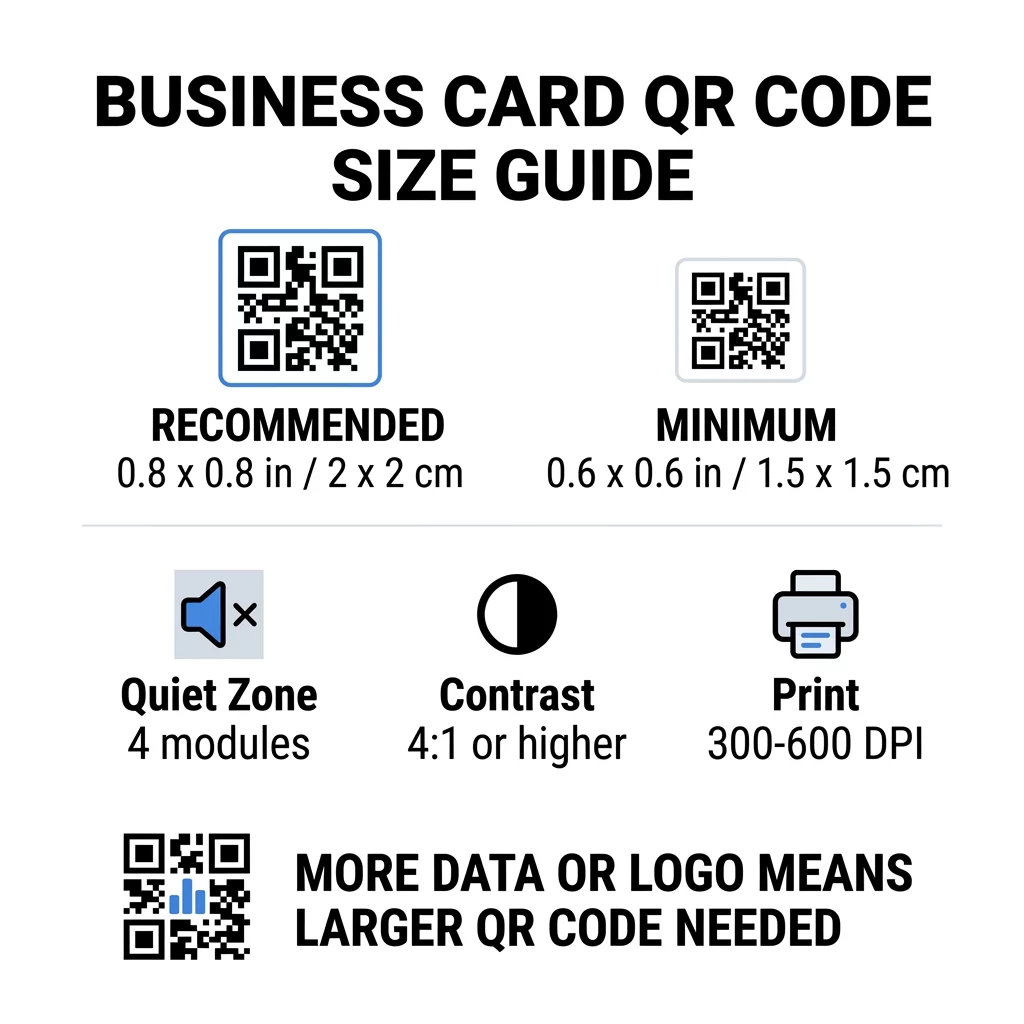
Vizitke pustijo malo prostora, zato je koristno najprej določiti velikost kode in nato oblikovati okoli nje. Priporočena velikost je 0,8 x 0,8 palca (2 x 2 cm). Če je kartica preveč natrpana, je minimum 0,6 x 0,6 palca (1,5 x 1,5 cm). To je odgovor na vprašanje, kako majhna je lahko QR koda na vizitki: 0,6 palca, s kratko povezavo, visokim kontrastom in čistim tiskom.
| Kategorija velikosti | Dimenzije (palci) | Dimenzije (cm) | Zanesljivost | Najboljši primer uporabe |
|---|---|---|---|---|
| Minimum | 0,6 x 0,6 in | 1,5 x 1,5 cm | Zmerno | Kratki URL-ji in podatki nizke gostote |
| Priporočeno | 0,8 x 0,8 in | 2,0 x 2,0 cm | Visoka | Standardne vizitke in kontaktne povezave |
| Visoka gostota | 1,0 x 1,0 palca+ | 2,5 x 2,5 cm+ | Visoka | Podrobne kontaktne kartice in vdelani logotipi |
Te velikosti so samo za črne kvadratke. Prazen rob okoli kode je dodaten, zato koda velikosti 0,8 palca potrebuje približno 0,1 palca praznega prostora na vsaki strani (glejte tiho cono spodaj).
Velikost QR kode na vizitki glede na format kartice
- Standardna ameriška vizitka (3,5 x 2 palca): koda velikosti 0,8 palca zavzame 40 % višine kartice. Namestite jo na zadnjo stran, da bo sprednja stran ostala čista.
- Evropska standardna vizitka (85 x 55 mm): uporabite 20 do 25 mm. Velja isto pravilo 2 cm.
- Zložljive ali kvadratne vizitke: imate več prostora, zato uporabite 1 palec (2,5 cm) ali več in kodo držite stran od pregiba.
- Samo zadnja stran kartice: če je sprednja stran polna, postavite 1-palčno kodo na zadnjo stran s kratkim stavkom, kot je “Skeniraj, da shraniš moj kontakt”.
Kako gostota podatkov določa velikost kode
Velikost vaše QR kode je odvisna od količine podatkov, ki jih vsebuje. QR koda je mreža majhnih kvadratov, imenovanih moduli. Različica 1 ima 21 x 21 modulov, različica 40 pa 177 x 177 modulov. Več podatkov pomeni več modulov, in vsak modul postane manjši, če velikost kode ostane enaka. Če so moduli natisnjeni manjši, kot jih lahko zazna kamera, skeniranje ne uspe.
Tukaj je izračun za kodo velikosti 2 cm (0,8 palca). Kratka povezava običajno ustreza v kodo različice 2 (25 modulov), tako da je vsak modul velik približno 0,8 mm. Celoten kontaktni zapis lahko zahteva različico 10 ali višjo (57 modulov ali več), in vsak modul se zmanjša na približno 0,35 mm. Drugo kodo je veliko težje natisniti in skenirati pri enaki velikosti.
Neposredna vCard s tvojim imenom, telefonskimi številkami, e-poštnimi naslovi in naslovom pisarne ustvari gosto mrežo. Uporaba Ustvari QR kodo vCard za ustvarjanje neposredne statične datoteke pogosto potrebuje kodo velikosti 1 palca (2,5 cm) ali več, da ostane berljiva.
Da bo vaša koda kompaktna in enostavna za skeniranje na majhni kartici:
- Zakodirajte kratko povezavo do vaše kontaktne strani namesto dolgega surovega besedila kontakta.
- Ohranite le bistvene kontaktne kanale.
- Ohranite majhno število modulov, da bo vsak kvadrat ostal velik in oster.
- Sledite načelom, kako oblikovati vizitko s QR kodo za uravnoteženje postavitve in funkcionalnosti.
Kratka povezava je najenostavnejši način za to. Dinamična QR koda shrani kratko povezavo in vam omogoča, da spremenite ciljno stran, ko so kartice natisnjene. Pageloot ponuja dinamične kode s 14-dnevnim brezplačnim preizkusom, načrte pa si lahko ogledate na pageloot.com/pricing. Statična koda je dovolj, če se vaša povezava nikoli ne bo spremenila.
Ustvarite svojo prilagojeno kodo vizitke Ste pripravljeni ustvariti skenabilno, sledljivo kontaktno kodo? Uporabite Izdelava QR kode za vizitke za oblikovanje kod visoke ločljivosti in deljenje vaših podatkov z enim skeniranjem.
So QR kode na vizitkah dobre ali slabe?
QR kode na vizitkah so dobre, če je koda dovolj velika, enostavna za skeniranje in vodi do nečesa uporabnega. Slabo je, če je koda majhna, povezava je prekinjena ali stran ni optimizirana za telefone.
Prednosti so resnične. Oseba lahko shrani vaš kontakt ali odpre vaš portfelj v dveh sekundah, vi pa lahko vključite več informacij, kot jih dopušča vizitka. Tudi tveganja so resnična: koda, ki se ne skenira, deluje malomarno, natisnjene kode z napačno povezavo pa ni mogoče popraviti na statični kodi. Uporabite ta pravila:
- Naj bo koda velika vsaj 0,8 palca (2 cm).
- Umerite jo na stran, ki se hitro odpre na telefonu.
- Dodajte kratko vrstico zraven, ki pove, kaj oseba dobi, na primer “Shrani moj kontakt” ali “Poglej moje delo”.
- Preizkusite natisnjen osnutek, preden naročite celotno naklado.
Bistveni tehnični standardi za zanesljivo skeniranje
Sama velikost ne zagotavlja dobrega skeniranja. Ta pravila tiskanja določajo, ali lahko kamera prebere vzorec.
Ohranjanje tihe cone
Tiho območje je prazen rob okoli celotne QR kode. Standard ISO/IEC zahteva vsaj štiri module na vsaki strani. Za 2 cm kodo s 25 moduli je ta rob približno 3 mm. Prazen prostor skenerju pove, kje se koda začne. Besedilo, obrobe ali slikovno ozadje znotraj tega roba so eden najpogostejših vzrokov za neuspešno skeniranje.
Uporaba visokega barvnega kontrasta
Skenerji preberejo razliko v svetlosti med temnimi moduli in svetlim ozadjem. Črno na belem je najvarnejša izbira. Temno modra, temno zelena ali črna na svetlem ozadju prav tako dobro delujejo. Izogibajte se svetlim modulom na temnem ozadju (invertirane kode), ker jih nekatere privzete aplikacije za kamero ne morejo prebrati. Ne uporabljajte dveh srednjih tonov, kot sta oranžna na rdeči. Preberite smernice za barvni kontrast QR kod da izberete varen barvni par.
Izvoz vektorskih formatov za tisk
Datoteke nizke ločljivosti, kot je JPEG s 72 DPI, se tiskajo z zamegljenimi robovi. Za tiskanje pošljite datoteko kot SVG, EPS ali PDF (vektorsko), ki ostane ostra pri kateri koli velikosti. Če lahko pošljete le PNG, ga izvozite pri 300 DPI ali večji končni velikosti tiskanja. Ti najboljšim praksam za berljivost QR kod vam pomagajo preprečiti težave, preden datoteka doseže tiskarno.
Popravljanje napak in integracija logotipa
QR kode uporabljajo Reed-Solomonovo popravljanje napak. Omogoča skenerju, da ponovno zgradi podatke, ko je del kode poškodovan, zmečkan ali prekrit. Obstajajo štiri ravni:
- Raven L obnovi približno 7 % poškodovanih podatkov. Uporabite jo za majhne, preproste kode brez logotipa.
- Raven M obnovi približno 15 % poškodovanih podatkov. To je pogosta privzeta raven za vizitke.
- Raven Q obnovi približno 25 % poškodovanih podatkov. To je dobra izbira za kartice, ki se shranjujejo v denarnicah.
- Raven H obnovi približno 30 % poškodovanih podatkov. Uporabite jo, če logotip postavite v sredino.
Višje ravni dodajo več modulov, zato mreža postane gostejša. Če uporabljate Raven H za osrednji logotip, povečajte natisnjeno velikost na vsaj 1,0 x 1,0 palca (2,5 x 2,5 cm) in ohranite logotip majhen, približno petino širine kode.
Izbira kartonskega papirja in obdelave
Površina kartice vpliva na to, kako svetloba doseže kamero telefona. Mat in nepremazan papir se najbolje skenirata, ker enakomerno razpršita svetlobo.
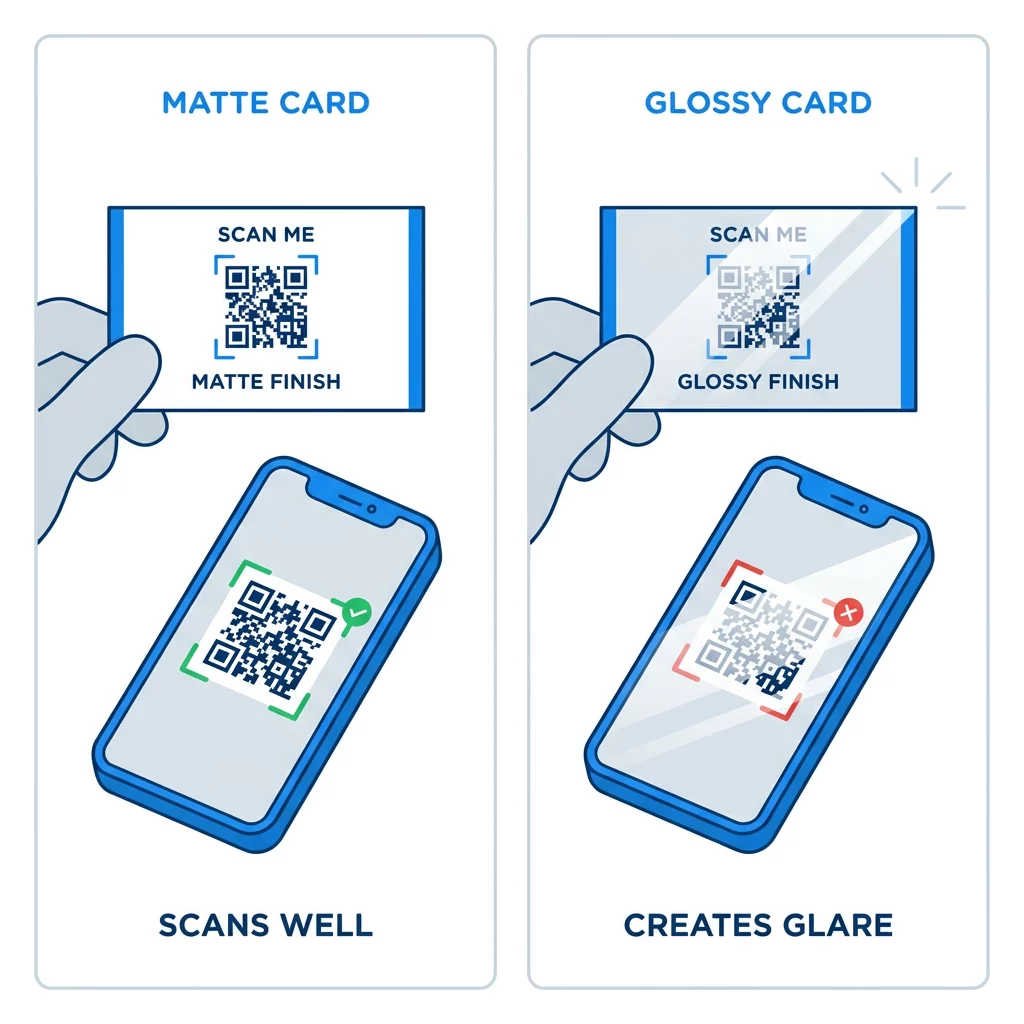
Visokosijajni premazi, kovinska folija in odsevni laminati ustvarjajo odboj svetlobe pod reflektorji, odboj pa izpere kontrast. Če uporabljate poseben zaključek, naj bo koda na ravni mat površini. Kodo hranite stran od pregibov, zaobljenih vogalov in roba, kjer palci držijo kartico.
Preizkusite QR kodo na vizitki, preden jo natisnete
- Natisnite poskusni izvod na pravi karton v 100-odstotni velikosti. Kode ne ocenjujte na zaslonu.
- Skenirajte jo z vsaj enim iPhoneom in enim telefonom Android.
- Skenirajte jo v močni dnevni svetlobi in v zatemnjeni sobi.
- Skenirajte z razdalje približno 4 palcev (10 cm) in približno 10 palcev (25 cm).
- Odprite ciljno stran prek mobilnih podatkov in potrdite, da se hitro naloži.
- Šele nato naročite celotno naklado tiska.
QR koda na vizitki se ne skenira? Preverite tole
- Koda je manjša od 0,6 palca (1,5 cm), ali pa je povezava dolga in moduli so majhni. Povečajte kodo ali skrajšajte povezavo.
- Besedilo ali rob se nahaja znotraj mirne cone. Premaknite ga vsaj za štiri module.
- Kontrast je prenizek ali pa so barve obrnjene. Uporabite temne module na svetlem ozadju.
- Datoteka je slika z nizko ločljivostjo. Ponatisnite iz vektorske datoteke ali PNG datoteke z 300 DPI v končni velikosti.
- Bleščanje zaradi sijajne ali folijske obdelave. Premaknite kodo na mat površino.
- Ciljna povezava je napačna ali pa je stran počasna. Odprite povezavo na telefonu in jo popravite.
Ustrezno velika QR koda naredi vašo vizitko zanesljiv most med stiskom roke in vašim spletnim profilom. Kodo naj bo velika 0,8 x 0,8 palca ali večja, zaščitite mirno cono in tiskajte iz čistih vektorskih datotek. Za izdelavo in testiranje vaše naslednje vizitke uporabite Pageloot generator QR kod.
Pogosta vprašanja
Načrtujte za 0,8 x 0,8 palca (2 x 2 cm). Ta velikost se hitro skenira na trenutnih pametnih telefonih z normalne razdalje držanja. Uporabite 1 palec (2,5 cm) ali več, če koda vsebuje veliko podatkov ali logotip.
Najmanjša velikost je približno 0,6 x 0,6 palcev (1,5 x 1,5 cm). Deluje le s kratko povezavo, visokim kontrastom, čisto tiho cono in ostrim tiskom. Za starejše telefone naj bo koda velika 0,8 palca (2 cm) ali večja.
Približno 0,6 palca (1,5 cm) na stran v najboljšem primeru. Manjše od tega, večina kamer telefonov ne more izostriti kartice, ki jo držite na normalni razdalji. Skrajšanje povezave poveča kvadratke in pomaga pri skeniranju majhnih kod.
Da, vendar uporabite popravljanje napak ravni H, tako da lahko koda obnovi skrite podatke. Raven H dodaja module, zato povečajte kodo na vsaj 1,0 x 1,0 palca (2,5 cm) in naj bo logotip majhen.
Pogosti vzroki so premajhno mirno območje, slab barvni kontrast, datoteka z nizko ločljivostjo, bleščanje s sijoče površine ali premajhna koda. Preverite vsakega na natisnjenem dokazu in ga popravite pred naslednjim tiskom.
So dobri, ko je koda velika vsaj 0,8 palcev, se dobro skenira in odpre stran, optimizirano za telefone. Slabi so, ko je koda majhna, težko skenljiva ali vodi do pokvarjene povezave. Vedno preizkusite natisnjen dokaz.
Statična koda je dovolj, če se povezava nikoli ne bo spremenila, in statične kode nikoli ne potečejo. Dinamična koda je vredna truda, če boste morda spremenili službo, spletna mesta ali kontaktne strani, saj lahko uredite destinacijo brez ponovnega tiskanja. Dinamične kode Pageloot vključujejo 14-dnevno brezplačno preizkusno obdobje, načrti pa so navedeni na pageloot.com/pricing.