> 사용 사례 > QR Codes on Shopping Bags: Design, Placement, and Tracking
QR shopping bag

QR Codes on Shopping Bags: Design, Placement, and Tracking

Learn to design and track QR codes on shopping bags. Boost post-purchase engagement with tips on placement, dynamic links, and effective calls to action.
Updated on 7월 2, 2026
목차

Are your shopping bags doing any work after a customer walks out the door? Most aren’t – and that’s a missed opportunity to keep the conversation going. This page shows you how to design effective QR codes for shopping bags, what to link them to, and how to measure the results.

Why Shopping Bags Are a Valuable QR Code Surface

A shopping bag travels well beyond the point of sale. It rides the subway, sits on an office desk, gets reused at a farmer’s market. Every trip is a potential impression – and a potential scan.

A World Sync 2024 consumer survey found that 64% of shoppers have already scanned a QR code on a product while shopping in-store, and 42% say QR codes have significantly improved their in-person shopping experience. Shoppers are ready to scan. The question is whether your bag gives them a reason to.

Unlike product packaging, which a customer often discards after opening, a shopping bag frequently gets reused. That extended lifespan means your QR code has repeated exposure – to the original buyer and to everyone around them. For retailers looking to squeeze more value from physical touchpoints, the bag is one of the simplest places to start. You can explore the full range of QR code use cases for retail businesses to see how other touchpoints compare.

What to Link Your Shopping Bag QR Code To

The destination matters as much as the code itself. A QR code that leads nowhere useful gets scanned once and forgotten. Here are the most effective destinations for retail bags:

  • Exclusive discounts or coupons – Reward customers who scan post-purchase with a discount on their next order. A coupon QR code lets you display multiple offers on a single branded landing page.
  • Loyalty program sign-up – Turn a one-time buyer into a repeat customer by making it effortless to join your rewards program.
  • New arrivals or seasonal collections – Link to a curated product page that keeps the shopping momentum going after they leave the store.
  • 소셜 미디어 프로필 – Grow your following by giving bag recipients a direct path to your Instagram, TikTok, or Pinterest page.
  • How-to content or brand story – A short video or article about how your products are made builds brand affinity and trust.
  • Product registration or warranty pages – Especially useful for tech, appliances, or premium goods.
  • Reviews page – Prompt customers to leave a Google or social review while the purchase is still fresh.

QR 코드 링크 handles most of these use cases cleanly – you enter a URL, customize the code to match your brand, and you’re ready to print.

Turn Your Shopping Bag Into a Marketing Channel 사용 QR 코드 생성기 to create a branded, trackable code for your next bag print run. No technical knowledge needed.

Why You Should Use Dynamic QR Codes on Bags

Static QR codes encode a fixed URL. Once you print them, that destination is permanent. If the promotion ends, the landing page changes, or the link breaks, every bag in circulation becomes a dead end.

동적 QR 코드 solve this by routing scans through a redirect, so you can update the destination at any time without reprinting the bags. This makes them the practical choice for retail packaging, where bag inventory often lasts months.

Beyond flexibility, dynamic QR codes provide detailed scan analytics: total and unique scan counts, scan times, device types, and geographic data down to city or region level. That data turns a passive bag into an active campaign asset you can measure and improve. You can read more about 동적 QR 코드가 수집하는 데이터 and how to use it.

For retailers running seasonal campaigns or testing different offers across store locations, the ability to update destinations and compare scan performance by location is especially valuable. Pageloot’s QR code solutions for retailers are built for exactly this kind of campaign management.

Update Your Bag Campaign Without a Reprint Create a dynamic QR code at Pageloot의 QR 코드 생성기 and change your destination URL anytime – your printed bags stay current automatically.

How to Design a QR Code That Scans Reliably on a Bag

A QR code that doesn’t scan is worse than no QR code at all – it frustrates customers and wastes print budget. Bags introduce specific design challenges: textured surfaces, folded panels, handles that interrupt the printing area, and varying lighting conditions at the point of scan. Here’s what to get right.

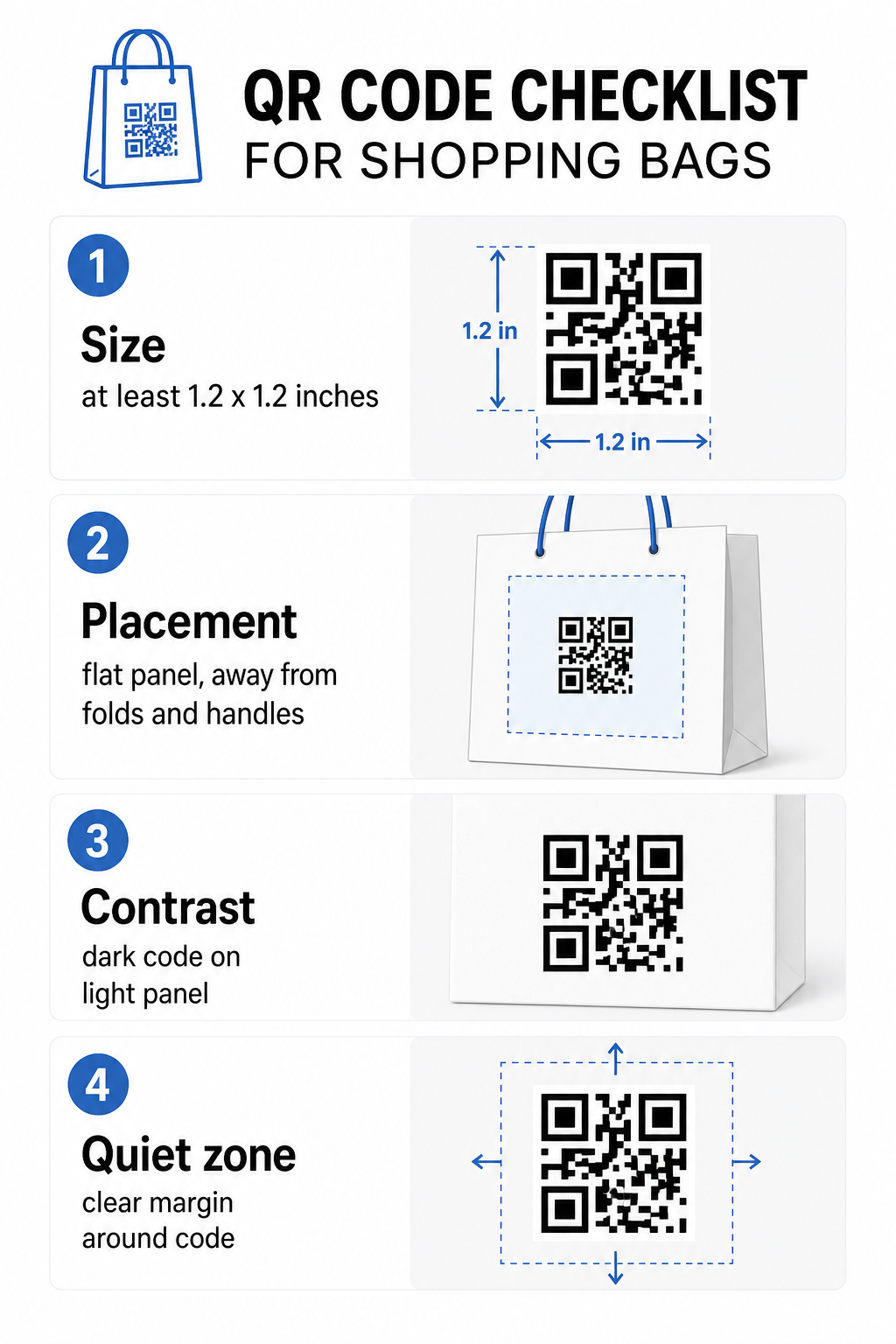
Bag QR checklist

크기

The minimum recommended print size for reliable scanning at arm’s length is 0.8 × 0.8인치 (2 × 2 cm). For a shopping bag, where the scanning distance is typically greater and the bag may be moving, aim for at least 1.2 × 1.2 inches (3 × 3 cm).

유용한 경험 법칙은 10:1 거리-크기 비율: the code should be 1 cm wide for every 10 cm of expected scanning distance. If someone is likely to scan your bag from about 30 cm (12 inches) away, the code should be at least 3 cm wide. Denser QR codes – those encoding longer URLs or more data – require additional size to remain readable, so using shortened or dynamic URLs keeps the code pattern less dense and easier to scan.

Placement

Avoid placing the code near folds, seams, handles, or reinforced edges. These areas distort the code’s geometry, which confuses scanners. The flat center panel – front or back – is the safest location. If your bag design includes a side gusset, that panel works too, provided the surface is flat when the bag is held open. For more strategic placement thinking, the guide to 소매점을 위한 최고의 QR 코드 배치 covers how to think about surface, visibility, and context together.

대비

QR code scanners detect the difference between dark modules and a light background. Dark pattern on a light background is the most reliable combination. Aim for a contrast ratio of at least 4:1 between the code and its background – higher is better. Avoid gradients, which create uneven contrast, and steer clear of reversed color schemes (light code on dark background), which some scanners fail to read.

If your bag has a dark base color, place the QR code inside a white or light-colored panel rather than printing directly onto the dark surface. For a full breakdown of which color pairings work and which to avoid, see the QR code color contrast best practices guide.

조용한 영역

그만큼 콰이어트 존 is the empty margin surrounding a QR code. It signals to the scanner where the code begins and ends. The standard requires at least four modules of clear space on all sides – where a module is the smallest square unit in the code grid. On a printed bag at typical sizes, this translates to roughly 3–4 mm of empty space on each side.

Do not let text, logos, brand patterns, or decorative elements intrude into this margin. Even partial encroachment can cause scan failures. If your bag design is dense with graphics, place the QR code inside a bordered white box to protect the quiet zone.

Branding the Code

A branded QR code – one that incorporates your logo and brand colors – is more likely to be scanned than a plain black-and-white version. Customers are more likely to engage when they recognize the source and understand there’s something worth scanning. You can use the 로고가 있는 QR 코드 생성기 to embed your logo in the center of the code while maintaining scannability.

When adding a logo, use a higher error correction level (Q or H) so the code remains readable even with part of the pattern covered. Keep the logo to no more than 30% of the total code area. The QR code readability best practices guide covers logo placement alongside contrast and size guidelines in full detail.

인쇄 전 테스트

Always test the final code on multiple devices and in conditions that match real use – varying light levels, different scanning angles, and at the expected scanning distance. Test on both iOS and Android. Print a physical sample before committing to a full bag run, because a code that looks fine on screen can fail on a textured or laminated bag surface.

Adding a Call-to-Action Near the Code

Research from Scantrust found that consumers who don’t typically scan QR codes said they’d be more likely to do so if the code clearly communicated what they would get. A short, direct call-to-action placed near the code does exactly that.

Keep it brief and specific. Examples that work well on bags:

  • Scan for 15% off your next order
  • Scan to join our rewards program
  • Scan for new arrivals
  • Exclusive offer inside – scan to unlock

Vague prompts like “Scan me” or “Learn more” give customers no reason to act. Tell them what they’ll get before they scan. This principle applies across all physical QR code placements – you can see how it works in broader retail QR code contexts as well.

Tracking Campaign Performance

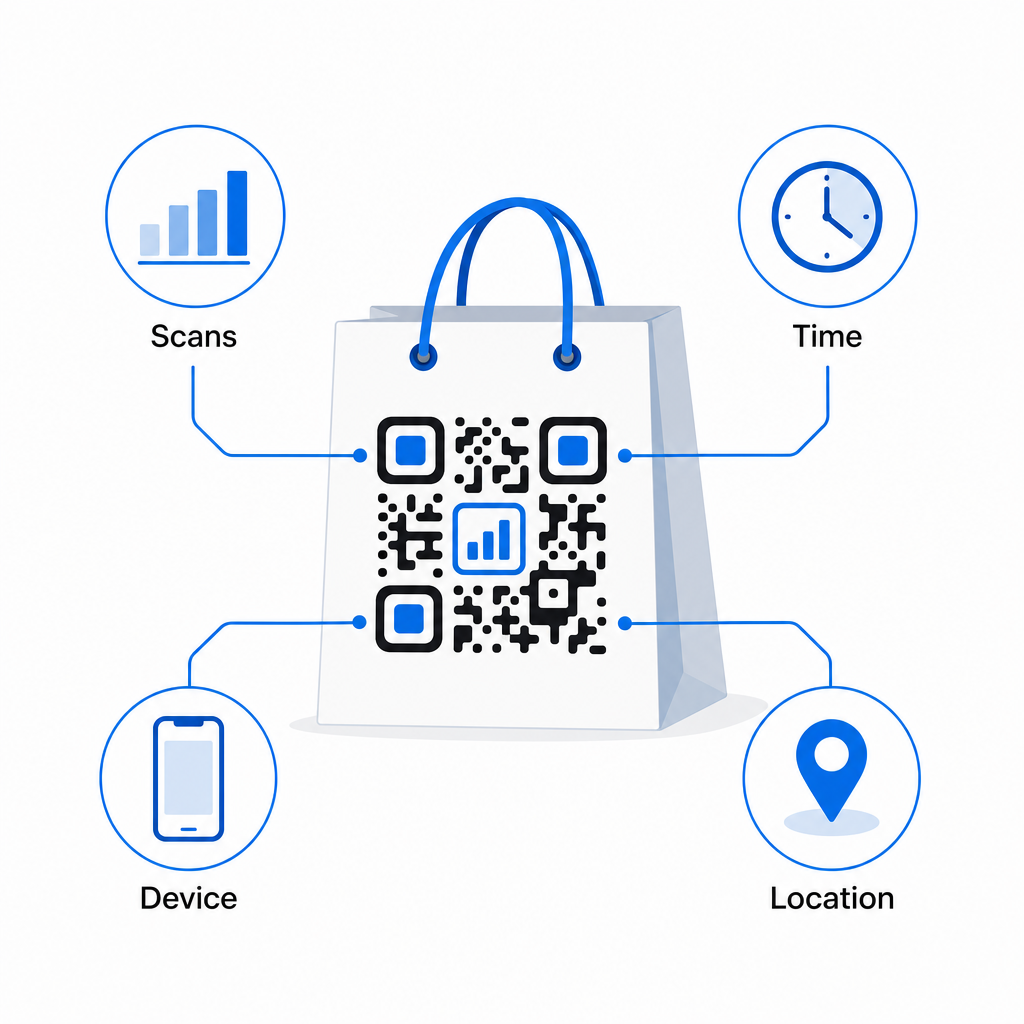
One of the strongest arguments for QR codes on shopping bags is measurability. Unlike a printed phone number or website URL, a QR code scan is a trackable event. With dynamic QR codes, each scan logs key data points that turn your bag into a measurable campaign asset:

QR 스캔 분석
  • Total scans and unique scans – distinguishes overall reach from repeat engagement
  • Scan time and date – reveals when customers are most likely to engage post-purchase
  • Device type – helps you optimize the landing page for the most common device your customers use
  • Location data – useful for retailers with multiple locations or regional campaigns

This data lets you compare performance across bag versions, store locations, or campaign periods. If a particular promotion drives significantly more scans, you can extend it. If scans drop off after two weeks, you know the offer has run its course and can update the destination without touching the bag. The QR code analytics and tracking feature explains what the dashboard shows and how to interpret scan data in real time.

For retailers running campaigns across multiple physical formats beyond bags, the industry solutions hub gives a broader view of how QR codes fit into a coordinated strategy.

Design and Technical Checklist

Before sending your bag design to print, confirm each of the following:

요소 요구 사항
Code size Minimum 1.2 × 1.2 inches (3 × 3 cm) for bags
Contrast ratio At least 4:1 between code and background
Quiet zone Minimum 4 modules of clear space on all sides
Placement Flat panel, away from folds, seams, and handles
Code type Dynamic QR code for updatable destinations
Call-to-action Specific and benefit-led, placed near the code
Logo (if used) Error correction level Q or H, ≤30% of code area
Testing Confirmed scannable on iOS and Android in real lighting

A shopping bag is one of the few retail materials that keeps working after the transaction ends. With a well-designed, dynamically linked QR code, it becomes a trackable connection between the physical purchase and your ongoing digital relationship with that customer. Design it carefully, give customers a clear reason to scan, and use the analytics to keep improving the campaign over time.

Start Building Your Bag Campaign 사용 Pageloot QR 코드 생성기 to create a branded, dynamic QR code ready for retail bag printing – with full analytics included.

자주 묻는 질문

Can I use the same QR code on bags across multiple store locations?

Yes. With a dynamic QR code, you can use a single code across all locations and track scan data by geography, which lets you see which stores drive the most engagement. Alternatively, you can create separate codes per location to compare performance directly.

What happens if my bag promotion ends but the bags are still in circulation?

With a dynamic QR code, you simply update the destination URL in your Pageloot dashboard. Customers scanning old bags will land on your new page automatically. You never need to reprint to keep the experience current.

How do I prevent the QR code from being distorted by the bag’s texture or finish?

Print the code on a flat, matte surface and avoid placing it near folds, seams, or glossy laminated areas that cause glare. If your bag has a textured finish throughout, consider applying a small flat label or printed panel specifically for the QR code, ensuring a clean, scannable surface.

작성자 정보

시임 코스타비는 페이지루트의 콘텐츠 책임자입니다. 그는 페이지루트의 혁신적인 QR 코드 생성 서비스에 대한 글을 쓰고 있습니다. 5년 이상 QR 코드 분야에서 쌓아온 깊이 있는 전문 지식을 바탕으로, 시임은 이 분야의 전문가로 인정받고 있습니다. 그는 QR 기술을 활용하여 디지털 상호작용을 간소화하고 향상시키는 데 크게 기여하고 있습니다.

범주
에 대해 자세히 알아보기
휴대폰 QR 코드 스캔
작동 원리 QR 코드 스캐너

온라인으로 QR 코드를 생성해야하는 경우 QR 코드 만들기 무료로 여기!
Pageloot는 #1 Go-To 솔루션 QR 코드를 만들고 스캔합니다.

BL-0293

블로그 세대

20,000개 이상의 브랜드로부터 신뢰를 받아 더 많은 매출, 리뷰, 팔로워를 확보했습니다.

클라이언트 로고
최고 브랜드의 신뢰
5 중 4.8 평가

4.86 / 5 별점

휴고 로랑
휴고 로랑
레스토랑 주인
가장 쉽고 안정적인 QR 코드 생성기. PDF 파일을 즉시 업로드할 수 있습니다. 이제 레스토랑 메뉴가 디지털화되었습니다.
루카스 얀센
루카스 얀센
부동산 개발사
이것은 훌륭한 도구이며 QR 코드를 사용하면 원하는 곳으로 이동할 수 있습니다. 우리는 위치 QR 코드만 사용하지만 유용한 기능이 너무 많습니다.
엠마 모레티
엠마 모레티
소매 제품
사용하기 쉽고 빠릅니다. 그것은 훌륭하게 작동하고 완벽한 이미지를 생성하므로 직원들이 내 vCard를 다운로드할 수 있습니다.
휴고 로랑
휴고 로랑
레스토랑 주인
가장 쉽고 안정적인 QR 코드 생성기. PDF 파일을 즉시 업로드할 수 있습니다. 이제 레스토랑 메뉴가 디지털화되었습니다.
루카스 얀센
루카스 얀센
부동산 개발사
이것은 훌륭한 도구이며 QR 코드를 사용하면 원하는 곳으로 이동할 수 있습니다. 우리는 위치 QR 코드만 사용하지만 유용한 기능이 너무 많습니다.
엠마 모레티
엠마 모레티
소매 제품
사용하기 쉽고 빠릅니다. 그것은 훌륭하게 작동하고 완벽한 이미지를 생성하므로 직원들이 내 vCard를 다운로드할 수 있습니다.
더 많은 QR 코드보기
휴대폰 QR 코드 스캔
QR 코드 흔한 실수
휴대폰 QR 코드 스캔
어떻게 QR 코드 스캔
무엇이든 디지털 경험으로 전환하세요 3분 이내에.

14일 무료 체험.

신용카드는 필요 없습니다.

첫 구매 시 30% 할인

코드를 사용하세요:

MP3 파일 공유

PDF QR 코드를 생성하려면 가입하세요

필요한 모든 것을 업로드하고 표시합니다.

  • 오디오 파일
  • 팟캐스트
  • 음악

가입 시 14일 무료 체험.
체험 기간 후 QR 코드 만료.

오디오 mp3 QR 코드를 생성하려면 가입하세요

프레임으로 더 많은 스캔 확보

QR 코드에 더 많은 프레임을 추가하려면 가입하세요

클릭 유도 문안 프레임은 고객이 QR 코드와 쉽게 상호 작용할 수 있도록 도와줍니다. 사용해 보세요!

가입 시 14일 무료 체험.
체험 기간 후 QR 코드 만료.

QR 코드에 더 많은 프레임을 추가하려면 가입하세요

도형으로 더 많은 스타일 추가

더 많은 도형을 만들려면 가입하세요

QR 코드는 정사각형일 필요가 없습니다. 브랜드 이미지에 맞게 전환해 보세요.

가입 시 14일 무료 체험.
체험 기간 후 QR 코드 만료.

더 많은 도형을 만들려면 가입하세요

QR 코드에 로고 추가

QR 코드에 로고를 추가하려면 가입하세요

로고와 브랜드를 추가하여 QR 코드를 돋보이게 만드세요.

가입 시 14일 무료 체험.
체험 기간 후 QR 코드 만료.

QR 코드에 로고를 추가하려면 가입하세요

스마트 앱 스토어 리디렉션

앱 스토어 QR 코드를 생성하려면 가입하세요

스마트 앱 스토어 QR 코드에 앱 링크를 추가하세요. 사용자는 장치에 따라 리디렉션됩니다.

가입 시 14일 무료 체험.
체험 기간 후 QR 코드 만료.

앱 스토어 QR 코드를 생성하려면 가입하세요

QR 코드에 이미지 업로드

이미지 QR 코드를 생성하려면 가입하세요

이미지를 쉽게 공유하세요. 몇 초 안에 동적으로 이미지를 변경하십시오.

가입 시 14일 무료 체험.
체험 기간 후 QR 코드 만료.

이미지 QR 코드를 생성하려면 가입하세요

PDF 파일 공유

PDF QR 코드를 생성하려면 가입하세요

필요한 모든 것을 업로드하고 표시합니다.

  • 메뉴 및 가격표
  • 명령
  • 모든 문서

가입 시 14일 무료 체험.
체험 기간 후 QR 코드 만료.

PDF QR 코드를 생성하려면 가입하세요

인쇄 없이 나중에 편집

다시 인쇄하지 않고 QR 코드를 편집하려면 가입하세요

동적 QR 코드를 사용하면 새 QR 코드를 인쇄하지 않고도 QR 코드의 내용을 변경할 수 있습니다.

가입 시 14일 무료 체험.
체험 기간 후 QR 코드 만료.

다시 인쇄하지 않고 QR 코드를 편집하려면 가입하세요

언제? 어디서? QR 코드 스캔 추적

QR 코드를 추적하려면 가입하세요

어떤 QR 코드가 가장 많이 스캔되고 무엇이 고객을 가장 흥분시키는지 알아보십시오.

가입 시 14일 무료 체험.
체험 기간 후 QR 코드 만료.

QR 코드를 추적하려면 가입하세요

인쇄 준비 파일 제공

PDF 및 SVG와 같은 벡터 QR 코드를 생성하려면 가입하세요.

.EPS, .PDF, .SVG

HD 해상도로 QR 코드를 다운로드하고 싶으신가요? 인쇄할 준비가 된 벡터 또는 픽셀 형식을 가져옵니다.

가입 시 14일 무료 체험.
체험 기간 후 QR 코드 만료.

PDF 및 SVG와 같은 벡터 QR 코드를 생성하려면 가입하세요.

기다리세요. 귀하의 QR 코드는 로드 중... 로드 중...

나만의 것으로 만들기

나중을 위해 QR 코드를 저장하려면 가입하세요.

다양한 색상, 로고 및 클릭 유도문안 프레임으로 멋진 QR 코드를 만들어 더 많은 스캔을 받으세요.

가입 시 14일 무료 체험.
체험 기간 후 QR 코드 만료.

나중을 위해 QR 코드를 저장하려면 가입하세요.