¿Quieres compartir un mensaje, un conjunto de instrucciones o datos de contacto con cualquier persona que tenga un smartphone? El texto plano a menudo se pasa por alto como un tipo de contenido de código QR, pero es uno de los formatos más directos y versátiles disponibles. Esta guía te explica exactamente cómo crear un código QR de texto, personalizarlo y asegurarte de que se escanee de forma fiable en todo momento.
¿Qué es un código QR de texto?
Un código QR (código de respuesta rápida) es un código de barras bidimensional que almacena datos en un patrón de cuadrados blancos y negros. Cuando la cámara de un smartphone lo apunta, el patrón se decodifica y la información almacenada se muestra instantáneamente, sin necesidad de escribir manualmente.
Un código QR de texto funciona de la misma manera, excepto que en lugar de redirigir a un sitio web, muestra el texto codificado directamente en la pantalla del usuario. Cuando alguien lo escanea, el contenido aparece de inmediato y puede leerlo, copiarlo o interactuar con él según sea necesario.
Esto hace que los códigos QR de texto sean útiles para una amplia gama de situaciones:
- Mensajes cortos o anuncios
- Instrucciones paso a paso en envases o señalización
- Datos de contacto o notas
- Emojis, URL o cualquier otro contenido basado en texto
A diferencia de un código QR de URL, un código QR de texto no requiere que el destinatario tenga una conexión a internet para leer el contenido; la información está incrustada directamente en el propio código.
Cómo crear un código QR a partir de texto
Crear un código QR de texto lleva menos de un minuto. Aquí está el proceso usando el Pageloot Text QR Code Generator:
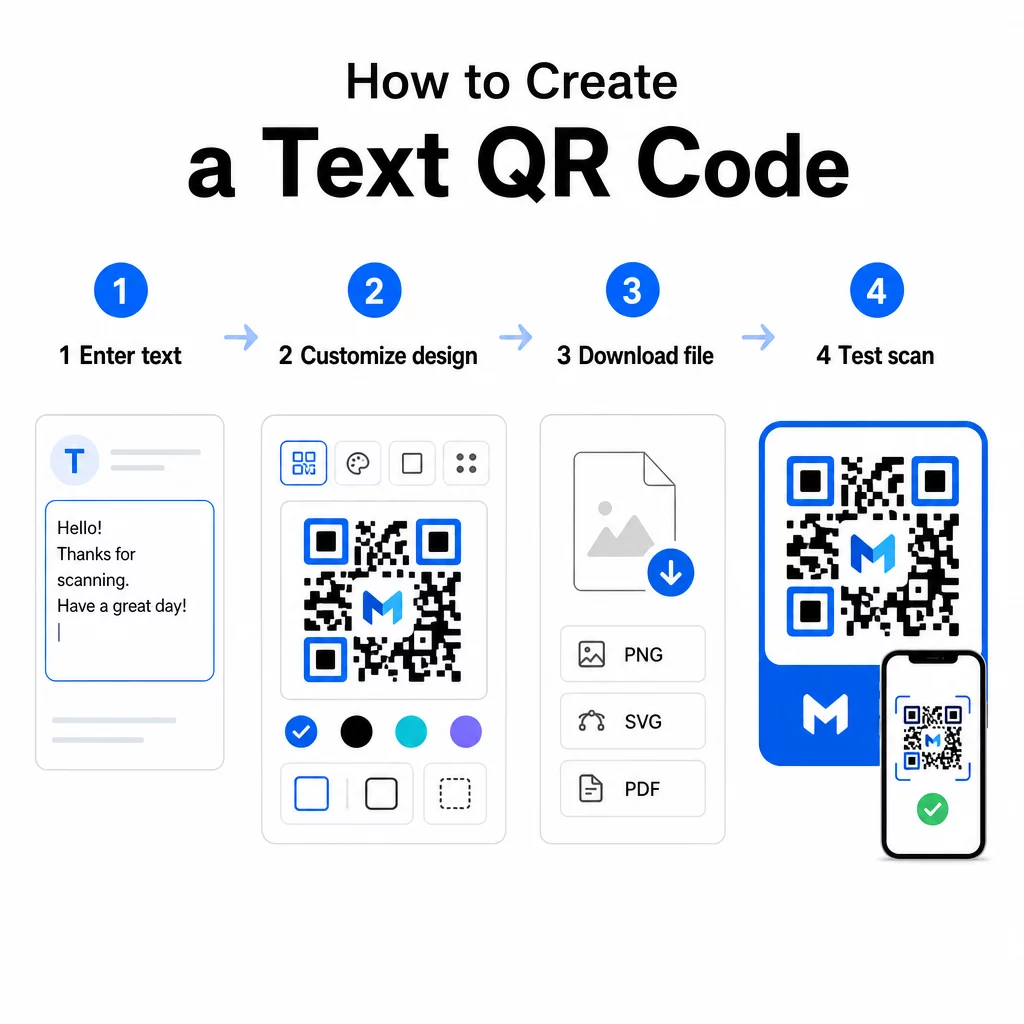
- Ingrese su texto – Escribe o pega el mensaje, las instrucciones o los detalles que deseas codificar. Esto puede ser cualquier cosa, desde una nota corta hasta información de contacto.
- Personaliza la apariencia – Ajusta los colores, añade tu logotipo, cambia la forma o añade un marco de llamada a la acción para que coincida con tu marca. Siguiendo mejores prácticas de contraste de color de códigos QR en esta etapa ayuda a asegurar que tu código sea escaneable.
- Guardar y descargar – Haz clic en “Guardar” para generar el código. Puedes descargarlo como un archivo de imagen PNG o JPG para usarlo en materiales digitales o impresos.
- Prueba antes de publicar – Escanea el código con un Lector QR online o la cámara de tu smartphone para confirmar que muestra el contenido correcto antes de distribuirlo.
Crea tu código QR de texto gratis ¿Listo para convertir cualquier mensaje en un código escaneable al instante? Usa el Generador de código QR de texto para crear, personalizar y descargar tu código en minutos.
Personalizando tu código QR de texto
Un código simple en blanco y negro funciona, pero un código QR de marca y bien diseñado obtiene más escaneos. Aquí están las opciones clave de personalización que vale la pena considerar:
- Colores – Usa los colores de tu marca, pero siempre mantén un primer plano oscuro sobre un fondo claro. El bajo contraste es la razón más común por la que un código QR no se escanea de forma fiable.
- Logotipo – Añadir tu logotipo genera confianza y refuerza el reconocimiento de la marca. Si añades una superposición de logotipo, usa un nivel de corrección de errores más alto (Q o H) para que el escáner pueda seguir leyendo el código incluso con parte de él oscurecida.
- Marco con llamada a la acción – Un mensaje corto como “Escanear para detalles” o “Leer instrucciones aquí” le dice a la gente exactamente qué esperar y los anima a escanear.
- Forma – Los códigos QR no tienen por qué ser perfectamente cuadrados. Las formas de puntos y los estilos de borde personalizados pueden hacer que un código se sienta más como parte de tu diseño sin comprometer la funcionalidad.
Para una mirada más profunda a lo que afecta la fiabilidad del escaneo, el guía de mejores prácticas de legibilidad de códigos QR cubre el tamaño, el contraste, las zonas de silencio y la ubicación en detalle.
Descargando y Usando Tu Código QR
Una vez que estés satisfecho con el diseño y lo hayas probado, descarga el archivo en el formato que se adapte a tu caso de uso:
- PNG o JPG – Mejor para uso digital: sitios web, correos electrónicos, redes sociales y presentaciones.
- SVG, EPS o PDF – Formatos vectoriales que escalan sin perder calidad, ideales para materiales impresos como folletos, carteles y empaques de productos.
El Generador de PNG de Código QR es una buena opción si necesitas un fondo transparente para colocar el código sobre imágenes o diseños texturizados sin un recuadro blanco alrededor.
Para la colocación, elige una superficie plana, lisa y de alta visibilidad. Evita superficies curvas, acabados altamente reflectantes o fondos desordenados, ya que estos pueden interferir con el escaneo. Se recomienda un tamaño mínimo de alrededor de 2 × 2 cm (aproximadamente 0.8 × 0.8 pulgadas) para el escaneo a corta distancia, y el código debe hacerse proporcionalmente más grande cuanto más lejos es probable que esté tu audiencia.
Códigos QR de Texto Estáticos vs. Dinámicos
Cuando creas un código QR de texto, tienes dos opciones estructurales:
| FUNCIÓN | Código QR estático | Código QR dinámico |
|---|---|---|
| Contenido editable después de la creación | No | Sí |
| Seguimiento y análisis de escaneo | No | Sí |
| URL codificada más corta (patrón más limpio) | No | Sí |
| Funciona sin internet | Sí | Requiere redirección |
UNA código QR estático codifica el texto de forma directa y permanente. Funciona sin conexión, pero si necesitas cambiar el mensaje más tarde, tienes que crear y redistribuir un nuevo código.
UNA código QR dinámico codifica una URL de redirección corta en lugar del texto en sí. Esto mantiene el patrón del código más simple y fácil de escanear, y te permite actualizar el contenido de destino en cualquier momento sin reimprimir. También te da acceso a análisis de escaneo, rastreando métricas como el número de escaneos, la ubicación, el tipo de dispositivo y la hora del escaneo.
Para usos únicos como un folleto o una etiqueta de producto con instrucciones fijas, un código estático es perfectamente suficiente. Para campañas en curso o cualquier cosa que pueda necesitar actualización, un código dinámico es la opción más flexible. Puedes explorar opciones dinámicas a través de la Generador de códigos QR de Pageloot.
Usos Prácticos para Códigos QR de Texto
Los códigos QR de texto encajan naturalmente en muchos escenarios del mundo real:
- Embalaje del producto – Codifica instrucciones de cuidado, pasos de montaje o información de seguridad para que los clientes puedan acceder a los detalles con un solo escaneo en lugar de buscar un inserto separado.
- Señalización de eventos – Comparte contraseñas de WiFi, horarios de eventos o reglas del lugar sin imprimirlos completamente en cada cartel.
- Tarjetas de visita – Incluye un mensaje personal corto o un eslogan que aparece cuando alguien escanea la tarjeta.
- Comercio minorista y hostelería – Codifica mensajes promocionales cortos, códigos de descuento o notas de bienvenida para los huéspedes.
- Mensajería instantánea – Los códigos QR de texto también se pueden combinar con flujos de trabajo de mensajería. La guía de códigos QR de mensajería instantánea explica cómo configurar códigos que abren un mensaje prellenado en WhatsApp, Facebook Messenger o SMS.
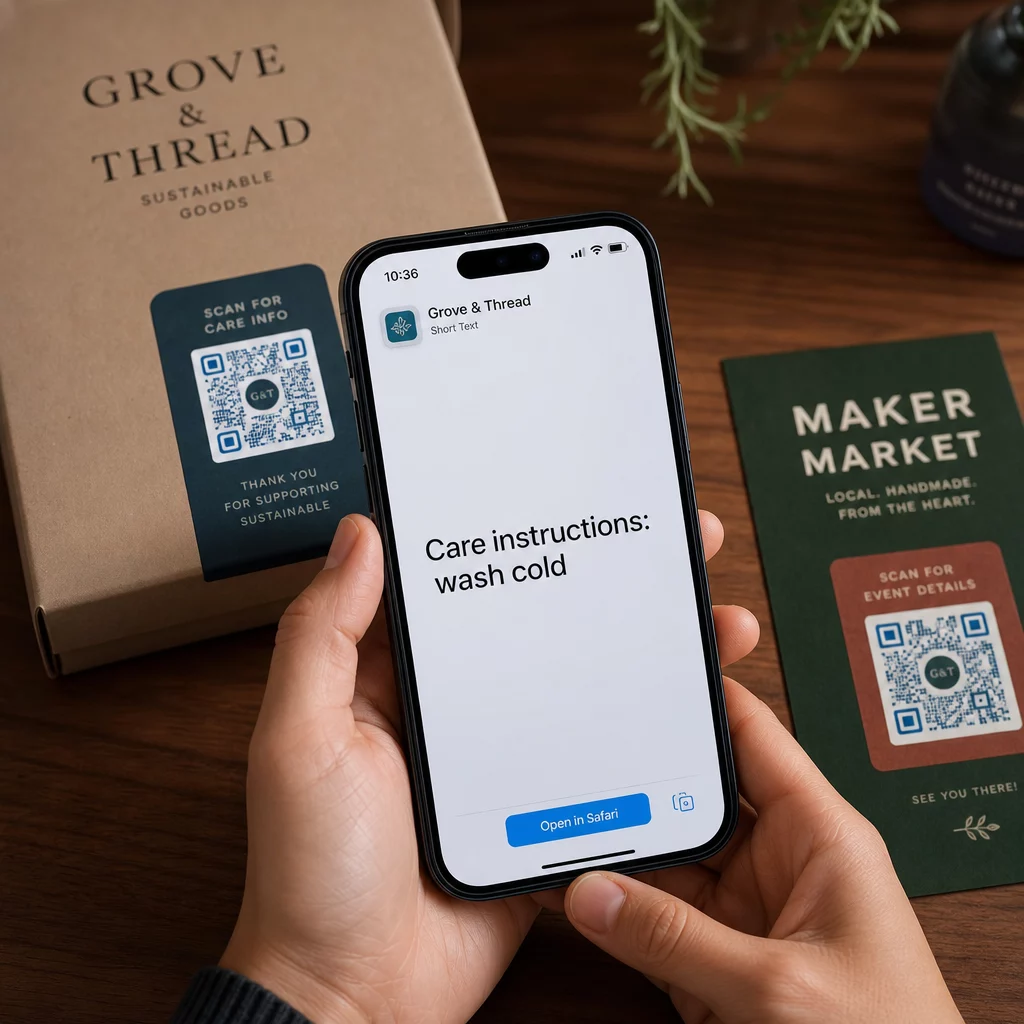
Antes de Distribuir: Lista de Verificación de Pruebas
Los problemas de escaneo son mucho más fáciles de detectar antes de que un código se imprima que después. Realice estas comprobaciones antes de distribuir cualquier código QR:
- Escanee con al menos dos dispositivos diferentes (iOS y Android)
- Pruebe en las condiciones de iluminación reales donde se mostrará el código
- Confirme que el texto mostrado es preciso y completo
- Verifique que la zona tranquila (el borde claro alrededor del código) esté despejada
- Para impresión, confirme que el código es lo suficientemente grande en relación con la distancia de escaneo esperada
El Guía de mejores prácticas de usabilidad de códigos QR tiene un desglose completo de los requisitos del estándar ISO/IEC 18004 si desea asegurarse de que su código cumpla con los criterios de cumplimiento técnico.
Un código QR de texto es una de las formas más rápidas de compartir información sin necesidad de una conexión a internet o una URL escrita. Hacer bien lo básico – contraste claro, tamaño apropiado, un diseño probado – significa que las personas a las que intenta llegar pueden acceder a su contenido al instante y sin fricciones.
Cree y Pruebe Su Código QR Use el Generador de códigos QR gratis para crear, personalizar y descargar un código QR de texto en minutos. No se requiere tarjeta de crédito para empezar.
Preguntas frecuentes
Sí. La mayoría de los smartphones modernos con iOS 11 o posterior y versiones recientes de Android pueden escanear códigos QR directamente a través de la aplicación de cámara integrada sin descargar nada adicional. Para dispositivos más antiguos o para verificar contenido antes de compartir, también puedes usar una herramienta en línea como el Pageloot QR Code Scanner.
Un código QR estándar puede codificar hasta 4.296 caracteres alfanuméricos en el nivel más bajo de corrección de errores. En la práctica, un texto más corto produce un código más simple y menos denso que se escanea más rápido y de forma más fiable en una gama más amplia de dispositivos y condiciones de iluminación. Si su mensaje es largo, considere si una URL que apunte a una página web podría funcionar mejor.
No con un código QR estático – el texto está codificado permanentemente en el patrón. Si necesitas cambiar el contenido más tarde, tendrías que crear un nuevo código. Un código QR dinámico resuelve esto: codifica una URL de redireccionamiento corta que puedes actualizar en cualquier momento, así el código impreso permanece igual incluso si el contenido cambia.