Хочете поділитися повідомленням, набором інструкцій або контактними даними з будь-ким, хто має смартфон? Звичайний текст часто недооцінюють як тип вмісту QR-коду, але це один із найпряміших і найуніверсальніших доступних форматів. Цей посібник докладно розповість вам, як створити текстовий QR-код, налаштувати його та переконатися, що він надійно сканується щоразу.
Що таке текстовий QR-код?
QR-код (код швидкого реагування) — це двовимірний штрих-код, який зберігає дані у вигляді візерунка з чорно-білих квадратів. Коли камера смартфона наводиться на нього, візерунок декодується, і збережена інформація миттєво відображається – ручне введення не потрібне.
Текстовий QR-код працює так само, за винятком того, що замість перенаправлення на веб-сайт він відображає закодований текст безпосередньо на екрані користувача. Коли хтось сканує його, вміст з'являється відразу, і його можна прочитати, скопіювати або взаємодіяти з ним за потреби.
Це робить текстові QR-коди корисними для широкого спектру ситуацій:
- Короткі повідомлення або оголошення
- Покрокові інструкції на упаковці або вивісках
- Контактні дані або нотатки
- Емодзі, URL-адреси або будь-який інший текстовий вміст
На відміну від QR-коду URL-адреси, текстовий QR-код не вимагає від одержувача підключення до Інтернету для читання вмісту – інформація вбудована безпосередньо в сам код.
Як створити QR-код з тексту
Створення текстового QR-коду займає менше хвилини. Ось процес використання Генератор текстових QR-кодів Pageloot:
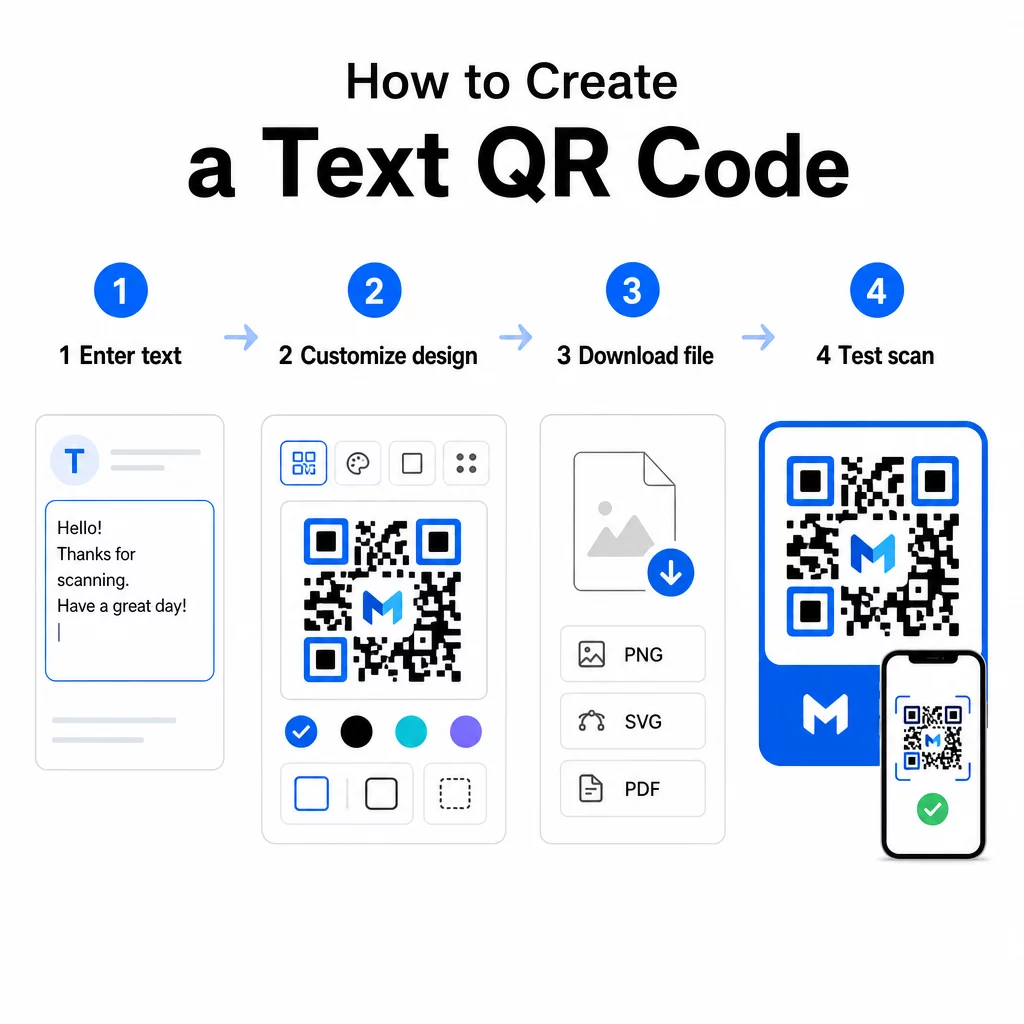
- Введіть текст – Введіть або вставте повідомлення, інструкції або деталі, які ви хочете закодувати. Це може бути що завгодно, від короткої нотатки до контактної інформації.
- Налаштуйте зовнішній вигляд – Налаштуйте кольори, додайте свій логотип, змініть форму або додайте рамку із закликом до дії, щоб відповідати вашому бренду. Далі найкращих практик контрастності кольорів QR-коду на цьому етапі допомагає забезпечити, щоб ваш код залишався сканованим.
- Зберегти та завантажити – Натисніть “Зберегти”, щоб згенерувати код. Ви можете завантажити його як файл зображення PNG або JPG для використання в цифрових або друкованих матеріалах.
- Протестуйте перед публікацією – Відскануйте код за допомогою Сканер QR онлайн або камери вашого смартфона, щоб переконатися, що він відображає правильний вміст, перш ніж розповсюджувати його.
Створіть свій текстовий QR-код безкоштовно Готові перетворити будь-яке повідомлення на миттєво сканований код? Використовуйте QR код текст: генератор щоб створити, налаштувати та завантажити свій код за лічені хвилини.
Налаштування вашого текстового QR-коду
Простий чорно-білий код працює, але фірмовий, добре розроблений QR-код отримує більше сканувань. Ось ключові параметри налаштування, які варто розглянути:
- Кольори – Використовуйте кольори вашого бренду, але завжди зберігайте темний передній план на світлому фоні. Низький контраст є найпоширенішою причиною того, що QR-код не сканується надійно.
- Логотип – Додавання вашого логотипу створює довіру та посилює впізнаваність бренду. Якщо ви додаєте накладення логотипу, використовуйте вищий рівень виправлення помилок (Q або H), щоб сканер міг читати код навіть із частково прихованим зображенням.
- Рамка із закликом до дії – Короткий заклик, як-от “Скануйте для деталей” або “Прочитайте інструкції тут”, точно повідомляє людям, чого очікувати, і заохочує їх сканувати.
- Форма – QR-коди не обов’язково мають бути ідеально квадратними. Нестандартні форми точок та стилі країв можуть зробити код більш схожим на частину вашого дизайну без шкоди для функціональності.
Для глибшого розуміння того, що впливає на надійність сканування, посібник з найкращих практик читабельності QR-кодів розглядаються розмір, контраст, тихі зони та розміщення детально.
Завантаження та використання вашого QR-коду
Коли ви задоволені дизайном і протестували його, завантажте файл у форматі, який відповідає вашому випадку використання:
- PNG або JPG – Найкраще для цифрового використання: веб-сайти, електронні листи, соціальні мережі та презентації.
- SVG, EPS або PDF – Векторні формати, які масштабуються без втрати якості, ідеально підходять для друкованих матеріалів, таких як листівки, плакати та упаковка продуктів.
Цей Генератор QR-кодів PNG є хорошим варіантом, якщо вам потрібен прозорий фон для розміщення коду поверх зображень або текстурованих дизайнів без білої рамки навколо нього.
Для розміщення виберіть рівну, гладку, добре видиму поверхню. Уникайте вигнутих поверхонь, сильно відбиваючих покриттів або захаращених фонів, оскільки це може перешкоджати скануванню. Для сканування з близької відстані рекомендується мінімальний розмір близько 2 × 2 см (приблизно 0,8 × 0,8 дюйма), і код повинен пропорційно збільшуватися, чим далі, ймовірно, буде ваша аудиторія.
Статичні проти динамічних текстових QR-кодів
Коли ви створюєте текстовий QR-код, у вас є два структурні варіанти:
| ФУНКЦІЯ | Статичний QR-код | Динамічний QR-код |
|---|---|---|
| Вміст можна редагувати після створення | Ні. | Так. |
| Відстеження та аналітика сканування | Ні. | Так. |
| Коротша закодована URL-адреса (чистіший шаблон) | Ні. | Так. |
| Працює без інтернету | Так. | Потребує перенаправлення |
A статичний QR-код кодує текст безпосередньо та постійно. Він працює офлайн, але якщо вам потрібно змінити повідомлення пізніше, вам доведеться створити та розповсюдити новий код.
A динамічний QR-код кодує коротку URL-адресу перенаправлення замість самого тексту. Це робить шаблон коду простішим і легшим для сканування, а також дозволяє оновлювати цільовий вміст у будь-який час без повторного друку. Це також надає доступ до аналітики сканувань – відстеження таких показників, як кількість сканувань, місцезнаходження, тип пристрою та час сканування.
Для одноразового використання, наприклад, для роздаткового матеріалу або етикетки продукту з фіксованими інструкціями, статичний код є цілком достатнім. Для поточних кампаній або будь-чого, що може потребувати оновлення, динамічний код є більш гнучким вибором. Ви можете дослідити динамічні опції через Генератор QR-кодів Pageloot.
Практичне використання текстових QR-кодів
Текстові QR-коди природно вписуються в багато реальних сценаріїв:
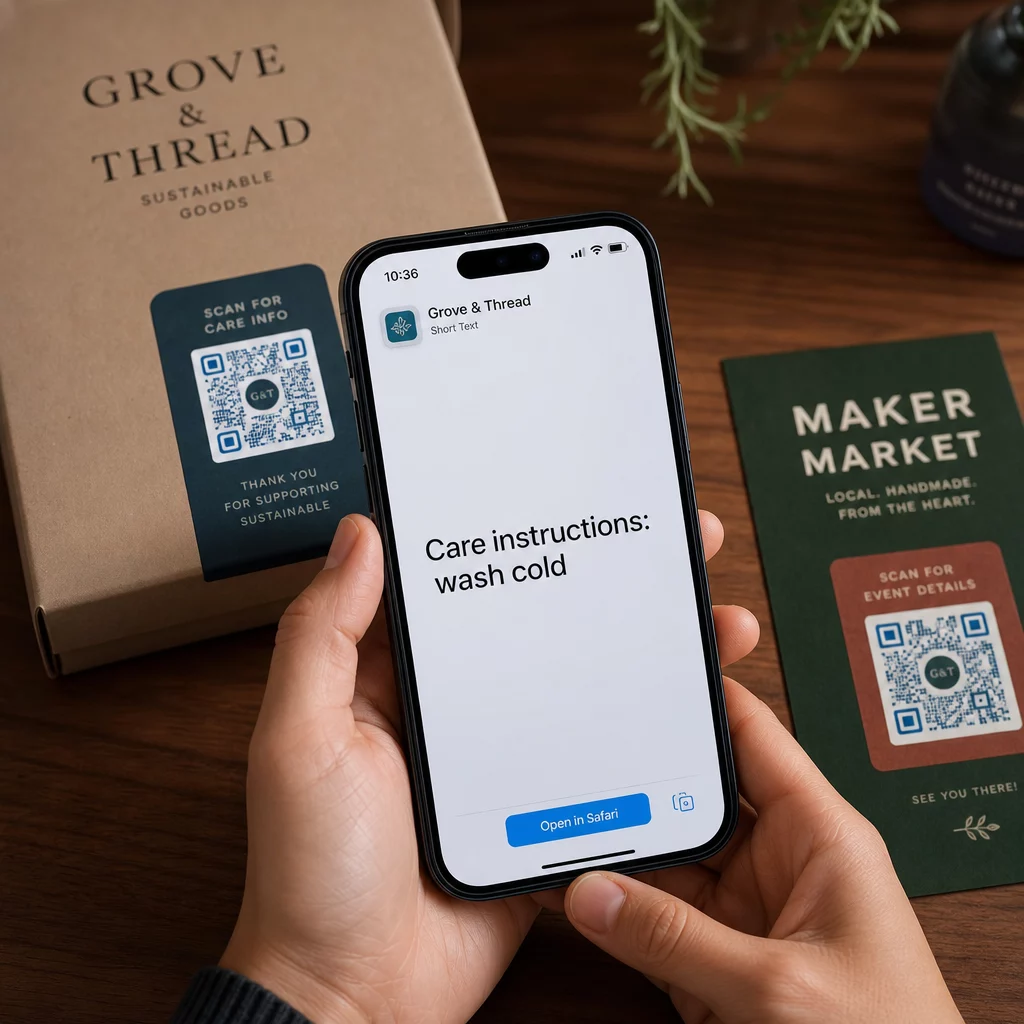
- Пакування товарів – Кодуйте інструкції з догляду, кроки збирання або інформацію про безпеку, щоб клієнти могли отримати доступ до деталей одним скануванням замість пошуку окремої вкладки.
- Вивіски подій – Діліться паролями Wi-Fi, розкладом подій або правилами місця проведення, не друкуючи їх повністю на кожній вивісці.
- Візитні картки – Включіть коротке особисте повідомлення або слоган, який з'являється, коли хтось сканує картку.
- Роздрібна торгівля та готельний бізнес – Кодуйте короткі рекламні повідомлення, коди знижок або вітальні нотатки для гостей.
- Миттєві повідомлення – Текстові QR-коди також можна поєднувати з робочими процесами обміну повідомленнями. Посібник з QR-кодів для миттєвих повідомлень пояснює, як налаштувати коди, які відкривають попередньо заповнене повідомлення в WhatsApp, Facebook Messenger або SMS.
Перед розповсюдженням: Контрольний список тестування
Проблеми зі скануванням набагато легше виявити до того, як код піде в друк, ніж після. Виконайте ці перевірки перед розповсюдженням будь-якого QR-коду:
- Скануйте принаймні двома різними пристроями (iOS та Android)
- Тестуйте в реальних умовах освітлення, де буде відображатися код
- Переконайтеся, що відображений текст є точним і повним
- Перевірте, що тиха зона (чітка межа навколо коду) не заблокована
- Для друку переконайтеся, що код достатньо великий відносно очікуваної відстані сканування
Цей Посібник з найкращих практик використання QR-кодів містить повний опис вимог стандарту ISO/IEC 18004, якщо ви хочете переконатися, що ваш код відповідає критеріям технічної відповідності.
Текстовий QR-код – це один із найшвидших способів обміну інформацією, який не вимагає підключення до Інтернету або введення URL-адреси. Правильне налаштування основ – чіткий контраст, відповідний розмір, перевірений дизайн – означає, що люди, до яких ви намагаєтеся достукатися, зможуть отримати доступ до вашого контенту миттєво та без перешкод.
Створіть та протестуйте свій QR-код Використовувати Безкоштовний QR генератор щоб створити, налаштувати та завантажити текстовий QR-код за лічені хвилини. Для початку не потрібна кредитна картка.
Поширені запитання
Так. Більшість сучасних смартфонів з iOS 11 або новішою версією та останніми версіями Android можуть сканувати QR-коди безпосередньо через вбудований додаток камери без завантаження чогось додаткового. Для старих пристроїв або для перевірки вмісту перед надсиланням ви також можете використовувати онлайн-інструмент, як-от Pageloot QR Code Scanner.
Стандартний QR-код може кодувати до 4296 буквено-цифрових символів на найнижчому рівні виправлення помилок. На практиці коротший текст створює простіший, менш щільний код, який сканується швидше та надійніше на ширшому діапазоні пристроїв та умов освітлення. Якщо ваше повідомлення довге, розгляньте, чи URL-адреса, що вказує на вебсторінку, може спрацювати краще.
Не за допомогою статичного QR-коду – текст постійно закодований у шаблоні. Якщо вам потрібно змінити вміст пізніше, вам потрібно буде створити новий код. Динамічний QR-код вирішує цю проблему: він кодує коротку URL-адресу перенаправлення, яку ви можете оновлювати в будь-який час, тому надрукований код залишається незмінним, навіть коли вміст змінюється.