Vill du dela ett meddelande, en uppsättning instruktioner eller kontaktuppgifter med någon som har en smartphone? Ren text förbises ofta som en innehållstyp för QR-koder, men det är ett av de mest direkta och mångsidiga formaten som finns. Denna guide går igenom exakt hur du skapar en text-QR-kod, anpassar den och ser till att den skannas tillförlitligt varje gång.
Vad är en text-QR-kod?
En QR-kod (Quick Response code) är en tvådimensionell streckkod som lagrar data i ett mönster av svarta och vita rutor. När en smartphonekamera riktas mot den avkodas mönstret och den lagrade informationen visas omedelbart – ingen manuell inmatning krävs.
En text-QR-kod fungerar på samma sätt, förutom att den istället för att omdirigera till en webbplats visar den kodade texten direkt på användarens skärm. När någon skannar den visas innehållet omedelbart och de kan läsa, kopiera eller interagera med det efter behov.
Detta gör text-QR-koder användbara för en mängd olika situationer:
- Korta meddelanden eller tillkännagivanden
- Steg-för-steg-instruktioner på förpackningar eller skyltar
- Kontaktuppgifter eller anteckningar
- Emojis, URL:er eller annat textbaserat innehåll
Till skillnad från en URL-QR-kod kräver en text-QR-kod inte att mottagaren har en internetanslutning för att läsa innehållet – informationen är inbäddad direkt i själva koden.
Så här skapar du en QR-kod från text
Att skapa en text-QR-kod tar mindre än en minut. Här är processen med hjälp av Pageloot Text QR Code Generator:
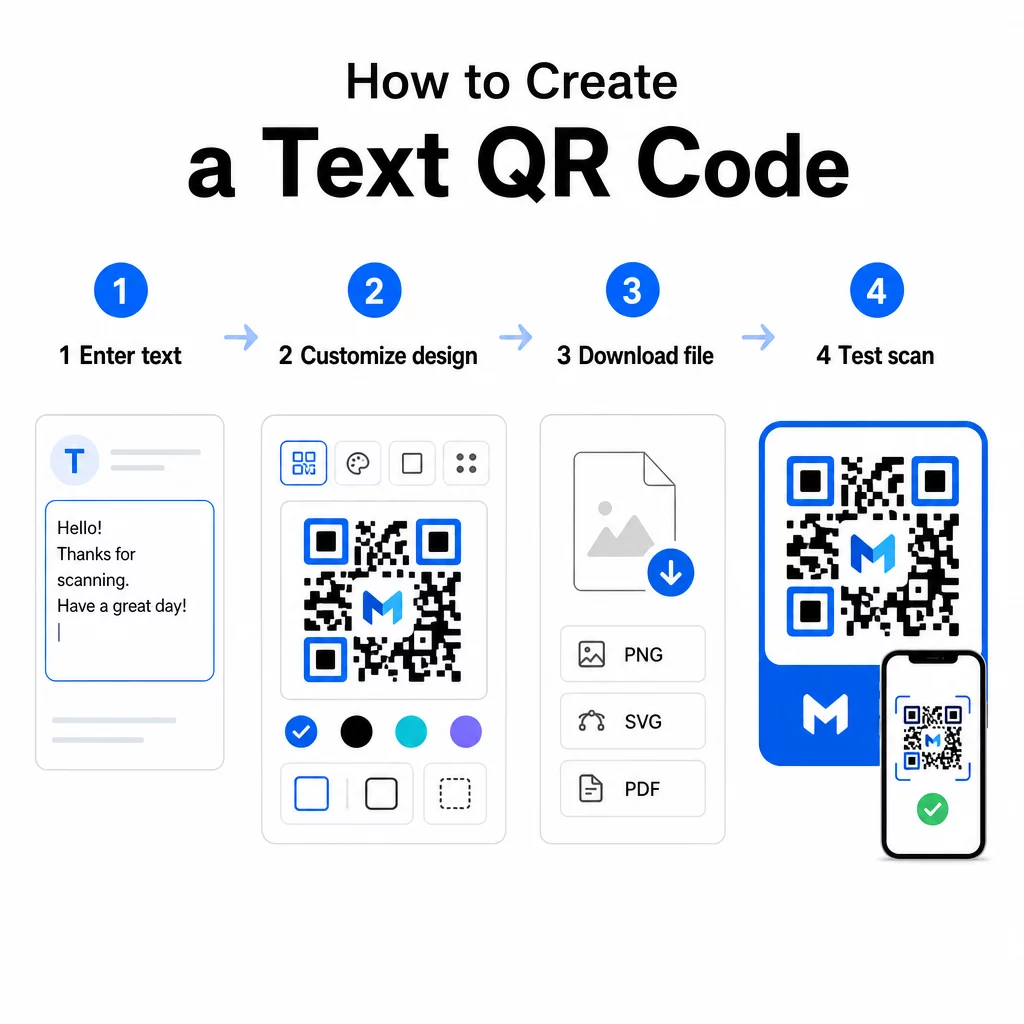
- Ange din text – Skriv eller klistra in meddelandet, instruktionerna eller detaljerna du vill koda. Detta kan vara allt från en kort anteckning till kontaktinformation.
- Anpassa utseendet – Justera färger, lägg till din logotyp, ändra formen eller lägg till en call-to-action-ram för att matcha ditt varumärke. Följande bästa praxis för färgkontrast i QR-koder i detta skede hjälper till att säkerställa att din kod förblir skanningsbar.
- Spara och ladda ner – Klicka på “Spara” för att generera koden. Du kan ladda ner den som en PNG- eller JPG-bildfil för användning i digitalt eller tryckt material.
- Testa innan du publicerar – Skanna koden med en Skanna QR-kod eller din smartphonekamera för att bekräfta att den visar rätt innehåll innan du distribuerar den.
Skapa din text-QR-kod gratis Redo att förvandla vilket meddelande som helst till en omedelbart skanningsbar kod? Använd QR-kodgenerator för text för att bygga, anpassa och ladda ner din kod på några minuter.
Anpassa din text-QR-kod
En enkel svartvit kod fungerar, men en varumärkesanpassad, väldesignad QR-kod får fler skanningar. Här är de viktigaste anpassningsalternativen att överväga:
- Färger – Använd dina varumärkesfärger, men ha alltid en mörk förgrund på en ljus bakgrund. Låg kontrast är den vanligaste anledningen till att en QR-kod inte skannas tillförlitligt.
- Logotyp – Att lägga till din logotyp bygger förtroende och förstärker varumärkeskännedomen. Om du lägger till en logotypöverlagring, använd en högre felkorrigeringsnivå (Q eller H) så att skannern fortfarande kan läsa koden även om en del av den är skymd.
- Ram med uppmaning till handling – En kort uppmaning som “Skanna för detaljer” eller “Läs instruktioner här” berättar för folk exakt vad de kan förvänta sig och uppmuntrar dem att skanna.
- Form – QR-koder behöver inte vara perfekt fyrkantiga. Anpassade punktformer och kantstilar kan få en kod att kännas mer som en del av din design utan att kompromissa med funktionaliteten.
För en djupare titt på vad som påverkar skanningspålitligheten, den guide för bästa praxis för QR-kodläsbarhet täcker storlek, kontrast, tysta zoner och placering i detalj.
Ladda ner och använda din QR-kod
När du är nöjd med designen och har testat den, ladda ner filen i det format som passar ditt användningsfall:
- PNG eller JPG – Bäst för digital användning: webbplatser, e-post, sociala medier och presentationer.
- SVG, EPS eller PDF – Vektorformat som skalas utan att förlora kvalitet, idealiskt för tryckt material som flygblad, affischer och produktförpackningar.
De QR-kod PNG-generator är ett bra alternativ om du behöver en transparent bakgrund för att placera koden över bilder eller texturerade designer utan en vit ruta runt den.
För placering, välj en platt, slät yta med hög synlighet. Undvik böjda ytor, mycket reflekterande ytor eller röriga bakgrunder, då dessa kan störa skanningen. En minimistorlek på cirka 2 × 2 cm (ungefär 0,8 × 0,8 tum) rekommenderas för skanning på nära håll, och koden bör bli proportionellt större ju längre bort din publik sannolikt befinner sig.
Statiska vs. dynamiska text-QR-koder
När du skapar en text-QR-kod har du två strukturella alternativ:
| FUNKTION | Statisk QR-kod | Dynamisk QR-kod |
|---|---|---|
| Innehåll redigerbart efter skapande | Nej | Ja |
| Skanningsspårning och analys | Nej | Ja |
| Kortare kodad URL (renare mönster) | Nej | Ja |
| Fungerar utan internet | Ja | Kräver omdirigering |
A statisk QR-kod kodar texten direkt och permanent. Det fungerar offline, men om du behöver ändra meddelandet senare måste du skapa och distribuera en ny kod.
A dynamisk QR-kod kodar en kort omdirigerings-URL istället för själva texten. Detta håller kodmönstret enklare och lättare att skanna, och det låter dig uppdatera destinationsinnehållet när som helst utan att skriva ut igen. Det ger dig också tillgång till skanningsanalys – spårningsmått som antal skanningar, plats, enhetstyp och tidpunkt för skanning.
För engångsanvändning som ett utdelningsmaterial eller en produktetikett med fasta instruktioner är en statisk kod helt tillräcklig. För pågående kampanjer eller något som kan behöva uppdateras är en dynamisk kod det mer flexibla valet. Du kan utforska dynamiska alternativ via Pageloot QR-kodgenerator.
Praktiska användningsområden för text-QR-koder
Text-QR-koder passar naturligt in i många verkliga scenarier:
- Produktförpackningar – Koda skötselanvisningar, monteringssteg eller säkerhetsinformation så att kunder kan komma åt detaljer med en enda skanning istället för att leta efter en separat bilaga.
- Evenemangsskyltning – Dela WiFi-lösenord, evenemangsscheman eller platsregler utan att skriva ut dem i sin helhet på varje skylt.
- Visitkort – Inkludera ett kort personligt meddelande eller en slogan som visas när någon skannar kortet.
- Detaljhandel och besöksnäring – Koda korta kampanjmeddelanden, rabattkoder eller välkomstmeddelanden för gäster.
- Direktmeddelande – Text-QR-koder kan också kombineras med meddelandeflöden. Den guide för QR-koder för snabbmeddelanden förklarar hur man ställer in koder som öppnar ett förifyllt meddelande i WhatsApp, Facebook Messenger eller SMS.
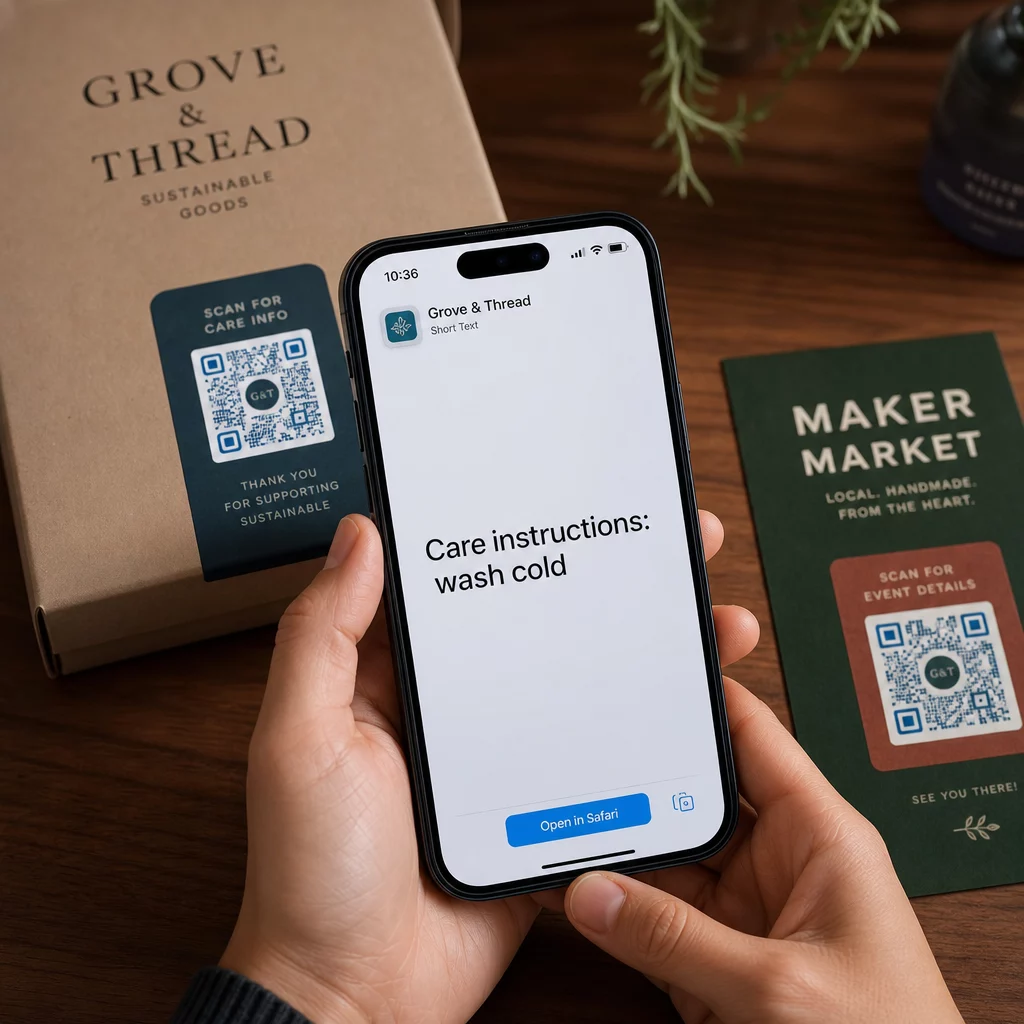
Innan du distribuerar: Testchecklista
Skanningsproblem är mycket lättare att upptäcka innan en kod går till tryck än efter. Gå igenom dessa kontroller innan du distribuerar någon QR-kod:
- Skanna med minst två olika enheter (iOS och Android)
- Testa i de faktiska ljusförhållandena där koden kommer att visas
- Bekräfta att den visade texten är korrekt och komplett
- Kontrollera att den tysta zonen (den tydliga ramen runt koden) är fri från hinder
- För tryck, bekräfta att koden är tillräckligt stor i förhållande till det förväntade skanningsavståndet
De Guide för bästa praxis för användbarhet av QR-koder har en fullständig genomgång av kraven i ISO/IEC 18004-standarden om du vill säkerställa att din kod uppfyller tekniska efterlevnadskriterier.
En text-QR-kod är ett av de snabbaste sätten att dela information utan att kräva en internetanslutning eller en skriven URL. Att få grunderna rätt – tydlig kontrast, lämplig storlek, en testad design – betyder att de personer du försöker nå kan komma åt ditt innehåll omedelbart och utan friktion.
Bygg och testa din QR-kod Använd Gratis QR-kodgenerator för att skapa, anpassa och ladda ner en text-QR-kod på några minuter. Inget kreditkort krävs för att komma igång.
Vanliga frågor
Ja. De flesta moderna smartphones som kör iOS 11 eller senare och nya Android-versioner kan skanna QR-koder direkt via den inbyggda kameraappen utan att ladda ner något extra. För äldre enheter eller för att verifiera innehåll innan delning, kan du också använda ett onlineverktyg som Pageloot QR Code Scanner.
En standard QR-kod kan koda upp till 4 296 alfanumeriska tecken vid den lägsta felkorrigeringsnivån. I praktiken ger kortare text en enklare, mindre tät kod som skannar snabbare och mer tillförlitligt över ett bredare utbud av enheter och ljusförhållanden. Om ditt meddelande är långt, överväg om en URL som pekar till en webbsida skulle fungera bättre.
Inte med en statisk QR-kod – texten är permanent inbäddad i mönstret. Om du behöver ändra innehållet senare, skulle du behöva skapa en ny kod. En dynamisk QR-kod löser detta: den kodar en kort omdirigerings-URL som du kan uppdatera när som helst, så den tryckta koden förblir densamma även när innehållet ändras.