Möchten Sie eine Nachricht, eine Reihe von Anweisungen oder Kontaktdaten mit jedem teilen, der ein Smartphone besitzt? Klartext wird oft als QR-Code-Inhaltstyp übersehen, ist aber eines der direktesten und vielseitigsten verfügbaren Formate. Dieser Leitfaden führt Sie genau durch die Erstellung eines Text-QR-Codes, dessen Anpassung und stellt sicher, dass er jedes Mal zuverlässig scannt.
Was ist ein Text-QR-Code?
Ein QR-Code (Quick Response Code) ist ein zweidimensionaler Barcode, der Daten in einem Muster aus schwarzen und weißen Quadraten speichert. Wenn eine Smartphone-Kamera darauf gerichtet wird, wird das Muster dekodiert und die gespeicherten Informationen sofort angezeigt – keine manuelle Eingabe erforderlich.
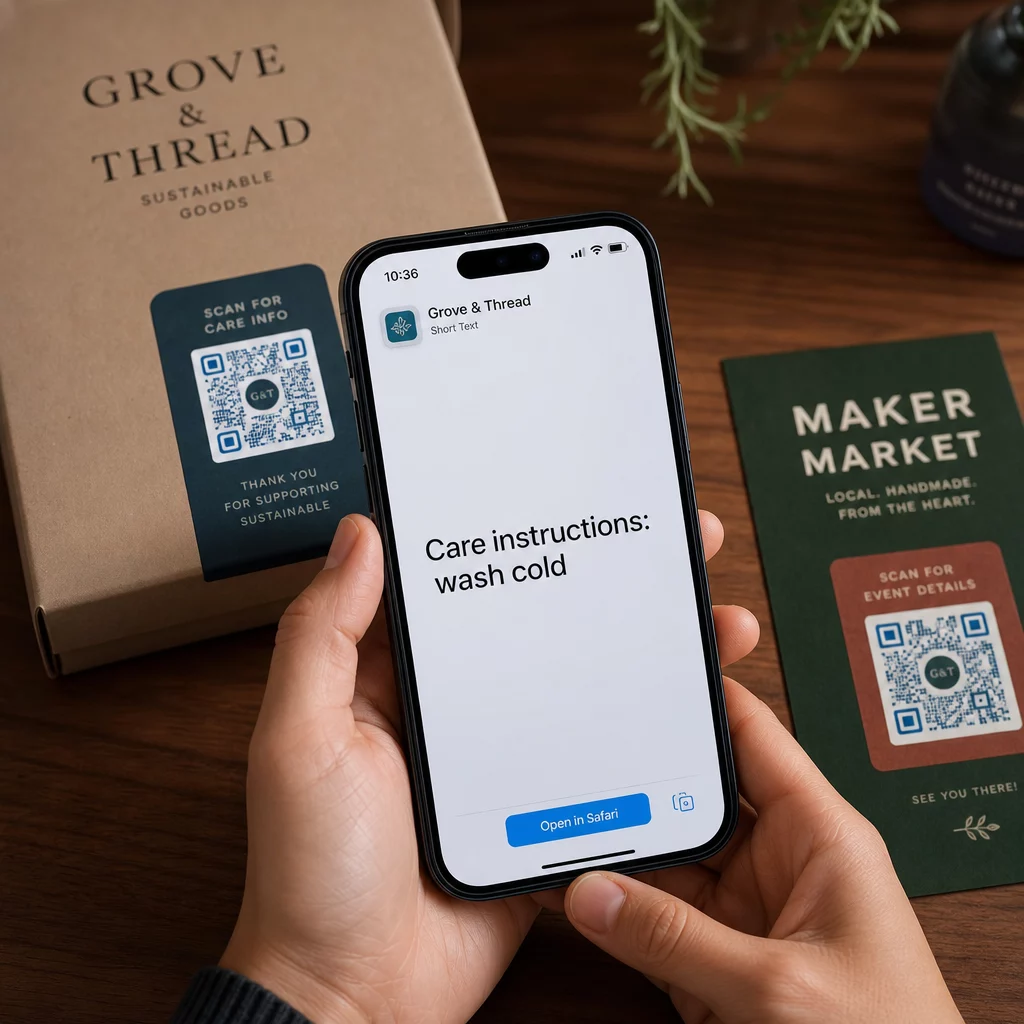
Ein Text-QR-Code funktioniert auf die gleiche Weise, nur dass er, anstatt auf eine Website umzuleiten, den kodierten Text direkt auf dem Bildschirm des Benutzers anzeigt. Wenn jemand ihn scannt, erscheint der Inhalt sofort und er kann ihn lesen, kopieren oder bei Bedarf damit interagieren.
Dies macht Text-QR-Codes für eine Vielzahl von Situationen nützlich:
- Kurze Nachrichten oder Ankündigungen
- Schritt-für-Schritt-Anleitungen auf Verpackungen oder Beschilderungen
- Kontaktdaten oder Notizen
- Emojis, URLs oder andere textbasierte Inhalte
Im Gegensatz zu einem URL-QR-Code benötigt ein Text-QR-Code keine Internetverbindung des Empfängers, um den Inhalt zu lesen – die Informationen sind direkt im Code selbst eingebettet.
Wie man einen QR-Code aus Text erstellt
Die Erstellung eines Text-QR-Codes dauert weniger als eine Minute. Hier ist der Prozess mit dem Pageloot Text-QR-Code-Generator:
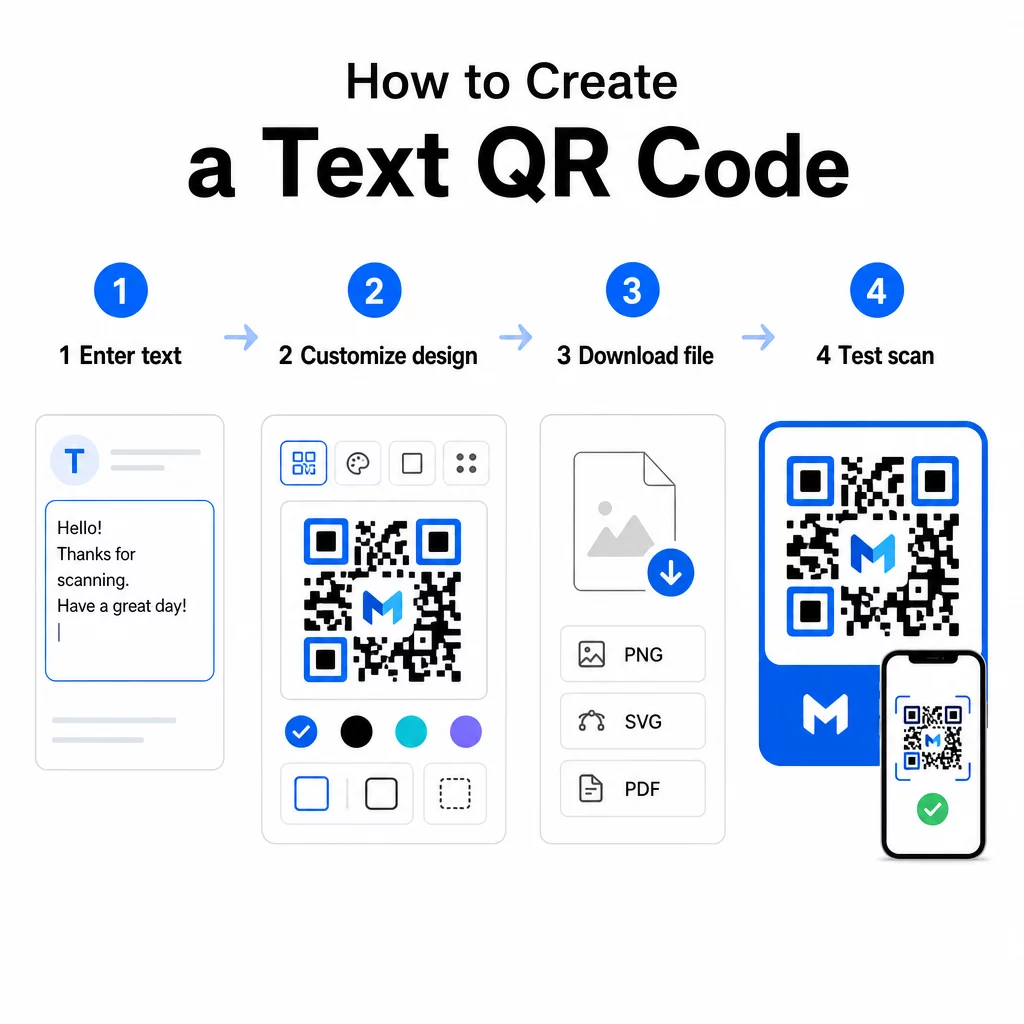
- Geben Sie Ihren Text ein – Geben Sie die Nachricht, Anweisungen oder Details, die Sie kodieren möchten, ein oder fügen Sie sie ein. Dies kann alles sein, von einer kurzen Notiz bis hin zu Kontaktinformationen.
- Das Aussehen anpassen – Passen Sie Farben an, fügen Sie Ihr Logo hinzu, ändern Sie die Form oder fügen Sie einen Call-to-Action-Rahmen hinzu, um Ihrer Marke zu entsprechen. Folgend Best Practices für den Farbkontrast von QR-Codes in diesem Stadium hilft sicherzustellen, dass Ihr Code scanbar bleibt.
- Speichern und herunterladen – Klicken Sie auf “Speichern”, um den Code zu generieren. Sie können ihn als PNG- oder JPG-Bilddatei für die Verwendung in digitalen oder gedruckten Materialien herunterladen.
- Testen Sie, bevor Sie veröffentlichen – Scannen Sie den Code mit einem QR-Code Scanner oder Ihrer Smartphone-Kamera, um zu bestätigen, dass er den richtigen Inhalt anzeigt, bevor Sie ihn verteilen.
Erstellen Sie Ihren Text-QR-Code kostenlos Bereit, jede Nachricht in einen sofort scanbaren Code zu verwandeln? Nutzen Sie den Text QR-Code Generator um Ihren Code in wenigen Minuten zu erstellen, anzupassen und herunterzuladen.
Anpassen Ihres Text-QR-Codes
Ein einfacher Schwarz-Weiß-Code funktioniert, aber ein gebrandeter, gut gestalteter QR-Code wird häufiger gescannt. Hier sind die wichtigsten Anpassungsoptionen, die Sie in Betracht ziehen sollten:
- Farben – Verwenden Sie Ihre Markenfarben, aber halten Sie immer einen dunklen Vordergrund auf einem hellen Hintergrund. Geringer Kontrast ist der häufigste Grund, warum ein QR-Code nicht zuverlässig gescannt werden kann.
- Logo – Das Hinzufügen Ihres Logos schafft Vertrauen und stärkt die Markenbekanntheit. Wenn Sie ein Logo-Overlay hinzufügen, verwenden Sie eine höhere Fehlerkorrekturstufe (Q oder H), damit der Scanner den Code auch dann noch lesen kann, wenn ein Teil davon verdeckt ist.
- Rahmen mit Handlungsaufforderung – Eine kurze Aufforderung wie “Für Details scannen” oder “Anweisungen hier lesen” sagt den Leuten genau, was sie erwarten können, und ermutigt sie zum Scannen.
- Form – QR-Codes müssen nicht perfekt quadratisch sein. Benutzerdefinierte Punktformen und Kantenstile können einen Code mehr wie einen Teil Ihres Designs wirken lassen, ohne die Funktionalität zu beeinträchtigen.
Für einen tieferen Einblick in die Faktoren, die die Scan-Zuverlässigkeit beeinflussen, ist der Leitfaden für bewährte Verfahren zur Lesbarkeit von QR-Codes behandelt Größe, Kontrast, Ruhezonen und Platzierung im Detail.
Herunterladen und Verwenden Ihres QR-Codes
Sobald Sie mit dem Design zufrieden sind und es getestet haben, laden Sie die Datei in dem Format herunter, das zu Ihrem Anwendungsfall passt:
- PNG oder JPG – Am besten für die digitale Nutzung: Websites, E-Mails, soziale Medien und Präsentationen.
- SVG, EPS oder PDF – Vektorformate, die ohne Qualitätsverlust skalieren, ideal für Druckmaterialien wie Flyer, Poster und Produktverpackungen.
Die QR-Code-PNG-Generator ist eine gute Option, wenn Sie einen transparenten Hintergrund benötigen, um den Code über Bildern oder strukturierten Designs zu platzieren, ohne einen weißen Kasten darum.
Für die Platzierung wählen Sie eine flache, glatte, gut sichtbare Oberfläche. Vermeiden Sie gekrümmte Oberflächen, stark reflektierende Oberflächen oder überladene Hintergründe, da diese das Scannen beeinträchtigen können. Eine Mindestgröße von etwa 2 × 2 cm (ungefähr 0,8 × 0,8 Zoll) wird für das Scannen aus nächster Nähe empfohlen, und der Code sollte proportional größer werden, je weiter Ihr Publikum voraussichtlich entfernt ist.
Statische vs. dynamische Text-QR-Codes
Wenn Sie einen Text-QR-Code erstellen, haben Sie zwei strukturelle Optionen:
| FUNKTION | Statischer QR-Code | Dynamischer QR-Code |
|---|---|---|
| Inhalt nach Erstellung bearbeitbar | Nein | Ja |
| Scan-Tracking und -Analyse | Nein | Ja |
| Kürzere kodierte URL (saubereres Muster) | Nein | Ja |
| Funktioniert ohne Internet | Ja | Erfordert Weiterleitung |
EIN statischer QR-Code kodiert den Text direkt und dauerhaft. Es funktioniert offline, aber wenn Sie die Nachricht später ändern müssen, müssen Sie einen neuen Code erstellen und neu verteilen.
EIN dynamischer QR-Code kodiert eine kurze Weiterleitungs-URL anstelle des Textes selbst. Dies hält das Codemuster einfacher und leichter zu scannen, und es ermöglicht Ihnen, den Zielinhalt jederzeit ohne Neudruck zu aktualisieren. Es bietet Ihnen auch Zugang zu Scan-Analysen – Verfolgung von Metriken wie Scan-Anzahl, Standort, Gerätetyp und Scan-Zeit.
Für einmalige Verwendungen wie ein Handout oder ein Produktetikett mit festen Anweisungen ist ein statischer Code vollkommen ausreichend. Für laufende Kampagnen oder alles, was aktualisiert werden muss, ist ein dynamischer Code die flexiblere Wahl. Sie können dynamische Optionen über die Pageloot QR-Code-Generator.
Praktische Anwendungen für Text-QR-Codes
Text-QR-Codes passen natürlich in viele reale Szenarien:
- Produktverpackungen – Kodieren Sie Pflegeanweisungen, Montageschritte oder Sicherheitsinformationen, damit Kunden Details mit einem einzigen Scan abrufen können, anstatt nach einer separaten Beilage zu suchen.
- Veranstaltungsbeschilderung – Teilen Sie WLAN-Passwörter, Veranstaltungspläne oder Veranstaltungsregeln, ohne sie vollständig auf jedem Schild auszudrucken.
- Visitenkarten – Fügen Sie eine kurze persönliche Nachricht oder einen Slogan hinzu, der erscheint, wenn jemand die Karte scannt.
- Einzelhandel und Gastgewerbe – Kodieren Sie kurze Werbebotschaften, Rabattcodes oder Willkommensnachrichten für Gäste.
- Sofortnachrichten – Text-QR-Codes können auch mit Messaging-Workflows kombiniert werden. Der Leitfaden für Instant-Messaging-QR-Codes erklärt, wie man Codes einrichtet, die eine vorausgefüllte Nachricht in WhatsApp, Facebook Messenger oder SMS öffnen.
Vor der Verteilung: Checkliste für Tests
Scanprobleme sind viel einfacher zu erkennen, bevor ein Code gedruckt wird, als danach. Führen Sie diese Prüfungen durch, bevor Sie einen QR-Code verteilen:
- Scannen Sie mit mindestens zwei verschiedenen Geräten (iOS und Android)
- Testen Sie unter den tatsächlichen Lichtverhältnissen, unter denen der Code angezeigt wird
- Bestätigen Sie, dass der angezeigte Text korrekt und vollständig ist
- Stellen Sie sicher, dass die Ruhezone (der klare Rand um den Code) frei ist
- Für den Druck bestätigen Sie, dass der Code groß genug ist im Verhältnis zur erwarteten Scan-Entfernung
Die Leitfaden für Best Practices zur Benutzerfreundlichkeit von QR-Codes enthält eine vollständige Aufschlüsselung der Anforderungen des ISO/IEC 18004 Standards, wenn Sie sicherstellen möchten, dass Ihr Code die technischen Konformitätskriterien erfüllt.
Ein Text-QR-Code ist eine der schnellsten Möglichkeiten, Informationen zu teilen, ohne eine Internetverbindung oder eine eingegebene URL zu benötigen. Wenn die Grundlagen stimmen – klarer Kontrast, angemessene Größe, ein getestetes Design – können die Personen, die Sie erreichen möchten, Ihre Inhalte sofort und reibungslos abrufen.
Erstellen und Testen Sie Ihren QR-Code Verwenden Sie die QR-Code erstellen kostenlos um in wenigen Minuten einen Text-QR-Code zu erstellen, anzupassen und herunterzuladen. Keine Kreditkarte erforderlich, um zu beginnen.
Häufig gestellte Fragen
Ja. Die meisten modernen Smartphones mit iOS 11 oder neuer und aktuellen Android-Versionen können QR-Codes direkt über die integrierte Kamera-App scannen, ohne etwas Zusätzliches herunterladen zu müssen. Für ältere Geräte oder um Inhalte vor dem Teilen zu überprüfen, können Sie auch ein Online-Tool wie den Pageloot QR Code Scanner verwenden.
Ein Standard-QR-Code kann bis zu 4.296 alphanumerische Zeichen auf der niedrigsten Fehlerkorrekturstufe kodieren. In der Praxis erzeugt kürzerer Text einen einfacheren, weniger dichten Code, der schneller und zuverlässiger über eine größere Bandbreite von Geräten und Lichtverhältnissen gescannt werden kann. Wenn Ihre Nachricht lang ist, überlegen Sie, ob eine URL, die auf eine Webseite verweist, besser funktionieren könnte.
Nicht mit einem statischen QR-Code – der Text ist dauerhaft im Muster kodiert. Wenn Sie den Inhalt später ändern müssen, müssten Sie einen neuen Code erstellen. Ein dynamischer QR-Code löst dies: Er kodiert eine kurze Weiterleitungs-URL, die Sie jederzeit aktualisieren können, sodass der gedruckte Code derselbe bleibt, auch wenn sich der Inhalt ändert.