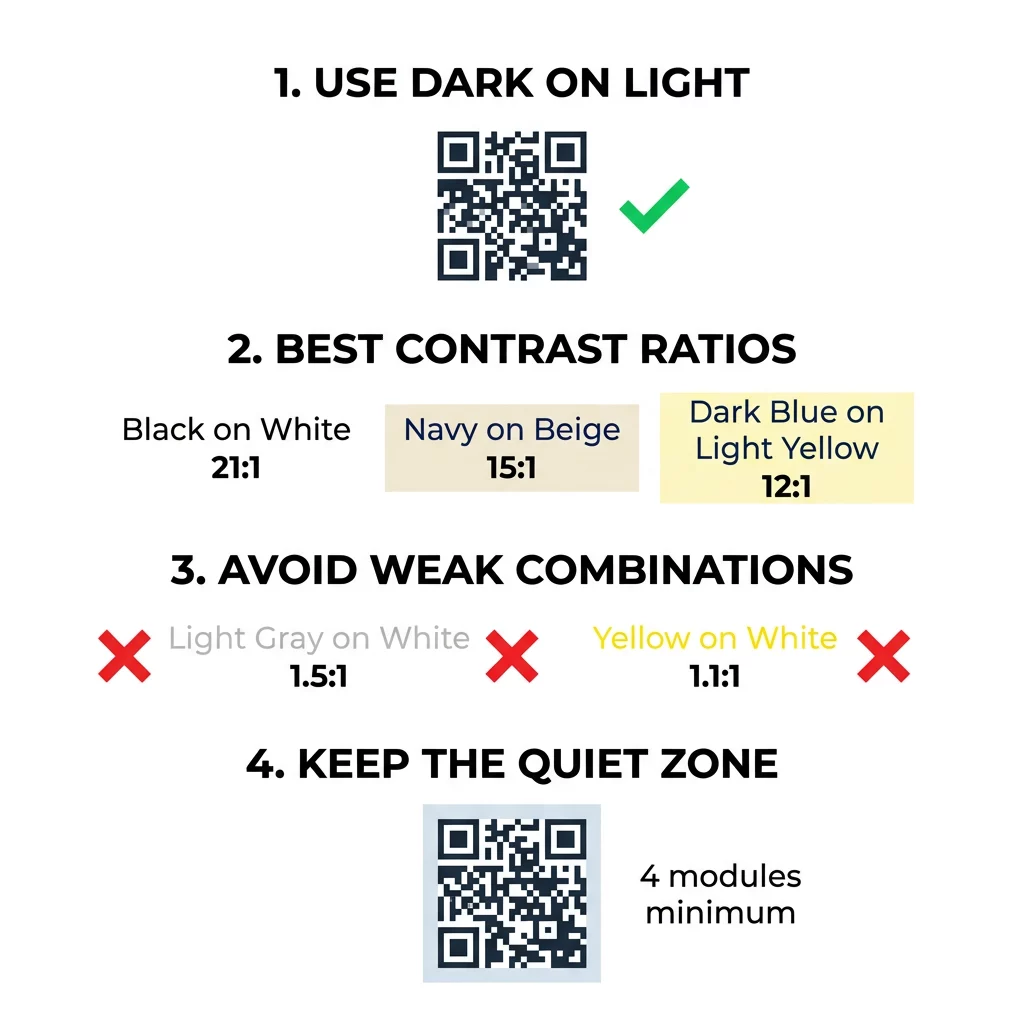
Los mejores colores para códigos QR son módulos oscuros (los cuadrados) sobre un fondo claro, y sí, los códigos QR pueden ser de color. La regla es simple: los módulos deben ser claramente más oscuros que el fondo. El negro sobre blanco ofrece una relación de contraste de 21:1 y es la opción más segura. Para un código de marca, apunte a al menos 4:1, y use 7:1 o más para señalización exterior, donde la luz solar y la distancia disminuyen el contraste efectivo. Esta guía proporciona los números, una tabla de colores y una rutina de prueba.
¿Qué colores de códigos QR funcionan y pueden ser de color los códigos QR?
Un código QR puede ser de casi cualquier color, y puede usar diferentes colores para los módulos y el fondo. La cámara de un teléfono no ve el tono. Convierte la imagen a escala de grises y decide, cuadrado por cuadrado, qué es oscuro y qué es claro. Así que la pregunta no es qué color elige, sino cuán diferentes son los dos valores de escala de grises.
- Funciona: módulos azul marino, verde oscuro, carbón, morado oscuro, marrón oscuro o negro sobre un fondo blanco, crema u otro fondo muy claro.
- Funciona con una prueba: rojo oscuro, verde azulado oscuro y naranja oscuro sobre blanco. Verifique primero la proporción y escanee una prueba impresa.
- No funciona: módulos amarillos, gris claro, pastel o neón, y cualquier par de colores con el mismo brillo, como verde medio sobre rojo medio.
- Arriesgado: módulos claros sobre un fondo oscuro (códigos invertidos). Muchas aplicaciones de escáner los leen, pero algunas no, así que evítelos en cualquier cosa que sea importante.
Por qué el contraste controla la escaneabilidad de los códigos QR
Los sensores ópticos leen los códigos QR midiendo la diferencia de reflectancia entre los módulos oscuros y claros. El estándar de código QR, ISO/IEC 18004, asume módulos oscuros sobre un fondo claro. Los módulos oscuros absorben la luz y el fondo claro la refleja. Si la diferencia es demasiado pequeña, el decodificador no puede separar el patrón de datos del fondo.
En las pruebas de códigos de barras (ISO/IEC 15415), el contraste del símbolo es la diferencia entre la reflectancia más brillante y la más oscura del código. Un contraste de símbolo del 70% o más obtiene la máxima calificación, y por debajo del 20% falla. Los evaluadores también comprueban la modulación, que muestra la uniformidad con la que los módulos claros y oscuros reflejan la luz en todo el símbolo. Los colores desiguales o una separación débil hacen que el escáner no detecte los bordes de los módulos.
La polaridad normal, con módulos oscuros sobre un fondo claro, funciona en todos los dispositivos. Algunas aplicaciones de cámara de teléfono incorporadas no pueden leer códigos claros sobre fondos oscuros, y la compatibilidad varía según el modelo de teléfono y la versión del software. Utilice la polaridad normal a menos que haya probado la versión invertida en los dispositivos que utiliza su público.
Evaluación de las relaciones y umbrales de contraste de color
La relación de contraste es un número de 1:1 (sin diferencia) a 21:1 (negro sobre blanco). La relación proviene de las reglas de accesibilidad de las Pautas de Accesibilidad al Contenido Web (WCAG), que fueron escritas para texto pero son una forma práctica de verificar los colores de los códigos QR. Un verificador de contraste (busque "verificador de contraste WCAG") acepta dos códigos hexadecimales y devuelve la relación. Para más información sobre diseño inclusivo, lea nuestra guía sobre Cómo hacer códigos QR accesibles conforme a ADA.
Utilice estos objetivos. Al menos 4:1 es el mínimo para impresiones y pantallas interiores. 7:1 o más es más seguro para embalajes, folletos y cualquier cosa fotografiada con luz variada. 10:1 o más es el objetivo para señalización exterior. Las proporciones a continuación son aproximadas y dependen del tono exacto.
| Combinación de Colores | Relación de Contraste Aproximada | Evaluación de Escaneabilidad |
|---|---|---|
| Negro sobre Blanco | 21:1 | Óptimo (estándar de la industria) |
| Azul Marino sobre Beige | ~15:1 | Excelente |
| Azul Oscuro sobre Amarillo Claro | ~12:1 | Muy Bueno |
| Marrón Oscuro sobre Blanco Roto | ~8:1 | Bueno |
| Rojo Puro (#FF0000) sobre Blanco | ~4:1 | En el límite, pruebe antes de imprimir |
| Rojo Oscuro (#8B0000) sobre Blanco | ~11:1 | Muy Bueno |
| Gris claro sobre blanco | ~1.5:1 | Deficiente (fallos frecuentes de escaneo) |
| Amarillo sobre blanco | ~1.1:1 | Ilegible |
Personalice códigos sin sacrificar la escaneabilidad Pruebe colores y previsualice su diseño en tiempo real utilizando nuestro Generador de código QR con logo para equilibrar la estética de la marca con un escaneo fiable.
Mejor relación de contraste de código QR para señalización exterior
Ningún estándar establece una proporción requerida para códigos QR en exteriores, pero las condiciones al aire libre reducen el contraste de tres maneras: el sol directo desvanece las áreas claras, el resplandor oculta partes del código y la distancia difumina los módulos pequeños. Planifique un margen de seguridad mayor que el que usaría en interiores.
- Utilice negro o un color muy oscuro sobre blanco. Busque una proporción de 10:1 o superior.
- Imprima en material mate o añada un laminado mate. El vinilo brillante y el vidrio reflejan el sol y rompen el patrón.
- Ajuste el tamaño del código a la distancia de escaneo. Una regla común es 1 unidad de ancho de código por cada 10 unidades de distancia, por lo que un código escaneado desde 2 metros (aproximadamente 6.5 pies) debe tener aproximadamente 20 cm (8 pulgadas) de ancho.
- Mantenga la zona silenciosa completa y coloque el código en un panel de luz sólido en lugar de una foto.
- Evite colocar el código donde reciba sol bajo o esté detrás de un vidrio, y escanee la señal impresa en el lugar real antes de encargar una tirada completa.
Contraste de códigos de barras: códigos QR vs. códigos de barras lineales
Las mismas reglas de contraste se aplican a otros códigos de barras de alto contraste, como Code 128 o EAN. Los escáneres minoristas suelen utilizar un láser rojo, y la luz roja no ve las barras rojas o la tinta roja como oscuras. Para códigos de barras lineales, imprima las barras en negro, azul oscuro o verde oscuro sobre blanco, y nunca en rojo o naranja. Los códigos QR leídos por la cámara de un teléfono son menos sensibles al tono, pero el mismo consejo proporciona el resultado más fiable para ambos.
Protección de la zona silenciosa y las dimensiones del código
El alto contraste debe extenderse hasta el borde del código. El margen en blanco alrededor del patrón es la zona silenciosa. Le indica a la cámara dónde comienza el código y dónde termina otra obra de arte.
- Mantenga una zona silenciosa de al menos cuatro anchos de módulo en los cuatro lados.
- Mantenga este margen libre de texto, ilustraciones y bordes.
- Haga coincidir la zona silenciosa con el color de su fondo claro para que el límite sea nítido.
- Imprima códigos de al menos 2 x 2 cm (0.8 x 0.8 pulgadas) para escaneo cercano y manual. Auméntelos para enlaces más largos, porque más datos significan módulos más pequeños.
- Prefiera un enlace corto. Una URL corta crea un patrón más simple con módulos más grandes que escanean mejor con poca luz.
El texto o las ilustraciones dentro de la zona silenciosa son una causa frecuente de errores de escaneo en materiales de marca. Nuestra guía para las mejores prácticas para la legibilidad de los códigos QR muestra cómo mantener los márgenes mientras se ajusta a su diseño.
Evitar Errores Comunes de Color y Estilo
Personalizar un código puede perjudicar la legibilidad. Las cámaras convierten la imagen a escala de grises, por lo que dos tonos diferentes pueden terminar con el mismo brillo y fusionarse en un solo gris.
- Evite los módulos en colores pastel como el azul bebé, la menta o el amarillo pálido.
- Evite los módulos rojos o naranjas brillantes. Los escáneres láser leen el rojo como luz, y la relación de contraste a menudo es inferior a 5:1. Un rojo oscuro como el granate es mucho más seguro.
- Evite los degradados donde la parte más clara del color del módulo esté cerca del fondo.
- Evite los fondos transparentes sobre fotos, papel texturizado o envases estampados. Coloque el código en un panel de color claro y sólido.
- Evite los diseños invertidos con módulos claros sobre un fondo oscuro a menos que los haya probado en los teléfonos que usa su público.
- Evite los logotipos grandes. Un logotipo que cubre demasiados módulos puede exceder la corrección de errores del código.
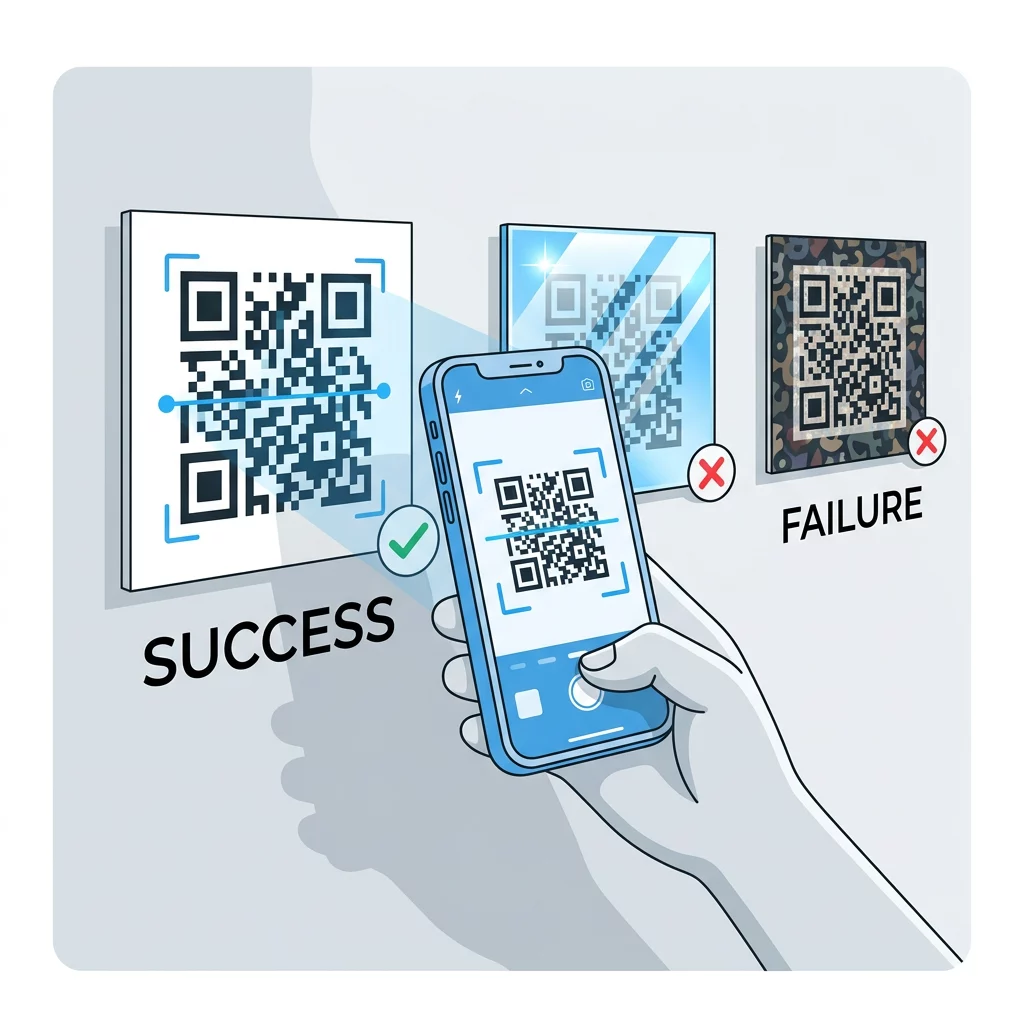
Conocer estos límites le permite aprender cómo crear un código QR personalizado que muestra su marca sin afectar la decodificación.
Pruebas y Validación en Entornos del Mundo Real
Un código que se escanea desde un monitor brillante puede fallar en papel. La luz de la habitación, el ángulo de visión y la textura del material cambian el contraste que llega a la lente. La luz solar directa desvanece las pequeñas diferencias de color, las habitaciones tenues reducen la capacidad del sensor’s para separar módulos y los acabados brillantes añaden deslumbramiento.
Realice esta verificación antes de cada trabajo de impresión:
- Verifique el par de colores en un verificador de contraste. La proporción debe ser de al menos 4:1, y 7:1 o más para empaques y uso en exteriores.
- Imprima una prueba en el material real, en el tamaño real, con el acabado real.
- Escanéelo con la cámara incorporada de al menos un iPhone y un teléfono Android, un teléfono más antiguo si es posible, y uno basado en navegador Lector QR online.
- Escanee el código bajo la peor luz que pueda enfrentar: habitación tenue, sol directo y en ángulo.
- Si el código duda en escanearse, aumente el contraste, agrande el código, acorte el enlace o restaure la zona de silencio.
Nuestra guía sobre Cómo probar un código QR antes de imprimir cubre esto con más detalle, y cómo mejorar la legibilidad de los códigos QR cubre soluciones para códigos que fallan.
Maximizando la Fiabilidad y el Compromiso del Código QR
Trate el contraste como un requisito técnico, no como un toque final. Elija un color oscuro sobre un fondo claro, mantenga la zona de silencio y pruebe una prueba impresa bajo la luz a la que se enfrentará. Esto protege su presupuesto de impresión de códigos que no escanean.
Cree su código de alto contraste con nuestro generador de códigos QR. Establezca los colores del módulo y del fondo, y descargue un PNG, SVG o PDF. Si imprime un código y es posible que necesite cambiar el enlace más tarde, use un código dinámico: puede editar el destino después de imprimir y ver las estadísticas de escaneo. Los códigos dinámicos vienen con una prueba gratuita de 14 días, y los planes se enumeran en https://pageloot.com/pricing/.
Preguntas frecuentes
Busque al menos una relación de 4:1 entre los módulos y el fondo. Utilice 7:1 o más para empaques y folletos, y 10:1 o más para señalización exterior. Negro sobre blanco es 21:1.
Sí. Cualquier color funciona si los módulos son claramente más oscuros que el fondo. El azul marino oscuro, el verde bosque, el gris carbón y el granate sobre blanco o crema funcionan bien. El amarillo, el gris claro y los colores pastel no.
Los módulos y el fondo pueden ser de diferentes colores, y puedes usar cualquier tono, pero solo importa la diferencia de brillo. Un teléfono lee el código en escala de grises, por lo que dos colores de igual brillo fallarán. Verifica la relación y escanea una prueba impresa.
No existe un estándar oficial. Una relación de 10:1 o superior es un objetivo seguro, como negro sobre blanco. Utilice un acabado mate para reducir el deslumbramiento, dimensione el código a aproximadamente 1/10 de la distancia de escaneo y pruébelo en el sitio.
Sí, si el color de tu marca es lo suficientemente oscuro, como azul marino intenso, verde bosque o carbón, y se asienta sobre un fondo claro uniforme. Si el color de tu marca es claro, usa un tono oscuro del mismo para los módulos.
El estándar QR define módulos oscuros sobre un fondo claro. Muchas aplicaciones de cámara buscan primero ese patrón, y algunas no pueden leer módulos claros sobre un fondo oscuro. La compatibilidad varía según el teléfono, así que prueba antes de imprimir.
Sí. Los códigos de barras lineales como Code 128 o EAN también necesitan barras oscuras sobre un fondo claro. Los escáneres láser de venta minorista utilizan luz roja, así que nunca imprima las barras en rojo o naranja.