Szeretne megosztani egy üzenetet, utasításokat vagy elérhetőségeket bárkivel, akinek van okostelefonja? Az egyszerű szöveget gyakran figyelmen kívül hagyják QR-kód tartalomtípusként, pedig ez az egyik legközvetlenebb és legsokoldalúbb elérhető formátum. Ez az útmutató pontosan bemutatja, hogyan hozhat létre szöveges QR-kódot, hogyan szabhatja testre, és hogyan biztosíthatja, hogy minden alkalommal megbízhatóan beolvasható legyen.
Mi az a szöveges QR-kód?
A QR-kód (Quick Response code) egy kétdimenziós vonalkód, amely fekete-fehér négyzetek mintázatában tárol adatokat. Amikor egy okostelefon kamerája ráirányul, a mintázat dekódolásra kerül, és a tárolt információ azonnal megjelenik – nincs szükség kézi gépelésre.
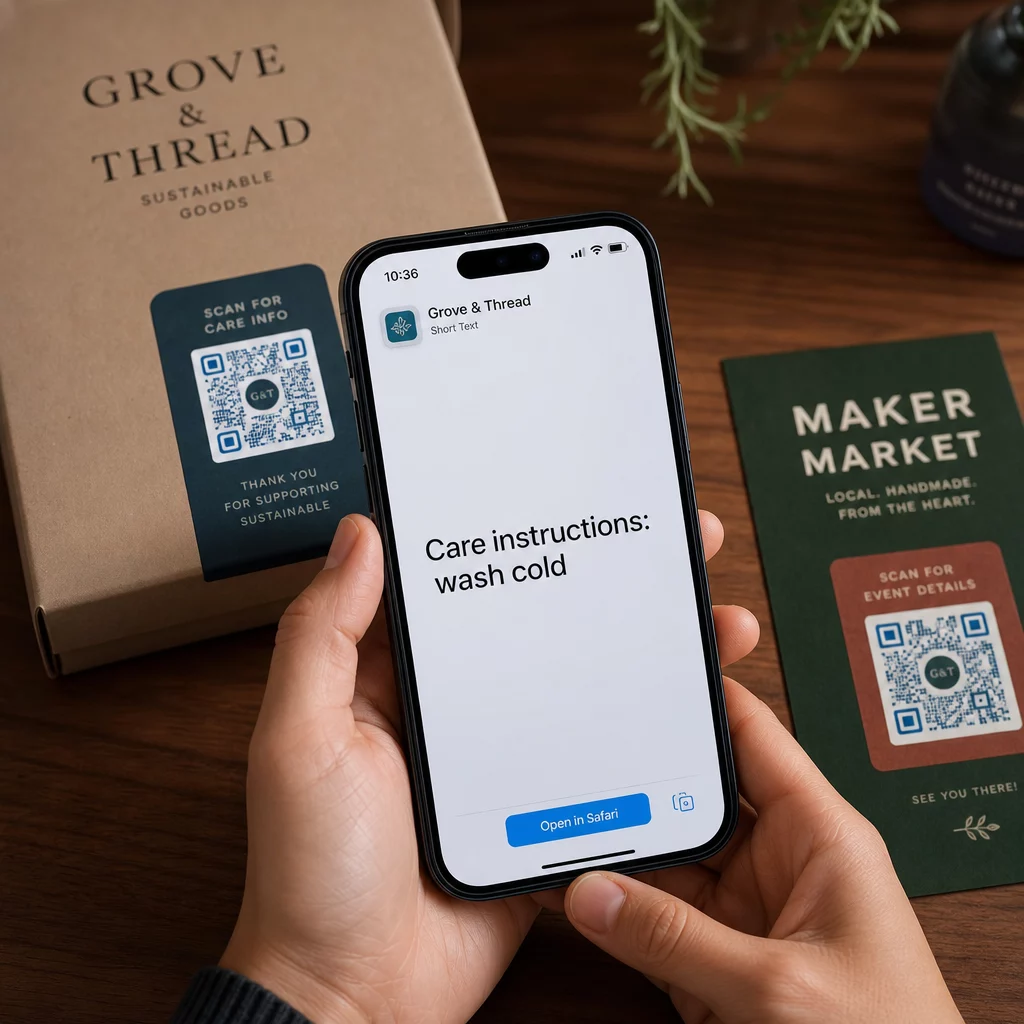
A szöveges QR-kód ugyanígy működik, azzal a különbséggel, hogy weboldalra való átirányítás helyett közvetlenül a felhasználó képernyőjén jeleníti meg a kódolt szöveget. Amikor valaki beolvassa, a tartalom azonnal megjelenik, és szükség szerint elolvashatja, másolhatja vagy interakcióba léphet vele.
Ezáltal a szöveges QR-kódok számos helyzetben hasznosak:
- Rövid üzenetek vagy bejelentések
- Lépésről lépésre útmutatók csomagoláson vagy táblákon
- Elérhetőségek vagy jegyzetek
- Hangulatjelek, URL-ek vagy bármilyen más szöveges tartalom
Egy URL QR-kóddal ellentétben a szöveges QR-kód nem igényli, hogy a címzettnek internetkapcsolata legyen a tartalom elolvasásához – az információ közvetlenül a kódban van beágyazva.
Hogyan hozzunk létre QR-kódot szövegből
Szöveges QR-kód létrehozása kevesebb mint egy percet vesz igénybe. Íme a folyamat a Pageloot Text QR Code Generator:
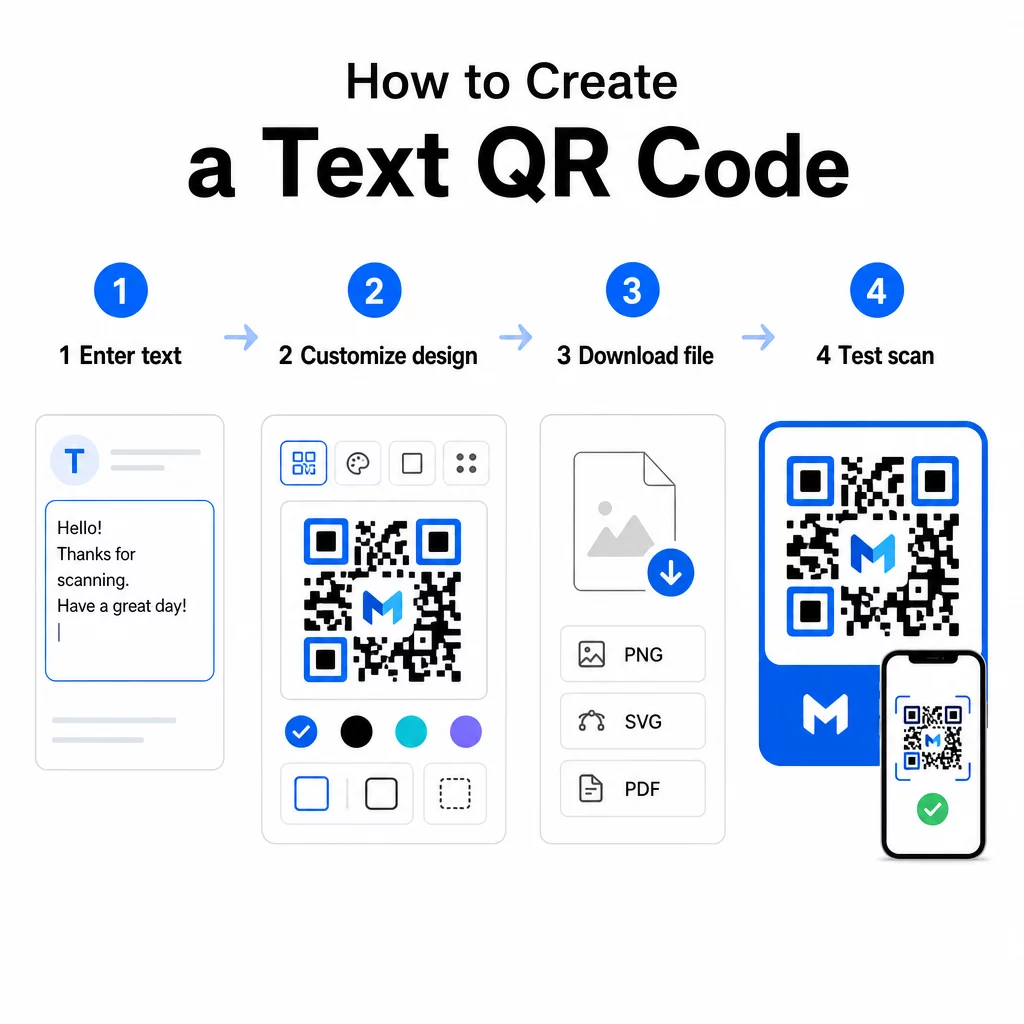
- Írja be a szövegét – Gépelje be vagy illessze be az üzenetet, utasításokat vagy részleteket, amelyeket kódolni szeretne. Ez lehet bármi, egy rövid jegyzettől az elérhetőségekig.
- Testreszabhatja a megjelenést – Állítsa be a színeket, adja hozzá logóját, változtassa meg az alakzatot, vagy adjon hozzá egy cselekvésre ösztönző keretet, hogy illeszkedjen márkájához. A következő QR-kód színkontrasztra vonatkozó legjobb gyakorlatokat ebben a szakaszban segít biztosítani, hogy a kódja olvasható maradjon.
- Mentés és letöltés – Kattintson a “Mentés” gombra a kód generálásához. Letöltheti PNG vagy JPG képfájlként digitális vagy nyomtatott anyagokban való felhasználásra.
- Tesztelje publikálás előtt – Olvassa be a kódot egy QR-kód olvasó vagy okostelefonja kamerájával, hogy megbizonyosodjon arról, a helyes tartalmat jeleníti meg, mielőtt terjesztené.
Készítsen szöveges QR-kódot ingyen Készen áll arra, hogy bármilyen üzenetet azonnal beolvasható kóddá alakítson? Használja a QR kód generátor szöveghez a kódja elkészítéséhez, testreszabásához és letöltéséhez percek alatt.
A szöveges QR-kód testreszabása
Egy egyszerű fekete-fehér kód is működik, de egy márkás, jól megtervezett QR-kód több beolvasást eredményez. Íme a legfontosabb testreszabási lehetőségek, amelyeket érdemes figyelembe venni:
- Színek – Használja a márka színeit, de mindig tartson sötét előteret világos háttéren. Az alacsony kontraszt a leggyakoribb ok, amiért egy QR-kód nem olvasható be megbízhatóan.
- Logó – A logó hozzáadása bizalmat épít és erősíti a márkafelismerést. Ha logóátfedést ad hozzá, használjon magasabb hibajavítási szintet (Q vagy H), hogy a szkenner továbbra is olvashassa a kódot, még akkor is, ha annak egy része el van takarva.
- Keret cselekvésre ösztönzéssel – Egy rövid felszólítás, mint például “Szkennelje be a részletekért” vagy “Olvassa el az utasításokat itt”, pontosan elmondja az embereknek, mire számíthatnak, és arra ösztönzi őket, hogy szkenneljenek.
- Alak – A QR-kódoknak nem kell tökéletesen négyzet alakúaknak lenniük. Az egyedi pontformák és élszínvonalak révén a kód jobban illeszkedhet a designjához anélkül, hogy a funkcionalitás sérülne.
A szkennelési megbízhatóságot befolyásoló tényezők mélyebb megismeréséhez a QR-kód olvashatósági legjobb gyakorlatok útmutató részletesen tárgyalja a méretet, kontrasztot, csendes zónákat és elhelyezést.
QR-kód letöltése és használata
Miután elégedett a tervezéssel és letesztelte, töltse le a fájlt az Ön felhasználási esetének megfelelő formátumban:
- PNG vagy JPG – Legjobb digitális használatra: weboldalak, e-mailek, közösségi média és prezentációk.
- SVG, EPS vagy PDF – Vektoros formátumok, amelyek minőségromlás nélkül méretezhetők, ideálisak nyomtatott anyagokhoz, mint például szórólapok, poszterek és termékcsomagolások.
A QR-kód PNG generátor jó választás, ha átlátszó háttérre van szüksége a kód képek vagy texturált minták fölé helyezéséhez anélkül, hogy fehér doboz lenne körülötte.
Az elhelyezéshez válasszon sík, sima, jól látható felületet. Kerülje az ívelt felületeket, a nagyon fényes felületeket vagy a zsúfolt háttereket, mivel ezek zavarhatják a szkennelést. Közeli szkenneléshez legalább 2 × 2 cm (körülbelül 0,8 × 0,8 hüvelyk) méret ajánlott, és a kódnak arányosan nagyobbnak kell lennie, minél távolabb van a közönség.
Statikus vs. dinamikus szöveges QR-kódok
Amikor szöveges QR-kódot hoz létre, két szerkezeti lehetősége van:
| FUNKCIÓ | Statikus QR-kód | Dinamikus QR-kód |
|---|---|---|
| Tartalom szerkeszthető létrehozás után | Nem | Igen |
| Szkenneléskövetés és elemzés | Nem | Igen |
| Rövidebb kódolt URL (tisztább minta) | Nem | Igen |
| Internet nélkül is működik | Igen | Átirányítást igényel |
A statikus QR-kód közvetlenül és véglegesen kódolja a szöveget. Offline is működik, de ha később módosítani kell az üzenetet, új kódot kell létrehozni és újra terjeszteni.
A dinamikus QR-kód egy rövid átirányítási URL-t kódol a szöveg helyett. Ez egyszerűbbé és könnyebben szkennelhetővé teszi a kódmintát, és lehetővé teszi a cél tartalom bármikori frissítését újranyomtatás nélkül. Emellett hozzáférést biztosít a szkennelési analitikához is – olyan mérőszámok követéséhez, mint a szkennelések száma, helye, eszköz típusa és a szkennelés ideje.
Egyszeri felhasználásra, például egy szórólaphoz vagy egy rögzített utasításokat tartalmazó termékcímkéhez, egy statikus kód tökéletesen elegendő. Folyamatos kampányokhoz vagy bármihez, ami frissítésre szorulhat, a dinamikus kód a rugalmasabb választás. A dinamikus lehetőségeket a következőn keresztül fedezheti fel: Pageloot QR Kód Generátor.
Szöveges QR-kódok gyakorlati felhasználása
A szöveges QR-kódok természetesen illeszkednek számos valós forgatókönyvbe:
- Termékcsomagolás – Kódolja be az ápolási utasításokat, összeszerelési lépéseket vagy biztonsági információkat, hogy az ügyfelek egyetlen szkenneléssel hozzáférhessenek a részletekhez, ahelyett, hogy külön betétet keresnének.
- Rendezvénytáblák – Ossza meg a WiFi jelszavakat, eseményütemterveket vagy helyszíni szabályokat anélkül, hogy minden táblára teljes egészében kinyomtatná őket.
- Névjegykártyák – Tartalmazzon egy rövid személyes üzenetet vagy szlogent, amely megjelenik, amikor valaki beolvassa a kártyát.
- Kiskereskedelem és vendéglátás – Kódolja be a rövid promóciós üzeneteket, kedvezménykódokat vagy üdvözlő üzeneteket a vendégek számára.
- Azonnali üzenetküldés – A szöveges QR-kódok üzenetküldési munkafolyamatokkal is kombinálhatók. A azonnali üzenetküldő QR-kód útmutató elmagyarázza, hogyan kell beállítani azokat a kódokat, amelyek előre kitöltött üzenetet nyitnak meg a WhatsAppban, a Facebook Messengerben vagy az SMS-ben.
Terjesztés előtt: Ellenőrző lista
A szkennelési problémákat sokkal könnyebb észrevenni, mielőtt egy kód nyomtatásba kerül, mint utána. Futtassa végig ezeket az ellenőrzéseket, mielőtt bármilyen QR-kódot terjesztene:
- Szkenneljen legalább két különböző eszközzel (iOS és Android)
- Tesztelje a tényleges fényviszonyok között, ahol a kód megjelenítésre kerül
- Győződjön meg arról, hogy a megjelenített szöveg pontos és teljes
- Ellenőrizze, hogy a csendes zóna (a kód körüli tiszta szegély) akadálytalan
- Nyomtatás esetén győződjön meg arról, hogy a kód elég nagy az elvárt szkennelési távolsághoz képest
A QR-kód használhatósági bevált gyakorlatok útmutatója teljes körűen bemutatja az ISO/IEC 18004 szabvány követelményeit, ha biztosítani szeretné, hogy kódja megfeleljen a műszaki megfelelőségi kritériumoknak.
A szöveges QR-kód az egyik leggyorsabb módja az információ megosztásának internetkapcsolat vagy begépelt URL nélkül. Az alapok helyes beállítása – tiszta kontraszt, megfelelő méret, tesztelt design – azt jelenti, hogy az emberek, akiket el szeretne érni, azonnal és súrlódásmentesen hozzáférhetnek a tartalmához.
Készítse el és tesztelje QR-kódját Használja a Ingyenes QR-kód generátor hogy percek alatt létrehozzon, testreszabjon és letöltsön egy szöveges QR-kódot. Nincs szükség hitelkártyára a kezdéshez.
Gyakori kérdések
Igen. A legtöbb modern okostelefon, amely iOS 11-et vagy újabbat, illetve friss Android-verziókat futtat, közvetlenül beolvashatja a QR-kódokat a beépített kameraalkalmazáson keresztül anélkül, hogy bármi extrát letöltene. Régebbi eszközök esetén, vagy a tartalom megosztás előtti ellenőrzéséhez, használhat online eszközt is, mint például a Pageloot QR Code Scanner.
Egy szabványos QR-kód akár 4296 alfanumerikus karaktert is kódolhat a legalacsonyabb hibajavítási szinten. A gyakorlatban a rövidebb szöveg egyszerűbb, kevésbé sűrű kódot eredményez, amely gyorsabban és megbízhatóbban olvasható be eszközök és fényviszonyok szélesebb körében. Ha az üzenete hosszú, fontolja meg, hogy egy weboldalra mutató URL nem működne-e jobban.
A statikus QR-kóddal nem – a szöveg véglegesen kódolva van a mintázatban. Ha később módosítani kell a tartalmat, új kódot kellene létrehoznia. Ezt egy dinamikus QR-kód oldja meg: egy rövid átirányító URL-t kódol, amelyet bármikor frissíthet, így a nyomtatott kód változatlan marad, még akkor is, ha a tartalom változik.