¿Cómo se comparte un conjunto de datos de 40 páginas o una bibliografía completa con alguien que está frente a tu póster durante 90 segundos? Los folletos de papel se agotan, las URL son demasiado largas para escribir y las aplicaciones requieren descargas que nadie quiere. Los códigos QR resuelven los tres problemas con un solo escaneo – esta guía explica cómo usarlos eficazmente en pósteres de investigación y presentaciones de conferencias.
A qué vincular tu código QR
Antes de generar un código, decide qué debería hacer realmente para la persona que lo escanea. Los enlaces más útiles en conferencias científicas se dividen en unas pocas categorías claras.
Materiales de investigación y datos suplementarios son el caso de uso más común. Un póster tiene espacio limitado, por lo que un código QR puede apuntar a tu artículo completo, una lista de referencias, figuras adicionales, conjuntos de datos sin procesar o versiones de alta resolución de gráficos que son difíciles de leer en formato impreso. Las guías de las bibliotecas universitarias señalan que los códigos QR son especialmente prácticos cuando hay demasiadas referencias para enumerar directamente en el póster – el código simplemente dirige a los espectadores a una lista completa en línea.
Utilice un PDF Código QR para alojar tu artículo o archivo suplementario directamente, para que los asistentes obtengan acceso instantáneo sin necesidad de buscar en una base de datos o escribir un DOI.
Información de contacto es igualmente importante. La creación de redes en conferencias ocurre rápidamente, y un vCard Código QR permite a alguien escanear tu credencial o póster y guardar tu nombre, institución, correo electrónico y sitio web directamente en los contactos de su teléfono – no se requieren tarjetas de presentación y no hay errores de transcripción.
Comentarios y encuestas extienden la conversación más allá de la sesión de pósteres. Incrustar un enlace a un breve formulario de Google permite a los asistentes enviar preguntas o calificar tu trabajo en segundos. Un Formulario de Google Código QR hace que el formulario sea accesible desde cualquier material impreso sin que nadie necesite escribir una URL.
Diapositivas de presentación y multimedia funcionan bien cuando se incrustan en presentaciones de diapositivas. Colocar un código QR al principio o al final de una charla permite a la audiencia descargar las diapositivas, acceder a una grabación o visitar recursos relacionados sin interrumpir la sesión.
Comparte materiales de investigación al instante Sube tu artículo, póster o archivo suplementario y genera un código escaneable en minutos con el Generador de código QR para PDF.
Códigos QR estáticos vs. dinámicos: Cuál usar
UNA código QR estático codifica la URL de destino directamente en el patrón. Una vez impreso, no se puede cambiar – si la página vinculada se mueve o el archivo se actualiza, el código se vuelve inútil.
UNA código QR dinámico codifica una URL de redirección corta en su lugar. Puedes actualizar el destino en cualquier momento desde un panel de control sin reimprimir nada. Esto es particularmente valioso para el uso en conferencias, donde los cambios de horario y las actualizaciones de archivos de última hora son rutinarios. Los códigos dinámicos también generan análisis: puedes ver el total de escaneos, escaneos únicos, tipos de dispositivos, datos geográficos y marcas de tiempo, lo que te da una medida real de cuántas personas realmente interactuaron con tus materiales.
Para cualquier cosa que planees imprimir con antelación – carteles, credenciales, actas – los códigos QR dinámicos son la opción más segura. El Generador de códigos QR dinámicos te permite convertir cualquier URL en un código dinámico, editar el destino después de imprimir y rastrear la interacción desde un único panel de control.
Un equipo de investigación financiado por DARPA en la Universidad de California, Santa Cruz, utilizó códigos QR dinámicos para rastrear el control de calidad en cinco universidades durante la producción de dispositivos bioelectrónicos. Al monitorear los datos de escaneo, identificaron que un paso de producción tenía solo una tasa de éxito de unión del 59% – un hallazgo que habría sido difícil de descubrir sin un seguimiento incrustado. Como señaló el investigador Cristian Hernandez, “El sistema de seguimiento de códigos QR ha permitido a nuestro equipo determinar que el paso 6 solo ha tenido una tasa de éxito de unión del 59%… tener estos datos ha identificado la causa raíz del modo de falla del dispositivo bioelectrónico.”
Diseño de códigos QR para un escaneo fiable
Un código QR que se ve bien pero no se escanea es peor que ningún código. Estos principios de diseño aseguran que el tuyo funcione en las condiciones de un entorno de conferencia real.
Tamaño y distancia de escaneo
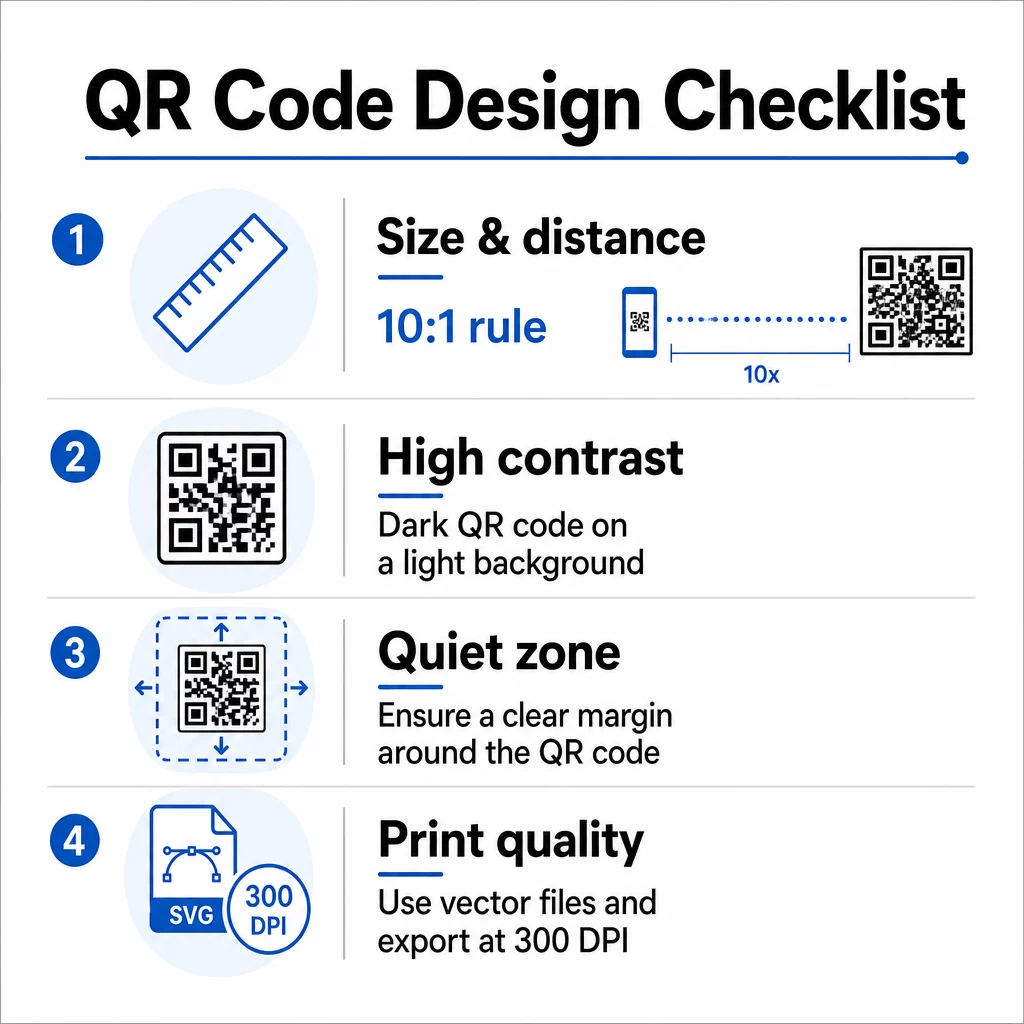
Sigue la regla 10:1: el ancho del código debe ser aproximadamente una décima parte de la distancia de escaneo esperada. Para un póster de investigación visto desde unos 50 cm (20 pulgadas) de distancia, el código debe tener al menos 5 cm (2 pulgadas) de ancho. Las de Pageloot pautas de tamaño para materiales impresos recomiendan un mínimo de 3 × 3 cm para pósteres, con 6 × 6 cm como objetivo ideal. Algunas guías universitarias sugieren un mínimo de alrededor de 5 × 5 pulgadas para códigos de póster que necesitan ser legibles desde una distancia de pie.
Para las diapositivas de presentación, el código debe ser lo suficientemente grande como para escanearlo desde un asiento. Pruébalo a la distancia de proyección real antes de la sesión.
Contraste y color
Los escáneres leen códigos QR detectando el contraste entre módulos oscuros y un fondo claro. Un contraste insuficiente es una de las principales causas de fallo de escaneo. Utiliza patrones de código oscuros sobre un fondo claro o blanco, y busca una relación de contraste de al menos 4.5:1. Evita esquemas invertidos (código claro sobre fondo oscuro), gradientes o fondos estampados detrás del código.
Si quieres usar colores de marca o institucionales, puedes hacerlo – siempre que la relación de contraste se mantenga lo suficientemente alta. Para más detalles sobre qué combinaciones de colores funcionan y cuáles fallan, consulta las de Pageloot mejores prácticas de contraste de color de códigos QR.
Zona tranquila
La zona tranquila es el margen claro que rodea el código. ISO/IEC 18004 especifica un mínimo de cuatro módulos de espacio vacío en los cuatro lados. No coloques texto, logotipos, bordes o texturas de fondo dentro de este margen. En un póster, esto significa dejar espacio blanco visible alrededor del código – trátalo como parte del diseño, no como espacio desperdiciado.
Formato de archivo y calidad de impresión
Exporte su código QR como un archivo vectorial (SVG o EPS) para impresión de gran formato. Los formatos ráster como PNG pueden pixelarse al ampliarse, lo que dificulta la distinción de los módulos individuales y reduce la capacidad de escaneo. Para resoluciones de impresión estándar, un mínimo de 300 DPI es el estándar práctico.
Obtenga archivos de código QR listos para imprimir Descargue su código en formato SVG, EPS o PDF para impresión de pósteres de alta resolución con el Generador de códigos QR.
Colocación en pósteres y diapositivas
El lugar donde coloque el código afecta si la gente realmente lo escanea. Las guías de fuentes de comunicación científica recomiendan colocar el código QR cerca del final de la ruta de lectura del póster –junto a las conclusiones o el mensaje principal– para que aparezca después de que el espectador ya esté involucrado con el contenido. Este es un momento lógico para ofrecer más: “¿Quiere el conjunto de datos completo? Escanee aquí.”
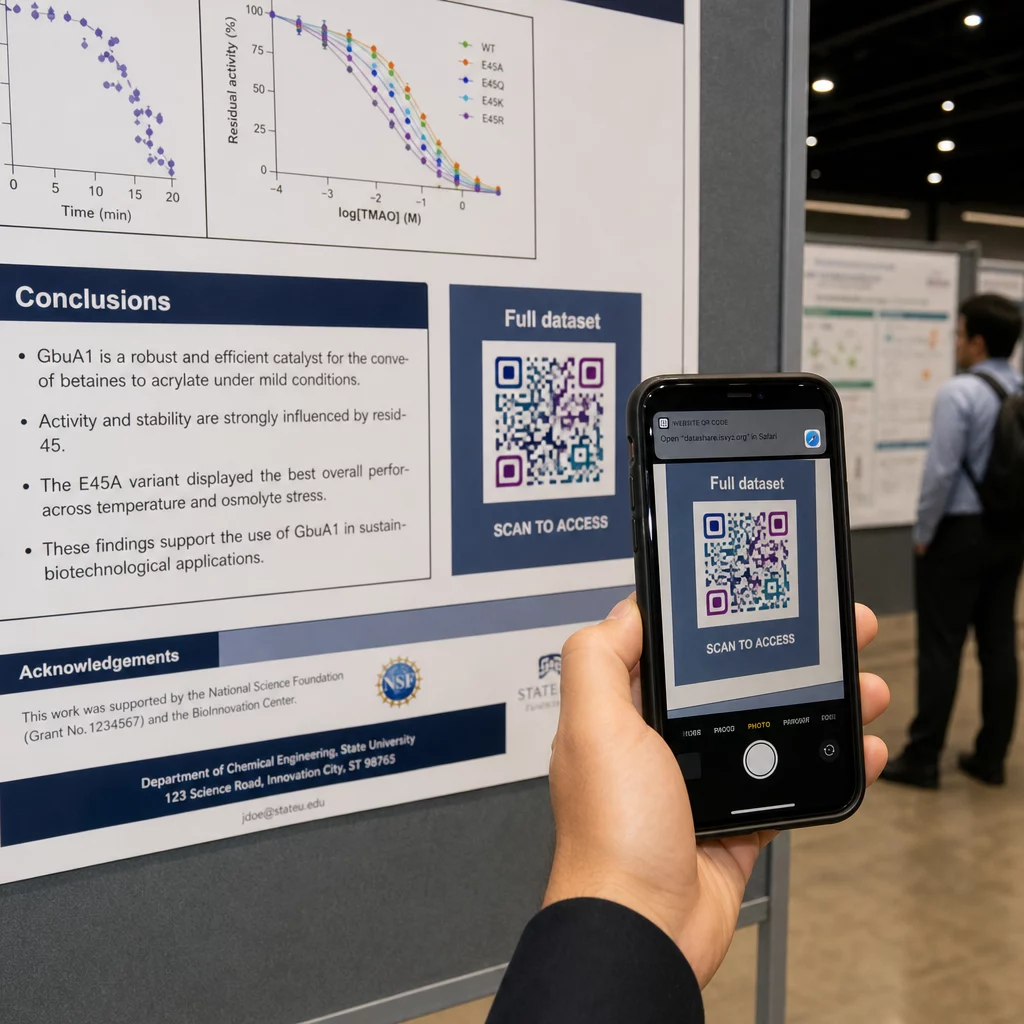
En un póster vertical, el área inferior derecha es un punto de descanso natural para la vista después de leer. En un diseño horizontal, el lado derecho funciona de manera similar. Para Códigos QR en carteles, la colocación a la altura de los ojos (aproximadamente de 3.5 a 5.5 pies del suelo) permite a los asistentes escanear cómodamente sin agacharse.
Siempre combine el código con una breve llamada a la acción que le diga a la gente lo que obtendrá:
- “Escanee para el artículo completo”
- “Acceda a datos suplementarios”
- “Guarde mis datos de contacto”
- “Descargue la presentación de diapositivas”
Sin una CTA, muchos asistentes ignorarán el código por completo – no saben si vale la pena escanearlo.
Para las diapositivas de presentación, muestre el código QR durante al menos 15-20 segundos y reconózcalo verbalmente. Colocarlo en la esquina inferior derecha de la diapositiva lo mantiene visible sin competir con su contenido principal. Los códigos dinámicos son especialmente útiles aquí: si el destino cambia entre charlas o fechas de conferencias, actualiza el enlace sin tocar el archivo de la diapositiva.
Para obtener orientación sobre la colocación en diferentes contextos, el de Pageloot Guía de ubicación de códigos QR cubre el posicionamiento a la altura de los ojos, las opciones de fondo y cómo hacer coincidir la colocación con la intención del usuario.
Pruebas antes de imprimir
Pruebe el código antes de enviar su póster a imprimir o finalizar sus diapositivas. Específicamente:
- Escanee desde la distancia real a la que estará de pie o sentado el público
- Pruebe en al menos dos dispositivos diferentes (iOS y Android)
- Pruebe en diferentes condiciones de iluminación, incluyendo las luces fluorescentes de techo comunes en las salas de conferencias
- Verifique que el destino vinculado se cargue correctamente, incluso con una conexión de datos móviles (no solo Wi-Fi)
- Compruebe que los PDF y otros archivos se abren en el móvil sin necesidad de una aplicación de escritorio
Si está utilizando un código dinámico, confirme que la redirección se resuelve correctamente después de cualquier actualización de destino. Para obtener una lista completa de criterios de diseño y prueba, consulte el de Pageloot las mejores prácticas de legibilidad de códigos QR.
Uso de códigos QR más allá del póster
Las conferencias científicas ofrecen múltiples puntos de contacto donde los códigos QR añaden valor práctico más allá del panel de pósteres.
Credenciales de conferencia con códigos QR de vCard permiten a cualquier asistente guardar sus datos de contacto durante las conversaciones en los pasillos, sin necesidad de intercambiar números de teléfono ni de que se pierda una tarjeta en una bolsa.
Materiales de sesión vinculados mediante código QR reemplazan montones de papel. Un solo código en un resumen impreso puede conectar a los asistentes a las actas completas, publicaciones relacionadas o un formulario de comentarios posterior a la sesión.
Registro y check-in los flujos se benefician de los códigos QR de asistencia que verifican la identidad y rastrean la participación, proporcionando a los organizadores recuentos de asistentes en tiempo real por sesión.
Materiales de networking puede usar un código QR de enlace para conectarse a un sitio web de laboratorio, perfil de Google Scholar o página de LinkedIn, lo que brinda a los colegas interesados múltiples formas de hacer un seguimiento después de que termine la conferencia.
La conferencia IASCON 2022 demostró cómo se ve esto a escala. Los organizadores colocaron códigos QR en el mostrador de registro, fuera de las salas de reuniones y en las diapositivas de presentación, reemplazando por completo los horarios y folletos en papel. Los asistentes podían acceder a los detalles de las sesiones, perfiles de oradores y descargas de presentaciones escaneando los códigos en cada ubicación. Un sistema de respuesta móvil activado por códigos QR permitió encuestas en vivo y preguntas y respuestas sin necesidad de descargar ninguna aplicación, logrando tasas de participación comparables a las de los formularios en papel tradicionales. Los análisis del evento revelaron una mayor participación durante las sesiones de la mañana y una caída medible después del almuerzo, datos que informaron directamente las futuras decisiones de programación.
Los códigos QR funcionan en conferencias de cualquier tamaño por la misma razón: eliminan la fricción entre un asistente curioso y la información que desea. Un código QR bien ubicado, de tamaño adecuado, de alto contraste y con una clara llamada a la acción hace algo que un póster impreso por sí solo no puede: mantiene la conversación después de que termina la sesión. Comience con códigos dinámicos para conservar la flexibilidad de actualizar destinos, rastrear quién interactúa con sus materiales y realizar cambios sin reimprimir. Para todo esto, el Generador de códigos QR de Pageloot proporciona las herramientas para crear, personalizar y administrar sus códigos desde un único panel.
Preguntas frecuentes
No. Los smartphones modernos tanto en iOS como en Android pueden escanear códigos QR directamente a través de la aplicación de cámara incorporada, sin necesidad de software adicional. Los asistentes simplemente abren su cámara, la apuntan al código y tocan la notificación para abrir el contenido vinculado en su navegador.
Un código QR estático codifica la URL de destino directamente en el patrón – una vez impreso, no se puede cambiar. Un código QR dinámico codifica una URL de redirección corta, por lo que puedes actualizar el destino en cualquier momento desde un panel de control sin reimprimir. Los códigos dinámicos también proporcionan análisis como el número de escaneos, tipos de dispositivos y marcas de tiempo, lo que los códigos estáticos no hacen. Para pósteres de conferencias y materiales impresos con antelación, se recomiendan encarecidamente los códigos dinámicos.
Siga la regla 10:1: el ancho del código debe ser aproximadamente una décima parte de la distancia de escaneo. Para un póster visto desde unos 50 cm (20 pulgadas) de distancia, eso significa un ancho mínimo de 5 cm (2 pulgadas). Un objetivo práctico para el uso en pósteres es de 6 × 6 cm, lo que proporciona un espacio de escaneo cómodo para la mayoría de los asistentes. Siempre pruebe el código impreso desde la distancia de visualización real antes de la conferencia.