Chcete zdieľať správu, súbor pokynov alebo kontaktné údaje s kýmkoľvek, kto má smartfón? Obyčajný text je často prehliadaný ako typ obsahu QR kódu, ale je to jeden z najpriamejších a najuniverzálnejších dostupných formátov. Tento sprievodca vás prevedie presne tým, ako vytvoriť textový QR kód, prispôsobiť ho a zabezpečiť, aby sa spoľahlivo skenoval zakaždým.
Čo je textový QR kód?
QR kód (Quick Response code) je dvojrozmerný čiarový kód, ktorý ukladá dáta vo vzore čiernych a bielych štvorcov. Keď naň namieri kamera smartfónu, vzor sa dekóduje a uložené informácie sa okamžite zobrazia – nie je potrebné žiadne manuálne zadávanie.
Textový QR kód funguje rovnako, s tým rozdielom, že namiesto presmerovania na webovú stránku zobrazuje zakódovaný text priamo na obrazovke používateľa. Keď ho niekto naskenuje, obsah sa okamžite zobrazí a môže si ho prečítať, skopírovať alebo s ním interagovať podľa potreby.
Vďaka tomu sú textové QR kódy užitočné pre širokú škálu situácií:
- Krátke správy alebo oznámenia
- Podrobné pokyny na obaloch alebo značení
- Kontaktné údaje alebo poznámky
- Emodži, URL adresy alebo akýkoľvek iný textový obsah
Na rozdiel od QR kódu URL, textový QR kód nevyžaduje, aby príjemca mal internetové pripojenie na prečítanie obsahu – informácie sú vložené priamo v samotnom kóde.
Ako vytvoriť QR kód z textu
Vytvorenie textového QR kódu trvá menej ako minútu. Tu je postup pomocou Pageloot Text QR Code Generator:
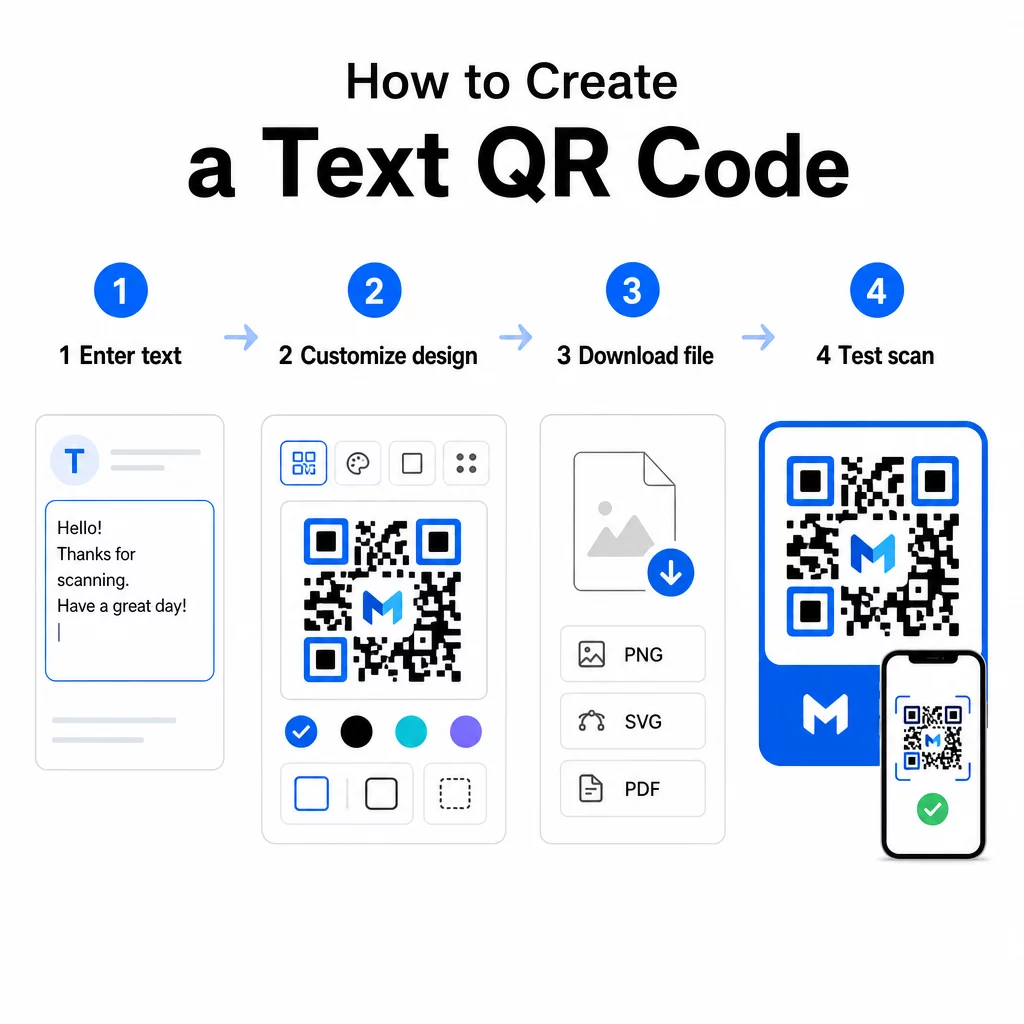
- Zadajte text – Napíšte alebo vložte správu, pokyny alebo podrobnosti, ktoré chcete zakódovať. Môže to byť čokoľvek od krátkej poznámky po kontaktné informácie.
- Prispôsobte vzhľad – Upravte farby, pridajte svoje logo, zmeňte tvar alebo pridajte rám s výzvou na akciu, aby zodpovedal vašej značke. Nasledujúce osvedčené postupy pre farebný kontrast QR kódov v tejto fáze pomáha zabezpečiť, aby váš kód zostal skenovateľný.
- Uložiť a prevziať – Kliknite na “Uložiť” pre vygenerovanie kódu. Môžete si ho stiahnuť ako obrázkový súbor PNG alebo JPG pre použitie v digitálnych alebo tlačených materiáloch.
- Otestujte pred publikovaním – Naskenujte kód pomocou Čítačka QR kódov alebo fotoaparátu vášho smartfónu, aby ste potvrdili, že zobrazuje správny obsah, predtým ako ho distribuujete.
Vytvorte si svoj textový QR kód zadarmo Pripravení premeniť akúkoľvek správu na okamžite skenovateľný kód? Použite QR kód text: generátor textového QR kódu na vytvorenie, prispôsobenie a stiahnutie vášho kódu v priebehu niekoľkých minút.
Prispôsobenie vášho textového QR kódu
Jednoduchý čiernobiely kód funguje, ale značkový, dobre navrhnutý QR kód získa viac skenov. Tu sú kľúčové možnosti prispôsobenia, ktoré stojí za zváženie:
- Farby – Použite farby vašej značky, ale vždy udržujte tmavé popredie na svetlom pozadí. Nízky kontrast je najčastejším dôvodom, prečo sa QR kód nedá spoľahlivo naskenovať.
- Logo – Pridanie vášho loga buduje dôveru a posilňuje rozpoznateľnosť značky. Ak pridáte prekrytie loga, použite vyššiu úroveň korekcie chýb (Q alebo H), aby skener mohol kód stále prečítať, aj keď je jeho časť zakrytá.
- Rám s výzvou k akcii – Krátka výzva ako “Naskenujte pre detaily” alebo “Prečítajte si pokyny tu” ľuďom presne povie, čo majú očakávať, a povzbudí ich k skenovaniu.
- Tvar – QR kódy nemusia byť dokonale štvorcové. Vlastné tvary bodiek a štýly okrajov môžu spôsobiť, že kód bude pôsobiť viac ako súčasť vášho dizajnu bez kompromisov vo funkčnosti.
Pre hlbší pohľad na to, čo ovplyvňuje spoľahlivosť skenovania, sprievodca osvedčenými postupmi čitateľnosti QR kódov pokrýva veľkosť, kontrast, tiché zóny a umiestnenie podrobne.
Stiahnutie a používanie vášho QR kódu
Keď ste spokojní s dizajnom a otestovali ste ho, stiahnite si súbor vo formáte, ktorý vyhovuje vášmu prípadu použitia:
- PNG alebo JPG – Najlepšie pre digitálne použitie: webové stránky, e-maily, sociálne médiá a prezentácie.
- SVG, EPS alebo PDF – Vektorové formáty, ktoré sa škálujú bez straty kvality, ideálne pre tlačové materiály ako letáky, plagáty a obaly produktov.
Ten Generátor QR kódu PNG je dobrou voľbou, ak potrebujete priehľadné pozadie na umiestnenie kódu cez obrázky alebo textúrované vzory bez bieleho rámčeka okolo neho.
Pre umiestnenie zvoľte rovný, hladký povrch s vysokou viditeľnosťou. Vyhnite sa zakriveným povrchom, vysoko reflexným úpravám alebo preplneným pozadiam, pretože tie môžu rušiť skenovanie. Minimálna veľkosť približne 2 × 2 cm (približne 0,8 × 0,8 palca) sa odporúča pre skenovanie zblízka a kód by sa mal proporcionálne zväčšovať, čím ďalej sa pravdepodobne nachádza vaše publikum.
Statické vs. Dynamické textové QR kódy
Keď vytvoríte textový QR kód, máte dve štrukturálne možnosti:
| FUNKCIA | Statický kód QR | Dynamický QR kód |
|---|---|---|
| Obsah editovateľný po vytvorení | Nie | Áno |
| Sledovanie a analýza skenovania | Nie | Áno |
| Kratšia zakódovaná URL (čistejší vzor) | Nie | Áno |
| Funguje bez internetu | Áno | Vyžaduje presmerovanie |
A statický QR kód kóduje text priamo a natrvalo. Funguje offline, ale ak potrebujete správu neskôr zmeniť, musíte vytvoriť a znova distribuovať nový kód.
A dynamický QR kód kóduje krátku presmerovaciu URL namiesto samotného textu. To udržuje vzor kódu jednoduchší a ľahšie skenovateľný a umožňuje vám kedykoľvek aktualizovať cieľový obsah bez opätovnej tlače. Poskytuje vám tiež prístup k analytike skenovania – sledovaniu metrík ako počet skenov, poloha, typ zariadenia a čas skenovania.
Pre jednorazové použitie, ako je leták alebo štítok produktu s pevnými pokynmi, je statický kód úplne postačujúci. Pre prebiehajúce kampane alebo čokoľvek, čo môže vyžadovať aktualizáciu, je dynamický kód flexibilnejšou voľbou. Dynamické možnosti môžete preskúmať prostredníctvom Generátor QR kódov Pageloot.
Praktické využitie textových QR kódov
Textové QR kódy sa prirodzene hodia do mnohých reálnych scenárov:
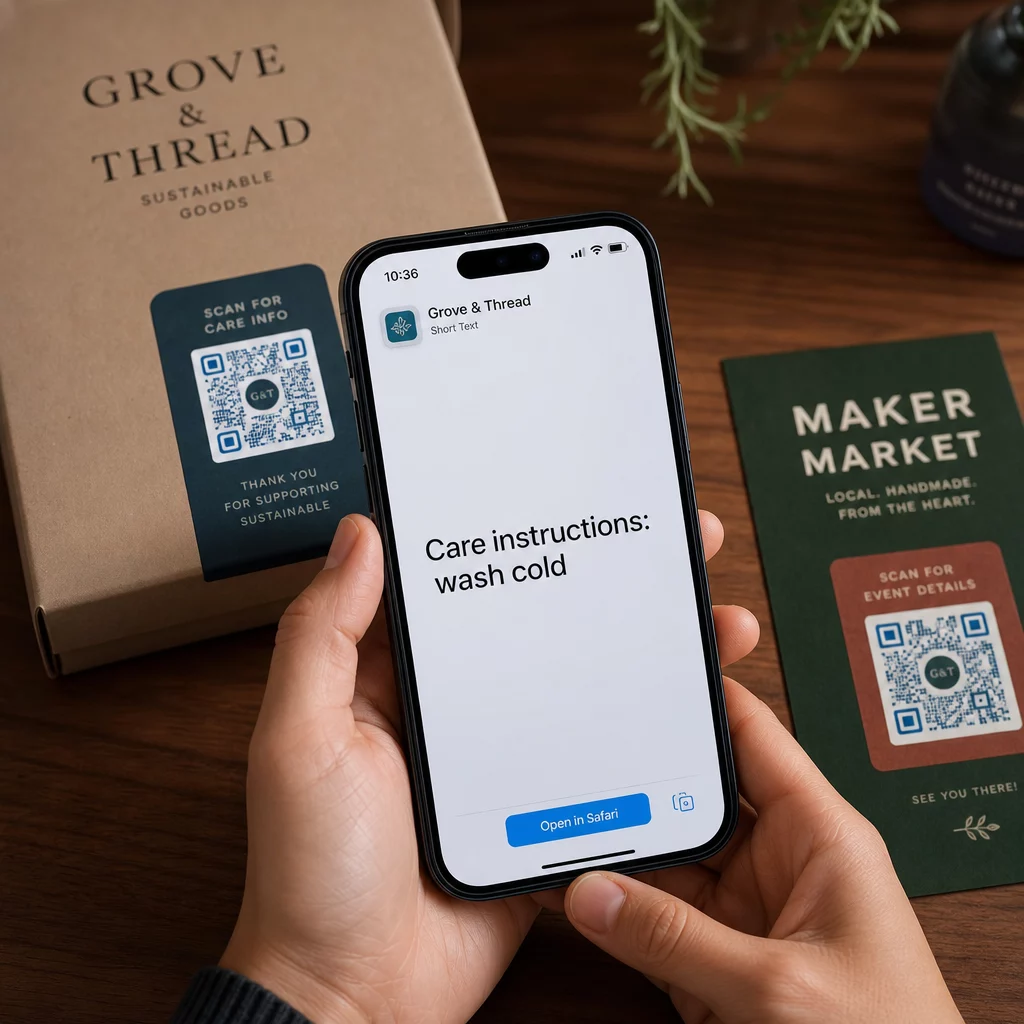
- Obal produktu – Zakódujte pokyny na údržbu, montážne kroky alebo bezpečnostné informácie, aby zákazníci mali prístup k detailom jediným skenom namiesto hľadania samostatného letáku.
- Označenie udalostí – Zdieľajte heslá k WiFi, programy udalostí alebo pravidlá miesta konania bez toho, aby ste ich tlačili v plnom rozsahu na každom označení.
- Vizitky – Zahrňte krátku osobnú správu alebo slogan, ktorý sa zobrazí, keď niekto naskenuje kartu.
- Maloobchod a pohostinstvo – Zakódujte krátke propagačné správy, zľavové kódy alebo uvítacie poznámky pre hostí.
- Okamžité správy – Textové QR kódy je možné kombinovať aj s pracovnými postupmi správ. Sprievodca QR kódmi pre okamžité správy vysvetľuje, ako nastaviť kódy, ktoré otvoria predvyplnenú správu v aplikáciách WhatsApp, Facebook Messenger alebo SMS.
Pred distribúciou: Kontrolný zoznam testovania
Problémy so skenovaním je oveľa jednoduchšie zachytiť predtým, ako sa kód vytlačí, než potom. Pred distribúciou akéhokoľvek QR kódu vykonajte tieto kontroly:
- Skenujte aspoň dvoma rôznymi zariadeniami (iOS a Android)
- Testujte v skutočných svetelných podmienkach, kde sa kód zobrazí
- Potvrďte, že zobrazený text je presný a úplný
- Skontrolujte, či je tichá zóna (čistý okraj okolo kódu) bez prekážok
- Pre tlač potvrďte, že kód je dostatočne veľký vzhľadom na očakávanú vzdialenosť skenovania
Ten Sprievodca osvedčenými postupmi použiteľnosti QR kódu obsahuje úplný rozpis požiadaviek normy ISO/IEC 18004, ak chcete zabezpečiť, aby váš kód spĺňal kritériá technickej zhody.
Textový QR kód je jedným z najrýchlejších spôsobov zdieľania informácií bez potreby internetového pripojenia alebo zadanej URL adresy. Správne zvládnutie základov – jasný kontrast, vhodná veľkosť, otestovaný dizajn – znamená, že ľudia, ktorých sa snažíte osloviť, môžu k vášmu obsahu pristupovať okamžite a bez prekážok.
Vytvorte a otestujte svoj QR kód Použi Generátor QR kódov zadarmo na vytvorenie, prispôsobenie a stiahnutie textového QR kódu v priebehu niekoľkých minút. Na začiatok nie je potrebná žiadna kreditná karta.
Často kladené otázky
Áno. Väčšina moderných smartfónov s operačným systémom iOS 11 alebo novším a novšími verziami Androidu dokáže skenovať QR kódy priamo prostredníctvom vstavanej aplikácie fotoaparátu bez sťahovania čohokoľvek navyše. Pre staršie zariadenia alebo na overenie obsahu pred zdieľaním môžete tiež použiť online nástroj, ako je Pageloot QR Code Scanner.
Štandardný QR kód dokáže zakódovať až 4 296 alfanumerických znakov pri najnižšej úrovni korekcie chýb. V praxi kratší text vytvára jednoduchší, menej hustý kód, ktorý sa skenuje rýchlejšie a spoľahlivejšie naprieč širšou škálou zariadení a svetelných podmienok. Ak je vaša správa dlhá, zvážte, či by URL odkazujúca na webovú stránku nefungovala lepšie.
Nie so statickým QR kódom – text je trvalo zakódovaný vo vzore. Ak potrebujete neskôr zmeniť obsah, museli by ste vytvoriť nový kód. Dynamický QR kód to rieši: kóduje krátku presmerovaciu URL adresu, ktorú môžete kedykoľvek aktualizovať, takže vytlačený kód zostáva rovnaký, aj keď sa obsah mení.