Kas soovite jagada sõnumit, juhiseid või kontaktandmeid kellegagi, kellel on nutitelefon? Lihtteksti jäetakse sageli QR-koodi sisutüübina tähelepanuta, kuid see on üks otsesemaid ja mitmekülgsemaid saadaolevaid vorminguid. See juhend selgitab teile täpselt, kuidas luua tekst-QR-koodi, seda kohandada ja tagada, et see skaneerib iga kord usaldusväärselt.
Mis on tekst-QR-kood?
QR-kood (Quick Response code) on kahemõõtmeline vöötkood, mis salvestab andmeid mustade ja valgete ruutude mustrisse. Kui nutitelefoni kaamera sellele suunatakse, dekodeeritakse muster ja salvestatud teave kuvatakse koheselt – käsitsi sisestamist pole vaja.
Tekst-QR-kood töötab samamoodi, välja arvatud see, et veebisaidile suunamise asemel kuvab see kodeeritud teksti otse kasutaja ekraanil. Kui keegi selle skaneerib, ilmub sisu kohe ja nad saavad seda lugeda, kopeerida või sellega vastavalt vajadusele suhelda.
See muudab tekst-QR-koodid kasulikuks paljudes olukordades:
- Lühisõnumid või teated
- Samm-sammult juhised pakendil või siltidel
- Kontaktandmed või märkmed
- Emotikonid, URL-id või muu tekstipõhine sisu
Erinevalt URL-QR-koodist ei vaja tekst-QR-kood vastuvõtjalt sisu lugemiseks internetiühendust – teave on otse koodi endasse manustatud.
Kuidas luua tekstist QR-koodi
Tekst-QR-koodi loomine võtab vähem kui minuti. Siin on protsess, kasutades Pagelooti tekst-QR-koodi generaatorit:
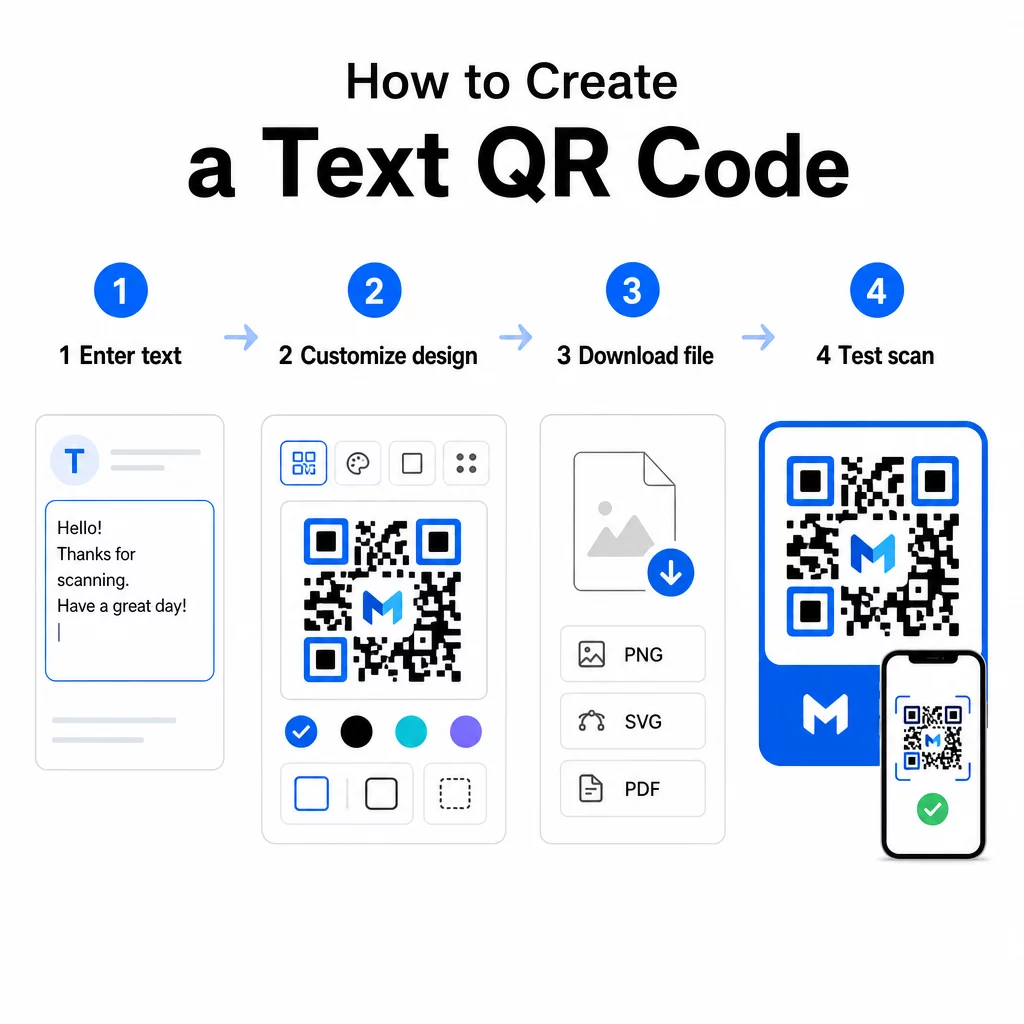
- Sisestage oma tekst – Tippige või kleepige sõnum, juhised või üksikasjad, mida soovite kodeerida. See võib olla mis tahes lühikesest märkest kontaktandmeteni.
- Kohandage välimust – Reguleerige värve, lisage oma logo, muutke kuju või lisage brändile vastav üleskutse raam. Järgmine QR-koodi värvikontrasti parimaid tavasid selles etapis aitab tagada, et teie kood jääb skaneeritavaks.
- Salvesta ja lae alla – Klõpsake “Salvesta”, et kood genereerida. Saate selle alla laadida PNG- või JPG-pildifailina digitaalsetes või trükimaterjalides kasutamiseks.
- Testi enne avaldamist – Skaneerige koodi QR-koodi lugeja või oma nutitelefoni kaameraga, et veenduda, et see kuvab õiget sisu enne selle levitamist.
Loo oma tekstiline QR-kood tasuta Kas olete valmis muutma mis tahes sõnumi koheselt skaneeritavaks koodiks? Kasutage Teksti QR koodi loomine oma koodi loomiseks, kohandamiseks ja allalaadimiseks minutitega.
Tekstilise QR-koodi kohandamine
Lihtne mustvalge kood töötab, kuid bränditud, hästi kujundatud QR-kood saab rohkem skaneeringuid. Siin on peamised kohandamisvõimalused, mida tasub kaaluda:
- Värvid – Kasutage oma brändi värve, kuid hoidke alati tume esiplaan heledal taustal. Madal kontrast on kõige tavalisem põhjus, miks QR-kood ei skaneeri usaldusväärselt.
- Logo – Logo lisamine loob usaldust ja tugevdab brändituvastust. Kui lisate logo ülekatte, kasutage kõrgemat veaparandustaset (Q või H), et skanner saaks koodi lugeda isegi siis, kui osa sellest on varjatud.
- Raam koos üleskutsega tegevusele – Lühike vihje nagu “Skaneeri detailide saamiseks” või “Loe juhiseid siit” ütleb inimestele täpselt, mida oodata, ja julgustab neid skaneerima.
- Kuju – QR-koodid ei pea olema täiesti ruudukujulised. Kohandatud punktikujud ja servastiilid võivad muuta koodi rohkem teie disaini osaks, ilma et see kahjustaks funktsionaalsust.
Põhjalikumaks ülevaateks sellest, mis mõjutab skaneerimise usaldusväärsust, QR-koodi loetavuse parimate tavade juhend käsitletakse üksikasjalikult suurust, kontrasti, vaikseid tsoone ja paigutust.
QR-koodi allalaadimine ja kasutamine
Kui olete disainiga rahul ja olete seda testinud, laadige fail alla vormingus, mis sobib teie kasutusjuhuga:
- PNG või JPG – Parim digitaalseks kasutamiseks: veebilehed, e-kirjad, sotsiaalmeedia ja esitlused.
- SVG, EPS või PDF – Vektorvormingud, mis skaleeruvad kvaliteeti kaotamata, ideaalsed trükimaterjalide jaoks, nagu flaierid, plakatid ja toote pakendid.
See QR-koodi PNG generaator on hea valik, kui vajate läbipaistvat tausta koodi paigutamiseks piltidele või tekstuuriga kujundustele ilma valge kastita selle ümber.
Paigutamiseks valige tasane, sile ja hästi nähtav pind. Vältige kumeraid pindu, tugevalt peegeldavaid viimistlusi või segaseid taustu, kuna need võivad skaneerimist häirida. Lähiskaneerimiseks on soovitatav minimaalne suurus umbes 2 × 2 cm (ligikaudu 0,8 × 0,8 tolli) ja kood peaks muutuma proportsionaalselt suuremaks, mida kaugemal teie sihtrühm tõenäoliselt asub.
Staatilised vs. dünaamilised teksti QR-koodid
Teksti QR-koodi loomisel on teil kaks struktuurilist valikut:
| FUNKTSIOON | Staatiline QR-kood | Dünaamiline QR-kood |
|---|---|---|
| Sisu muudetav pärast loomist | Ei | Jah |
| Skannide jälgimine ja analüüs | Ei | Jah |
| Lühem kodeeritud URL (puhtam muster) | Ei | Jah |
| Töötab ilma internetita | Jah | Nõuab ümbersuunamist |
A staatiline QR-kood kodeerib teksti otse ja püsivalt. See töötab võrguühenduseta, kuid kui teil on vaja sõnumit hiljem muuta, peate looma ja uuesti levitama uue koodi.
A dünaamiline QR-kood kodeerib lühikese ümbersuunamise URL-i teksti enda asemel. See hoiab koodimustri lihtsamana ja hõlpsamini skaneeritavana ning võimaldab teil sihtsisu igal ajal värskendada ilma uuesti printimata. See annab teile ka juurdepääsu skaneerimisanalüütikale – jälgides mõõdikuid nagu skaneerimiste arv, asukoht, seadme tüüp ja skaneerimise aeg.
Ühekordseks kasutamiseks, näiteks jaotusmaterjali või fikseeritud juhistega tootesildi puhul, on staatiline kood täiesti piisav. Käimasolevate kampaaniate või millegi puhul, mis võib vajada värskendamist, on dünaamiline kood paindlikum valik. Dünaamilisi valikuid saate uurida läbi Pageloot QR-koodi generaator.
Teksti QR-koodide praktilised kasutusviisid
Teksti QR-koodid sobivad loomulikult paljudesse reaalse maailma stsenaariumidesse:
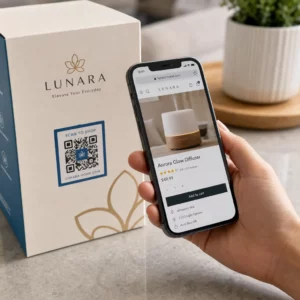
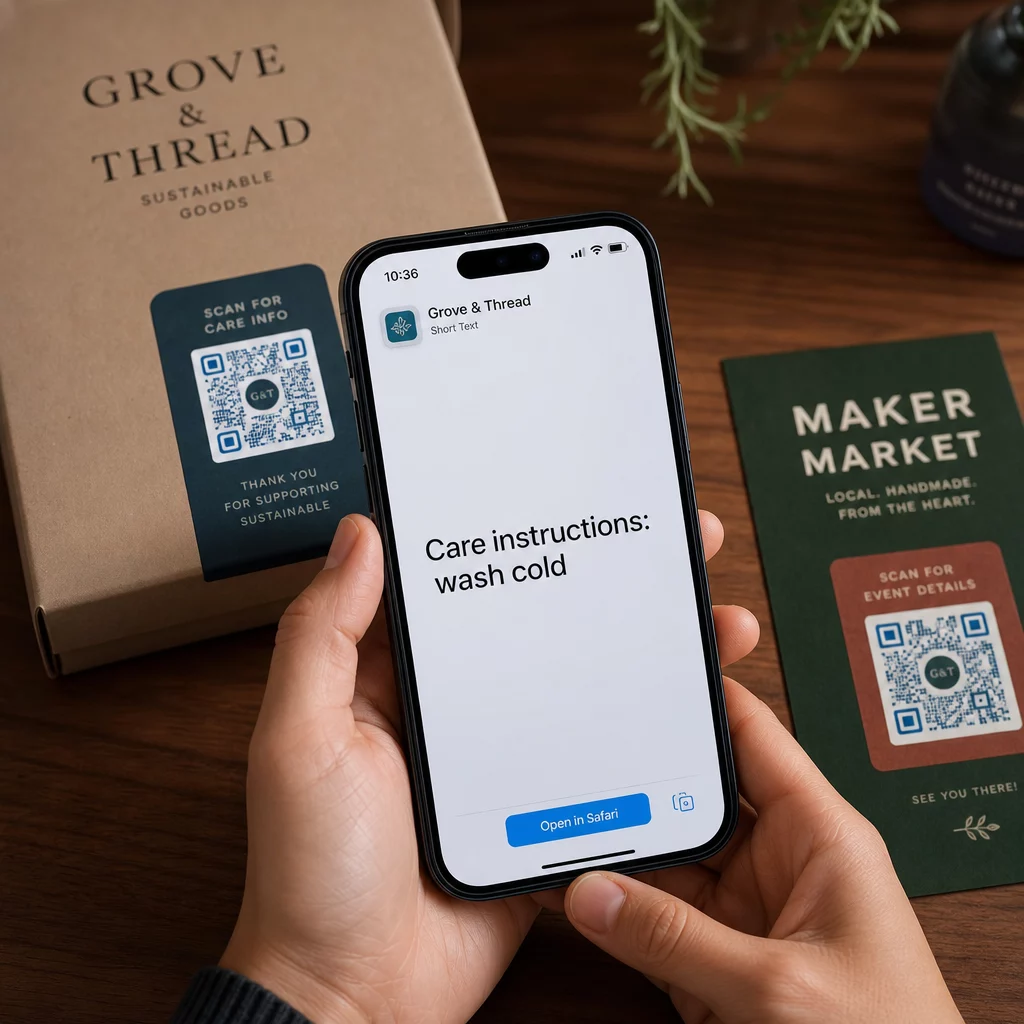
- Tootepakend – Kodeerige hooldusjuhised, kokkupanekuetapid või ohutusteave, et kliendid saaksid üksikasjadele juurde pääseda ühe skaneerimisega, selle asemel et otsida eraldi lisalehte.
- Ürituse sildid – Jagage WiFi paroole, ürituste ajakavasid või toimumiskoha reegleid, ilma et peaksite neid igale sildile täielikult printima.
- Visiitkaardid – Lisage lühike isiklik sõnum või tunnuslause, mis ilmub, kui keegi kaardi skaneerib.
- Jaekaubandus ja hotellindus – Kodeerige lühikesi reklaamsõnumeid, sooduskoode või tervitussõnumeid külalistele.
- Kiirsõnumid – Teksti QR-koode saab kombineerida ka sõnumivahetuse töövoogudega. The kiirsõnumite QR-koodi juhend selgitab, kuidas seadistada koode, mis avavad eeltäidetud sõnumi WhatsAppis, Facebook Messengeris või SMS-is.
Enne levitamist: testimise kontrollnimekiri
Skannimisprobleeme on palju lihtsam avastada enne koodi trükkimist kui pärast. Enne QR-koodi levitamist tehke läbi järgmised kontrollid:
- Skannige vähemalt kahe erineva seadmega (iOS ja Android)
- Testige tegelikes valgustingimustes, kus koodi kuvatakse
- Veenduge, et kuvatav tekst on täpne ja täielik
- Kontrollige, et vaikne tsoon (selge äär koodi ümber) oleks takistusteta
- Trükkimiseks veenduge, et kood on piisavalt suur võrreldes eeldatava skannimiskaugusega
See QR-koodi kasutatavuse parimate tavade juhend sisaldab ISO/IEC 18004 standardi nõuete täielikku ülevaadet, kui soovite tagada, et teie kood vastab tehnilistele vastavuskriteeriumidele.
Tekst-QR-kood on üks kiiremaid viise teabe jagamiseks, ilma et oleks vaja internetiühendust või sisestatud URL-i. Põhialuste õigesti tegemine – selge kontrast, sobiv suurus, testitud disain – tähendab, et inimesed, keda proovite tabada, saavad teie sisule koheselt ja takistusteta ligi.
Looge ja testige oma QR-koodi Kasuta QR koodi loomine tasuta tekst-QR-koodi loomiseks, kohandamiseks ja allalaadimiseks minutitega. Alustamiseks pole krediitkaarti vaja.
Korduma kippuvad küsimused
Jah. Enamik kaasaegseid nutitelefone, mis kasutavad iOS 11 või uuemat versiooni ja hiljutisi Androidi versioone, saavad skannida QR-koode otse sisseehitatud kaamerarakenduse kaudu, ilma midagi lisaks alla laadimata. Vanemate seadmete puhul või sisu kontrollimiseks enne jagamist, saate kasutada ka veebipõhist tööriista, nagu Pageloot QR-koodi skanner.
Standardne QR-kood suudab kodeerida kuni 4296 tähtnumbrilist märki madalaimal veaparandustasemel. Praktikas loob lühem tekst lihtsama, vähem tiheda koodi, mis skaneerib kiiremini ja usaldusväärsemalt laiemas seadmete ja valgustingimuste valikus. Kui teie sõnum on pikk, kaaluge, kas veebilehele viitav URL võiks paremini toimida.
Mitte staatilise QR-koodiga – tekst on mustrisse püsivalt kodeeritud. Kui teil on vaja sisu hiljem muuta, peaksite looma uue koodi. Dünaamiline QR-kood lahendab selle: see kodeerib lühikese ümbersuunamise URL-i, mida saate igal ajal värskendada, nii et prinditud kood jääb samaks isegi sisu muutumisel.