Chcesz udostępnić wiadomość, zestaw instrukcji lub dane kontaktowe każdemu, kto ma smartfon? Zwykły tekst jest często pomijany jako typ zawartości kodu QR, ale jest to jeden z najbardziej bezpośrednich i wszechstronnych dostępnych formatów. Ten przewodnik przeprowadzi Cię przez dokładny proces tworzenia tekstowego kodu QR, jego dostosowywania i upewnienia się, że skanuje się niezawodnie za każdym razem.
Co to jest tekstowy kod QR?
Kod QR (Quick Response code) to dwuwymiarowy kod kreskowy, który przechowuje dane w wzorze czarno-białych kwadratów. Kiedy aparat smartfona jest na niego skierowany, wzór jest dekodowany, a przechowywane informacje są natychmiast wyświetlane – bez konieczności ręcznego wpisywania.
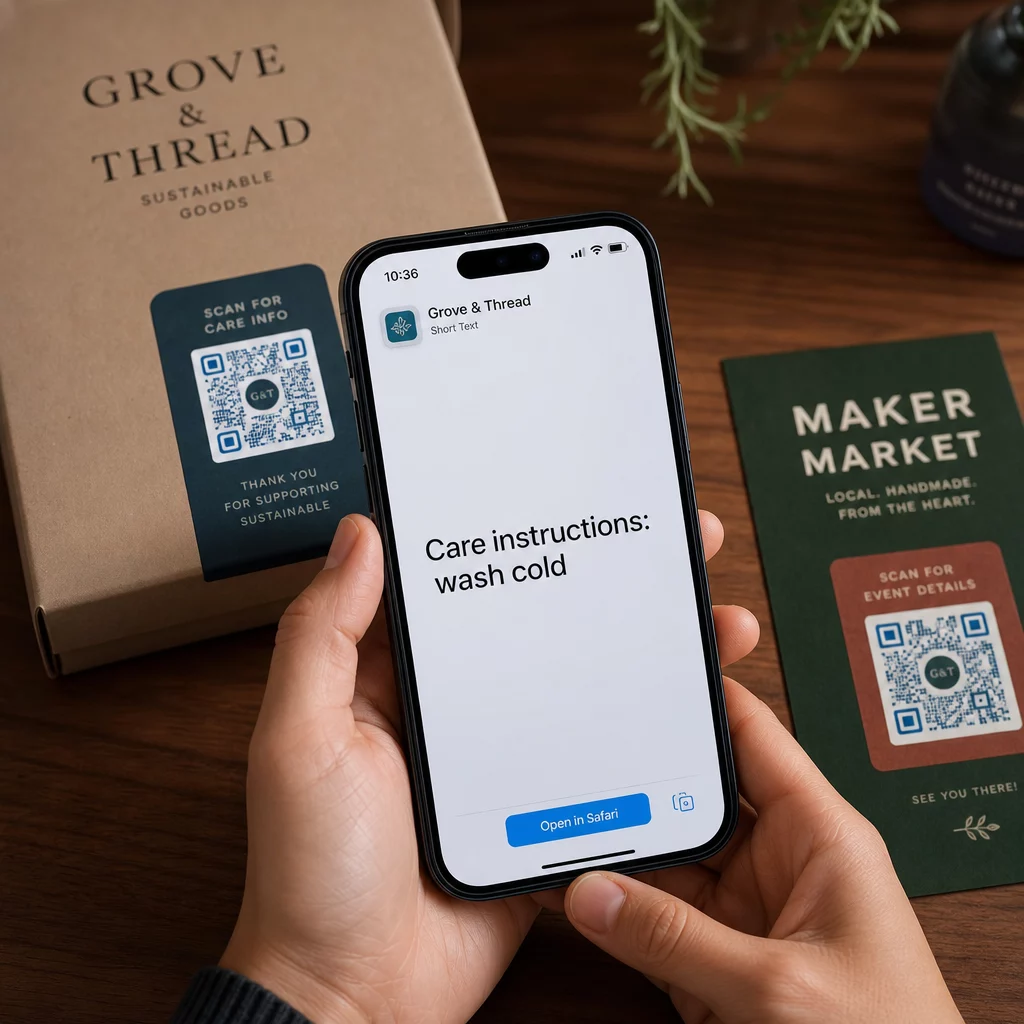
Tekstowy kod QR działa w ten sam sposób, z tą różnicą, że zamiast przekierowywać do strony internetowej, wyświetla zakodowany tekst bezpośrednio na ekranie użytkownika. Kiedy ktoś go zeskanuje, zawartość pojawia się od razu i można ją czytać, kopiować lub wchodzić z nią w interakcje w zależności od potrzeb.
To sprawia, że tekstowe kody QR są przydatne w wielu sytuacjach:
- Krótkie wiadomości lub ogłoszenia
- Instrukcje krok po kroku na opakowaniach lub oznakowaniach
- Dane kontaktowe lub notatki
- Emoji, adresy URL lub dowolna inna zawartość tekstowa
W przeciwieństwie do kodu QR z adresem URL, tekstowy kod QR nie wymaga od odbiorcy połączenia z internetem, aby odczytać zawartość – informacja jest osadzona bezpośrednio w samym kodzie.
Jak stworzyć kod QR z tekstu
Tworzenie tekstowego kodu QR zajmuje mniej niż minutę. Oto proces z wykorzystaniem Generatora tekstowych kodów QR Pageloot:
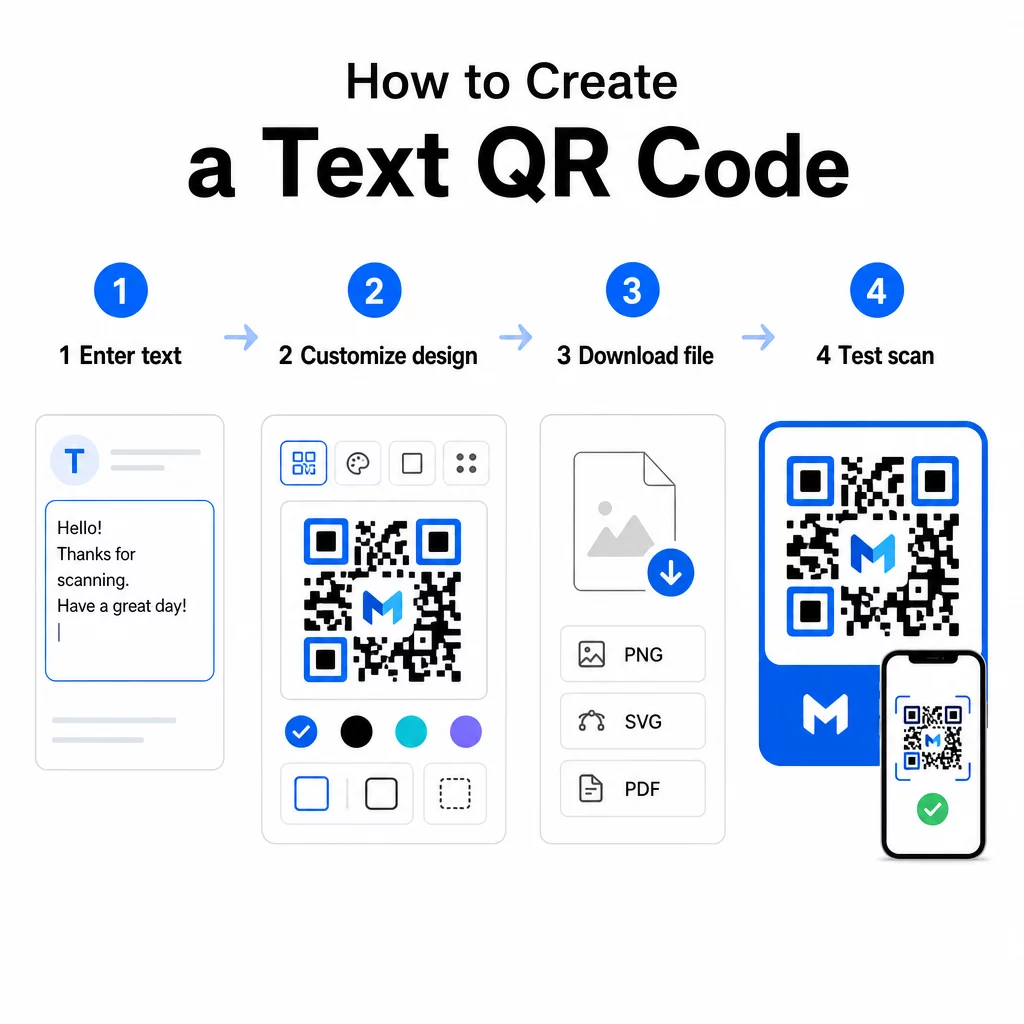
- Wpisz swój tekst – Wpisz lub wklej wiadomość, instrukcje lub szczegóły, które chcesz zakodować. Może to być wszystko, od krótkiej notatki po informacje kontaktowe.
- Dostosuj wygląd – Dostosuj kolory, dodaj swoje logo, zmień kształt lub dodaj ramkę z wezwaniem do działania, aby dopasować ją do swojej marki. Następnie najlepszymi praktykami kontrastu kolorów kodów QR na tym etapie pomaga zapewnić, że Twój kod pozostaje skanowalny.
- Zapisz i pobierz – Kliknij “Zapisz”, aby wygenerować kod. Możesz pobrać go jako plik obrazu PNG lub JPG do wykorzystania w materiałach cyfrowych lub drukowanych.
- Przetestuj przed publikacją – Zeskanuj kod za pomocą Skaner kodów QR online lub aparatu w smartfonie, aby potwierdzić, że wyświetla poprawną treść przed jego rozpowszechnieniem.
Stwórz swój tekstowy kod QR za darmo Gotowy, aby zamienić dowolną wiadomość w natychmiast skanowalny kod? Użyj Generator kodów QR z tekstu aby zbudować, dostosować i pobrać swój kod w kilka minut.
Dostosowywanie tekstowego kodu QR
Zwykły czarno-biały kod działa, ale markowy, dobrze zaprojektowany kod QR uzyskuje więcej skanów. Oto kluczowe opcje dostosowywania, które warto rozważyć:
- Kolory – Użyj kolorów swojej marki, ale zawsze zachowaj ciemny pierwszy plan na jasnym tle. Niski kontrast jest najczęstszą przyczyną, dla której kod QR nie skanuje się niezawodnie.
- Logo – Dodanie logo buduje zaufanie i wzmacnia rozpoznawalność marki. Jeśli dodasz nakładkę z logo, użyj wyższego poziomu korekcji błędów (Q lub H), aby skaner mógł nadal odczytać kod, nawet jeśli jego część jest zasłonięta.
- Ramka z wezwaniem do działania – Krótka zachęta, taka jak “Skanuj, aby uzyskać szczegóły” lub “Przeczytaj instrukcje tutaj”, mówi ludziom dokładnie, czego się spodziewać i zachęca ich do skanowania.
- Kształt – Kody QR nie muszą być idealnie kwadratowe. Niestandardowe kształty kropek i style krawędzi mogą sprawić, że kod będzie bardziej pasował do Twojego projektu, nie wpływając negatywnie na jego funkcjonalność.
Aby uzyskać głębsze spojrzenie na to, co wpływa na niezawodność skanowania, przewodnik po najlepszych praktykach czytelności kodów QR obejmuje szczegółowo rozmiar, kontrast, strefy ciszy i umiejscowienie.
Pobieranie i używanie kodu QR
Gdy będziesz zadowolony z projektu i przetestujesz go, pobierz plik w formacie, który pasuje do Twojego przypadku użycia:
- PNG lub JPG – Najlepsze do użytku cyfrowego: strony internetowe, e-maile, media społecznościowe i prezentacje.
- SVG, EPS lub PDF – Formaty wektorowe, które skalują się bez utraty jakości, idealne do materiałów drukowanych, takich jak ulotki, plakaty i opakowania produktów.
Plik Generator kodów QR PNG jest dobrą opcją, jeśli potrzebujesz przezroczystego tła do umieszczenia kodu na obrazach lub teksturowanych projektach bez białego obramowania.
Do umieszczenia wybierz płaską, gładką powierzchnię o wysokiej widoczności. Unikaj zakrzywionych powierzchni, wysoce odblaskowych wykończeń lub zagraconych teł, ponieważ mogą one zakłócać skanowanie. Zalecana minimalna wielkość to około 2 × 2 cm (około 0,8 × 0,8 cala) do skanowania z bliskiej odległości, a kod powinien być proporcjonalnie większy im dalej prawdopodobnie będzie znajdować się Twoja publiczność.
Statyczne vs. Dynamiczne kody QR tekstowe
Tworząc tekstowy kod QR, masz dwie opcje strukturalne:
| FUNKCJA | Statyczny kod QR | Dynamiczny kod QR |
|---|---|---|
| Treść edytowalna po utworzeniu | Nie | Tak |
| Śledzenie skanowania i analityka | Nie | Tak |
| Krótszy zakodowany URL (czystszy wzór) | Nie | Tak |
| Działa bez internetu | Tak | Wymaga przekierowania |
A statyczny kod QR koduje tekst bezpośrednio i na stałe. Działa offline, ale jeśli później zajdzie potrzeba zmiany wiadomości, należy utworzyć i ponownie rozpowszechnić nowy kod.
A dynamiczny kod QR koduje krótki adres URL przekierowania zamiast samego tekstu. Dzięki temu wzór kodu jest prostszy i łatwiejszy do zeskanowania, a także umożliwia aktualizację treści docelowej w dowolnym momencie bez ponownego drukowania. Daje również dostęp do analityki skanowania – śledzenia metryk, takich jak liczba skanów, lokalizacja, typ urządzenia i czas skanowania.
Do jednorazowych zastosowań, takich jak ulotka lub etykieta produktu ze stałymi instrukcjami, kod statyczny jest całkowicie wystarczający. W przypadku trwających kampanii lub czegokolwiek, co może wymagać aktualizacji, kod dynamiczny jest bardziej elastycznym wyborem. Możesz zapoznać się z opcjami dynamicznymi poprzez Pageloot Generator kodów QR.
Praktyczne zastosowania kodów QR tekstowych
Kody QR tekstowe naturalnie pasują do wielu rzeczywistych scenariuszy:
- Opakowania produktów – Zakoduj instrukcje pielęgnacji, kroki montażu lub informacje dotyczące bezpieczeństwa, aby klienci mogli uzyskać dostęp do szczegółów za pomocą jednego skanowania, zamiast szukać oddzielnej wkładki.
- Oznakowanie wydarzeń – Udostępniaj hasła WiFi, harmonogramy wydarzeń lub zasady miejsca bez drukowania ich w całości na każdym znaku.
- Wizytówki – Dołącz krótką osobistą wiadomość lub slogan, który pojawi się po zeskanowaniu karty.
- Handel detaliczny i hotelarstwo – Zakoduj krótkie wiadomości promocyjne, kody rabatowe lub notatki powitalne dla gości.
- Natychmiastowe powiadamianie – Kody QR tekstowe mogą być również łączone z przepływami pracy wiadomości. Przewodnik po kodach QR do komunikatorów internetowych wyjaśnia, jak skonfigurować kody, które otwierają wstępnie wypełnioną wiadomość w WhatsApp, Facebook Messenger lub SMS.
Przed dystrybucją: Lista kontrolna testów
Problemy ze skanowaniem są znacznie łatwiejsze do wychwycenia zanim kod trafi do druku niż po nim. Wykonaj te sprawdzenia przed rozpowszechnieniem jakiegokolwiek kodu QR:
- Skanuj za pomocą co najmniej dwóch różnych urządzeń (iOS i Android)
- Testuj w rzeczywistych warunkach oświetleniowych, gdzie kod będzie wyświetlany
- Potwierdź, że wyświetlany tekst jest dokładny i kompletny
- Sprawdź, czy strefa ciszy (przejrzysta ramka wokół kodu) jest niezakłócona
- W przypadku druku, potwierdź, że kod jest wystarczająco duży w stosunku do oczekiwanej odległości skanowania
Plik Przewodnik po najlepszych praktykach użyteczności kodu QR zawiera pełne omówienie wymagań normy ISO/IEC 18004, jeśli chcesz upewnić się, że Twój kod spełnia kryteria zgodności technicznej.
Tekstowy kod QR jest jednym z najszybszych sposobów udostępniania informacji bez konieczności połączenia z internetem lub wpisywania adresu URL. Prawidłowe opanowanie podstaw – wyraźny kontrast, odpowiedni rozmiar, przetestowany projekt – oznacza, że osoby, do których próbujesz dotrzeć, mogą uzyskać dostęp do Twoich treści natychmiast i bezproblemowo.
Zbuduj i przetestuj swój kod QR Użyj Darmowy generator kodów QR aby stworzyć, dostosować i pobrać tekstowy kod QR w kilka minut. Do rozpoczęcia nie jest wymagana karta kredytowa.
Najczęściej zadawane pytania
Tak. Większość nowoczesnych smartfonów działających na iOS 11 lub nowszym i nowszych wersjach Androida może skanować kody QR bezpośrednio za pośrednictwem wbudowanej aplikacji aparatu bez pobierania czegokolwiek dodatkowego. W przypadku starszych urządzeń lub w celu weryfikacji treści przed udostępnieniem, możesz również użyć narzędzia online takiego jak Pageloot QR Code Scanner.
Standardowy kod QR może zakodować do 4296 znaków alfanumerycznych na najniższym poziomie korekcji błędów. W praktyce krótszy tekst tworzy prostszy, mniej gęsty kod, który skanuje się szybciej i bardziej niezawodnie na szerszej gamie urządzeń i w różnych warunkach oświetleniowych. Jeśli Twoja wiadomość jest długa, zastanów się, czy adres URL wskazujący na stronę internetową nie byłby lepszym rozwiązaniem.
Nie ze statycznym kodem QR – tekst jest trwale zakodowany we wzorze. Jeśli zajdzie potrzeba zmiany treści później, trzeba będzie utworzyć nowy kod. Dynamiczny kod QR rozwiązuje ten problem: koduje krótki adres URL przekierowania, który możesz aktualizować w dowolnym momencie, więc wydrukowany kod pozostaje taki sam, nawet gdy treść się zmienia.