¿Cómo saber si tu campaña de QR basada en la ubicación realmente funciona? Sin las métricas adecuadas, estás gastando dinero en materiales impresos sin forma de probar su impacto. Esta guía desglosa las siete métricas que te dan una imagen clara y basada en datos del rendimiento de la campaña, desde el primer escaneo hasta la conversión final.
Qué Hace Medibles las Campañas de QR Basadas en la Ubicación
Las campañas de códigos QR basadas en la ubicación conectan ubicaciones offline – carteles, empaques, exhibidores en tiendas, materiales para eventos – con experiencias digitales. A diferencia del tráfico web, estas interacciones comienzan en el mundo físico, lo que crea un desafío de atribución: ¿cómo vinculas un escaneo en Austin con una compra en tu plataforma de comercio electrónico?
La respuesta es códigos QR dinámicos. A diferencia de los códigos estáticos, los códigos QR dinámicos dirigen los escaneos a través de un servidor de redirección que registra datos antes de enviar al usuario al destino. Este paso intermedio es lo que hace posible el seguimiento. Puedes capturar cuándo, dónde y cómo ocurrió un escaneo, y actualizar la URL de destino sin reimprimir un solo material.
Seguimiento del código QR funciona asignando a cada código un enlace de redirección único vinculado a tu campaña. Cada escaneo genera un evento de datos que tu plataforma de análisis registra. Combina eso con parámetros UTM incrustados en la URL de destino y podrás enviar los datos de escaneo directamente a Google Analytics 4, tu CRM o una herramienta de automatización de marketing.
Con esa base establecida, aquí están las siete métricas que vale la pena rastrear.
1. Escaneos Totales
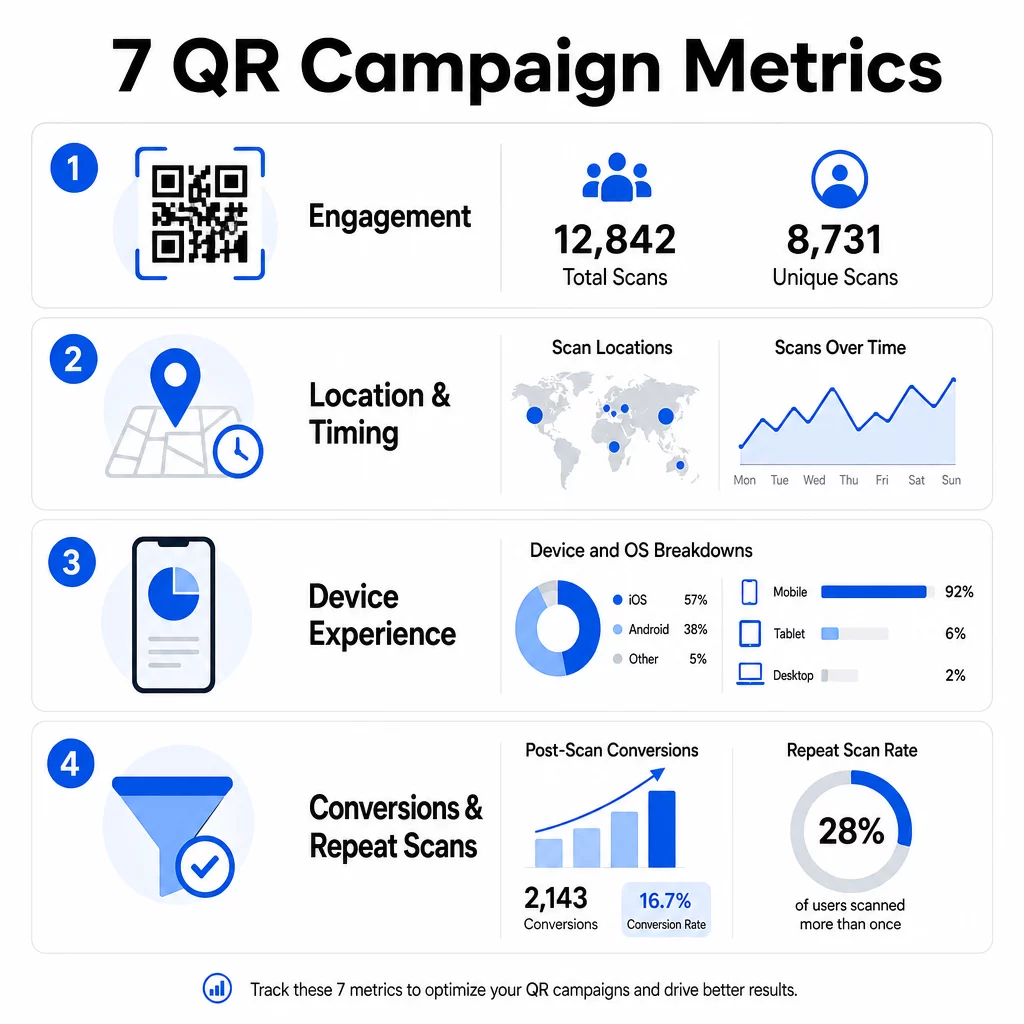
Los escaneos totales cuentan cada interacción con tu código QR, incluyendo múltiples escaneos por la misma persona. Esta es tu métrica de engagement de referencia: te dice si tu ubicación es lo suficientemente visible y atractiva como para incitar a la acción.
Las tasas de escaneo varían significativamente según el contexto:
- Los anuncios impresos suelen tener tasas de escaneo del 1–3%
- El empaque de productos tiende a rendir entre el 2–5%
- Los exhibidores en tiendas a menudo generan del 5–10%
- Los materiales para eventos pueden alcanzar del 10–20%
Un pico en los escaneos totales después del lanzamiento de una campaña es una señal positiva, pero vale la pena señalar que el 70% de los escaneos de por vida suelen ocurrir dentro de los primeros 30 días. Un lanzamiento sólido importa. Una llamada a la acción clara como “Escanea para un 10% de descuento” genera significativamente más escaneos tempranos que un código colocado sin contexto.
Para la ubicación, posiciona los códigos QR a la altura de los ojos – aproximadamente de 1.2 a 1.5 metros de altura – y asegúrate de que tengan al menos 2.5 cm de tamaño para un escaneo fiable. Los escaneos totales te dan alcance; las métricas a continuación te dicen qué hacer con él.
Rastrea tus campañas QR en tiempo real Ve el total de escaneos, visitantes únicos y tendencias geográficas a medida que ocurren. Explora las funciones de Análisis y Seguimiento de Códigos QR para empezar a medir lo que importa.
2. Escaneos Únicos
Los escaneos únicos filtran las interacciones repetidas, contando solo dispositivos o usuarios distintos. La brecha entre el total de escaneos y los escaneos únicos es una de las proporciones más informativas en tus análisis.
Si tienes 10,000 escaneos totales y 8,000 escaneos únicos, el 20% de tus interacciones son visitas recurrentes. Si eso es bueno o malo depende de tu objetivo. Para un programa de lealtad o un menú digital, los escaneos repetidos son el objetivo. Para una campaña de concientización diseñada para llegar a nuevas personas, un bajo número de escaneos únicos indica que no estás expandiendo tu audiencia.
Se requieren códigos QR dinámicos para el seguimiento de escaneos únicos. Las plataformas utilizan identificadores a nivel de dispositivo o señales basadas en IP para distinguir a los usuarios individuales mientras mantienen los datos anónimos. Esta distinción también es importante operativamente: si estás sincronizando datos de escaneo con un CRM, los escaneos únicos evitan registros duplicados y recuentos de leads inflados.
Una señal práctica: los usuarios que escanean el mismo código dos veces en 48 horas a menudo muestran una mayor intención de compra, lo que los convierte en un segmento útil para la segmentación de seguimiento o la puntuación de leads.
3. Ubicaciones de Escaneo
Los datos de escaneo geográfico te muestran exactamente dónde se están accediendo a tus códigos, típicamente a nivel de ciudad. Aquí es donde las campañas basadas en la ubicación se ganan su nombre, y donde las decisiones presupuestarias se vuelven mucho más fáciles de justificar.
La mayoría de los paneles de análisis de QR muestran los datos de ubicación como mapas de calor o desgloses a nivel de ciudad, lo que te permite identificar qué ubicaciones están generando resultados y qué regiones están rindiendo por debajo de la inversión. Para una campaña nacional con distribución uniforme, los datos de ubicación a menudo revelan una concentración sorprendente. Una campaña de folletos en varios estados podría generar 500 escaneos en una ciudad de tamaño mediano y menos de 100 en los principales mercados, una información que sería invisible sin el seguimiento de ubicación.
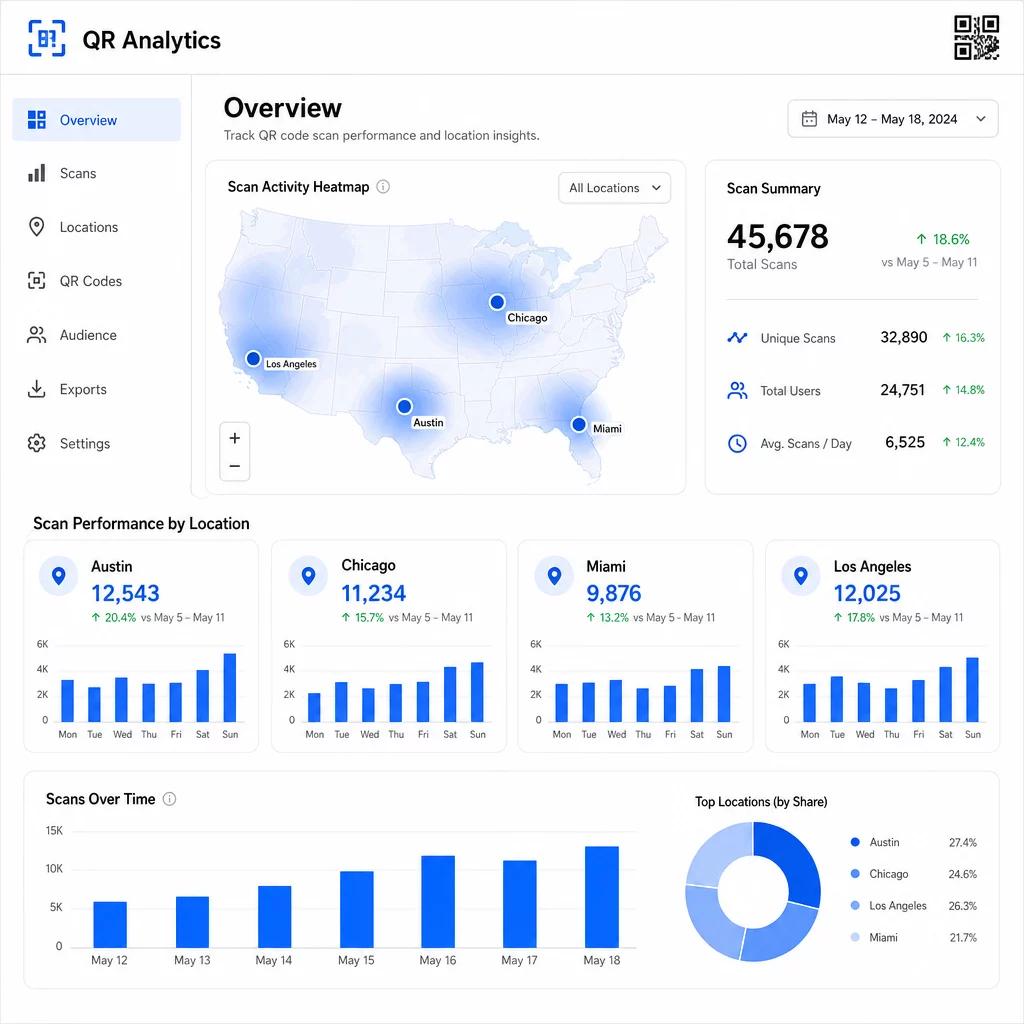
Asignar códigos QR únicos a cada ubicación es la forma más fiable de aislar el rendimiento de la ubicación. Un solo código en múltiples ubicaciones te da datos agregados; los códigos únicos te dan una comparación directa.
Los datos de ubicación también permiten la personalización. Códigos QR geodirigidos pueden redirigir a los usuarios a diferentes páginas de destino según su ubicación de escaneo; una cadena de supermercados, por ejemplo, puede promocionar bebidas calientes en regiones más frías y bebidas frías donde las temperaturas son más altas, sin imprimir materiales separados.
Una nota sobre la privacidad: Según la Ley de Privacidad del Consumidor de California, los datos de geolocalización precisos –definidos como una ubicación dentro de un radio de aproximadamente 1,850 pies– se clasifican como información personal sensible. El seguimiento basado en IP a nivel de ciudad generalmente queda fuera de ese umbral, pero el seguimiento basado en GPS requiere el consentimiento explícito del usuario. Revise las prácticas de datos de su plataforma y obtenga el consentimiento adecuado antes de recopilar datos de ubicación granulares.
4. Escaneos a lo largo del tiempo
Los datos de tiempo revelan patrones en cómo su audiencia interactúa –y cuándo. Observar el volumen de escaneos por hora, día y semana le ayuda a comprender no solo cuántas personas están escaneando, sino cuándo es más probable que actúen.
Los patrones generales varían según el tipo de campaña:
- Las campañas B2B tienden a alcanzar su punto máximo de martes a jueves, entre las 12:00 PM y las 2:00 PM
- Las campañas B2C suelen ver la mayor actividad de viernes a domingo, entre las 6:00 PM y las 8:00 PM
Pero las condiciones locales importan más que los puntos de referencia generales. Una exhibición en una cafetería podría ver picos a las 8:00 AM; un código QR en un lugar de eventos podría alcanzar su punto máximo 30 minutos antes de que abran las puertas. El seguimiento de la velocidad de escaneo –la tasa de escaneos por hora– le ayuda a detectar estos patrones y a identificar los primeros signos de declive de la campaña, cuando el interés comienza a disminuir después del período de lanzamiento inicial.
Los datos de tiempo se vuelven accionables cuando los combina con el control de contenido. Códigos QR dinámicos le permiten actualizar las URL de destino en tiempo real, para que pueda realizar ventas flash o promociones sensibles al tiempo que se alineen con las ventanas de máxima participación sin reimprimir materiales. Programar impulsos sociales o por correo electrónico justo antes de sus horas pico de escaneo puede amplificar el efecto.
Para ubicaciones continuas, revise los datos de tiempo mensualmente. Para campañas activas, las revisiones semanales suelen ser suficientes para detectar cambios significativos.
5. Desgloses por Dispositivo y SO
Los datos del dispositivo le indican qué está utilizando su audiencia para escanear –y si su página de destino realmente funciona para ellos. Para 2025, los dispositivos móviles representarán aproximadamente el 96% de todos los escaneos de códigos QR, con iOS y Android dividiéndose la mayor parte de ese tráfico.
Este desglose tiene implicaciones técnicas directas. Una página de destino que carga limpiamente en Safari/iOS puede comportarse de manera diferente en Chrome/Android, particularmente si incluye video, elementos de formulario o avisos de descarga de aplicaciones. Los datos del dispositivo le permiten detectar estos problemas antes de que le cuesten conversiones.
Un ejemplo práctico: una campaña que promociona una aplicación móvil podría dirigir a los usuarios de iOS directamente a la App Store de Apple y a los usuarios de Android a Google Play. Ese tipo de enrutamiento inteligente –basado en el tipo de dispositivo detectado– elimina la fricción y mejora las tasas de instalación. Panel de análisis de Pageloot muestra desgloses por dispositivo y SO junto con los datos de escaneo, para que pueda realizar estas optimizaciones sin conjeturas.
También cabe destacar: el 78% de los usuarios ahora escanean códigos QR usando la aplicación de cámara nativa de su teléfono en lugar de un escáner dedicado. Su contenido debe funcionar sin problemas con las aplicaciones de cámara integradas en todas las plataformas, no solo con aplicaciones de terceros.
Si notas altas tasas de rebote de un tipo de dispositivo específico, busca primero problemas de rendimiento – imágenes grandes, video no optimizado o formularios que no se renderizan correctamente en ciertos tamaños de pantalla son los culpables comunes.
6. Conversiones Post-Escaneo
Las conversiones post-escaneo son donde el engagement se convierte en ingresos. Cada métrica anterior a esta mide la atención; esta mide los resultados – compras, registros, descargas de aplicaciones o cualquier acción que tu campaña esté diseñada para impulsar.
Puntos de referencia de conversión comunes por tipo de acción:
- Seguidores en redes sociales: 20–30%
- Registros de correo electrónico: 15–25%
- Descargas de aplicaciones: 10–15%
- Compras: 2–5%
Si tus números caen significativamente por debajo de estos rangos, el problema suele estar en la experiencia post-escaneo: una página de carga lenta, un formulario demasiado complejo o un destino que no coincide con lo que prometía el código QR.
Configuración del seguimiento de conversiones requiere que dos cosas funcionen juntas. Primero, añade parámetros UTM a tus URLs de destino – por ejemplo, `utmsource=storedisplay&utmmedio=qrcódigo&utmcampaign=springpromo` – para que Google Analytics 4 pueda atribuir el tráfico a tu campaña de QR. Segundo, configura el seguimiento de eventos de GA4 para registrar las acciones específicas que te interesan: clics en botones, envíos de formularios, finalizaciones de video o compras. El guía de parámetros UTM para códigos QR detalla esta configuración.
Para una atribución más profunda, vincula tus datos de escaneo de QR a un CRM o plataforma de automatización de marketing. Esto te permite enviar seguimientos personalizados basados en el comportamiento de escaneo y rastrear conversiones a través de sesiones, no solo en la ventana inmediata post-escaneo.
Cálculo del ROI una vez que tienes datos de conversión es sencillo: resta los costos totales de la campaña (diseño, impresión, tarifas de plataforma) de los ingresos generados, divide por los costos y multiplica por 100. Una campaña que cuesta $500 y genera $2,000 en ventas devuelve un 300%.
Conecta los escaneos de QR a las conversiones posteriores Utilice Seguimiento del código QR con parámetros UTM para vincular cada escaneo a una campaña y medir lo que sucede después del escaneo.
7. Tasa de escaneo repetido
La tasa de escaneo repetido mide la frecuencia con la que los usuarios vuelven a escanear un código después de su primera interacción. Es una señal del valor del contenido: si los usuarios regresan, la experiencia está ofreciendo algo por lo que vale la pena regresar.
La tasa de escaneo repetido adecuada depende completamente de lo que estés ejecutando. Los programas de fidelización, los menús digitales y los manuales de productos están diseñados para la interacción repetida. Las campañas de concienciación y las promociones únicas suelen buscar un alcance único amplio en lugar de una participación repetida. Comparar tu tasa de repetición con tu tipo de campaña te indica si el comportamiento es esperado o una señal de un problema.
| Tasa de escaneo repetido | Lo que indica | Acción sugerida |
|---|---|---|
| Alta | El contenido es valioso; los usuarios regresan intencionalmente | Expande a ubicaciones similares; añade recompensas de fidelidad; reorienta a los usuarios comprometidos |
| Baja | El contenido despierta interés una sola vez pero carece de atractivo para el seguimiento | Mejora el contenido de la página de destino; simplifica el recorrido del usuario; prueba nuevas CTA |
| Total alto / único bajo | Audiencia pequeña pero muy comprometida | Enfóquese en la construcción de audiencias de nicho; ofrezca ofertas personalizadas a los usuarios principales |
Esté atento a las anomalías: escaneos repetidos extremadamente rápidos – múltiples aciertos en segundos – pueden indicar actividad de bots en lugar de un comportamiento genuino del usuario. Si su tasa de repetición es alta pero las conversiones son bajas, el contenido es atractivo pero la ruta de conversión tiene fricción.
Combine las marcas de tiempo de escaneos repetidos con sus datos de tiempo para identificar a sus usuarios más comprometidos. Alguien que escanea dos veces en 48 horas está expresando una fuerte intención – un disparador útil para el seguimiento basado en CRM o el alcance personalizado.
Comparación del rendimiento entre ubicaciones
Uno de los usos más prácticos del análisis de códigos QR es una comparación lado a lado de las ubicaciones. Al asignar códigos únicos a cada ubicación, puede atribuir directamente el rendimiento – no solo adivinar qué escaparate o ciudad está funcionando.
Aquí hay un ejemplo de cómo podría verse esa comparación:
| Ubicación del escaneo | ESCANEOS TOTALES | Escaneos únicos | Tasa de conversión | Acción sugerida |
|---|---|---|---|---|
| Austin, TX | 500 | 420 | 12% | Aumentar el gasto en publicidad local; reforzar la oferta actual |
| Chicago, IL | 95 | 80 | 3% | Reevaluar la ubicación; probar una CTA más fuerte |
| Miami, FL | 88 | 75 | 2.5% | Desviar el presupuesto a regiones de mayor rendimiento |
| Los Angeles, CA | 450 | 390 | 10% | Mantener la estrategia; usar como referencia para otros mercados urbanos |
Un alto volumen de escaneos con bajas conversiones a menudo apunta a un problema de experiencia posterior al escaneo. Los escaneos bajos en áreas de alto tráfico suelen indicar un problema de visibilidad o ubicación – intente agrandar el código, reposicionarlo a la altura de los ojos o hacer que la CTA sea más prominente.
Revisar esta comparación regularmente convierte los números brutos en decisiones presupuestarias. Para una mirada más profunda sobre cómo leer las tendencias de escaneo geográfico, el Guía del panel de análisis de códigos QR cubre la configuración e interpretación en detalle.
Armándolo todo
El seguimiento de estas siete métricas transforma las campañas de códigos QR basadas en la ubicación de una táctica de imprimir y esperar en un sistema medible y optimizable. Los escaneos totales y únicos le informan sobre el alcance. Los datos de ubicación y tiempo le indican dónde y cuándo concentrarse. Los desgloses por dispositivo aseguran que su contenido realmente funcione. Las conversiones conectan los escaneos con los ingresos. Y la tasa de escaneos repetidos le dice si los usuarios encuentran suficiente valor para volver.
La base de todo esto es el uso de códigos QR dinámicos; sin ellos, la mayoría de estas métricas simplemente no están disponibles. Las campañas que rastrean estos datos de manera consistente pueden identificar ubicaciones de alto rendimiento más rápido, corregir las de bajo rendimiento antes de que desperdicien presupuesto y construir una imagen más clara del ROI fuera de línea de lo que permiten la mayoría de los canales de medios tradicionales.
Comience a rastrear su campaña basada en la ubicación Cree códigos QR dinámicos, monitoree los datos de escaneo en tiempo real y compare el rendimiento por ubicación, todo desde un solo panel. Pruebe el Generador de códigos QR dinámicos gratis por 14 días.
Preguntas frecuentes
Los escaneos totales cuentan cada interacción con su código QR, incluidos múltiples escaneos por la misma persona. Los escaneos únicos cuentan solo dispositivos o usuarios distintos, lo que le brinda una imagen más clara de cuántas personas individuales interactuaron con su campaña. La brecha entre ambos le indica cuánto compromiso repetido está generando.
Sí. Los códigos QR estáticos incrustan una URL fija y no generan datos analíticos. Los códigos QR dinámicos dirigen los escaneos a través de un servidor de redirección que registra la hora del escaneo, la ubicación, el tipo de dispositivo y otros metadatos. Sin códigos dinámicos, métricas como escaneos únicos, datos de ubicación y tiempo de escaneo no están disponibles.
Agregue parámetros UTM a su URL de destino – por ejemplo, `utmsource=storedisplay&utmmedium=qrcode&utmcampaign=campaignname` – para que GA4 pueda atribuir el tráfico entrante a su código QR. Luego, configure el seguimiento de eventos de GA4 para registrar las acciones específicas que desea medir, como envíos de formularios o compras. Los códigos QR dinámicos facilitan esto porque puede actualizar o corregir los parámetros UTM sin reimprimir sus materiales.