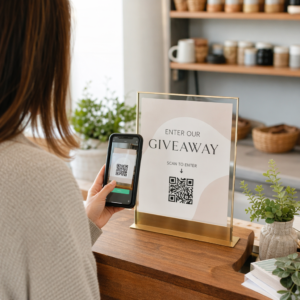
Muốn khách hàng nhắn tin cho bạn chỉ với một lần quét – không cần gõ phím, không cần tìm kiếm, không gặp trở ngại? Khi ai đó phải tự tìm số điện thoại của bạn hoặc tìm liên hệ WhatsApp của bạn, hầu hết họ sẽ không bận tâm. Hướng dẫn này giải thích chính xác cách mã QR hoạt động với các nền tảng nhắn tin phổ biến nhất để bạn có thể loại bỏ hoàn toàn rào cản đó.
Tại sao mã QR và nhắn tin hoạt động tốt cùng nhau
Mã QR thu hẹp khoảng cách giữa tài liệu vật lý và hành động kỹ thuật số. Thay vì yêu cầu ai đó nhập số điện thoại hoặc điều hướng đến cửa sổ trò chuyện, một lần quét duy nhất sẽ thực hiện tất cả những điều đó một cách tự động. Kết quả là ít trở ngại hơn, tỷ lệ chuyển đổi cao hơn và một kênh liên lạc trực tiếp mà bạn kiểm soát.
Điều này quan trọng hơn trước đây. Gần 83,4 triệu người dùng điện thoại thông minh trưởng thành ở Hoa Kỳ đã quét mã QR vào năm 2022 – khoảng 37,5% chủ sở hữu điện thoại thông minh trưởng thành – và tỷ lệ đó được dự kiến sẽ đạt 42,6% vào năm 2025. Trong số những người dùng đó, hầu hết quét vài lần một tháng, và khoảng một trong năm người báo cáo quét hàng tuần. Đối với các nhà tiếp thị, mức độ hành vi thói quen đó có nghĩa là một mã QR nhắn tin được đặt đúng chỗ có cơ hội thực sự được sử dụng.
Các ứng dụng thực tế rất rộng: một mã QR trên bao bì sản phẩm mở ra cuộc trò chuyện hỗ trợ khách hàng, một áp phích tại sự kiện bắt đầu cuộc trò chuyện với đội ngũ bán hàng, hoặc một danh thiếp cho phép ai đó nhắn tin cho bạn trên WhatsApp mà không cần lưu số của bạn trước. Bạn có thể tìm hiểu các nguyên tắc cơ bản về thiết lập mã QR trước khi đi sâu vào các bước cụ thể cho từng nền tảng dưới đây.
Mã QR cho WhatsApp
WhatsApp có khoảng 75,1 triệu người dùng hoạt động hàng tháng tại Hoa Kỳ tính đến giữa năm 2023, khiến nó trở thành một trong những nền tảng nhắn tin được sử dụng rộng rãi hơn cho các doanh nghiệp nhắm mục tiêu đến khách hàng ưu tiên thiết bị di động.
Có hai cách chính để liên kết mã QR với WhatsApp: mở cửa sổ trò chuyện, hoặc mở cửa sổ trò chuyện với một tin nhắn đã được điền sẵn. Sự khác biệt này quan trọng tùy thuộc vào những gì bạn muốn từ tương tác.
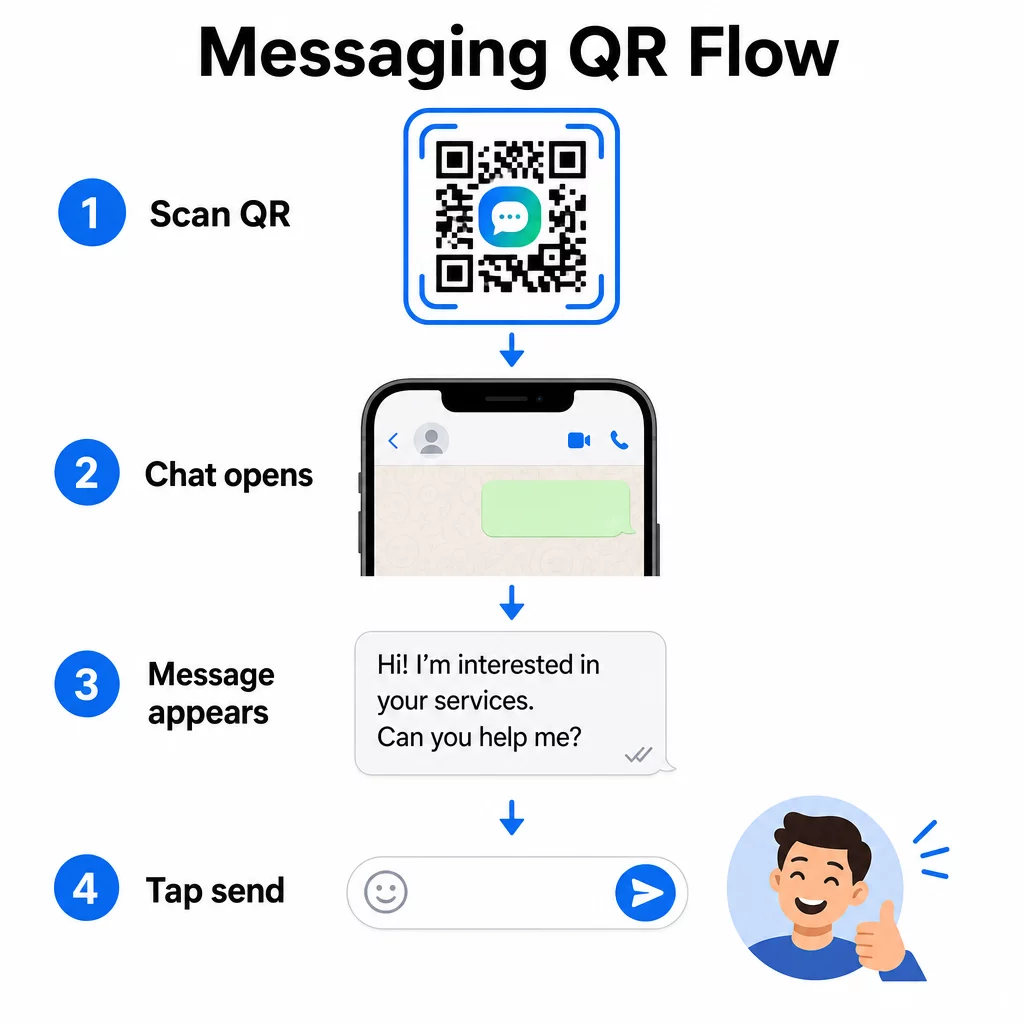
Mở cửa sổ trò chuyện (Nhấp để trò chuyện)
Tùy chọn đơn giản hơn trong hai tùy chọn chỉ mở một cuộc trò chuyện mới giữa người quét và số của bạn. Sử dụng định dạng này làm URL bên trong mã QR của bạn:
“`
https://wa.me/YOURNUMBER
“`
Số điện thoại phải ở định dạng quốc tế, không có dấu ngoặc đơn, dấu gạch ngang, dấu cộng hoặc số 0 đứng đầu. Ví dụ, một số điện thoại ở Vương quốc Anh tại Greater Manchester (0161 912 3456) sẽ được định dạng như sau:
“`
https://wa.me/441619123456
“`
Phân tích: mã quốc gia (44) + mã vùng không có số 0 đứng đầu (161) + số địa phương (9123456). Luôn kiểm tra liên kết của bạn trước khi in ở bất cứ đâu.
Tạo mã QR WhatsApp Sử dụng Tạo WhatsApp QR code để tạo một mã có thương hiệu, có thể quét được với số của bạn và tin nhắn điền sẵn tùy chọn – không yêu cầu định dạng URL thủ công.
Tin nhắn điền sẵn
Tùy chọn này mở một cuộc trò chuyện và điền vào trường tin nhắn văn bản bạn đã xác định trước. Khi ai đó quét, họ sẽ thấy một tin nhắn nháp sẵn sàng gửi – họ chỉ cần nhấn nút gửi. Định dạng URL là:
“`
https://wa.me/YOURNUMBER?text=YOURMESSAGE
“`
Replace spaces in your message with `%20` so the URL encodes correctly. For example, the phrase “I would like more information” becomes `I%20would%20like%20more%20information`.
Các ví dụ tin nhắn điền sẵn hữu ích bao gồm:
- `I%20would%20like%20to%20subscribe%20to%20your%20newsletter`
- `I%20would%20like%20a%20free%20sample`
- `I%20need%20help%20with%20my%20order`
Nếu bạn muốn chia sẻ một tin nhắn điền sẵn mà không nhắm mục tiêu đến một số cụ thể – hữu ích cho việc chia sẻ nội dung hơn là liên hệ trực tiếp – hãy sử dụng định dạng này thay thế:
“`
https://wa.me/?text=YOURMESSAGE
“`
Phương pháp tin nhắn điền sẵn đặc biệt hiệu quả cho việc tạo khách hàng tiềm năng. Bạn biết chính xác nơi ai đó đã quét (dựa trên mã họ đã sử dụng), và bạn ngay lập tức có số WhatsApp của họ khi họ gửi tin nhắn. Bạn cũng có thể tìm hiểu thêm về cách quét mã QR trên WhatsApp nếu bạn muốn hiểu trải nghiệm người dùng từ phía bên kia.
Mã QR cho Facebook Messenger
Facebook Messenger có khoảng 139 triệu người dùng hàng tháng tại Hoa Kỳ tính đến giữa năm 2023, trở thành ứng dụng nhắn tin di động được sử dụng rộng rãi nhất trong nước. Nếu đối tượng của bạn đang sử dụng Facebook, mã QR Messenger có thể là một đường dẫn trực tiếp vào hộp thư đến của trang của bạn.
Định dạng liên kết rất đơn giản:
“`
http://m.me/PAGENAME
“`
Thay thế `PAGENAME` bằng tên người dùng trang Facebook của bạn – đây là văn bản xuất hiện sau `facebook.com/` trong URL trang của bạn, không phải tên hiển thị ở đầu trang. Khi ai đó quét mã, Messenger sẽ mở một cuộc trò chuyện mới với trang của bạn trực tiếp.
Điều này hoạt động tương tự như tùy chọn nhấp để trò chuyện của WhatsApp: nó mở cửa sổ trò chuyện, nhưng không điền sẵn tin nhắn. Điều đó có nghĩa là lời kêu gọi hành động của bạn rất quan trọng. Bất cứ nơi nào bạn đặt mã, hãy ghép nó với một lời nhắc ngắn gọn như:
- “Trò chuyện với chúng tôi”
- “Hỏi chúng tôi một câu hỏi”
- “Liên hệ ngay bây giờ”
Đảm bảo trang của bạn đã bật thông báo tin nhắn để bạn phản hồi kịp thời. Trả lời chậm trễ sẽ làm mất đi mục đích của giao tiếp tức thì.
Mã QR cho Tin nhắn Văn bản (SMS)
SMS cổ điển có phạm vi tiếp cận gần như toàn cầu – nó được cài đặt sẵn trên mọi điện thoại thông minh và không thể gỡ bỏ. Đối với những đối tượng mà việc sử dụng WhatsApp hoặc Messenger không chắc chắn, SMS là phương án dự phòng an toàn nhất.
Định dạng URI tiêu chuẩn cho mã QR SMS là:
“`
sms:PHONENUMBER?body=YOURMESSAGE
“`
Lưu ý rằng iOS và Android xử lý URI này hơi khác nhau. iOS thường sử dụng dấu chấm phẩy trước `body` thay vì dấu chấm hỏi, vì vậy nếu bạn đang nhắm mục tiêu đến đối tượng hỗn hợp, việc kiểm tra trên cả hai nền tảng trước khi phân phối mã là rất cần thiết. Hầu hết các trình tạo mã QR đều xử lý việc này tự động khi bạn sử dụng công cụ mã QR SMS chuyên dụng.
Các Tạo mã QR văn bản có thể mã hóa hướng dẫn SMS, chi tiết liên hệ hoặc bất kỳ chuỗi văn bản ngắn nào thành mã có thể quét được, trong khi trình tạo SMS chuyên dụng xử lý định dạng tin nhắn được điền sẵn một cách cụ thể.
Mã QR cho Telegram
Telegram sử dụng các liên kết hồ sơ công khai theo định dạng `t.me/username` cho các kênh, nhóm và hồ sơ. Chuyển đổi liên kết đó thành mã QR cho phép ai đó tham gia kênh của bạn hoặc bắt đầu cuộc trò chuyện chỉ với một lần quét.
Đối với các nhóm hoặc kênh riêng tư không có tên người dùng công khai, hãy sử dụng liên kết mời được tạo từ bên trong ứng dụng. Để tìm nó: mở nhóm, chạm vào “Thêm thành viên,” sau đó chọn “Mời vào nhóm qua liên kết.” Sao chép URL đó và dán vào một trình tạo mã QR liên kết để tạo mã của bạn. Bạn có thể tìm thấy hướng dẫn từng bước trong bài viết này về Mã QR cho nhóm Telegram.
Mã QR cho Email
Email hoạt động khác với tin nhắn tức thời, nhưng nó chia sẻ cùng một ý tưởng cốt lõi: giảm ma sát để một liên hệ tiềm năng không phải gõ bất cứ điều gì. Một liên kết `mailto:` mã hóa địa chỉ người nhận, dòng chủ đề và nội dung tin nhắn trực tiếp vào mã QR.
Định dạng là:
“`
mailto:[email protected]?subject=Your%20Subject&body=Your%20Message
“`
Like WhatsApp prefilled messages, spaces must be encoded as `%20`. When someone scans the code, their default email client opens with the recipient, subject, and body already populated.
Các Tạo mã QR email xử lý định dạng này tự động và cho phép bạn tùy chỉnh giao diện của mã trước khi tải xuống.
Lựa chọn giữa mã QR tĩnh và động
Mọi ví dụ mã QR nhắn tin ở trên đều có thể được tạo dưới dạng mã tĩnh hoặc mã động – và lựa chọn này có những hệ quả thực tế đối với các chiến dịch dài hạn.
A mã QR tĩnh mã hóa liên kết đích vĩnh viễn. Nếu số điện thoại của bạn thay đổi, tên người dùng trang của bạn thay đổi hoặc bạn muốn thử một tin nhắn điền sẵn khác, bạn phải tạo và in lại một mã mới.
A mã QR động lưu trữ một URL chuyển hướng ngắn mà bạn có thể cập nhật bất cứ lúc nào, ngay cả sau khi mã đã được in. Thay đổi đích đến, hoán đổi tin nhắn điền sẵn hoặc chuyển hướng đến một nền tảng hoàn toàn khác – mã đã in vẫn giữ nguyên. Mã động cũng hỗ trợ phân tích quét: bạn có thể theo dõi có bao nhiêu người đã quét, khi nào, ở đâu và trên loại thiết bị nào.
Đối với các tài liệu in ấn như tờ rơi, bao bì sản phẩm hoặc màn hình trưng bày tại cửa hàng, mã động thường là lựa chọn thông minh hơn. Bạn có thể tìm hiểu thêm về các đánh đổi trong so sánh này về mã QR tĩnh và động, và khám phá cách thiết lập theo dõi trong hướng dẫn này về theo dõi mã QR.
Theo dõi mọi lượt quét trên các chiến dịch nhắn tin của bạn Bạn muốn biết vị trí nào thúc đẩy nhiều cuộc trò chuyện nhất? Trình tạo mã QR cho phép bạn xây dựng mã QR nhắn tin động với phân tích quét đầy đủ – theo dõi hiệu suất và cập nhật đích đến mà không cần in lại.
Nơi đặt mã QR nhắn tin
Thiết lập kỹ thuật chỉ là một nửa công việc. Một mã QR nhắn tin mà không ai nhìn thấy sẽ không thúc đẩy các cuộc trò chuyện. Một vài vị trí đã được chứng minh:
- Bao bì sản phẩm – khách hàng có câu hỏi có thể nhắn tin trực tiếp cho bạn từ hộp
- Danh thiếp – mã WhatsApp hoặc Messenger thay thế sự bất tiện khi lưu một liên hệ thủ công
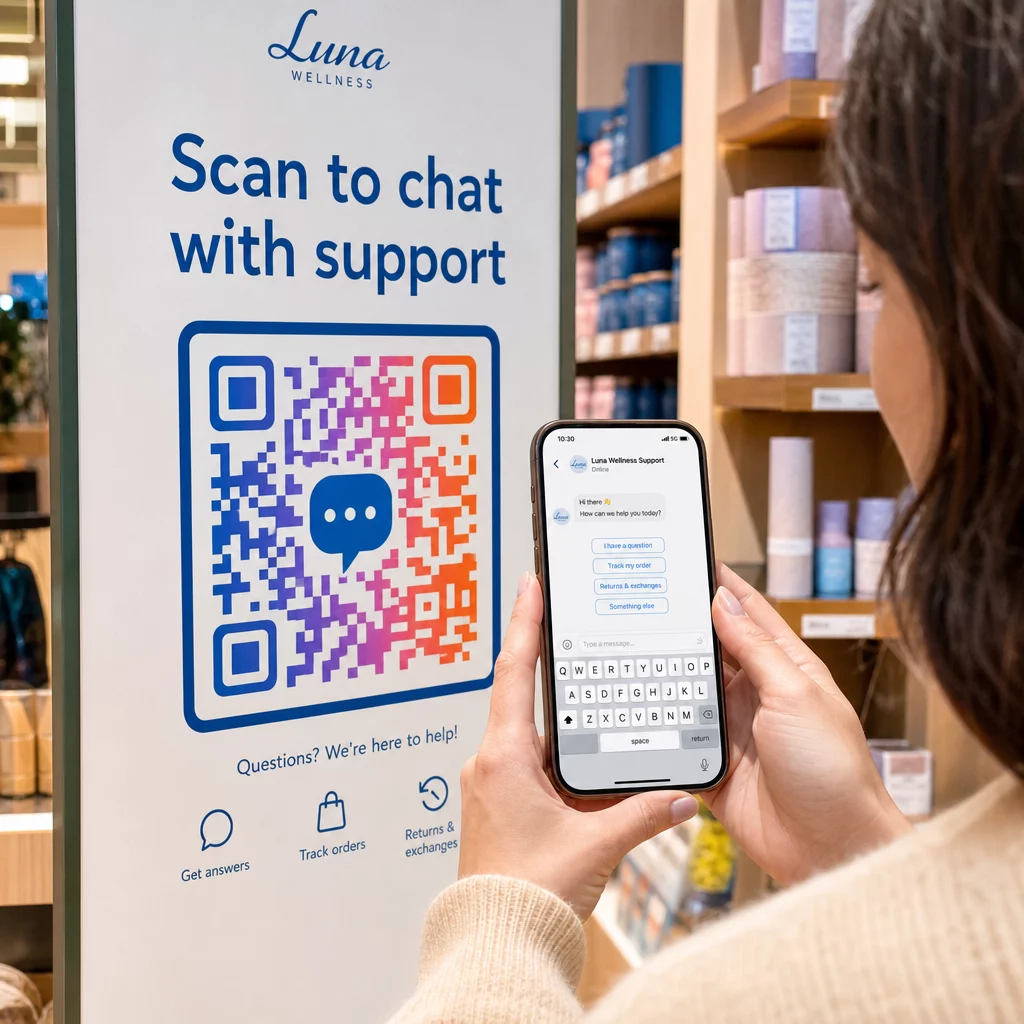
- Bảng hiệu trong cửa hàng – Mã “Trò chuyện với chúng tôi” gần quầy thanh toán hoặc bàn dịch vụ giúp giảm rào cản cho các câu hỏi
- Tài liệu sự kiện – thẻ bàn, dây đeo cổ hoặc màn hình gian hàng với mã Telegram hoặc Messenger để theo dõi ngay lập tức
- Quảng cáo in và tài liệu quảng cáo – mã SMS được điền sẵn cho phép khách hàng tiềm năng chọn tham gia vào các thông tin liên lạc theo dõi ngay lập tức
Bất cứ nơi nào bạn đặt mã, hãy thêm một lời kêu gọi hành động ngắn gọn ngay bên cạnh. Bản thân mã không giải thích lợi ích. Hãy cho mọi người biết họ sẽ nhận được gì khi quét: “Quét để trò chuyện với bộ phận hỗ trợ”, “Quét để nhận báo giá” hoặc “Quét để đăng ký”.”
Câu hỏi thường gặp
Có. Mã QR WhatsApp yêu cầu WhatsApp phải được cài đặt trên thiết bị của người quét; mã Messenger yêu cầu ứng dụng Messenger hoặc tài khoản Facebook có thể truy cập qua trình duyệt. Mã SMS hoạt động trên mọi điện thoại mà không cần ứng dụng bổ sung. Nếu việc sử dụng ứng dụng của đối tượng của bạn không chắc chắn, SMS mang lại phạm vi tiếp cận rộng nhất.
Có. WhatsApp hỗ trợ tin nhắn điền sẵn sử dụng tham số `?text=` trong định dạng liên kết `wa.me`. Mã QR SMS hỗ trợ tham số nội dung (body) trong URI `sms:`, mặc dù cú pháp chính xác có thể hơi khác nhau giữa iOS và Android. Nên kiểm tra trên cả hai nền tảng trước khi phân phối mã.
Mã QR động cho phép bạn cập nhật đích đến hoặc tin nhắn điền sẵn bất cứ lúc nào mà không cần in lại. Nó cũng cung cấp phân tích quét – tổng số lượt quét, vị trí quét, loại thiết bị – để bạn có thể đo lường vị trí đặt và tin nhắn nào hoạt động tốt nhất. Điều này đặc biệt hữu ích cho các tài liệu in có thời hạn sử dụng dài.