Gerenciar a participação em eventos manualmente é lento, propenso a erros e desconectado dos sistemas importantes. Este guia mostra como criar códigos QR dinâmicos que alimentam os dados de check-in diretamente no seu CRM, eliminando a entrada manual e fornecendo um registro de presença em tempo real para cada contato.
Por que os Códigos QR Dinâmicos Funcionam para Check-Ins de CRM
Um código QR estático codifica um URL fixo e não pode ser rastreado ou alterado após a impressão. Um código QR dinâmico, em contraste, usa um link de redirecionamento curto como intermediário. Você pode atualizar esse destino a qualquer momento sem reimprimir, e cada leitura é registrada com dados incluindo carimbo de data/hora, tipo de dispositivo e localização geográfica.
Para check-ins de CRM, essa distinção importa enormemente. Quando cada participante recebe um código dinâmico exclusivo vinculado ao seu registro de contato, escaneá-lo na porta faz três coisas simultaneamente: verifica a identidade, marca a presença e envia dados para o seu CRM – tudo sem que um membro da equipe digite nada.
Plataformas como o HubSpot rastreiam o status de registro, estado de presença, cancelamentos e indicadores de não comparecimento em relação a registros de contato individuais por meio de suas ferramentas de eventos de marketing. Sistemas que usam check-ins baseados em formulários podem atualizar um registro de contato existente anexando o ID exclusivo do contato ao URL do formulário, para que o envio se mescle com o perfil correto em vez de criar um duplicado. A mesma lógica se aplica, quer você esteja usando uma plataforma de eventos dedicada ou um CRM de uso geral com integrações de formulários.
Para entender a diferença completa entre os tipos de código antes de construir seu fluxo de trabalho, veja a comparação de códigos QR estáticos vs dinâmicos.
Crie Códigos de Check-In Rastreáveis em Minutos Use o Gerador de QR Code Dinâmico para criar códigos QR editáveis e prontos para análise que se conectam diretamente aos seus formulários de evento e fluxos de trabalho de CRM.
O Que Você Precisa Antes de Começar
Antes de gerar um único código, certifique-se de que três coisas estejam em ordem:
- Um formulário web de CRM que aceita parâmetros de URL. A maioria das ferramentas de CRM e formulários – incluindo Google Forms, formulários HubSpot e plataformas semelhantes – permite preencher campos passando valores através de strings de consulta no URL (por exemplo, `?email=value&first_name=value`). Confirme se seu formulário suporta isso antes de construir o fluxo de trabalho.
- Registros de contato com campos de mesclagem. Seu CRM deve ser capaz de extrair dados como e-mail, primeiro nome e sobrenome de registros de contato existentes e inserir esses valores dinamicamente em um modelo de URL.
- Um gerador de código QR dinâmico com análises. Você precisa de uma plataforma que gere códigos únicos por contato, rastreie cada leitura e permita atualizar destinos sem reimprimir. A ferramenta de código QR de presença é construída exatamente para este caso de uso.
Passo a Passo: Construindo Códigos QR Dinâmicos para Check-Ins de CRM
Configure Seu Formulário de Check-In
Crie um formulário web em seu CRM ou ferramenta de formulários com campos que capturem os dados que você precisa no check-in: no mínimo, endereço de e-mail, primeiro nome e sobrenome. Se você estiver usando o Google Forms, a Gerador de QR Code do Google Forms permite que você vincule diretamente ao seu formulário e rastreie leituras junto com as submissões.
Seu formulário também deve ser configurado para atualizar um registro de contato existente em vez de criar um novo. Em sistemas que permitem, anexar um identificador de contato à URL – como `?contact_id={{contact.id}}` – vincula a submissão do formulário ao registro de CRM correto automaticamente.
Construa a URL Dinâmica com Campos de Mesclagem
Uma URL de check-in dinâmica usa a sintaxe de campo de mesclagem do seu CRM para inserir os dados de cada contato como parâmetros de consulta. Um modelo se parece com isto:
“`
https://yourform.com/checkin?email=[Contact.Email]&firstname=[Contact.FirstName]&lastname=[Contact.LastName]
“`
Quando seu CRM processa este modelo para um contato individual, os espaços reservados são substituídos por valores reais:
“`
https://yourform.com/[email protected]&firstname=Jane&lastname=Smith
“`
A sintaxe exata do campo de mesclagem depende do seu CRM. Keep/Infusionsoft usa tags no estilo colchetes; HubSpot usa seu próprio formato de token de personalização. Verifique a documentação da sua plataforma para a sintaxe correta.
Codifique a URL Corretamente
URLs quebram quando contêm caracteres especiais não codificados. Espaços, e-comerciais e sinais de igual dentro de parâmetros valores devem ser codificados em percentagem para que navegadores e leitores de código QR os interpretem corretamente. As conversões comuns incluem:
- Space → `%20`
- Ampersand (`&`) → `%26`
- Equal sign (`=`) → `%3D`
A maioria das plataformas de CRM inclui uma função de codificação de URL que você pode aplicar à saída do campo de mesclagem. Use-a. Um único caractere não codificado no nome de um contato – como um e-comercial no nome de uma empresa – pode quebrar silenciosamente todo o fluxo de check-in para aquele participante.
Gerar um Código QR Dinâmico Único por Contato
Com o modelo de URL codificado pronto, gere um código QR dinâmico por participante. Cada código aponta para o URL do formulário pré-preenchido dessa pessoa. Como são códigos dinâmicos, você mantém a capacidade de atualizar o destino mais tarde – útil se o URL do seu formulário mudar depois que os códigos já tiverem sido distribuídos.
Para grandes eventos, a maioria das plataformas de CRM e ferramentas de automação de e-mail suportam a geração em massa de códigos: mescle o modelo de URL, codifique-o e acione a criação do código QR para cada contato em uma sequência. O código resultante é então incluído no e-mail de confirmação do participante, juntamente com os detalhes de seu registro.
O Gerador de QR Code para Eventos suporta este fluxo de trabalho e permite personalizar a aparência do código – adicionando a marca, logotipo ou esquema de cores do seu evento – antes da distribuição.
Distribuir e Implementar na Entrada
Envie a cada participante seu código QR exclusivo em seu e-mail de confirmação. Na entrada do evento, um membro da equipe escaneia o código usando qualquer câmera de smartphone padrão. O escaneamento abre o formulário pré-preenchido, o participante confirma ou envia, e o registro do CRM é atualizado com o carimbo de data/hora da presença.
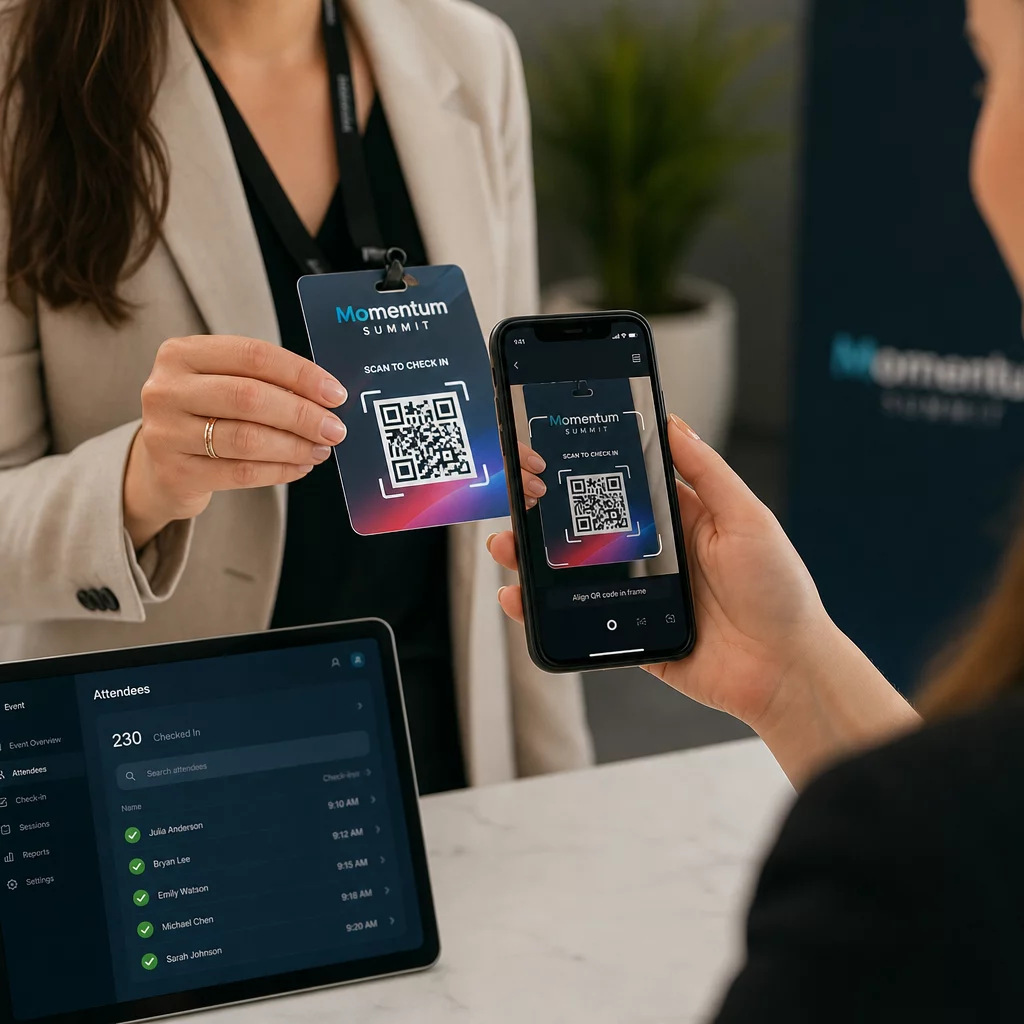
Para eventos maiores, considere configurar estações de escaneamento dedicadas. Treine a equipe para segurar o dispositivo de escaneamento a aproximadamente 30 cm do código e para habilitar o flash da câmera em ambientes com pouca luz. Se você estiver imprimindo códigos em crachás ou pulseiras, use materiais foscos em vez de acabamentos brilhantes para evitar que o brilho interfira na leitura. Mais detalhes sobre as melhores práticas de implementação física estão disponíveis em guia definitivo de códigos QR para check-ins de eventos.
Como os Dados de Presença Fluem para o Seu CRM
O escaneamento do check-in aciona uma cadeia de eventos que termina com um registro de contato atualizado. Veja o que acontece em cada etapa:
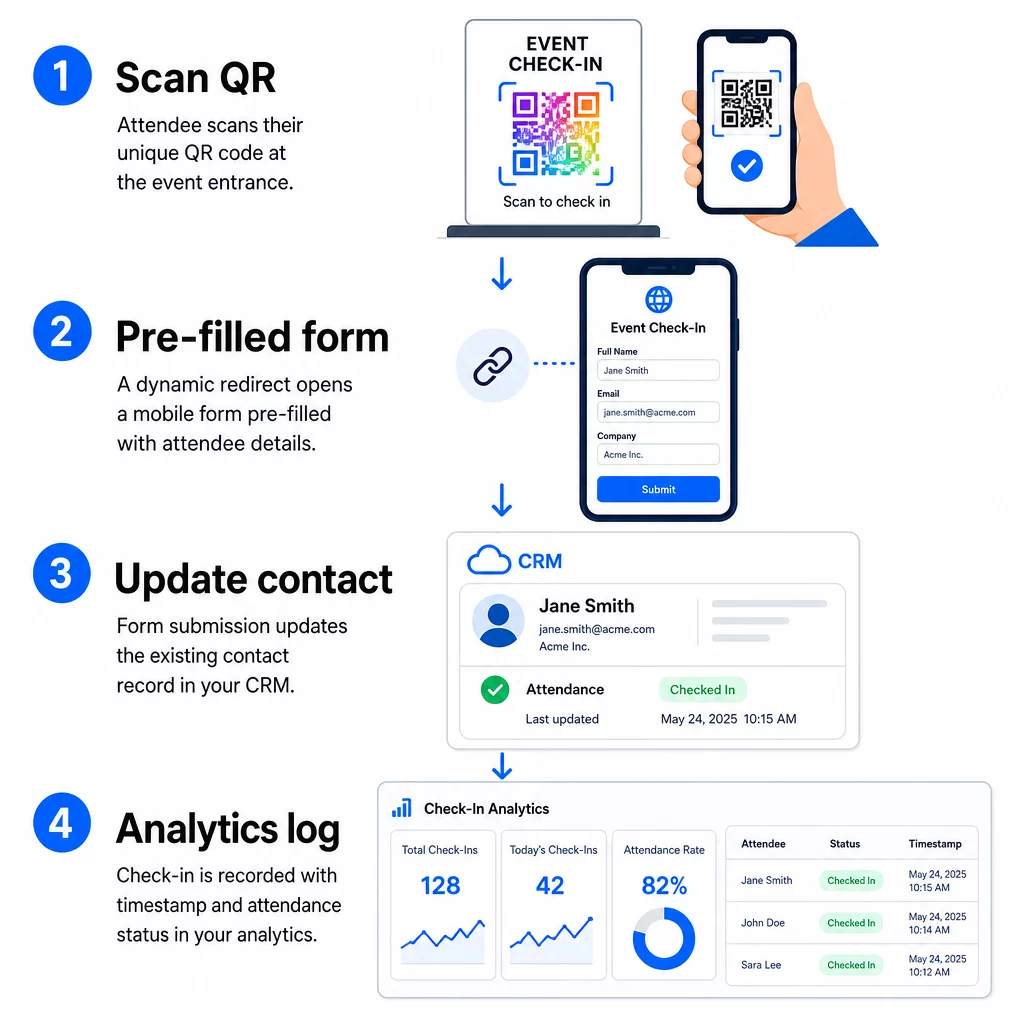
- O código QR único do participante é escaneado na entrada.
- O redirecionamento dinâmico carrega o formulário de check-in pré-preenchido no navegador do participante.
- O participante envia o formulário (ou o formulário é enviado automaticamente após uma breve confirmação).
- O envio do formulário, vinculado ao ID único do contato, atualiza o registro existente no CRM com o status de check-in, carimbo de data/hora e quaisquer campos adicionais capturados.
- Se o seu CRM suporta automação baseada em webhook, o envio pode simultaneamente acionar ações subsequentes: atribuir uma tarefa de acompanhamento, enviar um e-mail pós-evento ou atualizar o status de uma campanha.
Plataformas como o HubSpot armazenam os estados de participação – Registrado, Compareceu, Não Compareceu, Cancelado – diretamente no cartão de eventos de marketing do contato, dando à sua equipe um histórico completo de presença para cada contato sem qualquer reconciliação manual. Para saber como conectar escaneamentos a ações automatizadas de CRM de forma mais ampla, consulte o guia sobre Automação do fluxo de trabalho de leitura de código QR.
Rastreando o Desempenho do Check-In com Análises
Como você está usando códigos dinâmicos, cada escaneamento gera dados analíticos – não apenas um formulário preenchido. Seu painel de controle de código QR captura:
- Total de escaneamentos vs. escaneamentos únicos – útil para identificar se alguém escaneou seu código várias vezes
- Carimbos de data/hora de leitura – permite reconstruir padrões de chegada e identificar períodos de pico de check-in
- 6. Tipo de dispositivo e sistema operacional – ajuda a otimizar a experiência móvel do seu formulário de check-in
- Localização geográfica – confirma que os escaneamentos estão ocorrendo no local esperado
Esses dados ficam ao lado dos seus registros de presença no CRM e fornecem uma segunda camada de verificação. Se o envio do formulário de um contato falhou, mas o escaneamento do QR foi registrado, você tem um registro para investigar. Para uma análise mais aprofundada do que medir e como agir, o guia sobre análise de código QR empresarial e métricas chave cobre o panorama completo.
Você também pode rastrear digitalizações de códigos QR e análises ao nível da campanha, segmentando por evento, intervalo de datas ou código individual para comparar o desempenho em vários pontos de check-in.
Monitorizar Presença em Tempo Real Veja exatamente quem digitalizou, quando e de que local. Use a Ferramenta de Código QR de Presença para implementar códigos de check-in com análises de digitalização completas incorporadas.
Problemas Comuns e Como Resolvê-los
URLs quebradas após a substituição de campos de mesclagem. Sempre teste sua URL codificada com dados de contato reais antes de enviar códigos aos participantes. Preste atenção especial aos contatos cujos nomes ou endereços de e-mail incluem caracteres especiais.
Registros duplicados de CRM criados no check-in. Isso acontece quando a URL do formulário não contém o identificador de contato. Adicione o parâmetro de ID de contato ao seu modelo de URL e confirme se o seu CRM está configurado para corresponder a esse campo em vez de criar um novo registro.
Códigos QR que param de funcionar após a distribuição. É aqui que os códigos dinâmicos provam o seu valor. Se a URL do seu formulário mudar – porque você trocou de ferramentas de formulário ou atualizou seu domínio – você pode atualizar o destino no seu painel de gerenciamento de códigos QR sem redistribuir novos códigos aos participantes.
Códigos que digitalizam corretamente, mas não preenchem o formulário. Verifique se sua ferramenta de formulário requer nomes de parâmetros de consulta específicos. Algumas plataformas usam `email`, enquanto outras exigem `entry.12345` (Google Forms) ou uma chave de campo personalizada. Alinhe seu modelo de URL com os nomes de parâmetros esperados pela sua ferramenta de formulário.
Falhas de digitalização em baixa luminosidade na entrada. Certifique-se de que seus códigos QR impressos atendam à proporção de tamanho-distância de 10:1: um código escaneado a 10 polegadas de distância deve ter pelo menos 1 polegada de largura. Use impressão de alto contraste – módulos escuros em um fundo branco – e evite papel brilhante ou laminado.
Principais Conclusões
Códigos QR dinâmicos para check-ins de CRM funcionam porque cada código carrega a identidade de um contato codificada em sua URL de destino, direciona esses dados para um formulário vinculado a um registro existente e registra o próprio escaneamento como um evento de análise separado. O resultado é um registro de presença preciso, com carimbo de data/hora e conectado ao seu CRM sem qualquer entrada manual de dados.
Os requisitos técnicos são simples: um CRM com campos de mesclagem e formulários web que aceitam parâmetros de URL, URLs dinâmicas devidamente codificadas e uma plataforma de código QR que suporte a geração de códigos por contato e o rastreamento de escaneamentos. Acertando esses três elementos, o fluxo de trabalho de check-in funciona em grande parte por si só.
Comece a construir seu sistema de check-in com o Gerador de QR Code Dinâmico – nenhum cartão de crédito é necessário para o teste de 14 dias.
Perguntas frequentes
Um código QR estático codifica um URL fixo diretamente em seu padrão e não pode ser alterado ou rastreado após a impressão. Um código QR dinâmico usa um link de redirecionamento curto que você pode atualizar a qualquer momento a partir do seu painel, e cada leitura é registrada com dados incluindo carimbo de data/hora, tipo de dispositivo e localização. Para check-ins de CRM, os códigos dinâmicos são essenciais porque permitem a personalização de URL por contato e fornecem as análises necessárias para verificar a presença.
Anexe o identificador exclusivo do seu contato no CRM como um parâmetro de consulta na URL de check-in – por exemplo, `?contact_id={{contact.id}}`. Quando o formulário é enviado, seu CRM usa esse identificador para corresponder o envio ao registro existente, em vez de criar um novo. A maioria das plataformas de CRM também possui uma configuração para mesclar por endereço de e-mail como um fallback quando nenhum ID de contato está presente.
Sim. Como os códigos são dinâmicos, você pode alterar o URL de destino no seu painel de gerenciamento de código QR a qualquer momento. O código impresso ou distribuído permanece exatamente o mesmo – apenas o destino do redirecionamento muda. Isso significa que se o URL do seu formulário mudar depois que os e-mails de confirmação forem enviados, os participantes com os códigos originais ainda chegarão ao formulário correto.