Czy zastanawiałeś się kiedyś, co dzieje się z Twoją torbą, jeśli zostanie oddzielona od Ciebie na lotnisku? Ze standardową papierową zawieszką, obca osoba musi odczytać Twoje dane osobowe na głos, tylko po to, by ją zwrócić. Kod QR na Twojej zawieszce bagażowej całkowicie zmienia to równanie, pozwalając każdemu ze smartfonem skontaktować się z Tobą bez ujawniania Twoich prywatnych informacji każdemu przechodniowi w terminalu.
Dlaczego standardowe zawieszki bagażowe są niewystarczające
Amerykańscy przewoźnicy raportujący odnotowali w 2024 roku wskaźnik nieprawidłowo obsłużonego bagażu na poziomie 0,55%, co brzmi niewiele, dopóki nie weźmiesz pod uwagę ogromnej liczby odprawianych bagaży obsługiwanych każdego dnia. Zagubione, opóźnione lub uszkodzone torby to rutynowy problem podróżny, a pierwszą linią obrony jest czytelna, użyteczna zawieszka bagażowa.
Problem z tradycyjnymi zawieszkami to kompromis w kwestii prywatności. Eksperci ds. podróży konsekwentnie odradzają umieszczanie Twojego adresu domowego na zewnętrznej zawieszce, ponieważ sygnalizuje to każdemu obserwatorowi, że Twój dom jest pusty. Ostrzegają również przed umieszczaniem wrażliwych identyfikatorów, takich jak numery paszportów czy numery praw jazdy. Jednak zawieszka nadal potrzebuje wystarczającej ilości szczegółów, aby znalazca lub agent linii lotniczych mógł się z Tobą skontaktować.
Większość podróżnych kończy z niewygodnym kompromisem: zbyt wiele ujawnionych informacji lub niewystarczająco, by były użyteczne.
Jak kod QR rozwiązuje problem
Kod QR na zawieszce bagażowej działa jako warstwa prywatności między Twoimi danymi kontaktowymi a publicznością. Zamiast drukować Twój numer telefonu i adres e-mail dużym tekstem dla każdego do odczytania, gdy Twoja torba jedzie na karuzeli, kodujesz te informacje w skanowalny wzór. Znalazca skanuje kod, trafia na stronę kontaktową lub wstępnie wypełnioną wiadomość i kontaktuje się z Tobą – bez oglądania Twoich surowych danych osobowych wyświetlanych publicznie.
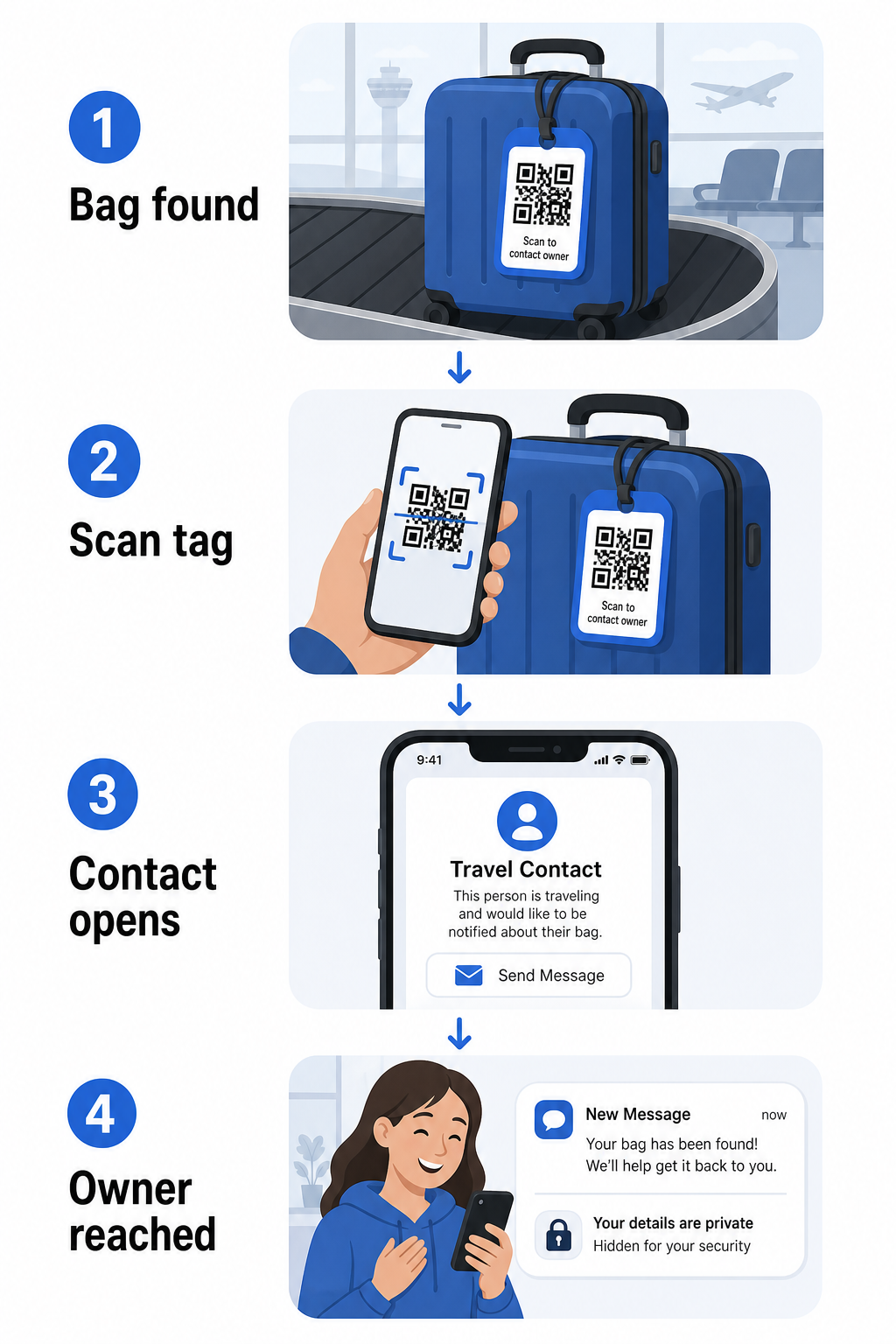
Istnieje kilka formatów wartych rozważenia, w zależności od tego, ile informacji chcesz udostępnić:
- vCard Kod QR: Koduje Twoje imię, numer telefonu i adres e-mail w formacie vCard. Po zeskanowaniu, telefon znalazcy prosi ich o zapisanie Twoich danych kontaktowych bezpośrednio do ich książki adresowej za pomocą Generator kodów QR vCard. Nie wymaga wpisywania i żadnych widocznych danych osobowych na samej zawieszce.
- Kod QR wiadomości e-mail: Otwiera wstępnie wypełniony e-mail zaadresowany do Ciebie po zeskanowaniu. Znalazca po prostu klika wyślij. Możesz to skonfigurować za pomocą Generator kodów QR do e-maila i ukryć Twój rzeczywisty adres przed wzrokiem.
- kodu QR z linku: Kieruje znalazcę na stronę internetową, którą kontrolujesz – prosty formularz kontaktowy lub stronę z Twoimi szczegółami podróży. Użyj generator kodów QR z linkiem aby skierować kod na dowolny wybrany przez Ciebie adres URL.
Każde podejście utrzymuje Twoje dane kontaktowe funkcjonalne do celów odzyskania, jednocześnie zmniejszając to, co każdy przypadkowy obserwator może odczytać z Twojej zawieszki w ruchliwym terminalu.
Utwórz przyjazny dla prywatności kod QR zawieszki bagażowej Gotowy do skonfigurowania kodu QR, który chroni Twoje dane, jednocześnie utrzymując Twoją torbę możliwą do znalezienia? Użyj Generator kodów QR aby zacząć – bezpłatnie, bez wymaganej wiedzy technicznej.
Jakie informacje uwzględnić (i co pominąć)
Eksperci ds. podróży zalecają utrzymywanie informacji na zawieszce bagażowej minimalnych, ale skutecznych. Praktyczny konsensus to:
- Włączać: Twoje pełne imię i nazwisko, numer telefonu komórkowego z kodem kraju, jeśli podróżujesz międzynarodowo, i adres e-mail
- Pomiń: Twój adres domowy (użyj adresu służbowego lub skrytki pocztowej, jeśli adres wydaje się konieczny), numery paszportów, numery dowodów tożsamości i numery telefonów stacjonarnych
- Rozważ: Adres e-mail przeznaczony do podróży, zamiast Twojego głównego konta osobistego, aby wszelkie niechciane kontakty pozostały ograniczone
Podejście z kodem QR ułatwia przestrzeganie tych wskazówek. Kodujesz tylko to, co jest konieczne, i kontrolujesz metodę kontaktu, której używa znalazca – czy to formularz e-mail, zapis vCard, czy strona kontaktowa.
Wiele źródeł podróżniczych również zaleca umieszczenie zapasowych informacji kontaktowych wewnątrz Twojej torby, aby torba nadal mogła zostać zidentyfikowana, jeśli zewnętrzna zawieszka zostanie zgubiona lub uszkodzona. Zawieszka z kodem QR w połączeniu z wewnętrzną kartą papierową zapewnia najlepsze pokrycie na obu frontach.
Dlaczego dynamiczny kod QR jest wart użycia
A dynamiczny kod QR ma jedną znaczącą przewagę nad statycznym w przypadku użycia zawieszki bagażowej: możesz zaktualizować cel bez ponownego drukowania zawieszki.
Dynamiczne kody QR działają poprzez stały, krótki adres URL przekierowania. Sam kod QR nigdy się nie zmienia, ale strona, na którą wskazuje, może być aktualizowana w dowolnym momencie z Twojego panelu. Oznacza to, że jeśli Twój numer telefonu się zmieni, otrzymasz nowy adres e-mail lub chcesz zamienić vCard na formularz kontaktowy, aktualizujesz cel – a każde zeskanowanie tej samej fizycznej zawieszki dociera do nowych informacji.
Dla zawieszki bagażowej, której używasz rok po roku, ta elastyczność jest praktyczna. Drukujesz zawieszkę raz i utrzymujesz kontrolę nad danymi kontaktowymi, które wyświetla, na czas nieokreślony.
Kody dynamiczne pozwalają również monitorować aktywność skanowania. Jeśli Twoja torba zaginie i ktoś zeskanuje Twój tag, możesz zobaczyć, że skanowanie miało miejsce, kiedy i w jakiej lokalizacji – przydatny kontekst podczas koordynacji z linią lotniczą. Aby zrozumieć szerszą rolę, jaką kody QR odgrywają w podróżach lotniczych, przegląd linii lotniczych i lotnisk opisuje, jak przewoźnicy ich używają na całej trasie podróży pasażera, w tym śledzenie bagażu.
Utrzymuj Swój Tag Aktualny Bez Ponownego Drukowania Użyj Generator dynamicznych kodów QR aby stworzyć kod QR na tag bagażowy, który możesz aktualizować w dowolnym momencie – zmień swoje dane kontaktowe lub adres URL miejsca docelowego bez dotykania fizycznego tagu.
Drukowanie Twojego Taga z Kodem QR: Rozmiar i Format
Kod QR, którego nie można zeskanować, mija się z celem. Obowiązuje kilka praktycznych wskazówek podczas drukowania na tag bagażowy:
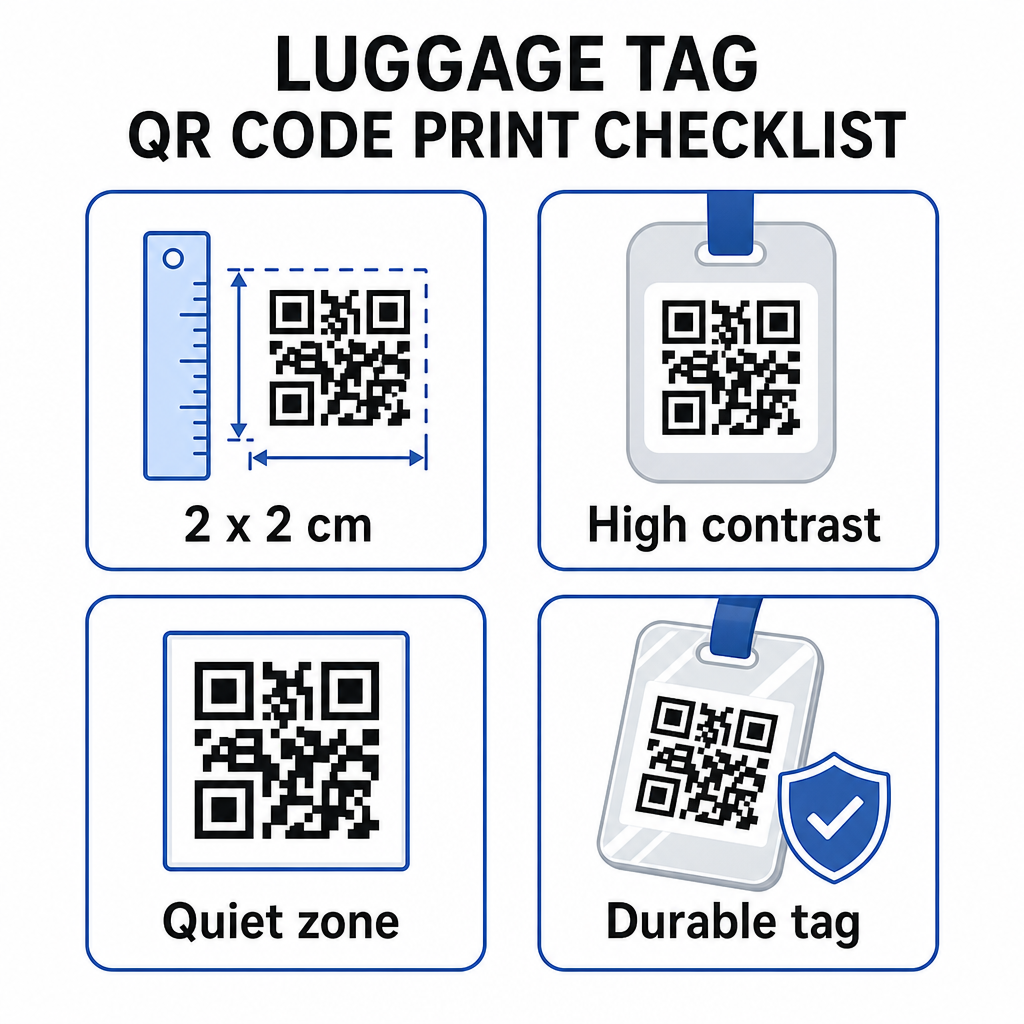
- Minimalny rozmiar: Celuj w co najmniej 2 × 2 cm (około 0.8 × 0.8 cala). Mniejsze niż to, a niezawodność skanowania spada, zwłaszcza przy słabym oświetleniu. Zobacz przewodnik po rozmiarach kodów QR dla materiałów drukowanych dla zaleceń dotyczących konkretnych powierzchni.
- Format pliku: PNG działa dobrze dla małych rozmiarów wydruku. W przypadku laminowanego lub profesjonalnie wydrukowanego tagu, eksporty SVG lub PDF zapewniają ostrzejsze krawędzie w każdym rozmiarze.
- Kontrast: Użyj ciemnego wzoru na jasnym tle. Niski kontrast jest jednym z najczęstszych powodów, dla których kody QR nie skanują się.
- Strefa ciszy: Pozostaw wyraźną ramkę wokół kodu – co najmniej cztery moduły szerokości z każdej strony – aby skaner mógł odróżnić kod od otaczającej grafiki lub tekstu.
- Korekcja błędów: Wyższe poziomy korekcji błędów pozwalają kodowi pozostać skanowalnym, nawet jeśli część jest porysowana lub zużyta, co ma znaczenie dla tagu intensywnie używanego podczas wielu podróży.
Aby uzyskać szczegółowe wskazówki dotyczące przygotowania kodu QR do etykiet fizycznych, przewodnik po drukowaniu kodów QR na etykietach szczegółowo opisuje proces.
Zachowanie Prywatności Twoich Danych Osobowych
Umieszczanie jakichkolwiek danych kontaktowych na publicznie dostępnym tagu wiąże się z pewnymi kwestiami prywatności. Kilka praktyk zmniejsza to ryzyko podczas używania kodów QR:
- Użyj formularza kontaktowego lub vCard zamiast kodować surowy numer telefonu jako zwykły tekst, aby informacja nie była natychmiast widoczna dla każdego, kto sprawdzi zawartość kodu
- Wybierz adres e-mail przeznaczony do podróży dla tagu, aby Twoje główne konto pozostało oddzielone od wszelkich kontaktów związanych z bagażem
- Jeśli używasz kodu dynamicznego, możesz dezaktywować lub przekierować link, jeśli chcesz wycofać tag lub zmienić sposób, w jaki znalazcy się z Tobą skontaktują
- Zakoduj tylko to, co jest niezbędne do odzyskania bagażu – Twoje imię i jedna metoda kontaktu są wystarczające
Aby uzyskać głębsze spojrzenie na zarządzanie prywatnością podczas używania kodów QR, przewodnik po ryzykach prywatności kodów QR oraz bezpieczne generowanie kodów QR najlepsze praktyki obejmują kluczowe kwestie. Aby uzyskać szerszy kontekst na temat tego, jak kody QR zmieniają ogólne doświadczenie podróży, Jak kody QR poprawiają doświadczenia w podróży jest przydatnym źródłem informacji.
Tag bagażowy z kodem QR to proste ulepszenie w stosunku do drukowanego tagu: utrzymuje Twoje dane kontaktowe funkcjonalne dla każdego, kto musi zwrócić Twoją torbę, jednocześnie chroniąc te szczegóły przed przypadkową obserwacją. Użyj kodu dynamicznego, abyś mógł utrzymywać tag aktualny podczas wielu podróży, dopasuj go prawidłowo do niezawodnego skanowania i zakoduj tylko metodę kontaktu, której chcesz, aby używali znalazcy.
Stwórz Swój Kod QR na Tag Bagażowy Już Dziś Skonfiguruj vCard, e-mail lub link z kodem QR dla Twojego bagażu w kilka minut. Zacznij od Pageloot Generator kodów QR – bezpłatna wersja próbna, karta kredytowa nie jest wymagana.
Najczęściej zadawane pytania
Kod QR vCard to praktyczny wybór, ponieważ pozwala znalazcy zapisać Twoje dane kontaktowe bezpośrednio na swój telefon jednym dotknięciem. Jeśli wolisz większą kontrolę nad tym, jakie informacje są udostępniane, kod QR z linkiem wskazujący na prosty formularz kontaktowy również dobrze się sprawdzi. Dynamiczne wersje obu pozwalają Ci zaktualizować miejsce docelowe bez ponownego drukowania znacznika.
Dobrze skonfigurowany kod QR na zawieszce bagażowej udostępnia tylko to, co zdecydujesz się zakodować – zazwyczaj imię, numer telefonu lub adres e-mail. Unikaj kodowania wrażliwych identyfikatorów, takich jak numery paszportów lub dowodów osobistych. Użycie strony z formularzem kontaktowym zamiast surowych danych osobowych dodaje kolejną warstwę separacji, a przestrzeganie najlepszych praktyk prywatności kodów QR zapewnia, że Twoja konfiguracja ogranicza niepotrzebne narażenie.
Nie, jeśli używasz dynamicznego kodu QR. Dynamiczne kody wskazują na adres URL przekierowania, który możesz zaktualizować w dowolnym momencie z pulpitu nawigacyjnego Pageloot. Fizyczna etykieta pozostaje taka sama, ale informacje kontaktowe, które wyświetla, mogą być zmieniane, kiedy tylko potrzebujesz – co czyni to praktycznym, długoterminowym rozwiązaniem dla często podróżujących.