Elgondolkodott már azon, mi történik a táskájával, ha elszakad öntől a repülőtéren? Egy hagyományos papírcímkével egy idegennek fel kell olvasnia az Ön személyes adatait csak azért, hogy visszaadja. Egy QR-kód az Ön poggyászcímkéjén teljesen megváltoztatja ezt az egyenletet, lehetővé téve, hogy bárki okostelefonnal felvegye Önnel a kapcsolatot anélkül, hogy felfedné az Ön privát adatait a terminálban minden járókelő előtt.
Miért nem elegendőek a hagyományos poggyászcímkék
Az amerikai jelentő légitársaságok 0,55%-os hibásan kezelt poggyászarányt jelentettek 2024-ben, ami kevésnek tűnik, amíg nem veszi figyelembe a naponta kezelt feladott poggyászok hatalmas mennyiségét. Az elveszett, késleltetett vagy sérült poggyászok rutinszerű utazási fejfájást okoznak, és az első védelmi vonal egy olvasható, hasznos poggyászcímke.
A hagyományos címkék problémája az adatvédelmi kompromisszum. Az utazási szakértők következetesen azt tanácsolják, hogy ne tüntesse fel otthoni címét egy külső címkén, mivel ez jelzi minden figyelőnek, hogy az Ön háza üres. Azt is figyelmeztetik, hogy ne tartalmazzon érzékeny azonosítókat, mint például útlevélszámokat vagy vezetői engedély számokat. Mégis, a címkének elegendő részletet kell tartalmaznia ahhoz, hogy egy megtaláló vagy légitársasági ügynök ténylegesen elérje Önt.
A legtöbb utazó kényelmetlen kompromisszummal szembesül: túl sok információ felfedve, vagy nem elég ahhoz, hogy hasznos legyen.
Hogyan oldja meg egy QR-kód a problémát
Egy QR-kód a poggyászcímkén adatvédelmi rétegként működik az Ön elérhetőségei és a nyilvánosság között. Ahelyett, hogy az Ön telefonszámát és e-mail címét nagy betűkkel kinyomtatná bárki számára olvashatóan, miközben a táskája a futószalagon utazik, ezt az információt egy szkennelhető mintába kódolja. Egy megtaláló beolvassa a kódot, egy kapcsolatfelvételi oldalra vagy előre kitöltött üzenetre jut, és eléri Önt – anélkül, hogy valaha is látná az Ön nyers személyes adatait nyíltan megjelenítve.
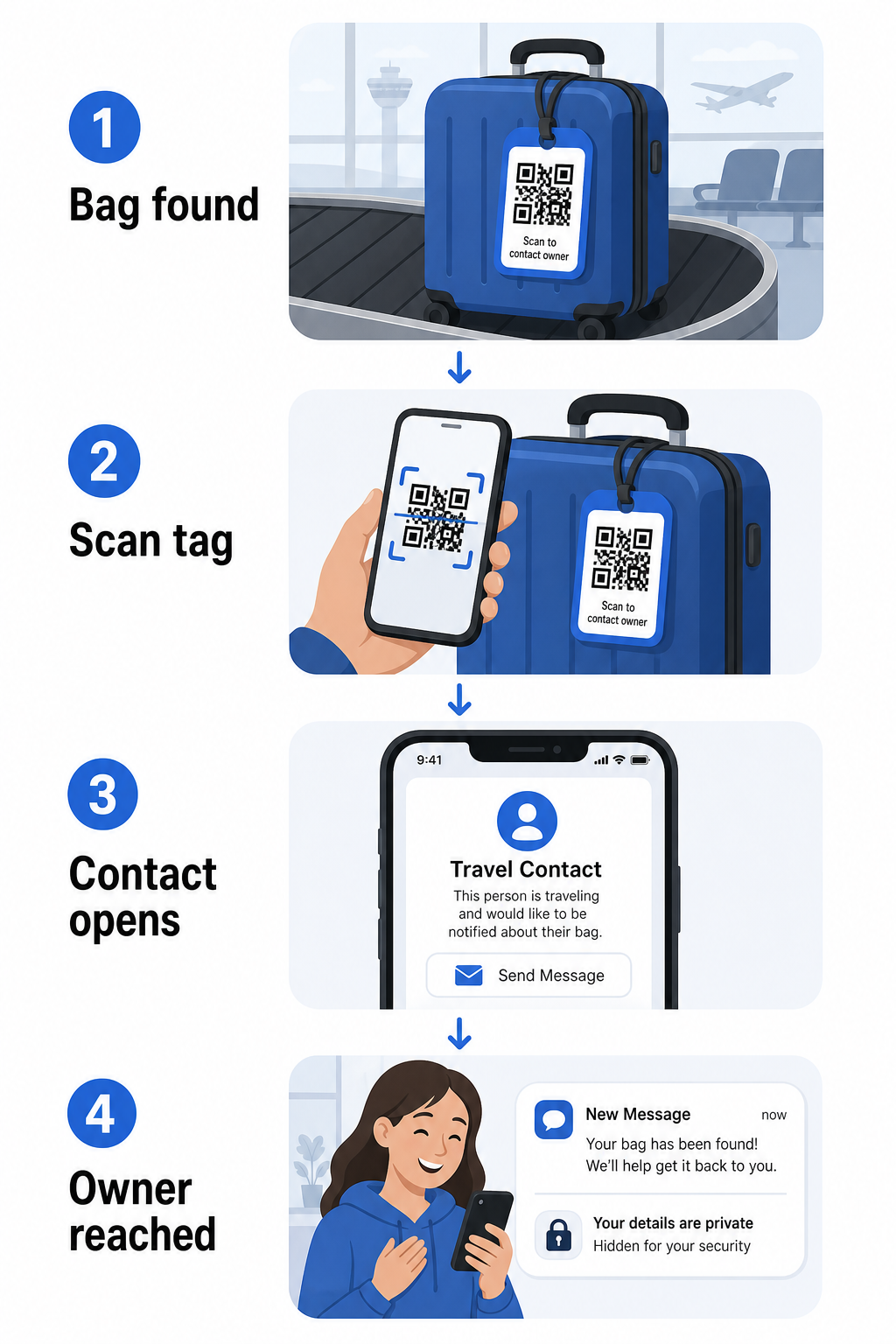
Néhány formátumot érdemes megfontolni, attól függően, hogy mennyi információt szeretne megosztani:
- vCard QR-kód: Kódolja az Ön nevét, telefonszámát és e-mail címét vCard formátumban. Beolvasáskor a megtaláló telefonja felkéri őket, hogy mentsék el az Ön elérhetőségeit közvetlenül a címjegyzékükbe a vCard QR kód generátor. Nincs szükség gépelésre, és nincs látható személyes adat magán a címkén.
- Email QR-kód: Előre kitöltött e-mailt nyit meg, amely Önnek szól, beolvasáskor. A megtaláló egyszerűen elküldi. Ezt beállíthatja a Email QR kód generátor és elrejtheti a tényleges címét a nyilvánosság elől.
- link QR-kóddal: A megtalálót egy Ön által ellenőrzött weboldalra irányítja – egy egyszerű kapcsolatfelvételi űrlapra vagy egy oldalra az Ön utazási adataival. Használja a link QR-kód generátor hogy a kódot bármely Ön által választott URL-re mutassa.
Minden megközelítés működőképessé teszi az Ön elérhetőségeit a visszaszerzés céljából, miközben csökkenti azt, amit bármely véletlenszerű megfigyelő leolvashat az Ön címkéjéről egy forgalmas terminálban.
Hozzon létre adatvédelmi szempontból barátságos poggyászcímke QR-kódot Készen áll egy QR-kód beállítására, amely védi az Ön adatait, miközben a táskája megtalálható marad? Használja a QR Kód Generátor a kezdéshez – ingyenes, és nincs szükség technikai tudásra.
Milyen információkat érdemes feltüntetni (és mit érdemes kihagyni)
Az utazási szakértők azt javasolják, hogy a poggyászcímke információi minimálisak, de hatékonyak legyenek. A gyakorlati konszenzus a következő:
- Tartalmazza: Az Ön teljes neve, egy mobiltelefonszám országkóddal, ha nemzetközi utazásról van szó, és egy e-mail cím
- Hagyja ki: Az Ön otthoni címe (használjon munkahelyi címet vagy postafiókot, ha egy cím szükségesnek tűnik), útlevélszámok, kormányzati azonosító számok és otthoni vezetékes telefonszámok
- Fontolja meg: Egy utazáshoz specifikus e-mail cím az Ön elsődleges személyes fiókja helyett, hogy bármilyen nem kívánt kapcsolatfelvétel korlátozott maradjon
A QR-kód megközelítés megkönnyíti ennek az útmutatásnak a követését. Csak azt kódolja, ami szükséges, és Ön irányítja a kapcsolatfelvételi módszert, amelyet a megtaláló használ – legyen az egy e-mail űrlap, egy vCard mentés vagy egy kapcsolatfelvételi oldal.
Több utazási forrás is javasolja, hogy helyezzen el biztonsági elérhetőségi információkat a táskájában, hogy a táska továbbra is azonosítható legyen, ha a külső címke elveszik vagy megsérül. Egy QR-kód címke belső papírkártyával kombinálva a legjobb lefedettséget biztosítja Önnek mindkét fronton.
Miért érdemes dinamikus QR-kódot használni
A dinamikus QR-kód egy jelentős előnnyel rendelkezik egy statikushoz képest a poggyászcímke használatában: frissítheti a célállomást a címke újranyomtatása nélkül.
A dinamikus QR-kódok egy állandó rövid átirányítási URL-en keresztül működnek. Maga a QR-kód soha nem változik, de az oldal, amire mutat, bármikor frissíthető az Ön irányítópultjáról. Ez azt jelenti, hogy ha az Ön telefonszáma megváltozik, új e-mail címet kap, vagy vCard-ot szeretne cserélni egy kapcsolatfelvételi űrlapra, frissíti a célállomást – és ugyanazon fizikai címke minden beolvasása eléri az új információt.
Egy olyan poggyászcímke esetében, amelyet évről évre használ, ez a rugalmasság praktikus. Egyszer kinyomtatja a címkét, és korlátlan ideig fenntartja az általa megjelenített elérhetőségek feletti ellenőrzést.
A dinamikus kódok lehetővé teszik a szkennelési tevékenység nyomon követését is. Ha a poggyásza eltűnik, és valaki beolvassa a címkéjét, láthatja, hogy mikor és hol történt a beolvasás – hasznos kontextus a légitársasággal való koordináció során. Ahhoz, hogy megértse a QR-kódok szélesebb körű szerepét a légi utazásban, a légitársaságok és repülőterek áttekintése bemutatja, hogyan használják a fuvarozók azokat az utasok utazása során, beleértve a poggyászkövetést is.
Tartsa naprakészen a címkéjét újranyomtatás nélkül Használja a Dinamikus QR-kód generátor hogy létrehozzon egy poggyászcímke QR-kódot, amelyet bármikor frissíthet – módosíthatja elérhetőségeit vagy a cél URL-t anélkül, hogy hozzáérne a fizikai címkéhez.
QR-kód címkéjének nyomtatása: méret és formátum
Egy beolvashatatlan QR-kód értelmetlenné teszi a célt. Néhány gyakorlati irányelv érvényes a poggyászcímke nyomtatásakor:
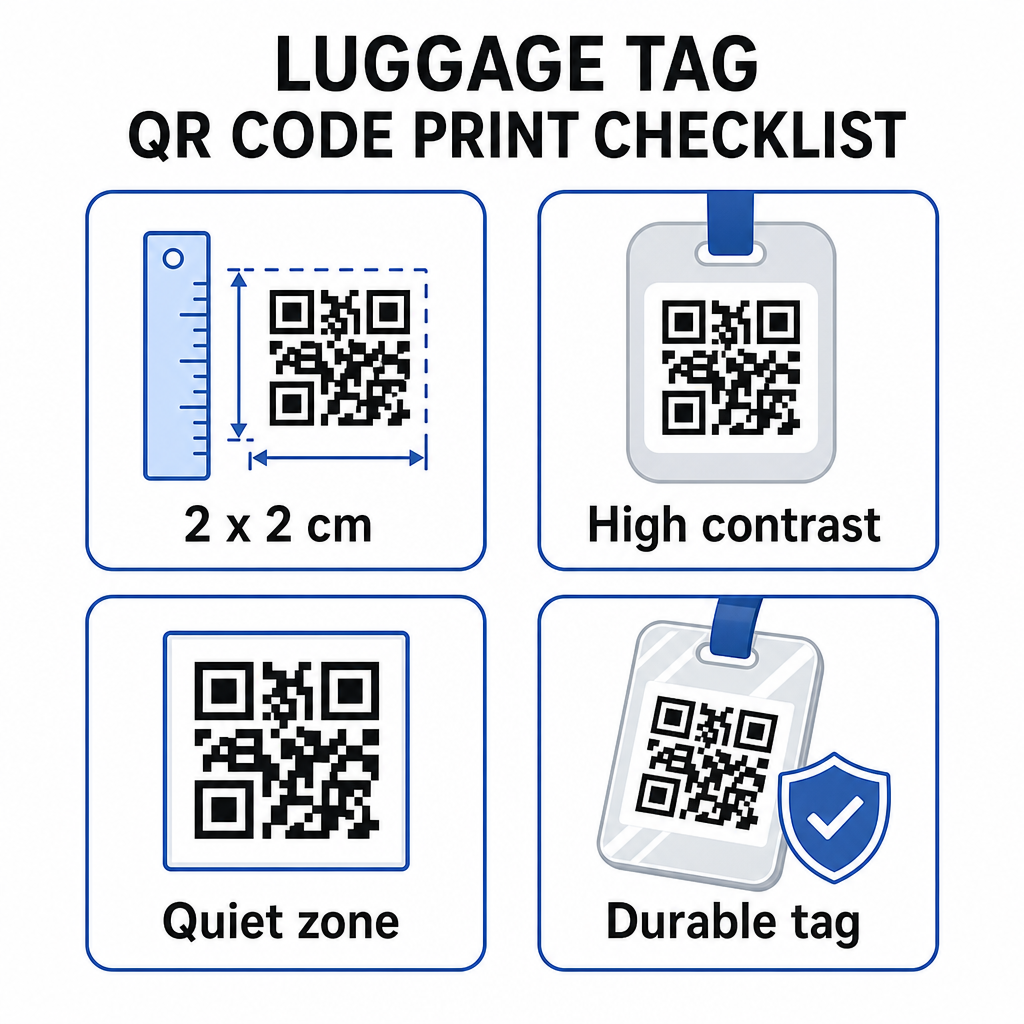
- Minimális méret: Célozzon legalább 2 × 2 cm-re (körülbelül 0,8 × 0,8 hüvelyk). Ennél kisebb méret esetén a szkennelési megbízhatóság csökken, különösen rossz fényviszonyok között. Lásd a QR-kód méretezési útmutatót nyomtatott anyagokhoz felületspecifikus ajánlásokat.
- Fájlformátum: A PNG jól működik kis nyomtatási méretekhez. Laminált vagy professzionálisan nyomtatott címke esetén az SVG vagy PDF exportok élesebb éleket biztosítanak bármilyen méretben.
- Kontraszt: Használjon sötét mintát világos háttéren. Az alacsony kontraszt az egyik leggyakoribb ok, amiért a QR-kódok nem olvashatók be.
- Csendes zóna: Hagyjon tiszta szegélyt a kód körül – legalább négy modul szélességben minden oldalon –, hogy a szkenner meg tudja különböztetni a kódot a környező grafikáktól vagy szövegtől.
- Hibajavítás: A magasabb hibajavítási szintek lehetővé teszik, hogy a kód beolvasható maradjon akkor is, ha egy része megkarcolódott vagy elkopott, ami fontos egy olyan címke esetében, amelyet több utazás során is intenzíven használnak.
Lépésről lépésre útmutatóért a QR-kód fizikai címkékre való előkészítéséhez, a QR-kódok címkékre nyomtatásának útmutatója részletesen ismerteti a folyamatot.
Személyes adatainak megőrzése
Bármilyen elérhetőségi adat nyilvános címkére helyezése bizonyos adatvédelmi megfontolásokat igényel. Néhány gyakorlat csökkenti ezt a kockázatot QR-kódok használatakor:
- Használjon kapcsolatfelvételi űrlapot vagy vCard-ot a nyers telefonszám egyszerű szövegként történő kódolása helyett, így az információ nem lesz azonnal látható bárki számára, aki megvizsgálja a kód tartalmát
- Válasszon utazásspecifikus e-mail címet a címkéhez, hogy elsődleges fiókja elkülönüljön minden poggyászhoz kapcsolódó kapcsolattól
- Dinamikus kód használata esetén deaktiválhatja vagy átirányíthatja a linket, ha vissza szeretne vonni egy címkét, vagy meg szeretné változtatni, hogyan érhetik el Önt a megtalálók
- Csak azt kódolja, ami a poggyász visszaszerzéséhez szükséges – az Ön neve és egy kapcsolattartási mód elegendő
A QR-kódok használatakor az adatvédelem kezelésének mélyebb megértéséhez a QR-kód adatvédelmi kockázatok útmutató és biztonságos QR-kód generálási legjobb gyakorlatok ismerteti a legfontosabb szempontokat. A QR-kódok utazási élményt átalakító szélesebb körű kontextusához, hogyan javítják a QR-kódok az utazási élményt hasznos referencia.
A QR-kódos poggyászcímke egy egyszerű fejlesztés a nyomtatott címkéhez képest: működőképesen tartja az Ön elérhetőségi adatait bárki számára, akinek vissza kell juttatnia a poggyászát, miközben elrejti ezeket az adatokat a véletlen megfigyelés elől. Használjon dinamikus kódot, hogy a címkét több utazás során is naprakészen tarthassa, méretezze helyesen a megbízható szkenneléshez, és csak azt a kapcsolattartási módot kódolja, amelyet a megtalálók használni szeretnének.
Készítse el poggyászcímke QR-kódját még ma Állítson be vCard, e-mail vagy link QR-kódot poggyászához percek alatt. Kezdje a Pageloot QR Kód Generátor – ingyenes próbaverzió, hitelkártya nem szükséges.
Gyakori kérdések
Egy vCard QR kód praktikus választás, mert lehetővé teszi a megtalálónak, hogy egy érintéssel közvetlenül a telefonjára mentse az Ön elérhetőségeit. Ha Ön nagyobb kontrollt szeretne az megosztott információk felett, egy link QR kód, amely egy egyszerű kapcsolatfelvételi űrlapra mutat, szintén jól működik. Mindkettő dinamikus változata lehetővé teszi a cél frissítését a címke újranyomtatása nélkül.
Egy jól konfigurált QR-kód egy poggyászcímkén csak azt osztja meg, amit Ön választ, hogy kódoljon – jellemzően egy nevet, telefonszámot vagy e-mail címet. Kerülje az érzékeny azonosítók, például útlevél- vagy személyi igazolvány számok kódolását. Egy kapcsolatfelvételi űrlap oldal használata a nyers személyes adatok helyett egy további elválasztó réteget ad hozzá, és a QR-kód adatvédelmi legjobb gyakorlatainak követése biztosítja, hogy az Ön beállítása korlátozza a szükségtelen kitettséget.
Nem, ha Ön dinamikus QR-kódot használ. A dinamikus kódok egy átirányítási URL-re mutatnak, amelyet Ön bármikor frissíthet a Pageloot irányítópultjáról. A fizikai címke változatlan marad, de az általa megjelenített kapcsolattartási információk bármikor megváltoztathatók, amikor Önnek szüksége van rá – így praktikus, hosszú távú megoldást jelent a gyakran utazók számára.