Zarządzanie setkami – lub tysiącami – kodów QR w kampaniach, lokalizacjach i liniach produktów jest trudniejsze, niż się wydaje. Bez jasnego systemu zespoły kończą z uszkodzonymi linkami, niespójnym brandingiem i brakiem rzeczywistej widoczności tego, co działa. Ten przewodnik obejmuje praktyczne strategie i narzędzia, które utrzymują duże wdrożenia kodów QR w sposób zorganizowany, możliwy do śledzenia i łatwy do aktualizacji.
Wybierz odpowiedni typ kodu QR, zanim zaczniesz skalować
Najważniejszą decyzją, jaką podejmiesz przed skalowaniem jakiegiegokolwiek programu kodów QR, jest wybór między kodami dynamicznymi a statycznymi – ponieważ ten wybór decyduje o tym, co będziesz mógł później zmieniać, śledzić i automatyzować.
Dynamiczne kody QR użyj krótkiego adresu URL przekierowania, który kontrolujesz. Ponieważ wydrukowany kod wskazuje tylko na to przekierowanie, możesz w dowolnym momencie zaktualizować miejsce docelowe, zamienić zawartość lub zmienić parametry śledzenia bez ponownego drukowania czegokolwiek. Umożliwiają również możliwości śledzenia w tym liczbę skanów, znaczniki czasu, lokalizację geograficzną, typ urządzenia i system operacyjny. To sprawia, że są one właściwym wyborem dla kampanii marketingowych, promocji, menu restauracyjnych, materiałów eventowych i każdego przypadku użycia, gdzie zmiana treści lub dane dotyczące wydajności mają znaczenie.
Statyczne kody QR kodują miejsce docelowe bezpośrednio w samym wzorze. Po wydrukowaniu te dane są stałe – nie możesz zaktualizować linku ani śledzić skanów bez wygenerowania nowego kodu. Są dobrze przystosowane do informacji, które naprawdę nigdy się nie zmieniają: stałe hasło Wi-Fi, stały dokument regulacyjny lub eksponat muzealny o stabilnej zawartości.
| FUNKCJA | Dynamiczne kody QR | Statyczne kody QR |
|---|---|---|
| Edytowalne po wydrukowaniu | Tak | Nie |
| Śledzenie skanowania | Tak | Nie |
| Analizy geograficzne | Tak | Nie |
| Statystyki w czasie rzeczywistym | Tak | Nie |
| Koszt | Wymagana subskrypcja | Bezpłatnie |
| Najlepsze dla | Kampanie, menu, promocje | Stała, trwała zawartość |
Aby uzyskać głębsze spojrzenie na to, jak te dwie opcje się porównują, zobacz pełne porównanie statycznych i dynamicznych kodów QR.
Zacznij zarządzać dynamicznymi kodami QR już dziś Potrzebujesz edytowalnych kodów z wbudowanym śledzeniem i scentralizowanym panelem? Generator dynamicznych kodów QR pozwala tworzyć, aktualizować i monitorować wszystkie Twoje kody w jednym miejscu.
Zbuduj system nazewnictwa i organizacji, który się skaluje
Kiedy zarządzasz dziesiątkami kodów, luźne konwencje nazewnictwa są niedogodnością. Przy setkach lub tysiącach stają się poważnym problemem operacyjnym. Spójna struktura nazewnictwa, w połączeniu z logiczną hierarchią folderów, utrzymuje Twój zespół w zgodzie i sprawia, że Twoje kody są łatwe do znalezienia na każdym etapie kampanii.
Użyj ustandaryzowanej konwencji nazewnictwa
Niezawodny format nazewnictwa zawiera wszystko, czego potrzebujesz, aby zidentyfikować kod bez jego otwierania. Jedna praktyczna struktura:
`Dział-KampaniaKanał-GeoCel-TypZasobuWersjaStatus`
Na przykład: `MKT-Lato25OOH-USAPromo-Plakatv2AKTYWNY`
Ustaw daty w formacie RRRR-MM, używaj numerów wersji (v1, v2) do rozróżniania iteracji i zawsze dołączaj wskaźnik statusu (AKTYWNY, WSTRZYMANY, ZARCHIWIZOWANY). Zapobiega to zamieszaniu, gdy wiele wersji tej samej kampanii jest aktywnych jednocześnie.
Zapisuj ustrukturyzowane metadane dla każdego kodu
Poza nazwą, każdy kod QR powinien zawierać ustrukturyzowane metadane, do których każdy członek Twojego zespołu może się odwołać. Pola do uwzględnienia:
- Właściciel (osoba lub zespół odpowiedzialny)
- Jednostka biznesowa lub linia produktów
- Docelowy adres URL i zapasowy adres URL
- Typ kodu (dynamiczny lub statyczny)
- Data rozpoczęcia i data zakończenia
- Tekst wezwania do działania
- Poziom dostępu lub bezpieczeństwa
Daty zakończenia i zapasowe adresy URL są szczególnie ważne w dużej skali – zapobiegają skanom prowadzącym donikąd po zakończeniu kampanii, a zapasowy adres URL zapewnia, że użytkownicy nadal trafią w użyteczne miejsce, jeśli główny cel przestanie działać.
Organizuj za pomocą folderów i tagów
Dwupoziomowa struktura folderów sprawdza się w przypadku większości zespołów: foldery najwyższego poziomu dla jednostek biznesowych lub linii produktów oraz podfoldery dla poszczególnych kampanii lub lokalizacji. Tagi dodają drugą warstwę filtrowania – oznaczaj kody według regionu (USA, UE), kanału (e-mail, reklama zewnętrzna, opakowanie), typu umiejscowienia (plakat, butelka, ekran) i statusu (aktywny, zarchiwizowany).
Pageloot Funkcja folderów kodów QR obsługuje udostępnianie folderów w oparciu o zespoły z uprawnieniami opartymi na rolach, dzięki czemu możesz nadać nowym członkom zespołu dostęp do odczytu analityki, jednocześnie ograniczając, kto może edytować lub usuwać kody. Jest to szczególnie przydatne dla agencji zarządzających wieloma klientami lub przedsiębiorstw używających kodów w różnych działach.
Generuj kody masowo bez utraty kontroli
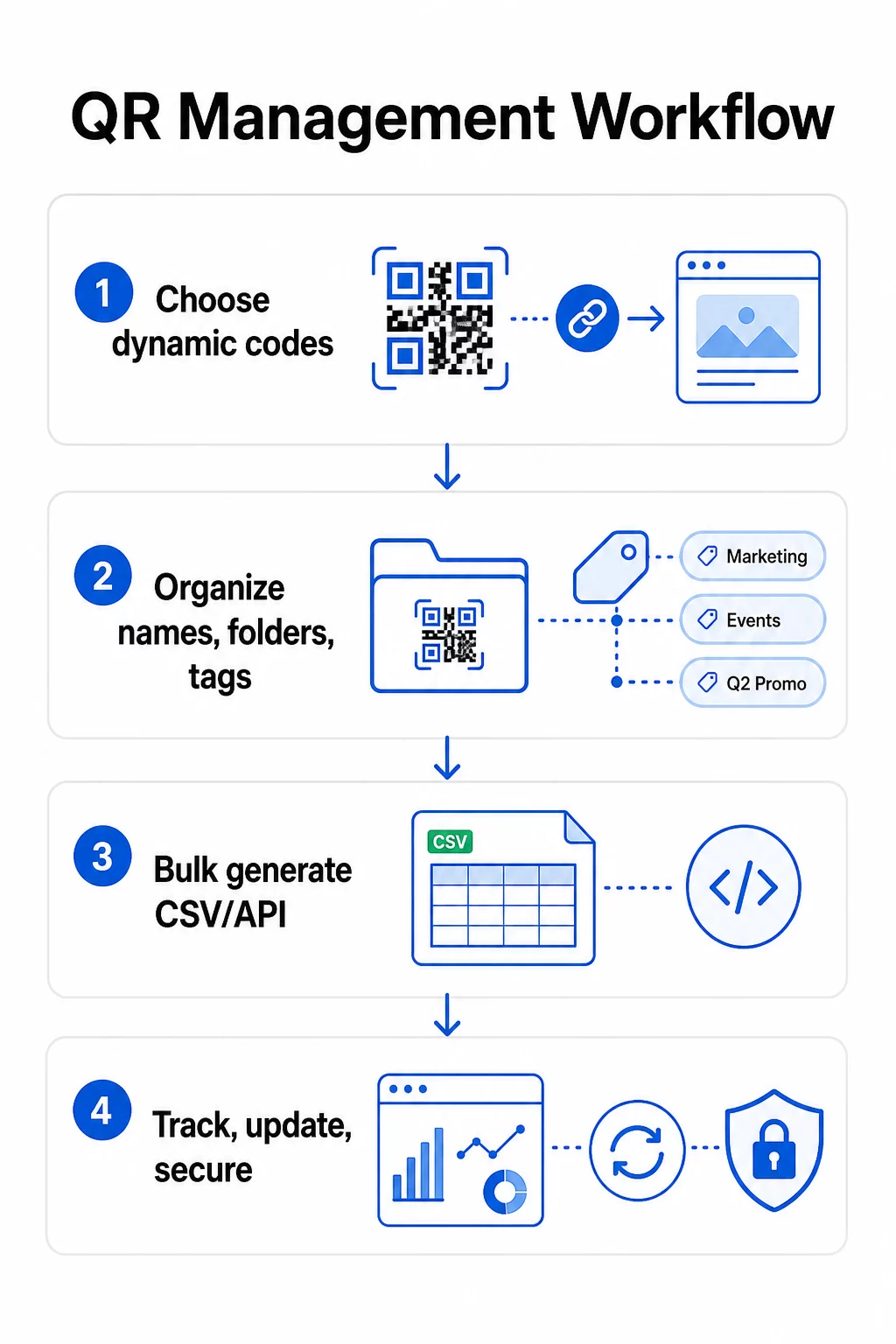
Gdy struktura nazewnictwa i folderów jest już ustalona, masowe tworzenie staje się proste – pod warunkiem, że dane wejściowe są czyste, a proces obejmuje etap walidacji przed generowaniem w dużej ilości.
Użyj plików CSV do generowania wsadowego
Masowe generowanie oparte na plikach CSV to najbardziej praktyczna metoda efektywnego tworzenia dużych ilości kodów. Dobrze ustrukturyzowany plik CSV do generowania kodów QR powinien zawierać:
- `unique_id` – Twój wewnętrzny identyfikator
- `qr_type` – URL, PDF, vCard, formularz itp.
- `destination_url` – docelowy adres
- `campaign_name` – do raportowania i filtrowania
- `folder` – gdzie kod powinien znajdować się w Twoim panelu
- `template_name` – markowy projekt do zastosowania
- `utm_parameters` – źródło, medium, kampania, treść
- `startdate` / `enddate` – okno kampanii
- `status` – aktywny lub wstrzymany
- `owner` – odpowiedzialny członek zespołu
Przed przesłaniem, zweryfikuj plik CSV: upewnij się, że wszystkie wymagane pola są wypełnione, sprawdź, czy adresy URL są aktywne i poprawnie sformatowane, oraz uruchom testową partię pięciu do dziesięciu kodów na różnych urządzeniach, aby wyłapać błędy, zanim rozprzestrzenią się na całą serię.
Do zautomatyzowanego generowania masowego na skalę korporacyjną, Zarządzanie kodami QR oparte na API pozwala programowo przekazywać parametry, wyzwalać tworzenie partii z własnych systemów oraz jednocześnie aktualizować docelowe adresy URL w tysiącach kodów za pomocą żądań PATCH lub PUT.
Dodawaj parametry UTM konsekwentnie
Parametry UTM to to, co łączy skany kodów QR z Twoim szerszym stosem analitycznym. Bez nich możesz zobaczyć, że ktoś zeskanował kod, ale nie możesz łatwo przypisać tego skanu do konkretnej kampanii, kanału lub miejsca w Google Analytics.
Postępuj zgodnie z tymi konwencjami, aby utrzymać swoje dane w czystości:
- Używaj małych liter wszędzie – śledzenie UTM jest wrażliwe na wielkość liter, a mieszana kapitalizacja tworzy fragmentaryczne raportowanie
- Utrzymuj wartości parametrów opisowe, ale zwięzłe: `utmsource=storedisplay`, `utmmedium=qrcode`, `utmcampaign=summersale_2025`
- Użyj `utmcontent`, aby rozróżnić miejsca docelowe w ramach tej samej kampanii (np. `windowposter` vs. `checkout_counter`)
- Udokumentuj swoją taksonomię nazewnictwa we wspólnym dokumencie referencyjnym, aby każdy członek zespołu przestrzegał tych samych zasad
Aby uzyskać pełny przewodnik po konfiguracji UTM i raportowaniu w Google Analytics 4, zobacz parametrów UTM dla kodów QR.
Połącz swoje skany QR z analityką kampanii Pageloot platforma dla agencji i zespołów obsługuje automatyczne dodawanie UTM, kontrolę dostępu opartą na rolach i udostępniane raporty klientów – co znacznie ułatwia śledzenie atrybucji w dużych wdrożeniach.
Zachowaj spójność marki w każdym kodzie
W dużej skali spójność wizualna ma znaczenie z dwóch powodów: buduje rozpoznawalność i zaufanie wśród osób skanujących Twoje kody oraz zapobiega rozmyciu tożsamości Twojej marki przez mozaikę niedopasowanych projektów.
Przed wygenerowaniem dużej partii, zdefiniuj i zablokuj swoje standardy projektowe:
- Umiejscowienie logo i minimalny rozmiar
- Paleta kolorów marki (ciemny pierwszy plan na jasnym tle pozostaje najbardziej niezawodnym wzorcem do skanowania)
- Styl narożników i modułów
- Wymagania dotyczące strefy ciszy (co najmniej cztery moduły wolnej przestrzeni ze wszystkich stron)
- Minimalny rozmiar wydruku (co najmniej 2 × 2 cm do skanowania z bliskiej odległości; skaluj w górę, stosując zasadę 10:1 – szerokość kodu powinna wynosić co najmniej jedną dziesiątą oczekiwanej odległości skanowania)
- Formaty plików: SVG lub PDF dla materiałów drukowanych (300+ DPI), PNG do użytku cyfrowego
Dynamiczne kody QR oferują tutaj praktyczną przewagę: ponieważ kodują krótki adres URL przekierowania, a nie długi cel, podstawowy wzór jest mniej gęsty. To pozostawia więcej miejsca na włączenie logo i niestandardowych kolorów bez pogarszania skanowalności.
Zapisz te standardy jako szablony marki wielokrotnego użytku na swojej platformie kodów QR. Pageloot umożliwia tworzenie szablonów dla różnych kontekstów – kompaktowy format dla wizytówek, odważniejsza wersja dla oznakowania wielkoformatowego – i stosowanie ich konsekwentnie w każdym masowym generowaniu.
Przed zatwierdzeniem dużego nakładu druku, przetestuj próbkę fizycznych wydruków na wielu urządzeniach i w różnych warunkach oświetleniowych. Jeśli którykolwiek z kodów nie skanuje się niezawodnie, zwiększ rozmiar fizyczny, wzmocnij kontrast kolorów lub poszerz strefę ciszy.
Śledź wydajność za pomocą odpowiednich metryk
Efektywne generowanie kodów to tylko połowa sukcesu. Zrozumienie, jak działają – i działanie na podstawie tych danych – jest tym, co napędza ciągłe doskonalenie.
Kluczowe metryki do monitorowania dla wdrożeń na dużą skalę to:
- Całkowita liczba skanów i unikalne skany: Całkowita liczba skanów pokazuje ogólne zaangażowanie; unikalne skany ujawniają Twój rzeczywisty zasięg. Wysoki stosunek całkowitej liczby skanów do unikalnych skanów może wskazywać na silne powtarzające się zaangażowanie lub, w niektórych przypadkach, na słabo zoptymalizowaną stronę docelową, która skłania użytkowników do wielokrotnego skanowania.
- Rozkład geograficzny: Analityka Pageloot dostarcza danych o skanach opartych na lokalizacji, z dokładnością do poziomu miasta. Użyj tego, aby zidentyfikować, które regiony lub miejsca osiągają lepsze wyniki niż inne i odpowiednio przydzielić zasoby.
- Urządzenie i system operacyjny: Jeśli większość Twoich skanów pochodzi z określonego typu urządzenia, priorytetowo traktuj testowanie swoich stron docelowych na tej platformie. Optymalizacja pod kątem urządzeń mobilnych jest kluczowa dla większości kampanii opartych na kodach QR.
- Trendy czasowe: Dane o skanach w czasie ujawniają szczytowe okresy zaangażowania. W przypadku kampanii wrażliwych na czas – promocji detalicznych, wydarzeń – dane te pomagają zaplanować zmiany treści w odpowiednim momencie.
- Śledzenie konwersji: Sama liczba skanów nie wskazuje na sukces kampanii. Ustaw jasne cele końcowe (przesłanie formularzy, zakupy, pobrania aplikacji) i użyj danych UTM oraz swojej platformy analitycznej, aby zmierzyć, czy skany prowadzą do pożądanych działań.
Aby uzyskać szczegółowe podejście do tworzenia widoków raportowania wokół tych metryk, zobacz przewodnik dotyczący korzystania z pulpitu nawigacyjnego analityki kodów QR.
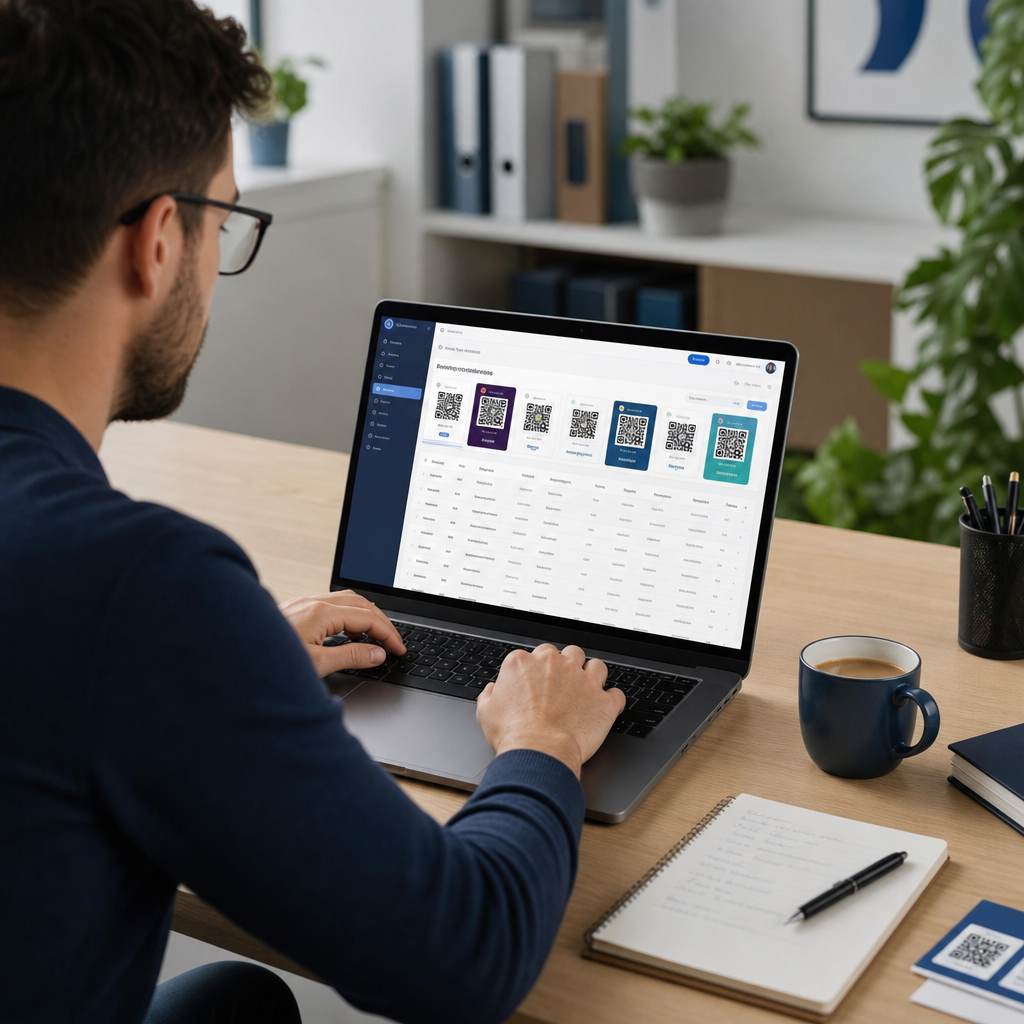
Twórz pulpity nawigacyjne, które ujawniają praktyczne spostrzeżenia
Surowe dane skanowania z setek kodów stają się nieporęczne bez ustrukturyzowanych widoków. Zorganizuj swoje raportowanie w:
- Pulpity nawigacyjne na poziomie kampanii: Porównaj wydajność aktywnych kampanii, filtrując według okresu. Śledź koszt za skan, współczynnik konwersji i ROI w porównaniu z benchmarkami kampanii.
- Widoki oparte na lokalizacji: Mapuj rozkład skanów geograficznie, aby zidentyfikować najlepiej działające miejsca i podejmować świadome decyzje dotyczące przyszłych wdrożeń.
- Segmentacja odbiorców: Grupuj użytkowników według typu urządzenia, częstotliwości skanowania lub wzorców zachowań, aby dostosować treści uzupełniające.
Skonfiguruj automatyczne alerty dla znaczących odchyleń – nagły wzrost liczby skanów z nietypowego źródła geograficznego może wskazywać na uszkodzone przekierowanie lub oszukańczą aktywność, podczas gdy gwałtowny spadek może sygnalizować uszkodzony link wymagający natychmiastowej uwagi.
Aktualizuj i utrzymuj kody bez ponownego drukowania
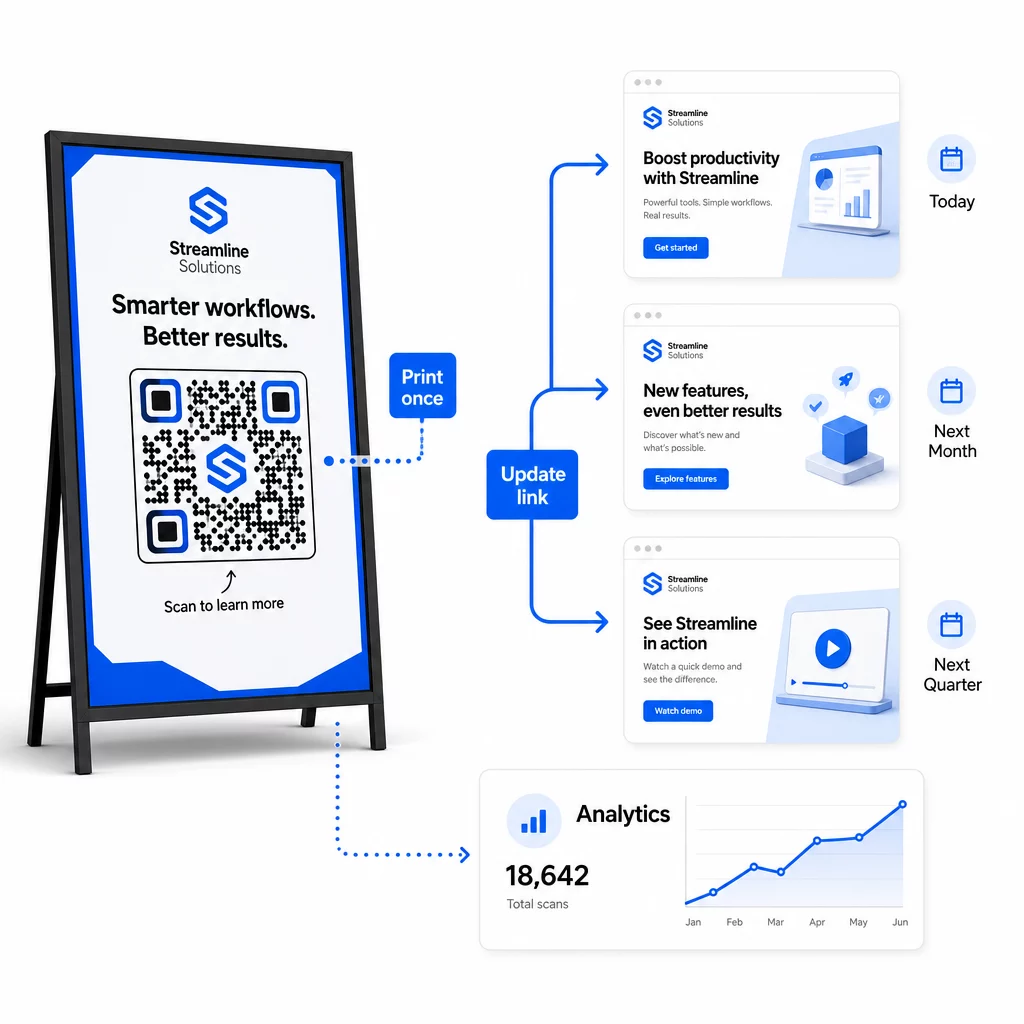
Jedną z kluczowych zalet operacyjnych dynamicznych kodów QR jest możliwość edytowania docelowych adresów URL po wydrukowaniu – bez nowych kodów, bez nowych serii wydruków, bez przerw w działaniu aktywnych materiałów. Na dużą skalę ta funkcja staje się niezbędna.
Wprowadź kontrolę wersji dla zmian docelowych
Za każdym razem, gdy aktualizujesz miejsce docelowe dynamicznego kodu QR, rejestruj zmianę, podając:
- Data i godzina aktualizacji
- Poprzedni docelowy adres URL
- Nowy docelowy adres URL
- Powód zmiany
- Kto to autoryzował
Użyj schematu wersjonowania – v1.0 dla początkowego uruchomienia, v1.1 dla drobnych korekt, v2.0 dla znaczącej zmiany miejsca docelowego – aby Twój zespół zawsze wiedział, która wersja jest aktywna i mógł przywrócić poprzednią, jeśli coś się zepsuje. W przypadku zespołów z wieloma współtwórcami, uprawnienia oparte na rolach zapewniają, że tylko autoryzowani użytkownicy mogą wprowadzać zmiany w aktywnych kodach.
Automatyzuj przekierowania oparte na czasie
W przypadku kampanii z przewidywalnymi harmonogramami treści, przekierowania czasowe eliminują potrzebę ręcznej interwencji. Restauracja może serwować menu śniadaniowe, obiadowe i kolacyjne z jednego wydrukowanego kodu QR, planując zmiany miejsca docelowego o ustalonych godzinach. Sprzedawca detaliczny może skonfigurować kod tak, aby przekierowywał do strony promocyjnej w okresie wyprzedaży i automatycznie wracał do standardowej strony produktu po zakończeniu promocji.
To podejście jest szczególnie cenne, gdy kody QR są drukowane na materiałach o długim czasie realizacji. Możesz sfinalizować fizyczną produkcję z dużym wyprzedzeniem, mając pewność, że kod będzie wyświetlał właściwą treść, gdy kampania zostanie uruchomiona.
Monitoruj linki automatycznie
Na dużą skalę ręczne sprawdzanie, czy każdy docelowy adres URL jest aktywny, nie jest praktyczne. Skonfiguruj automatyczne monitorowanie linków, aby powiadomić swój zespół, gdy miejsce docelowe zwróci błąd, dzięki czemu możesz przekierować skany na zapasowy adres URL, zanim użytkownicy napotkają niedziałające doświadczenie. Dokumentowanie zapasowych adresów URL w metadanych – jak opisano w sekcji dotyczącej konwencji nazewnictwa powyżej – oznacza, że Twój zespół zawsze ma gotowe rozwiązanie awaryjne.
Zabezpiecz swój program kodów QR w miarę jego rozwoju
Efektywność operacyjna na dużą skalę wymaga zarządzania – jasnej własności, odpowiednich kontroli dostępu i proaktywnego monitorowania w celu ochrony danych i użytkowników.
Kontrola dostępu oparta na rolach jest podstawą bezpiecznego, dobrze zarządzanego programu kodów QR. Przypisz uprawnienia odpowiadające obowiązkom każdego członka zespołu: osoby przeglądające analitykę mogą widzieć dane skanowania, ale nie edytować kodów; menedżerowie kampanii mogą aktualizować miejsca docelowe, ale nie usuwać kodów; administratorzy mają pełny dostęp. Ta struktura zapobiega przypadkowym lub nieautoryzowanym zmianom, jednocześnie umożliwiając współpracę w dużych zespołach.
Dla przedsiębiorstw zarządzających kodami QR w wielu działach, Pageloot obsługuje kontrole dostępu na poziomie obszaru roboczego i udostępnianie folderów zespołowych, umożliwiając zdecentralizowanym zespołom zarządzanie własnymi kodami bez wglądu w kampanie innych grup.
Poza kontrolą dostępu, zwracaj uwagę na anomalne wzorce skanowania – nieoczekiwane skoki wolumenu, wysokie koncentracje skanów z jednego zakresu adresów IP lub rozkłady geograficzne niezgodne z rozmieszczeniem Twoich kampanii. Te wzorce mogą wskazywać na aktywność botów lub inne oszukańcze skanowanie, które mogłoby zepsuć Twoje dane analityczne. Zautomatyzowane monitorowanie, które wcześnie wykrywa te wzorce, chroni zarówno integralność Twoich danych, jak i wgląd w wydajność kampanii.
Prowadź dziennik audytu wszystkich zmian w aktywnych kodach: kto, co, kiedy i dlaczego zmienił. Gdy pojawi się problem z kampanią, ten zapis jest najszybszą drogą do diagnozy i rozwiązania.
Najczęściej zadawane pytania
Dynamiczne kody QR pozwalają aktualizować docelowy adres URL lub zawartość po wydrukowaniu kodu, bez generowania lub ponownego drukowania czegokolwiek. Na dużą skalę oznacza to, że możesz poprawiać uszkodzone linki, aktualizować sezonowe promocje lub przekierowywać użytkowników do nowych treści na tysiącach wdrożonych kodów z jednego pulpitu nawigacyjnego – eliminując koszty ponownego drukowania i przestoje operacyjne.
Używaj małych liter konsekwentnie, zachowuj wartości opisowe i zwięzłe oraz standaryzuj strukturę parametrów w udostępnionym dokumencie referencyjnym. Niezawodny wzorzec to: `utmsource` dla konkretnego miejsca docelowego (np. `storedisplay`), `utmmedium=qrcode` konsekwentnie we wszystkich kodach, `utmcampaign` dla nazwy kampanii z datą (np. `summersale2025`) oraz `utmcontent` do rozróżniania poszczególnych miejsc docelowych w ramach tej samej kampanii. Unikaj wewnętrznych linków UTM i przeprowadzaj przedpremierowe testy QA, aby potwierdzić, że wszystkie parametry są prawidłowo przekazywane do Twojej platformy analitycznej.
Zdefiniuj swoje standardy projektowe – umiejscowienie logo, kolory marki, rozmiar strefy ciszy, minimalne wymiary druku i formaty plików – przed wygenerowaniem jakiejkolwiek partii, a następnie zapisz je jako szablony marki wielokrotnego użytku na swojej platformie kodów QR. Zastosuj ten sam szablon do każdego kodu w ramach partii. Dynamiczne kody QR ułatwiają to, ponieważ ich krótsze zakodowane dane tworzą mniej gęste wzory, pozostawiając więcej miejsca na logo i niestandardowe kolory bez pogarszania skanowalności.