ホーム > ユースケース > QR Codes on Luggage Tags: How They Work and Why They Help
Scanning luggage QR tag

QR Codes on Luggage Tags: How They Work and Why They Help

Protect your personal data and recover lost bags by using QR codes on luggage tags. Learn how vCard and dynamic codes keep your contact details secure and
Updated on 7月 2, 2026
目次

Ever wondered what happens to your bag if it gets separated from you at the airport? With a standard paper tag, a stranger has to read your personal details out loud just to return it. A QR code on your luggage tag changes that equation entirely, letting anyone with a smartphone contact you without exposing your private information to every passerby in the terminal.

Why Standard Luggage Tags Fall Short

U.S. reporting carriers posted a mishandled baggage rate of 0.55% in 2024, which sounds small until you consider the sheer volume of checked bags handled every day. Lost, delayed, or damaged bags are a routine travel headache, and the first line of defense is a legible, useful luggage tag.

The problem with traditional tags is the privacy tradeoff. Travel experts consistently advise against listing your home address on an external tag, since it signals to anyone watching that your house is empty. They also warn against including sensitive identifiers like passport numbers or driver’s license numbers. Yet the tag still needs enough detail that a finder or airline agent can actually reach you.

Most travelers end up with an uncomfortable compromise: too much information exposed, or not enough to be useful.

How a QR Code Solves the Problem

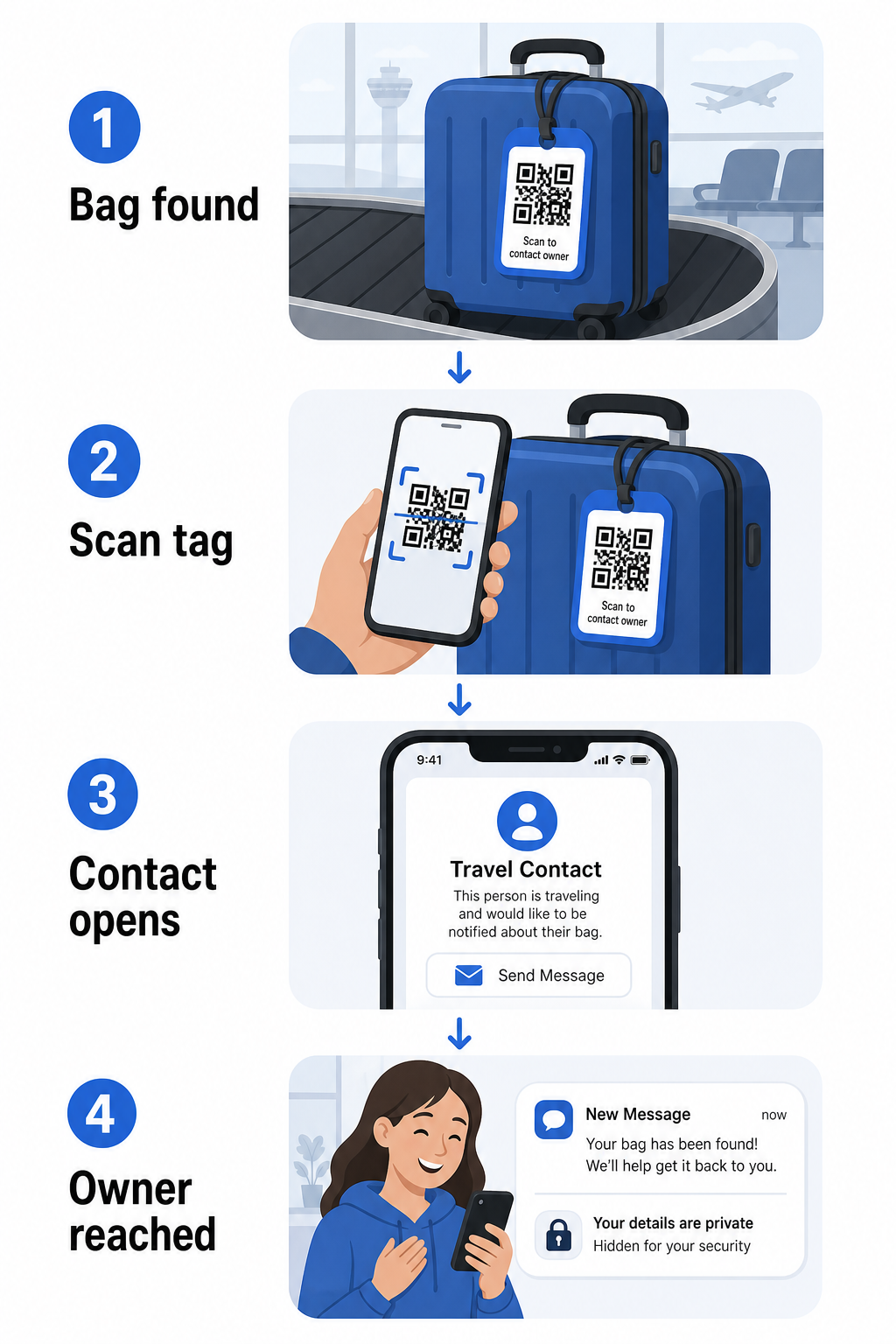
A QR code on a luggage tag works as a privacy layer between your contact details and the public. Instead of printing your phone number and email in large text for anyone to read while your bag rides a carousel, you encode that information into a scannable pattern. A finder scans the code, lands on a contact page or pre-filled message, and reaches you – without ever seeing your raw personal data displayed in the open.

QR luggage privacy flow

There are a few formats worth considering, depending on how much information you want to share:

  • vカードQRコード: Encodes your name, phone number, and email in vCard format. When scanned, the finder’s phone prompts them to save your contact details directly to their address book using the vCard QRコードジェネレータ. No typing required, and no visible personal data on the tag itself.
  • EメールQRコード: Opens a pre-filled email addressed to you when scanned. The finder simply hits send. You can set this up with the 電子メールQRコードジェネレーター and keep your actual address hidden from plain sight.
  • リンクQRコード: Directs the finder to a webpage you control – a simple contact form or a page with your travel details. Use the リンクQRコードジェネレーター to point the code at any URL you choose.

Each approach keeps your contact details functional for recovery purposes while reducing what any random observer can read off your tag in a busy terminal.

Create a Privacy-Friendly Luggage Tag QR Code Ready to set up a QR code that protects your details while keeping your bag findable? Use the QRコードジェネレーター to get started – free, with no technical knowledge required.

What Information to Include (and What to Leave Out)

Travel experts recommend keeping luggage tag information minimal but effective. The practical consensus is:

  • 含む: Your full name, a mobile phone number with country code if traveling internationally, and an email address
  • Skip: Your home address (use a work address or PO box if an address feels necessary), passport numbers, government ID numbers, and home landline numbers
  • Consider: A travel-specific email address rather than your primary personal account, so that any unwanted contact stays contained

A QR code approach makes this guidance easier to follow. You encode only what is necessary, and you control the contact method the finder uses – whether that’s an email form, a vCard save, or a contact page.

Multiple travel sources also recommend placing backup contact information inside your bag, so the bag can still be identified if the external tag is lost or damaged. A QR code tag combined with an internal paper card gives you the best coverage on both fronts.

Why a Dynamic QR Code Is Worth Using

ダイナミックQRコード has one significant advantage over a static one for luggage tag use: you can update the destination without reprinting the tag.

Dynamic QR codes work through a permanent short redirect URL. The QR code itself never changes, but the page it points to can be updated anytime from your dashboard. This means if your phone number changes, you get a new email address, or you want to swap a vCard for a contact form, you update the destination – and every scan of the same physical tag reaches the new information.

For a luggage tag you use year after year, this flexibility is practical. You print the tag once and maintain control of the contact details it surfaces indefinitely.

Dynamic codes also let you monitor scan activity. If your bag goes missing and someone scans your tag, you can see that a scan occurred, when, and in what location – useful context when coordinating with an airline. To understand the broader role QR codes play in air travel, the airlines and airports overview covers how carriers are using them across the passenger journey, including baggage tracking.

Keep Your Tag Current Without Reprinting を使用しています。 ダイナミックQRコードジェネレーター to create a luggage tag QR code you can update anytime – change your contact details or destination URL without touching the physical tag.

Printing Your QR Code Tag: Size and Format

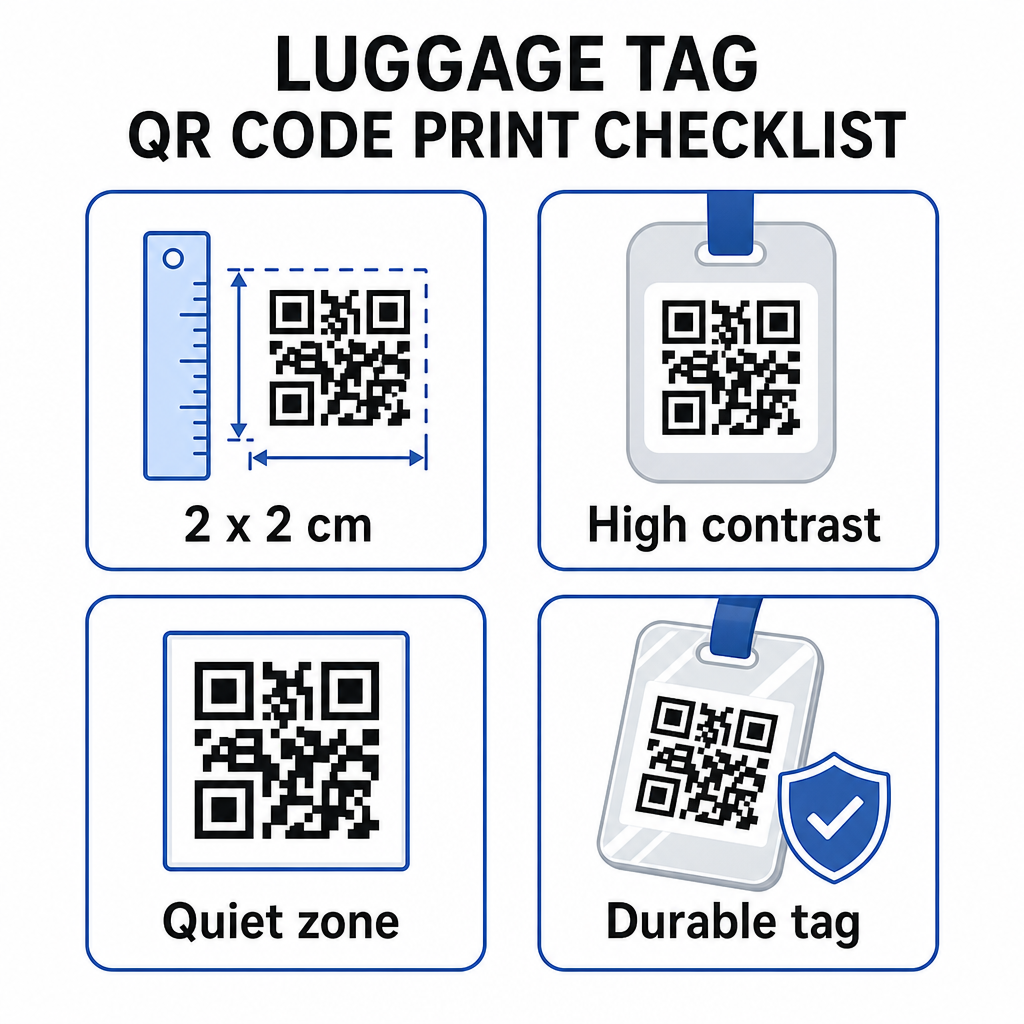
A QR code that can’t be scanned defeats the purpose. A few practical guidelines apply when printing for a luggage tag:

Printable QR tag tips
  • Minimum size: Aim for at least 2 × 2 cm (roughly 0.8 × 0.8 inches). Smaller than this and scanning reliability drops, especially in poor lighting. See the 印刷物用QRコードサイズガイド for surface-specific recommendations.
  • File format: PNG works well for small print sizes. For a laminated or professionally printed tag, SVG or PDF exports give sharper edges at any size.
  • コントラスト: Use a dark pattern on a light background. Low contrast is one of the most common reasons QR codes fail to scan.
  • Quiet zone: Leave a clear border around the code – at least four modules wide on all sides – so a scanner can distinguish the code from surrounding graphics or text.
  • Error correction: Higher error correction levels allow the code to remain scannable even if part of it is scratched or worn, which matters for a tag that sees heavy use across multiple trips.

For step-by-step guidance on preparing a QR code for physical labels, the guide to printing QR codes on labels covers the process in detail.

Keeping Your Personal Data Private

Placing any contact information on a public-facing tag involves some privacy consideration. A few practices reduce that risk when using QR codes:

  • Use a contact form or vCard rather than encoding a raw phone number as plain text, so the information isn’t immediately visible to anyone who inspects the code’s content
  • Choose a travel-specific email address for the tag so your primary account stays separate from any luggage-related contact
  • If using a dynamic code, you can deactivate or redirect the link if you want to retire a tag or change how finders reach you
  • Encode only what is necessary for bag recovery – your name and one contact method is sufficient

For a deeper look at managing privacy when using QR codes, the QR code privacy risks guide そして 安全なQRコード生成のベストプラクティス cover the key considerations. For broader context on how QR codes are reshaping the travel experience overall, how QR codes improve travel experiences is a useful reference.

A QR code luggage tag is a straightforward upgrade over a printed tag: it keeps your contact information functional for anyone who needs to return your bag while shielding those details from casual observation. Use a dynamic code so you can keep the tag current across multiple trips, size it correctly for reliable scanning, and encode only the contact method you want finders to use.

Build Your Luggage Tag QR Code Today Set up a vCard, email, or link QR code for your luggage in minutes. Start with the Pageloot QRコードジェネレータ – free trial, no credit card required.

よくある質問

What type of QR code is best for a luggage tag?

A vCard QR code is a practical choice because it lets the finder save your contact details directly to their phone with one tap. If you prefer more control over what information is shared, a link QR code pointing to a simple contact form works well too. Dynamic versions of either allow you to update the destination without reprinting the tag.

Can someone steal my personal information by scanning my luggage tag QR code?

A well-configured QR code on a luggage tag shares only what you choose to encode – typically a name, phone number, or email address. Avoid encoding sensitive identifiers like passport or ID numbers. Using a contact form page rather than raw personal data adds another layer of separation, and following QR code privacy best practices ensures your setup limits unnecessary exposure.

Do I need to reprint my luggage tag if my contact details change?

Not if you use a dynamic QR code. Dynamic codes point to a redirect URL that you can update anytime from your Pageloot dashboard. The physical tag stays the same, but the contact information it surfaces can be changed whenever you need – making it a practical long-term solution for frequent travelers.

著者について

Siim KostabiはPagelootのコンテンツリードです。Pagelootの革新的なQRコード生成サービスについて執筆しています。5年以上にわたるQRコードに関する深い専門知識を持つSiimは、この分野の専門家です。QRテクノロジーを活用してデジタルインタラクションを簡素化・拡張する上で、大きな進歩を遂げています。.

カテゴリー
について詳しくはこちら
Supporter scanning donation QR
のQRコード 非営利団体
✅ QRコードの#1ソリューション

オンラインでQRコードを作成する必要がある場合は QRコードを作る ここで無料で
ページルートは #1のGo-Toソリューション でQRコードを作成してスキャンすることができます。

BL-0305

ブログジェネ

売上、レビュー、フォロワーを増やすために 20,000 を超えるブランドから信頼されています。

クライアントのロゴ
トップブランドから信頼される
5 のうち 4.8 と評価しました

4.86 / 5つ星評価

ユーゴ・ローラン
ユーゴ・ローラン
レストランオーナー
最も簡単で信頼性の高いQRコードジェネレータです。PDFファイルを即座にアップロードできます。レストランのメニューがデジタル化されました。
ルーカス・ジャンセン
ルーカス・ジャンセン
不動産開発業者
これは優れたツールで、QRコードでちょうど欲しいところに連れて行ってくれます。私たちは位置情報のQRコードしか使っていませんが、とても便利な機能がたくさんあります。
エマ・モレッティ
エマ・モレッティ
小売製品
使いやすいし、早い。素晴らしい機能で、完璧な画像を作成してくれるので、社員は私のvCardをダウンロードすることができます。
ユーゴ・ローラン
ユーゴ・ローラン
レストランオーナー
最も簡単で信頼性の高いQRコードジェネレータです。PDFファイルを即座にアップロードできます。レストランのメニューがデジタル化されました。
ルーカス・ジャンセン
ルーカス・ジャンセン
不動産開発業者
これは優れたツールで、QRコードでちょうど欲しいところに連れて行ってくれます。私たちは位置情報のQRコードしか使っていませんが、とても便利な機能がたくさんあります。
エマ・モレッティ
エマ・モレッティ
小売製品
使いやすいし、早い。素晴らしい機能で、完璧な画像を作成してくれるので、社員は私のvCardをダウンロードすることができます。
QRコードをもっと見る
Customer scanning signup QR
どのように 電子メールを収集する
QRコードを使ったネットワーキング
のQRコードを作る 連絡先
あらゆるものをデジタル体験に変えよう 3分以内に。

14日間の無料トライアル。

クレジットカードは必要ありません。

初回購入で30%オフ

次のコードを使用してください:

MP3ファイルを共有

PDF QRコードを作成するにはサインアップしてください

必要なものをすべてアップロードして表示する。

  • オーディオファイル
  • ポッドキャスト
  • 音楽

サインアップで14日間無料トライアル。.
トライアル終了後、QRコードは期限切れになります。.

オーディオmp3 QRコードを作成するにはサインアップしてください

フレームでより多くのスキャンを獲得

QRコードにフレームを追加するにはサインアップしてください

コールトゥアクションフレームは、お客様が簡単にQRコードと対話できるようにします。ぜひお試しください。

サインアップで14日間無料トライアル。.
トライアル終了後、QRコードは期限切れになります。.

QRコードにフレームを追加するにはサインアップしてください

シェイプでスタイルを追加

より多くの図形を作成するにはサインアップしてください

QRコードは四角いものである必要はありません。あなたのブランドのイメージに合わせて変えてみてください。

サインアップで14日間無料トライアル。.
トライアル終了後、QRコードは期限切れになります。.

より多くの図形を作成するにはサインアップしてください

QRコードにロゴを追加

QRコードにロゴを追加するにはサインアップしてください

QRコードにロゴやブランドを入れることで、目立たせることができます。

サインアップで14日間無料トライアル。.
トライアル終了後、QRコードは期限切れになります。.

QRコードにロゴを追加するにはサインアップしてください

スマートなApp Storeリダイレクト

アプリストアのQRコードを作成するにはサインアップしてください

スマートなApp StoreのQRコードに、あなたのアプリのリンクを追加します。ユーザーは、デバイスに応じてリダイレクトされます。

サインアップで14日間無料トライアル。.
トライアル終了後、QRコードは期限切れになります。.

アプリストアのQRコードを作成するにはサインアップしてください

QRコードに画像をアップロード

画像QRコードを作成するにはサインアップしてください

画像を簡単に共有できます。どんな画像も、数秒でダイナミックに変化します。

サインアップで14日間無料トライアル。.
トライアル終了後、QRコードは期限切れになります。.

画像QRコードを作成するにはサインアップしてください

PDFファイルを共有

PDF QRコードを作成するにはサインアップしてください

必要なものをすべてアップロードして表示する。

  • メニュー&プライスリスト
  • 指示
  • 任意の書類

サインアップで14日間無料トライアル。.
トライアル終了後、QRコードは期限切れになります。.

PDF QRコードを作成するにはサインアップしてください

印刷せずに後で編集

再度印刷せずにQRコードを編集するにはサインアップしてください

ダイナミックQRコードは、新たにQRコードを印刷することなく、QRコードの内容を変更することができます。

サインアップで14日間無料トライアル。.
トライアル終了後、QRコードは期限切れになります。.

再度印刷せずにQRコードを編集するにはサインアップしてください

いつ?どこで?QRコードのスキャンを追跡

QRコードを追跡するにはサインアップしてください

どのQRコードが最も多くスキャンされ、何が最も顧客を喜ばせているのかを知ることができます。

サインアップで14日間無料トライアル。.
トライアル終了後、QRコードは期限切れになります。.

QRコードを追跡するにはサインアップしてください

印刷可能なファイルが利用可能

PDFやSVGのようなベクターQRコードを作成するにはサインアップしてください

.eps、.pdf、.svg

QRコードをHD解像度でダウンロードしたいですか?すぐに印刷できるベクターまたはピクセル形式を入手しましょう。

サインアップで14日間無料トライアル。.
トライアル終了後、QRコードは期限切れになります。.

PDFやSVGのようなベクターQRコードを作成するにはサインアップしてください

しばらくお待ちください。あなたのQRコードは ロード... ロード...

あなただけのものに

サインアップしてQRコードを後で保存してください

異なる色、ロゴ、コールトゥアクションフレームで素晴らしいQRコードを作成することで、より多くのスキャンを得ることができます。

サインアップで14日間無料トライアル。.
トライアル終了後、QRコードは期限切れになります。.

サインアップしてQRコードを後で保存してください