Har du någonsin undrat vad som händer med din väska om den kommer bort från dig på flygplatsen? Med en vanlig pappersetikett måste en främling läsa dina personliga uppgifter högt bara för att lämna tillbaka den. En QR-kod på din bagagetagg ändrar den ekvationen helt, vilket låter vem som helst med en smartphone kontakta dig utan att exponera din privata information för varje förbipasserande i terminalen.
Varför Standardbagagetaggar inte räcker till
Amerikanska rapporterande flygbolag rapporterade en frekvens av felhanterat bagage på 0,55% under 2024, vilket låter litet tills du överväger den enorma volymen incheckade väskor som hanteras varje dag. Förlorade, försenade eller skadade väskor är en rutinmässig resehuvudvärk, och den första försvarslinjen är en läsbar, användbar bagagetagg.
Problemet med traditionella taggar är avvägningen med integriteten. Reseexperter avråder konsekvent från att lista din hemadress på en extern tagg, eftersom det signalerar till alla som tittar att ditt hus är tomt. De varnar också för att inkludera känsliga identifierare som passnummer eller körkortsnummer. Ändå behöver taggen fortfarande tillräckligt med detaljer för att en upphittare eller flygbolagsagent faktiskt ska kunna nå dig.
De flesta resenärer hamnar i en obekväm kompromiss: för mycket information exponerad, eller inte tillräckligt för att vara användbar.
Hur en QR-kod löser problemet
En QR-kod på en bagagetagg fungerar som ett integritetslager mellan dina kontaktuppgifter och allmänheten. Istället för att skriva ut ditt telefonnummer och din e-postadress med stor text för vem som helst att läsa medan din väska åker på ett bagageband, kodar du den informationen till ett skanningsbart mönster. En upphittare skannar koden, hamnar på en kontaktsida eller ett förifyllt meddelande och når dig – utan att någonsin se dina råa personuppgifter visas öppet.
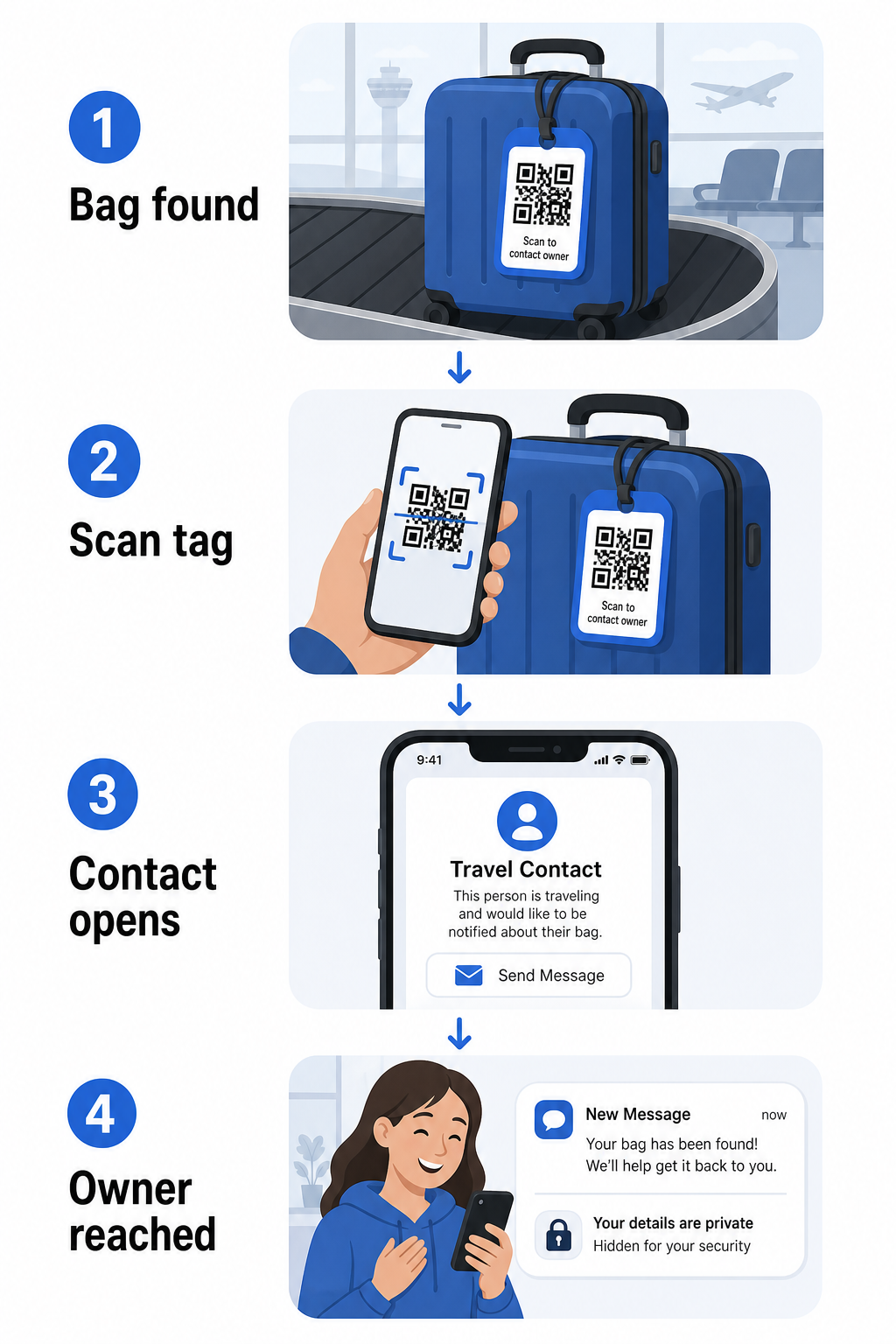
Det finns några format värda att överväga, beroende på hur mycket information du vill dela:
- vCard QR-kod: Kodar ditt namn, telefonnummer och e-postadress i vCard-format. När den skannas uppmanar upphittarens telefon dem att spara dina kontaktuppgifter direkt i deras adressbok med hjälp av vCard QR-kodgenerator. Ingen inmatning krävs, och inga synliga personuppgifter på själva taggen.
- QR-kod för e-post: Öppnar ett förifyllt e-postmeddelande adresserat till dig när det skannas. Upphittaren trycker helt enkelt på skicka. Du kan ställa in detta med QR-kodgenerator för e-post och hålla din faktiska adress dold från insyn.
- QR-kod för länk: Dirigerar upphittaren till en webbsida du kontrollerar – ett enkelt kontaktformulär eller en sida med dina resedetaljer. Använd länk-QR-kodgenerator för att peka koden mot vilken URL du vill.
Varje tillvägagångssätt håller dina kontaktuppgifter funktionella för återhämtningsändamål samtidigt som det minskar vad en slumpmässig observatör kan läsa från din tagg i en upptagen terminal.
Skapa en integritetsvänlig QR-kod för bagagetagg Redo att ställa in en QR-kod som skyddar dina uppgifter samtidigt som din väska förblir hittbar? Använd QR-kodgenerator för att komma igång – gratis, utan teknisk kunskap krävs.
Vilken information som ska inkluderas (och vad som ska utelämnas)
Reseexperter rekommenderar att bagagetaggsinformationen hålls minimal men effektiv. Det praktiska samförståndet är:
- Omfatta: Ditt fullständiga namn, ett mobiltelefonnummer med landskod om du reser internationellt, och en e-postadress
- Hoppa över: Din hemadress (använd en arbetsadress eller postbox om en adress känns nödvändig), passnummer, statliga ID-nummer och fasta telefonnummer hemma
- Överväg: En resespecifik e-postadress snarare än ditt primära personliga konto, så att oönskad kontakt hålls begränsad
Ett QR-kodtillvägagångssätt gör denna vägledning lättare att följa. Du kodar bara det som är nödvändigt, och du kontrollerar kontaktmetoden som upphittaren använder – vare sig det är ett e-postformulär, en vCard-sparning eller en kontaktsida.
Flera resekällor rekommenderar också att placera reservkontaktinformation inuti din väska, så att väskan fortfarande kan identifieras om den externa taggen förloras eller skadas. En QR-kodtagg kombinerad med ett internt papperskort ger dig den bästa täckningen på båda fronterna.
Varför en dynamisk QR-kod är värd att använda
A dynamisk QR-kod har en betydande fördel jämfört med en statisk för användning av bagagetagg: du kan uppdatera destinationen utan att skriva ut taggen igen.
Dynamiska QR-koder fungerar via en permanent kort omdirigerings-URL. QR-koden i sig ändras aldrig, men sidan den pekar på kan uppdateras när som helst från din instrumentpanel. Detta innebär att om ditt telefonnummer ändras, du får en ny e-postadress, eller du vill byta ut ett vCard mot ett kontaktformulär, uppdaterar du destinationen – och varje skanning av samma fysiska tagg når den nya informationen.
För en bagagetagg du använder år efter år är denna flexibilitet praktisk. Du skriver ut taggen en gång och behåller kontrollen över de kontaktuppgifter den visar på obestämd tid.
Dynamiska koder låter dig också övervaka skanningsaktivitet. Om din väska försvinner och någon skannar din tagg, kan du se att en skanning ägde rum, när och på vilken plats – användbar kontext vid samordning med ett flygbolag. För att förstå den bredare roll QR-koder spelar i flygresor, den översikt över flygbolag och flygplatser beskriver hur flygbolag använder dem under hela passagerarresan, inklusive bagagespårning.
Håll Din Tagg Uppdaterad Utan Att Skriva Ut Igen Använd Dynamisk QR-kodgenerator för att skapa en QR-kod för bagagetagg som du kan uppdatera när som helst – ändra dina kontaktuppgifter eller destinations-URL utan att röra den fysiska taggen.
Skriva ut Din QR-kodtagg: Storlek och Format
En QR-kod som inte kan skannas förfelar syftet. Några praktiska riktlinjer gäller vid utskrift för en bagagetagg:
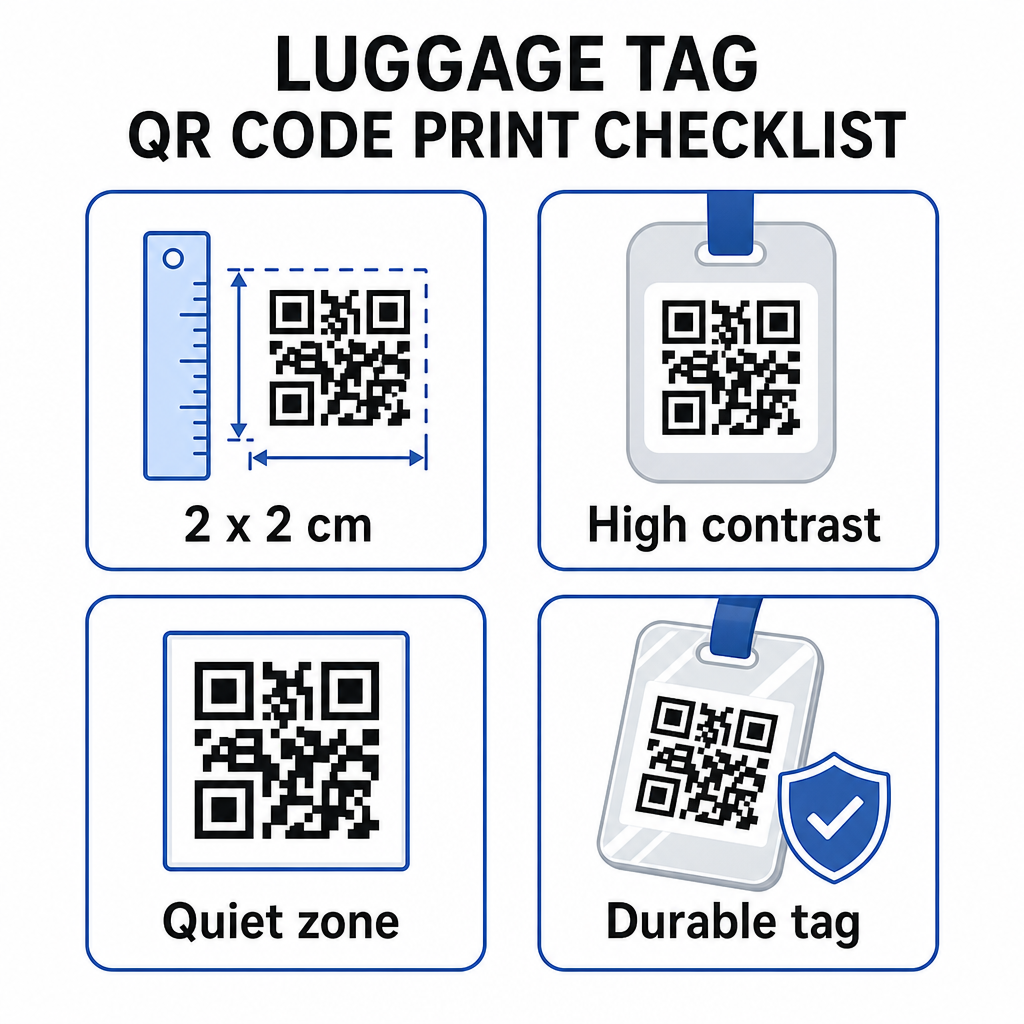
- Minsta storlek: Sikta på minst 2 × 2 cm (ungefär 0,8 × 0,8 tum). Mindre än så här och skanningspålitligheten minskar, särskilt i dålig belysning. Se den storleksguide för QR-koder för tryckmaterial för ytspecifika rekommendationer.
- Filformat: PNG fungerar bra för små utskriftsstorlekar. För en laminerad eller professionellt tryckt tagg, ger SVG- eller PDF-exporter skarpare kanter i alla storlekar.
- Kontrast: Använd ett mörkt mönster på en ljus bakgrund. Låg kontrast är en av de vanligaste anledningarna till att QR-koder misslyckas med att skannas.
- Tyst zon: Lämna en tydlig kant runt koden – minst fyra moduler bred på alla sidor – så att en skanner kan skilja koden från omgivande grafik eller text.
- Felkorrigering: Högre felkorrigeringsnivåer gör att koden förblir skanningsbar även om en del av den är repad eller sliten, vilket är viktigt för en tagg som används flitigt under flera resor.
För steg-för-steg-vägledning om hur man förbereder en QR-kod för fysiska etiketter, den guide för att skriva ut QR-koder på etiketter beskriver processen i detalj.
Hålla Dina Personuppgifter Privata
Att placera kontaktinformation på en offentlig tagg innebär vissa integritetsöverväganden. Några metoder minskar den risken när du använder QR-koder:
- Använd ett kontaktformulär eller vCard istället för att koda ett rått telefonnummer som vanlig text, så att informationen inte omedelbart är synlig för någon som granskar kodens innehåll
- Välj en resespecifik e-postadress för taggen så att ditt primära konto förblir separat från all bagagerelaterad kontakt
- Om du använder en dynamisk kod, kan du avaktivera eller omdirigera länken om du vill ta bort en tagg eller ändra hur upphittare når dig
- Koda endast det som är nödvändigt för bagageåterhämtning – ditt namn och en kontaktmetod är tillräckligt
För en djupare titt på att hantera integritet när du använder QR-koder, den guide för QR-kodens integritetsrisker och säkra bästa praxis för generering av QR-koder täcker de viktigaste övervägandena. För en bredare kontext om hur QR-koder omformar reseupplevelsen överlag, Så förbättrar QR-koder resupplevelsen en användbar referens.
En QR-kod bagagetagg är en enkel uppgradering jämfört med en tryckt tagg: den håller din kontaktinformation funktionell för alla som behöver returnera din väska samtidigt som den skyddar dessa detaljer från tillfällig observation. Använd en dynamisk kod så att du kan hålla taggen uppdaterad över flera resor, storleksanpassa den korrekt för pålitlig skanning, och koda endast den kontaktmetod du vill att upphittare ska använda.
Skapa Din Bagagetagg QR-kod Idag Ställ in ett vCard, e-post eller länk QR-kod för ditt bagage på några minuter. Börja med den Pageloot QR-kodgenerator – gratis provperiod, inget kreditkort krävs.
Vanliga frågor
En vCard QR-kod är ett praktiskt val eftersom den låter upphittaren spara dina kontaktuppgifter direkt till sin telefon med ett tryck. Om du föredrar mer kontroll över vilken information som delas, fungerar en länk-QR-kod som pekar på ett enkelt kontaktformulär också bra. Dynamiska versioner av båda låter dig uppdatera destinationen utan att trycka om taggen.
En välkonfigurerad QR-kod på en bagagetagg delar bara det du väljer att koda – vanligtvis ett namn, telefonnummer eller e-postadress. Undvik att koda känsliga identifierare som pass- eller ID-nummer. Att använda en kontaktsida snarare än råa personuppgifter lägger till ytterligare ett lager av separation, och att följa bästa praxis för QR-kodens integritet säkerställer att din inställning begränsar onödig exponering.
Inte om du använder en dynamisk QR-kod. Dynamiska koder pekar på en omdirigerings-URL som du kan uppdatera när som helst från din Pageloot-instrumentpanel. Den fysiska taggen förblir densamma, men kontaktinformationen den visar kan ändras när du behöver – vilket gör den till en praktisk långsiktig lösning för frekventa resenärer.