Už ste sa niekedy zamýšľali, čo sa stane s vašou batožinou, ak sa oddelí od vás na letisku? So štandardnou papierovou visačkou musí cudzinec nahlas prečítať vaše osobné údaje, len aby ju vrátil. QR kód na vašej batožinovej visačke úplne mení túto rovnicu, umožňuje komukoľvek so smartfónom kontaktovať vás bez toho, aby ste vystavili vaše súkromné informácie každému okoloidúcemu v termináli.
Prečo štandardné batožinové visačky zlyhávajú
Americkí vykazujúci dopravcovia zaznamenali mieru nesprávne vybavenej batožiny 0,55% v roku 2024, čo znie málo, kým nezvážite obrovský objem odbavenej batožiny, ktorá sa vybavuje každý deň. Stratené, oneskorené alebo poškodené batožiny sú bežnou cestovnou nepríjemnosťou a prvou líniou obrany je čitateľná, užitočná batožinová visačka.
Problém s tradičnými visačkami je kompromis v oblasti súkromia. Cestovní experti dôsledne radia neuvádzať vašu domácu adresu na externej visačke, pretože to signalizuje každému, kto sleduje, že váš dom je prázdny. Taktiež varujú pred zahrnutím citlivých identifikátorov, ako sú čísla pasov alebo čísla vodičských preukazov. Napriek tomu visačka stále potrebuje dostatok detailov, aby vás nálezca alebo agent leteckej spoločnosti mohol skutočne kontaktovať.
Väčšina cestujúcich skončí s nepríjemným kompromisom: príliš veľa odhalených informácií, alebo nedostatočné na to, aby boli užitočné.
Ako QR kód rieši problém
QR kód na batožinovej visačke funguje ako vrstva súkromia medzi vašimi kontaktnými údajmi a verejnosťou. Namiesto tlače vášho telefónneho čísla a e-mailu veľkým písmom pre kohokoľvek na prečítanie, zatiaľ čo vaša batožina jazdí na kolotoči, zakódujete tieto informácie do skenovateľného vzoru. Nálezca naskenuje kód, dostane sa na kontaktnú stránku alebo predvyplnenú správu a kontaktuje vás – bez toho, aby kedykoľvek videl vaše nespracované osobné údaje zobrazené verejne.
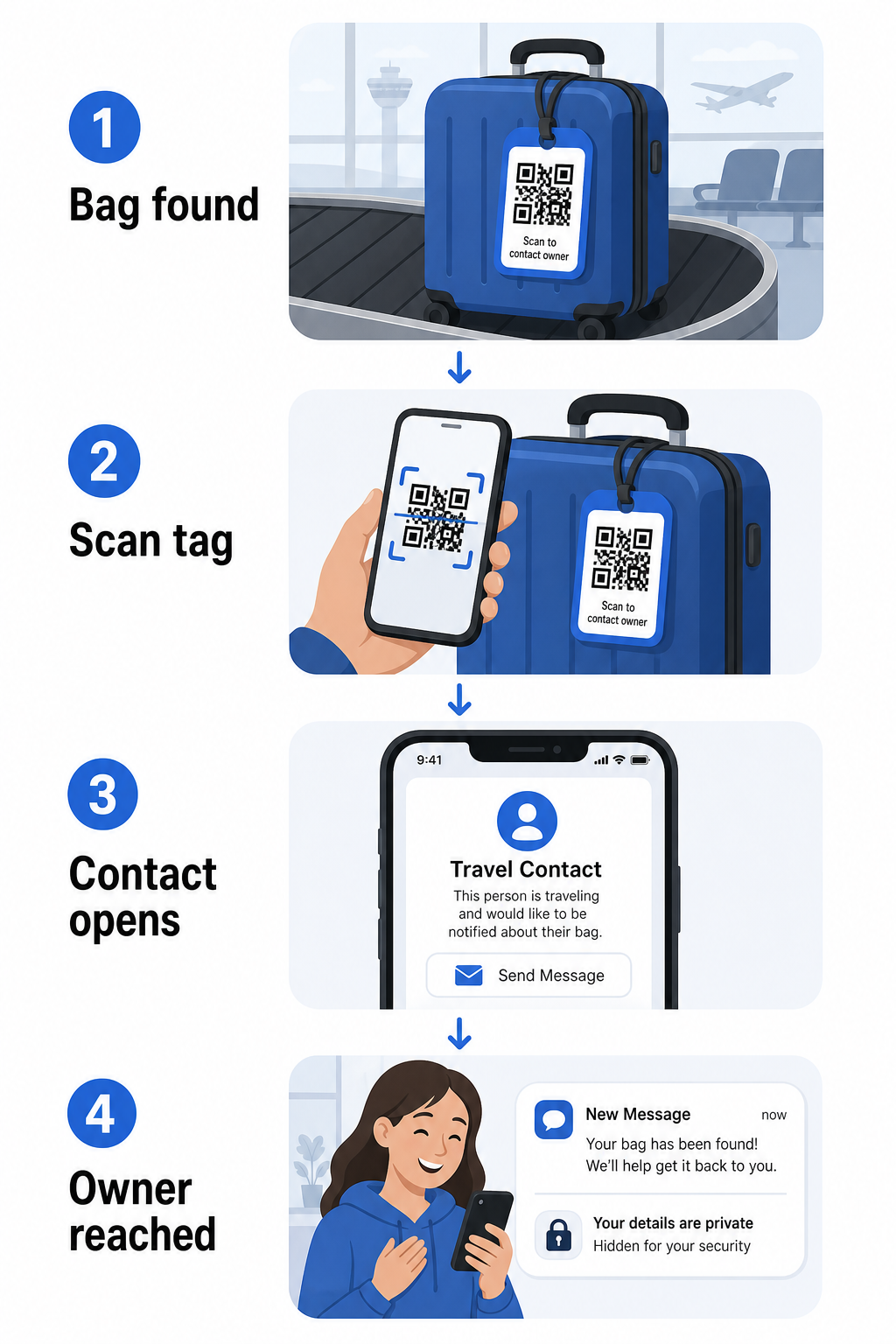
Existuje niekoľko formátov, ktoré stojí za to zvážiť, v závislosti od toho, koľko informácií chcete zdieľať:
- QR kód vCard: Zakóduje vaše meno, telefónne číslo a e-mail vo formáte vCard. Po naskenovaní telefón nálezcu vyzve, aby si uložil vaše kontaktné údaje priamo do svojho adresára pomocou QR vCard: generátor vCard QR kódu. Nevyžaduje sa žiadne písanie a žiadne viditeľné osobné údaje na samotnej visačke.
- E-mailový kód QR: Otvorí predvyplnený e-mail adresovaný vám po naskenovaní. Nálezca jednoducho stlačí odoslať. Môžete to nastaviť pomocou Generátor QR kódu pre e-mail a udržať vašu skutočnú adresu skrytú pred zrakmi verejnosti.
- QR kód odkazu: Nasměruje nálezcu na webovú stránku, ktorú ovládate – jednoduchý kontaktný formulár alebo stránku s vašimi cestovnými údajmi. Použite generátor QR kódov odkazov na nasmerovanie kódu na akúkoľvek URL adresu, ktorú si vyberiete.
Každý prístup udržuje vaše kontaktné údaje funkčné pre účely obnovy, zatiaľ čo znižuje to, čo si akýkoľvek náhodný pozorovateľ môže prečítať z vašej visačky v rušnom termináli.
Vytvorte QR kód batožinovej visačky šetrný k súkromiu Pripravení nastaviť QR kód, ktorý chráni vaše údaje, zatiaľ čo udržuje vašu batožinu nájditeľnou? Použite Generátor QR kódov na začiatok – zadarmo, bez potreby technických znalostí.
Aké informácie zahrnúť (a čo vynechať)
Cestovní experti odporúčajú udržiavať informácie na batožinovej visačke minimálne, ale efektívne. Praktický konsenzus je:
- Zahrnúť: Vaše celé meno, mobilné telefónne číslo s kódom krajiny, ak cestujete medzinárodne, a e-mailová adresa
- Vynechať: Vaša domáca adresa (použite pracovnú adresu alebo P.O. box, ak sa adresa zdá byť nevyhnutná), čísla pasov, čísla štátnych preukazov totožnosti a čísla pevných liniek
- Zvážiť: E-mailovú adresu špecifickú pre cestovanie namiesto vášho primárneho osobného účtu, aby akýkoľvek nechcený kontakt zostal obmedzený
Prístup s QR kódom uľahčuje dodržiavanie tohto usmernenia. Zakódujete len to, čo je potrebné, a vy kontrolujete metódu kontaktu, ktorú nálezca použije – či už je to e-mailový formulár, uloženie vCard alebo kontaktná stránka.
Viaceré cestovné zdroje tiež odporúčajú umiestniť záložné kontaktné informácie do vašej batožiny, aby bolo možné batožinu stále identifikovať, ak sa externá visačka stratí alebo poškodí. QR kód visačka v kombinácii s internou papierovou kartou vám poskytuje najlepšie pokrytie na oboch frontoch.
Prečo sa dynamický QR kód oplatí použiť
A dynamický QR kód má jednu významnú výhodu oproti statickému pre použitie na batožinovej visačke: môžete aktualizovať cieľ bez opätovnej tlače visačky.
Dynamické QR kódy fungujú prostredníctvom trvalej krátkej presmerovacej URL adresy. Samotný QR kód sa nikdy nemení, ale stránka, na ktorú odkazuje, môže byť kedykoľvek aktualizovaná z vášho ovládacieho panela. To znamená, že ak sa vaše telefónne číslo zmení, získate novú e-mailovú adresu, alebo chcete vymeniť vCard za kontaktný formulár, aktualizujete cieľ – a každé naskenovanie tej istej fyzickej visačky dosiahne nové informácie.
Pre batožinovú visačku, ktorú používate rok čo rok, je táto flexibilita praktická. Visačku vytlačíte raz a udržiavate kontrolu nad kontaktnými údajmi, ktoré zobrazuje, neobmedzene.
Dynamické kódy vám tiež umožňujú monitorovať aktivitu skenovania. Ak sa vaša batožina stratí a niekto naskenuje váš štítok, môžete vidieť, že skenovanie prebehlo, kedy a na akom mieste – užitočný kontext pri koordinácii s leteckou spoločnosťou. Aby ste pochopili širšiu úlohu, ktorú QR kódy zohrávajú v leteckej doprave, prehľad leteckých spoločností a letísk pokrýva, ako ich dopravcovia používajú počas celej cesty pasažiera, vrátane sledovania batožiny.
Udržujte Váš Štítok Aktuálny Bez Opätovnej Tlače Použi Dynamický QR kód generátor na vytvorenie QR kódu pre batožinový štítok, ktorý môžete kedykoľvek aktualizovať – zmeňte vaše kontaktné údaje alebo cieľovú URL adresu bez dotyku fyzického štítku.
Tlač Vášho QR Kód Štítku: Veľkosť a Formát
QR kód, ktorý sa nedá naskenovať, stráca zmysel. Pri tlači pre batožinový štítok platí niekoľko praktických pokynov:
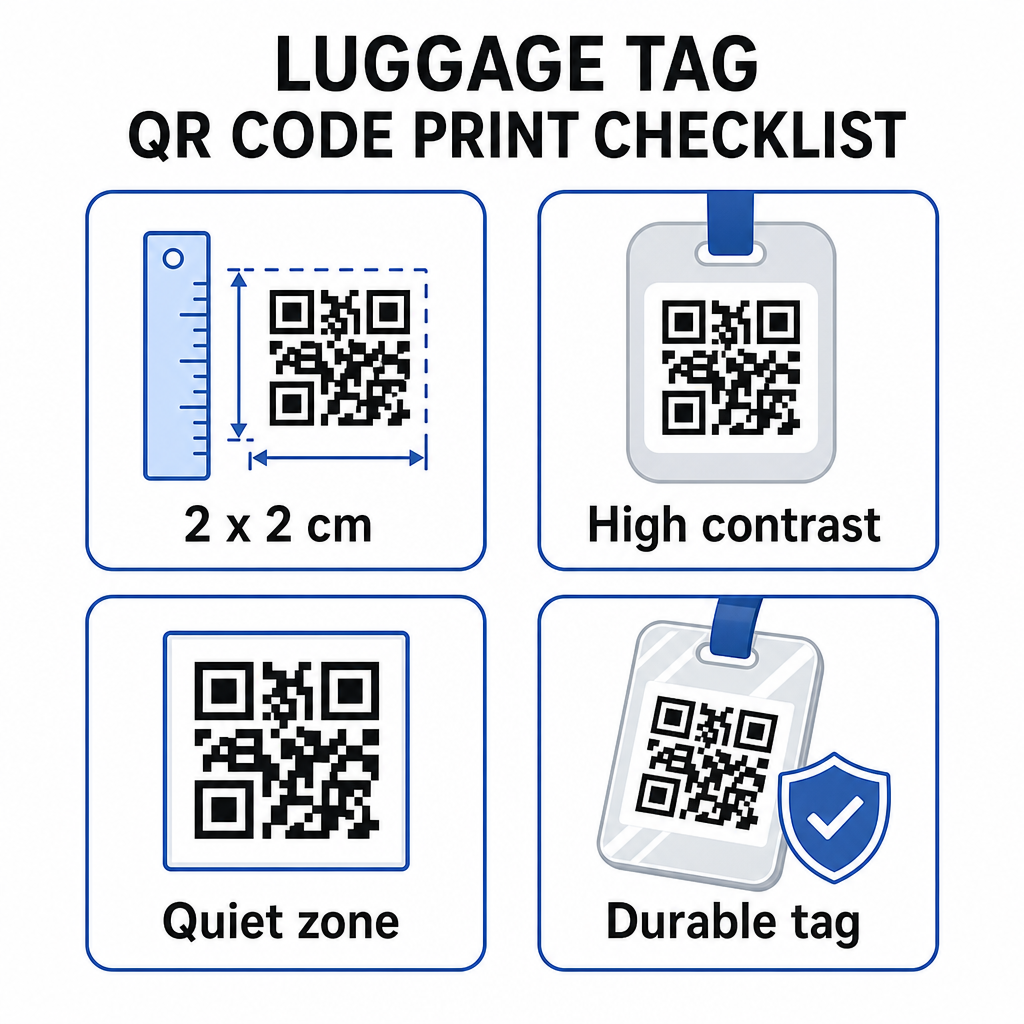
- Minimálna veľkosť: Zamerajte sa na aspoň 2 × 2 cm (približne 0,8 × 0,8 palca). Menšie ako toto a spoľahlivosť skenovania klesá, najmä pri slabom osvetlení. Pozrite si sprievodcu dimenzovaním QR kódu pre tlačové materiály pre odporúčania pre konkrétne povrchy.
- Formát súboru: PNG funguje dobre pre malé tlačové veľkosti. Pre laminovaný alebo profesionálne vytlačený štítok poskytujú exporty SVG alebo PDF ostrejšie hrany pri akejkoľvek veľkosti.
- Kontrast: Použite.
- Tichá zóna: Okolo kódu ponechajte jasný okraj – aspoň štyri moduly široký na všetkých stranách – aby skener dokázal odlíšiť kód od okolitej grafiky alebo textu.
- Korekcia chýb: Vyššie úrovne korekcie chýb umožňujú, aby kód zostal skenovateľný, aj keď je jeho časť poškriabaná alebo opotrebovaná, čo je dôležité pre štítok, ktorý je intenzívne používaný počas viacerých ciest.
Pre podrobné pokyny k príprave QR kódu pre fyzické štítky, sprievodca tlačou QR kódov na štítky podrobne pokrýva proces.
Udržiavanie súkromia vašich osobných údajov
Umiestnenie akýchkoľvek kontaktných informácií na verejne prístupný štítok si vyžaduje určité zváženie súkromia. Niekoľko postupov znižuje toto riziko pri používaní QR kódov:
- Použite kontaktný formulár alebo vCard namiesto kódovania surového telefónneho čísla ako obyčajného textu, aby informácie neboli okamžite viditeľné pre každého, kto skontroluje obsah kódu.
- Zvoľte si e-mailovú adresu špecifickú pre cestovanie pre štítok, aby váš primárny účet zostal oddelený od akéhokoľvek kontaktu súvisiaceho s batožinou.
- Ak používate dynamický kód, môžete odkaz deaktivovať alebo presmerovať, ak chcete štítok vyradiť alebo zmeniť spôsob, akým vás nálezcovia kontaktujú.
- Zakódujte len to, čo je nevyhnutné pre nájdenie batožiny – vaše meno a jedna kontaktná metóda sú dostatočné.
Pre hlbší pohľad na správu súkromia pri používaní QR kódov, sprievodca rizikami súkromia QR kódov a osvedčené postupy pre bezpečnú generáciu QR kódov pokrýva kľúčové úvahy. Pre širší kontext o tom, ako QR kódy celkovo menia cestovateľský zážitok, ako QR kódy zlepšujú cestovateľské zážitky užitočným referenčným bodom.
QR kód na batožinu je jednoduché vylepšenie oproti tlačenému štítku: udržuje vaše kontaktné informácie funkčné pre každého, kto potrebuje vrátiť vašu batožinu, pričom tieto detaily chráni pred náhodným pozorovaním. Použite dynamický kód, aby ste mohli štítok udržiavať aktuálny počas viacerých ciest, správne ho dimenzujte pre spoľahlivé skenovanie a zakódujte len kontaktnú metódu, ktorú chcete, aby nálezcovia použili.
Vytvorte si svoj QR kód na batožinu ešte dnes Nastavte si vCard, e-mail alebo odkaz QR kód pre vašu batožinu za pár minút. Začnite s Generátor QR kódov Pageloot – bezplatná skúšobná verzia, nie je potrebná kreditná karta.
Často kladené otázky
QR kód vCard je praktická voľba, pretože umožňuje nálezcovi uložiť vaše kontaktné údaje priamo do ich telefónu jedným ťuknutím. Ak uprednostňujete väčšiu kontrolu nad tým, aké informácie sa zdieľajú, QR kód odkazu smerujúci na jednoduchý kontaktný formulár funguje tiež dobre. Dynamické verzie oboch vám umožňujú aktualizovať cieľ bez opätovnej tlače štítku.
Dobre nakonfigurovaný QR kód na batožinovom štítku zdieľa len to, čo sa rozhodnete zakódovať – zvyčajne meno, telefónne číslo alebo e-mailovú adresu. Vyhnite sa kódovaniu citlivých identifikátorov, ako sú čísla pasov alebo občianskych preukazov. Použitie stránky s kontaktným formulárom namiesto nespracovaných osobných údajov pridáva ďalšiu vrstvu oddelenia a dodržiavanie osvedčených postupov ochrany súkromia QR kódu zabezpečuje, že vaše nastavenie obmedzuje zbytočné vystavenie.
Nie, ak použijete dynamický QR kód. Dynamické kódy smerujú na presmerovaciu URL adresu, ktorú môžete kedykoľvek aktualizovať z vášho Pageloot dashboardu. Fyzická značka zostáva rovnaká, ale kontaktné informácie, ktoré zobrazuje, sa dajú zmeniť kedykoľvek potrebujete – čo z neho robí praktické dlhodobé riešenie pre častých cestovateľov.