Pernahkah Anda bertanya-tanya apa yang terjadi pada tas Anda jika terpisah dari Anda di bandara? Dengan tag kertas standar, orang asing harus membaca detail pribadi Anda dengan suara keras hanya untuk mengembalikannya. Kode QR pada tag bagasi Anda mengubah persamaan itu sepenuhnya, memungkinkan siapa pun dengan ponsel pintar menghubungi Anda tanpa mengekspos informasi pribadi Anda kepada setiap orang yang lewat di terminal.
Mengapa Tag Bagasi Standar Kurang Efektif
Maskapai pelapor AS mencatat tingkat bagasi yang salah penanganan sebesar 0,55% pada tahun 2024, yang terdengar kecil sampai Anda mempertimbangkan volume besar tas terdaftar yang ditangani setiap hari. Tas yang hilang, tertunda, atau rusak adalah masalah perjalanan rutin, dan garis pertahanan pertama adalah tag bagasi yang terbaca dan berguna.
Masalah dengan tag tradisional adalah pertukaran privasi. Pakar perjalanan secara konsisten menyarankan untuk tidak mencantumkan alamat rumah Anda pada tag eksternal, karena itu memberi sinyal kepada siapa pun yang melihat bahwa rumah Anda kosong. Mereka juga memperingatkan agar tidak menyertakan pengenal sensitif seperti nomor paspor atau nomor SIM. Namun tag itu masih membutuhkan detail yang cukup agar penemu atau agen maskapai dapat benar-benar menghubungi Anda.
Sebagian besar pelancong berakhir dengan kompromi yang tidak nyaman: terlalu banyak informasi yang terekspos, atau tidak cukup untuk menjadi berguna.
Bagaimana Kode QR Memecahkan Masalah
Kode QR pada tag bagasi berfungsi sebagai lapisan privasi antara detail kontak Anda dan publik. Alih-alih mencetak nomor telepon dan email Anda dalam teks besar agar siapa pun dapat membacanya saat tas Anda berputar di konveyor, Anda mengkodekan informasi itu ke dalam pola yang dapat dipindai. Penemu memindai kode, mendarat di halaman kontak atau pesan yang sudah terisi, dan menghubungi Anda – tanpa pernah melihat data pribadi mentah Anda ditampilkan secara terbuka.
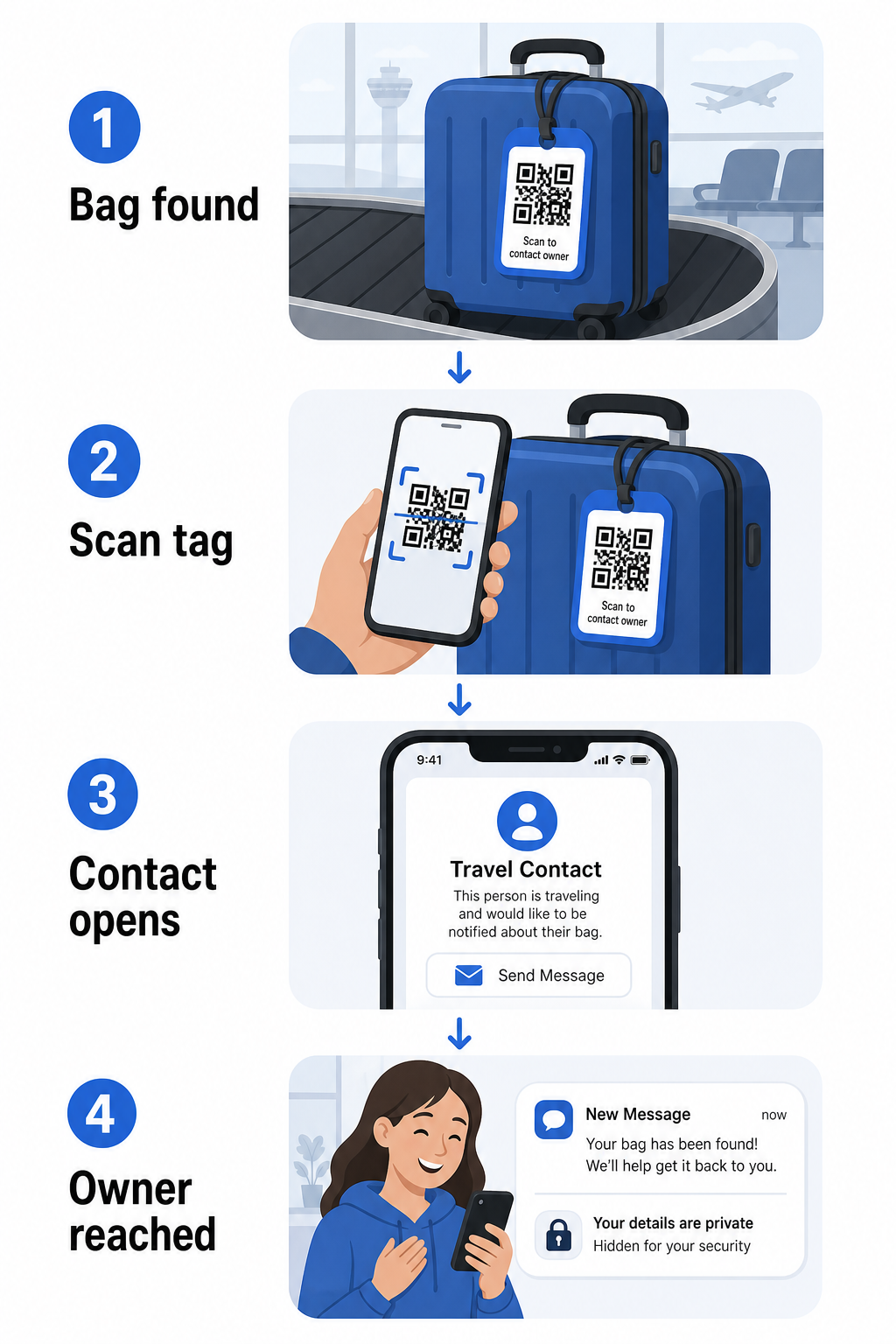
Ada beberapa format yang patut dipertimbangkan, tergantung pada seberapa banyak informasi yang ingin Anda bagikan:
- kode vCard QR: Mengkodekan nama, nomor telepon, dan email Anda dalam format vCard. Saat dipindai, ponsel penemu akan meminta mereka untuk menyimpan detail kontak Anda langsung ke buku alamat mereka menggunakan Generator kode QR vCard. Tidak perlu mengetik, dan tidak ada data pribadi yang terlihat pada tag itu sendiri.
- Kode QR email: Membuka email yang sudah terisi yang ditujukan kepada Anda saat dipindai. Penemu cukup menekan kirim. Anda dapat mengaturnya dengan Generator QR Code Email dan menjaga alamat asli Anda tersembunyi dari pandangan.
- QR code link: Mengarahkan penemu ke halaman web yang Anda kendalikan – formulir kontak sederhana atau halaman dengan detail perjalanan Anda. Gunakan pembuat kode QR tautan untuk mengarahkan kode ke URL apa pun yang Anda pilih.
Setiap pendekatan menjaga detail kontak Anda berfungsi untuk tujuan pemulihan sambil mengurangi apa yang dapat dibaca oleh pengamat acak dari tag Anda di terminal yang sibuk.
Buat Kode QR Tag Bagasi yang Ramah Privasi Siap untuk menyiapkan kode QR yang melindungi detail Anda sambil menjaga tas Anda tetap dapat ditemukan? Gunakan Generator Kode QR untuk memulai – gratis, tanpa memerlukan pengetahuan teknis.
Informasi Apa yang Harus Disertakan (dan Apa yang Harus Dihilangkan)
Pakar perjalanan merekomendasikan untuk menjaga informasi tag bagasi minimal namun efektif. Konsensus praktisnya adalah:
- Termasuk: Nama lengkap Anda, nomor telepon seluler dengan kode negara jika bepergian internasional, dan alamat email
- Lewati: Alamat rumah Anda (gunakan alamat kantor atau kotak pos jika alamat dirasa perlu), nomor paspor, nomor ID pemerintah, dan nomor telepon rumah
- Pertimbangkan: Alamat email khusus perjalanan daripada akun pribadi utama Anda, agar kontak yang tidak diinginkan tetap terkendali
Pendekatan kode QR membuat panduan ini lebih mudah diikuti. Anda hanya mengkodekan apa yang diperlukan, dan Anda mengontrol metode kontak yang digunakan penemu – apakah itu formulir email, penyimpanan vCard, atau halaman kontak.
Beberapa sumber perjalanan juga merekomendasikan menempatkan informasi kontak cadangan di dalam tas Anda, sehingga tas masih dapat diidentifikasi jika tag eksternal hilang atau rusak. Tag kode QR yang dikombinasikan dengan kartu kertas internal memberi Anda cakupan terbaik di kedua sisi.
Mengapa Kode QR Dinamis Layak Digunakan
SEBUAH kode QR dinamis memiliki satu keuntungan signifikan dibandingkan yang statis untuk penggunaan tag bagasi: Anda dapat memperbarui tujuan tanpa mencetak ulang tag.
Kode QR dinamis bekerja melalui URL pengalihan singkat permanen. Kode QR itu sendiri tidak pernah berubah, tetapi halaman yang ditunjuknya dapat diperbarui kapan saja dari dasbor Anda. Ini berarti jika nomor telepon Anda berubah, Anda mendapatkan alamat email baru, atau Anda ingin menukar vCard dengan formulir kontak, Anda memperbarui tujuan – dan setiap pemindaian tag fisik yang sama akan mencapai informasi baru.
Untuk tag bagasi yang Anda gunakan tahun demi tahun, fleksibilitas ini praktis. Anda mencetak tag sekali dan mempertahankan kontrol detail kontak yang muncul tanpa batas waktu.
Kode dinamis juga memungkinkan Anda memantau aktivitas pemindaian. Jika tas Anda hilang dan seseorang memindai tag Anda, Anda dapat melihat bahwa pemindaian terjadi, kapan, dan di lokasi mana – konteks yang berguna saat berkoordinasi dengan maskapai penerbangan. Untuk memahami peran yang lebih luas yang dimainkan kode QR dalam perjalanan udara, the ikhtisar maskapai penerbangan dan bandara mencakup bagaimana maskapai menggunakannya di seluruh perjalanan penumpang, termasuk pelacakan bagasi.
Jaga Tag Anda Tetap Terkini Tanpa Mencetak Ulang Menggunakan Generator QR Code Dinamis untuk membuat kode QR tag bagasi yang dapat Anda perbarui kapan saja – ubah detail kontak Anda atau URL tujuan tanpa menyentuh tag fisik.
Mencetak Tag Kode QR Anda: Ukuran dan Format
Kode QR yang tidak dapat dipindai akan mengalahkan tujuannya. Beberapa panduan praktis berlaku saat mencetak untuk tag bagasi:
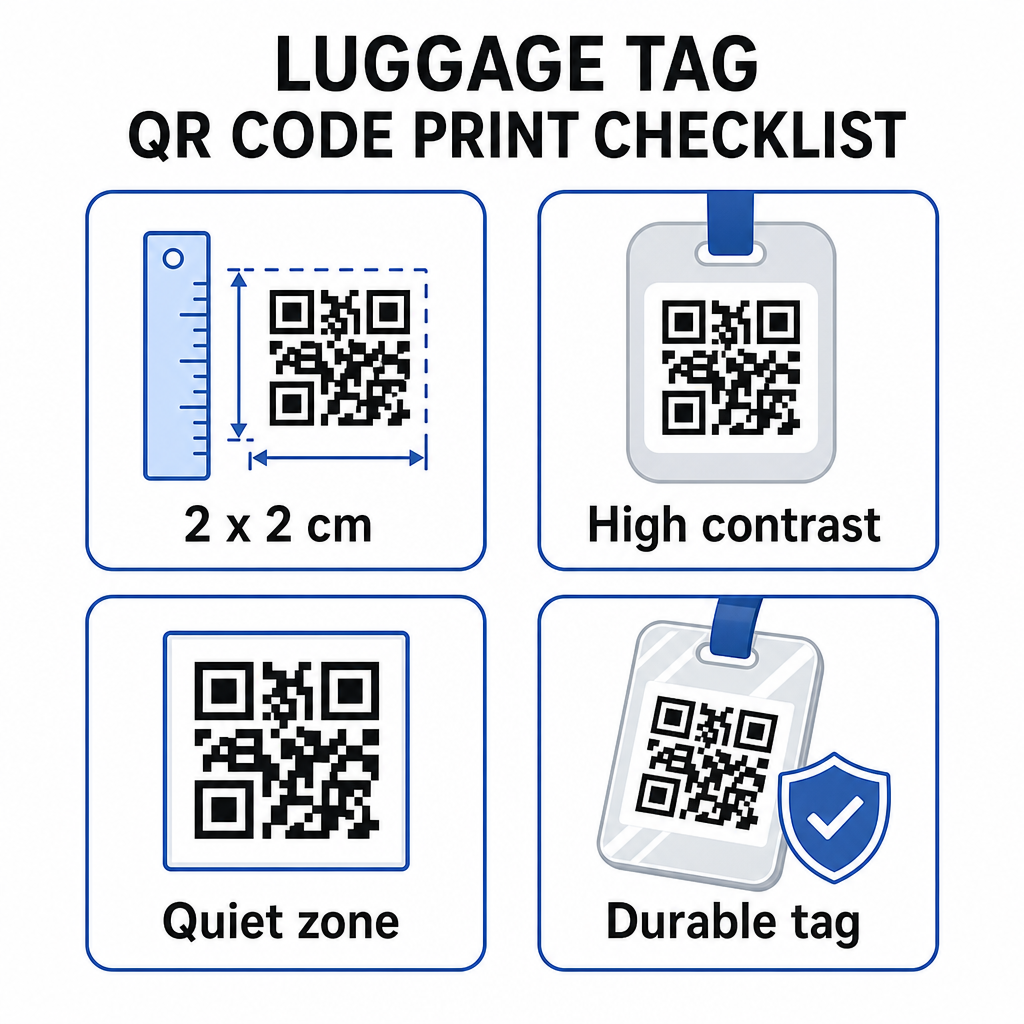
- Ukuran minimum: Targetkan setidaknya 2 × 2 cm (sekitar 0,8 × 0,8 inci). Lebih kecil dari ini dan keandalan pemindaian menurun, terutama dalam pencahayaan yang buruk. Lihat the panduan ukuran kode QR untuk bahan cetak untuk rekomendasi khusus permukaan.
- Format file: PNG berfungsi baik untuk ukuran cetak kecil. Untuk tag yang dilaminasi atau dicetak secara profesional, ekspor SVG atau PDF memberikan tepi yang lebih tajam pada ukuran berapa pun.
- Kontras: Gunakan pola gelap pada latar belakang terang. Kontras rendah adalah salah satu alasan paling umum mengapa kode QR gagal dipindai.
- Zona tenang: Sisakan batas yang jelas di sekitar kode – setidaknya empat modul lebar di semua sisi – sehingga pemindai dapat membedakan kode dari grafik atau teks di sekitarnya.
- Koreksi kesalahan: Tingkat koreksi kesalahan yang lebih tinggi memungkinkan kode tetap dapat dipindai meskipun sebagian tergores atau aus, yang penting untuk tag yang sering digunakan dalam beberapa perjalanan.
Untuk panduan langkah demi langkah tentang menyiapkan kode QR untuk label fisik, the panduan mencetak kode QR pada label mencakup prosesnya secara rinci.
Menjaga Data Pribadi Anda Tetap Pribadi
Menempatkan informasi kontak apa pun pada tag yang menghadap publik melibatkan beberapa pertimbangan privasi. Beberapa praktik mengurangi risiko tersebut saat menggunakan kode QR:
- Gunakan formulir kontak atau vCard daripada mengkodekan nomor telepon mentah sebagai teks biasa, sehingga informasi tersebut tidak langsung terlihat oleh siapa pun yang memeriksa konten kode
- Pilih alamat email khusus perjalanan untuk tag sehingga akun utama Anda tetap terpisah dari kontak terkait bagasi apa pun
- Jika menggunakan kode dinamis, Anda dapat menonaktifkan atau mengalihkan tautan jika Anda ingin menghentikan penggunaan tag atau mengubah cara penemu menghubungi Anda
- Kodekan hanya yang diperlukan untuk pemulihan tas – nama Anda dan satu metode kontak sudah cukup
Untuk melihat lebih dalam tentang mengelola privasi saat menggunakan kode QR, the panduan risiko privasi kode QR dan praktik terbaik pembuatan kode QR yang aman mencakup pertimbangan utama. Untuk konteks yang lebih luas tentang bagaimana kode QR membentuk kembali pengalaman perjalanan secara keseluruhan, Cara kode QR meningkatkan pengalaman perjalanan adalah referensi yang berguna.
Tag bagasi kode QR adalah peningkatan langsung dibandingkan tag cetak: ini menjaga informasi kontak Anda tetap berfungsi untuk siapa pun yang perlu mengembalikan tas Anda sambil melindungi detail tersebut dari pengamatan biasa. Gunakan kode dinamis agar Anda dapat menjaga tag tetap terkini di berbagai perjalanan, ukur dengan benar untuk pemindaian yang andal, dan kodekan hanya metode kontak yang Anda inginkan agar digunakan oleh penemu.
Buat Kode QR Tag Bagasi Anda Hari Ini Siapkan vCard, email, atau tautan kode QR untuk bagasi Anda dalam hitungan menit. Mulai dengan the Pembuat Kode QR Pageloot – uji coba gratis, tidak memerlukan kartu kredit.
Pertanyaan yang sering diajukan
Kode QR vCard adalah pilihan praktis karena memungkinkan penemu menyimpan detail kontak Anda langsung ke ponsel mereka dengan satu ketukan. Jika Anda lebih suka kontrol lebih atas informasi apa yang dibagikan, kode QR tautan yang mengarah ke formulir kontak sederhana juga berfungsi dengan baik. Versi dinamis dari keduanya memungkinkan Anda memperbarui tujuan tanpa mencetak ulang tag.
Sebuah kode QR yang terkonfigurasi dengan baik pada tag bagasi hanya membagikan apa yang Anda pilih untuk dienkode – biasanya nama, nomor telepon, atau alamat email. Hindari mengenkode pengidentifikasi sensitif seperti nomor paspor atau ID. Menggunakan halaman formulir kontak daripada data pribadi mentah menambahkan lapisan pemisahan lain, dan mengikuti praktik terbaik privasi kode QR memastikan pengaturan Anda membatasi paparan yang tidak perlu.
Tidak jika Anda menggunakan kode QR dinamis. Kode dinamis mengarah ke URL pengalihan yang bisa Anda perbarui kapan saja dari dasbor Pageloot Anda. Tag fisik tetap sama, tetapi informasi kontak yang ditampilkannya bisa diubah kapan pun Anda butuhkan – menjadikannya solusi jangka panjang yang praktis untuk pelancong yang sering bepergian.