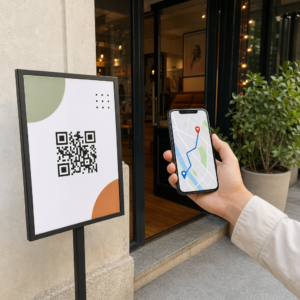
Haben Sie sich jemals gefragt, was mit Ihrem Gepäck passiert, wenn es am Flughafen von Ihnen getrennt wird? Mit einem Standard-Papieranhänger muss ein Fremder Ihre persönlichen Daten laut vorlesen, nur um es zurückzugeben. Ein QR-Code auf Ihrem Gepäckanhänger ändert diese Gleichung vollständig, indem er es jedem mit einem Smartphone ermöglicht, Sie zu kontaktieren, ohne Ihre privaten Informationen jedem Passanten im Terminal preiszugeben.
Warum Standard-Gepäckanhänger Mängel aufweisen
US-amerikanische meldende Fluggesellschaften verzeichneten im Jahr 2024 eine Rate von 0,55% für falsch behandeltes Gepäck, was gering klingt, bis Sie das schiere Volumen der täglich abgefertigten aufgegebenen Gepäckstücke berücksichtigen. Verlorenes, verspätetes oder beschädigtes Gepäck ist ein routinemäßiges Reiseärgernis, und die erste Verteidigungslinie ist ein lesbarer, nützlicher Gepäckanhänger.
Das Problem bei traditionellen Anhängern ist der Kompromiss beim Datenschutz. Reiseexperten raten konsequent davon ab, Ihre Privatadresse auf einem externen Anhänger anzugeben, da dies jedem Beobachter signalisiert, dass Ihr Haus leer steht. Sie warnen auch davor, sensible Identifikatoren wie Passnummern oder Führerscheinnummern aufzunehmen. Dennoch benötigt der Anhänger genügend Details, damit ein Finder oder ein Airline-Mitarbeiter Sie tatsächlich erreichen kann.
Die meisten Reisenden enden mit einem unangenehmen Kompromiss: zu viele Informationen preisgegeben oder nicht genug, um nützlich zu sein.
Wie ein QR-Code das Problem löst
Ein QR-Code auf einem Gepäckanhänger fungiert als Datenschicht zwischen Ihren Kontaktdaten und der Öffentlichkeit. Anstatt Ihre Telefonnummer und E-Mail-Adresse in großer Schrift für jedermann lesbar auszudrucken, während Ihr Gepäck auf einem Gepäckband fährt, kodieren Sie diese Informationen in ein scannbares Muster. Ein Finder scannt den Code, landet auf einer Kontaktseite oder einer vorausgefüllten Nachricht und erreicht Sie – ohne jemals Ihre rohen persönlichen Daten offen angezeigt zu sehen.
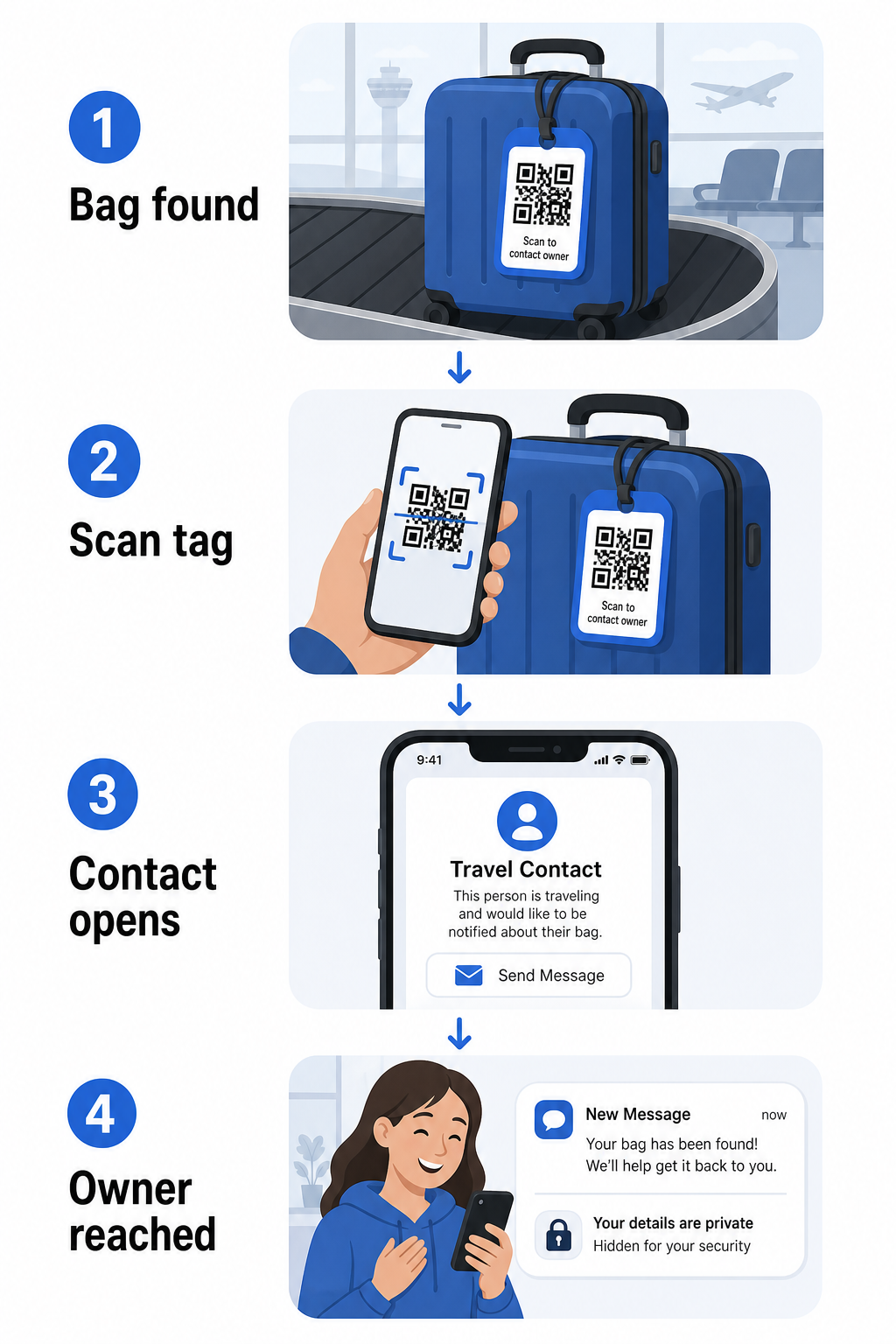
Es gibt einige Formate, die es wert sind, in Betracht gezogen zu werden, je nachdem, wie viele Informationen Sie teilen möchten:
- vCard QR-Code: Kodiert Ihren Namen, Ihre Telefonnummer und E-Mail-Adresse im vCard-Format. Beim Scannen fordert das Telefon des Finders ihn auf, Ihre Kontaktdaten direkt in sein Adressbuch zu speichern, indem er den vCard QR-Code Generator. Keine Eingabe erforderlich und keine sichtbaren persönlichen Daten auf dem Anhänger selbst.
- E-Mail QR-Code: Öffnet beim Scannen eine vorausgefüllte E-Mail, die an Sie gerichtet ist. Der Finder drückt einfach auf Senden. Sie können dies mit dem E-Mail QR-Code Generator einrichten und Ihre tatsächliche Adresse vor neugierigen Blicken verbergen.
- Link QR-Code: Leitet den Finder zu einer von Ihnen kontrollierten Webseite – einem einfachen Kontaktformular oder einer Seite mit Ihren Reisedaten. Verwenden Sie den Link-QR-Code-Generator , um den Code auf eine beliebige URL Ihrer Wahl zu verweisen.
Jeder Ansatz hält Ihre Kontaktdaten für Wiederherstellungszwecke funktionsfähig, während er reduziert, was ein zufälliger Beobachter in einem belebten Terminal von Ihrem Anhänger ablesen kann.
Erstellen Sie einen datenschutzfreundlichen Gepäckanhänger-QR-Code Bereit, einen QR-Code einzurichten, der Ihre Daten schützt und gleichzeitig Ihr Gepäck auffindbar hält? Verwenden Sie den QR-Code-Generator , um loszulegen – kostenlos und ohne technische Kenntnisse erforderlich.
Welche Informationen einzuschließen sind (und welche wegzulassen sind)
Reiseexperten empfehlen, die Informationen auf dem Gepäckanhänger minimal, aber effektiv zu halten. Der praktische Konsens ist:
- Enthalten: Ihr vollständiger Name, eine Mobiltelefonnummer mit Landesvorwahl, wenn Sie international reisen, und eine E-Mail-Adresse
- Weglassen: Ihre Privatadresse (verwenden Sie eine Arbeitsadresse oder ein Postfach, wenn eine Adresse notwendig erscheint), Passnummern, staatliche Ausweisnummern und Festnetznummern zu Hause
- In Betracht ziehen: Eine reisespezifische E-Mail-Adresse anstelle Ihres primären persönlichen Kontos, damit unerwünschter Kontakt eingedämmt bleibt
Ein QR-Code-Ansatz erleichtert die Befolgung dieser Richtlinien. Sie kodieren nur das Notwendige, und Sie kontrollieren die Kontaktmethode, die der Finder verwendet – sei es ein E-Mail-Formular, eine vCard-Speicherung oder eine Kontaktseite.
Mehrere Reisequellen empfehlen auch, Sicherungskontaktinformationen in Ihrem Gepäck zu platzieren, damit das Gepäck immer noch identifiziert werden kann, wenn der externe Anhänger verloren geht oder beschädigt wird. Ein QR-Code-Anhänger in Kombination mit einer internen Papierkarte bietet Ihnen die beste Abdeckung an beiden Fronten.
Warum sich ein dynamischer QR-Code lohnt
EIN dynamischer QR-Code hat einen wesentlichen Vorteil gegenüber einem statischen für die Verwendung als Gepäckanhänger: Sie können das Ziel aktualisieren, ohne den Anhänger neu drucken zu müssen.
Dynamische QR-Codes funktionieren über eine permanente kurze Weiterleitungs-URL. Der QR-Code selbst ändert sich nie, aber die Seite, auf die er verweist, kann jederzeit von Ihrem Dashboard aus aktualisiert werden. Das bedeutet, wenn sich Ihre Telefonnummer ändert, Sie eine neue E-Mail-Adresse erhalten oder Sie eine vCard gegen ein Kontaktformular tauschen möchten, aktualisieren Sie das Ziel – und jeder Scan desselben physischen Anhängers erreicht die neuen Informationen.
Für einen Gepäckanhänger, den Sie Jahr für Jahr verwenden, ist diese Flexibilität praktisch. Sie drucken den Anhänger einmal und behalten die Kontrolle über die Kontaktdaten, die er auf unbestimmte Zeit anzeigt.
Dynamische Codes ermöglichen es Ihnen auch, die Scan-Aktivität zu überwachen. Wenn Ihr Gepäck verloren geht und jemand Ihren Anhänger scannt, können Sie sehen, dass ein Scan stattgefunden hat, wann und an welchem Ort – ein nützlicher Kontext bei der Koordination mit einer Fluggesellschaft. Um die breitere Rolle zu verstehen, die QR-Codes im Flugverkehr spielen, ist der Übersicht über Fluggesellschaften und Flughäfen beschreibt, wie Fluggesellschaften sie entlang der gesamten Passagierreise einsetzen, einschließlich der Gepäckverfolgung.
Halten Sie Ihren Anhänger aktuell ohne Neudruck Verwenden Sie die Dynamischer QR-Code Generator um einen QR-Code für einen Gepäckanhänger zu erstellen, den Sie jederzeit aktualisieren können – ändern Sie Ihre Kontaktdaten oder die Ziel-URL, ohne den physischen Anhänger zu berühren.
Drucken Ihres QR-Code-Anhängers: Größe und Format
Ein QR-Code, der nicht gescannt werden kann, verfehlt seinen Zweck. Einige praktische Richtlinien gelten beim Drucken für einen Gepäckanhänger:
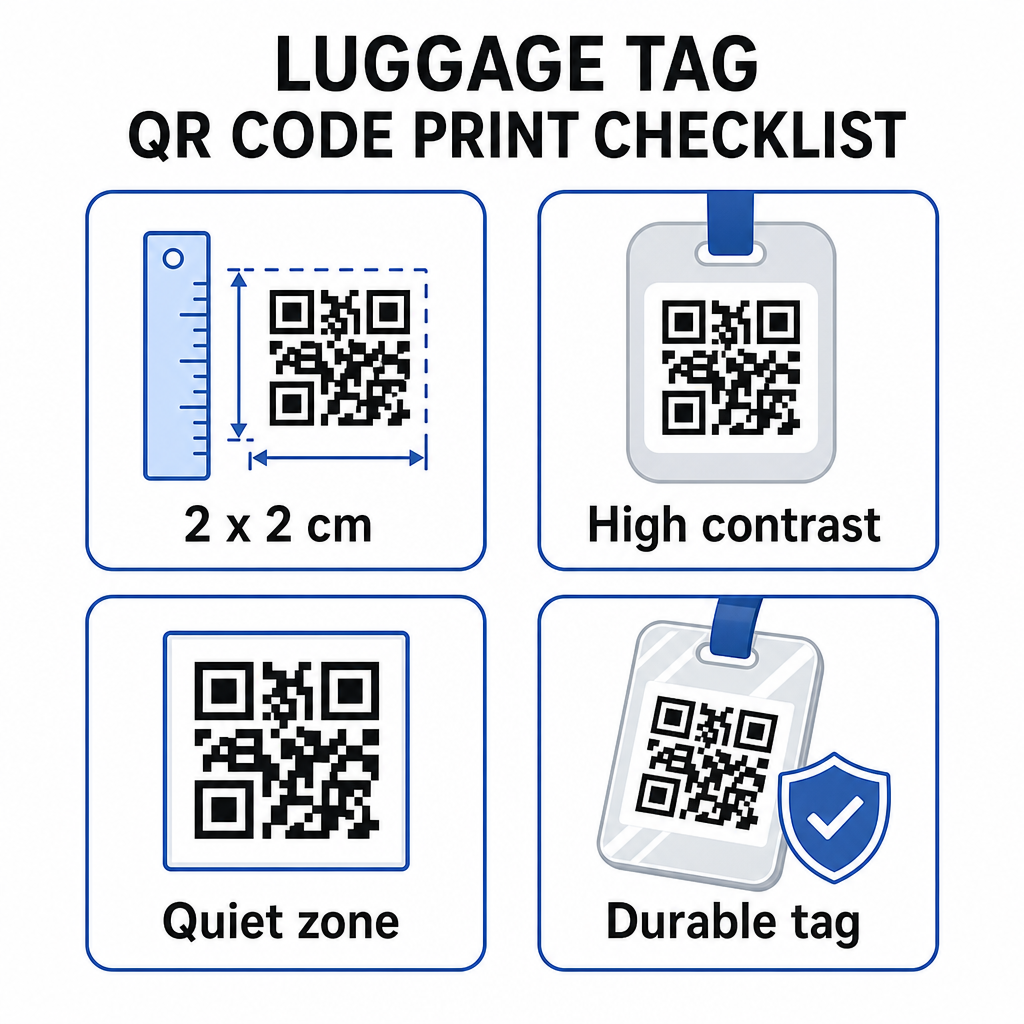
- Mindestgröße: Streben Sie mindestens 2 × 2 cm (ungefähr 0,8 × 0,8 Zoll) an. Kleiner als dies und die Scan-Zuverlässigkeit sinkt, besonders bei schlechten Lichtverhältnissen. Siehe den QR-Code-Größenleitfaden für Druckmaterialien für oberflächenspezifische Empfehlungen.
- Dateiformat: PNG funktioniert gut für kleine Druckgrößen. Für einen laminierten oder professionell gedruckten Anhänger bieten SVG- oder PDF-Exporte schärfere Kanten in jeder Größe.
- Kontrast: Verwenden Sie ein dunkles Muster auf hellem Hintergrund. Geringer Kontrast ist einer der häufigsten Gründe, warum QR-Codes nicht gescannt werden können.
- Ruhezone: Lassen Sie einen klaren Rand um den Code – mindestens vier Module breit auf allen Seiten – damit ein Scanner den Code von umgebenden Grafiken oder Text unterscheiden kann.
- Fehlerkorrektur: Höhere Fehlerkorrekturstufen ermöglichen es dem Code, scanbar zu bleiben, selbst wenn ein Teil davon zerkratzt oder abgenutzt ist, was für einen Anhänger wichtig ist, der bei mehreren Reisen stark beansprucht wird.
Für eine Schritt-für-Schritt-Anleitung zur Vorbereitung eines QR-Codes für physische Etiketten, der Leitfaden zum Drucken von QR-Codes auf Etiketten beschreibt den Prozess detailliert.
Ihre persönlichen Daten privat halten
Das Platzieren von Kontaktinformationen auf einem öffentlich sichtbaren Anhänger birgt einige Datenschutzbedenken. Einige Praktiken reduzieren dieses Risiko bei der Verwendung von QR-Codes:
- Verwenden Sie ein Kontaktformular oder eine vCard, anstatt eine rohe Telefonnummer als Klartext zu kodieren, damit die Informationen nicht sofort für jeden sichtbar sind, der den Inhalt des Codes überprüft
- Wählen Sie eine reisespezifische E-Mail-Adresse für den Anhänger, damit Ihr primäres Konto von jeglichem gepäckbezogenen Kontakt getrennt bleibt
- Wenn Sie einen dynamischen Code verwenden, können Sie den Link deaktivieren oder umleiten, wenn Sie einen Anhänger ausmustern oder ändern möchten, wie Finder Sie erreichen
- Kodieren Sie nur das, was für die Gepäckrückführung notwendig ist – Ihr Name und eine Kontaktmethode sind ausreichend
Für einen tieferen Einblick in die Verwaltung der Privatsphäre bei der Verwendung von QR-Codes, der Leitfaden zu QR-Code-Datenschutzrisiken und Best Practices für die sichere QR-Code-Generierung behandelt die wichtigsten Überlegungen. Für einen breiteren Kontext, wie QR-Codes das Reiseerlebnis insgesamt neu gestalten, Wie QR-Codes das Reiseerlebnis verbessern eine nützliche Referenz.
Ein QR-Code-Gepäckanhänger ist ein unkompliziertes Upgrade gegenüber einem gedruckten Anhänger: Er hält Ihre Kontaktinformationen für jeden funktionsfähig, der Ihr Gepäck zurückgeben muss, während er diese Details vor beiläufiger Beobachtung schützt. Verwenden Sie einen dynamischen Code, damit Sie den Anhänger über mehrere Reisen hinweg aktuell halten können, passen Sie ihn korrekt für zuverlässiges Scannen an und kodieren Sie nur die Kontaktmethode, die Finder verwenden sollen.
Erstellen Sie Ihren QR-Code für Gepäckanhänger noch heute Richten Sie in wenigen Minuten einen vCard-, E-Mail- oder Link-QR-Code für Ihr Gepäck ein. Beginnen Sie mit dem Pageloot QR-Code-Generator – kostenlose Testversion, keine Kreditkarte erforderlich.
Häufig gestellte Fragen
Ein vCard QR-Code ist eine praktische Wahl, weil er dem Finder ermöglicht, Ihre Kontaktdaten mit einem Tippen direkt auf sein Telefon zu speichern. Wenn Sie mehr Kontrolle darüber bevorzugen, welche Informationen geteilt werden, funktioniert auch ein Link-QR-Code gut, der auf ein einfaches Kontaktformular verweist. Dynamische Versionen von beiden ermöglichen es Ihnen, das Ziel zu aktualisieren, ohne das Etikett neu zu drucken.
Ein gut konfigurierter QR-Code auf einem Gepäckanhänger teilt nur das, was Sie kodieren möchten – typischerweise einen Namen, eine Telefonnummer oder eine E-Mail-Adresse. Vermeiden Sie das Kodieren sensibler Identifikatoren wie Pass- oder ID-Nummern. Die Verwendung einer Kontaktformularseite anstelle von rohen persönlichen Daten fügt eine weitere Trennungsebene hinzu, und das Befolgen der Best Practices für den Datenschutz von QR-Codes stellt sicher, dass Ihre Einrichtung unnötige Offenlegung begrenzt.
Nicht, wenn Sie einen dynamischen QR-Code verwenden. Dynamische Codes verweisen auf eine Weiterleitungs-URL, die Sie jederzeit über Ihr Pageloot-Dashboard aktualisieren können. Das physische Etikett bleibt gleich, aber die Kontaktinformationen, die es anzeigt, können jederzeit geändert werden, wenn Sie es benötigen – was es zu einer praktischen Langzeitlösung für Vielreisende macht.