V-ați întrebat vreodată ce se întâmplă cu bagajul dumneavoastră dacă se separă de dumneavoastră la aeroport? Cu o etichetă de hârtie standard, un străin trebuie să citească detaliile dumneavoastră personale cu voce tare doar pentru a-l returna. Un cod QR pe eticheta dumneavoastră de bagaj schimbă complet această ecuație, permițând oricui cu un smartphone să vă contacteze fără a expune informațiile dumneavoastră private fiecărui trecător din terminal.
De ce Etichetele Standard de Bagaje Nu Sunt Suficiente
Companiile aeriene americane raportoare au înregistrat o rată de bagaje gestionate greșit de 0,55% în 2024, ceea ce sună puțin până când luați în considerare volumul imens de bagaje înregistrate manipulate zilnic. Bagajele pierdute, întârziate sau deteriorate sunt o bătaie de cap obișnuită în călătorii, iar prima linie de apărare este o etichetă de bagaj lizibilă și utilă.
Problema cu etichetele tradiționale este compromisul de confidențialitate. Experții în călătorii sfătuiesc în mod constant să nu listați adresa dumneavoastră de acasă pe o etichetă externă, deoarece semnalează oricui privește că locuința dumneavoastră este goală. De asemenea, avertizează împotriva includerii de identificatori sensibili cum ar fi numerele de pașaport sau numerele permiselor de conducere. Totuși, eticheta are nevoie de suficiente detalii pentru ca un găsitor sau un agent al companiei aeriene să vă poată contacta efectiv.
Majoritatea călătorilor ajung la un compromis inconfortabil: prea multe informații expuse, sau nu suficiente pentru a fi utile.
Cum un Cod QR Rezolvă Problema
Un cod QR pe o etichetă de bagaj funcționează ca un strat de confidențialitate între detaliile dumneavoastră de contact și public. În loc să imprimați numărul dumneavoastră de telefon și e-mailul cu text mare pentru ca oricine să le citească în timp ce bagajul dumneavoastră se plimbă pe o bandă rulantă, codificați acele informații într-un model scanabil. Un găsitor scanează codul, ajunge pe o pagină de contact sau un mesaj pre-completat și vă contactează – fără a vedea vreodată datele dumneavoastră personale brute afișate public.
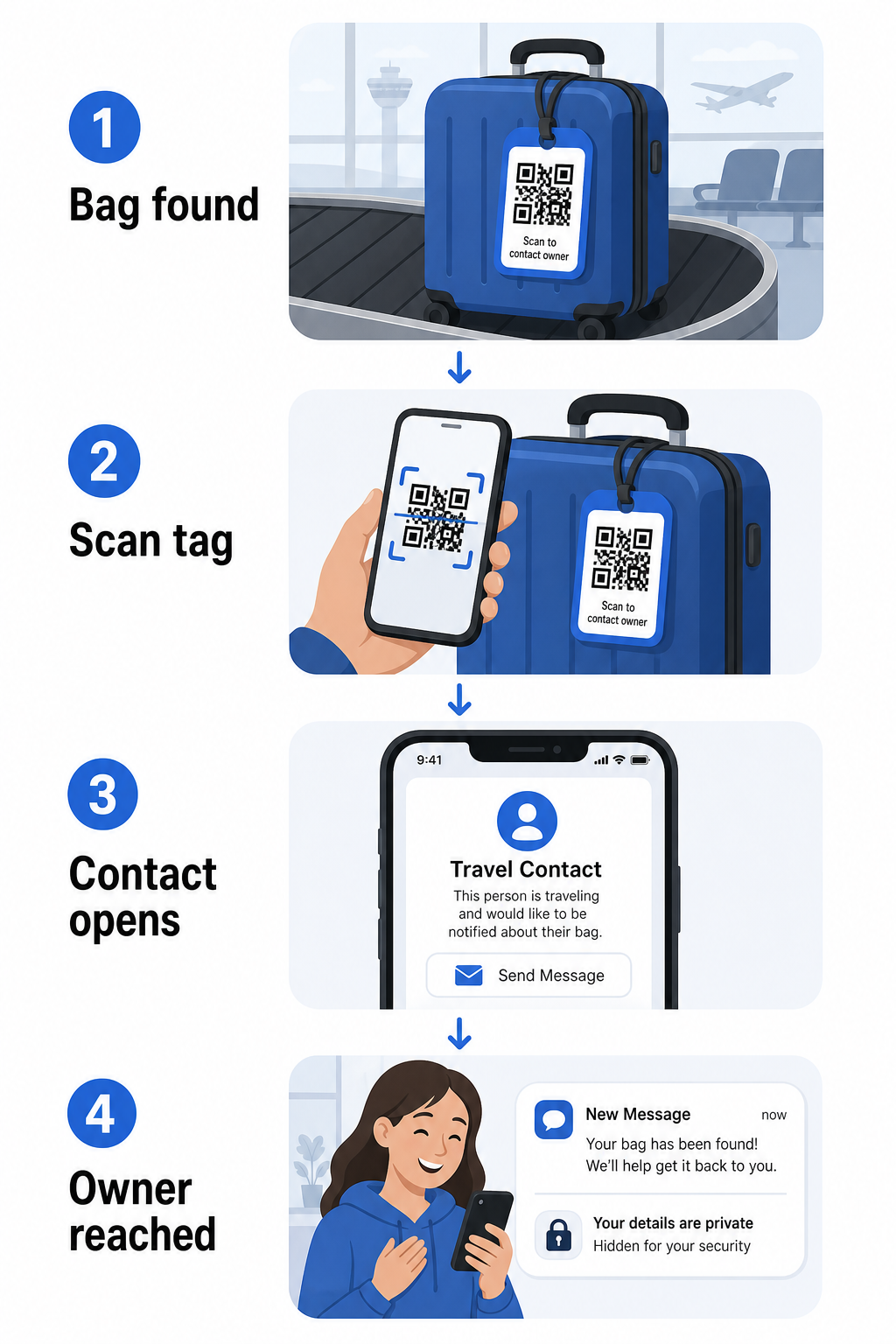
Există câteva formate demne de luat în considerare, în funcție de cât de multe informații doriți să partajați:
- Cod QR vCard: Codifică numele dumneavoastră, numărul de telefon și e-mailul în format vCard. Când este scanat, telefonul găsitorului îi solicită să salveze detaliile dumneavoastră de contact direct în agenda lor folosind Creare vCard cu cod QR. Nu este necesară tastarea și nu există date personale vizibile pe etichetă.
- Cod QR pentru e-mail: Deschide un e-mail pre-completat adresat dumneavoastră când este scanat. Găsitorul apasă pur și simplu trimite. Puteți configura acest lucru cu Generator cod QR pentru email și să păstrați adresa dumneavoastră reală ascunsă de ochii lumii.
- cod QR cu link: Direcționează găsitorul către o pagină web pe care o controlați – un simplu formular de contact sau o pagină cu detaliile dumneavoastră de călătorie. Folosiți generatorul de coduri QR pentru link-uri pentru a direcționa codul către orice URL alegeți.
Fiecare abordare menține detaliile dumneavoastră de contact funcționale în scopuri de recuperare, reducând în același timp ceea ce orice observator aleatoriu poate citi de pe eticheta dumneavoastră într-un terminal aglomerat.
Creați un Cod QR pentru Eticheta de Bagaj Prietenos cu Confidențialitatea Gata să configurați un cod QR care vă protejează detaliile menținând în același timp bagajul dumneavoastră găsibil? Folosiți Generator de coduri QR pentru a începe – gratuit, fără a fi necesare cunoștințe tehnice.
Ce Informații să Includeți (și Ce să Omiteți)
Experții în călătorii recomandă menținerea informațiilor de pe eticheta de bagaj la un nivel minim, dar eficient. Consensul practic este:
- Includeți: Numele dumneavoastră complet, un număr de telefon mobil cu prefix de țară dacă călătoriți internațional și o adresă de e-mail
- Omiteți: Adresa dumneavoastră de acasă (folosiți o adresă de serviciu sau o cutie poștală dacă o adresă este considerată necesară), numerele de pașaport, numerele de identificare guvernamentale și numerele de telefon fix de acasă
- Luați în considerare: O adresă de e-mail specifică călătoriilor mai degrabă decât contul dumneavoastră personal principal, astfel încât orice contact nedorit să rămână izolat
O abordare cu cod QR face această îndrumare mai ușor de urmat. Codificați doar ceea ce este necesar și controlați metoda de contact pe care o folosește găsitorul – fie că este un formular de e-mail, o salvare vCard sau o pagină de contact.
Mai multe surse de călătorie recomandă, de asemenea, plasarea informațiilor de contact de rezervă în interiorul bagajului dumneavoastră, astfel încât bagajul să poată fi identificat în continuare dacă eticheta externă este pierdută sau deteriorată. O etichetă cu cod QR combinată cu o carte de hârtie internă vă oferă cea mai bună acoperire pe ambele fronturi.
De ce un Cod QR Dinamic Merită Folosit
A cod QR dinamic are un avantaj semnificativ față de unul static pentru utilizarea ca etichetă de bagaj: puteți actualiza destinația fără a re-imprima eticheta.
Codurile QR dinamice funcționează printr-un URL de redirecționare scurt și permanent. Codul QR în sine nu se schimbă niciodată, dar pagina către care indică poate fi actualizată oricând din tabloul de bord. Aceasta înseamnă că dacă numărul dumneavoastră de telefon se schimbă, obțineți o nouă adresă de e-mail sau doriți să schimbați un vCard cu un formular de contact, actualizați destinația – și fiecare scanare a aceleiași etichete fizice ajunge la noile informații.
Pentru o etichetă de bagaj pe care o folosiți an după an, această flexibilitate este practică. Imprimați eticheta o singură dată și mențineți controlul asupra detaliilor de contact pe care le afișează pe termen nelimitat.
Codurile dinamice vă permit, de asemenea, să monitorizați activitatea de scanare. Dacă bagajul dvs. se pierde și cineva scanează eticheta dvs., puteți vedea că a avut loc o scanare, când și în ce locație – context util atunci când coordonați cu o companie aeriană. Pentru a înțelege rolul mai larg pe care codurile QR îl joacă în călătoriile aeriene, generală a companiilor aeriene și aeroporturilor acoperă modul în care transportatorii le utilizează pe parcursul călătoriei pasagerilor, inclusiv urmărirea bagajelor.
Păstrați-vă eticheta actualizată fără a o reimprima Folosește Generator cod QR dinamic pentru a crea un cod QR pentru eticheta de bagaj pe care îl puteți actualiza oricând – schimbați detaliile de contact sau URL-ul destinației fără a atinge eticheta fizică.
Imprimarea etichetei dvs. cu cod QR: Dimensiune și format
Un cod QR care nu poate fi scanat anulează scopul. Câteva ghiduri practice se aplică atunci când imprimați pentru o etichetă de bagaj:
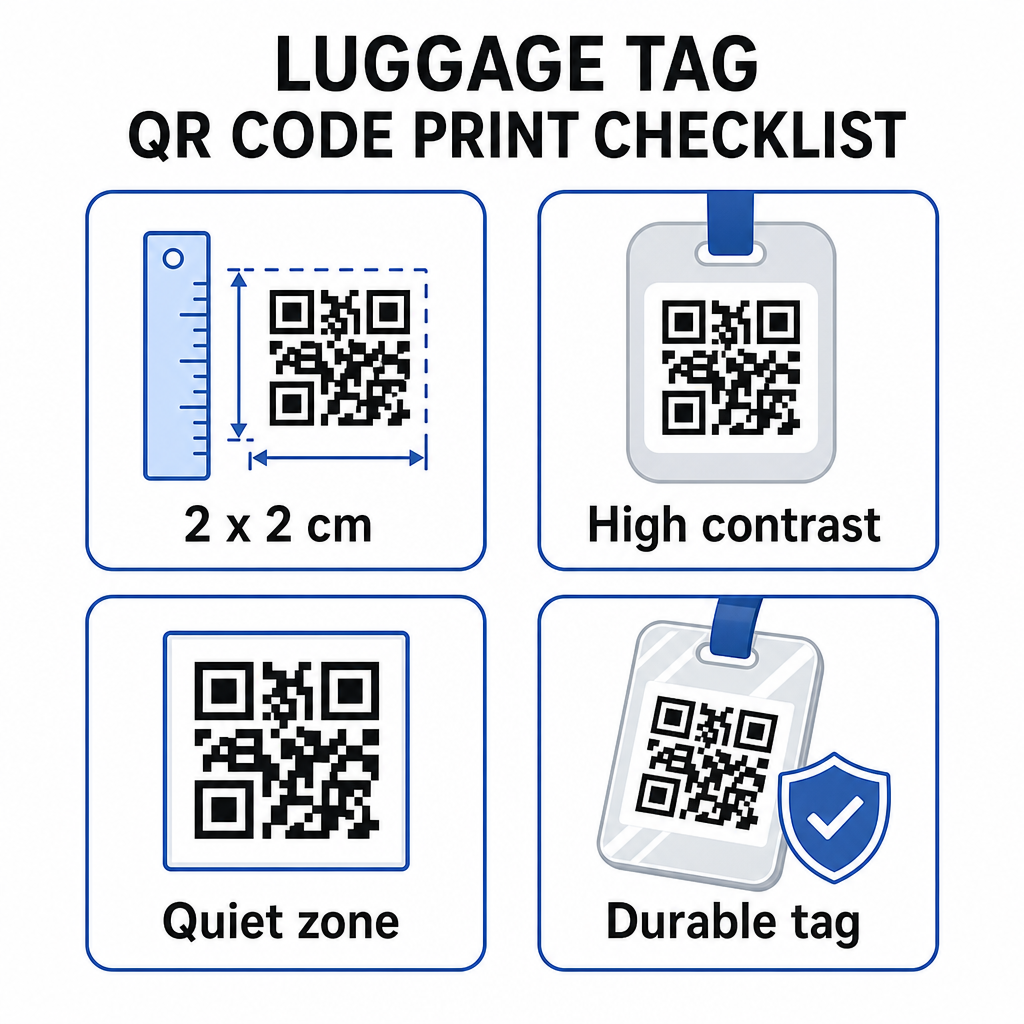
- Dimensiunea minimă: Vizați cel puțin 2 × 2 cm (aproximativ 0,8 × 0,8 inchi). Mai mic de atât și fiabilitatea scanării scade, mai ales în condiții de iluminare slabă. Consultați ghidul de dimensionare a codurilor QR pentru materiale tipărite pentru recomandări specifice suprafeței.
- Format fișier: PNG funcționează bine pentru dimensiuni mici de imprimare. Pentru o etichetă laminată sau imprimată profesional, exporturile SVG sau PDF oferă margini mai clare la orice dimensiune.
- Contrast: Utilizați un model închis pe un fundal deschis. Contrastul scăzut este unul dintre cele mai comune motive pentru care codurile QR nu reușesc să fie scanate.
- Zonă liniștită: Lăsați o margine clară în jurul codului – cel puțin patru module lățime pe toate părțile – astfel încât un scaner să poată distinge codul de grafica sau textul înconjurător.
- Corecția erorilor: Nivelurile mai ridicate de corecție a erorilor permit codului să rămână scanabil chiar dacă o parte din el este zgâriată sau uzată, ceea ce contează pentru o etichetă care este utilizată intens pe parcursul mai multor călătorii.
Pentru îndrumări pas cu pas privind pregătirea unui cod QR pentru etichete fizice, ghidul de imprimare a codurilor QR pe etichete acoperă procesul în detaliu.
Păstrarea datelor dvs. personale private
Plasarea oricăror informații de contact pe o etichetă publică implică anumite considerații de confidențialitate. Câteva practici reduc acest risc atunci când utilizați coduri QR:
- Utilizați un formular de contact sau un vCard mai degrabă decât să codificați un număr de telefon brut ca text simplu, astfel încât informațiile să nu fie imediat vizibile oricui inspectează conținutul codului
- Alegeți o adresă de e-mail specifică călătoriilor pentru etichetă, astfel încât contul dvs. principal să rămână separat de orice contact legat de bagaje
- Dacă utilizați un cod dinamic, puteți dezactiva sau redirecționa linkul dacă doriți să scoateți din uz o etichetă sau să schimbați modul în care vă contactează găsitorii
- Codificați doar ceea ce este necesar pentru recuperarea bagajului – numele dvs. și o metodă de contact sunt suficiente
Pentru o privire mai aprofundată asupra gestionării confidențialității atunci când utilizați coduri QR, ghidul privind riscurile de confidențialitate ale codurilor QR și cele mai bune practici pentru generarea sigură de coduri QR acoperă considerațiile cheie. Pentru un context mai larg despre modul în care codurile QR remodelează experiența de călătorie în ansamblu, cum codurile QR îmbunătățesc experiențele de călătorie este o referință utilă.
O etichetă de bagaj cu cod QR este o îmbunătățire simplă față de o etichetă imprimată: vă menține informațiile de contact funcționale pentru oricine trebuie să vă returneze bagajul, protejând în același timp aceste detalii de observația ocazională. Utilizați un cod dinamic pentru a putea menține eticheta actualizată pe parcursul mai multor călătorii, dimensionați-o corect pentru o scanare fiabilă și codificați doar metoda de contact pe care doriți ca găsitorii să o utilizeze.
Creați-vă astăzi codul QR pentru eticheta de bagaj Configurați un vCard, e-mail sau cod QR de link pentru bagajul dvs. în câteva minute. Începeți cu Generator de coduri QR Pageloot – încercare gratuită, nu este necesar un card de credit.
Întrebări frecvente
Un cod QR vCard este o alegere practică deoarece îi permite celui care îl găsește să salveze detaliile tale de contact direct pe telefonul său cu o singură atingere. Dacă preferi mai mult control asupra informațiilor partajate, un cod QR cu link care indică un formular de contact simplu funcționează bine de asemenea. Versiunile dinamice ale oricăruia dintre ele îți permit să actualizezi destinația fără a retipări eticheta.
Un cod QR bine configurat pe o etichetă de bagaj partajează doar ceea ce alegi să codifici – de obicei un nume, un număr de telefon sau o adresă de e-mail. Evită codificarea identificatorilor sensibili precum numerele de pașaport sau de buletin. Utilizarea unei pagini cu formular de contact, mai degrabă decât a datelor personale brute, adaugă un alt strat de separare, și respectarea celor mai bune practici de confidențialitate ale codurilor QR asigură că configurația ta limitează expunerea inutilă.
Nu dacă folosiți un cod QR dinamic. Codurile dinamice indică o adresă URL de redirecționare pe care o puteți actualiza oricând din tabloul de bord Pageloot. Eticheta fizică rămâne aceeași, dar informațiile de contact pe care le afișează pot fi modificate oricând aveți nevoie – făcând-o o soluție practică pe termen lung pentru călătorii frecvenți.