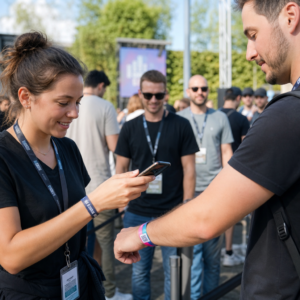
Pernahkah anda terfikir apa yang berlaku kepada beg anda jika ia terpisah daripada anda di lapangan terbang? Dengan tag kertas standard, orang yang tidak dikenali perlu membaca butiran peribadi anda dengan kuat hanya untuk mengembalikannya. Kod QR pada tag bagasi anda mengubah persamaan itu sepenuhnya, membolehkan sesiapa sahaja yang mempunyai telefon pintar menghubungi anda tanpa mendedahkan maklumat peribadi anda kepada setiap orang yang lalu-lalang di terminal.
Mengapa Tag Bagasi Standard Tidak Mencukupi
Syarikat penerbangan pelapor A.S. mencatatkan kadar bagasi yang salah urus sebanyak 0.55% pada tahun 2024, yang kedengaran kecil sehingga anda mempertimbangkan jumlah besar beg yang diperiksa yang dikendalikan setiap hari. Beg yang hilang, lewat, atau rosak adalah masalah perjalanan rutin, dan barisan pertahanan pertama adalah tag bagasi yang boleh dibaca dan berguna.
Masalah dengan tag tradisional adalah pertukaran privasi. Pakar perjalanan secara konsisten menasihatkan agar tidak menyenaraikan alamat rumah anda pada tag luaran, kerana ia memberi isyarat kepada sesiapa sahaja yang memerhati bahawa rumah anda kosong. Mereka juga memberi amaran agar tidak memasukkan pengenal sensitif seperti nombor pasport atau nombor lesen memandu. Namun, tag itu masih memerlukan butiran yang mencukupi agar pencari atau ejen syarikat penerbangan benar-benar dapat menghubungi anda.
Kebanyakan pengembara berakhir dengan kompromi yang tidak selesa: terlalu banyak maklumat terdedah, atau tidak cukup untuk berguna.
Bagaimana Kod QR Menyelesaikan Masalah
Kod QR pada tag bagasi berfungsi sebagai lapisan privasi antara butiran hubungan anda dan orang awam. Daripada mencetak nombor telefon dan e-mel anda dalam teks besar untuk dibaca oleh sesiapa sahaja semasa beg anda berada di karusel, anda mengekod maklumat itu ke dalam corak yang boleh diimbas. Pencari mengimbas kod, mendarat di halaman hubungan atau mesej pra-isi, dan menghubungi anda – tanpa pernah melihat data peribadi mentah anda dipaparkan secara terbuka.
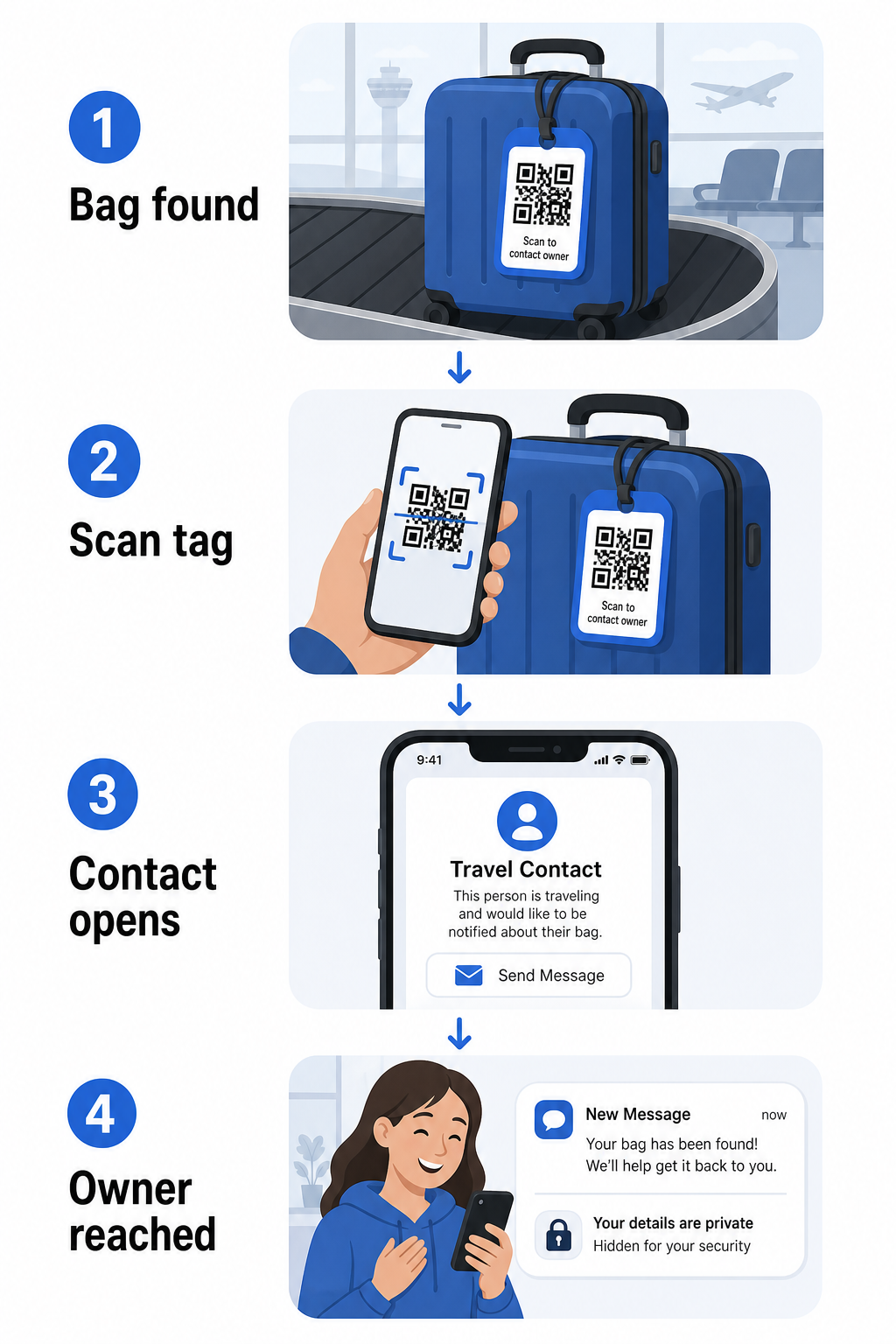
Terdapat beberapa format yang patut dipertimbangkan, bergantung pada berapa banyak maklumat yang anda ingin kongsi:
- kod QR vCard: Mengekod nama, nombor telefon, dan e-mel anda dalam format vCard. Apabila diimbas, telefon pencari akan meminta mereka untuk menyimpan butiran hubungan anda terus ke buku alamat mereka menggunakan Kod QR vCard: apa itu vCard?. Tiada penaipan diperlukan, dan tiada data peribadi yang kelihatan pada tag itu sendiri.
- E-mel kod QR: Membuka e-mel pra-isi yang ditujukan kepada anda apabila diimbas. Pencari hanya menekan hantar. Anda boleh menyediakannya dengan Penjana kod QR e-mel dan merahsiakan alamat sebenar anda daripada pandangan umum.
- kod QR pautan: Mengarahkan pencari ke halaman web yang anda kawal – borang hubungan ringkas atau halaman dengan butiran perjalanan anda. Gunakan penjana kod QR pautan untuk mengarahkan kod ke mana-mana URL yang anda pilih.
Setiap pendekatan memastikan butiran hubungan anda berfungsi untuk tujuan pemulihan sambil mengurangkan apa yang boleh dibaca oleh mana-mana pemerhati rawak daripada tag anda di terminal yang sibuk.
Cipta Kod QR Tag Bagasi Mesra Privasi Bersedia untuk menyediakan kod QR yang melindungi butiran anda sambil memastikan beg anda boleh ditemui? Gunakan Penjana Kod QR untuk bermula – percuma, tanpa pengetahuan teknikal diperlukan.
Maklumat Apa yang Perlu Dimasukkan (dan Apa yang Perlu Ditinggalkan)
Pakar perjalanan mengesyorkan agar maklumat tag bagasi disimpan minimum tetapi berkesan. Konsensus praktikal adalah:
- Sertakan: Nama penuh anda, nombor telefon bimbit dengan kod negara jika melancong ke luar negara, dan alamat e-mel
- Langkau: Alamat rumah anda (gunakan alamat kerja atau peti surat jika alamat dirasakan perlu), nombor pasport, nombor ID kerajaan, dan nombor telefon rumah
- Pertimbangkan: Alamat e-mel khusus perjalanan dan bukannya akaun peribadi utama anda, supaya sebarang hubungan yang tidak diingini kekal terkawal
Pendekatan kod QR menjadikan panduan ini lebih mudah diikuti. Anda mengekod hanya apa yang perlu, dan anda mengawal kaedah hubungan yang digunakan oleh pencari – sama ada itu borang e-mel, simpanan vCard, atau halaman hubungan.
Pelbagai sumber perjalanan juga mengesyorkan meletakkan maklumat hubungan sandaran di dalam beg anda, supaya beg itu masih boleh dikenal pasti jika tag luaran hilang atau rosak. Tag kod QR digabungkan dengan kad kertas dalaman memberikan anda liputan terbaik di kedua-dua aspek.
Mengapa Kod QR Dinamik Berbaloi Digunakan
A kod QR dinamik mempunyai satu kelebihan ketara berbanding yang statik untuk penggunaan tag bagasi: anda boleh mengemas kini destinasi tanpa mencetak semula tag.
Kod QR dinamik berfungsi melalui URL pengalihan pendek yang kekal. Kod QR itu sendiri tidak pernah berubah, tetapi halaman yang ditujunya boleh dikemas kini pada bila-bila masa dari papan pemuka anda. Ini bermakna jika nombor telefon anda berubah, anda mendapat alamat e-mel baharu, atau anda ingin menukar vCard dengan borang hubungan, anda mengemas kini destinasi – dan setiap imbasan tag fizikal yang sama mencapai maklumat baharu.
Untuk tag bagasi yang anda gunakan tahun demi tahun, fleksibiliti ini adalah praktikal. Anda mencetak tag sekali dan mengekalkan kawalan butiran hubungan yang dipaparkannya selama-lamanya.
Kod dinamik juga membolehkan anda memantau aktiviti imbasan. Jika beg anda hilang dan seseorang mengimbas tag anda, anda boleh melihat bahawa imbasan berlaku, bila, dan di lokasi mana – konteks yang berguna apabila menyelaras dengan syarikat penerbangan. Untuk memahami peranan yang lebih luas yang dimainkan oleh kod QR dalam perjalanan udara, the gambaran keseluruhan syarikat penerbangan dan lapangan terbang meliputi bagaimana syarikat penerbangan menggunakannya sepanjang perjalanan penumpang, termasuk penjejakan bagasi.
Pastikan Tag Anda Terkini Tanpa Mencetak Semula Menggunakan Penjana dynamic QR code untuk mencipta kod QR tag bagasi anda boleh kemas kini bila-bila masa – tukar butiran hubungan anda atau URL destinasi tanpa menyentuh tag fizikal.
Mencetak Tag Kod QR Anda: Saiz dan Format
Kod QR yang tidak boleh diimbas menafikan tujuannya. Beberapa garis panduan praktikal terpakai apabila mencetak untuk tag bagasi:
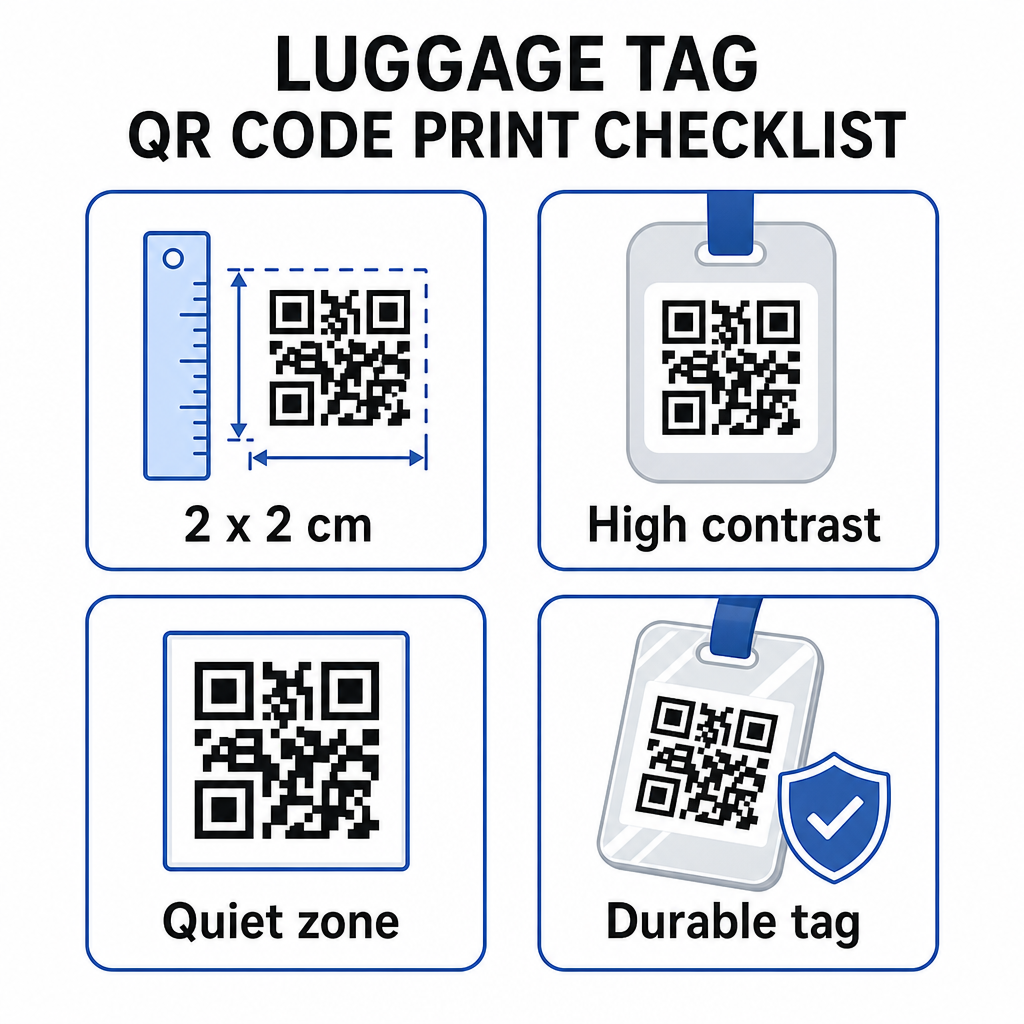
- Saiz minimum: Sasarkan sekurang-kurangnya 2 × 2 cm (kira-kira 0.8 × 0.8 inci). Lebih kecil daripada ini dan kebolehpercayaan imbasan menurun, terutamanya dalam pencahayaan yang kurang baik. Lihat the panduan saiz kod QR untuk bahan cetakan untuk cadangan khusus permukaan.
- Format fail: PNG berfungsi dengan baik untuk saiz cetakan kecil. Untuk tag yang dilaminasi atau dicetak secara profesional, eksport SVG atau PDF memberikan tepi yang lebih tajam pada sebarang saiz.
- Berbeza: Gunakan corak gelap pada latar belakang cerah. Kontras rendah adalah salah satu sebab paling biasa kod QR gagal diimbas.
- Zon senyap: Tinggalkan sempadan yang jelas di sekeliling kod – sekurang-kurangnya empat modul lebar di semua sisi – supaya pengimbas dapat membezakan kod daripada grafik atau teks di sekelilingnya.
- Pembetulan ralat: Tahap pembetulan ralat yang lebih tinggi membolehkan kod kekal boleh diimbas walaupun sebahagian daripadanya tercalar atau haus, yang penting untuk tag yang banyak digunakan merentasi pelbagai perjalanan.
Untuk panduan langkah demi langkah tentang menyediakan kod QR untuk label fizikal, the panduan mencetak kod QR pada label meliputi proses tersebut secara terperinci.
Menjaga Data Peribadi Anda Sulit
Meletakkan sebarang maklumat hubungan pada tag yang menghadap awam melibatkan beberapa pertimbangan privasi. Beberapa amalan mengurangkan risiko itu apabila menggunakan kod QR:
- Gunakan borang hubungan atau vCard daripada mengekod nombor telefon mentah sebagai teks biasa, supaya maklumat itu tidak serta-merta kelihatan kepada sesiapa yang memeriksa kandungan kod
- Pilih alamat e-mel khusus perjalanan untuk tag supaya akaun utama anda kekal berasingan daripada sebarang hubungan berkaitan bagasi
- Jika menggunakan kod dinamik, anda boleh menyahaktifkan atau mengubah hala pautan jika anda ingin menamatkan penggunaan tag atau menukar cara penemu menghubungi anda
- Kodkan hanya apa yang perlu untuk pemulihan beg – nama anda dan satu kaedah hubungan sudah mencukupi
Untuk melihat dengan lebih mendalam tentang mengurus privasi apabila menggunakan kod QR, the panduan risiko privasi kod QR dan amalan terbaik penjanaan kod QR selamat meliputi pertimbangan utama. Untuk konteks yang lebih luas tentang bagaimana kod QR membentuk semula pengalaman perjalanan secara keseluruhan, bagaimana kod QR meningkatkan pengalaman perjalanan adalah rujukan yang berguna.
Tag bagasi kod QR adalah peningkatan yang mudah berbanding tag bercetak: ia memastikan maklumat hubungan anda berfungsi untuk sesiapa sahaja yang perlu memulangkan beg anda sambil melindungi butiran tersebut daripada pemerhatian biasa. Gunakan kod dinamik supaya anda boleh memastikan tag terkini merentasi pelbagai perjalanan, saizkannya dengan betul untuk pengimbasan yang boleh dipercayai, dan kodkan hanya kaedah hubungan yang anda mahu penemu gunakan.
Bina Kod QR Tag Bagasi Anda Hari Ini Sediakan vCard, e-mel, atau pautan kod QR untuk bagasi anda dalam beberapa minit. Mulakan dengan the Penjana Kod Pageloot QR – percubaan percuma, tiada kad kredit diperlukan.
Soalan lazim
Kod QR vCard adalah pilihan yang praktikal kerana ia membolehkan pencari menyimpan butiran hubungan anda terus ke telefon mereka dengan satu ketukan. Jika anda lebih suka kawalan yang lebih terhadap maklumat yang dikongsi, kod QR pautan yang menunjuk ke borang hubungan ringkas juga berfungsi dengan baik. Versi dinamik bagi kedua-duanya membolehkan anda mengemas kini destinasi tanpa mencetak semula tag tersebut.
Kod QR yang dikonfigurasi dengan baik pada tag bagasi hanya berkongsi apa yang anda pilih untuk dikodkan – biasanya nama, nombor telefon, atau alamat e-mel. Elakkan mengekod pengecam sensitif seperti nombor pasport atau ID. Menggunakan halaman borang hubungan dan bukannya data peribadi mentah menambah satu lagi lapisan pemisahan, dan mengikuti amalan terbaik privasi kod QR memastikan persediaan anda mengehadkan pendedahan yang tidak perlu.
Bukan jika anda menggunakan kod QR dinamik. Kod dinamik menunjuk ke URL pengalihan yang anda boleh kemas kini bila-bila masa dari papan pemuka Pageloot anda. Tag fizikal kekal sama, tetapi maklumat hubungan yang dipaparkannya boleh diubah bila-bila masa anda perlukan – menjadikannya penyelesaian jangka panjang yang praktikal untuk pengembara yang kerap.