Har du nogensinde undret dig over, hvad der sker med din taske, hvis den bliver adskilt fra dig i lufthavnen? Med et standard papirmærke skal en fremmed læse dine personlige oplysninger højt bare for at returnere den. En QR-kode på dit bagagemærke ændrer den ligning fuldstændigt, ved at lade enhver med en smartphone kontakte dig uden at afsløre dine private oplysninger for enhver forbipasserende i terminalen.
Hvorfor Standard Bagagemærker kommer til kort
Amerikanske rapporterende luftfartsselskaber rapporterede en rate for fejlhåndteret bagage på 0,55% i 2024, hvilket lyder lille, indtil du overvejer den enorme mængde indchecket bagage, der håndteres hver dag. Mistet, forsinket eller beskadiget bagage er en rutinemæssig rejsehovedpine, og den første forsvarslinje er et læseligt, nyttigt bagagemærke.
Problemet med traditionelle mærker er afvejningen af privatlivets fred. Rejseeksperter fraråder konsekvent at angive din hjemmeadresse på et eksternt mærke, da det signalerer til enhver, der ser med, at dit hus er tomt. De advarer også mod at inkludere følsomme identifikatorer som pasnumre eller kørekortnumre. Alligevel skal mærket stadig indeholde nok detaljer, så en finder eller flyselskabsagent faktisk kan nå dig.
De fleste rejsende ender med et ubehageligt kompromis: for mange oplysninger afsløret, eller ikke nok til at være nyttige.
Hvordan en QR-kode løser problemet
En QR-kode på et bagagemærke fungerer som et privatlivslag mellem dine kontaktoplysninger og offentligheden. I stedet for at printe dit telefonnummer og din e-mail i stor tekst, så enhver kan læse det, mens din taske kører på et bagagebånd, koder du den information ind i et scannbart mønster. En finder scanner koden, lander på en kontaktside eller en forududfyldt besked og når dig – uden nogensinde at se dine rå personlige data vist åbent.
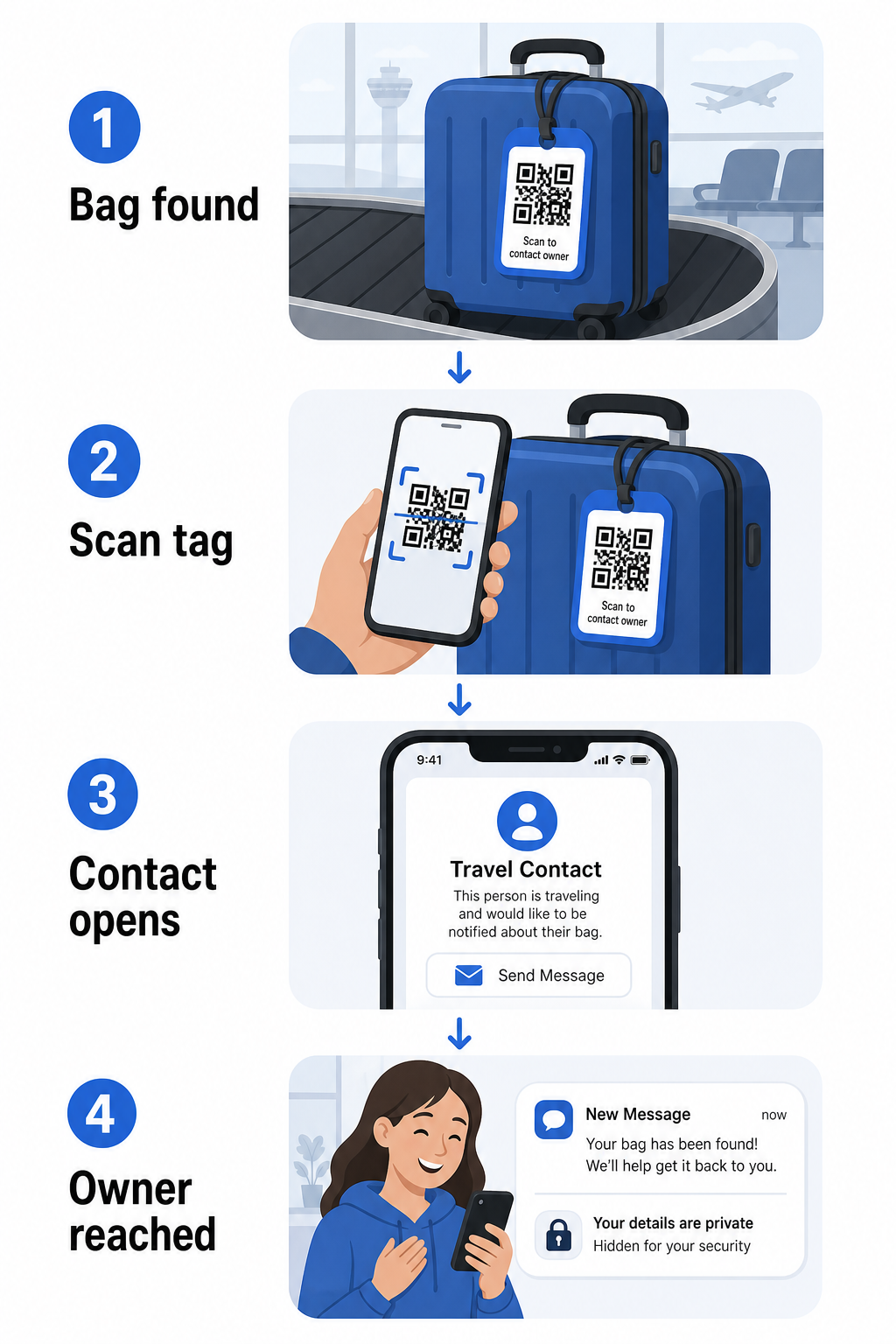
Der er et par formater værd at overveje, afhængigt af hvor meget information du ønsker at dele:
- vCard QR-kode: Koder dit navn, telefonnummer og e-mail i vCard-format. Når den scannes, beder finderens telefon dem om at gemme dine kontaktoplysninger direkte i deres adressebog ved hjælp af vCard QR-kode generator. Ingen indtastning påkrævet, og ingen synlige personlige data på selve mærket.
- QR-kode til e-mail: Åbner en forududfyldt e-mail adresseret til dig, når den scannes. Findere trykker blot send. Du kan opsætte dette med E-mail QR-kode generator og holde din faktiske adresse skjult for almindeligt syn.
- QR-kode til et link: Dirigerer finderen til en webside, du kontrollerer – en simpel kontaktformular eller en side med dine rejsedetaljer. Brug link QR-kodegenerator til at pege koden på enhver URL, du vælger.
Hver tilgang holder dine kontaktoplysninger funktionelle til genopretningsformål, samtidig med at det reducerer, hvad enhver tilfældig observatør kan læse fra dit mærke i en travl terminal.
Opret en privatlivsvenlig Bagagemærke QR-kode Klar til at opsætte en QR-kode, der beskytter dine detaljer, samtidig med at din taske forbliver findbar? Brug QR-kodegenerator for at komme i gang – gratis, uden teknisk viden påkrævet.
Hvilken information skal inkluderes (og hvad der skal udelades)
Rejseeksperter anbefaler at holde bagagemærkeinformation minimal, men effektiv. Den praktiske konsensus er:
- Omfatte: Dit fulde navn, et mobiltelefonnummer med landekode, hvis du rejser internationalt, og en e-mailadresse
- Spring over: Din hjemmeadresse (brug en arbejdsadresse eller postboks, hvis en adresse føles nødvendig), pasnumre, offentlige ID-numre og fastnetnumre derhjemme
- Overvej: En rejsespecifik e-mailadresse i stedet for din primære personlige konto, så uønsket kontakt forbliver begrænset
En QR-kode tilgang gør denne vejledning lettere at følge. Du koder kun det, der er nødvendigt, og du kontrollerer den kontaktmetode, finderen bruger – hvad enten det er en e-mailformular, en vCard-gem eller en kontaktside.
Flere rejsekilder anbefaler også at placere backup-kontaktoplysninger inde i din taske, så tasken stadig kan identificeres, hvis det eksterne mærke mistes eller beskadiges. Et QR-kode mærke kombineret med et internt papirkort giver dig den bedste dækning på begge fronter.
Hvorfor en dynamisk QR-kode er værd at bruge
EN dynamisk QR-kode har én væsentlig fordel i forhold til en statisk til brug for bagagemærker: du kan opdatere destinationen uden at genprinte mærket.
Dynamiske QR-koder fungerer via en permanent kort omdirigerings-URL. Selve QR-koden ændrer sig aldrig, men den side, den peger på, kan opdateres når som helst fra dit dashboard. Dette betyder, at hvis dit telefonnummer ændrer sig, du får en ny e-mailadresse, eller du ønsker at udskifte et vCard med en kontaktformular, opdaterer du destinationen – og hver scanning af det samme fysiske mærke når den nye information.
For et bagagemærke, du bruger år efter år, er denne fleksibilitet praktisk. Du printer mærket én gang og bevarer kontrollen over de kontaktoplysninger, det viser, på ubestemt tid.
Dynamiske koder lader dig også overvåge scanningsaktivitet. Hvis din taske forsvinder, og nogen scanner din tag, kan du se, at en scanning fandt sted, hvornår og på hvilken placering – nyttig kontekst, når du koordinerer med et flyselskab. For at forstå den bredere rolle QR-koder spiller i flyrejser, dækker den oversigt over flyselskaber og lufthavne hvordan transportører bruger dem på tværs af passagerrejsen, inklusive bagagesporing.
Hold din tag opdateret uden at genudskrive Brug Dynamisk QR-kode generator for at oprette en bagagetag QR-kode, du kan opdatere når som helst – ændre dine kontaktoplysninger eller destinations-URL uden at røre ved den fysiske tag.
Udskrivning af din QR-kode tag: Størrelse og format
En QR-kode, der ikke kan scannes, modarbejder formålet. Et par praktiske retningslinjer gælder, når du udskriver til en bagagetag:
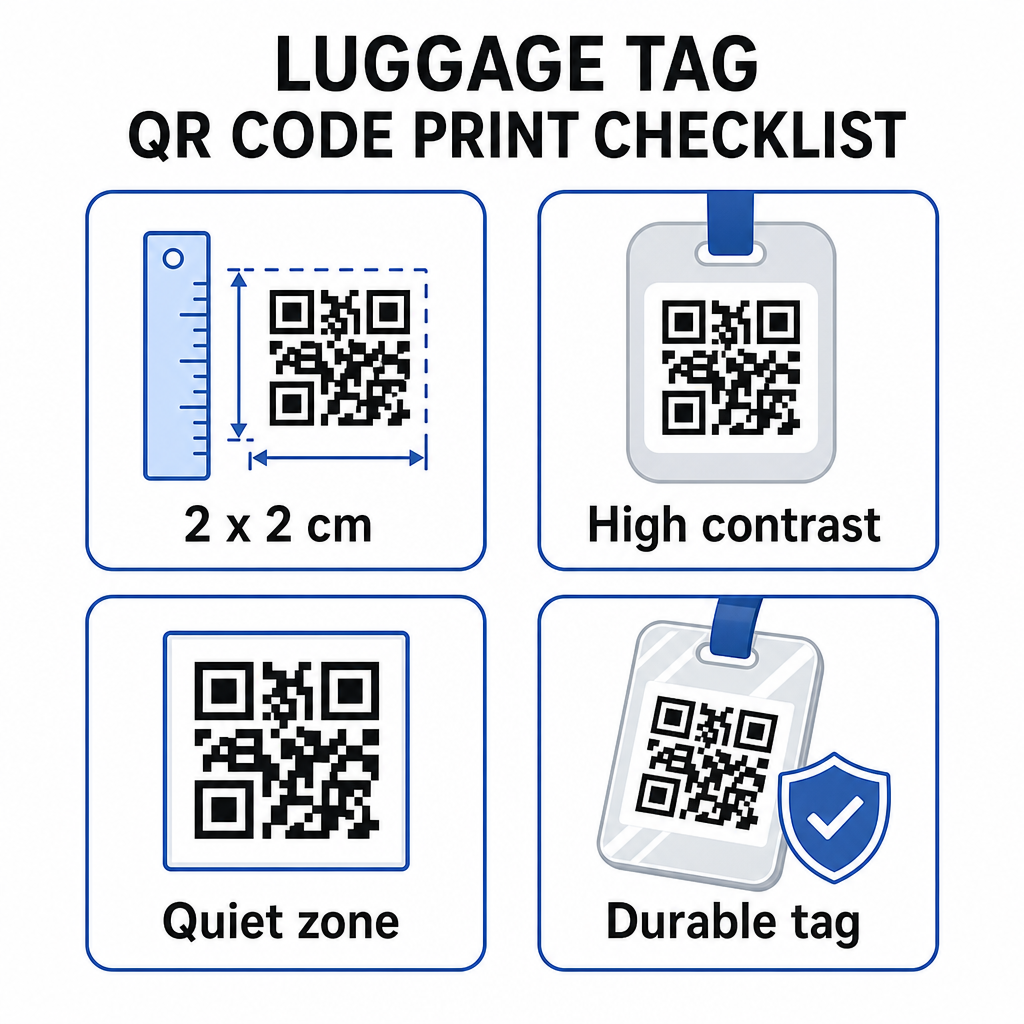
- Mindstestørrelse: Sigt efter mindst 2 × 2 cm (ca. 0,8 × 0,8 tommer). Mindre end dette, og scanningspålideligheden falder, især i dårlig belysning. Se den QR-kode størrelsesguide for printmaterialer for overfladespecifikke anbefalinger.
- Filformat: PNG fungerer godt til små udskriftsstørrelser. For en lamineret eller professionelt udskrevet tag giver SVG- eller PDF-eksport skarpere kanter i enhver størrelse.
- Kontrast: Brug et mørkt mønster på en lys baggrund. Lav kontrast er en af de mest almindelige årsager til, at QR-koder ikke kan scannes.
- Stillezone: Efterlad en klar kant omkring koden – mindst fire moduler bred på alle sider – så en scanner kan skelne koden fra omgivende grafik eller tekst.
- Fejlkorrektion: Højere fejlkorrektionsniveauer gør det muligt for koden at forblive scannbar, selvom en del af den er ridset eller slidt, hvilket er vigtigt for en tag, der udsættes for hårdt brug på tværs af flere ture.
For trin-for-trin vejledning om forberedelse af en QR-kode til fysiske etiketter, dækker den guide til udskrivning af QR-koder på etiketter processen i detaljer.
Hold dine personlige data private
At placere kontaktoplysninger på en offentligt synlig tag indebærer visse privatlivsovervejelser. Et par fremgangsmåder reducerer den risiko, når du bruger QR-koder:
- Brug en kontaktformular eller et vCard snarere end at kode et råt telefonnummer som almindelig tekst, så informationen ikke er umiddelbart synlig for enhver, der inspicerer kodens indhold
- Vælg en rejsespecifik e-mailadresse til taggen, så din primære konto forbliver adskilt fra enhver bagagerelateret kontakt
- Hvis du bruger en dynamisk kode, kan du deaktivere eller omdirigere linket, hvis du vil udfase en tag eller ændre, hvordan findere kontakter dig
- Kod kun det, der er nødvendigt for bagagegenfinding – dit navn og én kontaktmetode er tilstrækkeligt
For et dybere kig på håndtering af privatliv, når du bruger QR-koder, dækker den guide til QR-kode privatlivsrisici og bedste praksis for sikker QR-kodegenerering de vigtigste overvejelser. For en bredere kontekst om, hvordan QR-koder omformer rejseoplevelsen generelt, Sådan forbedrer QR-koder rejseoplevelsen en nyttig reference.
En QR-kode bagagetag er en ligetil opgradering i forhold til en trykt tag: den holder dine kontaktoplysninger funktionelle for enhver, der skal returnere din taske, samtidig med at disse detaljer skærmes fra tilfældig observation. Brug en dynamisk kode, så du kan holde taggen opdateret på tværs af flere ture, størrelse den korrekt for pålidelig scanning, og kod kun den kontaktmetode, du ønsker, at findere skal bruge.
Byg din bagagetag QR-kode i dag Opsæt et vCard, e-mail eller link QR-kode til din bagage på få minutter. Start med den Pageloot QR-kodegenerator – gratis prøveperiode, intet kreditkort påkrævet.
Ofte stillede spørgsmål
En vCard QR-kode er et praktisk valg, fordi den lader finderen gemme dine kontaktoplysninger direkte til deres telefon med ét tryk. Hvis du foretrækker mere kontrol over hvilken information der deles, fungerer en link QR-kode, der peger på en simpel kontaktformular, også godt. Dynamiske versioner af begge giver dig mulighed for at opdatere destinationen uden at genudskrive tagget.
En velkonfigureret QR-kode på et bagagemærke deler kun, hvad du vælger at indkode – typisk et navn, telefonnummer eller en e-mailadresse. Undgå at indkode følsomme identifikatorer som pas- eller ID-numre. Brug af en kontaktformularside i stedet for rå personlige data tilføjer endnu et lag af adskillelse, og ved at følge bedste praksis for QR-kode-privatliv sikrer du, at din opsætning begrænser unødvendig eksponering.
Ikke hvis du bruger en dynamisk QR-kode. Dynamiske koder peger på en omdirigerings-URL, som du kan opdatere når som helst fra dit Pageloot-dashboard. Den fysiske tag forbliver den samme, men den kontaktinformation, den viser, kan ændres, når du behøver det – hvilket gør det til en praktisk langtidsholdbar løsning for hyppige rejsende.