תהיתם פעם מה קורה למזוודה שלך אם היא נפרדת ממך בשדה התעופה? עם תג נייר סטנדרטי, זר צריך לקרוא את הפרטים האישיים שלך בקול רם רק כדי להחזיר אותה. קוד QR על תג המזוודה שלך משנה את המשוואה הזו לחלוטין, ומאפשר לכל אחד עם סמארטפון ליצור איתך קשר מבלי לחשוף את המידע הפרטי שלך לכל עובר אורח בטרמינל.
למה תגי מזוודה סטנדרטיים נופלים קצר
חברות תעופה אמריקאיות מדווחות דיווחו על שיעור טיפול לקוי במזוודות של 0.55% בשנת 2024, שנשמע קטן עד שאתה שוקל את הנפח העצום של מזוודות שנבדקות שמטופלות מדי יום. מזוודות אבודות, מעוכבות או פגומות הן כאב ראש שגרתי בנסיעות, והקו הראשון של ההגנה הוא תג מזוודה קריא ושימושי.
הבעיה עם תגים מסורתיים היא פשרת הפרטיות. מומחי נסיעות מייעצים באופן עקבי נגד רישום כתובת הבית שלך על תג חיצוני, מכיוון שזה מאותת לכל מי שצופה שהבית שלך ריק. הם גם מזהירים מפני הכללת מזהים רגישים כמו מספרי דרכון או מספרי רישיון נהיגה. ובכל זאת התג עדיין צריך מספיק פרטים כדי שמוצא או סוכן חברת תעופה יוכלו באמת ליצור איתך קשר.
רוב המטיילים מסיימים עם פשרה לא נוחה: יותר מדי מידע חשוף, או לא מספיק כדי להיות שימושי.
איך קוד QR פותר את הבעיה
קוד QR על תג מזוודה פועל כשכבת פרטיות בין פרטי הקשר שלך לבין הציבור. במקום להדפיס את מספר הטלפון שלך והאימייל בטקסט גדול לכל אחד לקרוא בזמן שהמזוודה שלך נוסעת על מסוע, אתה מקודד את המידע הזה לתבנית סריקה. מוצא סורק את הקוד, נוחת בדף יצירת קשר או הודעה מלאה מראש, ויוצר איתך קשר – מבלי לראות אי פעם את הנתונים האישיים הגולמיים שלך מוצגים בגלוי.
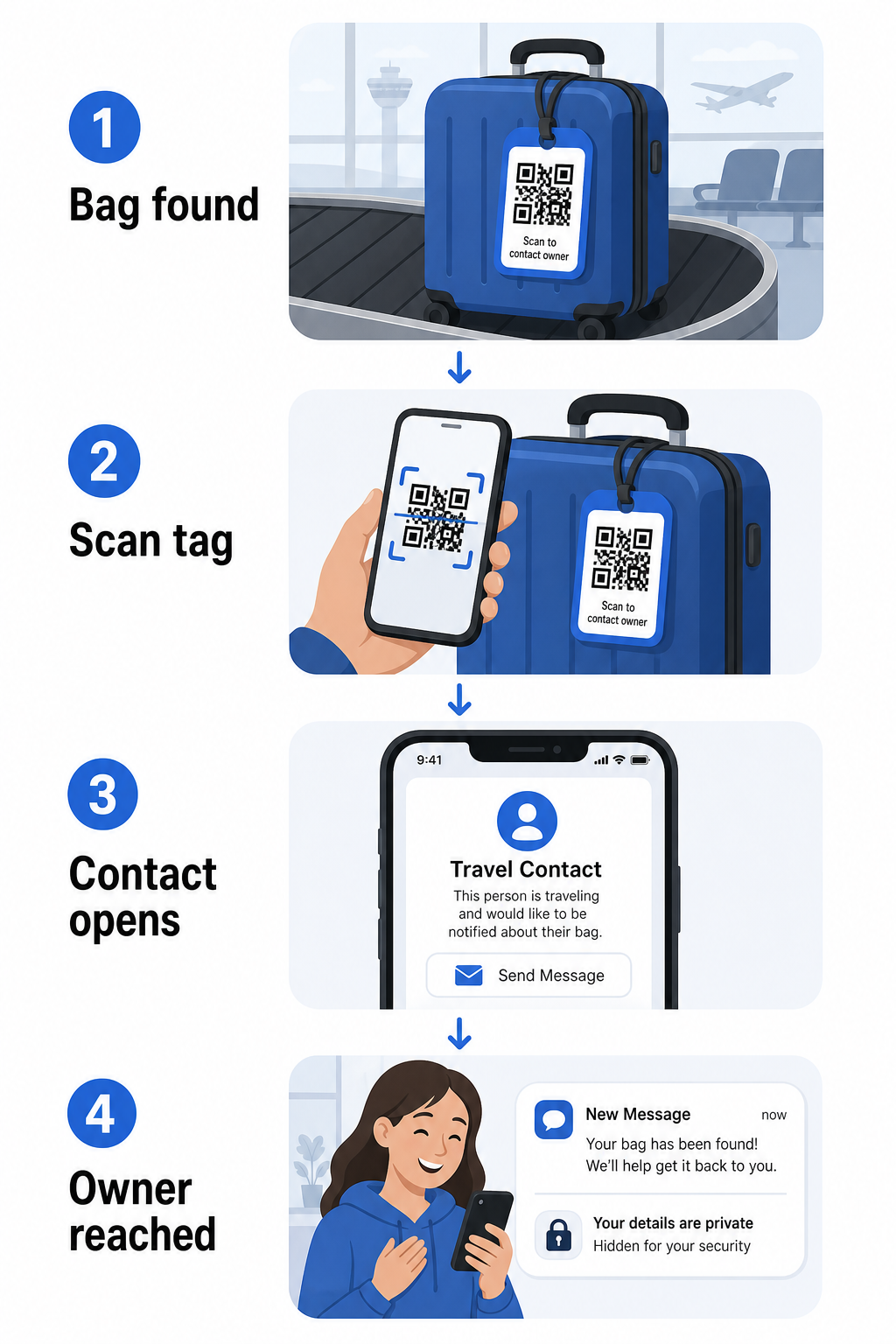
ישנם כמה פורמטים שכדאי לשקול, בהתאם לכמות המידע שאתה רוצה לשתף:
- קוד QR vCard: מקודד את שמך, מספר טלפון, ואימייל בפורמט vCard. כאשר נסרק, הטלפון של המוצא מנחה אותם לשמור את פרטי הקשר שלך ישירות לספר הכתובות שלהם באמצעות ה- V card בקוד QR. אין צורך בהקלדה, ואין נתונים אישיים גלויים על התג עצמו.
- דוא"ל קוד QR: פותח אימייל מלא מראש הממוען אליך כאשר נסרק. המוצא פשוט לוחץ שלח. אתה יכול להגדיר זאת עם ה- מחולל ברקוד QR למייל ולשמור את הכתובת האמיתית שלך מוסתרת מעין רואה.
- קוד QR לקישור: מפנה את המוצא לדף אינטרנט שאתה שולט בו – טופס יצירת קשר פשוט או דף עם פרטי הנסיעה שלך. השתמש ב- מחולל קוד QR לקישור כדי להפנות את הקוד לכל כתובת URL שתבחר.
כל גישה שומרת על פרטי הקשר שלך פונקציונליים למטרות שחזור תוך צמצום מה שכל צופה אקראי יכול לקרוא מהתג שלך בטרמינל עמוס.
צור קוד QR לתג מזוודה ידידותי לפרטיות מוכן להגדיר קוד QR שמגן על הפרטים שלך תוך שמירה על המזוודה שלך ניתנת לאיתור? השתמש ב- מחולל קודי QR כדי להתחיל – בחינם, ללא צורך בידע טכני.
איזה מידע לכלול (ומה להשאיר בחוץ)
מומחי נסיעות ממליצים לשמור על מידע תג המזוודה מינימלי אך יעיל. הקונצנזוס המעשי הוא:
- לִכלוֹל: שמך המלא, מספר טלפון נייד עם קידומת מדינה אם נוסעים לחו"ל, וכתובת אימייל
- דלג על: כתובת הבית שלך (השתמש בכתובת עבודה או תא דואר אם כתובת נראית הכרחית), מספרי דרכון, מספרי תעודת זהות ממשלתיים, ומספרי טלפון קוויים ביתיים
- שקול: כתובת אימייל ספציפית לנסיעות במקום חשבונך האישי הראשי, כך שכל קשר לא רצוי יישאר מוגבל.
גישת קוד QR הופכת הנחיה זו לקלה יותר למעקב. אתה מקודד רק את מה שצריך, ואתה שולט בשיטת יצירת הקשר שהמוצא משתמש בה – בין אם זה טופס אימייל, שמירת vCard, או דף יצירת קשר.
מקורות נסיעות מרובים ממליצים גם למקם מידע גיבוי ליצירת קשר בתוך המזוודה שלך, כך שהמזוודה עדיין תוכל להיות מזוהה אם התג החיצוני אבד או ניזוק. תג קוד QR בשילוב עם כרטיס נייר פנימי נותן לך את הכיסוי הטוב ביותר בשתי החזיתות.
למה קוד QR דינמי שווה שימוש
א קוד QR דינמי יש לו יתרון משמעותי אחד על פני סטטי לשימוש בתג מזוודה: אתה יכול לעדכן את היעד מבלי להדפיס מחדש את התג.
קודי QR דינמיים פועלים באמצעות כתובת URL קצרה קבועה להפניה. קוד ה-QR עצמו לעולם אינו משתנה, אך הדף שאליו הוא מפנה יכול להתעדכן בכל עת מלוח המחוונים שלך. זה אומר שאם מספר הטלפון שלך משתנה, אתה מקבל כתובת אימייל חדשה, או שאתה רוצה להחליף vCard בטופס יצירת קשר, אתה מעדכן את היעד – וכל סריקה של אותו תג פיזי מגיעה למידע החדש.
עבור תג מזוודה שאתה משתמש בו שנה אחר שנה, גמישות זו מעשית. אתה מדפיס את התג פעם אחת ושומר על שליטה על פרטי הקשר שהוא מציג ללא הגבלת זמן.
קודים דינמיים מאפשרים לך גם לנטר פעילות סריקה. אם התיק שלך נעלם ומישהו סורק את התג שלך, אתה יכול לראות שסריקה התרחשה, מתי, ובאיזה מיקום – הקשר שימושי בעת תיאום עם חברת תעופה. כדי להבין את התפקיד הרחב יותר שקודי QR ממלאים בנסיעות אוויריות, ה- חברות תעופה ושדות תעופה מכסה כיצד חברות תעופה משתמשות בהם לאורך מסע הנוסע, כולל מעקב אחר כבודה.
שמור על התג שלך מעודכן מבלי להדפיס מחדש להשתמש ב מחולל QR דינמי ליצירת קוד QR לתג כבודה שאתה יכול לעדכן בכל עת – שנה את פרטי הקשר שלך או כתובת URL יעד מבלי לגעת בתג הפיזי.
הדפסת תג קוד ה-QR שלך: גודל ופורמט
קוד QR שלא ניתן לסרוק מפספס את המטרה. כמה הנחיות מעשיות חלות בעת הדפסה עבור תג כבודה:
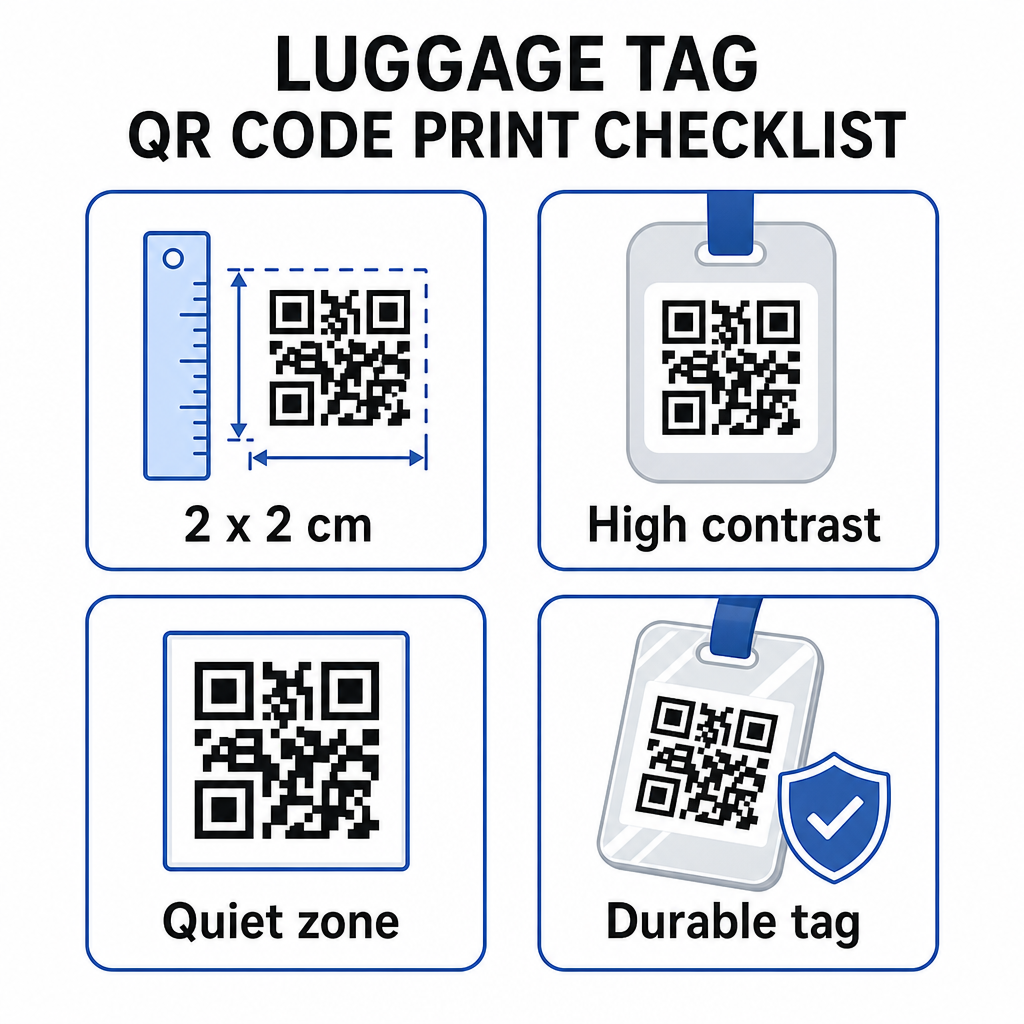
- גודל מינימלי: שאף ללפחות 2 × 2 ס"מ (בערך 0.8 × 0.8 אינץ'). קטן מזה ואמינות הסריקה יורדת, במיוחד בתאורה חלשה. ראה את ה- מדריך גודל קוד QR לחומרי הדפסה להמלצות ספציפיות למשטח.
- פורמט קובץ: PNG עובד היטב עבור גדלי הדפסה קטנים. עבור תג למינציה או מודפס מקצועית, ייצוא SVG או PDF נותנים קצוות חדים יותר בכל גודל.
- בניגוד: השתמש בתבנית כהה על רקע בהיר. ניגודיות נמוכה היא אחת הסיבות הנפוצות ביותר שקודי QR נכשלים בסריקה.
- אזור שקט: השאר גבול ברור סביב הקוד – לפחות ארבעה מודולים רוחב מכל הצדדים – כך שסורק יוכל להבחין בקוד מגרפיקה או טקסט מסביב.
- תיקון שגיאות: רמות תיקון שגיאות גבוהות יותר מאפשרות לקוד להישאר ניתן לסריקה גם אם חלק ממנו שרוט או בלוי, וזה חשוב עבור תג שרואה שימוש רב במספר נסיעות.
להדרכה שלב אחר שלב על הכנת קוד QR עבור תוויות פיזיות, ה- מדריך להדפסת קודי QR על תוויות מכסה את התהליך בפירוט.
שמירה על פרטיות הנתונים האישיים שלך
הצבת כל פרטי קשר על תג הפונה לציבור כרוכה בשיקולי פרטיות מסוימים. כמה שיטות מפחיתות סיכון זה בעת שימוש בקודי QR:
- השתמש בטופס יצירת קשר או vCard במקום לקודד מספר טלפון גולמי כטקסט רגיל, כך שהמידע אינו גלוי מיד לכל מי שבודק את תוכן הקוד
- בחר כתובת דוא"ל ספציפית לנסיעות עבור התג כך שהחשבון הראשי שלך יישאר נפרד מכל קשר הקשור לכבודה
- אם אתה משתמש בקוד דינמי, אתה יכול לבטל או להפנות מחדש את הקישור אם אתה רוצה להוציא תג משימוש או לשנות כיצד מוצאים מגיעים אליך
- קודד רק את מה שנחוץ לשחזור תיק – השם שלך ושיטת קשר אחת מספיקים
להתבוננות מעמיקה יותר בניהול פרטיות בעת שימוש בקודי QR, ה- מדריך סיכוני פרטיות של קוד QR ו שיטות עבודה מומלצות ליצירת קוד QR מאובטח מכסים את שיקולי המפתח. להקשר רחב יותר על האופן שבו קודי QR מעצבים מחדש את חווית הנסיעה הכוללת, כיצד קודי QR משפרים חוויות נסיעה הוא מקור מידע שימושי.
תג כבודה עם קוד QR הוא שדרוג פשוט על פני תג מודפס: הוא שומר על פרטי הקשר שלך פונקציונליים לכל מי שצריך להחזיר את התיק שלך תוך כדי מיגון פרטים אלה מתצפית אקראית. השתמש בקוד דינמי כך שתוכל לשמור על התג מעודכן לאורך מספר נסיעות, התאם את גודלו נכון לסריקה אמינה, וקודד רק את שיטת הקשר שאתה רוצה שמוצאים ישתמשו בה.
בנה את קוד ה-QR לתג הכבודה שלך היום הגדר vCard, דוא"ל, או קישור קוד QR עבור הכבודה שלך תוך דקות. התחל עם ה- מחולל קוד QR של Pageloot – ניסיון חינם, ללא צורך בכרטיס אשראי.
שאלות נפוצות
קוד QR של vCard הוא בחירה פרקטית מכיוון שהוא מאפשר למוצא לשמור את פרטי הקשר שלך ישירות לטלפון שלו בלחיצה אחת. אם אתה מעדיף יותר שליטה על איזו מידע משותף, קוד QR של קישור המצביע על טופס יצירת קשר פשוט עובד היטב גם כן. גרסאות דינמיות של כל אחד מהם מאפשרות לך לעדכן את היעד מבלי להדפיס מחדש את התג.
קוד QR מוגדר היטב על תג מזוודה משתף רק את מה שתבחר/י לקודד – בדרך כלל שם, מספר טלפון, או כתובת אימייל. הימנע/י מקידוד מזהים רגישים כמו מספרי דרכון או תעודת זהות. שימוש בדף טופס יצירת קשר במקום נתונים אישיים גולמיים מוסיף שכבת הפרדה נוספת, ויישום שיטות עבודה מומלצות לפרטיות קוד QR מבטיח שההגדרה שלך מגבילה חשיפה מיותרת.
לא אם אתה משתמש בקוד QR דינמי. קודים דינמיים מצביעים לכתובת URL להפניה מחדש שאתה יכול לעדכן בכל עת מלוח המחוונים שלך ב-Pageloot. התג הפיזי נשאר זהה, אבל פרטי הקשר שהוא מציג ניתנים לשינוי בכל פעם שאתה צריך – מה שהופך אותו לפתרון מעשי לטווח ארוך עבור מטיילים תכופים.