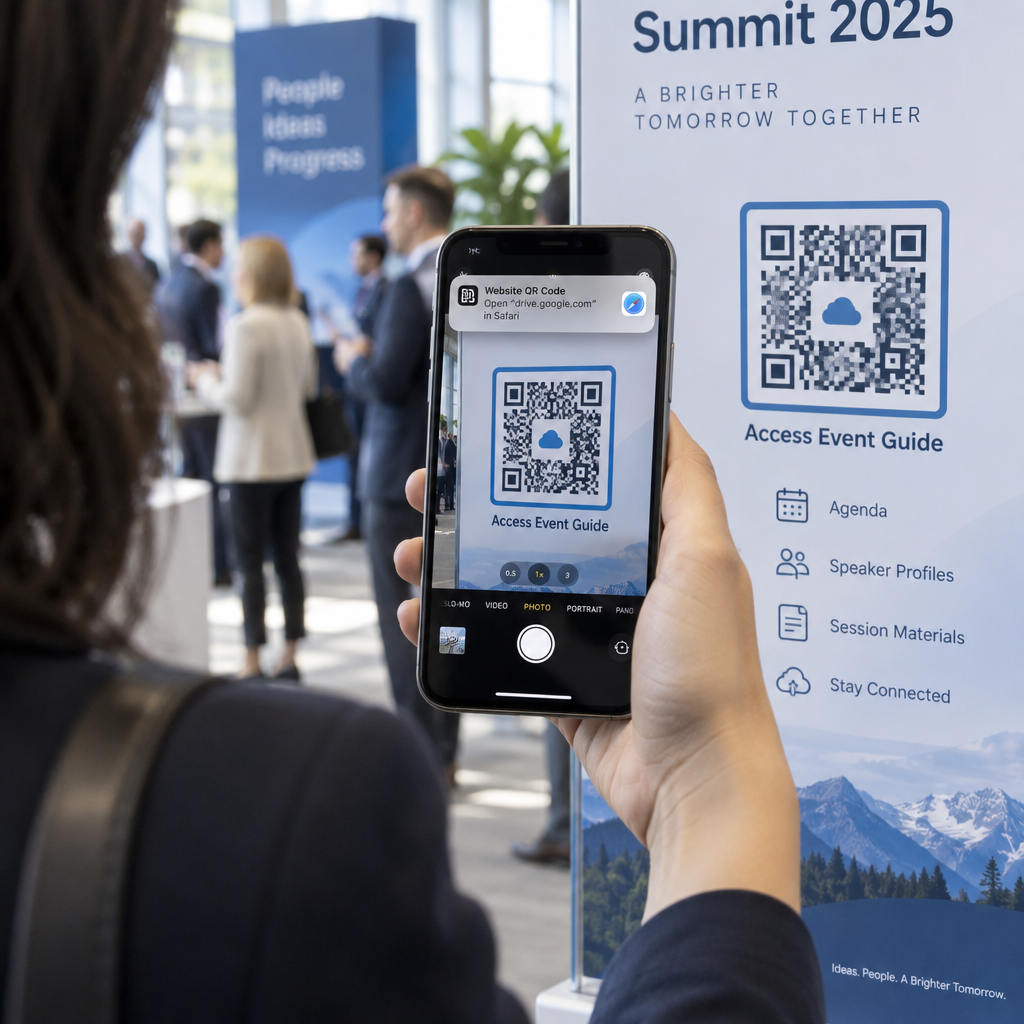
Havalimanında çantanız sizden ayrılırsa ne olduğunu hiç merak ettiniz mi? Standart bir kağıt etiketle, bir yabancı onu iade etmek için kişisel bilgilerinizi yüksek sesle okumak zorunda kalır. Bagaj etiketinizdeki bir QR kodu bu denklemi tamamen değiştirir, akıllı telefonu olan herkesin özel bilgilerinizi terminaldeki her geçene ifşa etmeden sizinle iletişime geçmesini sağlar.
Neden Standart Bagaj Etiketleri Yetersiz Kalıyor
ABD'li raporlama taşıyıcıları 2024'te %0,551'lik bir yanlış elleçlenen bagaj oranı bildirdi; bu, her gün elleçlenen kayıtlı bagajların muazzam hacmini düşünene kadar küçük gibi görünür. Kayıp, gecikmiş veya hasarlı bagajlar rutin bir seyahat sorunudur ve ilk savunma hattı okunaklı, kullanışlı bir bagaj etiketidir.
Geleneksel etiketlerdeki sorun gizlilik ödünleşimidir. Seyahat uzmanları, dış bir etikette ev adresinizi listelememenizi sürekli olarak tavsiye eder, çünkü bu, izleyen herkese evinizin boş olduğunu işaret eder. Ayrıca pasaport numaraları veya ehliyet numaraları gibi hassas tanımlayıcıları dahil etmeye karşı uyarırlar. Yine de etiket, bir bulan veya havayolu acentesinin size gerçekten ulaşabilmesi için yeterli ayrıntıya ihtiyaç duyar.
Çoğu gezgin rahatsız edici bir uzlaşmayla karşılaşır: çok fazla bilginin ifşa edilmesi veya kullanışlı olmak için yeterli olmaması.
Bir QR Kodu Sorunu Nasıl Çözer
Bir bagaj etiketindeki QR kodu, iletişim bilgileriniz ile halk arasında bir gizlilik katmanı olarak işlev görür. Çantanız bir bagaj bandında dönerken telefon numaranızı ve e-postanızı herkesin okuyabileceği büyük metinle yazdırmak yerine, bu bilgiyi taranabilir bir desene kodlarsınız. Bir bulan kodu tarar, bir iletişim sayfasına veya önceden doldurulmuş bir mesaja ulaşır ve size ulaşır – ham kişisel verilerinizin açıkta görüntülendiğini hiç görmeden.
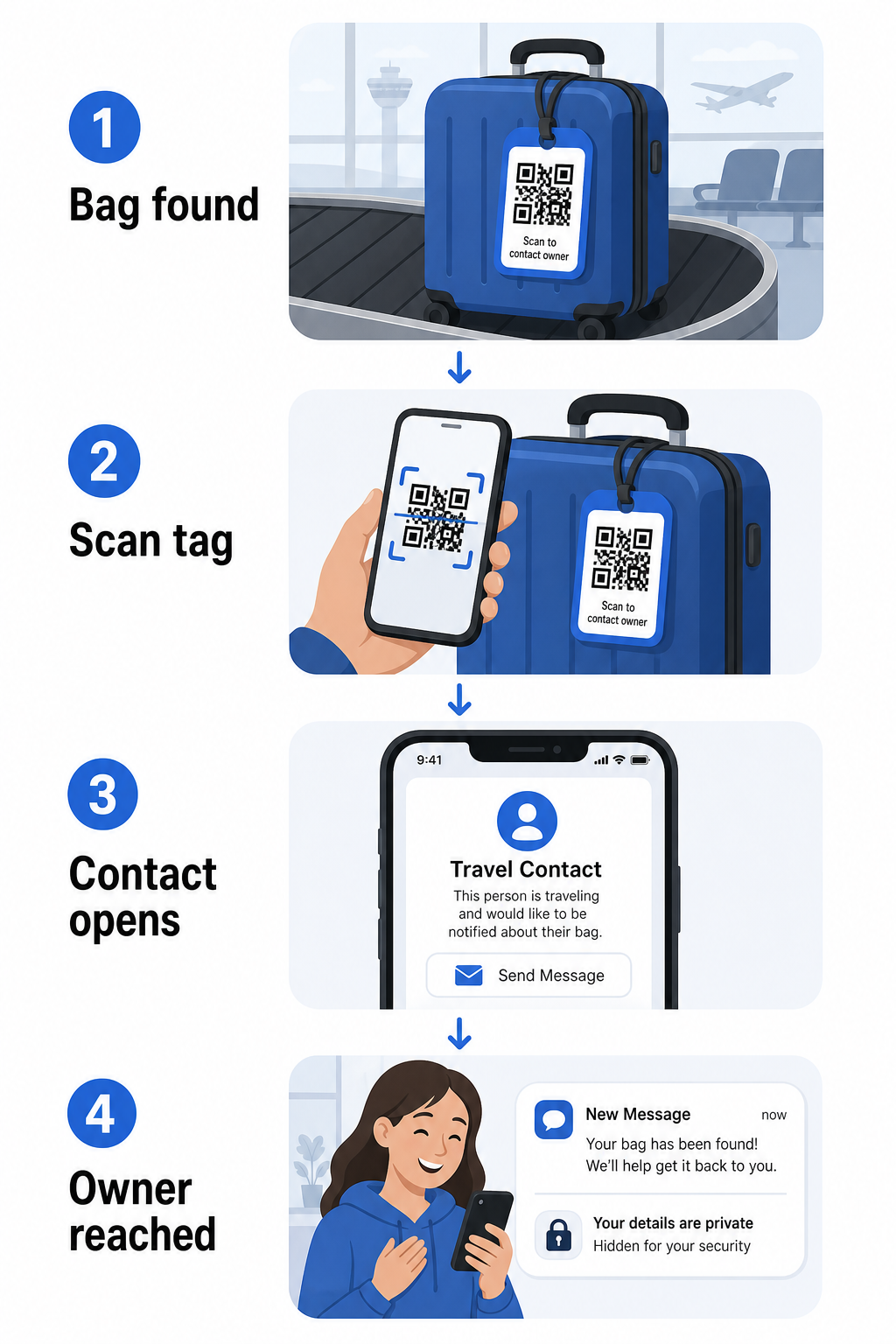
Ne kadar bilgi paylaşmak istediğinize bağlı olarak dikkate alınmaya değer birkaç format vardır:
- vCard QR kodu: Adınızı, telefon numaranızı ve e-postanızı vCard formatında kodlar. Tarandığında, bulan kişinin telefonu, iletişim bilgilerinizi doğrudan adres defterine kaydetmesini ister, şunu kullanarak vCard QR Kod Oluşturucu. Yazmaya gerek yok ve etiketin kendisinde görünür kişisel veri yok.
- E-posta QR kodu: Tarandığında size hitaben önceden doldurulmuş bir e-posta açar. Bulan kişi sadece gönder tuşuna basar. Bunu şununla kurabilirsiniz E-posta QR Kod Oluşturucu ve gerçek adresinizi gözden uzak tutabilirsiniz.
- için taramaları takip edin ve artırın: Bulan kişiyi kontrol ettiğiniz bir web sayfasına yönlendirir – basit bir iletişim formu veya seyahat ayrıntılarınızın olduğu bir sayfa. Şunu kullanın bağlantı QR kod oluşturucunuzun kodu seçtiğiniz herhangi bir URL'ye yönlendirmek için.
Her yaklaşım, iletişim bilgilerinizi kurtarma amaçları için işlevsel tutarken, yoğun bir terminalde herhangi bir rastgele gözlemcinin etiketinizden okuyabileceği bilgiyi azaltır.
Gizlilik Dostu Bir Bagaj Etiketi QR Kodu Oluşturun Ayrıntılarınızı korurken çantanızı bulunabilir tutan bir QR kodu kurmaya hazır mısınız? Şunu kullanın QR Kod Oluşturucu başlamak için – ücretsiz, teknik bilgi gerektirmeden.
Hangi Bilgileri Dahil Etmeli (ve Neleri Dışarıda Bırakmalı)
Seyahat uzmanları, bagaj etiketi bilgilerini minimal ama etkili tutmayı tavsiye eder. Pratik fikir birliği şudur:
- Katmak: Tam adınız, uluslararası seyahat ediyorsanız ülke kodlu bir cep telefonu numarası ve bir e-posta adresi
- Atlayın: Ev adresiniz (bir adresin gerekli olduğunu düşünüyorsanız iş adresi veya posta kutusu kullanın), pasaport numaraları, devlet kimlik numaraları ve ev sabit hat numaraları
- Düşünün: Birincil kişisel hesabınız yerine seyahate özel bir e-posta adresi, böylece istenmeyen herhangi bir iletişim kontrol altında kalır
Bir QR kodu yaklaşımı, bu rehberliği takip etmeyi kolaylaştırır. Sadece gerekli olanı kodlarsınız ve bulan kişinin kullandığı iletişim yöntemini kontrol edersiniz – ister bir e-posta formu, ister bir vCard kaydı, ister bir iletişim sayfası olsun.
Birden fazla seyahat kaynağı, yedek iletişim bilgilerini çantanızın içine yerleştirmenizi de tavsiye eder, böylece dış etiket kaybolur veya hasar görürse çanta hala tanımlanabilir. Dahili bir kağıt kartla birleştirilmiş bir QR kodu etiketi, size her iki cephede de en iyi kapsamı sağlar.
Neden Dinamik Bir QR Kodu Kullanmaya Değer
Bir dinamik QR kodu bagaj etiketi kullanımı için statik olana göre önemli bir avantaja sahiptir: etiketi yeniden yazdırmadan hedefi güncelleyebilirsiniz.
Dinamik QR kodları, kalıcı bir kısa yönlendirme URL'si aracılığıyla çalışır. QR kodunun kendisi asla değişmez, ancak işaret ettiği sayfa kontrol panelinizden istediğiniz zaman güncellenebilir. Bu, telefon numaranız değişirse, yeni bir e-posta adresi alırsanız veya bir vCard'ı bir iletişim formuyla değiştirmek isterseniz, hedefi güncellersiniz – ve aynı fiziksel etiketin her taraması yeni bilgilere ulaşır.
Yıllarca kullandığınız bir bagaj etiketi için bu esneklik pratiktir. Etiketi bir kez yazdırırsınız ve ortaya çıkardığı iletişim bilgilerinin kontrolünü süresiz olarak elinizde tutarsınız.
Dinamik kodlar ayrıca tarama etkinliğini izlemenizi sağlar. Çantanız kaybolursa ve birisi etiketinizi tararsa, bir taramanın ne zaman ve nerede gerçekleştiğini görebilirsiniz – bir havayolu şirketiyle koordinasyon kurarken faydalı bir bağlam. QR kodlarının hava yolculuğunda oynadığı daha geniş rolü anlamak için, havayolları ve havalimanları genel bakışımız taşıyıcıların bunları yolcu yolculuğu boyunca, bagaj takibi de dahil olmak üzere nasıl kullandığını kapsar.
Etiketinizi Yeniden Yazdırmadan Güncel Tutun Kullan Dinamik QR Kod Oluşturucu fiziksel etikete dokunmadan istediğiniz zaman güncelleyebileceğiniz bir bagaj etiketi QR kodu oluşturmak için – iletişim bilgilerinizi veya hedef URL'nizi değiştirin.
QR Kod Etiketinizi Yazdırma: Boyut ve Biçim
Taranamayan bir QR kodu amacına ulaşamaz. Bir bagaj etiketi için yazdırırken birkaç pratik kılavuz geçerlidir:
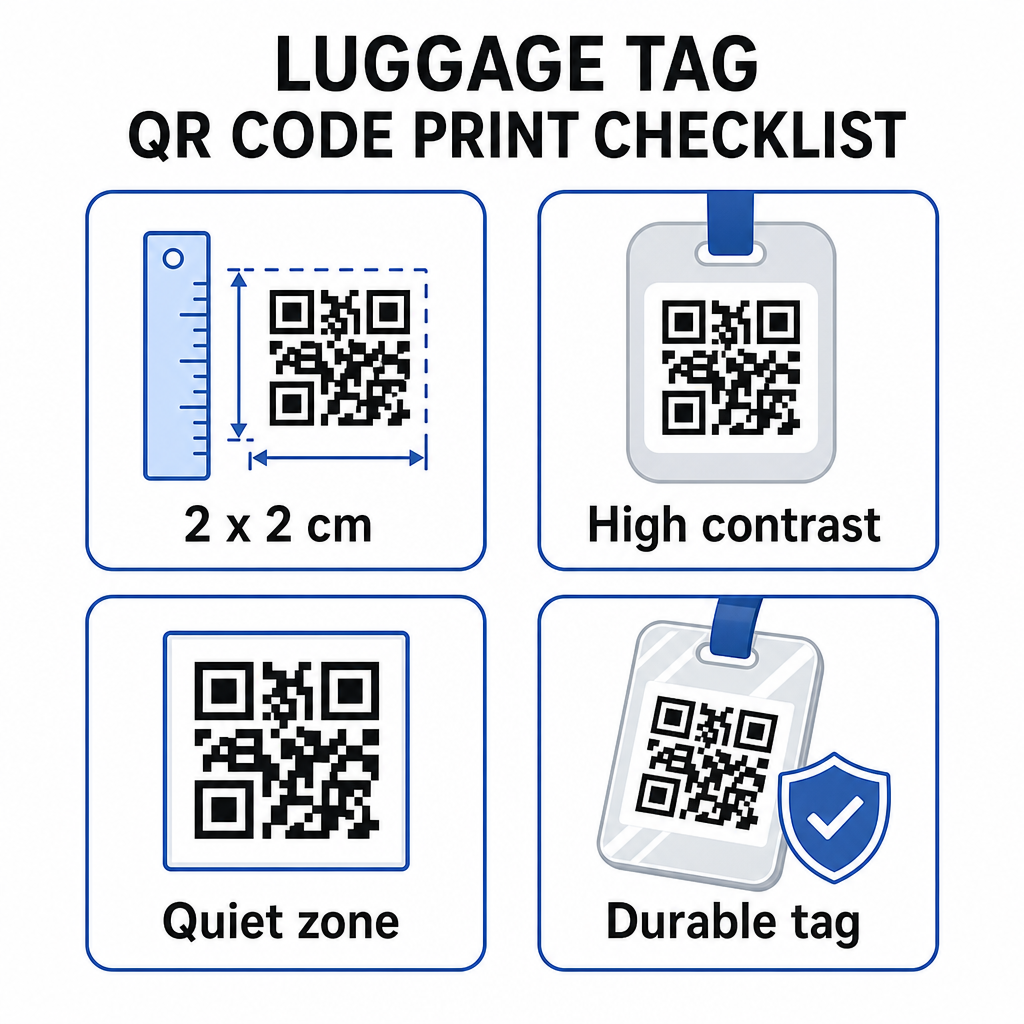
- En küçük boyut: En az 2 × 2 cm (yaklaşık 0.8 × 0.8 inç) hedefleyin. Bundan daha küçük olursa tarama güvenilirliği düşer, özellikle de zayıf ışıkta. Bkz. Baskı malzemeleri için QR kodu boyutlandırma kılavuzu yüzeye özel öneriler için.
- Dosya formatı: PNG küçük baskı boyutları için iyi çalışır. Lamine edilmiş veya profesyonelce basılmış bir etiket için, SVG veya PDF dışa aktarımları her boyutta daha keskin kenarlar sağlar.
- Kontrast: Açık bir arka plan üzerinde koyu bir desen kullanın. Düşük kontrast, QR kodlarının taranamamasının en yaygın nedenlerinden biridir.
- Sessiz bölge: Kodun etrafında net bir kenarlık bırakın – her tarafta en az dört modül genişliğinde – böylece bir tarayıcı kodu çevredeki grafiklerden veya metinden ayırt edebilir.
- Hata düzeltme: Daha yüksek hata düzeltme seviyeleri, kodun bir kısmı çizilse veya yıpransa bile taranabilir kalmasını sağlar; bu da birden fazla seyahatte yoğun kullanılan bir etiket için önemlidir.
Fiziksel etiketler için bir QR kodu hazırlama konusunda adım adım rehberlik için, etiketlere QR kodu yazdırma rehberi süreci ayrıntılı olarak kapsar.
Kişisel Verilerinizi Gizli Tutma
Herhangi bir iletişim bilgisini halka açık bir etikete yerleştirmek bazı gizlilik hususlarını içerir. QR kodlarını kullanırken bu riski azaltan birkaç uygulama:
- Ham bir telefon numarasını düz metin olarak kodlamak yerine bir iletişim formu veya vCard kullanın, böylece bilgiler kodun içeriğini inceleyen herkes tarafından hemen görünmez olur
- Etiket için seyahate özel bir e-posta adresi seçin, böylece birincil hesabınız bagajla ilgili herhangi bir iletişimden ayrı kalır
- Dinamik bir kod kullanıyorsanız, bir etiketi kullanımdan kaldırmak veya bulanların size nasıl ulaşacağını değiştirmek isterseniz bağlantıyı devre dışı bırakabilir veya yönlendirebilirsiniz
- Sadece bagajın geri alınması için gerekli olanı kodlayın – adınız ve bir iletişim yöntemi yeterlidir
QR kodlarını kullanırken gizliliği yönetmeye daha derinlemesine bir bakış için, QR kodu gizlilik riskleri rehberi ve güvenli QR kodu oluşturma en iyi uygulamaları temel hususları kapsar. QR kodlarının genel olarak seyahat deneyimini nasıl yeniden şekillendirdiğine dair daha geniş bir bağlam için, QR Kodlar Seyahat Deneyimini Nasıl Geliştirir yararlı bir referanstır.
Bir QR kodu bagaj etiketi, basılı bir etikete göre basit bir yükseltmedir: iletişim bilgilerinizi çantanızı iade etmesi gereken herkes için işlevsel tutarken, bu ayrıntıları sıradan gözlemlerden korur. Etiketi birden fazla seyahatte güncel tutabilmeniz için dinamik bir kod kullanın, güvenilir tarama için doğru boyutta ayarlayın ve bulanların kullanmasını istediğiniz tek iletişim yöntemini kodlayın.
Bagaj Etiketi QR Kodunuzu Bugün Oluşturun Bagajınız için dakikalar içinde bir vCard, e-posta veya bağlantı QR kodu kurun. ile başlayın Pageloot QR Kodu Oluşturucu – ücretsiz deneme, kredi kartı gerekmez.
Sıkça sorulan sorular
Bir vCard QR kodu, bulucunun iletişim bilgilerinizi tek bir dokunuşla doğrudan telefonlarına kaydetmesini sağladığı için pratik bir seçimdir. Hangi bilgilerin paylaşıldığı konusunda daha fazla kontrol tercih ediyorsanız, basit bir iletişim formuna işaret eden bir bağlantı QR kodu da iyi çalışır. Her ikisinin de dinamik versiyonları, etiketi yeniden yazdırmadan hedefi güncellemenize olanak tanır.
İyi yapılandırılmış bir QR kod bir bagaj etiketinin üzerinde yalnızca kodlamayı seçtiğiniz şeyi paylaşır – tipik olarak bir isim, telefon numarası veya e-posta adresi. Pasaport veya kimlik numaraları gibi hassas tanımlayıcıları kodlamaktan kaçının. Ham kişisel veriler yerine bir iletişim formu sayfası kullanmak başka bir ayrım katmanı ekler ve QR kod gizliliği en iyi uygulamalarını takip etmek kurulumunuzun gereksiz maruziyeti sınırlamasını sağlar.
Dinamik bir QR kodu kullanırsanız hayır. Dinamik kodlar, Pageloot kontrol panelinizden istediğiniz zaman güncelleyebileceğiniz bir yönlendirme URL'sine işaret eder. Fiziksel etiket aynı kalır, ancak yüzeye çıkardığı iletişim bilgileri istediğiniz zaman değiştirilebilir – bu da onu sık seyahat edenler için pratik bir uzun vadeli çözüm haline getirir.